steering Citroen C3 2014 2.G Owner's Guide
[x] Cancel search | Manufacturer: CITROEN, Model Year: 2014, Model line: C3, Model: Citroen C3 2014 2.GPages: 284, PDF Size: 9.01 MB
Page 197 of 284
195
C3_en_Chap13b_RT6-2-8_ed01-2014
The system is protected in such a way that it will only
operate in your vehicle.
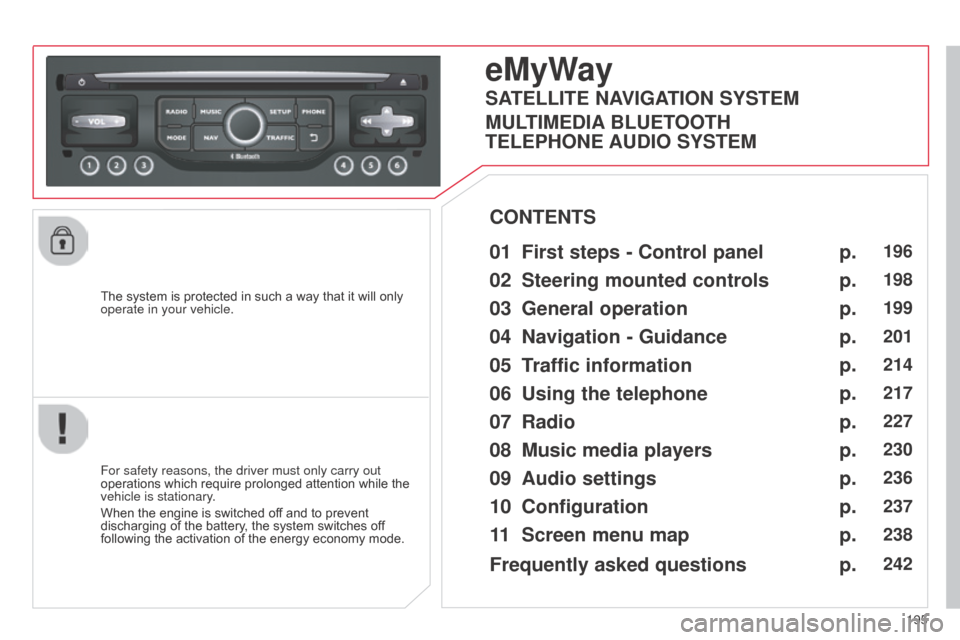
eMyWay
01 First steps - Control panel
For safety reasons, the driver must only carry out
operations which require prolonged attention while the
vehicle is stationary.
When the engine is switched off and to prevent
discharging of the battery, the system switches off
following the activation of the energy economy mode.
CONTENTS
02
Steering mounted
controls
03
General operation
04
Navigation
- Guidance
05
T
raffic information
06
Using
the telephone
07
Radio
08
Music media players
09
Audio
settings
10
Configuration
11
Screen menu
map p.
p.
p.
p.
p.
p.
p.
p.
p.
p.
p.
196
198
199
201
214
217
227
230
236
237
238
SATELLITE NAVIGATION SYSTEM
MULTIMEDIA BLUETOOTH
TELEPHONE AUDIO SYSTEM
Frequently asked questions p.
242
Page 200 of 284
02
198
C3_en_Chap13b_RT6-2-8_ed01-2014
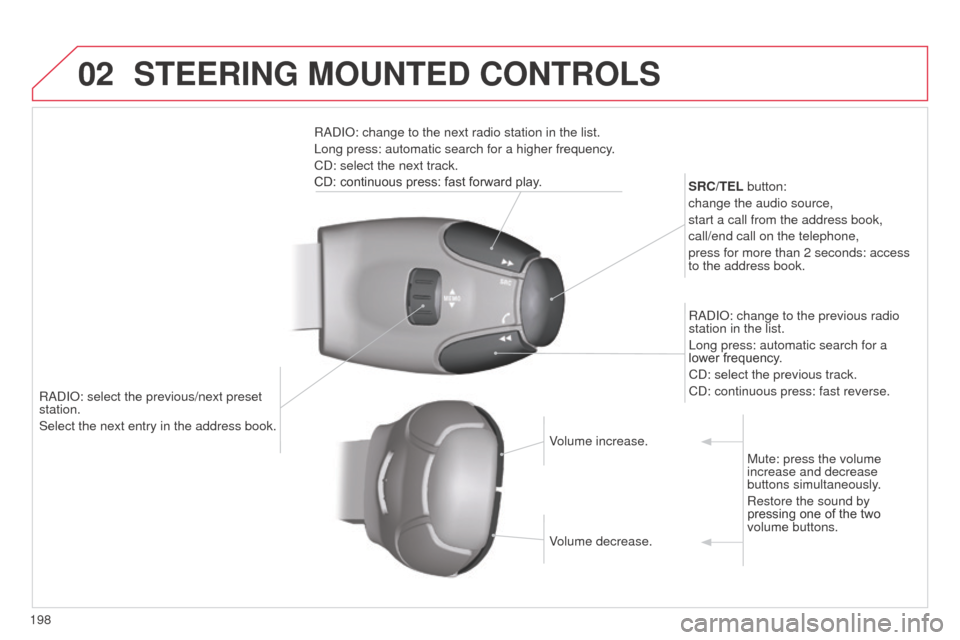
RadIo: select the previous/next preset
station.
Select the next entry in the address book. SRC/TEL
button:
change the audio source,
start a call from the address book,
call/end call on the telephone,
press for more than 2 seconds: access
to the address book.
R ad I o : change to the previous radio
station in the list.
Long press: automatic search for a
lower frequency.
C d : select the previous track.
C d : continuous press: fast reverse.
R ad I o : change to the next radio station in the list.
Long press: automatic search for a higher frequency.
C d : select the next track.
CD: continuous press: fast forward play.
Volume increase.
Volume decrease.Mute: press the volume
increase and decrease
buttons simultaneously.
Restore the sound by
pressing one of the two
volume buttons.
STEERING MOUNTED CONTROLS
Page 224 of 284
06
222
C3_en_Chap13b_RT6-2-8_ed01-2014
USING THE TELEPHONE
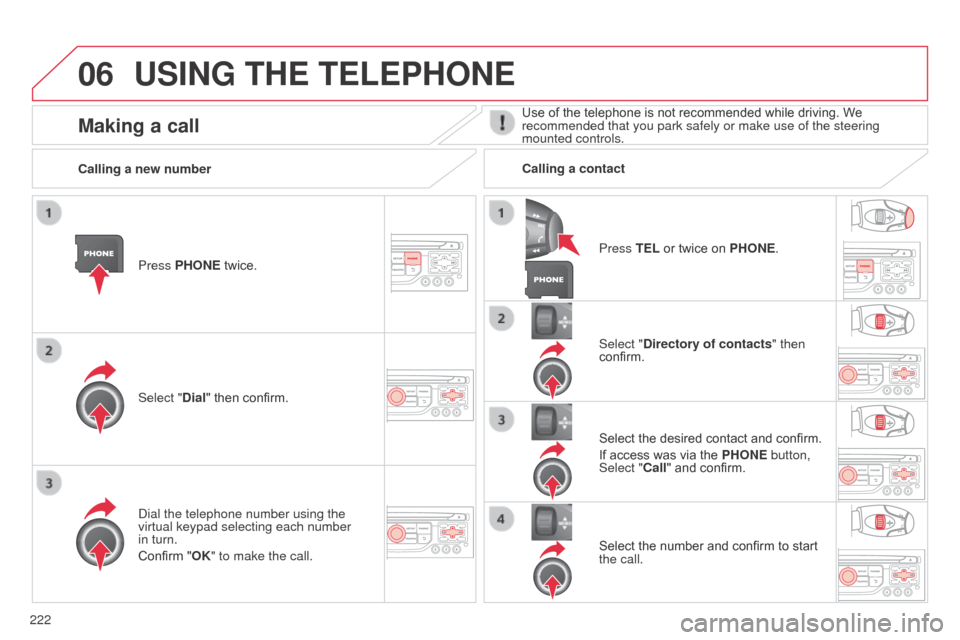
Press PHONE twice.
Select "Dial" then confirm.Select "Directory of contacts" then
confirm.
d
ial the telephone number using the
virtual keypad selecting each number
in turn.
Confirm "OK" to make the call. Press TEL or twice on PHONE.
Calling a new number
Calling a contact
Select the desired contact and confirm.
If access was via the PHONE button,
Select "Call" and confirm.
Select the number and confirm to start
the call.
Making a callUse of the telephone is not recommended while driving. We
recommended that you park safely or make use of the steering
mounted controls.
Page 225 of 284
06
223
C3_en_Chap13b_RT6-2-8_ed01-2014
USING THE TELEPHONE
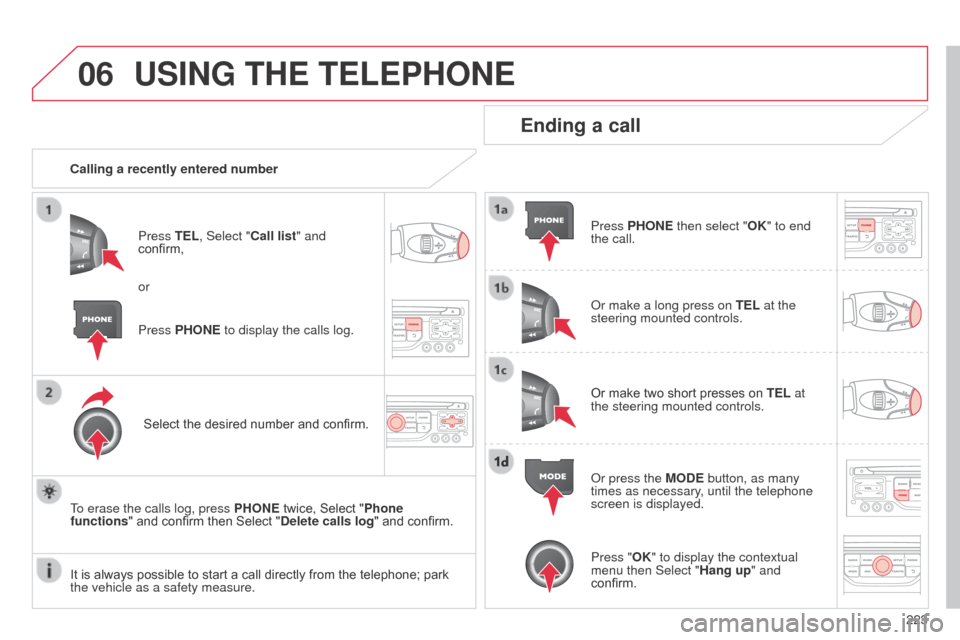
Calling a recently entered numberPress TEL, Select "Call list" and
confirm,
Select the desired number and confirm.
To erase the calls log, press PHONE twice, Select "Phone
functions" and confirm then Select "Delete calls log" and confirm.
Ending a call
Press PHONE then select "OK" to end
the call.
o
r make a long press on TEL at the
steering mounted controls.
Or make two short presses on TEL at
the steering mounted controls.
o
r press the MODE button, as many
times as necessary, until the telephone
screen is displayed.
Press PHONE to display the calls log. or
Press "OK" to display the contextual
menu then Select "Hang up" and
confirm.
It is always possible to start a call directly from the telephone; park
the vehicle as a safety measure.
Page 230 of 284
07
228
C3_en_Chap13b_RT6-2-8_ed01-2014
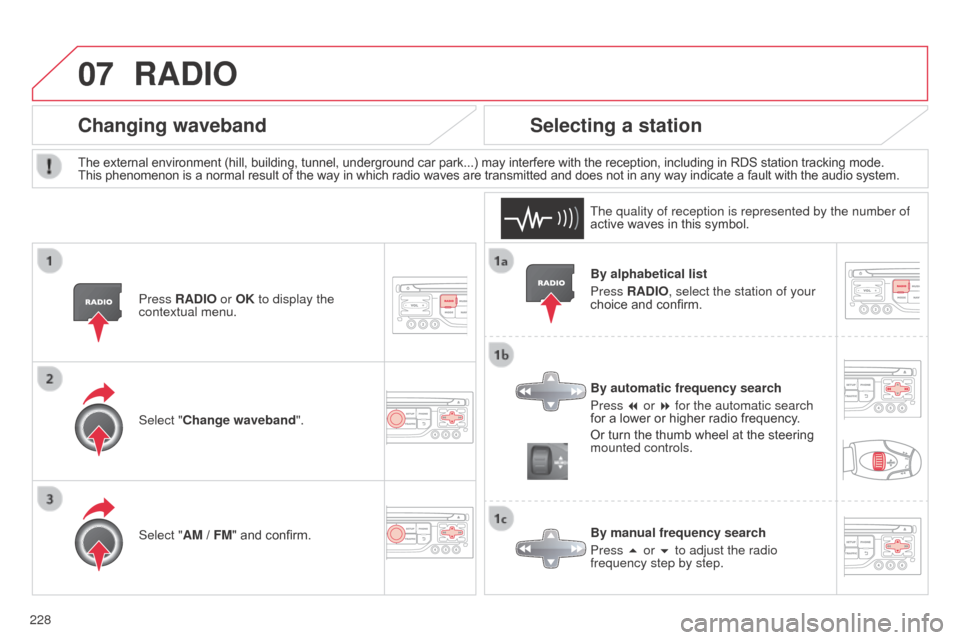
By alphabetical list
Press RADIO, select the station of your
choice and confirm.
By automatic frequency search
Press 7 or 8 for the automatic search
for a lower or higher radio frequency.
Or turn the thumb wheel at the steering
mounted controls.
By manual frequency search
Press 5 or 6 to adjust the radio
frequency step by step.
Selecting a station
The external environment (hill, building, tunnel, underground car park...) may interfere with the reception, including in RDS station tracking mode.
This phenomenon is a normal result of the way in which radio waves are transmitted and does not in any way indicate a fault with the audio system.
The quality of reception is represented by the number of
active waves in this symbol.
Press RADIO or OK to display the
contextual menu.
Changing waveband
Select "Change waveband".
Select "AM / FM" and confirm.
RADIO
Page 231 of 284
07
229
C3_en_Chap13b_RT6-2-8_ed01-2014
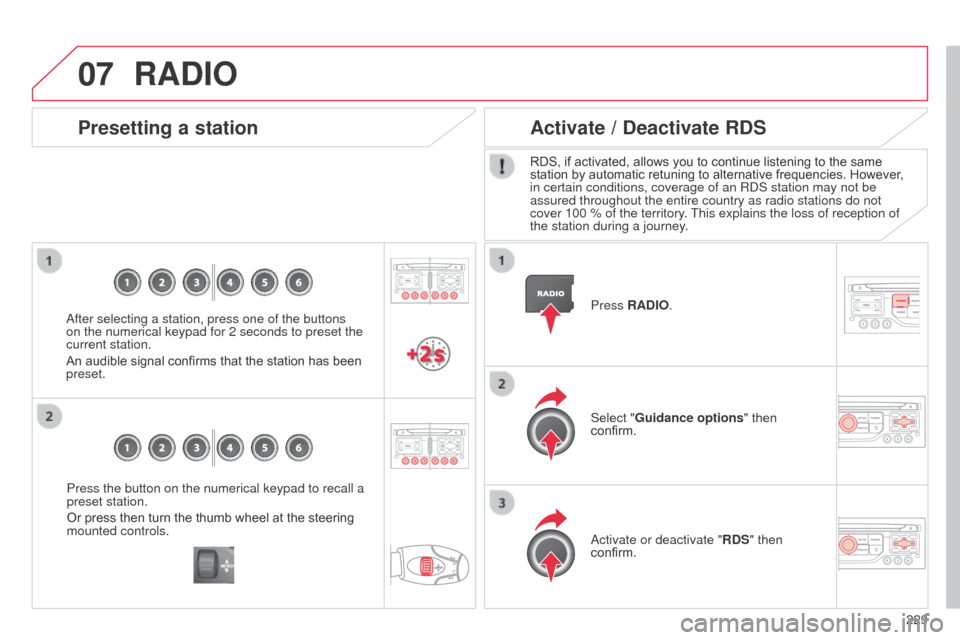
Press the button on the numerical keypad to recall a
preset station.
Or press then turn the thumb wheel at the steering
mounted controls.
Presetting a station
after selecting a station, press one of the buttons
on the numerical keypad for 2 seconds to preset the
current station.
An audible signal confirms that the station has been
preset. Press
RADIO.
Activate / Deactivate RDS
RDS, if activated, allows you to continue listening to the same
station by automatic retuning to alternative frequencies. However
,
in certain conditions, coverage of an R
d S station may not be
assured throughout the entire country as radio stations do not
cover 100 % of the territory. This explains the loss of reception of
the station during a journey.
Select "Guidance options " then
confirm.
a
ctivate or deactivate "RDS" then
confirm.
RADIO
Page 234 of 284
08
232
C3_en_Chap13b_RT6-2-8_ed01-2014
Insert the Cd in the player, insert the USb
memory stick in the US b player or connect the
US
b peripheral to the US b port using a suitable
cable (not supplied)
The system builds playlists (in temporary
memory), an operation which can take from
a few seconds to several minutes at the first
connection.
Reduce the number of non-music files and the
number of folders to reduce the waiting time.
The playlists are updated every time the ignition
is switched off or connection of a USB memory
stick. However, the system memorises these
lists and if they are not modified, the loading
time will be shorter.
Play starts automatically after a period which
depends on the capacity of the US
b memory
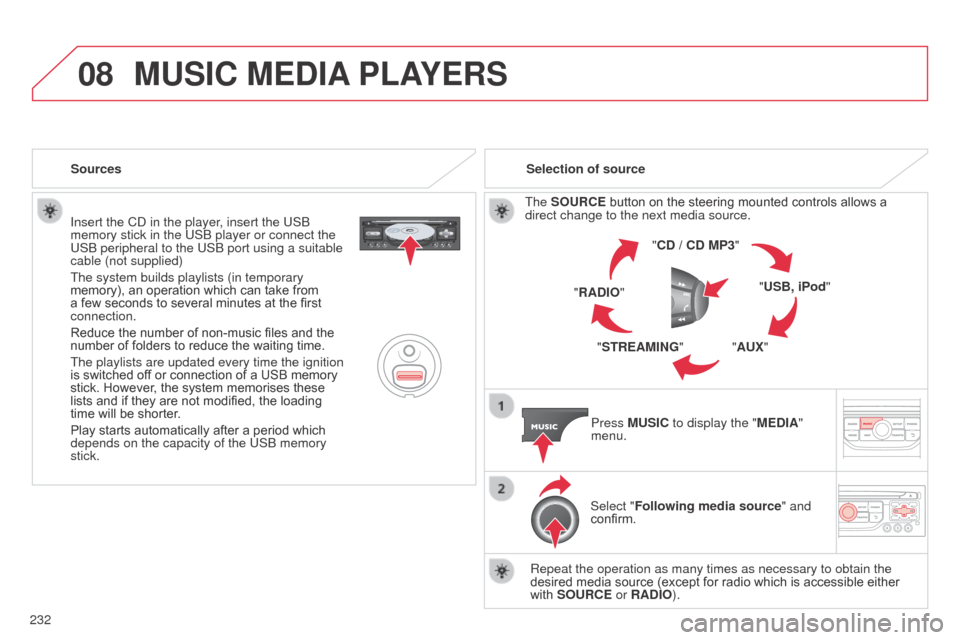
stick. Selection of source
The SOURCE button on the steering mounted controls allows a
direct change to the next media source. "CD / CD MP3"
"USB, iPod"
"AUX"
"STREAMING"
"RADIO"
Press MUSIC to display the "MEDIA"
menu.
Select "Following media source " and
confirm.
Repeat the operation as many times as necessary to obtain the
desired media source (except for radio which is accessible either
with SOURCE or RADIO).
Sources
MUSIC MEDIA
PLAYERS
Page 251 of 284
249
C3_en_Chap13c_Rd45_ed01_2014
Audio system
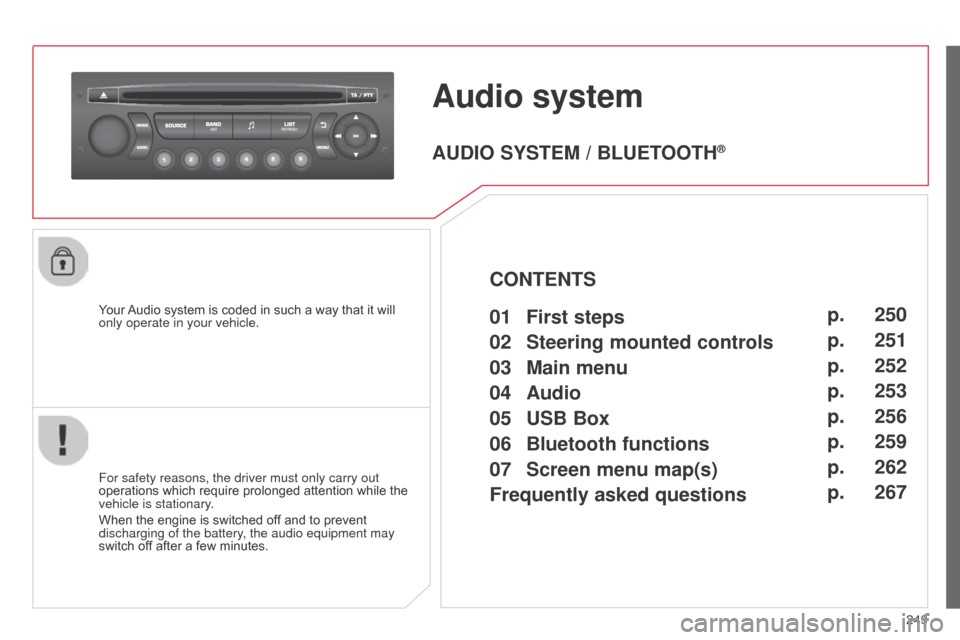
Your Audio system is coded in such a way that it will
only operate in your vehicle.
For safety reasons, the driver must only carry out
operations which require prolonged attention while the
vehicle is stationary.
When the engine is switched off and to prevent
discharging of the battery, the audio equipment may
switch off after a few minutes.
AUDIO SYSTEM / BLUETOOTH®
01 First steps
02
Steering mounted
controls
03
Main
menu
04
Audio
05
USB Box
06
Bluetooth
functions
07
Screen menu map(s)
Frequently
asked questions p.
p.
p.
p.
p.
p.
p.
p.
250
251
252
253
256
259
262
267
CONTENTS
Page 253 of 284
02
251
C3_en_Chap13c_Rd45_ed01_2014
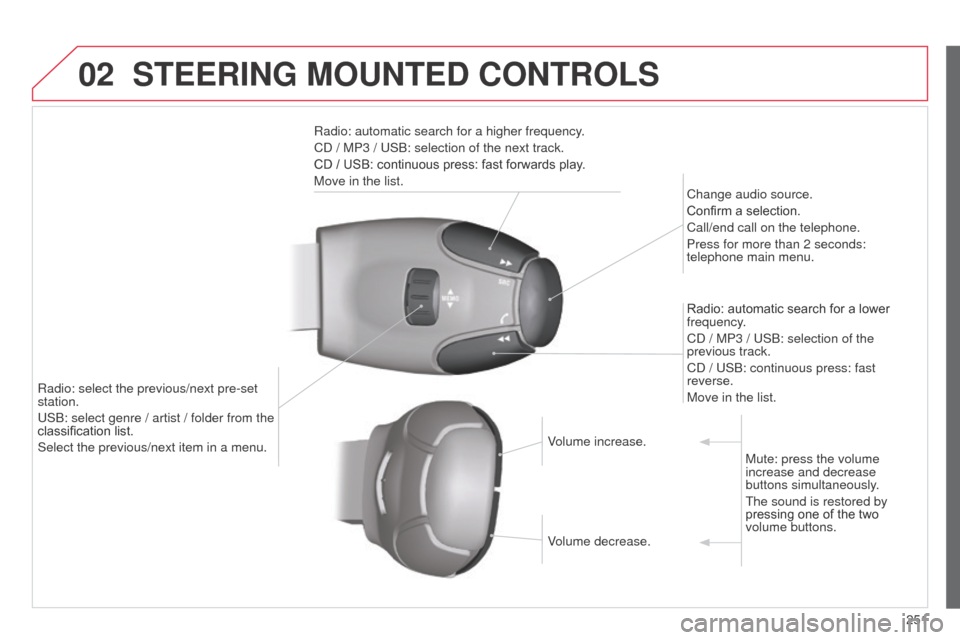
STEERING MOUNTED CONTROLS
Radio: automatic search for a higher frequency.
Cd / MP3 / US b : selection of the next track.
CD / USB: continuous press: fast forwards play.
Move in the list. Change audio source.
Confirm a selection.
Call/end call on the telephone.
Press for more than 2 seconds:
telephone main menu.
Radio: automatic search for a lower
frequency.
C
d / MP3 / US b : selection of the
previous track.
C
d / US b : continuous press: fast
reverse.
Move in the list.
Radio: select the previous/next pre-set
station.
US
b
: select genre / artist / folder from the
classification list.
Select the previous/next item in a menu. Volume increase.
Volume decrease.Mute: press the volume
increase and decrease
buttons simultaneously.
The sound is restored by
pressing one of the two
volume buttons.
Page 258 of 284
05
256
C3_en_Chap13c_Rd45_ed01_2014
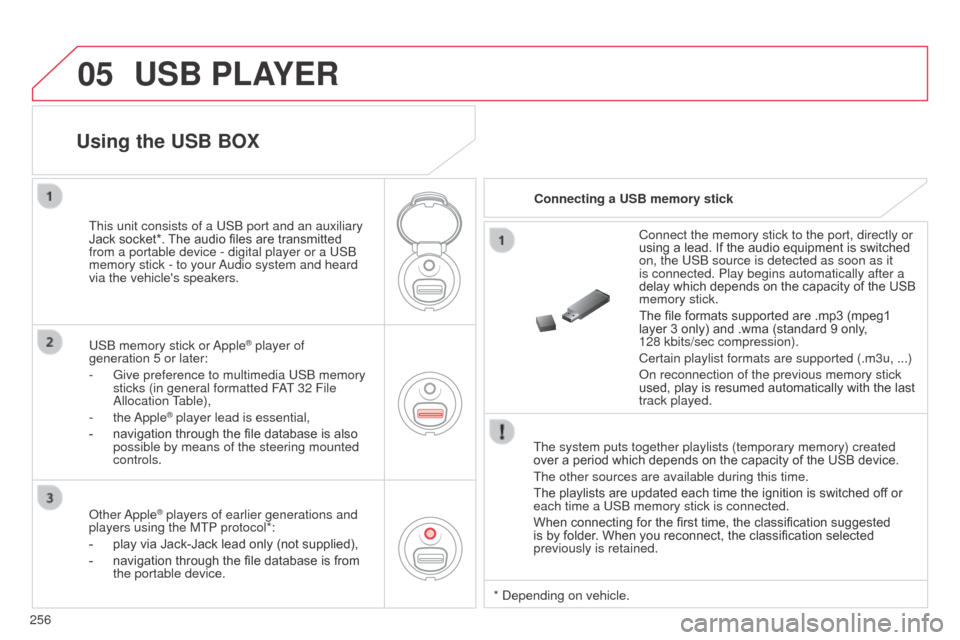
USB PLAYER
The system puts together playlists (temporary memory) created
over a period which depends on the capacity of the USB device.
The other sources are available during this time.
The playlists are updated each time the ignition is switched off or
each time a USb memory stick is connected.
When connecting for the first time, the classification suggested
is by folder. When you reconnect, the classification selected
previously is retained. Connect the memory stick to the port, directly or
using a lead. If the audio equipment is switched
on, the US
b source is detected as soon as it
is connected. Play begins automatically after a
delay which depends on the capacity of the USB
memory stick.
The file formats supported are .mp3 (mpeg1
layer 3 only) and .wma (standard 9 only,
128 kbits/sec compression).
Certain playlist formats are supported (.m3u, ...)
o
n reconnection of the previous memory stick
used, play is resumed automatically with the last
track played.
This unit consists of a US
b
port and an auxiliary
Jack socket*. The audio files are transmitted
from a portable device - digital player or a US
b
memory stick - to your
a
udio system and heard
via the vehicle's speakers.
US
b
memory stick or
a
pple
® player of
generation 5 or later:
-
Give preference to multimedia US
b memory
sticks (in general formatted F
aT
32 File
a
llocation Table),
-
the
a
pple
® player lead is essential,
-
navigation through the file database is also
possible by means of the steering mounted
controls.
Using the USB BOX
Connecting a USB memory stick
o
ther
a
pple
® players of earlier generations and
players using the MTP protocol*:
-
play via Jack-Jack lead only (not supplied),
-
navigation through the file database is from
the portable device. *
d epending on vehicle.