service Citroen C3 2014 2.G Owner's Guide
[x] Cancel search | Manufacturer: CITROEN, Model Year: 2014, Model line: C3, Model: Citroen C3 2014 2.GPages: 284, PDF Size: 9.01 MB
Page 245 of 284
243
C3_en_Chap13b_RT6-2-8_ed01-2014
FREQUENTLY ASKED QUESTIONS
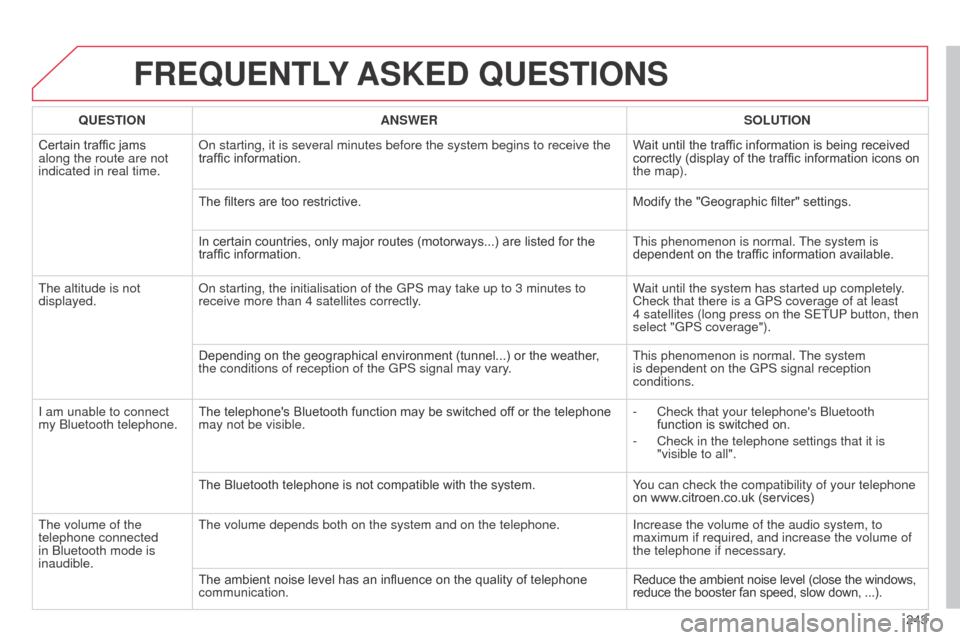
QUESTION ANSWER SOLUTION
Certain traffic jams
along the route are not
indicated in real time.
o
n starting, it is several minutes before the system begins to receive th\
e
traffic information. Wait until the traffic information is being received
correctly (display of the traffic information icons on
the map).
The filters are too restrictive. Modify the "Geographic filter" settings.
In certain countries, only major routes (motorways...) are listed for the
traffic information. This phenomenon is normal. The system is
dependent on the traffic information available.
The altitude is not
displayed.
o
n starting, the initialisation of the GPS may take up to 3 minutes to
receive more than 4 satellites correctly. Wait until the system has started up completely.
Check that there is a GPS coverage of at least
4
satellites (long press on the SETUP button, then
select "GPS coverage").
Depending on the geographical environment (tunnel...) or the weather ,
the conditions of reception of the GPS signal may vary. This phenomenon is normal. The system
is dependent on the GPS signal reception
conditions.
I am unable to connect
my
b
luetooth telephone. The telephone's Bluetooth function may be switched off or the telephone
may not be visible. -
Check that your telephone's
b luetooth
function is switched on.
-
Check in the telephone settings that it is
"visible to all".
The Bluetooth telephone is not compatible with the system. Y
ou can check the compatibility of your telephone
on www.citroen.co.uk (services)
The volume of the
telephone connected
in
b
luetooth mode is
inaudible. The volume depends both on the system and on the telephone.
Increase the volume of the audio system, to
maximum if required, and increase the volume of
the telephone if necessary.
The ambient noise level has an influence on the quality of telephone
communication. Reduce the ambient noise level (close the windows,
reduce the booster fan speed, slow down,
...).
Page 261 of 284
06
259
C3_en_Chap13c_Rd45_ed01_2014
BLUETOOTH FUNCTIONS
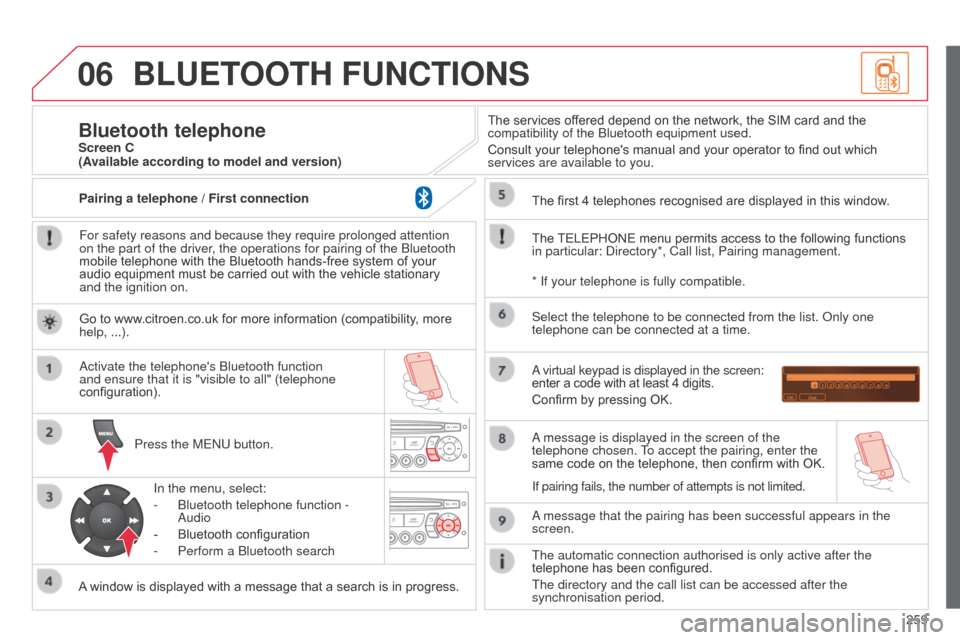
For safety reasons and because they require prolonged attention
on the part of the driver, the operations for pairing of the b luetooth
mobile telephone with the Bluetooth hands-free system of your
audio equipment must be carried out with the vehicle stationary
and the ignition on.
Press the ME
n U button.
A window is displayed with a message that a search is in progress.
a
ctivate the telephone's b luetooth function
and ensure that it is "visible to all" (telephone
configuration).
In the menu, select:
-
b luetooth telephone function -
a
udio
-
Bluetooth configuration
-
Perform a
b luetooth search The services offered depend on the network, the SIM card and the
compatibility of the
b luetooth equipment used.
Consult your telephone's manual and your operator to find out which
services are available to you.
Bluetooth telephoneScreen C
The TELEPHONE menu permits access to the following functions
in particular:
d irectory*, Call list, Pairing management.
The first 4 telephones recognised are displayed in this window.
a virtual keypad is displayed in the screen:
enter a code with at least 4 digits.
Confirm by pressing OK.
a message that the pairing has been successful appears in the
screen. Select the telephone to be connected from the list.
o nly one
telephone can be connected at a time.
a message is displayed in the screen of the
telephone chosen.
To accept the pairing, enter the
same code on the telephone, then confirm with OK.
The automatic connection authorised is only active after the
telephone has been configured.
The directory and the call list can be accessed after the
synchronisation period.
(Available according to model and version)
* If your telephone is fully compatible.
If pairing fails, the number of attempts is not limited.
Go to www.citroen.co.uk for more information (compatibility, more
help, ...).
Pairing a telephone / First connection
Page 270 of 284
268
C3_en_Chap13c_Rd45_ed01_2014
FREQUENTLY ASKED QUESTIONS
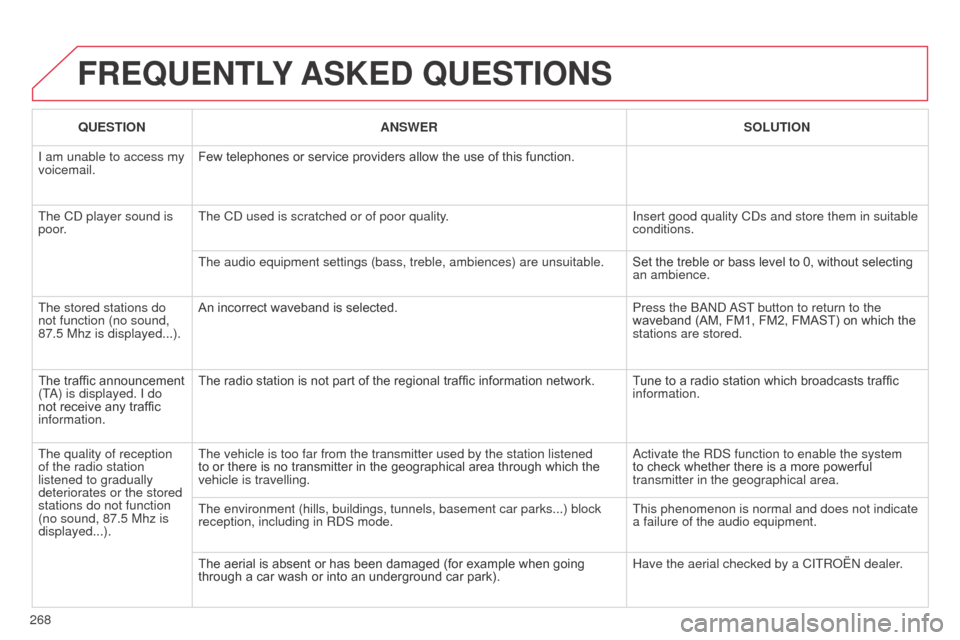
QUESTION ANSWER SOLUTION
I am unable to access my
voicemail. Few telephones or service providers allow the use of this function.
The C
d player sound is
poor. The C
d used is scratched or of poor quality. Insert good quality C
d s and store them in suitable
conditions.
The audio equipment settings (bass, treble, ambiences) are unsuitable.\
Set the treble or bass level to 0, without selecting
an ambience.
The stored stations do
not function (no sound,
87.5 Mhz is displayed...). An incorrect waveband is selected.
Press the
band
a
ST button to return to the
waveband (AM, FM1, FM2, FMAST) on which the
stations are stored.
The traffic announcement
(T
a
) is displayed. I do
not receive any traffic
information. The radio station is not part of the regional traffic information network.
Tune to a radio station which broadcasts traffic
information.
The quality of reception
of the radio station
listened to gradually
deteriorates or the stored
stations do not function
(no sound, 87.5
Mhz is
displayed...). The vehicle is too far from the transmitter used by the station listened\
to or there is no transmitter in the geographical area through which the
vehicle is travelling.
a
ctivate the R d S function to enable the system
to check whether there is a more powerful
transmitter in the geographical area.
The environment (hills, buildings, tunnels, basement car parks...) blo\
ck
reception, including in R
d S mode. This phenomenon is normal and does not indicate
a failure of the audio equipment.
The aerial is absent or has been damaged (for example when going
through a car wash or into an underground car park). Have the aerial checked by a CITR
o Ë n dealer.
Page 279 of 284
277
Radio ........................................... 227, 228, 253
Radio pre-equipment .................................. 17
7
Rear foglamp ............................................... 15 8
Rear screen (demisting)
................................46
Recharging the battery
............................... 16
8
Reduction of electrical load
........................171
Regeneration of the particle emissions filter
.......................................... 13 9
Reinitialising the electric windows
................57
Reinitialising the remote control
................... 55
R
emote control
........................................ 5
3, 56
Removing a wheel
...................................... 149
Removing the mat
......................................... 80
Replacing bulbs
..........................15 4, 15 8, 159
Replacing fuses
..............................
............161
Replacing the air filter
.................................13 9
Replacing the oil filter
................................. 13
9
Replacing the passenger compartment filter
.................................... 13 9
Replacing wiper blades .........................73 , 172
Resetting the service indicator
.....................23
Resetting the trip recorder
............................25
Rev counter
............................................. 1 0 , 11
Reversing camera
....................................... 13 0
Reversing lamp
........................................... 15
8
Risk areas (update)
..................................... 206
Routine checks
................................... 13 9, 14 0
Running out of fuel (
di
esel)
........................13
3
RS
T
Safety for children .............................9 0, 93, 95
Scented air freshener ................................... 47
S
creen, colour 16/9 ....................................... 37
Screen, colour and mapping ...............19 9, 238
Screen menu map
......................238, 262, 264
Screen, monochrome
................252, 262, 264
Screen, multifunction (with audio equipment)
...................................... 30, 33, 37
Screenwash
.................................................. 72
Screenwash fluid level
................................13 8
Screen-wash reservoir
...............................13 8
Seat adjustment
...............................
.............48
Seat belts
...................................... 8
9, 104, 105
Seat, rear bench
........................................... 50
Seats, rear
..................................................... 50
Serial number, vehicle
................................ 19
1
Service indicator
........................................... 22
Service warning light
.................................... 17
S
ervicing
...............................
..........................8
Setting the clock
.........................25, 30, 33, 37
Short-cut menus
......................................... 200
Sidelamps
..................................... 6 6, 15 6, 15 8
Side repeater
..............................
................15 6
Snow chains
................................................ 15
3
Spare wheel
...............................
.................146
Speakers (fitting)
......................................... 17 7
Speed limiter
............................................... 124
Speedometer
.......................................... 1 0 , 11
Starting the vehicle
........................5 4 , 111, 115
Steering mounted controls, audio
..............2 51
Stopping the vehicle
......................5 4 , 111, 115
Stop Start
..........29, 46, 63, 120, 132, 139, 168
Storage
.................................................... 76, 78
Storage box
................................................... 8
2Table of weights
..........................18
1, 18 4, 18 6
Tables of engines
........................181, 18 4, 18 6
Tables of fuses
............................................161
Ta n k , f u e l
.................................................63, 65
Technical data
.............................181, 18 4, 18 6
Telephone
...........................................218, 222
Temperature adjustment
............................... 44
T
emperature control for heated seats
..........49
Temporary tyre repair kit .............................141
Third brake lamp
.........................................159
Time
..............................................................10
TMC (Traffic info)
........................................2
15
To o l s
............................................................146
Total distance recorder
.................................25
To w b a r
.........................................................175
Towed loads
................................181, 18 4, 18 6
Towing another vehicle
...............................17
3
Traction control (
aS
R)
....................16, 18, 103
Traffic information (T
a)
...............216, 229, 254
Traffic information (TMC)
.................... 21
5, 216
Tr a i l e r
..........................................................175
Storage drawer
.............................................80
Stowing rings
................................................81
Sun visor
.......................................................78
Synchronising the remote control
.................55
Synthesiser, voice
....................................... 2
12
System, navigation ...................................... 202
.
alphabetical index