trip computer Citroen C3 2015 2.G User Guide
[x] Cancel search | Manufacturer: CITROEN, Model Year: 2015, Model line: C3, Model: Citroen C3 2015 2.GPages: 401, PDF Size: 13.04 MB
Page 282 of 401
280
C3_en_Chap13c_RD45_ed01-2015
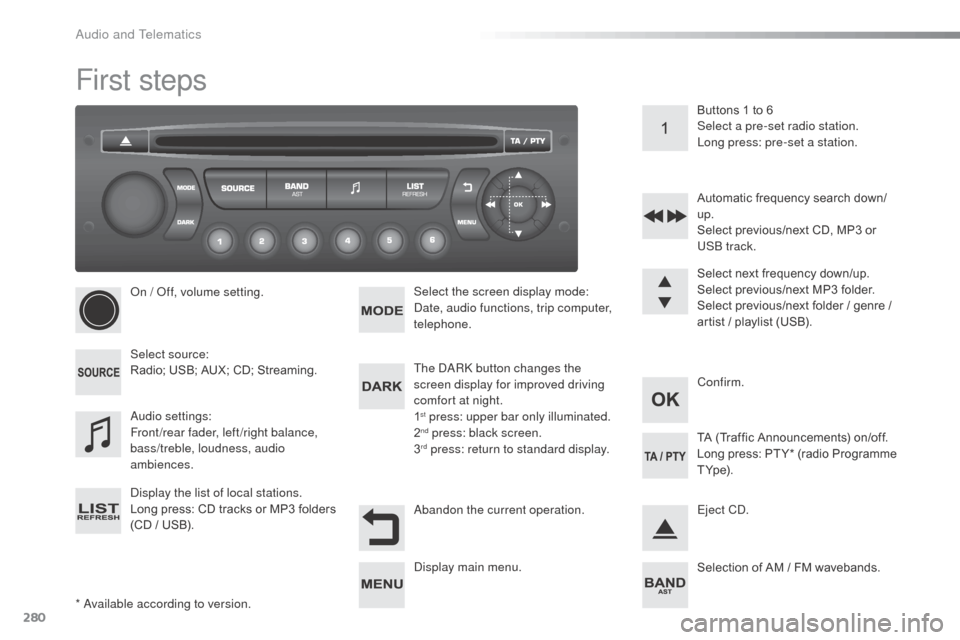
First steps
* available according to version.
on /
o
f
f, volume setting.
Select source:
Radio; USB; AUX; CD; Streaming.
di
splay the list of local stations.
Long press: CD tracks or MP3 folders
(CD / USB). Select the screen display mode:
da
te, audio functions, trip computer,
telephone.
aud
io settings:
Front/rear fader, left/right balance,
bass/treble, loudness, audio
ambiences. The da
Rk
button changes the
screen display for improved driving
comfort at night.
1
st press: upper bar only illuminated.
2nd press: black screen.
3rd press: return to standard display. Select next frequency down/up.
Select previous/next MP3 folder.
Select previous/next folder / genre /
artist / playlist (USB).
ab
andon the current operation. Confirm. Buttons 1 to 6
Select a pre-set radio station.
Long press: pre-set a station.
Automatic frequency search down/
up.
Select previous/next CD, MP3 or
US
b
track.
Eject C
d
.
di
splay main menu. TA (Traffic Announcements) on/off.
Long press: PT Y* (radio Programme
T Yp e).
Selection of AM / FM wavebands.
audio and Telematics
Page 284 of 401
282
C3_en_Chap13c_RD45_ed01-2015
Menus
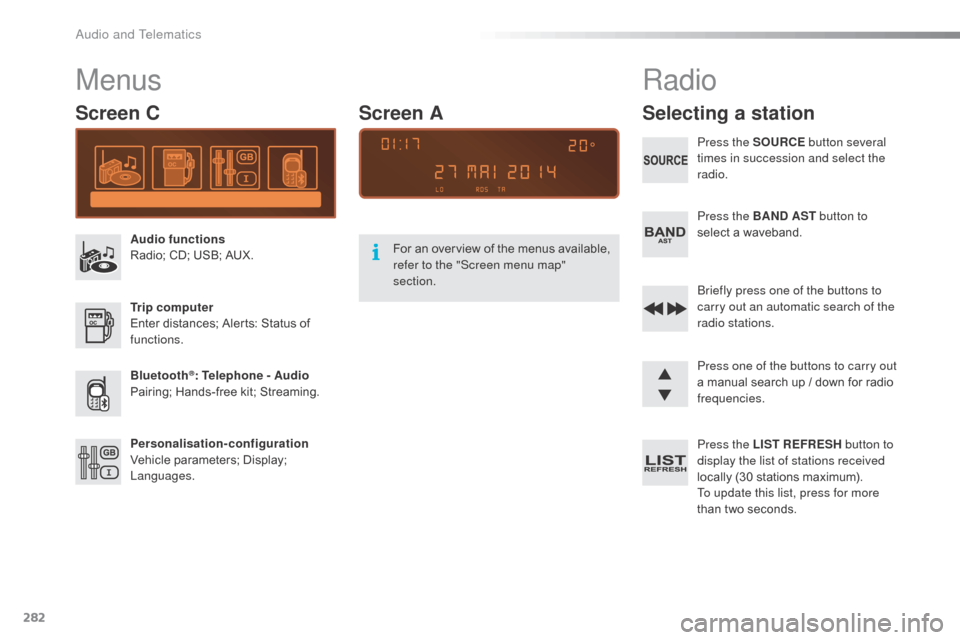
Screen C
Audio functions
Radio; CD; USB; AUX.
Trip computer
Enter distances; Alerts: Status of
functions.
Bluetooth
®: Telephone - Audio
Pairing; Hands-free kit; Streaming.
Personalisation-configuration
Vehicle parameters; Display;
Languages. For an overview of the menus available,
refer to the "Screen menu map"
section.
Screen A
Radio
Selecting a station
Press the SOURCE
button several
times in succession and select the
radio.
Press the BAND AST button to
select a waveband.
br
iefly press one of the buttons to
carry out an automatic search of the
radio stations.
Press one of the buttons to carry out
a manual search up / down for radio
frequencies.
Press the LIST REFRESH button to
display the list of stations received
locally (30 stations maximum).
To update this list, press for more
than two seconds.
audio and Telematics
Page 294 of 401
292
C3_en_Chap13c_RD45_ed01-2015
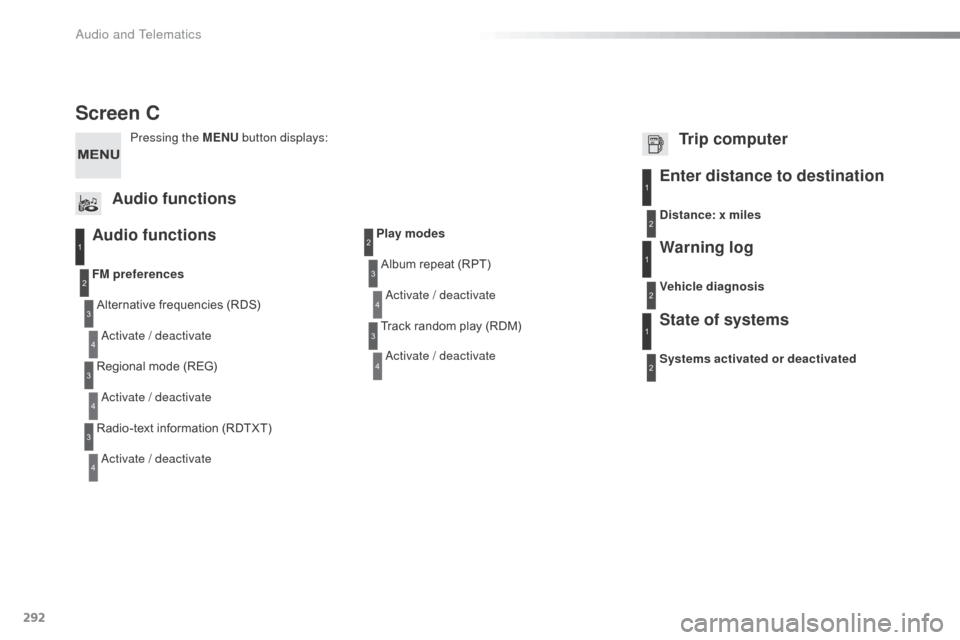
Screen C
Audio functions
Alternative frequencies (RDS)
ac
tivate / deactivate
FM
preferences
Regional mode (REG)
ac
tivate / deactivate
Radio-text information (RDTXT)
ac
tivate / deactivate
1
2
3
4
3
4
3
4
Play modesAlbum repeat (RPT)
ac
tivate / deactivate
Track random play (RDM)
ac
tivate / deactivate2
3
4
3
4
Enter distance to destination1
1
1
2
2
2
Pressing the MENU button displays:
Audio functions Trip computerDistance: x miles
Vehicle diagnosis
Warning log
Systems activated or deactivated
State of systems
Audio and Telematics
Page 302 of 401
300
C3_en_Chap14_Recherche-visuel-Index-Alpha_ed01-2015
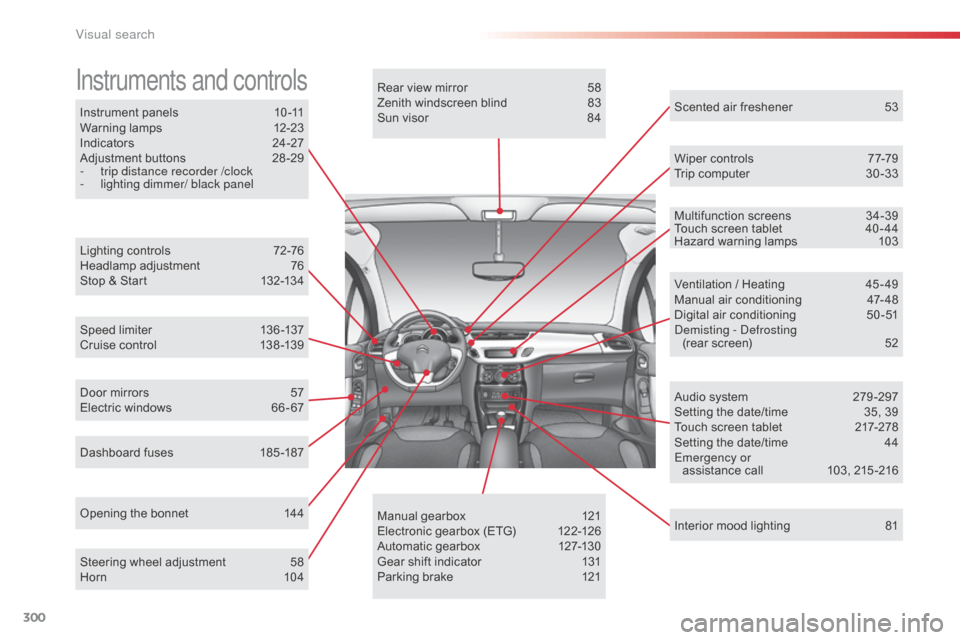
Instrument panels 10 -11
Warning lamps 1 2-23
Indicators
2
4-27
Adjustment buttons
2
8 -29
-
t
rip distance recorder /clock
-
l
ighting dimmer/ black panel
Instruments and controls
Lighting controls 7 2-76
Headlamp adjustment 7 6
Stop & Start
1
32-134
Speed limiter
1
36 -137
Cruise control
1
38 -139
Dashboard fuses
1
85 -187
Opening the bonnet
1
44Rear view mirror
5
8
Zenith windscreen blind
8
3
Sun visor
8
4
Wiper controls
7
7-79
Trip computer
3
0 -33
Audio system
2
79 -297
Setting the date/time
3
5, 39
Touch screen tablet
2
17-278
Setting the date/time
4
4
Emergency or assistance call
1
03, 215 -216
Ventilation / Heating
4
5 - 49
Manual air conditioning
4
7- 48
Digital air conditioning
5
0-51
dem
isting - d
e
frosting
(rear screen)
5
2
Interior mood lighting
8
1
Steering wheel adjustment
5
8
Horn
10
4 Scented air freshener
5
3
Manual gearbox
1
21
Electronic gearbox (ETG)
1
22-126
Automatic gearbox
1
27-130
Gear shift indicator
1
31
Parking brake
1
21
Door mirrors
5
7
Electric windows
6
6 - 67 Multifunction screens
3
4-39
Touch screen tablet
4
0 - 44
Hazard warning lamps 1 03
Visual search
Page 308 of 401
306
C3_en_Chap14_Recherche-visuel-Index-Alpha_ed01-2015
V
W
Vanity mirror ....................................................84
V ehicle configuration
.............34, 37, 42, 257, 290, 291
Ventilation
..............................
..............45 - 47, 51
Warning lamps
........................................... 12-23
Warning lamp, SCR emissions control system
........................................................... 23
Wash-wipe, rear
.............................................. 78
Weights
......................................... 204, 207, 210
Wi-Fi network connection
.............................26
0
Window controls
............................................. 66
Wiper control stalk
..................................... 7 7-79
Wiper, rear ....................................................... 78
Wipers
....................................................... 77, 79Zenith windscreen
...........................................
83
ZTU
Table of weights ............................2 04, 207, 210
Tables of engines ..........................202, 206, 208
Tables of fuses
.............................................. 185
Tank,
a d
blu
e
® additive ......................... 1 56, 163
Ta n k , f u e l
............................................... 152, 15 4
Technical data
........................................ 202-213
Telephone
............................................. 264, 288
Temperature adjustment
........................... 4
7, 50
Temperature control for heated seats
............55
Temporary tyre repair kit ...............................166
Third brake lamp
........................................... 183
Three flashes function (direction indicators)
................................... 103
Time
................................................................ 10
TMC (Traffic info)
.......................................... 23
4
To o l s
.............................................................. 171
Total distance recorder
................................... 28
Touch screen tablet
........................................ 40
T
ouch screen tablet (Menus) ....40, 42, 217, 221
To w b a r
........................................................... 200
Towed loads
.................................. 204, 207, 210
Towing another vehicle
................................. 19
9
Traction control (ASR)
...................... 16, 18, 110
Traffic information (TA)
......................... 235, 283
Traffic information (TMC)
.............................. 23
4
Tr a i l e r
............................................................ 200
Trajectory control systems
............................ 11 0
Trip computer
...................................... 30 -33, 38
Trip distance recorder
..................................... 28
Tyre pressures
...................................... 170, 213
Tyre under-inflation detection
....................................... 21, 105, 170Under-inflation (detection)
..............
2
1, 105, 170
Unlocking
..............................
..........................
63
Unlocking from the inside ...............................
69
U pdate risk areas ..........................................23
3
Updating the date
................................35, 39, 44
Updating the time
................................35, 39, 44
URE
a
....................................................15 6, 157
US
b
player ......................................85, 246, 284
alphabetical index
Page 329 of 401
2
Multifunction screens1
C3-additif_en_Chap02_Ecrans-multifonction_ed01-2015
Touch screen tablet
This system gives access to: - menus for adjusting settings for vehicle functions and systems, - audio and display configuration menus, - audio system and telephone controls and the display of associated information, - the display of alert messages, - the display of ambient temperature (a blue snow flake appears when there is a risk of ice), - the display of the trip computer.
And, depending on equipment, it allows: - the display of visual parking sensors information, - access to the controls for the navigation system and Internet services, and the display of associated information.
Recommendations
It is necessary to press firmly, particularly for "flick" gestures (scrolling through lists, moving the map...). A light wipe is not enough.
The screen does not recognise pressing with more than one finger. This technology allows use at all temperatures and when wearing gloves. Do not use pointed objects on the touch screen tablet. Do not touch the touch screen tablet with wet hands. Uses a soft clean cloth to clean it.
General operation
As a safety measure, some functions can only be viewed with the vehicle stationary. When the vehicle moves off, their display is interrupted.
After a few moments with no action on the secondary page, the primary page is displayed automatically.
Principles
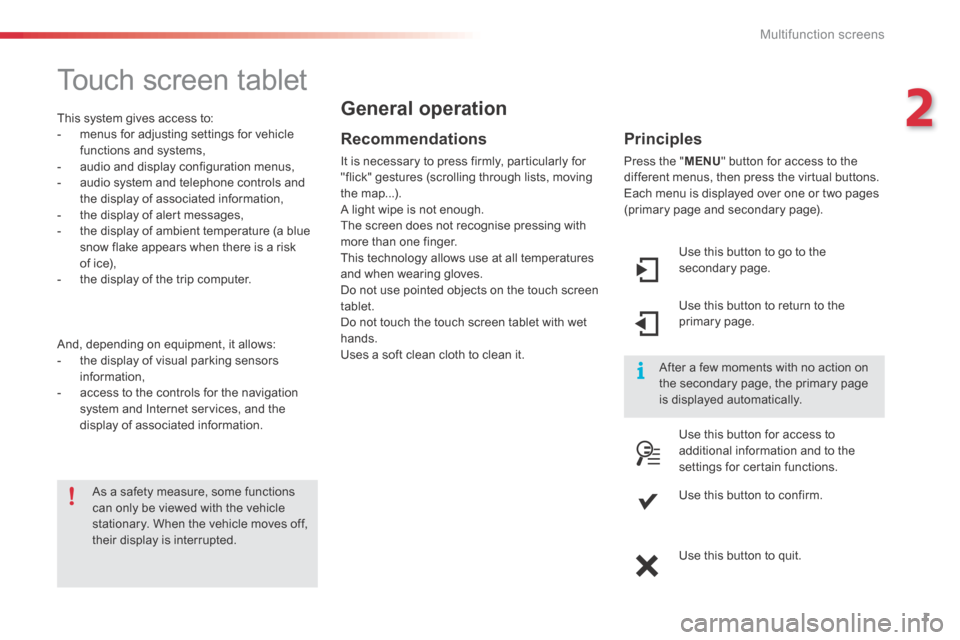
Press the " MENU " button for access to the different menus, then press the virtual buttons. Each menu is displayed over one or two pages (primary page and secondary page).
Use this button to go to the secondary page.
Use this button to return to the primary page.
Use this button for access to additional information and to the settings for certain functions.
Use this button to confirm.
Use this button to quit.
Page 330 of 401

Multifunction screens
2
C3-additif_en_Chap02_Ecrans-multifonction_ed01-2015
Menus
Navigation Navigation is available depending on country and/or trim level. Refer to the "Audio and telematics" section.
Telephone Refer to the "Audio and telematics"
section.
1. Volume / mute. Refer to the "Audio and telematics" section.
Radio Media Refer to the "Audio and telematics" section.
Settings Allows configuration of the display and the system.
Refer to the corresponding section.
Connected services. (Depending on equipment). Allows you to run some of your smartphone's applications via
MirrorLinkTM or CarPlay®. Refer to the "Audio and telematics" section.
Driving Allows access to the trip computer and, depending on version, the
adjustment of settings for certain functions. Refer to the corresponding section.
Press this button, then choose the desired menu.
Page 341 of 401
13
C3-additif_en_Chap13b_SMEGplus_ed01-2015
Menus
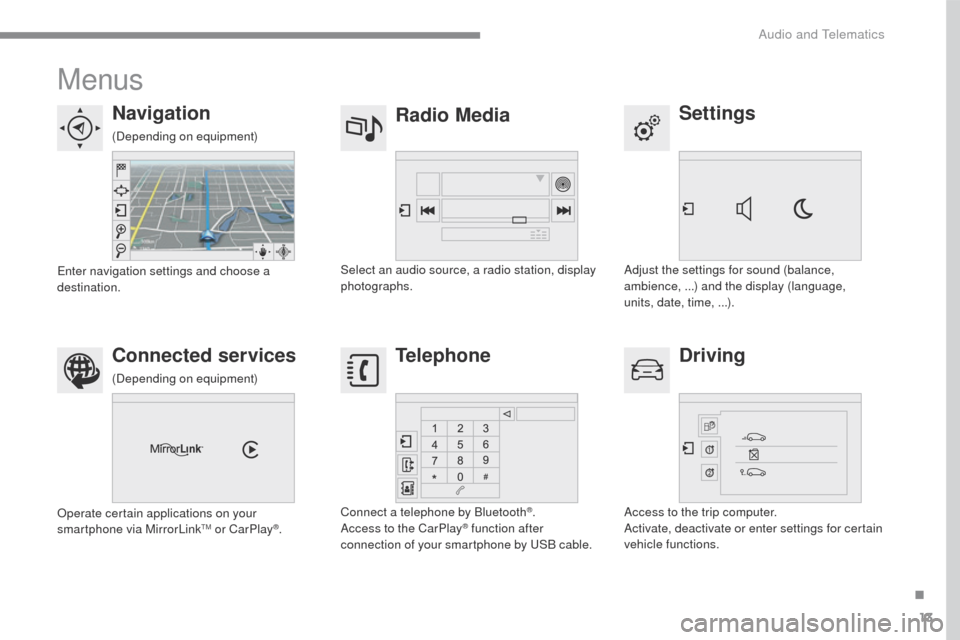
Settings
Radio Media
Navigation
Driving
Connected services Telephone
Adjust the settings for sound (balance,
ambience, ...) and the display (language,
units, date, time, ...).
Select an audio source, a radio station, display
photographs.
Enter navigation settings and choose a
destination.
Access to the trip computer.
Activate, deactivate or enter settings for certain
vehicle functions.
Operate certain applications on your
smartphone via MirrorLink
TM or CarPlay®.
Connect a telephone by Bluetooth
®.
Access to the CarPlay® function after
connection of your smartphone by USB cable.
(Depending on equipment)
(Depending on equipment)
.
Audio and Telematics