ecu Citroen C3 2015 2.G Owner's Guide
[x] Cancel search | Manufacturer: CITROEN, Model Year: 2015, Model line: C3, Model: Citroen C3 2015 2.GPages: 401, PDF Size: 13.04 MB
Page 179 of 401

177
F Tighten the security bolt (if your vehicle has them) using the wheelbrace 1 fitted with
the security bolt socket 4 .
F
T
ighten the other bolts using the
wheelbrace 1 o n l y.
F
R
efit the bolt covers on each of the bolts.
F
S
tow the tools in the box.
F
L
ower the vehicle fully.
F
F
old the jack 2 and remove it.
11
Practical information
Page 184 of 401
182
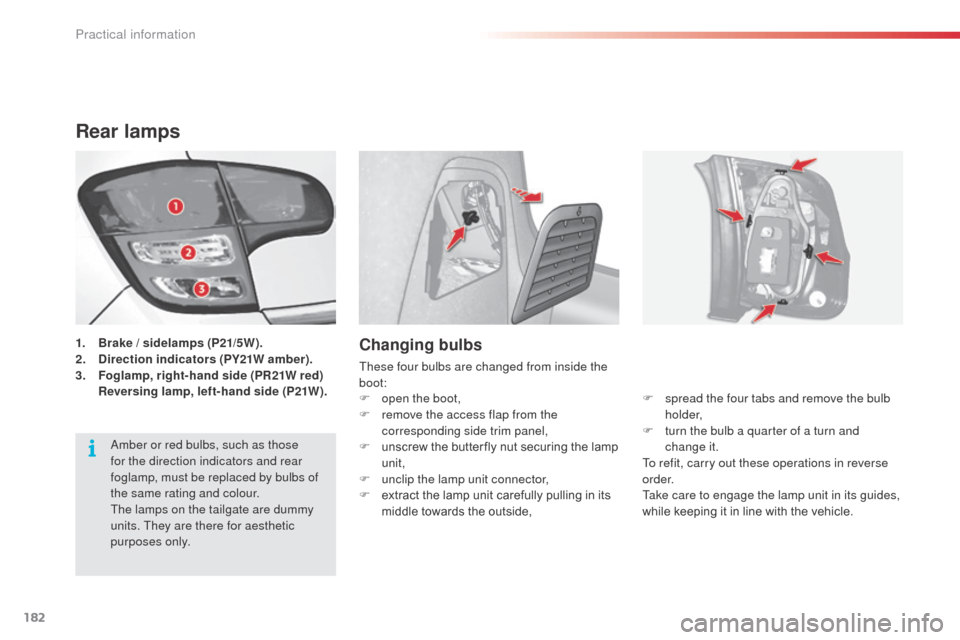
Rear lamps
1. Brake / sidelamps (P21/5W).
2. D irection indicators (PY21W amber).
3.
F
oglamp, right-hand side (PR21W red)
R
eversing lamp, left-hand side (P21W).Changing bulbs
These four bulbs are changed from inside the
boot: F
s
pread the four tabs and remove the bulb
h o l d e r,
F
t
urn the bulb a quarter of a turn and
change it.
To refit, carry out these operations in reverse
o r d e r.
Take care to engage the lamp unit in its guides,
while keeping it in line with the vehicle.
F
o
pen the boot,
F
r
emove the access flap from the
corresponding side trim panel,
F
u
nscrew the butter fly nut securing the lamp
unit,
F
u
nclip the lamp unit connector,
F
e
xtract the lamp unit carefully pulling in its
middle towards the outside,
am
ber or red bulbs, such as those
for the direction indicators and rear
foglamp, must be replaced by bulbs of
the same rating and colour.
The lamps on the tailgate are dummy
units. They are there for aesthetic
purposes only.
Practical information
Page 195 of 401

193
battery
Access to the battery
The battery is located under the bonnet.
To gain access to it:
F
o
pen the bonnet using the interior release
lever, then the exterior safety catch,
F
s
ecure the bonnet stay,
F
l
ift the plastic cover on the (+) terminal.
The presence of this label, in particular
with the Stop & Start system, indicates
the use of a 12 V lead-acid battery with
special technology and specification;
the involvement of a CITR
oËn
dealer
or a qualified workshop is essential
when replacing or disconnecting the
battery.
Failure to observe this recommendation
may cause premature wear of the
battery.
af
ter refitting the battery by a CITR
oËn
dealer or a qualified workshop,
the Stop
& Start system will only
be active after a continuous period
of immobilisation of the vehicle, a
period which depends on the climatic
conditions and the state of charge of
the battery (up to about 8
hours).
Procedure for charging your battery when it is flat or for starting the engine using another battery.
11
Practical information
Page 263 of 401
261
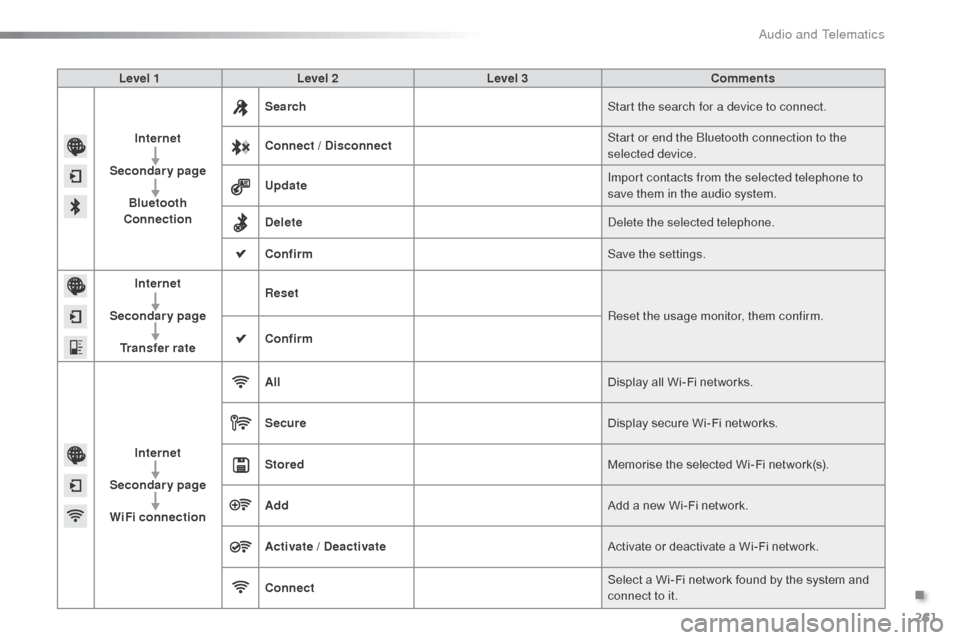
Level 1Level 2 Level 3 Comments
Internet
Secondary page Bluetooth
Connection Search
Start the search for a device to connect.
Connect / Disconnect Start or end the
b
l
uetooth connection to the
selected device.
Update Import contacts from the selected telephone to
save them in the audio system.
Delete
del
ete the selected telephone.
Confirm Save the settings.
Internet
Secondary page Transfer rate Reset
Reset the usage monitor, them confirm.
Confirm
Internet
Secondary page WiFi connection All
Display all Wi-Fi networks.
Secure Display secure Wi-Fi networks.
Stored Memorise the selected Wi-Fi network(s).
Add Add a new Wi-Fi network.
Activate / Deactivate Activate or deactivate a Wi-Fi network.
Connect Select a Wi-Fi network found by the system and
connect to it.
.
Audio and Telematics
Page 320 of 401
.
Audio and Telematics 5
Additif-2_en_web_AC-AP_SMEGplus_Services_connectes_ed01-2015
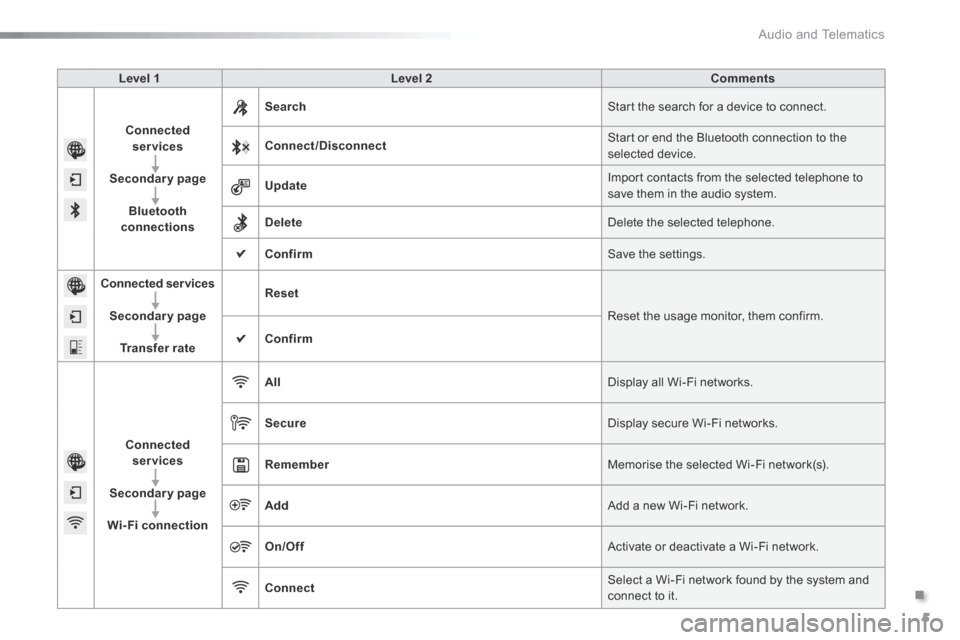
Level 1 Level 2 Comments
Connected services
Secondary page
Bluetooth connections
Search Start the search for a device to connect.
Connect/Disconnect Start or end the Bluetooth connection to the selected device.
Update Import contacts from the selected telephone to save them in the audio system.
Delete Delete the selected telephone.
Confirm Save the settings.
Connected services
Secondary page
Transfer rate
Reset
Reset the usage monitor, them confirm.
Confirm
Connected services
Secondary page
Wi-Fi connection
All Display all Wi-Fi networks.
Secure Display secure Wi-Fi networks.
Remember Memorise the selected Wi-Fi network(s).
Add Add a new Wi-Fi network.
On/Off Activate or deactivate a Wi-Fi network.
Connect Select a Wi-Fi network found by the system and connect to it.
Page 332 of 401

Practical information
4
C3-additif_en_Chap11_Info-pratiques_ed01-2015
Rear lamps
1. Brake / sidelamps (P21/5W).2. Direction indicators (PY21W amber).3. Foglamp, right-hand side (PR21W red) Reversing lamp, left-hand side (P21W).
Changing bulbs
spread the four tabs and remove the bulb holder, turn the bulb a quarter of a turn and change it. To refit, carry out these operations in reverse o r d e r. Take care to engage the lamp unit in its guides,
while keeping it in line with the vehicle.
Open the boot, remove the access flap from the corresponding side trim panel, unscrew the butter fly nut securing the lamp unit, unclip the lamp unit connector, from the outside, extract the lamp unit
carefully pulling it in the centreline of the vehicle,
The location of the reversing lamp or foglamp may vary depending on the side on which the rear lamp is positioned (left or right). Amber or red bulbs, such as those for the direction indicators and rear foglamp, must be replaced by bulbs of the same rating and colour. The lamps on the tailgate are dummy units. They are there for aesthetic purposes only.