set date CITROEN C3 2021 User Guide
[x] Cancel search | Manufacturer: CITROEN, Model Year: 2021, Model line: C3, Model: CITROEN C3 2021Pages: 450, PDF Size: 10.11 MB
Page 262 of 450

260
B618_en_Chap11_index-alpha_ed01-2016
Accessories ...........................................117, 157
AdBlue® ............................... ......26, 36, 215, 216
Adjusting headlamps .................................... 11
2
Adjusting head restraints
................................ 77
A
djusting seat
................................................. 76
A
djusting the air distribution
.....................8
5, 88
Adjusting the air flow
.................................8
5, 88
Adjusting the date
..................................... 4
1, 54
Adjusting the height and reach of the steering wheel
...............................
.........82
Adjusting the temperature
........................8
5, 88
Adjusting the time
............................... 4
1, 54, 55
Advice on driving
..............................
....151, 152
Airbags
...............
............................. 29, 129, 137
Airbags, curtain
..................................... 13
2, 13 3
Airbags, front......................................... 13 0, 13 3
Airbags, lateral
...................................... 13
1, 13 3
AIRBUMP
® .................................................... 2 19
Air conditioning ............................... ............ 9, 87
Air conditioning, automatic
.......................8
4, 88
Air conditioning, manual
........................... 8
4, 86
Air intake
...............
.................................... 86, 88
Air vents
..............................
............................ 83
Alarm
............................................................... 72
A
nti-lock braking system (ABS)
....................12
3
Anti-slip regulation (ASR)
............................. 12
3
Anti-theft
..............................
.........................153
Armrest, front
............................................9
6, 98
Assistance call
...............................
....... 119, 121
Assistance, emergency braking
................... 12
3
Audio system
...............................
....................41
Auxiliary socket
............................................... 98
ABChild seats, ISOFIX .......................14 3 -145, 147
C ITROËN C onnect Box ....................... 1 19, 121
C
ITROËN
L
ocalised Emergency Call... 119, 121
Closing the boot
...............................
......... 57, 69
Closing the doors
.......................... 5
7, 60, 61, 68
Coat hanger
..............................
......................99
Configuration, vehicle
......................... 4
1, 44, 46
ConnectedCAM C
ITROËN
™
.......................19
3
Control, electric windows
................................ 74
C
ontrol, emergency boot release
...................69
C
ontrol, emergency door
................................ 64
C
ontrol, heated seats
...................................... 78
C
ontrol stalk, lighting
.............. 1
6, 105, 106, 110
Control stalk, wipers
..............................11
3 -115
Courtesy lamp
...............................
..........94, 240
Cruise control
................................ 1
70, 173, 178
Cruise control by speed limit recognition
.....17
3
Cup holder
...............................
........................96
Capacity, fuel tank
..............................
.......... 19 6
Cap, fuel filler
................................................ 19
6
Central locking
.................................... 6
0, 61, 70
Changing a bulb
........................... 2
34, 238, 240
Changing a fuse
............................ 2
41, 243, 246
Changing a wheel
...............................
. 226, 227
Changing a wiper blade
........................ 11
6 , 2 0 4
Changing the remote control battery
.............. 66
C
hecking the engine oil level
.......................... 35
C
hecking the levels
............................... 2
0 9 -212
Checking tyre pressures (using the kit)
........ 2
21
Checks
...............
................... 207, 208, 213, 214
Child lock
...............................
........................ 150
Children
...............................
... 141, 143 -145, 147
Children (safety)
...............................
............. 150
Child seats
............ 1
28, 134-136, 140, 141, 149
Child seats, conventional
...................... 14
0, 141
Child seats, i-Size
...............................
.......... 147 Date (setting)
...............................
.............. 41, 54
Daytime running lamps
.........1
06, 110, 234, 235
Deactivating the passenger airbag
....... 13
0, 137
Deadlocking
...............................
............... 57, 62
Demisting - defrosting
...............................9
2, 93
Dimensions
..............................
.....................257
Dipstick
................
....................................35, 209
Direction indicators
...... 1
08, 110, 234, 235, 238
Display screen, instrument panel
.................16
5
Doors
..............................................................
.68
Driving economically ......................................... 9
Driving time warning
..................................... 18
2
Dynamic stability control (DSC)
...... 2
2, 123, 125
C
D
Battery ................................... 203, 213, 248 -251
Battery, charging ............................... ............250
Battery, remote control
.............................6
3, 66
Blanking screen (snow shield)
......................2
01
Blind, panoramic roof
...................................... 95
B
lind spot monitoring system
........................18
4
Blind spot sensors
.................................. 18
, 18 4
BlueHDi
...............................
......32, 36, 215, 220
Bonnet
...............
............................................ 206
Boot
........
.......................................... 69, 95, 100
Brake discs
.................................................... 2
14
Brake lamps
...............................
...................238
Brakes
..................................................... 2
2, 214
Bulbs (changing)
...............................
... 234, 238
Alphabetical index
Page 265 of 450
263
B618_en_Chap11_index-alpha_ed01-2016
Safety, children .............................13 0, 13 4 -13 6,
141, 143 -145, 147
Screen, cold climate
..................................... 2
01
Screen, monochrome
..................................... 41
S
creenwash, front
......................................... 11
4
Screenwash, rear
...............................
...........114
SCR (Selective Catalytic Reduction) system
................
................................... 27, 215
Seat belts
....................................... 12
6 -128, 14 0
Seats, front
...............................
.......................76
Seats, heated
...............................
...................78
Seats, rear
....................................................... 79
Sel
ector, gear
................................................ 16
1
Serial number, vehicle
..................................25
8
Service indicator
.......................................3
2, 34
Servicing
...............................
............................ 9Tables of fuses
.............................. 2
41, 243, 246
Tank, fuel
...............................
................19 6, 198
Temperature, coolant
...................................... 31
T
hird brake lamp
...........................................23
9
Three flashes (direction indicators)
.............. 10
8
Time (setting)
..............................
........ 41, 54, 55
S
T
Settings, equipment ......................4 0, 41, 44, 46
Sidelamps .................... 1 05, 110, 234, 235, 238
Side repeater
..............................
..................237
Snow chains
..........................................1
90, 200
Socket, 12 V accessory
............................9
6, 97
Socket, auxiliary
...............................
...............98
Sockets, audio
................................................ 98
Spe
ed limiter
...............................
.. 170, 173, 175
Speed limit recognition
................................. 17
1
Stability control (ESC) ...................................123
Starting the engine
....................... 1
53, 156, 161
Starting using another battery
..............1
58, 249
Stay, bonnet
...............................
...................206
Steering wheel, adjustment
............................8
2
Stop
...............
.................................................. 20
Stopping the vehicle
..................... 1
53, 156, 161
Stop & Start
.......................... 1
8, 52, 84, 92, 167,
196, 206, 213, 251
Stop (warning lamp)
........................................ 20
St
orage
................
............................................ 97
Sun visor
...................................................9
6, 97
Switching off the engine
...............................15
3
Synchronising the remote control
...................67
R
emoving the mat
...............................
............ 99
Replacing bulbs ..............................
..... 234, 238
Replacing fuses
..............................
...... 241, 243
Replacing the air filter
................................... 2
13
Replacing the oil filter
................................... 2
13
Replacing the passenger
compartment filter
...................................... 2
13
Reservoir, screenwash
................................. 2
11
Resetting the service indicator
....................... 34
R
esetting the trip recorder
.............................. 39
R
eversing camera
...............................
.......... 189
Reversing lamp
............................................. 23
8
Roof bars
....................................................... 20
5
Running out of fuel (Diesel)
.......................... 2
20 To o l s ................
..................................... 226, 227
Total distance recorder ................................... 39
T
ouch screen.............................................44, 46
To w b a r
................
...................................152, 202
Towing another vehicle
.................................2
52
Towing eye
....................................................10
1
Traction control (ASR)
.................... 2
2, 123, 125
Tr a i l e r
...............
.....................................152, 202
Triangle, warning ................................... 101, 2 20
Trip computer
............................................5
0-52
Trip distance recorder
..................................... 39
T
y r e s
..........................................................9
, 258
Tyre under-inflation detection
...............
............... 30, 190, 192, 225
U
Under floor storage .......................................10 1
Under-inflation (detection) ............................ 19
0
Unlocking
..............................
.................... 57, 59
Unlocking from the inside
...............................70
U
pdating the date
............................................ 54
U
pdating the time
......................................5
4, 55
.
Alphabetical index
Page 277 of 450
3
.
12:13
18,5 21,5
23 °C
Audio and Telematics
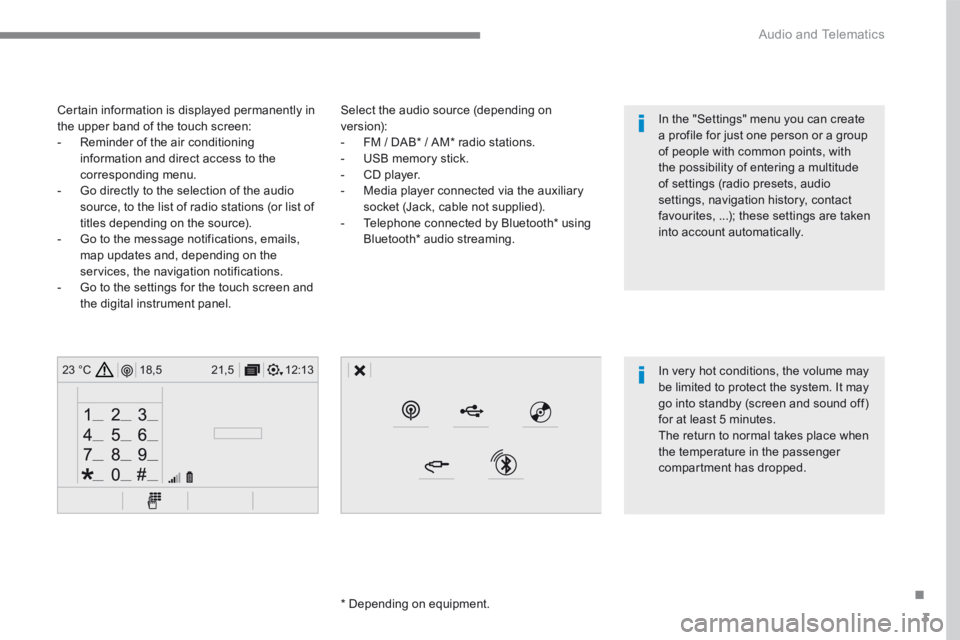
Select the audio source (depending on version): - FM / DAB * / AM * radio stations. - USB memory stick. - CD player. - Media player connected via the auxiliary socket (Jack, cable not supplied). - Telephone connected by Bluetooth * using
Bluetooth * audio streaming.
* Depending on equipment.
Certain information is displayed permanently in the upper band of the touch screen: - Reminder of the air conditioning information and direct access to the corresponding menu. - Go directly to the selection of the audio source, to the list of radio stations (or list of titles depending on the source).
- Go to the message notifications, emails, map updates and, depending on the services, the navigation notifications. - Go to the settings for the touch screen and the digital instrument panel.
In very hot conditions, the volume may be limited to protect the system. It may go into standby (screen and sound off) for at least 5 minutes.
The return to normal takes place when the temperature in the passenger compartment has dropped.
In the "Settings" menu you can create a profile for just one person or a group of people with common points, with the possibility of entering a multitude of settings (radio presets, audio settings, navigation history, contact favourites, ...); these settings are taken into account automatically.
Page 279 of 450
5
.
Audio and Telematics
Steering mounted controls
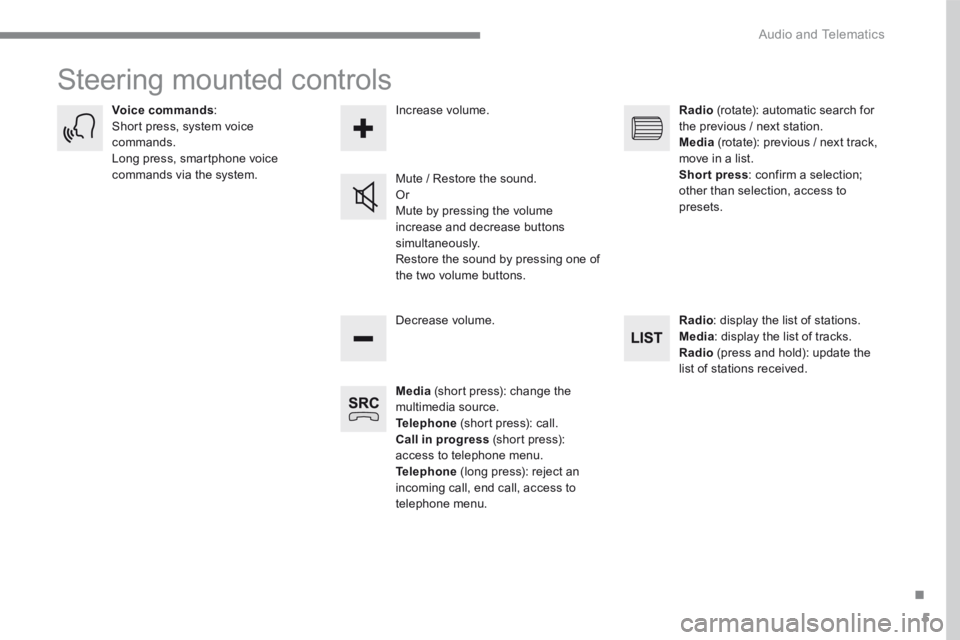
Media (short press): change the multimedia source. Telephone (short press): call. Call in progress (short press): access to telephone menu. Telephone (long press): reject an incoming call, end call, access to telephone menu.
Decrease volume.
Voice commands : Short press, system voice commands. Long press, smartphone voice commands via the system. Mute / Restore the sound. Or Mute by pressing the volume
increase and decrease buttons simultaneously. Restore the sound by pressing one of the two volume buttons.
Radio (rotate): automatic search for the previous / next station. Media (rotate): previous / next track, move in a list. Short press : confirm a selection; other than selection, access to presets.
Radio : display the list of stations. Media : display the list of tracks. Radio (press and hold): update the list of stations received.
Increase volume.
Page 281 of 450
7
.
FM/87.5 MHz
87.5MHz
12:13
18,5 21,5
23 °C12:13
18,5 21,5
23 °C12:13
18,5 21,5
23 °C
Audio and Telematics
Settings Radio Media Telephone
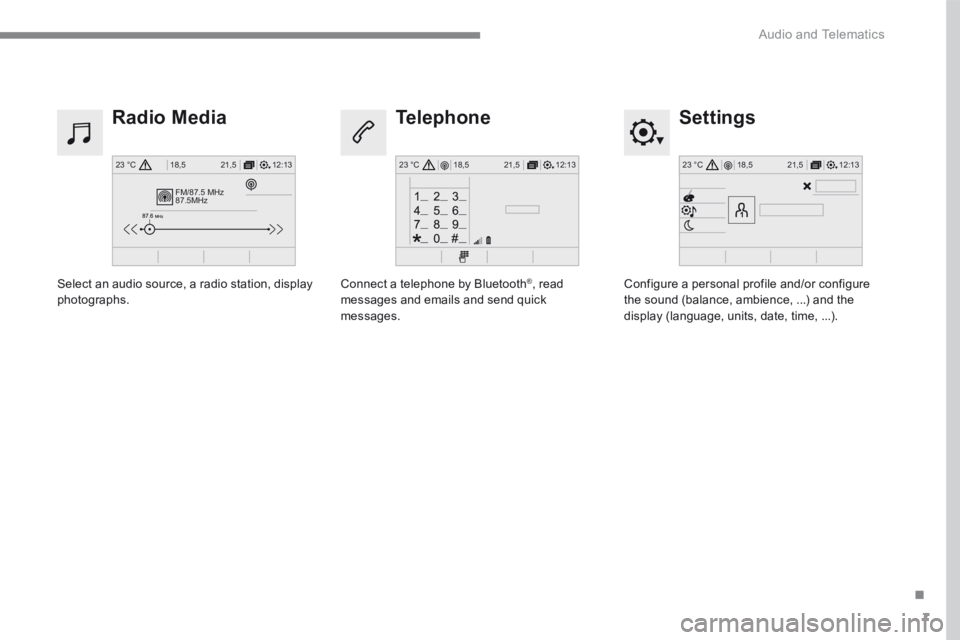
Configure a personal profile and/or configure the sound (balance, ambience, ...) and the display (language, units, date, time, ...).
Select an audio source, a radio station, display photographs. Connect a telephone by Bluetooth ® , read messages and emails and send quick messages.
Page 305 of 450
31
.
Audio and Telematics
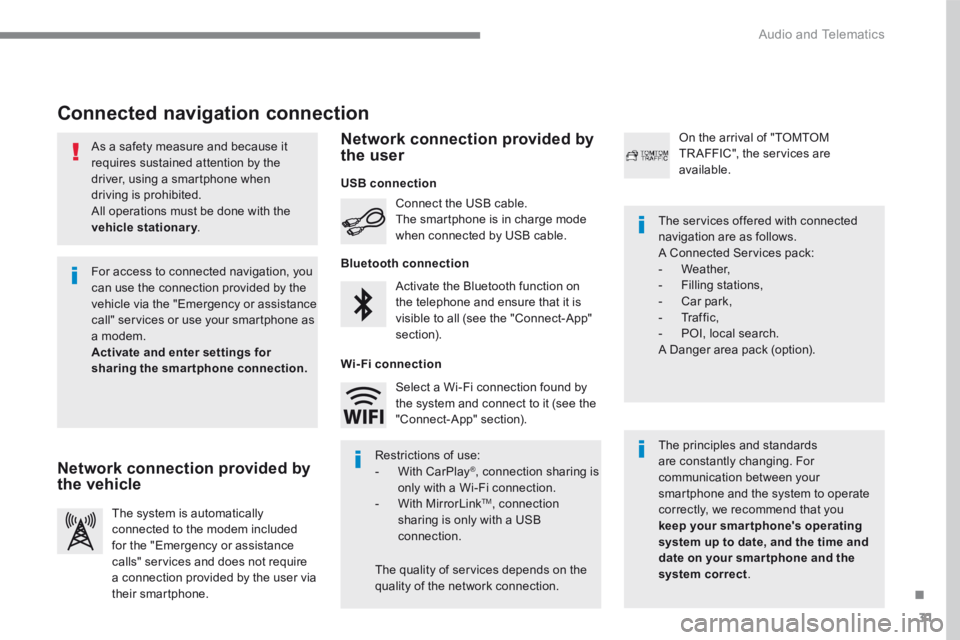
As a safety measure and because it requires sustained attention by the driver, using a smartphone when driving is prohibited. All operations must be done with the
vehicle stationary . vehicle stationary . vehicle stationary
Connected navigation connection
The principles and standards are constantly changing. For communication between your smartphone and the system to operate correctly, we recommend that you keep your smar tphone's operating system up to date, and the time and date on your smar tphone and the system correct.
The services offered with connected navigation are as follows. A Connected Services pack: - Weather, - Filling stations, - Car park, - Traffic, - POI, local search. A Danger area pack (option).
Activate the Bluetooth function on the telephone and ensure that it is visible to all (see the "Connect-App" section).
Connect the USB cable. The smartphone is in charge mode when connected by USB cable.
The system is automatically connected to the modem included for the "Emergency or assistance calls" services and does not require a connection provided by the user via
their smartphone.
On the arrival of "TOMTOM TR AFFIC", the services are available.
For access to connected navigation, you can use the connection provided by the vehicle via the "Emergency or assistance call" services or use your smartphone as a modem. Activate and enter settings for sharing the smartphone connection.
Restrictions of use: - With CarPlay ® , connection sharing is only with a Wi-Fi connection. - W i t h M i r r o r L i n k TM , connection sharing is only with a USB connection.
The quality of services depends on the quality of the network connection.
Select a Wi-Fi connection found by the system and connect to it (see the "Connect-App" section).
USB connection
Network connection provided by the vehicle
Network connection provided by the user
Bluetooth connection
Wi-Fi connection
Page 313 of 450
39
.
1
Audio and Telematics
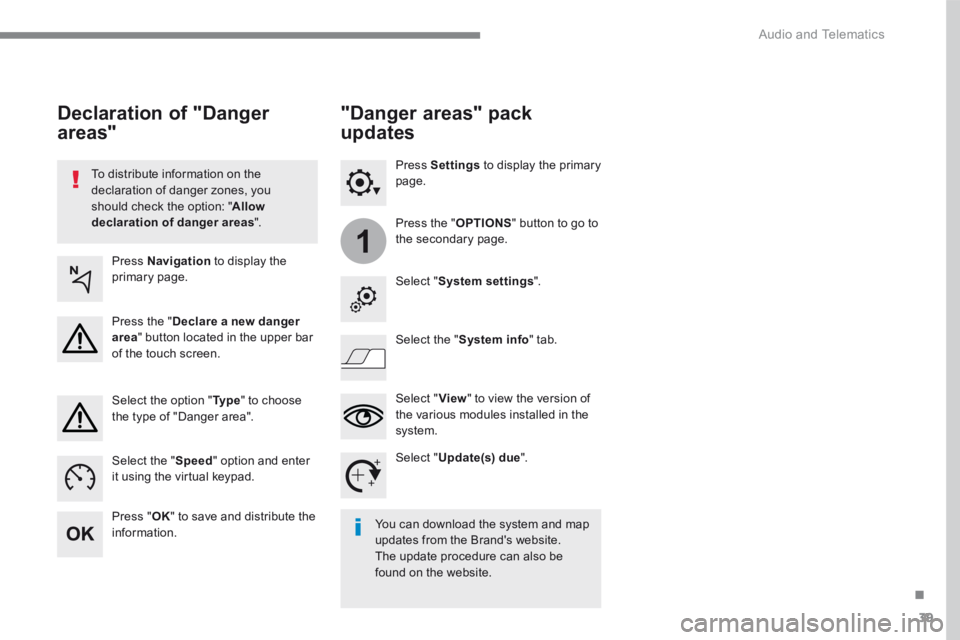
To distribute information on the declaration of danger zones, you should check the option: " Allow declaration of danger areas ".
Declaration of "Danger
areas"
Press Navigation to display the primary page.
Press the " Declare a new danger area " button located in the upper bar of the touch screen.
Select the option " Ty p e " to choose the type of "Danger area".
Select the " Speed " option and enter it using the virtual keypad.
Press " OK " to save and distribute the information. You can download the system and map updates from the Brand's website. The update procedure can also be found on the website.
"Danger areas" pack
updates
Press Settings to display the primary page.
Press the " OPTIONS " button to go to the secondary page.
Select " System settings ".
Select " View " to view the version of the various modules installed in the system.
Select " Update(s) due ".
Select the " System info " tab.
Page 331 of 450
57
.
5
12
8
6
13
14
15
9
7
10
11
1
1
1
Audio and Telematics
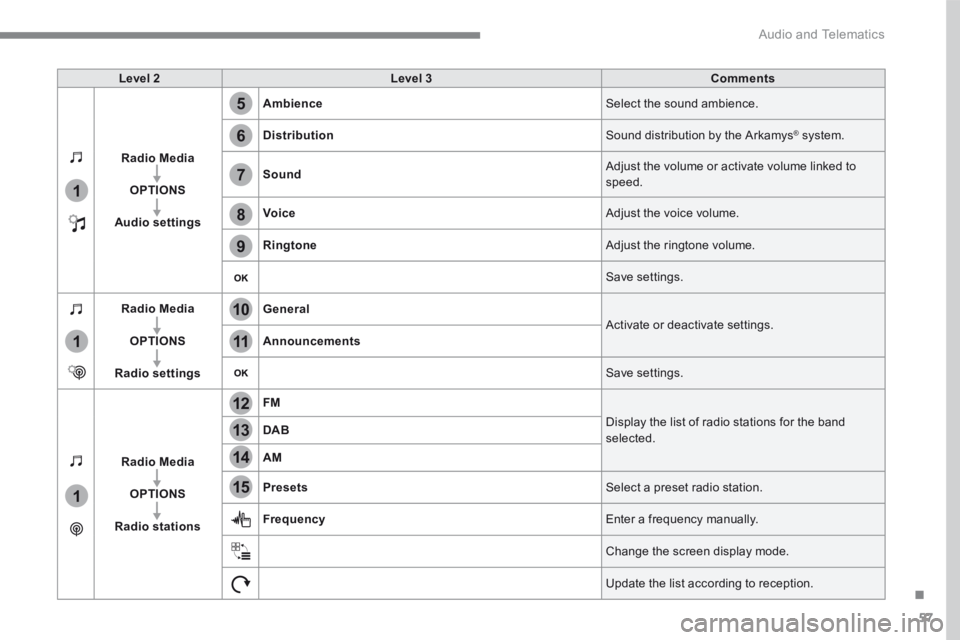
Level 2Level 3Comments
Radio Media
OPTIONS
Audio settings
Ambience Select the sound ambience.
Distribution Sound distribution by the Arkamys ® system. ® system. ®
Sound Adjust the volume or activate volume linked to speed.
Voice Adjust the voice volume.
Ringtone Adjust the ringtone volume.
Save settings.
Radio Media
OPTIONS
Radio settings
General Activate or deactivate settings. Announcements
Save settings.
Radio Media
OPTIONS
Radio stations
FM
Display the list of radio stations for the band selected. DAB
AM
Presets Select a preset radio station.
Frequency Enter a frequency manually.
Change the screen display mode.
Update the list according to reception.
Page 338 of 450
64
Audio and Telematics
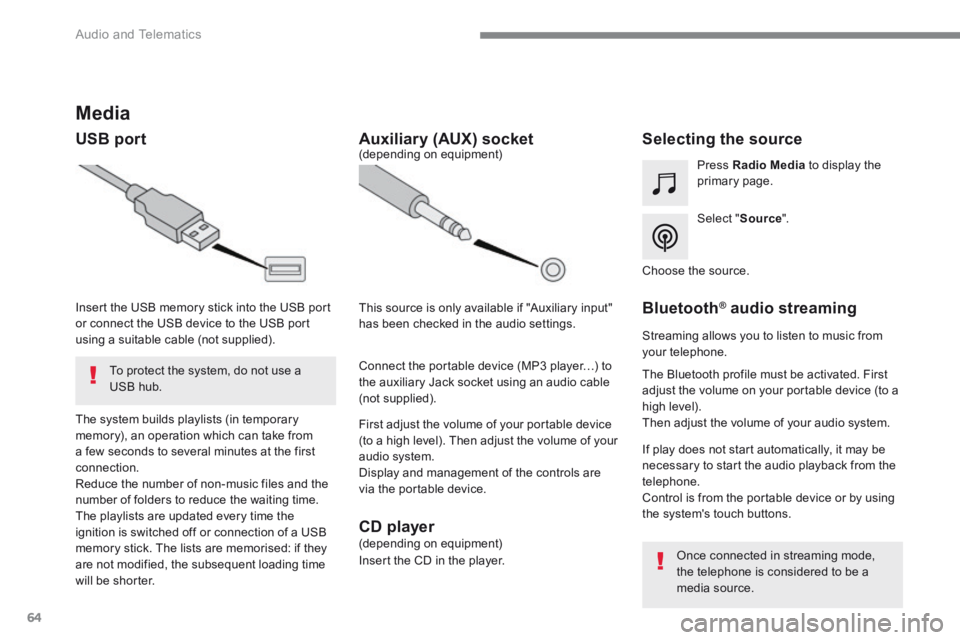
Media
USB port Selecting the source
Select " Source ".
Press Radio Media to display the primary page.
The system builds playlists (in temporary memory), an operation which can take from a few seconds to several minutes at the first connection. Reduce the number of non-music files and the number of folders to reduce the waiting time. The playlists are updated every time the ignition is switched off or connection of a USB memory stick. The lists are memorised: if they are not modified, the subsequent loading time will be shorter.
Insert the USB memory stick into the USB port or connect the USB device to the USB port using a suitable cable (not supplied).
Auxiliary (AUX) socket
First adjust the volume of your portable device (to a high level). Then adjust the volume of your audio system. Display and management of the controls are via the portable device.
This source is only available if "Auxiliary input" has been checked in the audio settings.
(depending on equipment)
Connect the portable device (MP3 player…) to the auxiliary Jack socket using an audio cable (not supplied).
Choose the source.
Bluetooth ® Bluetooth ® Bluetooth audio streaming ® audio streaming ®
Streaming allows you to listen to music from your telephone.
The Bluetooth profile must be activated. First adjust the volume on your portable device (to a high level). Then adjust the volume of your audio system.
If play does not start automatically, it may be necessary to start the audio playback from the telephone. Control is from the portable device or by using the system's touch buttons.
Once connected in streaming mode, the telephone is considered to be a media source.
To protect the system, do not use a USB hub.
CD player (depending on equipment)
Insert the CD in the player.
Page 355 of 450
81
.
1
15
16
1
1
11
12
13
14
9
8
10
Audio and Telematics
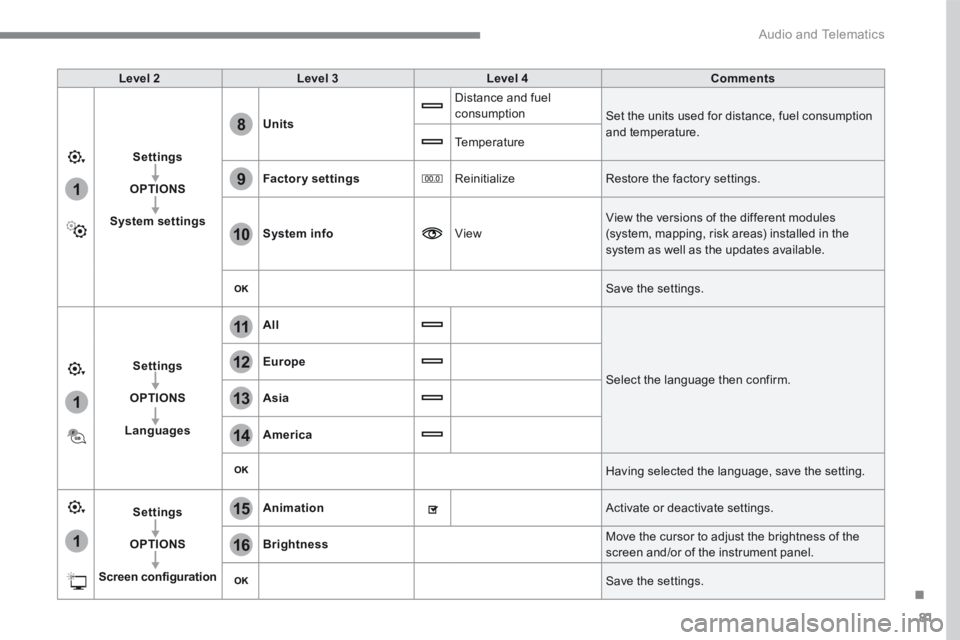
Level 2Level 3Level 4Comments
Settings
OPTIONS
System settings
Units
Distance and fuel consumption Set the units used for distance, fuel consumption and temperature. Temperature
Factory settings Reinitialize Restore the factory settings.
System info View
View the versions of the different modules
(system, mapping, risk areas) installed in the system as well as the updates available.
Save the settings.
Settings
OPTIONS
Languages
All
Select the language then confirm.
Europe
Asia
America
Having selected the language, save the setting.
Settings
OPTIONS
Screen configuration
Animation Activate or deactivate settings.
Brightness Move the cursor to adjust the brightness of the screen and/or of the instrument panel.
Save the settings.