set date CITROEN C3 2021 Owner's Guide
[x] Cancel search | Manufacturer: CITROEN, Model Year: 2021, Model line: C3, Model: CITROEN C3 2021Pages: 450, PDF Size: 10.11 MB
Page 413 of 450
139
.
12
13
14
15
Audio and Telematics
Transversal-Citroen_en_Chap02_RCC-2-2-0_ed01-2016
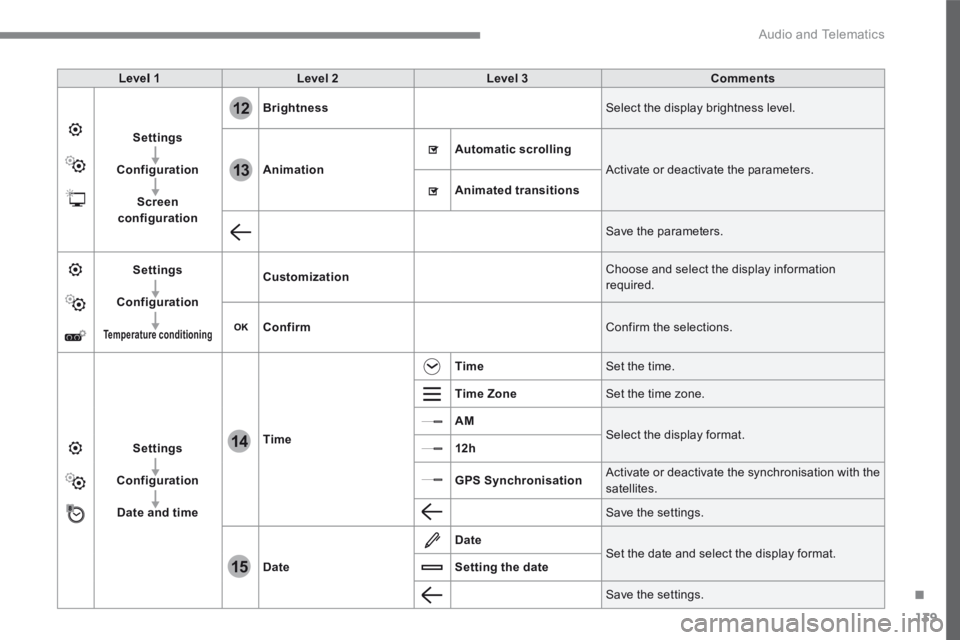
Level 1Level 2Level 3Comments
Settings
Configuration
Screen configuration
Brightness Select the display brightness level.
Animation
Automatic scrolling
Activate or deactivate the parameters.
Animated transitions
Save the parameters.
Settings
Configuration
Temperature conditioning
Customization Choose and select the display information required.
Confirm Confirm the selections.
Settings
Configuration
Date and time
Time
Time Set the time.
Time Zone Set the time zone.
AM Select the display format. 12h
GPS Synchronisation Activate or deactivate the synchronisation with the satellites.
Save the settings.
Date
Date Set the date and select the display format. Setting the date
Save the settings.
Page 416 of 450
142
15
14
Audio and Telematics
Transversal-Citroen_en_Chap02_RCC-2-2-0_ed01-2016
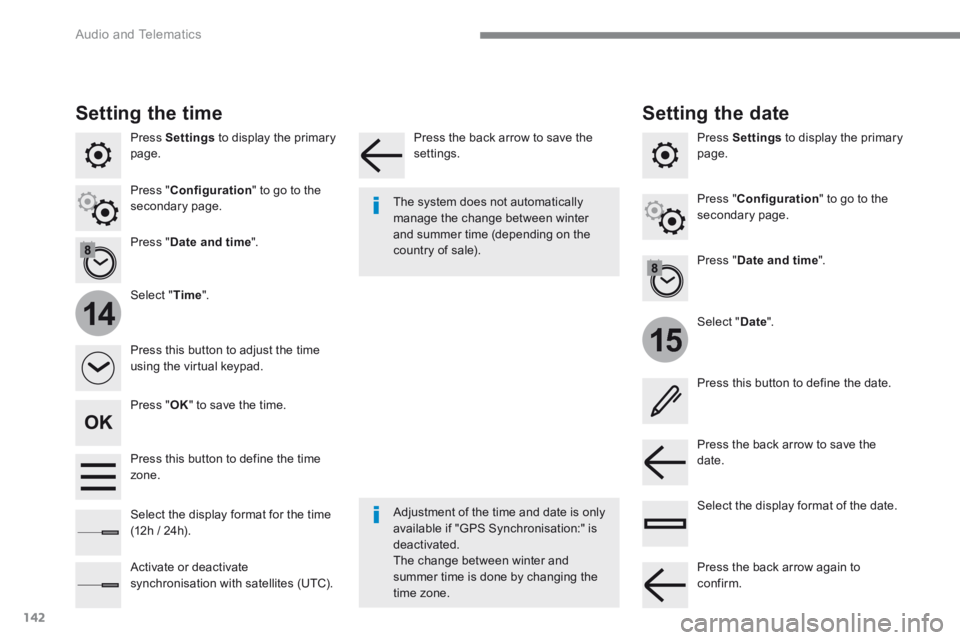
Press Settings to display the primary page.
Select " Date ".
Select " Time ".
Press " Date and time ".
Adjustment of the time and date is only available if "GPS Synchronisation:" is deactivated. The change between winter and summer time is done by changing the
time zone.
The system does not automatically manage the change between winter and summer time (depending on the country of sale).
Setting the time
Press this button to define the date.
Press this button to adjust the time using the virtual keypad.
Press the back arrow to save the date. Press this button to define the time z o n e .
Select the display format of the date. Select the display format for the time (12h / 24h).
Activate or deactivate synchronisation with satellites (UTC).
Press Settings to display the primary page.
Press " Date and time ".
Setting the date
Press " Configuration " to go to the secondary page. Press " Configuration " to go to the secondary page.
Press " OK " to save the time.
Press the back arrow to save the settings.
Press the back arrow again to confirm.
Page 422 of 450
148
Audio and Telematics
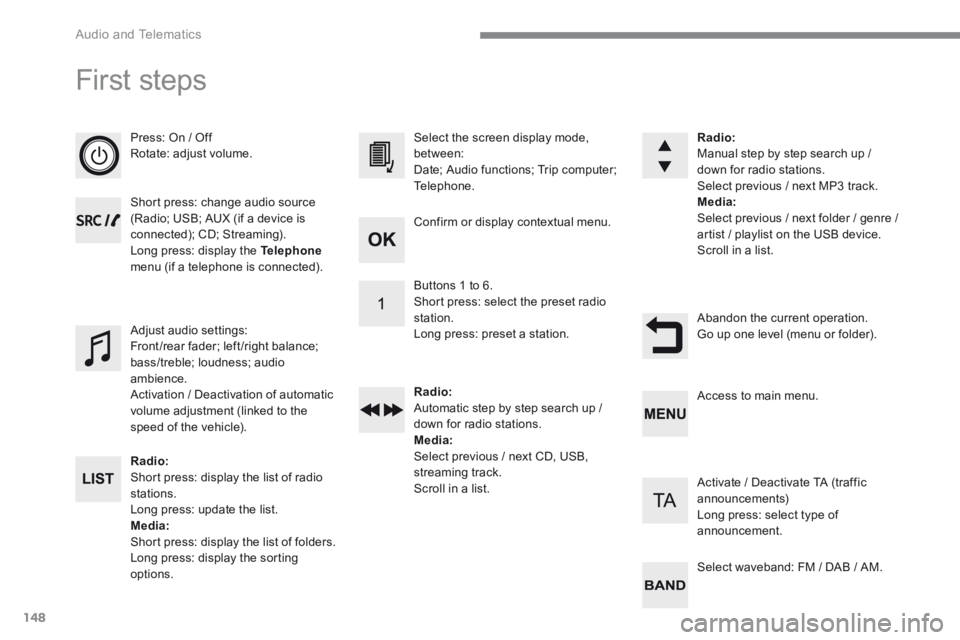
First steps
Press: On / Off Rotate: adjust volume.
Short press: change audio source (Radio; USB; AUX (if a device is connected); CD; Streaming). Long press: display the Telephonemenu (if a telephone is connected).
Radio: Short press: display the list of radio stations. Long press: update the list. Media: Short press: display the list of folders. Long press: display the sorting options.
Select the screen display mode, between: Date; Audio functions; Trip computer; Telephone.
Adjust audio settings: Front /rear fader; left /right balance; bass/treble; loudness; audio ambience. Activation / Deactivation of automatic volume adjustment (linked to the speed of the vehicle).
Radio: Manual step by step search up / down for radio stations. Select previous / next MP3 track. Media: Select previous / next folder / genre / artist / playlist on the USB device. Scroll in a list.
Abandon the current operation. Go up one level (menu or folder).
Confirm or display contextual menu.
Buttons 1 to 6. Short press: select the preset radio station. Long press: preset a station.
Radio: Automatic step by step search up / down for radio stations. Media: Select previous / next CD, USB, streaming track. Scroll in a list.
Access to main menu.
Activate / Deactivate TA (traffic announcements) Long press: select type of announcement.
Select waveband: FM / DAB / AM.
Page 423 of 450
149
.
Audio and Telematics
Transversal-Citroen_en_Chap03_RD6_ed01-2016
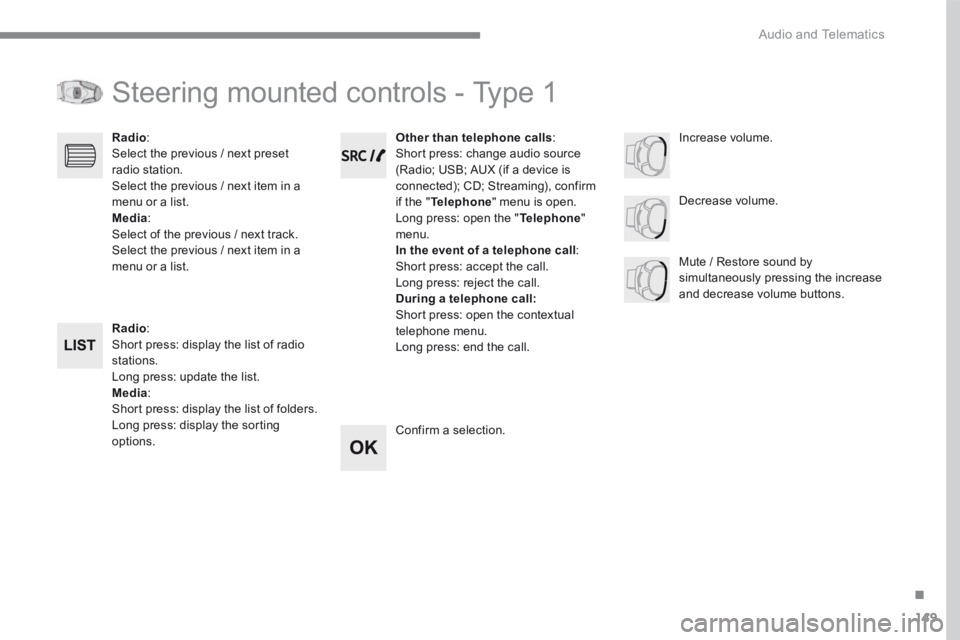
Steering mounted controls - Type 1
Radio : Short press: display the list of radio stations. Long press: update the list. Media : Short press: display the list of folders. Long press: display the sorting options.
Decrease volume.
Radio : Select the previous / next preset radio station. Select the previous / next item in a menu or a list. Media: Select of the previous / next track. Select the previous / next item in a menu or a list. Mute / Restore sound by simultaneously pressing the increase and decrease volume buttons.
Other than telephone calls : Short press: change audio source (Radio; USB; AUX (if a device is connected); CD; Streaming), confirm if the " Telephone " menu is open. Long press: open the " Telephone " menu. In the event of a telephone call : Short press: accept the call. Long press: reject the call. During a telephone call: Short press: open the contextual telephone menu. Long press: end the call.
Confirm a selection.
Increase volume.
Page 424 of 450
150
Audio and Telematics
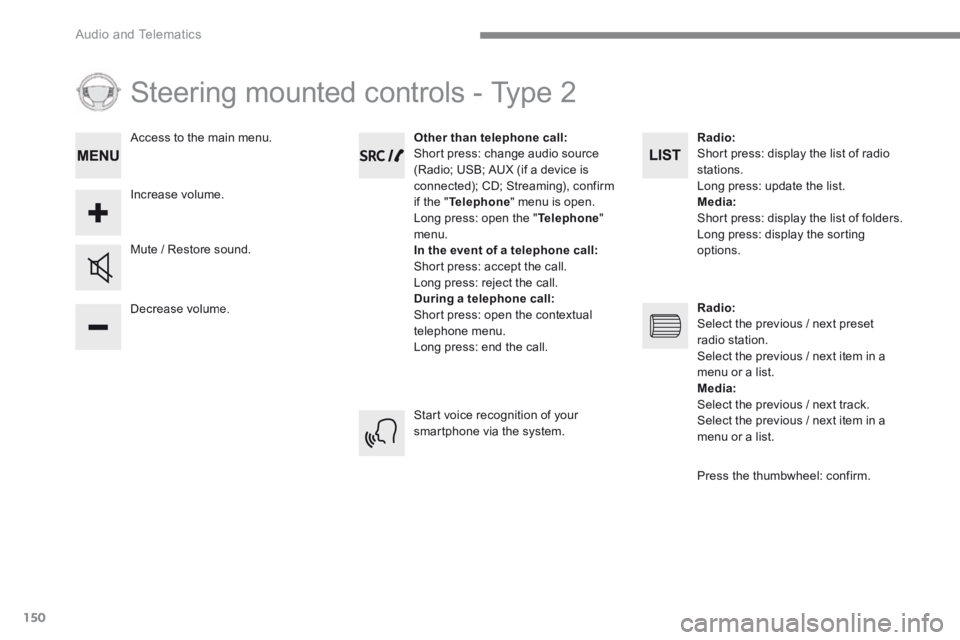
Steering mounted controls - Type 2
Decrease volume.
Mute / Restore sound.
Other than telephone call: Short press: change audio source (Radio; USB; AUX (if a device is connected); CD; Streaming), confirm if the " Telephone " menu is open. Long press: open the " Telephone " menu. In the event of a telephone call: Short press: accept the call. Long press: reject the call. During a telephone call: Short press: open the contextual telephone menu. Long press: end the call.
Increase volume.
Access to the main menu.
Start voice recognition of your smartphone via the system.
Radio: Short press: display the list of radio stations. Long press: update the list. Media: Short press: display the list of folders. Long press: display the sorting options.
Radio: Select the previous / next preset radio station. Select the previous / next item in a menu or a list. Media: Select the previous / next track. Select the previous / next item in a
menu or a list.
Press the thumbwheel: confirm.
Page 425 of 450
151
.
Audio and Telematics
Transversal-Citroen_en_Chap03_RD6_ed01-2016
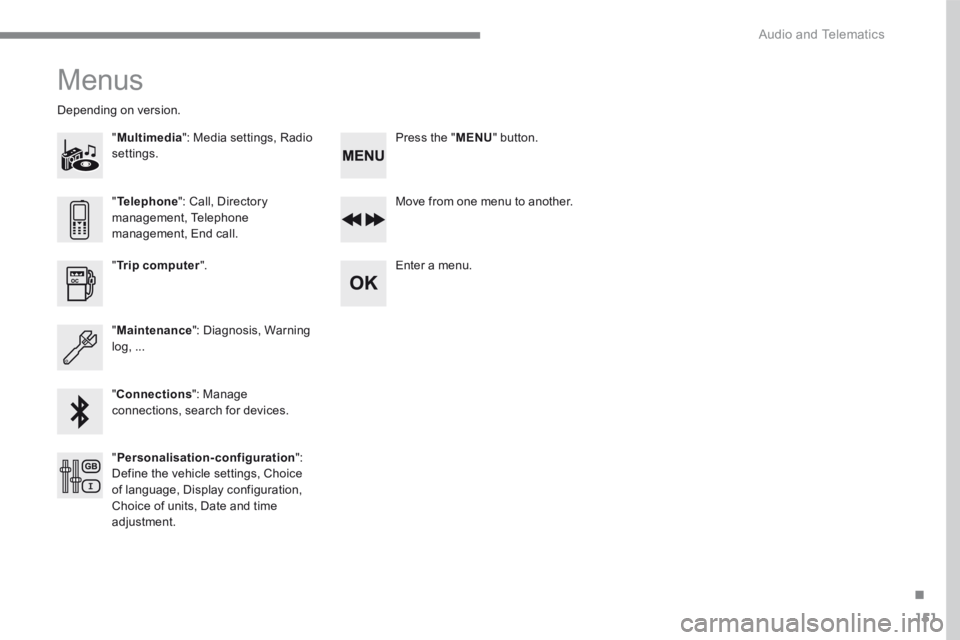
Menus
"Multimedia ": Media settings, Radio settings.
D e p e n d i n g o n v e r s i o n .
Move from one menu to another.
Enter a menu. " Trip computer ".
" Maintenance ": Diagnosis, Warning log, ...
"Connections ": Manage connections, search for devices.
" Telephone ": Call, Directory management, Telephone management, End call.
" Personalisation-configuration ": Define the vehicle settings, Choice of language, Display configuration, Choice of units, Date and time adjustment.
Press the " MENU " button.
Page 428 of 450
154
1
3
5
2
4
6
6543
21
Audio and Telematics
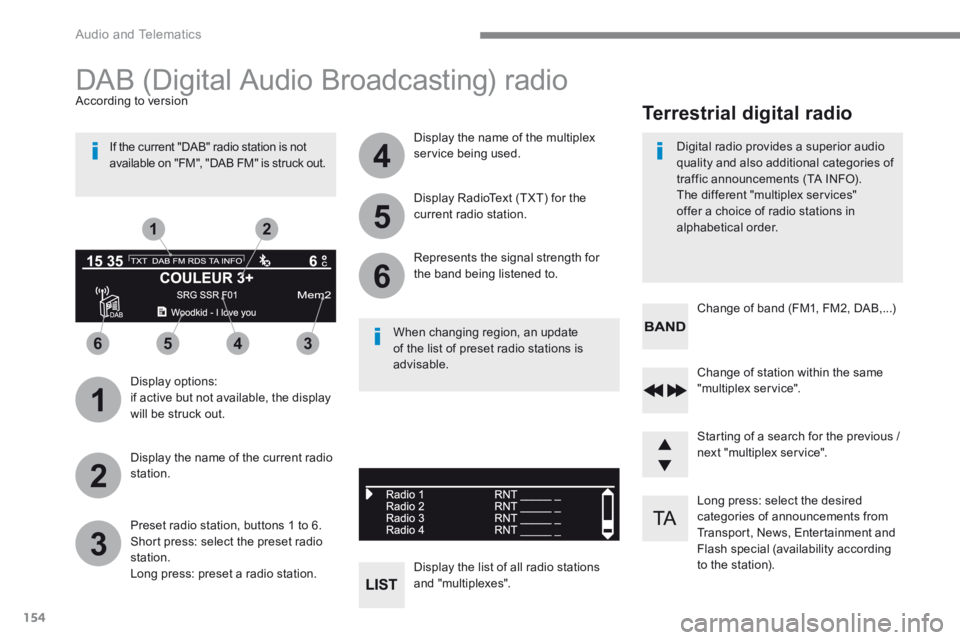
Long press: select the desired categories of announcements from Transport, News, Entertainment and Flash special (availability according to the station).
Change of station within the same "multiplex service".
Starting of a search for the previous / next "multiplex service".
Change of band (FM1, FM2, DAB,...)
Digital radio provides a superior audio quality and also additional categories of traffic announcements (TA INFO). The different "multiplex services" offer a choice of radio stations in
alphabetical order.
Terrestrial digital radio
DAB (Digital Audio Broadcasting) radio
Display options: if active but not available, the display will be struck out.
A c c o r d i n g t o v e r s i o n
Preset radio station, buttons 1 to 6. Short press: select the preset radio station. Long press: preset a radio station.
Display the name of the multiplex service being used.
Display the list of all radio stations and "multiplexes".
Represents the signal strength for the band being listened to.
Display RadioText (TXT) for the current radio station.
Display the name of the current radio station.
If the current "DAB" radio station is not available on "FM", "DAB FM" is struck out.
When changing region, an update of the list of preset radio stations is advisable.