change time CITROEN C3 2021 Owner's Manual
[x] Cancel search | Manufacturer: CITROEN, Model Year: 2021, Model line: C3, Model: CITROEN C3 2021Pages: 450, PDF Size: 10.11 MB
Page 373 of 450
99
.
Audio and Telematics
Transversal-Citroen_en_Chap02_RCC-2-2-0_ed01-2016
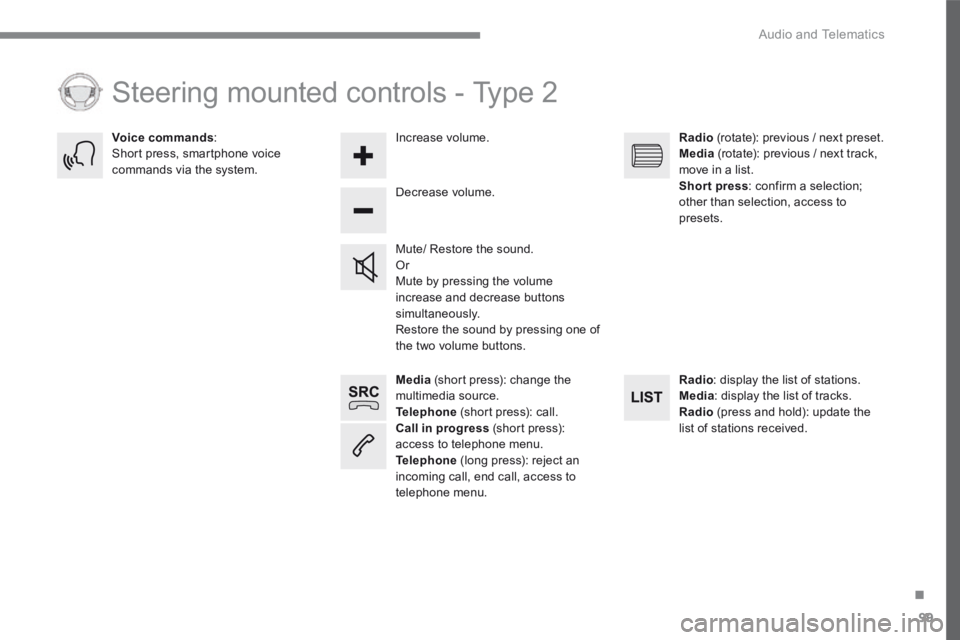
Media (short press): change the multimedia source. Telephone (short press): call. Call in progress (short press): access to telephone menu. Telephone (long press): reject an incoming call, end call, access to telephone menu.
Decrease volume.
Voice commands : Short press, smartphone voice commands via the system.
Mute/ Restore the sound. Or Mute by pressing the volume increase and decrease buttons simultaneously. Restore the sound by pressing one of the two volume buttons.
Radio (rotate): previous / next preset. Media (rotate): previous / next track, move in a list. Short press : confirm a selection; other than selection, access to presets.
Radio : display the list of stations. Media : display the list of tracks. Radio (press and hold): update the list of stations received.
Increase volume.
Steering mounted controls - Type 2
Page 389 of 450
115
.
55
Audio and Telematics
Transversal-Citroen_en_Chap02_RCC-2-2-0_ed01-2016
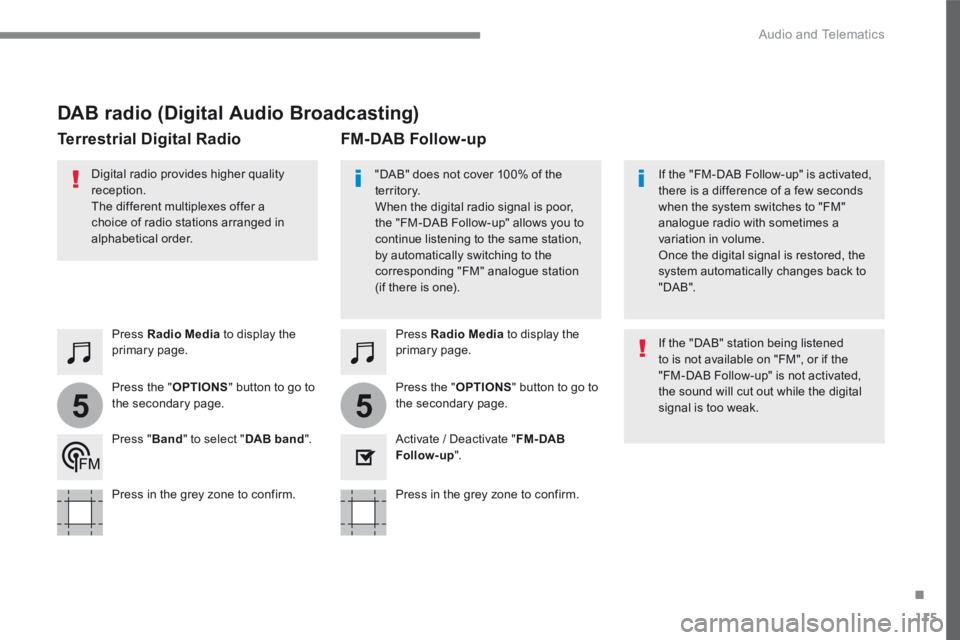
DAB radio (Digital Audio Broadcasting)
Press Radio Media to display the primary page.
Press the " OPTIONS " button to go to the secondary page.
FM-DAB Follow-up Terrestrial Digital Radio
"DAB" does not cover 100% of the te r r i to r y. When the digital radio signal is poor, the "FM-DAB Follow-up" allows you to continue listening to the same station, by automatically switching to the corresponding "FM" analogue station (if there is one).
If the "FM-DAB Follow-up" is activated, there is a difference of a few seconds when the system switches to "FM" analogue radio with sometimes a variation in volume. Once the digital signal is restored, the system automatically changes back to " D A B " .
Digital radio provides higher quality reception. The different multiplexes offer a choice of radio stations arranged in
alphabetical order.
If the "DAB" station being listened to is not available on "FM", or if the "FM-DAB Follow-up" is not activated, the sound will cut out while the digital signal is too weak.
Activate / Deactivate " FM- DAB Follow-up ".
Press Radio Media to display the primary page.
Press the " OPTIONS " button to go to the secondary page.
Press " Band " to select " DAB band ".
Press in the grey zone to confirm. Press in the grey zone to confirm.
Page 416 of 450
142
15
14
Audio and Telematics
Transversal-Citroen_en_Chap02_RCC-2-2-0_ed01-2016
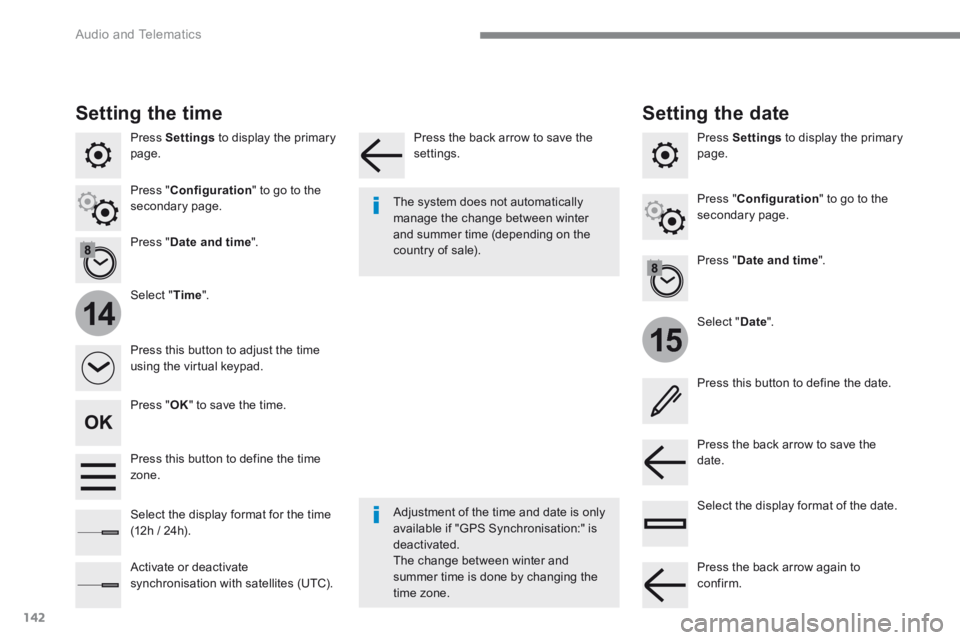
Press Settings to display the primary page.
Select " Date ".
Select " Time ".
Press " Date and time ".
Adjustment of the time and date is only available if "GPS Synchronisation:" is deactivated. The change between winter and summer time is done by changing the
time zone.
The system does not automatically manage the change between winter and summer time (depending on the country of sale).
Setting the time
Press this button to define the date.
Press this button to adjust the time using the virtual keypad.
Press the back arrow to save the date. Press this button to define the time z o n e .
Select the display format of the date. Select the display format for the time (12h / 24h).
Activate or deactivate synchronisation with satellites (UTC).
Press Settings to display the primary page.
Press " Date and time ".
Setting the date
Press " Configuration " to go to the secondary page. Press " Configuration " to go to the secondary page.
Press " OK " to save the time.
Press the back arrow to save the settings.
Press the back arrow again to confirm.
Page 429 of 450
155
.
Audio and Telematics
Transversal-Citroen_en_Chap03_RD6_ed01-2016
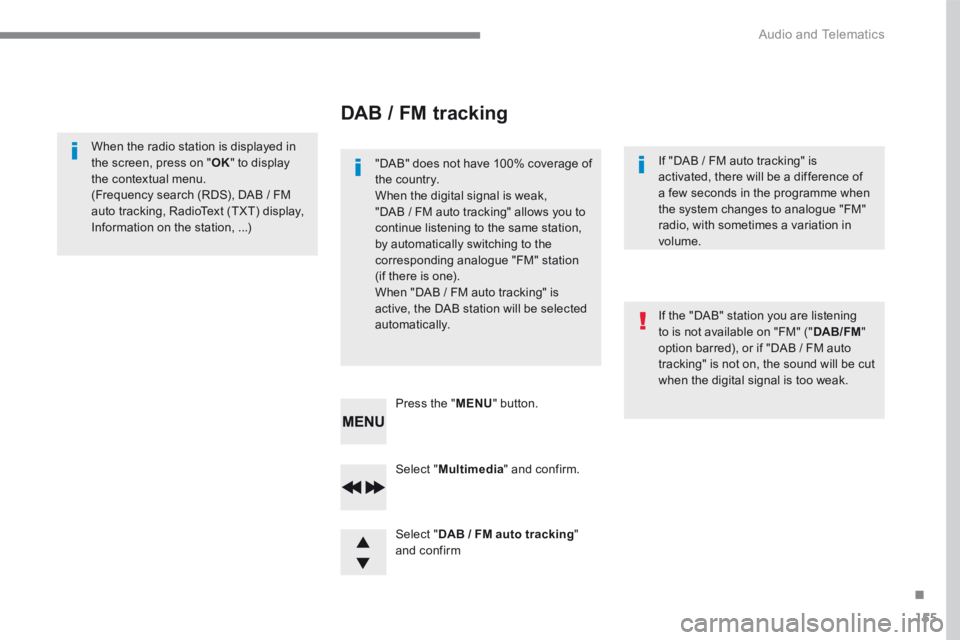
Select " Multimedia " and confirm.
Select " DAB / FM auto tracking " and confirm
Press the " MENU " button.
When the radio station is displayed in the screen, press on " OK " to display the contextual menu. (Frequency search (RDS), DAB / FM auto tracking, RadioText (TXT) display,
Information on the station, ...)
DAB / FM tracking
"DAB" does not have 100% coverage of the country. When the digital signal is weak, "DAB / FM auto tracking" allows you to continue listening to the same station, by automatically switching to the corresponding analogue "FM" station (if there is one). When "DAB / FM auto tracking" is active, the DAB station will be selected automatically.
If "DAB / FM auto tracking" is activated, there will be a difference of a few seconds in the programme when the system changes to analogue "FM"
radio, with sometimes a variation in volume.
If the "DAB" station you are listening to is not available on "FM" (" DAB/FM " option barred), or if "DAB / FM auto tracking" is not on, the sound will be cut when the digital signal is too weak.
Page 430 of 450
156
Audio and Telematics
Media
USB port
This unit consists of a USB port and an auxiliary Jack socket, depending on version.
Insert a USB memory stick into the USB port or connect a USB peripheral device to the USB port using a suitable cable (not supplied). The system changes automatically to "USB" source. The system creates playlists (temporary memory), which can take from a few seconds to several minutes on the first connection. Reducing the number of non-music files and the number of folders reduces this waiting time. Playlists are updated every time a new USB memory stick is connected.
Press this button to display the
contextual menu for the Media function.
Press this button to select the play mode.
Press this button to confirm.
Play mode
The play modes available are: - Normal : the tracks are played in order, depending on the classification of the selected files. - Random : the tracks in an album or folder are played in a random order. - Random on all media : all of the tracks saved in the media are played in random o r d e r. - Repeat : the tracks played are only those from the current album or folder.
The choice made is displayed at the top of the screen.
While connected by USB, the portable device may be charged automatically.
To protect the system, do not use a USB hub.
Any additional equipment connected to the system must conform to the standard of the product or standard IEC 60950 -1.