ignition CITROEN C3 2022 Manual PDF
[x] Cancel search | Manufacturer: CITROEN, Model Year: 2022, Model line: C3, Model: CITROEN C3 2022Pages: 450, PDF Size: 10.11 MB
Page 251 of 450
249
B618_en_Chap08_En-cas-de-panne_ed01-2016
When your vehicle's battery is discharged, the
engine can be started using a slave battery
(external or on another vehicle) and jump lead
cables or a battery booster.
Starting using another battery
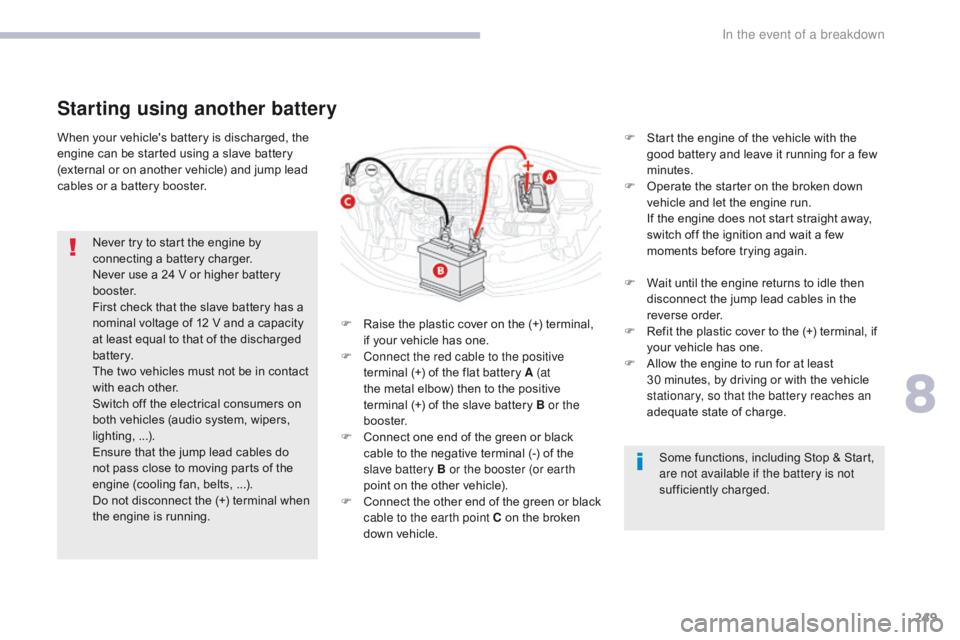
F Raise the plastic cover on the (+) terminal, if your vehicle has one.
F
C
onnect the red cable to the positive
terminal (+) of the flat battery A (at
the metal elbow) then to the positive
terminal
(+) of the slave battery B or the
b o o s t e r.
F
C
onnect one end of the green or black
cable to the negative terminal (-) of the
slave battery B or the booster (or earth
point on the other vehicle).
F
C
onnect the other end of the green or black
cable to the earth point C on the broken
down vehicle. F
S
tart the engine of the vehicle with the
good battery and leave it running for a few
minutes.
F
O
perate the starter on the broken down
vehicle and let the engine run.
I
f the engine does not start straight away,
switch off the ignition and wait a few
moments before trying again.
Never try to start the engine by
connecting a battery charger.
Never use a 24 V or higher battery
b o o s t e r.
First check that the slave battery has a
nominal voltage of 12 V and a capacity
at least equal to that of the discharged
battery.
The two vehicles must not be in contact
with each other.
Switch off the electrical consumers on
both vehicles (audio system, wipers,
lighting,
...
).
Ensure that the jump lead cables do
not pass close to moving parts of the
engine (cooling fan, belts,
...).
Do not disconnect the (+) terminal when
the engine is running. F
W
ait until the engine returns to idle then
disconnect the jump lead cables in the
reverse order.
F R efit the plastic cover to the (+) terminal, if
your vehicle has one.
F
A
llow the engine to run for at least
30
minutes, by driving or with the vehicle
stationary, so that the battery reaches an
adequate state of charge.
Some functions, including Stop & Start,
are not available if the battery is not
sufficiently charged.
8
In the event of a breakdown
Page 252 of 450
250
B618_en_Chap08_En-cas-de-panne_ed01-2016
Charging the battery using a battery charger
For optimum service life of the battery, it is
essential to maintain an adequate state of
charge.
In some circumstances it may be necessary to
charge the battery:
-
i
f you use your vehicle essentially for short
journeys,
-
i
f the vehicle is to be taken off the road for
several weeks.
Contact a CITROËN dealer or a qualified
workshop. It is not necessary to disconnect the
battery.
Never try to charge a frozen battery.
If the battery has been frozen, have
it checked by a CITROËN dealer or a
qualified workshop, who will check that
the internal components have not been
damaged and the casing is not cracked,
which could cause a leak of toxic and
corrosive acid.
If you envisage charging your vehicle's
battery yourself, use only a charger
compatible with lead-acid batteries of a
nominal voltage of 12 V.
If this label is present, it is essential
to use only a 12 V charger, to avoid
causing irreversible damage to the
electrical components related to the
Stop & Start system. Follow the instructions for use provided
by the manufacturer of the charger.
Never reverse polarities.
F
S
witch off the ignition.
F
S
witch off all electrical consumers (audio
system, lighting, wipers,
...).
F
S
witch off the charger B before connecting
the cables to the battery, so as to avoid any
dangerous sparks.
F
E
nsure that the charger cables are in good
condition.
F
R
aise the plastic cover, if your vehicle has
one, on the (+) terminal.
F
C
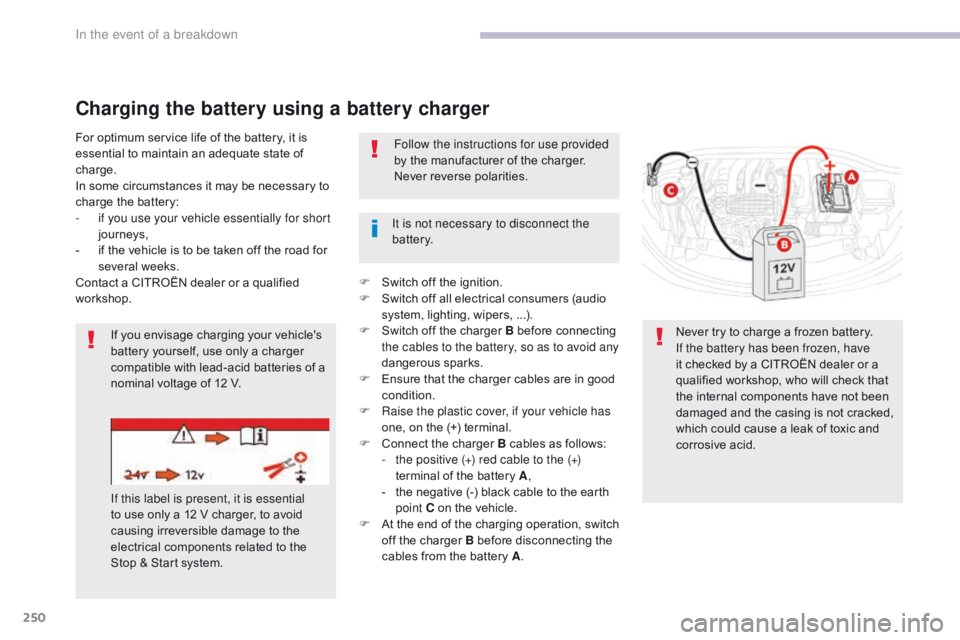
onnect the charger B cables as follows:
-
t
he positive (+) red cable to the (+)
terminal of the battery A ,
-
t
he negative (-) black cable to the earth
point C on the vehicle.
F
A
t the end of the charging operation, switch
off the charger B before disconnecting the
cables from the battery A .
In the event of a breakdown
Page 253 of 450
251
B618_en_Chap08_En-cas-de-panne_ed01-2016
Do not force the lever as locking will
not be possible if the clamp is not
positioned correctly; start the procedure
again.
Quick-release terminal clamp
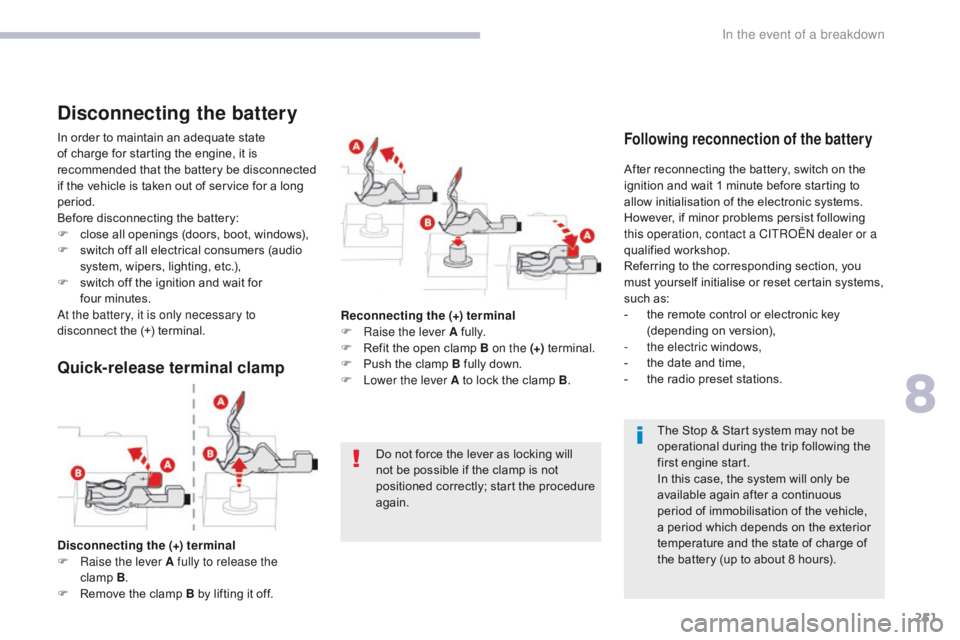
Disconnecting the (+) terminal
F Ra ise the lever A fully to release the
clamp
B .
F
R
emove the clamp B by lifting it off. The Stop & Start system may not be
operational during the trip following the
first engine start.
In this case, the system will only be
available again after a continuous
period of immobilisation of the vehicle,
a period which depends on the exterior
temperature and the state of charge of
the battery (up to about 8 hours).
In order to maintain an adequate state
of charge for starting the engine, it is
recommended that the battery be disconnected
if the vehicle is taken out of service for a long
period.
Before disconnecting the battery:
F
c
lose all openings (doors, boot, windows),
F
s
witch off all electrical consumers (audio
system, wipers, lighting, etc.),
F
s
witch off the ignition and wait for
four
m
inutes.
At the battery, it is only necessary to
disconnect the (+) terminal.
Disconnecting the battery
After reconnecting the battery, switch on the
ignition and wait 1 minute before starting to
allow initialisation of the electronic systems.
However, if minor problems persist following
this operation, contact a CITROËN dealer or a
qualified workshop.
Referring to the corresponding section, you
must yourself initialise or reset certain systems,
such as:
-
t
he remote control or electronic key
(depending on version),
-
t
he electric windows,
-
t
he date and time,
-
t
he radio preset stations.
Following reconnection of the battery
Reconnecting the (+) terminal
F Ra ise the lever A fully.
F
R
efit the open clamp B on the (+) terminal.
F
P
ush the clamp B fully down.
F
L
ower the lever A to lock the clamp B .
8
In the event of a breakdown
Page 255 of 450
253
B618_en_Chap08_En-cas-de-panne_ed01-2016
Towing another vehicle
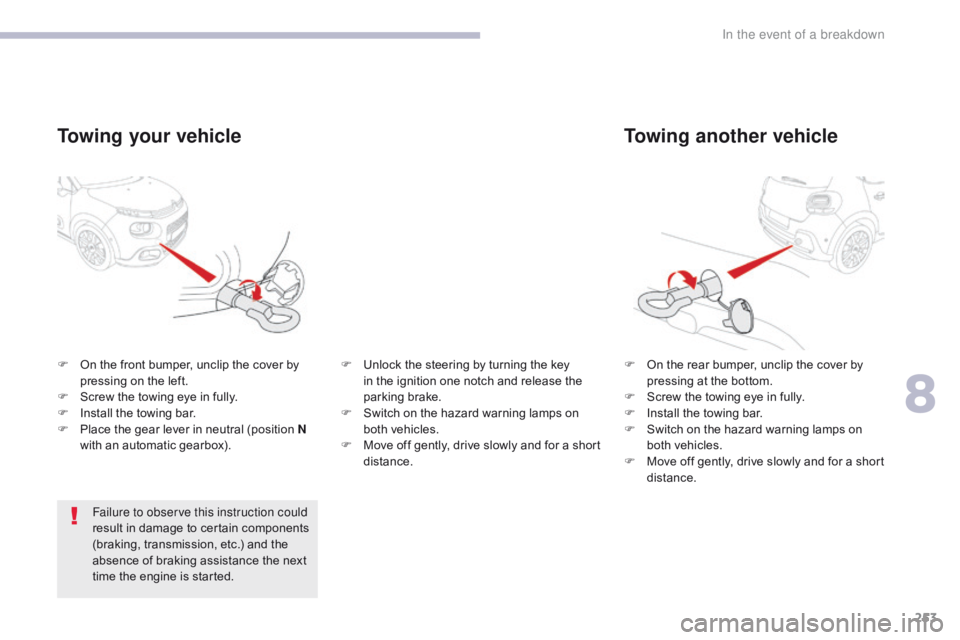
F On the rear bumper, unclip the cover by pressing at the bottom.
F
S
crew the towing eye in fully.
F
I
nstall the towing bar.
F
S
witch on the hazard warning lamps on
both vehicles.
F
M
ove off gently, drive slowly and for a short
distance.
F
O
n the front bumper, unclip the cover by
pressing on the left.
F
S
crew the towing eye in fully.
F
I
nstall the towing bar.
F
P
lace the gear lever in neutral (position N
with an automatic gearbox).
Towing your vehicle
Failure to observe this instruction could
result in damage to certain components
(braking, transmission, etc.) and the
absence of braking assistance the next
time the engine is started. F
U
nlock the steering by turning the key
in the ignition one notch and release the
parking brake.
F
S
witch on the hazard warning lamps on
both vehicles.
F
M
ove off gently, drive slowly and for a short
distance.
8
In the event of a breakdown
Page 263 of 450
261
B618_en_Chap11_index-alpha_ed01-2016
Earth point, remote ............................... 207, 208
Eco-driving (advice) .......................................... 9
E
conomy mode
...............................
..............203
Electronic brake force distribution (EBFD)
...12
3
Emergency braking assistance (EBA)
..........12
3
Emergency call
..................................... 1
19, 121
Emergency switching off
...............................15
8
Emergency warning lamps
................... 1
18, 220
Emissions control system, SCR
.....................2
7
Energy economy mode
.................................20
3
Engine compartment
............................ 2
07, 208
Engine, Diesel
.............................. 1
99, 208, 220
Engine, petrol
........................................1
99, 207
Engines
..............................
...................254-256
Environment
...............................
.................9, 63
Electronic stability control (ESC)
..................12
3Gauge, fuel....................................................
19 6
Gearbox, automatic
... 9
, 161, 166, 167, 214, 248
Gearbox, manual
........ 9
, 96, 160, 166, 167, 214
Gear efficiency indicator
............................... 16
5
Gear lever
..............................
........................... 9
Gear lever, manual gearbox
.........................16
0
Glove box
..................................................9
6, 97
Hazard warning lamps
.......................... 1
18, 220
Headlamps, automatic illumination
...............................
... 106, 109, 111
Headlamps, dipped beam
............ 1
05, 234, 235
Headlamps, main beam
............... 1
05, 234, 236
Head restraints, front
......................................77
H
ead restraints, rear
.......................................79
H
eating
................
..................................9, 85, 86
Hill start assist
...............................................16
6
Hooks
...............................
.............................101
Horn ............................................................... 118
G
H
I
F
Folding the rear seats .....................................79
Fu el............................................................9, 199
Fuel consumption
.............................................. 9
F
uel tank........................................................ 198
Fusebox, engine compartment
..................... 24
6
Fuses
................
............................. 241, 243, 246
E
Fatigue detection .............................. ............182
Filling the fuel tank ........................1 96, 198, 199
Filter, air
...............
......................................... 213
Filter, Diesel fuel
........................................... 20
8
Filter, oil
......................................................... 2
13
Filter, particle
........................................ 21
2, 213
Filter, passenger compartment
..................... 2
13
Fitting a wheel
...............................
................229
Fitting roof bars
............................................. 20
5
Fittings, boot
......................................... 10
0, 102
Fittings, interior
.........................................9
6, 97
Flap, fuel filler
...............................
.........19 6, 198
Flashing indicators
........................ 1
08, 110, 235
Foglamps, rear
...................................... 1
07, 238
Foglamps, front
............................. 1
07, 234, 236 Ignition
................
............................. 91, 155, 157
Immobiliser, electronic
............................6
3, 153
Indicator, AdBlue
® range ...........................2 6, 36
Indicator, coolant temperature ........................ 3
1
Indicator, engine oil level
................................ 35
I
ndicator lamps, operation
........................ 1
6, 19
Indicators, direction
..............................1
08, 235
Inflating tyres
..............................
......9, 221, 258
Instrument panel
...............................
........ 11, 13
ISOFIX
...............
................................... 143, 14 4
Key
.......
.................................. 56, 59, 61, 63, 64
Key, electronic
........................................... 5
9 - 61
Keyless Entry and Starting
.............................5
9, 61, 63, 153, 156
Key not recognised
....................................... 15
8
Key with remote control
................................ 15
3
Kit, temporary puncture repair
..............1
01, 2 21
Jack
........
.............................................. 226, 227
Jump starting
..............................
..................249
K
J
.
Alphabetical index
Page 264 of 450
262
B618_en_Chap11_index-alpha_ed01-2016
Maintenance (advice) ....................................2 19
Maintenance, routine ........................................ 9
M
ap reading lamps
......................................... 94
M
arkings, identification
................................. 25
8
Mat
.......
.....................................................96, 99
Memorising a speed
..................................... 17
0
Mirror, rear view
............................................ 10
4
Mirrors, door ..........................................103, 184
Misfuel prevention
...............................
..........198
Mountings, Isofix
...............................
............143
Oil change
...............................
......................209
Oil consumption
............................................ 20
9
OIl, engine
...............................
......................209
Opening the bonnet
...................................... 20
6
Opening the boot
..............................
.. 57, 59, 69
Opening the doors
.............................. 5
7, 59, 68Pads, brake ...................................................
2
14
Paint colour code
..........................................25
8
Panoramic glass sunroof
................................95
P
arcel shelf, rear
...................................10
1, 102
Parking brake
.................................. 1
7, 159, 214
Parking sensors, rear.................................... 187
Plates, identification ...................................... 258
Port, USB
..................................................9
6, 98
Pre-heater, Diesel
...............................
............17
Pressures, tyres
....................................2
25, 258
Pre-tensioning seat belts
..............................12
8
Priming the fuel system
................................2
20
Protecting children
........................13
0, 13 4 -13 6,
141, 143 -145, 147
Protectors
...................................................... 2
19
Puncture
................
........................................221
M
O
P
Number plate lamps ......................................23 9
N
L
Range, AdBlue ..........................................26, 36
Rear screen, demisting ................................... 93
R
echarging the battery
.................................25
0
Recirculation, air
...............................
........86, 88
Reduction of electrical load
.......................... 20
3
Regeneration of the particle filter
.................2
13
Reinitialisation of the under-inflation detection system
................................. 19
1, 192
Reinitialising the remote control
.....................67
R
eminder, key in ignition
...............................15
5
Reminder, lighting on
.................................... 10
8
Remote control
........................ 5
6, 57, 59 - 61, 63
Removing a wheel
..............................
..........229
R
Labels, identification ..................................... 25 8
Lamp, boot ............................... ...............95, 240
Lamps, parking
............................................. 11
0
Lane Departure Warning System (LDWS)
...18
3
LEDs - Light-emitting diodes
........................11
0
Level, AdBlue
................................................ 2
12
Level, brake fluid
........................................... 2
10
Level, Diesel additive
.................................... 2
12
Level, engine coolant
.............................. 3
1, 211
Level, engine oil
...............................
.......35, 209
Levels and checks
..............................
...2 07-212
Level, screenwash fluid
................................2
11
Light-emitting diodes - LEDs
................11
0 , 2 4 0
Lighting
................
............................................ 16
Lighting, guide-me home
..............................111
L
ighting, interior
.............................................. 94
L
ighting, welcome
......................................... 111
Lo
ading
..............................
............................... 9
Load reduction mode
.................................... 20
3
Localised Assistance Call
..................... 1
19, 121
Locating your vehicle
...................................... 58
Lo
cking
...................................................... 5
7, 63
Locking from the inside
...................................70
L
ow fuel level
..............................
..................19 6
Alphabetical index
Page 275 of 450

1
.
Audio and Telematics
CITROËN Connect Nav
GPS satellite navigation - Applications - Multimedia audio - Bluetooth ® GPS satellite navigation - Applications - Multimedia audio - Bluetooth ® GPS satellite navigation - Applications - Multimedia audio - Bluetooth telephone ® telephone ®
Contents First steps 2
Steering mounted controls 5
Menus 6
Voice commands 8
Navigation 14
Connected navigation 30
Applications 40
Radio Media 54
Telephone 66
Settings 78
Frequently asked questions 88
The system is protected in such a way that it will only operate in your vehicle. Displaying of the Energy Economy Mode message signals that a change to standby is imminent.
The different functions and settings described vary according to the version and configuration of your vehicle.
The link below gives access to OSS (Open Source Software) codes for the system. http://www.psa-peugeot-citroen.com/oss
As a safety measure and because it requires sustained attention by the driver, the pairing of a Bluetooth mobile telephone with the Bluetooth hands-free system of your audio system must be done with the vehicle stationaryand the ignition on.
Page 276 of 450
2
FM/87.5 MHz
87.5MHz
12:13
18,5 21,5
23 °C
Audio and Telematics
First steps
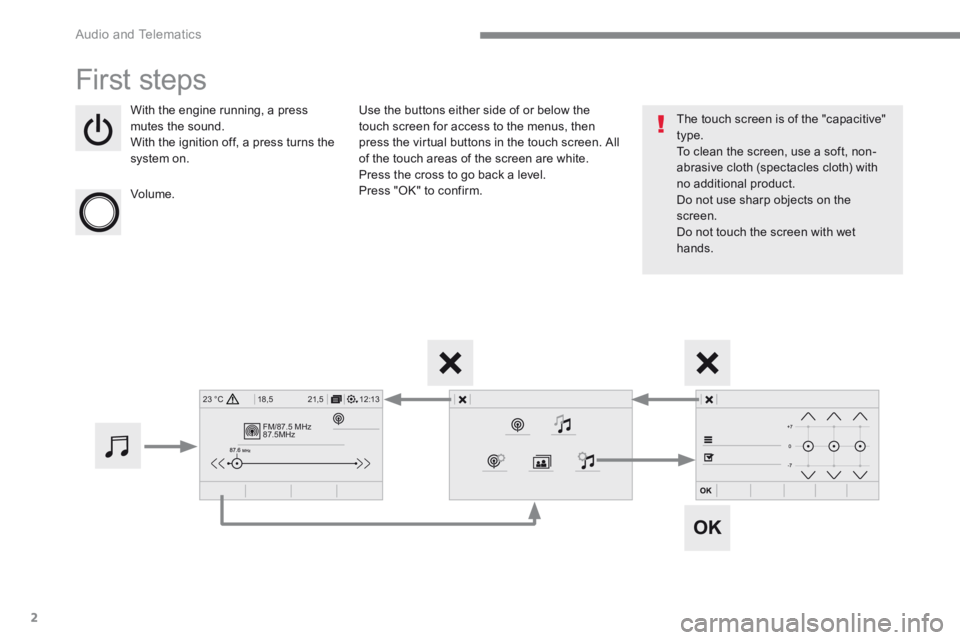
With the engine running, a press mutes the sound. With the ignition off, a press turns the system on.
Volume.
Use the buttons either side of or below the touch screen for access to the menus, then press the virtual buttons in the touch screen. All of the touch areas of the screen are white. Press the cross to go back a level. Press "OK" to confirm.
The touch screen is of the "capacitive" type. To clean the screen, use a soft, non-abrasive cloth (spectacles cloth) with no additional product. Do not use sharp objects on the screen. Do not touch the screen with wet hands.
Page 326 of 450
52
1
Audio and Telematics
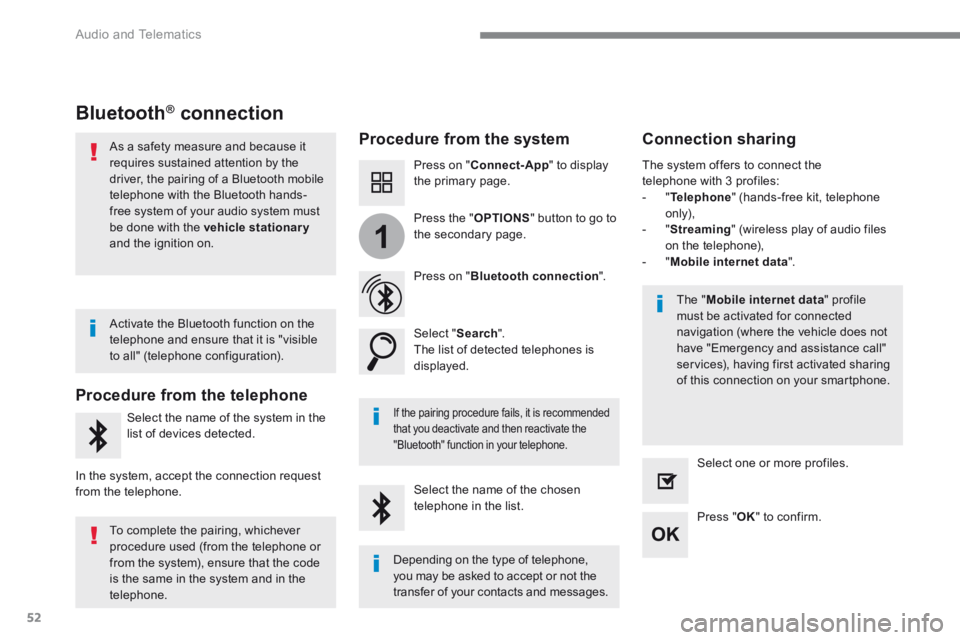
Bluetooth® connection ® connection ®
Procedure from the system Connection sharing
Press on " Connect-App " to display the primary page.
Press on " Bluetooth connection ".
Select " Search ". The list of detected telephones is displayed.
If the pairing procedure fails, it is recommended that you deactivate and then reactivate the
"Bluetooth" function in your telephone.
The " Mobile internet data " profile must be activated for connected navigation (where the vehicle does not have "Emergency and assistance call" services), having first activated sharing of this connection on your smartphone.
The system offers to connect the telephone with 3 profiles: - " Telephone " (hands-free kit, telephone only), - " Streaming " (wireless play of audio files on the telephone), - " Mobile internet data ".
Select the name of the chosen telephone in the list. Press " OK " to confirm.
Select one or more profiles.
Press the " OPTIONS " button to go to the secondary page.
As a safety measure and because it requires sustained attention by the driver, the pairing of a Bluetooth mobile telephone with the Bluetooth hands-free system of your audio system must
be done with the vehicle stationaryand the ignition on.
Procedure from the telephone
Select the name of the system in the
list of devices detected.
In the system, accept the connection request from the telephone.
Activate the Bluetooth function on the telephone and ensure that it is "visible to all" (telephone configuration).
To complete the pairing, whichever procedure used (from the telephone or from the system), ensure that the code is the same in the system and in the
telephone.
Depending on the type of telephone, you may be asked to accept or not the
transfer of your contacts and messages.
Page 338 of 450
64
Audio and Telematics
Media
USB port Selecting the source
Select " Source ".
Press Radio Media to display the primary page.
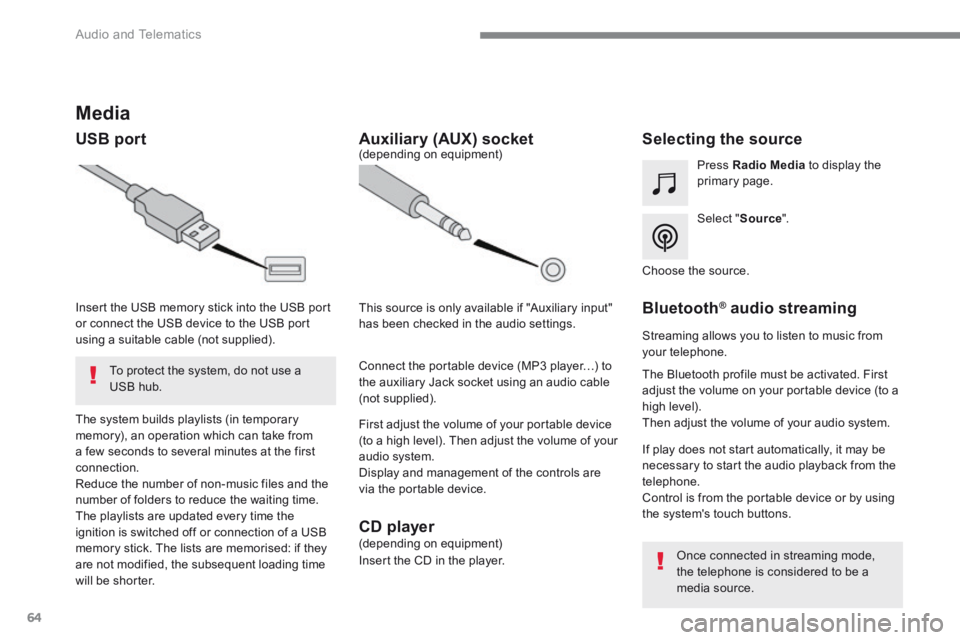
The system builds playlists (in temporary memory), an operation which can take from a few seconds to several minutes at the first connection. Reduce the number of non-music files and the number of folders to reduce the waiting time. The playlists are updated every time the ignition is switched off or connection of a USB memory stick. The lists are memorised: if they are not modified, the subsequent loading time will be shorter.
Insert the USB memory stick into the USB port or connect the USB device to the USB port using a suitable cable (not supplied).
Auxiliary (AUX) socket
First adjust the volume of your portable device (to a high level). Then adjust the volume of your audio system. Display and management of the controls are via the portable device.
This source is only available if "Auxiliary input" has been checked in the audio settings.
(depending on equipment)
Connect the portable device (MP3 player…) to the auxiliary Jack socket using an audio cable (not supplied).
Choose the source.
Bluetooth ® Bluetooth ® Bluetooth audio streaming ® audio streaming ®
Streaming allows you to listen to music from your telephone.
The Bluetooth profile must be activated. First adjust the volume on your portable device (to a high level). Then adjust the volume of your audio system.
If play does not start automatically, it may be necessary to start the audio playback from the telephone. Control is from the portable device or by using the system's touch buttons.
Once connected in streaming mode, the telephone is considered to be a media source.
To protect the system, do not use a USB hub.
CD player (depending on equipment)
Insert the CD in the player.