light CITROEN C3 2023 Owners Manual
[x] Cancel search | Manufacturer: CITROEN, Model Year: 2023, Model line: C3, Model: CITROEN C3 2023Pages: 104, PDF Size: 2.38 MB
Page 4 of 104
2
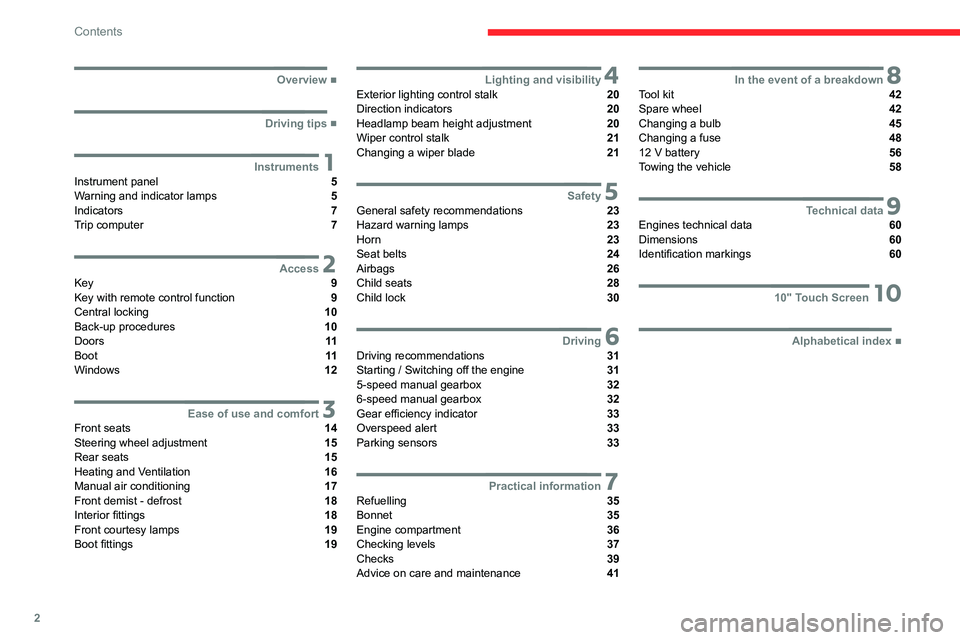
Contents
■
Overview
■
Driving tips
1InstrumentsInstrument panel 5
Warning and indicator lamps 5
Indicators 7
Trip computer 7
2AccessKey 9
Key with remote control function 9
Central locking 10
Back-up procedures 10
Doors 11
Boot 11
Windows 12
3Ease of use and comfortFront seats 14
Steering wheel adjustment 15
Rear seats 15
Heating and Ventilation 16
Manual air conditioning 17
Front demist - defrost 18
Interior fittings 18
Front courtesy lamps 19
Boot fittings 19
4Lighting and visibilityExterior lighting control stalk 20
Direction indicators 20
Headlamp beam height adjustment 20
Wiper control stalk 21
Changing a wiper blade 21
5SafetyGeneral safety recommendations 23
Hazard warning lamps 23
Horn 23
Seat belts 24
Airbags 26
Child seats 28
Child lock 30
6DrivingDriving recommendations 31
Starting / Switching off the engine 31
5-speed manual gearbox 32
6-speed manual gearbox 32
Gear efficiency indicator 33
Overspeed alert 33
Parking sensors 33
7Practical informationRefuelling 35
Bonnet 35
Engine compartment 36
Checking levels 37
Checks 39
Advice on care and maintenance 41
8In the event of a breakdownTool kit 42
Spare wheel 42
Changing a bulb 45
Changing a fuse 48
12
V battery 56
Towing the vehicle 58
9Technical dataEngines technical data 60
Dimensions 60
Identification markings 60
1010" Touch Screen
■
Alphabetical index
Page 5 of 104
3
Overview
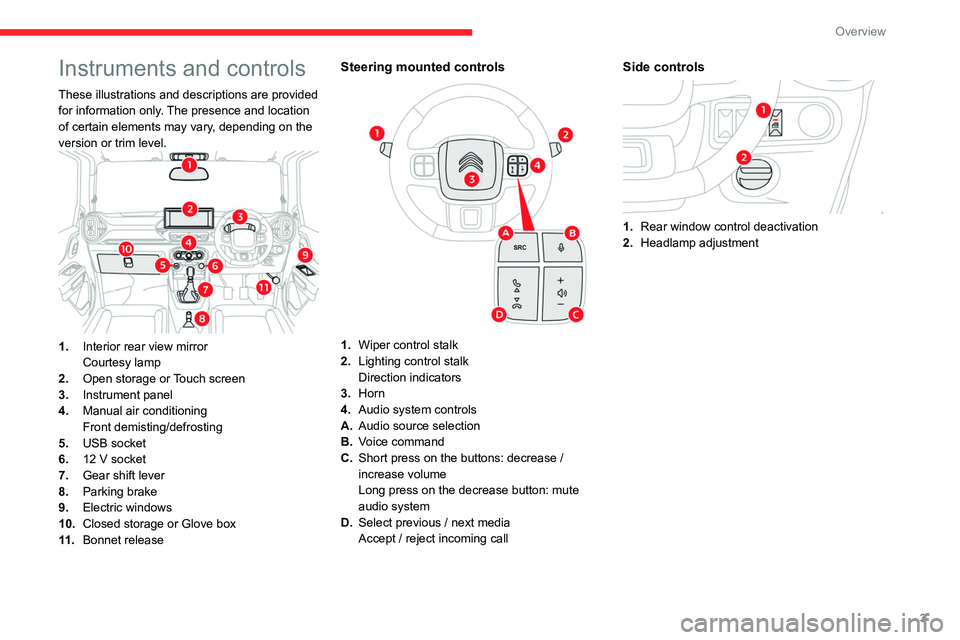
Instruments and controls
These illustrations and descriptions are provided
for information only. The presence and location
of certain elements may vary, depending on the
version or trim level.
1.Interior rear view mirror
Courtesy lamp
2. Open storage or Touch screen
3. Instrument panel
4. Manual air conditioning
Front demisting/defrosting
5. USB socket
6. 12 V socket
7. Gear shift lever
8. Parking brake
9. Electric windows
10. Closed storage or Glove box
11 . Bonnet release
Steering mounted controls
1.Wiper control stalk
2. Lighting control stalk
Direction indicators
3. Horn
4. Audio system controls
A. Audio source selection
B. Voice command
C. Short press on the buttons: decrease
/
increase volume
Long press on the decrease button: mute
audio system
D. Select previous
/ next media
Accept
/ reject incoming call
Side controls
1.Rear window control deactivation
2. Headlamp adjustment
Page 7 of 104
5
Instruments
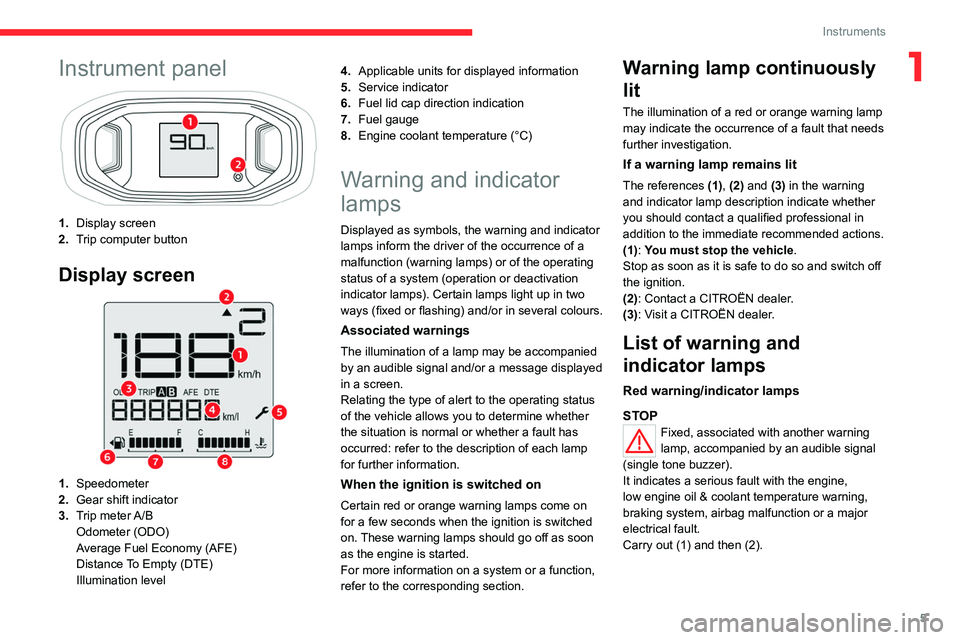
1Instrument panel
1.Display screen
2. Trip computer button
Display screen
1.Speedometer
2. Gear shift indicator
3. Trip meter A/B
Odometer (ODO)
Average Fuel Economy (AFE)
Distance To Empty (DTE)
Illumination level 4.
Applicable units for displayed information
5. Service indicator
6. Fuel lid cap direction indication
7. Fuel gauge
8. Engine coolant temperature (°C)
Warning and indicator
lamps
Displayed as symbols, the warning and indicator
lamps inform the driver of the occurrence of a
malfunction (warning lamps) or of the operating
status of a system (operation or deactivation
indicator lamps). Certain lamps light up in two
ways (fixed or flashing) and/or in several colours.
Associated warnings
The illumination of a lamp may be accompanied
by an audible signal and/or a message displayed
in a screen.
Relating the type of alert to the operating status
of the vehicle allows you to determine whether
the situation is normal or whether a fault has
occurred: refer to the description of each lamp
for further information.
When the ignition is switched on
Certain red or orange warning lamps come on
for a few seconds when the ignition is switched
on. These warning lamps should go off as soon
as the engine is started.
For more information on a system or a function,
refer to the corresponding section.
Warning lamp continuously
lit
The illumination of a red or orange warning lamp
may indicate the occurrence of a fault that needs
further investigation.
If a warning lamp remains lit
The references (1), (2) and (3) in the warning
and indicator lamp description indicate whether
you should contact a qualified professional in
addition to the immediate recommended actions.
(1): You must stop the vehicle .
Stop as soon as it is safe to do so and switch off
the ignition.
(2): Contact a CITROËN dealer.
(3): Visit a CITROËN dealer.
List of warning and
indicator lamps
Red warning/indicator lamps
STOP
Fixed, associated with another warning
lamp, accompanied by an audible signal
(single tone buzzer).
It indicates a serious fault with the engine,
low engine oil & coolant temperature warning,
braking system, airbag malfunction or a major
electrical fault.
Carry out (1) and then (2).
Page 11 of 104
9
Access
2Key
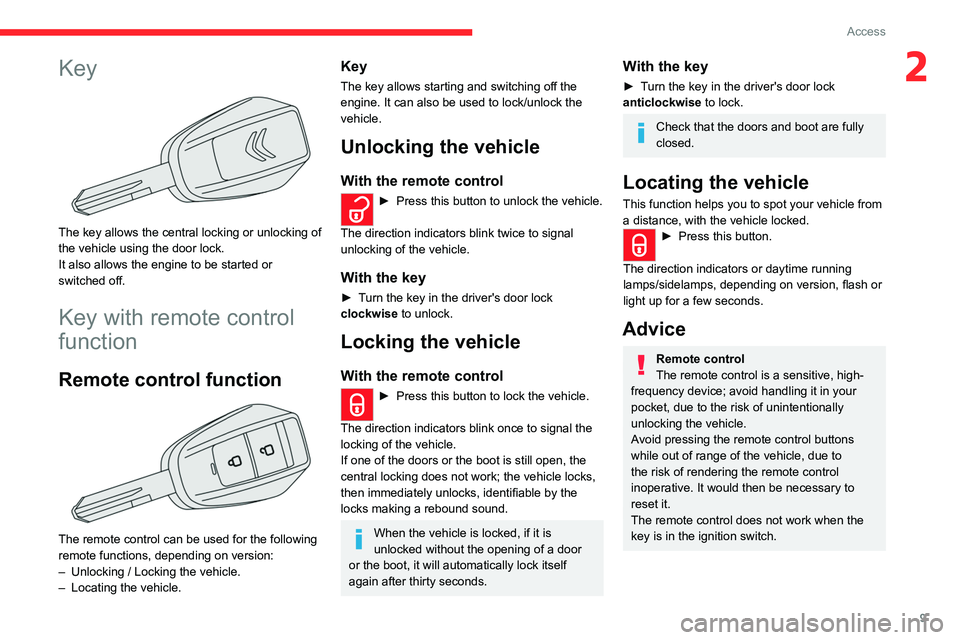
The key allows the central locking or unlocking of
the vehicle using the door lock.
It also allows the engine to be started or
switched off.
Key with remote control
function
Remote control function
The remote control can be used for the following
remote functions, depending on version:
–
Unlocking / Locking the vehicle.
–
Locating the vehicle.
Key
The key allows starting and switching off the
engine. It can also be used to lock/unlock the
vehicle.
Unlocking the vehicle
With the remote control
► Press this button to unlock the vehicle.
The direction indicators blink twice to signal
unlocking of the vehicle.
With the key
► Turn the key in the driver's door lock
clockwise to unlock.
Locking the vehicle
With the remote control
► Press this button to lock the vehicle.
The direction indicators blink once to signal the
locking of the vehicle.
If one of the doors or the boot is still open, the
central locking does not work; the vehicle locks,
then immediately unlocks, identifiable by the
locks making a rebound sound.
When the vehicle is locked, if it is
unlocked without the opening of a door
or the boot, it will automatically lock itself
again after thirty seconds.
With the key
► Turn the key in the driver's door lock
anticlockwise to lock.
Check that the doors and boot are fully
closed.
Locating the vehicle
This function helps you to spot your vehicle from
a distance, with the vehicle locked.
► Press this button.
The direction indicators or daytime running
lamps/sidelamps, depending on version, flash or
light up for a few seconds.
Advice
Remote control
The remote control is a sensitive, high-
frequency device; avoid handling it in your
pocket, due to the risk of unintentionally
unlocking the vehicle.
Avoid pressing the remote control buttons
while out of range of the vehicle, due to
the risk of rendering the remote control
inoperative. It would then be necessary to
reset it.
The remote control does not work when the
key is in the ignition switch.
Page 19 of 104

17
Ease of use and comfort
3Condensation created by the air
conditioning results in a discharge of
water underneath the vehicle. This is perfectly
normal.
Servicing the ventilation and air
conditioning system
►
Ensure that the passenger compartment
filter is in good condition and have the filter
elements replaced regularly
.
►
T
o ensure correct operation of the
air conditioning system, have it checked
according to the recommendations in the
Maintenance and Warranty Guide.
Manual air conditioning
1. Temperature adjustment
2. Air flow adjustment
3. Air distribution adjustment
4. Air conditioning on/off
5. Interior air recirculation
Temperature adjustment
► Turn the thumbwheel 1 to adjust the
temperature to your requirements.
Air flow adjustment
► Turn the thumbwheel 2 to choose the speed
of the ventilation fan (from 0 to 4).
When the air flow is reduced to a minimum,
ventilation stops.
Air distribution adjustment
You can vary the air distribution turning the
thumbwheel 3 to the desired position:
Ventilation
Temperature-controlled air comes out of the
center and side outlets.
Bi-level ventilation
Temperature-controlled air comes out of the floor
outlets and cooler air comes out of the center
and side outlets. When the temperature selector
1 is in the fully cold or fully hot position, the air
from the floor outlets and the air from the center
and side outlets will be the same temperature.
Heat
Temperature-controlled air comes out of the floor
outlets and the side outlets. a small amount of
air comes out of the windshield defroster outlets
and also comes slightly out of the side defroster
outlets.
Heat and defrost
Temperature-controlled air comes out of the floor
outlets, the windshield defroster outlets, the side
defroster outlets and the side outlets.
Defrost
Temperature-controlled air comes out of the
windshield defroster outlets, the side defroster
outlets and the side outlets.
Air conditioning on / off
The air conditioning system is designed to
operate effectively in all seasons, with the
windows closed.
It is used to:
–
lower the temperature in summer
,
–
increase the effectiveness of the demisting in
winter
, above 3°C.
►
Press button
4 to activate/deactivate the air
conditioning system.
Air conditioning does not operate when the air flow is disabled.
To obtain cool air more quickly, enable interior
air recirculation for a brief period. Then return
to the intake of exterior air.
Switching off the air conditioning may result in
some discomfort (humidity or misting).
Page 21 of 104

19
Ease of use and comfort
312 V socket
► To connect a 12 V accessory (maximum
power: 120 W), lift the cover and plug in the
correct adapter.
Do not exceed the maximum power
rating of the socket (you may otherwise
damage your portable device).
Front courtesy lamps
Model 1 (without microphone)
The switch has 2 positions:Permanently off.
Permanent lighting (with key in "ACC",
"Ignition" or "Start" position)
Model 2 (with microphone)
The switch has 3 positions:Permanently off.
Permanent lighting, irrespective of the
doors status.
When the switch is in the middle position, it is in
AUTO mode:
–
The lamp switches ON when any of the doors
is open.
–
The lamp dims and goes OFF upon closing of
all doors.
–
The lamp goes OFF with ignition ON and all
doors closed properly
.
Boot fittings
Hooks
They are used to hang shopping bags.
Take care to only hang lightweight bags (max. 3 kg).
Page 22 of 104

20
Lighting and visibility
Exterior lighting control
stalk
Main lighting
Lighting off (ignition off)
Sidelamps only
Dipped or main beam headlamps
Headlamp dipping
► Turn and align the selection ring to switch
between dipped and main beam headlamps.
In the lighting off and sidelamps modes, the
driver can switch on the main beam headlamps
temporarily (“headlamp flash”) by pulling up the
stalk.
Switching on the lamps after
switching off the ignition
To reactivate the lighting control, rotate the
ring to the "0" position - lamps off, then to the
desired position.
If the driver's door is opened, a temporary
audible signal warns the driver that the lamps
are on.
In some weather conditions (e.g. low
temperature or humidity), the presence
of misting on the internal surface of the glass
of the headlamps and rear lamps is normal; it
disappears after the lamps have been on for a
few minutes.
Direction indicators
► Left or right: lower or raise the lighting control
stalk, beyond the point of resistance.
Three flashes
► Press briefly upwards or downwards, without
going beyond the point of resistance; the
direction indicators will flash 3 times.
Headlamp beam height
adjustment
To avoid disturbing other road users, the height
of the headlamp beams should be adjusted
according to the load in the vehicle.
Knob
switch
position Static loading condition
0 Driver only
Page 23 of 104
21
Lighting and visibility
4Knob
switch
positionStatic loading condition
0 Driver + 1 passenger
1 All the seats occupied
2 All the seats occupied + load
evenly distributed in the boot
3 Driver + load evenly distributed
in the boot
Wiper control stalk
In wintry conditions, remove snow, ice or
frost present on the windscreen, around
the wiper arms and blades and on the
windscreen seal, before operating the wipers.
Do not operate the wipers on a dry
windscreen. Under extremely hot or cold
conditions, ensure that the wiper blades are
not stuck to the windscreen before operating
the wipers.
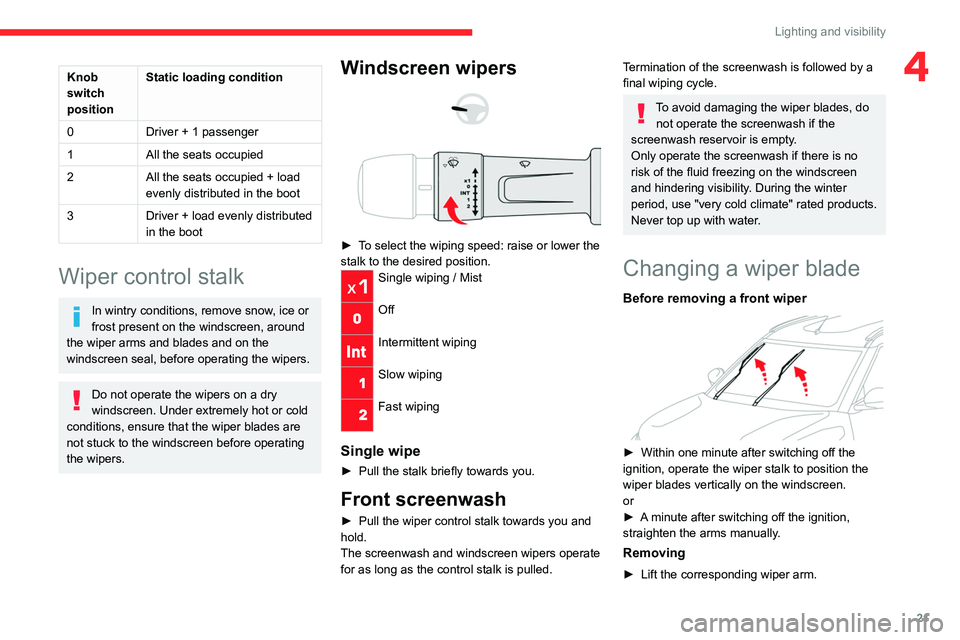
Windscreen wipers
► To select the wiping speed: raise or lower the
stalk to the desired position.
Single wiping / Mist
Off
Intermittent wiping
Slow wiping
Fast wiping
Single wipe
► Pull the stalk briefly towards you.
Front screenwash
► Pull the wiper control stalk towards you and
hold.
The screenwash and windscreen wipers operate
for as long as the control stalk is pulled.
Termination of the screenwash is followed by a
final wiping cycle.
To avoid damaging the wiper blades, do not operate the screenwash if the
screenwash reservoir is empty.
Only operate the screenwash if there is no
risk of the fluid freezing on the windscreen
and hindering visibility. During the winter
period, use "very cold climate" rated products.
Never top up with water.
Changing a wiper blade
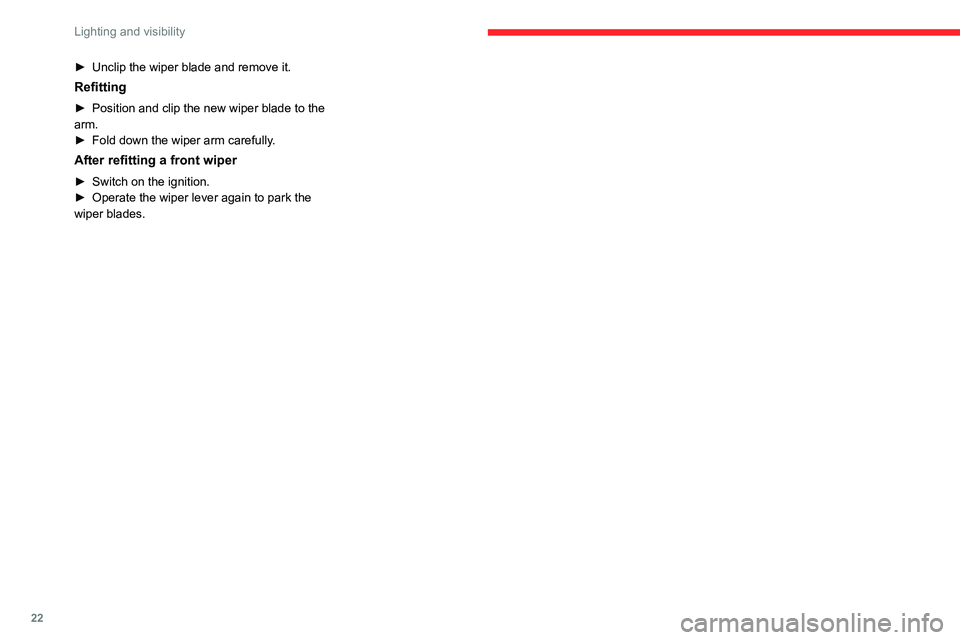
Before removing a front wiper
► Within one minute after switching off the
ignition, operate the wiper stalk to position the
wiper blades vertically on the windscreen.
or
►
A
minute after switching off the ignition,
straighten the arms manually.
Removing
► Lift the corresponding wiper arm.
Page 24 of 104
22
Lighting and visibility
► Unclip the wiper blade and remove it.
Refitting
► Position and clip the new wiper blade to the
arm.
►
Fold down the wiper arm carefully
.
After refitting a front wiper
► Switch on the ignition.
► Operate the wiper lever again to park the
wiper blades.
Page 25 of 104
23
Safety
5General safety
recommendations
Do not remove the labels attached in
different places on your vehicle. They
include safety warnings as well as
identification information for the vehicle.
For all work on your vehicle, use a
qualified workshop that has the technical
information, skills and equipment required, all
of which a CITROËN dealer is able to
provide.
Installing electrical accessories:
– The fitting of electrical equipment
or accessories not approved by CITROËN
may cause excessive current consumption
and failure of the vehicle's electrical system.
Contact a CITROËN dealer for information on
the range of approved accessories.
–
As a safety measure, access to the
diagnostic socket, used for the vehicle's
electronic systems, is reserved strictly for
CITROËN dealers, equipped with the special
tools required (risk of malfunctions of the
vehicle's electronic systems that could cause
breakdowns or serious accidents).
The
Manufacturer cannot be held responsible if
this advice is not followed.
–
Any modification or adaptation not intended
or authorised by CITROËN or carried out
without meeting the technical requirements
defined by the Manufacturer will result in the
suspension of the commercial warranty.
Hazard warning lamps
► Pressing the red button causes all the
direction indicators to flash.
They can operate with the ignition off.
Horn
► Press the central part of the steering wheel.
Anti-lock Braking System (ABS) and Electronic
Brake Force Distribution
(EBFD)
These systems enhance the vehicle’s stability
and handling during braking, and enable greater
control while cornering, particularly on poor or
slippery road surfaces.
ABS prevents wheel locking in the event of
emergency braking.
EBFD manages the braking pressure wheel by
wheel.
This warning lamp is continuously on in
the event of an ABS malfunction.
The vehicle retains conventional braking. Drive
carefully at a moderate speed.
Contact a CITROËN dealer as soon as possible.
This warning lamp, accompanied by an audible signal, indicates an EBFD
malfunction.
You must stop as soon as it is safe to do so.
Contact a CITROËN dealer.
The normal operation of the ABS may result in slight vibrations in the brake
pedal.
When braking in an emergency, press
the brake pedal very firmly and
maintain this pressure.