brake CITROEN C3 AIRCROSS 2017 Owner's Guide
[x] Cancel search | Manufacturer: CITROEN, Model Year: 2017, Model line: C3 AIRCROSS, Model: CITROEN C3 AIRCROSS 2017Pages: 308, PDF Size: 9.13 MB
Page 146 of 308
144
Where the speed of your vehicle is too
high approaching another vehicle, the first
level of alert may not be displayed: the
level 2 alert may be displayed directly.
Important: the level 1 alert is never
displayed when the " Close" trigger
threshold has been selected.
Modifying the alert trigger
threshold
This threshold determines how you wish
to be alerted of the presence of a moving
or stationary vehicle in front of you, or a
pedestrian present in your traffic lane.
The current threshold can be modified via the
vehicle configuration menu.
You can select one of three predefined
thresholds:
-
"Distant ",
-
"Normal ",
-
"Close ".
The last threshold selected is kept in memory
when the ignition is switched off.
Without audio system
With audio systemIntelligent emergency
braking assistance
If the driver brakes, but not sufficiently to avoid
a collision, this system will supplement the
braking, within the limits of the laws of physics.
This assistance will only be provided if you
press the brake pedal.
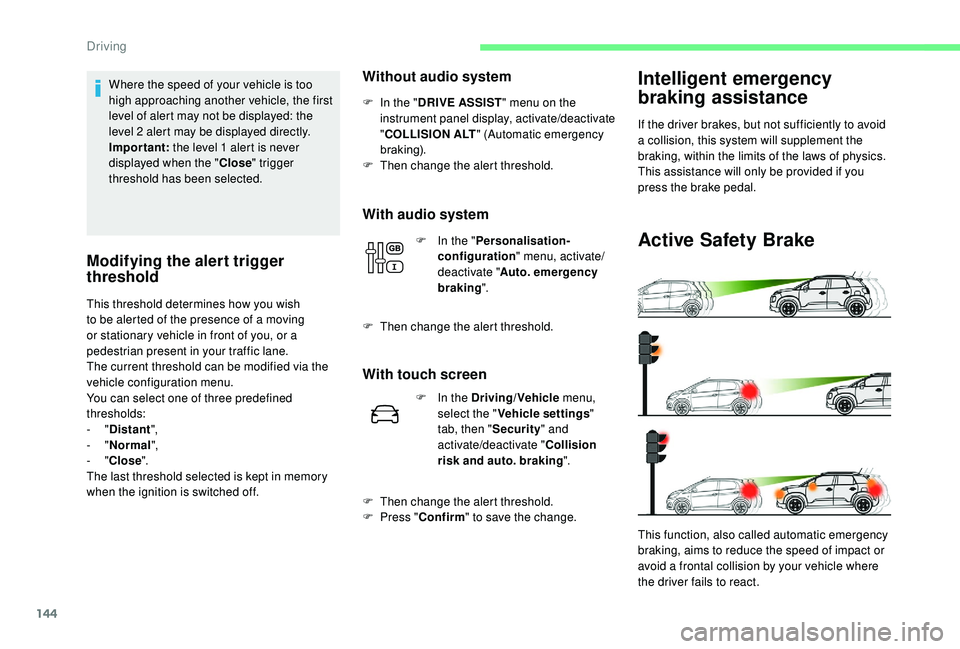
Active Safety Brake
This function, also called automatic emergency
braking, aims to reduce the speed of impact or
avoid a frontal collision by your vehicle where
the driver fails to react.
F
I
n the "
DRIVE ASSIST " menu on the
instrument panel display, activate/deactivate
" COLLISION ALT " (Automatic emergency
b r ak ing).
F
T
hen change the alert threshold.
F
I
n the "
Personalisation-
configuration " menu, activate/
deactivate " Auto. emergency
braking ".
F
T
hen change the alert threshold.
With touch screen
F In the Driving/Vehicle
menu,
select the " Vehicle settings "
tab, then " Security" and
activate/deactivate " Collision
risk and auto. braking ".
F
T
hen change the alert threshold.
F
P
ress " Confirm " to save the change.
Driving
Page 147 of 308
145
If the camera has confirmed
the presence of a vehicle or a
pedestrian, this warning lamp
flashes once the function is acting
on the vehicle's brakes.
Using the camera, this function acts on the
vehicle's braking system.
Important : if operation of the
automatic emergency braking is
triggered, you should take back
control of your vehicle and brake
with the pedal to add to or finish the
automatic braking action.
The driver can take back control of the vehicle
at any time by sharply turning the steering
wheel and/or pressing the accelerator pedal.
The point at which braking is triggered
may be adjusted according to the driving
actions from the driver, such as movement
of the steering wheel or pressing the
accelerator pedal.
Operation of the function may be felt by
slight vibration in the brake pedal.
If the vehicle comes to a complete stop,
the automatic braking is maintained for 1
to 2
seconds. With a manual gearbox, in the event of
automatic emergency braking until the
vehicle comes to a complete stop, the
engine may stall.
With an automatic gearbox, in the event
of automatic emergency braking until the
vehicle comes to a complete stop, keep
the brake pedal down to stop the vehicle
from starting off again.
Specific conditions for operation
The vehicle's speed must be between 3 mph
a nd 53 mph (5 km/h and 85 km/h) when a
moving vehicle is detected.
The vehicle's speed must not exceed 50
mph
(80 km/h) when a stopped vehicle is detected.
The vehicle's speed must not exceed 37
mph
(60
km/h) when a pedestrian is detected.
The ESC system must not be defective.
The ASR system must not be deactivated.
All passenger seat belts must be fastened.
Driving at a steady speed on roads with few
bends is required.
After an impact, the function automatically
stops operating. Consult a CITROËN
dealer or a qualified workshop to have the
system checked.
Deactivation/Activation
By default, the system is automatically
activated at every engine start-up.
The system can be deactivated or activated via
the vehicle settings menu. Deactivation of the system is
signalled by the illumination of this
indicator lamp, accompanied by the
display of a message.
Without audio system
F In the " DRIVE ASSIST " menu on the
instrument panel display, activate/deactivate
" COLLISION ALT " (Automatic emergency
b r ak ing).
With audio system
F In the " Personalisation-
configuration " menu, activate/
deactivate " Auto. emergency
braking ".
With touch screen
F In the Driving/Vehicle menu,
select the " Vehicle settings "
tab, then " Security" and
activate/deactivate " Automatic
emergency braking ".
6
Driving
Page 157 of 308
155
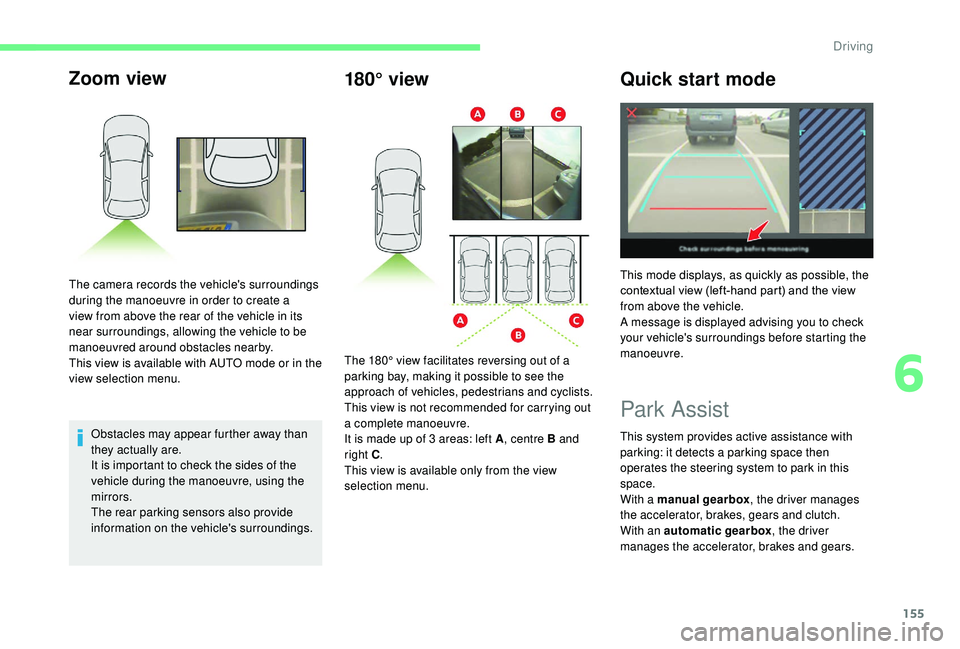
Zoom view
Obstacles may appear further away than
they actually are.
It is important to check the sides of the
vehicle during the manoeuvre, using the
mirrors.
The rear parking sensors also provide
information on the vehicle's surroundings.
The camera records the vehicle's surroundings
during the manoeuvre in order to create a
view from above the rear of the vehicle in its
near surroundings, allowing the vehicle to be
manoeuvred around obstacles nearby.
This view is available with AUTO mode or in the
view selection menu.
180° view
Quick start mode
Park Assist
This system provides active assistance with
parking: it detects a parking space then
operates the steering system to park in this
space.
With a manual gearbox, the driver manages
the accelerator, brakes, gears and clutch.
With an automatic gearbox , the driver
manages the accelerator, brakes and gears.
The 180° view facilitates reversing out of a
parking bay, making it possible to see the
approach of vehicles, pedestrians and cyclists.
This view is not recommended for carrying out
a complete manoeuvre.
It is made up of 3 areas: left A
, centre B and
right C .
This view is available only from the view
selection menu. This mode displays, as quickly as possible, the
contextual view (left-hand part) and the view
from above the vehicle.
A message is displayed advising you to check
your vehicle's surroundings before starting the
manoeuvre.
6
Driving
Page 169 of 308
167
Fuel cut- of f
Your vehicle is equipped with a safety device
which cuts off the fuel supply in the event of a
collision.
Misfuel prevention
(Diesel)
(Depending on country of sale)
Mechanical device which prevents filling the
tank of a Diesel vehicle with petrol. It helps
avoid the risk of engine damage that can result
from filling with the wrong fuel.
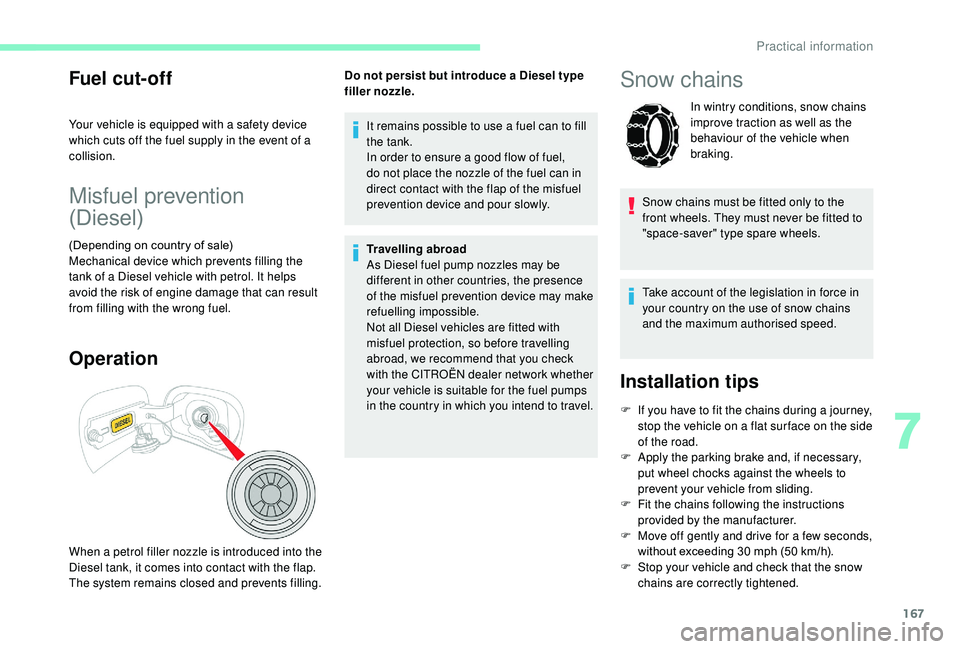
Operation
When a petrol filler nozzle is introduced into the
Diesel tank, it comes into contact with the flap.
The system remains closed and prevents filling.It remains possible to use a fuel can to fill
the tank.
In order to ensure a good flow of fuel,
do not place the nozzle of the fuel can in
direct contact with the flap of the misfuel
prevention device and pour slowly.
Travelling abroad
As Diesel fuel pump nozzles may be
different in other countries, the presence
of the misfuel prevention device may make
refuelling impossible.
Not all Diesel vehicles are fitted with
misfuel protection, so before travelling
abroad, we recommend that you check
with the CITROËN dealer network whether
your vehicle is suitable for the fuel pumps
in the country in which you intend to travel.
Do not persist but introduce a Diesel type
filler nozzle.
Snow chains
In wintry conditions, snow chains
improve traction as well as the
behaviour of the vehicle when
braking.
Snow chains must be fitted only to the
front wheels. They must never be fitted to
"space-saver" type spare wheels.
Take account of the legislation in force in
your country on the use of snow chains
and the maximum authorised speed.
Installation tips
F If you have to fit the chains during a journey, stop the vehicle on a flat sur face on the side
of the road.
F
A
pply the parking brake and, if necessary,
put wheel chocks against the wheels to
prevent your vehicle from sliding.
F
F
it the chains following the instructions
provided by the manufacturer.
F
M
ove off gently and drive for a few seconds,
without exceeding 30
mph (50 km/h).
F
S
top your vehicle and check that the snow
chains are correctly tightened.
7
Practical information
Page 178 of 308
176
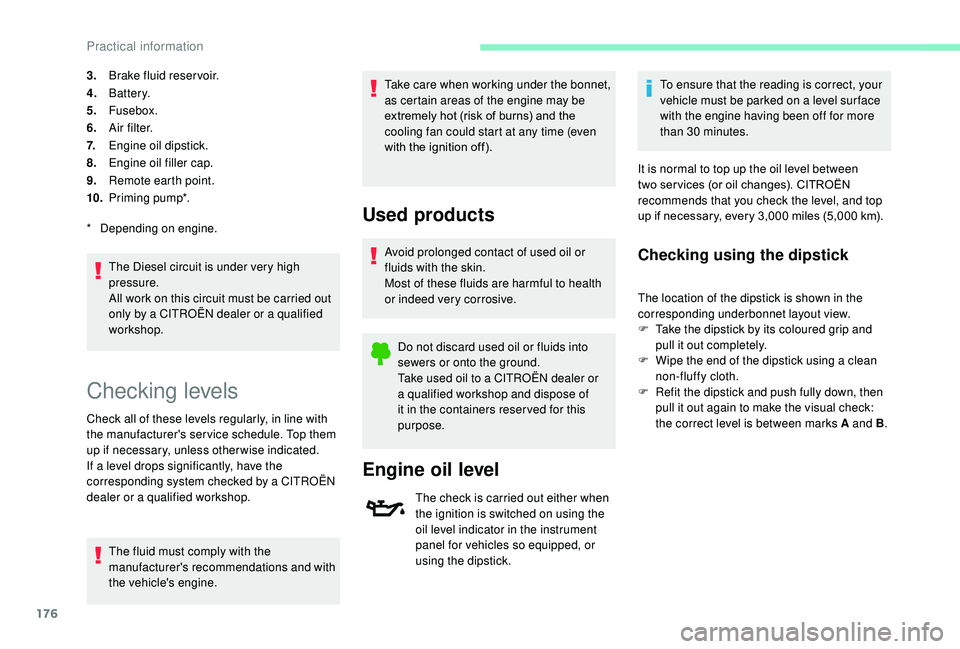
3.Brake fluid reser voir.
4. Battery.
5. Fusebox.
6. A i r f i l t e r.
7. Engine oil dipstick.
8. Engine oil filler cap.
9. Remote earth point.
10. Priming pump*.
The Diesel circuit is under very high
pressure.
All work on this circuit must be carried out
only by a CITROËN dealer or a qualified
workshop.
*
D
epending on engine.
Checking levels
Check all of these levels regularly, in line with
the manufacturer's service schedule. Top them
up if necessary, unless other wise indicated.
If a level drops significantly, have the
corresponding system checked by a CITROËN
dealer or a qualified workshop. The fluid must comply with the
manufacturer's recommendations and with
the vehicle's engine. Take care when working under the bonnet,
as certain areas of the engine may be
extremely hot (risk of burns) and the
cooling fan could start at any time (even
with the ignition off).
Used products
Avoid prolonged contact of used oil or
fluids with the skin.
Most of these fluids are harmful to health
or indeed very corrosive.
Do not discard used oil or fluids into
sewers or onto the ground.
Take used oil to a CITROËN dealer or
a qualified workshop and dispose of
it in the containers reser ved for this
purpose.
Engine oil level
The check is carried out either when
the ignition is switched on using the
oil level indicator in the instrument
panel for vehicles so equipped, or
using the dipstick. To ensure that the reading is correct, your
vehicle must be parked on a level sur face
with the engine having been off for more
than 30
minutes.
It is normal to top up the oil level between
two ser vices (or oil changes). CITROËN
recommends that you check the level, and top
up if necessary, every 3,000 miles (5,000 km).
Checking using the dipstick
The location of the dipstick is shown in the
corresponding underbonnet layout view.
F
T
ake the dipstick by its coloured grip and
pull it out completely.
F
W
ipe the end of the dipstick using a clean
non-fluffy cloth.
F
R
efit the dipstick and push fully down, then
pull it out again to make the visual check:
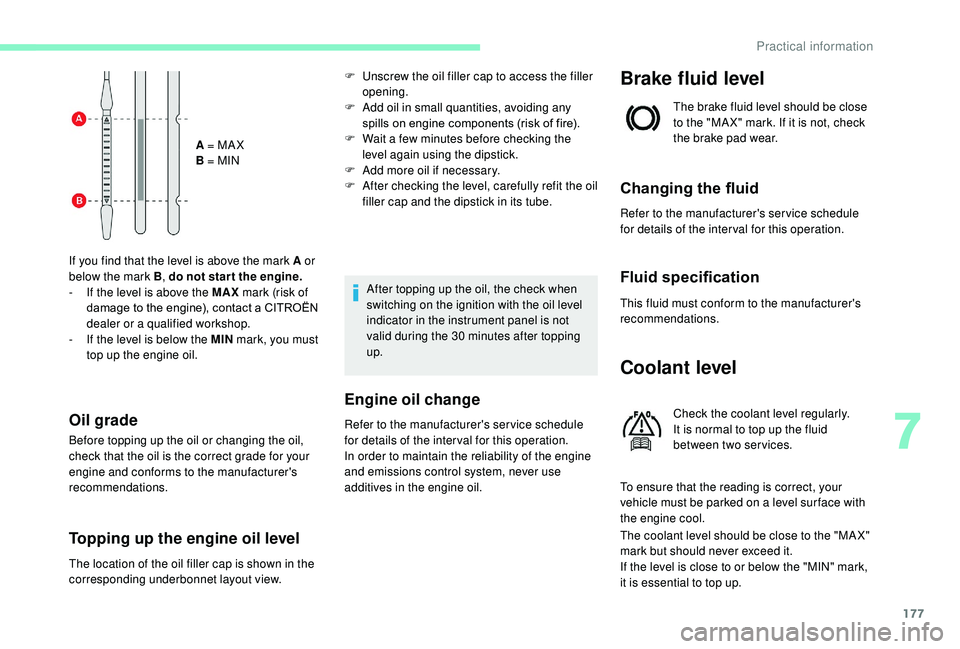
the correct level is between marks A and B .
Practical information
Page 179 of 308
177
A = MA X
B = MIN
If you find that the level is above the mark A or
below the mark B , do not star t the engine.
-
I
f the level is above the MAX mark (risk of
damage to the engine), contact a CITROËN
dealer or a qualified workshop.
-
I
f the level is below the MIN mark, you must
top up the engine oil.
Oil grade
Before topping up the oil or changing the oil,
check that the oil is the correct grade for your
engine and conforms to the manufacturer's
recommendations.
Topping up the engine oil level
F Unscrew the oil filler cap to access the filler opening.
F
A
dd oil in small quantities, avoiding any
spills on engine components (risk of fire).
F
W
ait a few minutes before checking the
level again using the dipstick.
F
A
dd more oil if necessary.
F
A
fter checking the level, carefully refit the oil
filler cap and the dipstick in its tube.
After topping up the oil, the check when
switching on the ignition with the oil level
indicator in the instrument panel is not
valid during the 30
minutes after topping
up.
Engine oil change
Refer to the manufacturer's service schedule
for details of the inter val for this operation.
In order to maintain the reliability of the engine
and emissions control system, never use
additives in the engine oil.
Brake fluid level
The brake fluid level should be close
to the "MA X" mark. If it is not, check
the brake pad wear.
Changing the fluid
Refer to the manufacturer's service schedule
for details of the inter val for this operation.
Fluid specification
This fluid must conform to the manufacturer's
recommendations.
Coolant level
Check the coolant level regularly.
It is normal to top up the fluid
between two services.
To ensure that the reading is correct, your
vehicle must be parked on a level sur face with
the engine cool.
The coolant level should be close to the "MA X"
mark but should never exceed it.
If the level is close to or below the "MIN" mark,
it is essential to top up.
The location of the oil filler cap is shown in the
corresponding underbonnet layout view.
7
Practical information
Page 182 of 308
180
Automatic gearbox
The gearbox does not require any
maintenance (no oil change).
Brake pads
Brake wear depends on the style
of driving, particularly in the case
of vehicles used in town, over short
distances. It may be necessary to
have the condition of the brakes
checked, even between vehicle
services.
Unless there is a leak in the circuit, a drop in
the brake fluid level indicates that the brake
pads are worn.
Brake disc wear
For information on checking brake
disc wear, contact a CITROËN or a
qualified workshop.
Parking brake
If excessive travel or a loss of
effectiveness of this system is
noticed, the parking brake must
be checked, even between two
services.
Checking this system must be done by a
CITROËN dealer or a qualified workshop.
Only use products recommended by
CITROËN or products of equivalent quality
and specification.
In order to optimise the operation of
components as important as those in the
braking system, CITROËN selects and
offers very specific products.
After washing the vehicle, dampness, or
in wintry conditions, ice can form on the
brake discs and pads: braking efficiency
may be reduced. Make light brake
applications to dry and defrost the brakes.
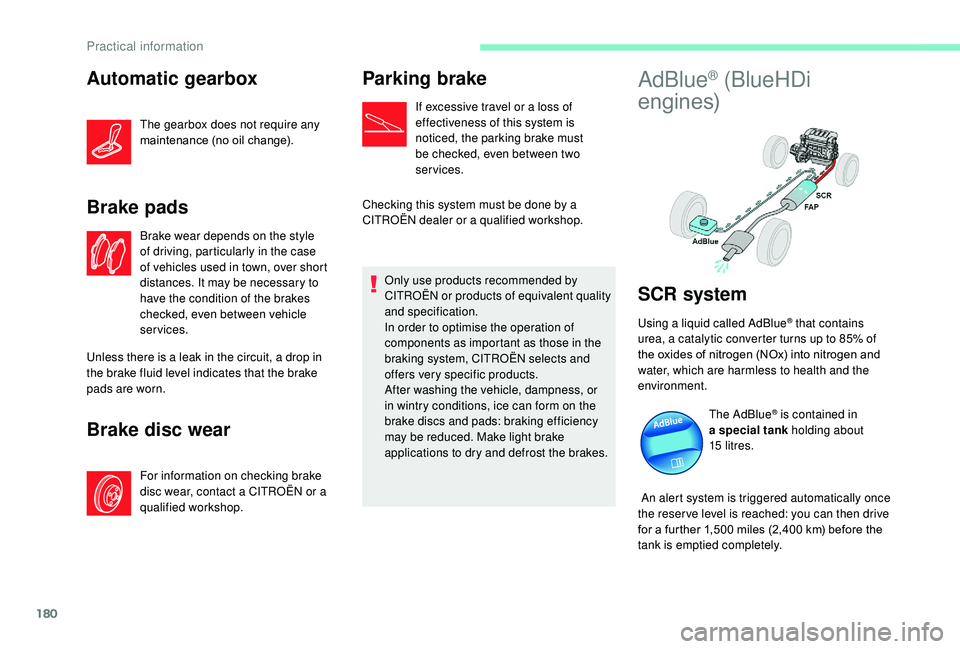
AdBlue® (BlueHDi
engines)
SCR system
Using a liquid called AdBlue® that contains
urea, a catalytic converter turns up to 85% of
the oxides of nitrogen (NOx) into nitrogen and
water, which are harmless to health and the
environment.
The AdBlue
® is contained in
a special tank holding about
15
litres.
An alert system is triggered automatically once
the reser ve level is reached: you can then drive
for a further 1,500
miles (2,400 km) before the
tank is emptied completely.
Practical information
Page 187 of 308
185
Repair procedure
F Park the vehicle without obstructing any traffic and apply the parking brake.
F
F
ollow the safety instructions (hazard warning
lamps, warning triangle, wearing high visibility
vest, etc.) according to the legislation in force
in the country where you are driving.
F
S
witch off the ignition.
F Uncoil the pipe stowed under the compressor.
Access to the kit
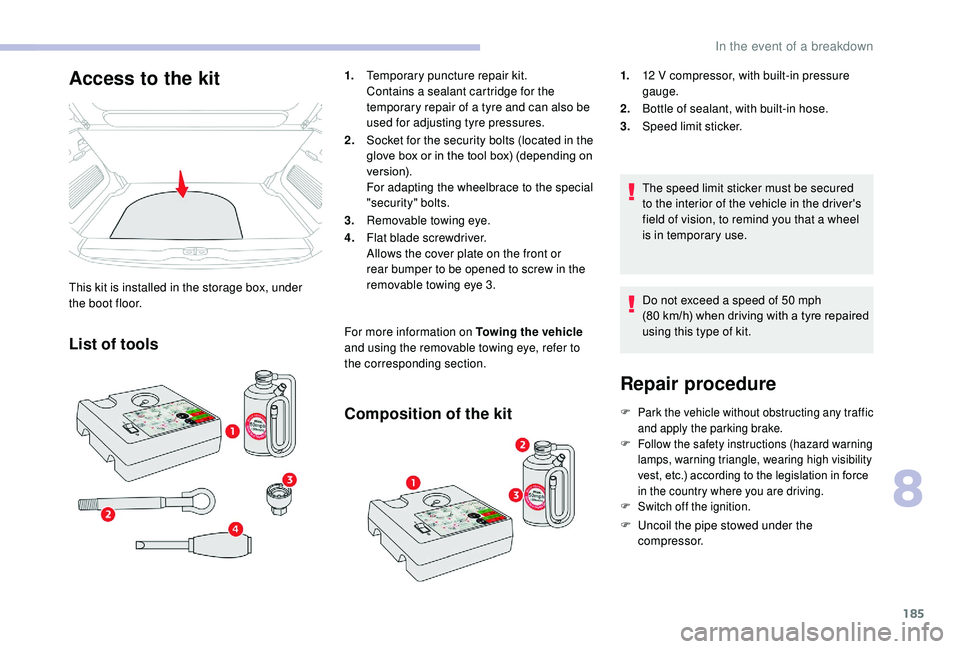
This kit is installed in the storage box, under
the boot floor.
List of tools
1. Temporary puncture repair kit.
Contains a sealant cartridge for the
temporary repair of a tyre and can also be
used for adjusting tyre pressures.
2. Socket for the security bolts (located in the
glove box or in the tool box) (depending on
ve r s i o n).
For adapting the wheelbrace to the special
"security" bolts.
3. Removable towing eye.
4. Flat blade screwdriver.
Allows the cover plate on the front or
rear bumper to be opened to screw in the
removable towing eye 3.
For more information on Towing the vehicle
and using the removable towing eye, refer to
the corresponding section.
Composition of the kit
1. 12 V compressor, with built-in pressure
gauge.
2. Bottle of sealant, with built-in hose.
3. Speed limit sticker.
The speed limit sticker must be secured
to the interior of the vehicle in the driver's
field of vision, to remind you that a wheel
is in temporary use.
Do not exceed a speed of 50
mph
(80
km/h) when driving with a tyre repaired
using this type of kit.
8
In the event of a breakdown
Page 192 of 308
190
Access to the spare wheel
Removing the wheel
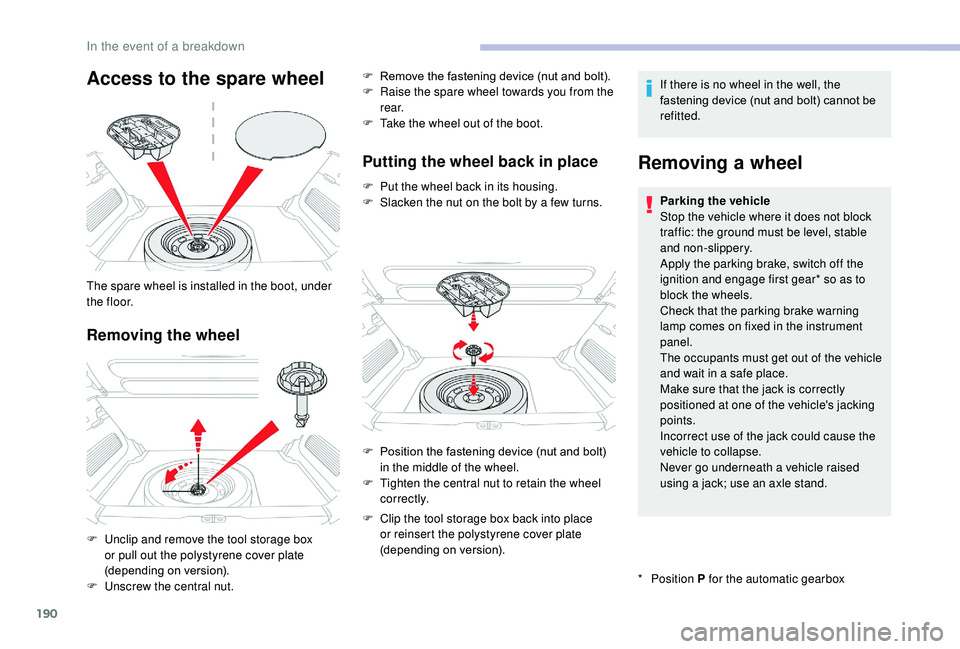
The spare wheel is installed in the boot, under
t h e f l o o r.
F
U
nclip and remove the tool storage box
or pull out the polystyrene cover plate
(depending on version).
F
U
nscrew the central nut. F
R
emove the fastening device (nut and bolt).
F
R
aise the spare wheel towards you from the
r e a r.
F
T
ake the wheel out of the boot.
Putting the wheel back in place
F Put the wheel back in its housing.
F
S lacken the nut on the bolt by a few turns. If there is no wheel in the well, the
fastening device (nut and bolt) cannot be
refitted.
Removing a wheel
* Position
P for the automatic gearbox
Parking the vehicle
Stop the vehicle where it does not block
traffic: the ground must be level, stable
and non-slippery.
Apply the parking brake, switch off the
ignition and engage first gear* so as to
block the wheels.
Check that the parking brake warning
lamp comes on fixed in the instrument
panel.
The occupants must get out of the vehicle
and wait in a safe place.
Make sure that the jack is correctly
positioned at one of the vehicle's jacking
points.
Incorrect use of the jack could cause the
vehicle to collapse.
Never go underneath a vehicle raised
using a jack; use an axle stand.
F
P
osition the fastening device (nut and bolt)
in the middle of the wheel.
F
T
ighten the central nut to retain the wheel
c o r r e c t l y.
F
C
lip the tool storage box back into place
or reinsert the polystyrene cover plate
(depending on version).
In the event of a breakdown
Page 197 of 308
195
Integrated direction indicator
side repeaters
For the replacement of this type of lamp, contact
a CITROËN dealer or a qualified workshop.
Rear lamps
Changing bulbs
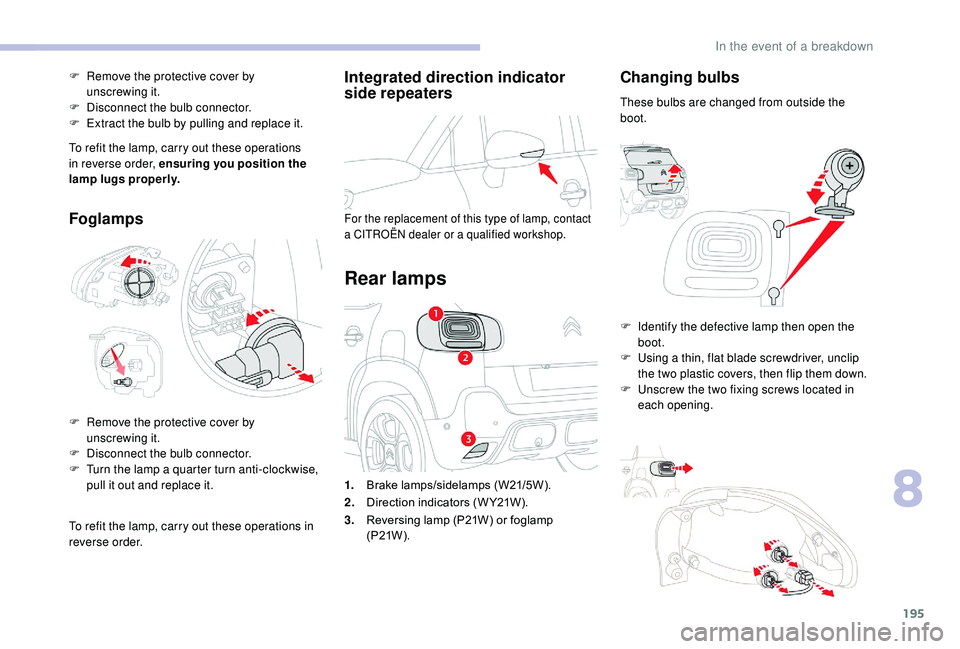
These bulbs are changed from outside the
boot.
1. Brake lamps/sidelamps (W21/5W).
2. Direction indicators (W Y21W).
3. Reversing lamp (P21W) or foglamp
(P21W ). F
I
dentify the defective lamp then open the
boot.
F
U
sing a thin, flat blade screwdriver, unclip
the two plastic covers, then flip them down.
F
U
nscrew the two fixing screws located in
each opening.
F
R
emove the protective cover by
unscrewing
it.
F
D
isconnect the bulb connector.
F
E
xtract the bulb by pulling and replace it.
To refit the lamp, carry out these operations
in reverse order, ensuring you position the
lamp lugs properly.
Foglamps
F Remove the protective cover by unscrewing it.
F
D
isconnect the bulb connector.
F
T
urn the lamp a quarter turn anti-clockwise,
pull it out and replace it.
To refit the lamp, carry out these operations in
reverse order.
8
In the event of a breakdown