instrument panel CITROEN C3 AIRCROSS 2017 Repair Manual
[x] Cancel search | Manufacturer: CITROEN, Model Year: 2017, Model line: C3 AIRCROSS, Model: CITROEN C3 AIRCROSS 2017Pages: 308, PDF Size: 9.13 MB
Page 192 of 308
190
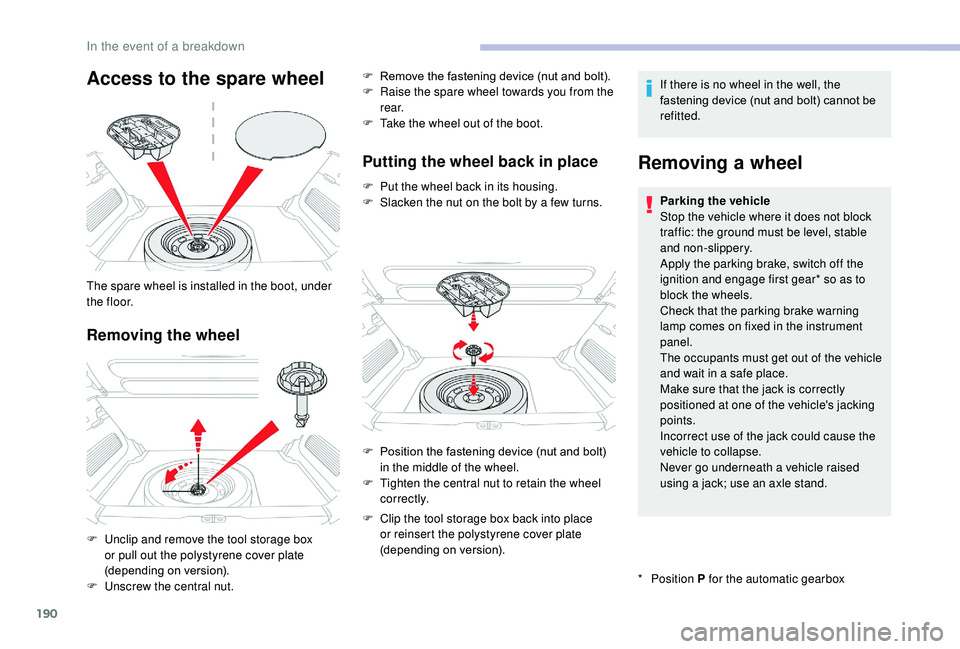
Access to the spare wheel
Removing the wheel
The spare wheel is installed in the boot, under
t h e f l o o r.
F
U
nclip and remove the tool storage box
or pull out the polystyrene cover plate
(depending on version).
F
U
nscrew the central nut. F
R
emove the fastening device (nut and bolt).
F
R
aise the spare wheel towards you from the
r e a r.
F
T
ake the wheel out of the boot.
Putting the wheel back in place
F Put the wheel back in its housing.
F
S lacken the nut on the bolt by a few turns. If there is no wheel in the well, the
fastening device (nut and bolt) cannot be
refitted.
Removing a wheel
* Position
P for the automatic gearbox
Parking the vehicle
Stop the vehicle where it does not block
traffic: the ground must be level, stable
and non-slippery.
Apply the parking brake, switch off the
ignition and engage first gear* so as to
block the wheels.
Check that the parking brake warning
lamp comes on fixed in the instrument
panel.
The occupants must get out of the vehicle
and wait in a safe place.
Make sure that the jack is correctly
positioned at one of the vehicle's jacking
points.
Incorrect use of the jack could cause the
vehicle to collapse.
Never go underneath a vehicle raised
using a jack; use an axle stand.
F
P
osition the fastening device (nut and bolt)
in the middle of the wheel.
F
T
ighten the central nut to retain the wheel
c o r r e c t l y.
F
C
lip the tool storage box back into place
or reinsert the polystyrene cover plate
(depending on version).
In the event of a breakdown
Page 216 of 308
2
12:13
18,5 21,5
23 °CFirst steps
With the engine running, a press
mutes the sound.
With the ignition off, a press turns
the system on.
Adjustment of the volume.
Use the buttons either side of or below the
touch screen for access to the menus, then
press the virtual buttons in the touch screen.
Depending on the model, use the "Source" or
"Menu" buttons either side of the touch screen
for access to the menus, then press the virtual
buttons in the touch screen.
You can display the menu at any time by
pressing the screen briefly with three fingers.
All of the touch areas of the screen are white.
Press the cross to go back a level.
Press "OK" to confirm. The touch screen is of the "capacitive"
type.
To clean the screen, use a soft, non-
abrasive cloth (e.g. spectacles cloth) with
no additional product.
Do not use sharp objects on the screen.
Do not touch the screen with wet hands.
*
D
epending on equipment
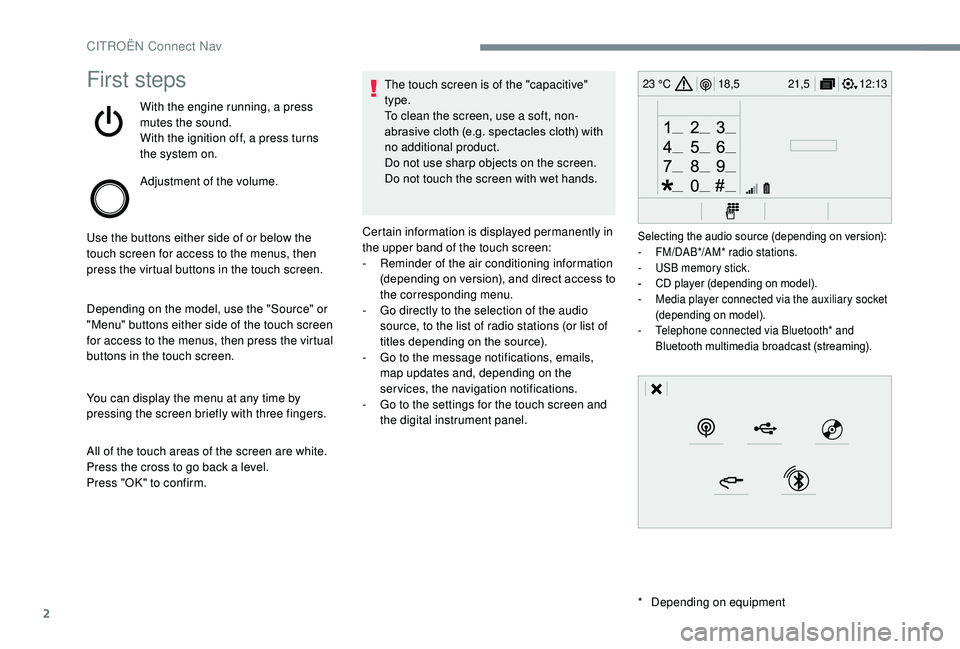
Certain information is displayed permanently in
the upper band of the touch screen:
-
R
eminder of the air conditioning information
(depending on version), and direct access to
the corresponding menu.
-
G
o directly to the selection of the audio
source, to the list of radio stations (or list of
titles depending on the source).
-
G
o to the message notifications, emails,
map updates and, depending on the
services, the navigation notifications.
-
G
o to the settings for the touch screen and
the digital instrument panel.
Selecting the audio source (depending on version):
- F M/DAB*/AM* radio stations.
-
U
SB memory stick.
-
C
D player (depending on model).
-
M
edia player connected via the auxiliary socket
(depending on model).
-
T
elephone connected via Bluetooth* and
Bluetooth multimedia broadcast (streaming).
CITROËN Connect Nav
Page 245 of 308
31
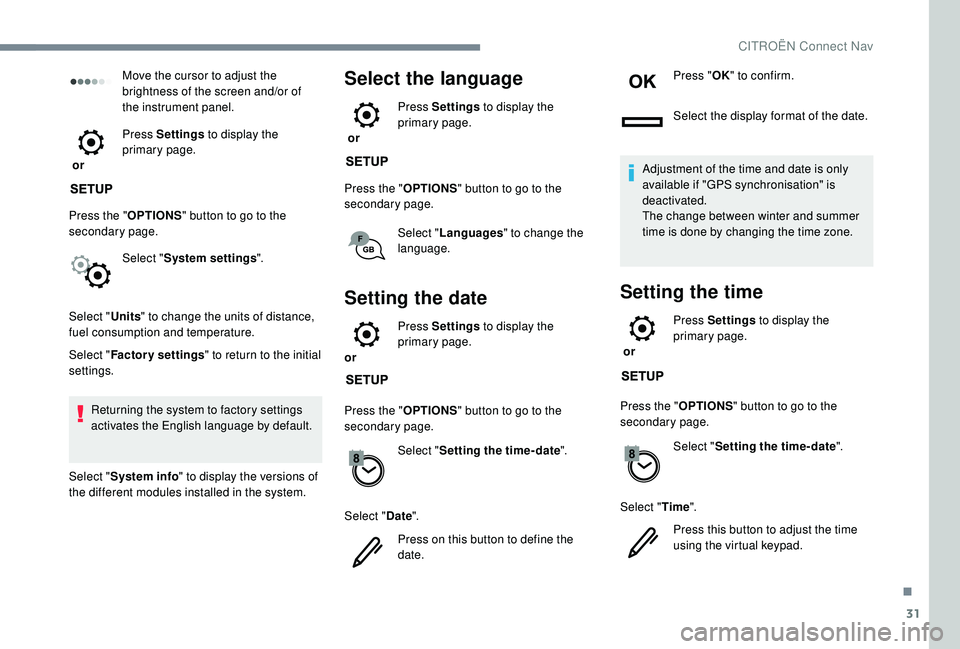
Move the cursor to adjust the
brightness of the screen and/or of
the instrument panel.
or Press Settings
to display the
primary page.
Press the " OPTIONS" button to go to the
secondary page.
Select "System settings ".
Select " Units" to change the units of distance,
fuel consumption and temperature.
Select " Factory settings " to return to the initial
settings.
Returning the system to factory settings
activates the English language by default.
Select " System info " to display the versions of
the different modules installed in the system.Select the language
or Press Settings
to display the
primary page.
Press the " OPTIONS" button to go to the
secondary page.
Select "Languages " to change the
language.
Setting the date
or Press Settings
to display the
primary page.
Press the " OPTIONS" button to go to the
secondary page.
Select "Setting the time- date".
Select " Date".
Press on this button to define the
date. Press "
OK" to confirm.
Select the display format of the date.
Adjustment of the time and date is only
available if "GPS synchronisation" is
deactivated.
The change between winter and summer
time is done by changing the time zone.
Setting the time
or Press Settings
to display the
primary page.
Press the " OPTIONS" button to go to the
secondary page.
Select "Setting the time- date".
Select " Time".
Press this button to adjust the time
using the virtual keypad.
.
CITROËN Connect Nav
Page 254 of 308
2
First steps
With the engine running, a press
mutes the sound.
With the ignition off, a press turns
the system on.
Adjustment of the volume.
Use the buttons on either side of or below the
touch screen for access to the menus, then
press the virtual buttons in the touch screen.
Depending on the model, use the "Source" or
"Menu" buttons either side of the touch screen
for access to the menus, then press the virtual
buttons in the touch screen.
You can display the menu at any time by
pressing the screen briefly with three fingers.
All of the touch areas of the screen are white.
Press in the grey zone to go back a level or
confirm.
Press the back arrow to go back a level or
confirm. The touch screen is of the "capacitive"
type.
To clean the screen, use a soft, non-
abrasive cloth (e.g. spectacles cloth) with
no additional product.
Do not use sharp objects on the screen.
Do not touch the screen with wet hands.
*
D
epending on equipment.
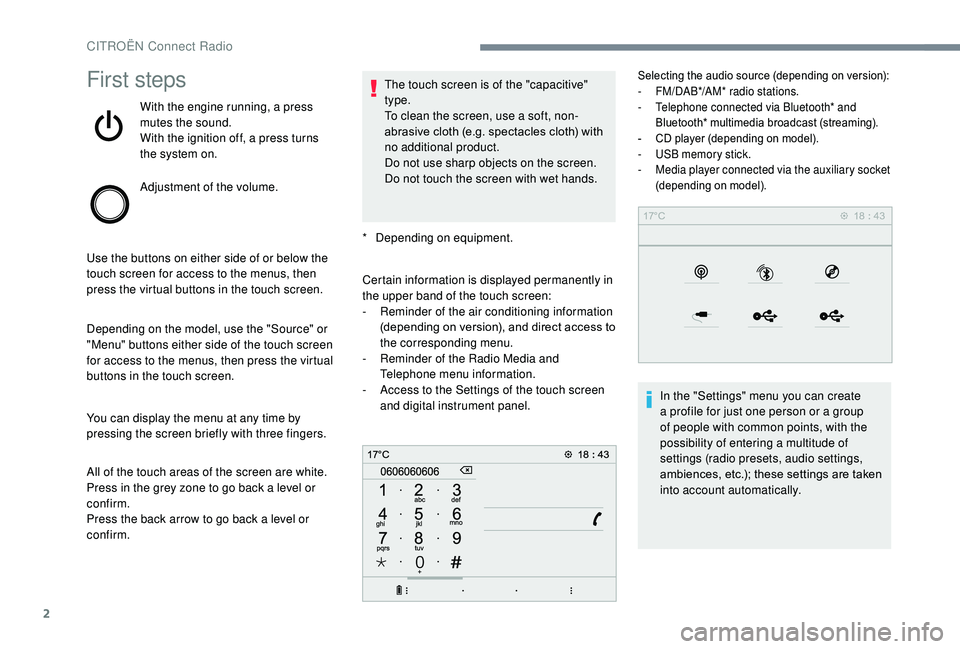
Certain information is displayed permanently in
the upper band of the touch screen:
-
R
eminder of the air conditioning information
(depending on version), and direct access to
the corresponding menu.
-
R
eminder of the Radio Media and
Telephone menu information.
-
A
ccess to the Settings of the touch screen
and digital instrument panel.
Selecting the audio source (depending on version):
- F M/DAB*/AM* radio stations.
-
T
elephone connected via Bluetooth* and
Bluetooth* multimedia broadcast (streaming).
-
C
D player (depending on model).
-
U
SB memory stick.
-
M
edia player connected via the auxiliary socket
(depending on model).
In the "Settings" menu you can create
a profile for just one person or a group
of people with common points, with the
possibility of entering a multitude of
settings (radio presets, audio settings,
ambiences, etc.); these settings are taken
into account automatically.
CITROËN Connect Radio
Page 268 of 308
16
Press "Recent calls ".
Select the desired contact from the list offered.
It is always possible to make a call directly
from the telephone; as a safety measure,
first park the vehicle.
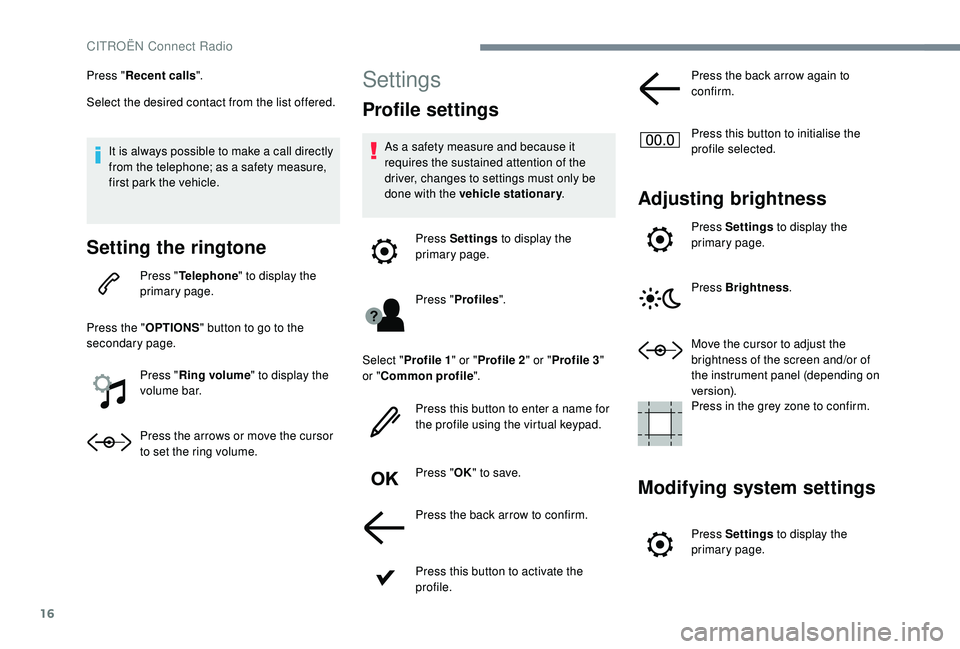
Setting the ringtone
Press " Telephone " to display the
primary page.
Press the " OPTIONS" button to go to the
secondary page.
Press "Ring volume " to display the
volume bar.
Press the arrows or move the cursor
to set the ring volume.
Settings
Profile settings
As a safety measure and because it
requires the sustained attention of the
driver, changes to settings must only be
done with the vehicle stationary .
Press Settings to display the
primary page.
Press " Profiles ".
Select " Profile 1 " or "Profile 2 " or "Profile 3 "
or " Common profile ".
Press this button to enter a name for
the profile using the virtual keypad.
Press " OK" to save.
Press the back arrow to confirm.
Press this button to activate the
profile. Press the back arrow again to
confirm.
Press this button to initialise the
profile selected.
Adjusting brightness
Press Settings
to display the
primary page.
Press Brightness .
Move the cursor to adjust the
brightness of the screen and/or of
the instrument panel (depending on
ve r s i o n).
Press in the grey zone to confirm.
Modifying system settings
Press Settings to display the
primary page.
CITROËN Connect Radio
Page 269 of 308
17
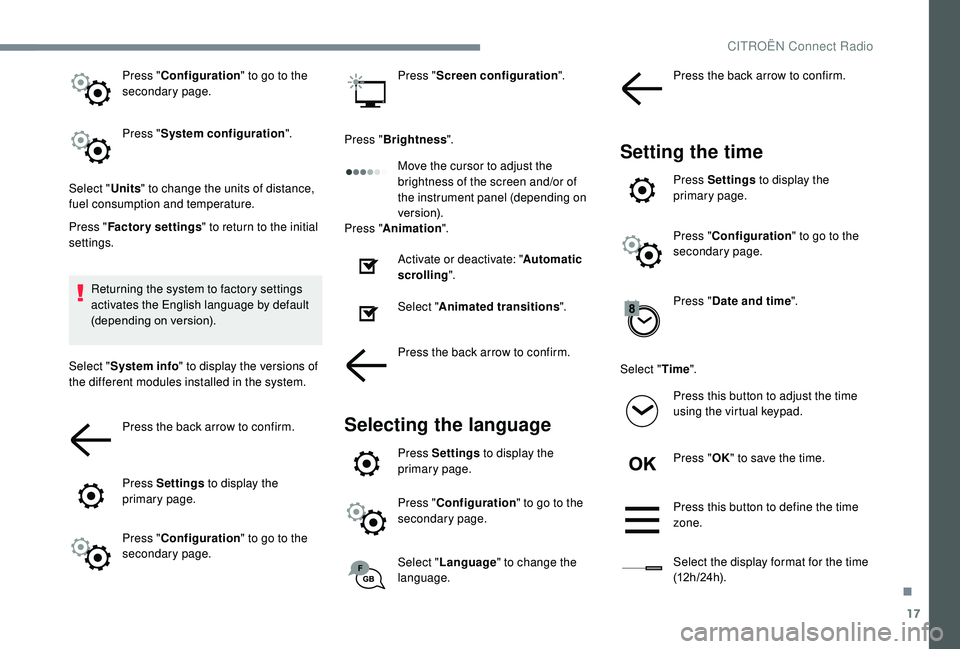
Press "Configuration " to go to the
secondary page.
Press " System configuration ".
Select " Units" to change the units of distance,
fuel consumption and temperature.
Press " Factory settings " to return to the initial
settings.
Returning the system to factory settings
activates the English language by default
(depending on version).
Select " System info " to display the versions of
the different modules installed in the system.
Press the back arrow to confirm.
Press Settings to display the
primary page.
Press " Configuration " to go to the
secondary page. Press "
Screen configuration ".
Press " Brightness ".
Move the cursor to adjust the
brightness of the screen and/or of
the instrument panel (depending on
ve r s i o n).
Press " Animation ".
Activate or deactivate: " Automatic
scrolling ".
Select " Animated transitions ".
Press the back arrow to confirm.
Selecting the language
Press Settings to display the
primary page.
Press " Configuration " to go to the
secondary page.
Select " Language " to change the
language. Press the back arrow to confirm.
Setting the time
Press Settings
to display the
primary page.
Press " Configuration " to go to the
secondary page.
Press " Date and time ".
Select " Time".
Press this button to adjust the time
using the virtual keypad.
Press " OK" to save the time.
Press this button to define the time
zone.
Select the display format for the time
(12 h / 24 h).
.
CITROËN Connect Radio
Page 294 of 308
214
Defrosting ........................................................ 70
Defrosting, front .............................................. 69
Demisting, front
............................................... 69
D
emisting, rear
................................................ 63
Demisting, rear screen
...................................63
Dimensions
..............................
.....................210
Dipstick
................
............................. 28, 176 -17 7
Direction indicators
..............22, 81- 82 , 193 -195
Display, head-up
...............................
............132
Display screen, instrument panel
.................128
Distance alert ~ Collision Risk Alert
.............143
Doors
............................................................... 48
Driver’s attention warning
......................14 6 -147
Driving time warning
..................................... 14 6
Dynamic stability control (DSC)
.....15 -16 , 93-96
EEarth point, remote ....................................... 17 5
Economy mode ............................................. 17
2
Electronic brake force distribution (EBFD)
.....93
Electronic stability control (ESC)
...................15
E
mergency braking assistance (EBA) ............93
Emergency call
......................................... 91-92
Emergency switching off
...............................123
Emissions control
...............................
.............14
Energy economy mode
................................. 17
2
Engine
............................................................. 14
Engine, Diesel
....................................... 165, 18 4
Engine, petrol
...............................
.........165, 175
Engine compartment
.................................... 17
5
Engine fault
..................................................... 14
Engines
.................................................. 207-209
Engine self-diagnosis
..................................... 14
E
nvironment
.................................................... 45
FFatigue detection ................................... 14 6 -147
Filling the fuel tank ................................. 165 -167
Filter, air
........................................................ 179
Filter, Diesel fuel
........................................... 176
Filter, oil
................
......................................... 179
Filter, particle
......................................... 178 -179
Filter, passenger compartment
.....................179
Fitting a wheel
....................................... 19 0 -192
Fitting roof bars
...................................... 173 -174
Fittings, boot
................................................... 76
Fittings, interior
......................................... 71,
75
Fittings, rear
.................................................... 75
Flap, fuel filler
......................................... 166 -167
Floor, boot, adjustable
....................................77
Foglamp, rear
............................................ 21, 81
Foglamps, front
.......23, 80 - 81 , 85-86 , 193, 195
Foglamps, rear
................................................ 80
F
olding the rear seats
...............................60-62
Frequency (radio)
....................................... 21-22
Fuel ................................................................ 165
Fuel tank ........................................................ 167
Fusebox, dashboard
..................................... 201
Fusebox, engine compartment
.....................201
Fuses
...................................................... 1
97-2 01
G
Gauge, fuel............................................. 166 -167
Gearbox, automatic .......................125 -131, 18 0
Gearbox, manual
......71, 124 -125 , 12 9 -131, 179
Gear lever, manual gearbox
..................124 -125
Gear shift indicator ~ Gear efficiency indicator
..................................... 128
Glove box
........................................................ 71
G . P. S .
.............................................................. 12
Grab handles
.................................................. 75
Grip control
............................................... 95-96
HHazard warning lamps ....................................91Hazard warning lamps, automatic operation .......91Headlamps, automatic dipping ...........23, 83-85
Headlamps, automatic illumination ..........82- 83
Headlamps, dipped beam
.........23, 80 , 193 -19 4
Headlamps, main beam
............23, 80 , 193 -19 4
Head restraints, front
...................................... 59
Head restraints, rear
.................................60-62
Head-up display
..................................... 13
2-13 3
Heating
...................................................... 6
6- 67
Hill Assist Descent Control
................22, 97- 9 8
Hill start assist
............................................... 12 9
Hooks
.............................................................. 77
Horn ................................................................. 91
IIgnition .......................................69, 121 , 123 , 28
Immobiliser, electronic ............................45, 11 9
Indicator, AdBlue
® range ........................... 28-29
Indicator, coolant temperature ........................ 25
Indicator, engine oil level
................................ 28
Indicator lamps, operation
.............................. 11
I
ndicators, direction
................................ 81, 19 4
Inflating tyres and accessories (using the kit)
.............................. 18 4 -185, 187
Instrument panel
.......................................... 8 -10
Instrument panel, matrix
................................... 9
Internet browser
.............................................. 16
I
SOFIX mountings ......................................... 112
JJack .............................................18 8 -19 0, 23, 9
Jump starting ................................................ 202
Alphabetical index
Page 296 of 308
216
Replacing the passenger compartment filter ....179Reservoir, screenwash .................................178
Resetting the service indicator .......................28
Resetting the trip recorder
........................3 0 - 31
Reversing camera
...............................
...15 4 -15 5
Roof bars
................................................ 173 -174
Running out of fuel (Diesel)
..........................18 4
SSafety, children .........102-103 , 105 -107 , 111 -115
SCR (Selective Catalytic Reduction) ............18 0
Screen, instrument panel
................................38
Screen, monochrome
...............................32-33
Screen, multifunction (with audio system)
........4
Screen menu map
........................................... 12
Screenwash, front
........................................... 88
Screenwash, rear
............................................ 87
Seat belts
......................................... 9 8 -101, 11 0
Seats, front
...............................
.................57- 5 8
Seats, heated
............................................ 59-60
Seats, rear
................................................. 60-62
Selector, gear
......................................... 125 -128
Serial number, vehicle
..................................2 11
Service indicator
....................................... 26, 28
Servicing
......................................................... 26
S
ettings, equipment
................................... 31- 3 6
Settings, system
........................................ 30, 16
Sidelamps
................................. 80,
82, 193 -195
Side repeater
................................................ 195
Snow chains
................................... 162, 167-168
Socket, 12
V accessory .......................71-72, 76
Socket, auxiliary
...................................... 23,
9, 8
Socket, Jack
............................................ 23, 9, 8
Sockets, audio
................................................ 73
Spe
ed limiter
.......................... 13
3 -13 4, 13 6 -13 9
Speed limit recognition
.......................... 13
4 -13 5
Stability control (ESC)...............................15, 93
Starting a Diesel engine ............................... 16
5
Starting the engine
....................................... 12
0
Starting the vehicle
......... 11
8, 120 -12 2 , 125 -128
Starting using another battery
..............123, 202
Station, radio
...............................
......21-22 , 6, 4
Stay, bonnet
........................................... 174 -175
Steering mounted controls, audio
........ 3,
3, 2-3
Steering wheel, adjustment
............................ 62
S
TOP (warning lamp)
...................................... 12
St
op & Start
..............................
22 , 39 , 66 , 69, 12 9 -131 , 166, 175, 179 , 205
Stopping the vehicle
.......11 8, 120 -12 2 , 125 -128
Storage
...................................................... 71, 75
Storage box
..................................................... 77
Storage wells
.................................................. 77
Stowing rings
.................................................. 75
Sunroof, panoramic
........................................ 53
S
un visor
...............................
..........................71
Switching off the engine
...............................120
Synchronising the remote control
...................47
TTables of fuses ....................................... 1 97-2 01
Ta n k , f u e l ................................................ 166 -167
Telephone
.......... 7
2-73, 25 -29 , 13 -16, 1 0 -11, 13
Telephone, Bluetooth with voice recognition ......14Temperature, coolant ...................................... 25
Three flashes (direction indicators) ................8
2
Time (setting)
........................... 32-33, 40, 31, 17
TMC (Traffic info)
............................................ 13
T
o o l s
........................... 77, 78, 188 -189, 188 -19 0
Total distance recorder
.............................3 0 - 31
Touch screen ....................... 33-36, 86, 13 5 , 1, 1
To w b a r
...............................
....................11 9, 171
Towbar with quickly detachable towball ...... 1 6 8 -171
Towed loads .................................................. 207
Towing another vehicle .........................205-206
Traction control (ASR)
...................15 -16, 93-95
Traffic information (TA)
.....................................5
Traffic information (TMC)
................................13
Tr a i l e r
...............
..................................... 11 9, 171
Trip computer
............................................. 37- 3 9
Trip distance recorder
............................... 3
0 - 31
Ty r e s
.............................................................. 2 11
Tyre under-inflation detection
.........15, 161 , 188
UUnder-inflation (detection) ............................161
Unlocking .................................................. 42- 43
Unlocking from the inside
...............................49
Updating the date
................................ 40,
31, 18
Updating the time
...............................
.40 , 31 , 17
USB
................................................... 23 -24, 9, 7
VVentilation ................................................. 64- 67
Voice commands ......................................... 5 -10
WWarning and indicator lamps .....................1 0 -11
Warning lamp, braking system .......................12
Warning lamp, Diesel engine pre-heater
.......21
Warning lamp, driver’s seat belt not fastened
...............................
....9 9 -10 0
Warning lamp, low fuel level
...........................17
Warning lamp, seat belts
........................9 9 -10 0
Warning lamp, Service ....................................20
Alphabetical index