instrument panel CITROEN C3 AIRCROSS 2017 Workshop Manual
[x] Cancel search | Manufacturer: CITROEN, Model Year: 2017, Model line: C3 AIRCROSS, Model: CITROEN C3 AIRCROSS 2017Pages: 308, PDF Size: 9.13 MB
Page 150 of 308
148
OFF
OFF
Lane Departure Warning
System
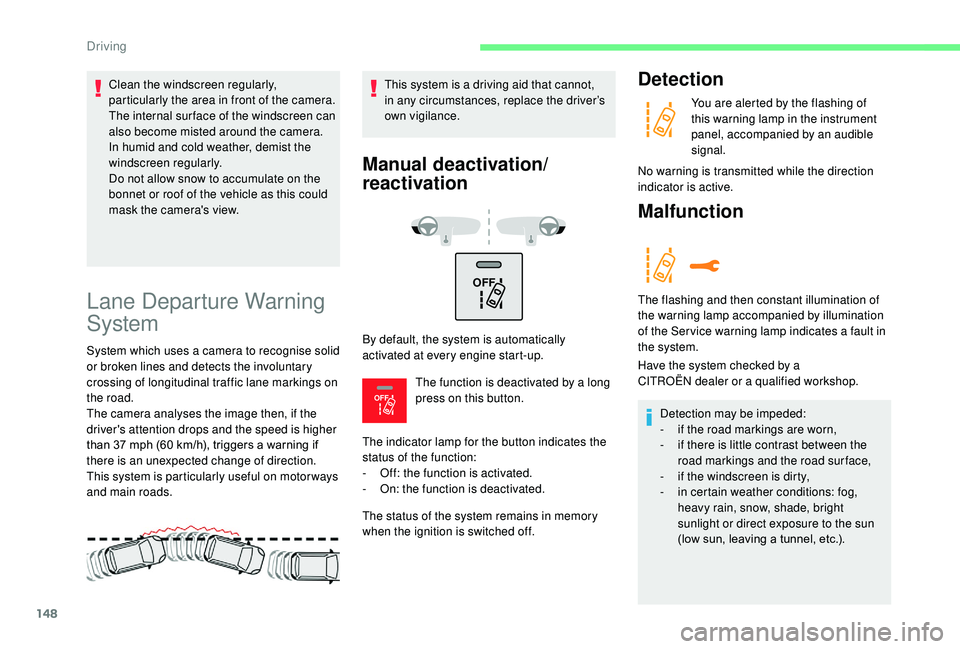
System which uses a camera to recognise solid
or broken lines and detects the involuntary
crossing of longitudinal traffic lane markings on
the road.
The camera analyses the image then, if the
driver's attention drops and the speed is higher
than 37 mph (60 km/h), triggers a warning if
there is an unexpected change of direction.
This system is particularly useful on motor ways
and main roads.This system is a driving aid that cannot,
in any circumstances, replace the driver’s
own vigilance.
Manual deactivation/
reactivation
By default, the system is automatically
activated at every engine start-up.
The function is deactivated by a long
press on this button.
The indicator lamp for the button indicates the
status of the function:
-
O
ff: the function is activated.
-
O
n: the function is deactivated.
The status of the system remains in memory
when the ignition is switched off.
Detection
You are alerted by the flashing of
this warning lamp in the instrument
panel, accompanied by an audible
signal.
No warning is transmitted while the direction
indicator is active.
Malfunction
The flashing and then constant illumination of
the warning lamp accompanied by illumination
of the Ser vice warning lamp indicates a fault in
the system.
Have the system checked by a
CITROËN
dealer or a qualified workshop.
Detection may be impeded:
-
i
f the road markings are worn,
-
i
f there is little contrast between the
road markings and the road surface,
-
i
f the windscreen is dirty,
-
i
n certain weather conditions: fog,
heavy rain, snow, shade, bright
sunlight or direct exposure to the sun
(low sun, leaving a tunnel, etc.).
Clean the windscreen regularly,
particularly the area in front of the camera.
The internal sur face of the windscreen can
also become misted around the camera.
In humid and cold weather, demist the
windscreen regularly.
Do not allow snow to accumulate on the
bonnet or roof of the vehicle as this could
mask the camera's view.
Driving
Page 151 of 308
149
Blind spot monitoring
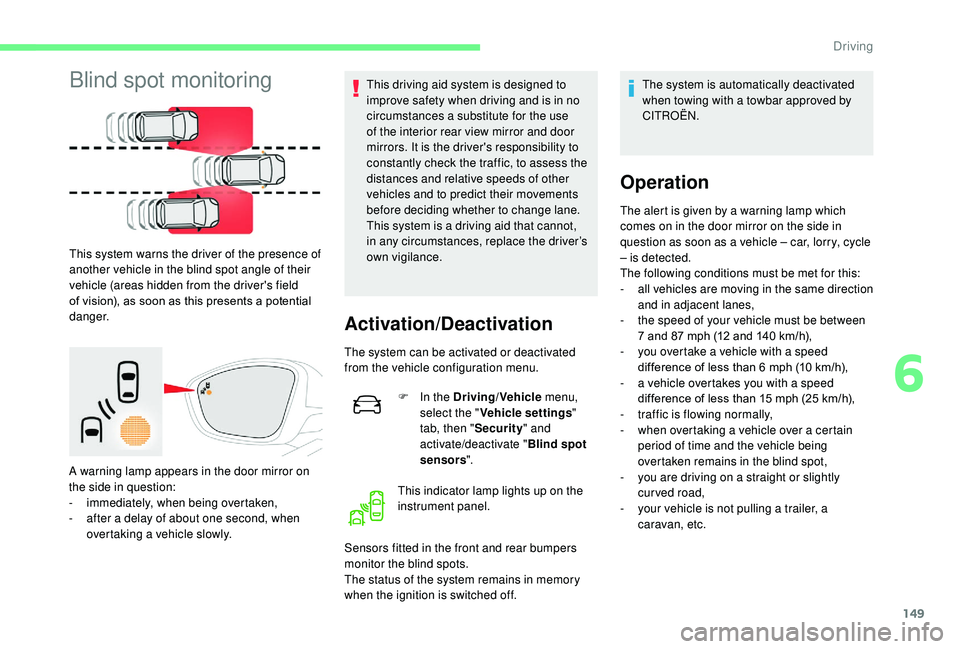
This system warns the driver of the presence of
another vehicle in the blind spot angle of their
vehicle (areas hidden from the driver's field
of vision), as soon as this presents a potential
danger.
A warning lamp appears in the door mirror on
the side in question:
-
i
mmediately, when being overtaken,
-
a
fter a delay of about one second, when
overtaking a vehicle slowly. This driving aid system is designed to
improve safety when driving and is in no
circumstances a substitute for the use
of the interior rear view mirror and door
mirrors. It is the driver's responsibility to
constantly check the traffic, to assess the
distances and relative speeds of other
vehicles and to predict their movements
before deciding whether to change lane.
This system is a driving aid that cannot,
in any circumstances, replace the driver’s
own vigilance.
Activation/Deactivation
The system can be activated or deactivated
from the vehicle configuration menu.
F
I
n the Driving/Vehicle menu,
select the " Vehicle settings "
tab, then " Security" and
activate/deactivate " Blind spot
sensors ".
This indicator lamp lights up on the
instrument panel.
Sensors fitted in the front and rear bumpers
monitor the blind spots.
The status of the system remains in memory
when the ignition is switched off. The system is automatically deactivated
when towing with a towbar approved by
CITROËN.
Operation
The alert is given by a warning lamp which
comes on in the door mirror on the side in
question as soon as a vehicle – car, lorry, cycle
– is detected.
The following conditions must be met for this:
-
a
ll vehicles are moving in the same direction
and in adjacent lanes,
-
t
he speed of your vehicle must be between
7 and 87
mph (12 and 140 km/h),
-
y
ou overtake a vehicle with a speed
difference of less than 6
mph (10 km/h),
-
a v
ehicle overtakes you with a speed
difference of less than 15
mph (25 km/h),
-
t
raffic is flowing normally,
-
w
hen overtaking a vehicle over a certain
period of time and the vehicle being
overtaken remains in the blind spot,
-
y
ou are driving on a straight or slightly
curved road,
-
y
our vehicle is not pulling a trailer, a
caravan, etc.
6
Driving
Page 152 of 308
150
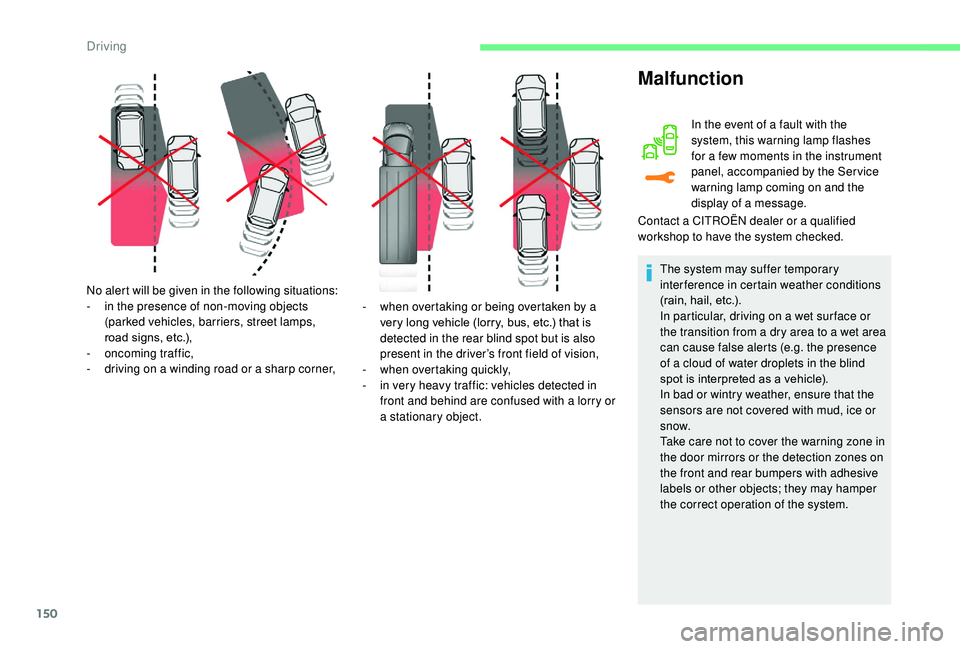
No alert will be given in the following situations:
- i n the presence of non-moving objects
(parked vehicles, barriers, street lamps,
road signs, etc.),
-
on
coming traffic,
-
d
riving on a winding road or a sharp corner, -
w
hen overtaking or being overtaken by a
very long vehicle (lorry, bus, etc.) that is
detected in the rear blind spot but is also
present in the driver’s front field of vision,
-
w
hen overtaking quickly,
-
i
n very heavy traffic: vehicles detected in
front and behind are confused with a lorry or
a stationary object.
Malfunction
In the event of a fault with the
system, this warning lamp flashes
for a few moments in the instrument
panel, accompanied by the Ser vice
warning lamp coming on and the
display of a message.
Contact a CITROËN dealer or a qualified
workshop to have the system checked.
The system may suffer temporary
interference in certain weather conditions
(rain, hail, etc.).
In particular, driving on a wet sur face or
the transition from a dry area to a wet area
can cause false alerts (e.g. the presence
of a cloud of water droplets in the blind
spot is interpreted as a vehicle).
In bad or wintry weather, ensure that the
sensors are not covered with mud, ice or
snow.
Take care not to cover the warning zone in
the door mirrors or the detection zones on
the front and rear bumpers with adhesive
labels or other objects; they may hamper
the correct operation of the system.
Driving
Page 154 of 308
152
The sound emitted by the speaker (front or
rear) indicates whether the obstacle is in
front or behind.
Deactivation/Activation
The system is activated and deactivated from
the vehicle configuration menu or via the button
on the dashboard (depending on version).
With/without audio system
F Press this button; the button indicator lamp lights up to
confirm deactivation of the
function.
With touch screen
F In the Driving/Vehicle menu,
select the " Driving functions "
tab, then " Parking sensors ".The system will be deactivated
automatically if a trailer is being towed or a
bicycle carrier is fitted on a towbar (vehicle
fitted with a towbar installed in line with
the manufacturer's recommendations).
Malfunction
If a fault occurs when shifting
to reverse, this warning lamp
comes on in the instrument panel,
accompanied by a message and an
audible signal.
Contact a CITROËN dealer or a qualified
workshop to have the system checked.
In bad or wintry weather, ensure that the
sensors are not covered by mud, ice or
snow.
When reverse gear is engaged, an audible
signal (long beep) indicates that the
sensors may be dirty.
Certain sound sources (motorcycle,
lorry, pneumatic drill, etc.) may trigger
the audible signals of the parking sensor
system. High pressure jet wash
When washing your vehicle, direct the
lance at least 30
cm away from the
sensors.
Top Rear Vision camera
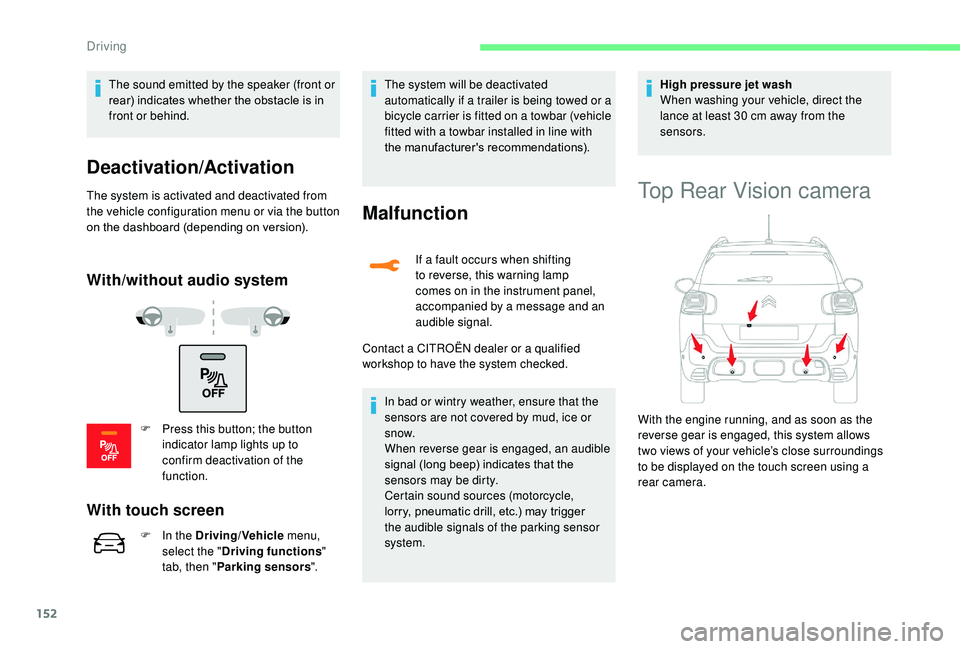
With the engine running, and as soon as the
reverse gear is engaged, this system allows
two views of your vehicle’s close surroundings
to be displayed on the touch screen using a
rear camera.
Driving
Page 162 of 308
160
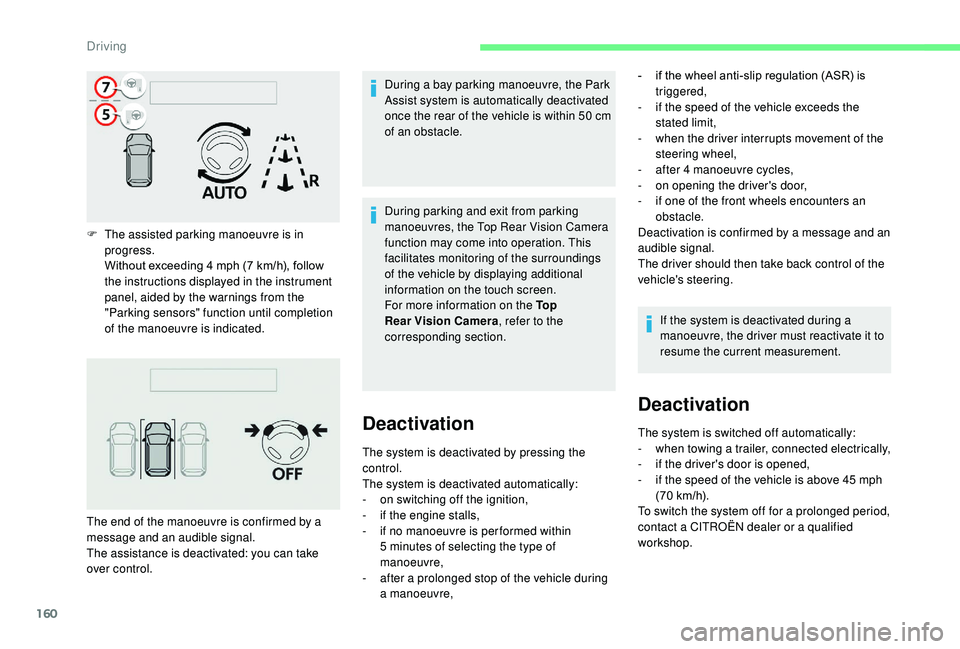
F The assisted parking manoeuvre is in progress.
Without exceeding 4
mph (7 km/h), follow
the instructions displayed in the instrument
panel, aided by the warnings from the
"Parking sensors" function until completion
of the manoeuvre is indicated. During a bay parking manoeuvre, the Park
Assist system is automatically deactivated
once the rear of the vehicle is within 50
cm
of an obstacle.
The end of the manoeuvre is confirmed by a
message and an audible signal.
The assistance is deactivated: you can take
over control. During parking and exit from parking
manoeuvres, the Top Rear Vision Camera
function may come into operation. This
facilitates monitoring of the surroundings
of the vehicle by displaying additional
information on the touch screen.
For more information on the To p
Rear Vision Camera
, refer to the
corresponding section.
Deactivation
The system is deactivated by pressing the
control.
The system is deactivated automatically:
-
o
n switching off the ignition,
-
i
f the engine stalls,
-
i
f no manoeuvre is per formed within
5
minutes of selecting the type of
manoeuvre,
-
a
fter a prolonged stop of the vehicle during
a manoeuvre, -
i
f the wheel anti-slip regulation (ASR) is
triggered,
-
i
f the speed of the vehicle exceeds the
stated limit,
-
w
hen the driver interrupts movement of the
steering wheel,
-
a
fter 4 manoeuvre cycles,
-
o
n opening the driver's door,
-
i
f one of the front wheels encounters an
obstacle.
Deactivation is confirmed by a message and an
audible signal.
The driver should then take back control of the
vehicle's steering.
If the system is deactivated during a
manoeuvre, the driver must reactivate it to
resume the current measurement.
Deactivation
The system is switched off automatically:
- w hen towing a trailer, connected electrically,
-
i
f the driver's door is opened,
-
i
f the speed of the vehicle is above 45 mph
(70
km/h).
To switch the system off for a prolonged period,
contact a CITROËN dealer or a qualified
workshop.
Driving
Page 163 of 308
161
Malfunctions
If a fault occurs, this warning lamp
comes on accompanied by a
message and an audible signal.
In the event of a fault with the
power steering, this warning lamp
flashes in the instrument panel,
accompanied by a message.
If the lateral distance between your vehicle
and the space is too great, the system may
not be able to measure the space.
Any object projecting beyond the dimensions
of the vehicle (e.g. a ladder on the roof or a
towball) will not be taken into account by the
Park Assist system during a manoeuvre.
In bad weather or in winter, ensure that
the sensors are not covered by road dirt,
ice or snow.
In the event of a fault, have the system
checked by a CITROËN dealer or a
qualified workshop.High pressure jet washing
When washing your vehicle, keep the lance at
least 12 inches (30
cm) away from the sensors.
Contact a CITROËN dealer or a qualified
workshop.
Under-inflation detection
System which automatically checks the
pressures of the tyres while driving.
The system monitors the pressure in all four
tyres, as soon as the vehicle is moving.
It compares the information given by the wheel
speed sensors with reference values, which
must be reinitialised ever y time the tyre
pressures are adjusted or a wheel changed .
The system triggers an alert as soon as it
detects a drop in the pressure of one or more
tyres. The under-inflation detection system does
not replace the need for vigilance on the
part of the driver.
This system does not avoid the need to
check the tyre pressures (including the
spare wheel) every month as well as
before a long journey.
Driving with under-inflated tyres worsens
road-holding, lengthens braking distances,
causes premature wear of the tyres,
particularly in adverse conditions (heavy
loads, high speeds, long journeys).
Driving with under-inflated tyres
increases fuel consumption.
The inflation pressures defined for your
vehicle can be found on the tyre pressure
label.
For more information on the
Identification markings , refer to the
corresponding section.
6
Driving
Page 168 of 308
166
Fuel tank
Tank capacity: approximately 45 litres.
I f you have put the wrong fuel in your
vehicle, you must have the fuel tank
drained and filled with the correct fuel
before star ting the engine.
Low fuel level
When the low fuel level in the
tank is reached, this warning lamp
comes on in the instrument panel,
accompanied by an audible warning
and a message.
When it first comes on, about 5
litres of fuel
remain in the tank.
This warning lamp will come on every time
the ignition is switched on, accompanied
by a message and an audible signal, until
a sufficient addition of fuel is made. This
audible signal and message are repeated with
increasing frequency as the fuel level drops
and approaches " 0".
Refuel as soon as possible to avoid running
out.
For more information on Running out of
fuel (Diesel) , refer to the corresponding
section.
Refilling
A self-adhesive label on the inner face of the
filler flap reminds you of the type of fuel to use,
depending on your engine.
Additions of fuel must be of at least 5
litres, in
order to be registered by the fuel gauge.
Opening the filler cap may create a noise
caused by an inrush of air. This vacuum is
entirely normal, resulting from the sealing of the
fuel system.
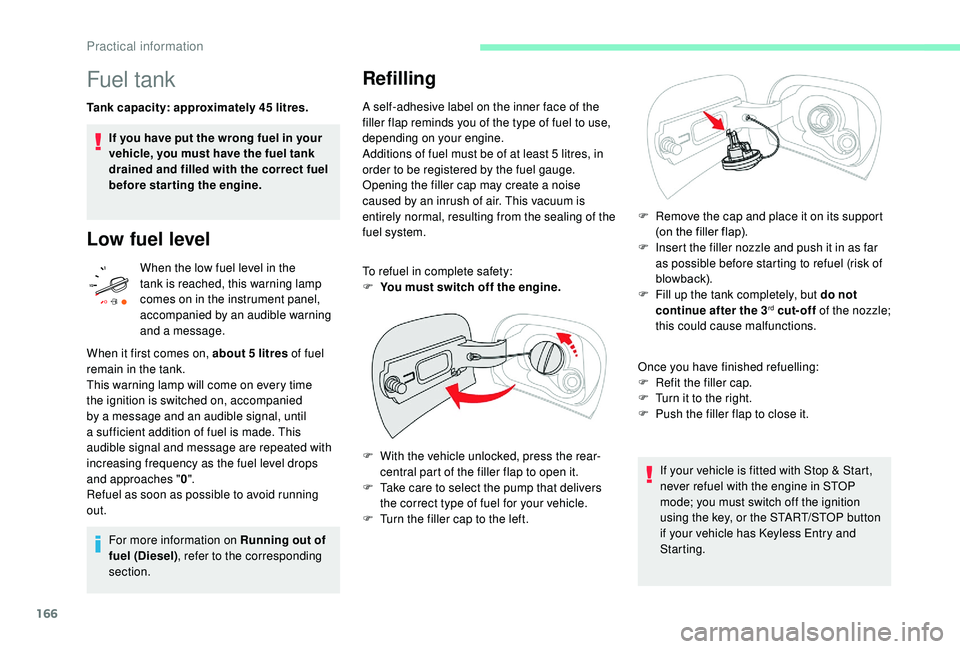
To refuel in complete safety:
F
Y
ou must switch off the engine.
F
W
ith the vehicle unlocked, press the rear-
central part of the filler flap to open it.
F
T
ake care to select the pump that delivers
the correct type of fuel for your vehicle.
F
T
urn the filler cap to the left. F
R
emove the cap and place it on its support
(on the filler flap).
F
I
nsert the filler nozzle and push it in as far
as possible before starting to refuel (risk of
blowback).
F
F
ill up the tank completely, but do not
continue after the 3
rd cut-off of the nozzle;
this could cause malfunctions.
Once you have finished refuelling:
F
R
efit the filler cap.
F
T
urn it to the right.
F
P
ush the filler flap to close it.
If your vehicle is fitted with Stop & Start,
never refuel with the engine in STOP
mode; you must switch off the ignition
using the key, or the START/STOP button
if your vehicle has
K
eyless Entry and
Starting.
Practical information
Page 174 of 308
172
Load reduction mode
System which manages the use of certain
functions according to the level of charge
remaining in the battery.
When the vehicle is being driven, the load
reduction function temporarily deactivates
certain functions, such as air conditioning,
heated rear screen, etc.
The deactivated functions are reactivated
automatically as soon as conditions permit.
Energy economy mode
System which manages the duration of use of
certain functions to conser ve a sufficient level
of charge in the battery.
After the engine has stopped, you can still use
functions such as the audio and telematics
system, windscreen wipers, dipped beam
headlamps,
courtesy lamps, etc. for a
maximum combined duration of about forty
minutes.
Switching to this mode
A message appears in the instrument panel
screen indicating that the vehicle has switched
to economy mode and the active functions are
put on standby.
If a telephone call is being made at this
time, it will be maintained for around
10
minutes with the hands-free kit of your
audio system.
Exiting the mode
These functions will be automatically restored
the next time the vehicle is used.
In order to restore the use of these functions
immediately, start the engine and let it run:
-
f
or less than ten minutes, to use the
equipment for approximately five minutes, A flat battery prevents the engine from
starting.
For more information on the 12
V batter y
,
refer to the corresponding section.
Obser ve the maximum authorised towable
weight, indicated on your vehicle's
registration certificate, the manufacturer's
label as well as in the Technical data
section of this guide.
Complying with the maximum
authorised nose weight (towball)
also includes the use of accessories
(bicycle carriers, tow boxes, etc.).
Obser ve the legislation in force in the
country in which you are driving. -
f
or more than ten minutes, to use the
equipment for up to approximately thirty
minutes.
Let the engine run for the duration specified to
ensure that the battery charge is sufficient.
Do not repeatedly and continuously restart the
engine in order to charge the battery.
Practical information
Page 178 of 308
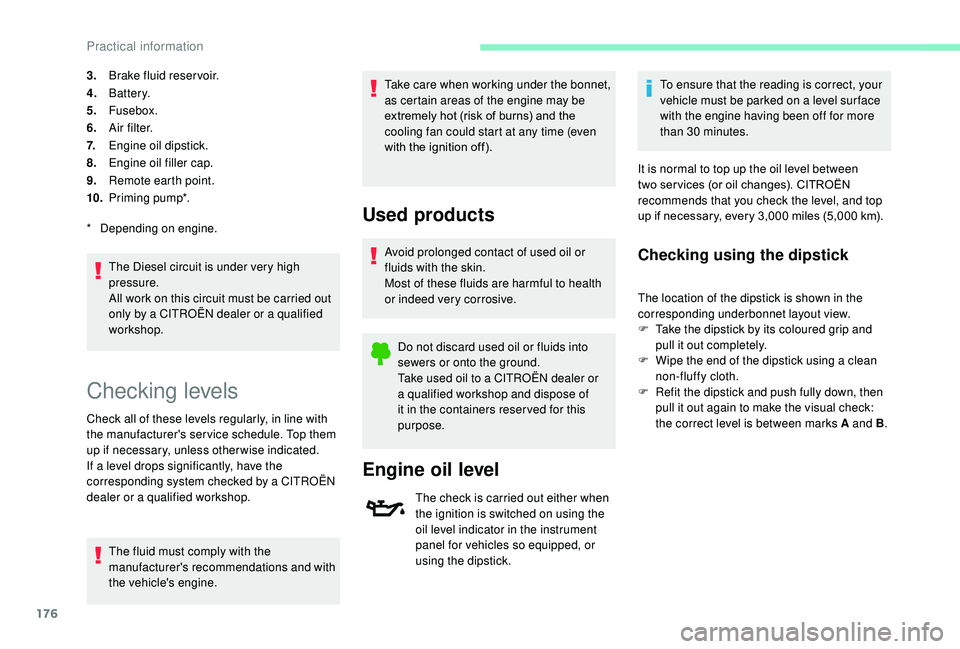
176
3.Brake fluid reser voir.
4. Battery.
5. Fusebox.
6. A i r f i l t e r.
7. Engine oil dipstick.
8. Engine oil filler cap.
9. Remote earth point.
10. Priming pump*.
The Diesel circuit is under very high
pressure.
All work on this circuit must be carried out
only by a CITROËN dealer or a qualified
workshop.
*
D
epending on engine.
Checking levels
Check all of these levels regularly, in line with
the manufacturer's service schedule. Top them
up if necessary, unless other wise indicated.
If a level drops significantly, have the
corresponding system checked by a CITROËN
dealer or a qualified workshop. The fluid must comply with the
manufacturer's recommendations and with
the vehicle's engine. Take care when working under the bonnet,
as certain areas of the engine may be
extremely hot (risk of burns) and the
cooling fan could start at any time (even
with the ignition off).
Used products
Avoid prolonged contact of used oil or
fluids with the skin.
Most of these fluids are harmful to health
or indeed very corrosive.
Do not discard used oil or fluids into
sewers or onto the ground.
Take used oil to a CITROËN dealer or
a qualified workshop and dispose of
it in the containers reser ved for this
purpose.
Engine oil level
The check is carried out either when
the ignition is switched on using the
oil level indicator in the instrument
panel for vehicles so equipped, or
using the dipstick. To ensure that the reading is correct, your
vehicle must be parked on a level sur face
with the engine having been off for more
than 30
minutes.
It is normal to top up the oil level between
two ser vices (or oil changes). CITROËN
recommends that you check the level, and top
up if necessary, every 3,000 miles (5,000 km).
Checking using the dipstick
The location of the dipstick is shown in the
corresponding underbonnet layout view.
F
T
ake the dipstick by its coloured grip and
pull it out completely.
F
W
ipe the end of the dipstick using a clean
non-fluffy cloth.
F
R
efit the dipstick and push fully down, then
pull it out again to make the visual check:
the correct level is between marks A and B .
Practical information
Page 179 of 308
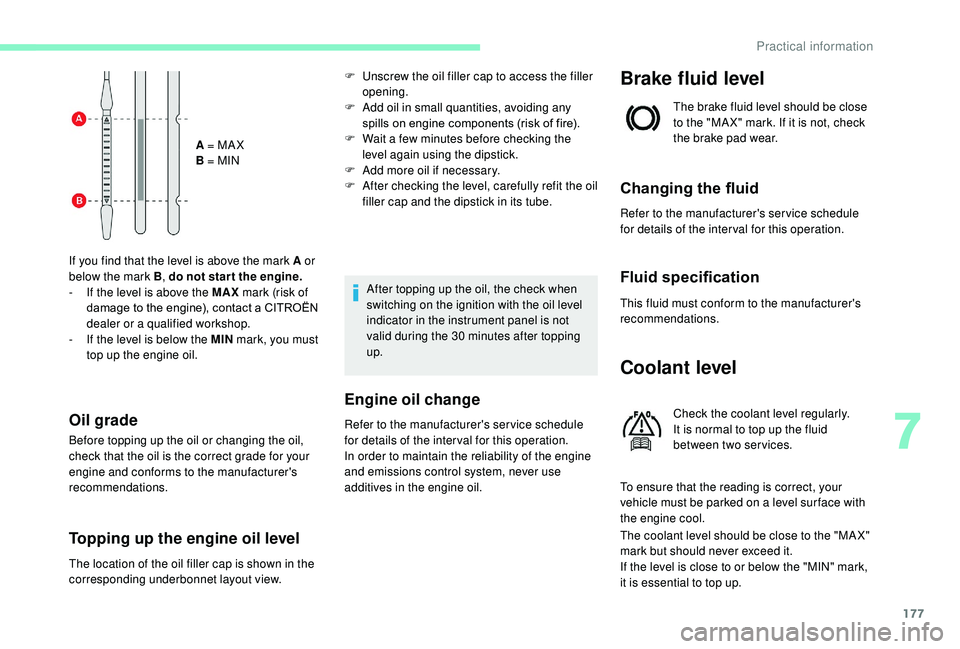
177
A = MA X
B = MIN
If you find that the level is above the mark A or
below the mark B , do not star t the engine.
-
I
f the level is above the MAX mark (risk of
damage to the engine), contact a CITROËN
dealer or a qualified workshop.
-
I
f the level is below the MIN mark, you must
top up the engine oil.
Oil grade
Before topping up the oil or changing the oil,
check that the oil is the correct grade for your
engine and conforms to the manufacturer's
recommendations.
Topping up the engine oil level
F Unscrew the oil filler cap to access the filler opening.
F
A
dd oil in small quantities, avoiding any
spills on engine components (risk of fire).
F
W
ait a few minutes before checking the
level again using the dipstick.
F
A
dd more oil if necessary.
F
A
fter checking the level, carefully refit the oil
filler cap and the dipstick in its tube.
After topping up the oil, the check when
switching on the ignition with the oil level
indicator in the instrument panel is not
valid during the 30
minutes after topping
up.
Engine oil change
Refer to the manufacturer's service schedule
for details of the inter val for this operation.
In order to maintain the reliability of the engine
and emissions control system, never use
additives in the engine oil.
Brake fluid level
The brake fluid level should be close
to the "MA X" mark. If it is not, check
the brake pad wear.
Changing the fluid
Refer to the manufacturer's service schedule
for details of the inter val for this operation.
Fluid specification
This fluid must conform to the manufacturer's
recommendations.
Coolant level
Check the coolant level regularly.
It is normal to top up the fluid
between two services.
To ensure that the reading is correct, your
vehicle must be parked on a level sur face with
the engine cool.
The coolant level should be close to the "MA X"
mark but should never exceed it.
If the level is close to or below the "MIN" mark,
it is essential to top up.
The location of the oil filler cap is shown in the
corresponding underbonnet layout view.
7
Practical information