instrument panel CITROEN C4 2007 Owner's Manual
[x] Cancel search | Manufacturer: CITROEN, Model Year: 2007, Model line: C4, Model: CITROEN C4 2007Pages: 279, PDF Size: 12.3 MB
Page 121 of 279
116
IX
D R I V I N G
SPEED LIMITER
System which prevents the vehi-
cle from exceeding the speed pro-
grammed by the driver.
Once the limit speed has been
reached, the accelerator pedal no
longer has any effect.
The speed limiter is switched
on manually: a speed of at least
20 mph (around 30 km/h) must be
programmed.
The speed limiter cannot, in any cir-
cumstances, take the place of the
observance of speed limits or of the
vigilance and responsibility of the
driver.
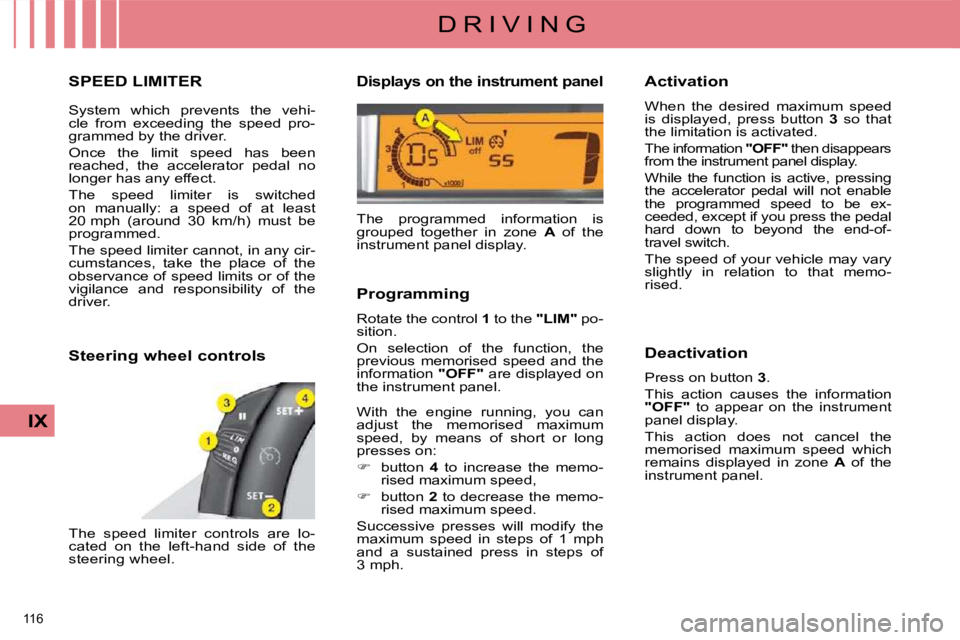
Steering wheel controls
The speed limiter controls are lo-
cated on the left-hand side of the
steering wheel.
Displays on the instrument panel
The programmed information is
grouped together in zone A of the
instrument panel display.
Programming
Rotate the control 1 to the "LIM" po-
sition.
On selection of the function, the
previous memorised speed and the
information "OFF" are displayed on
the instrument panel.
With the engine running, you can
adjust the memorised maximum
speed, by means of short or long
presses on:
button 4 to increase the memo-
rised maximum speed,
button 2 to decrease the memo-
rised maximum speed.
Successive presses will modify the
maximum speed in steps of 1 mph
and a sustained press in steps of
3 mph. Activation
When the desired maximum speed
is displayed, press button
3 so that
the limitation is activated.
The information "OFF" then disappears from the instrument panel display.
While the function is active, pressing
the accelerator pedal will not enable
the programmed speed to be ex-
ceeded, except if you press the pedal
hard down to beyond the end-of-
travel switch.
The speed of your vehicle may vary
slightly in relation to that memo-
rised.
Deactivation
Press on button 3 .
This action causes the information
"OFF" to appear on the instrument
panel display.
This action does not cancel the
memorised maximum speed which
remains displayed in zone A of the
instrument panel.
Page 123 of 279
118
IX
D R I V I N G
CRUISE CONTROL
System which automatically main-
tains the vehicle speed programmed
by the driver, without any action on
the accelerator pedal.
The cruise control is switched on
manually: the vehicle speed must be
at least 25 mph (approx. 40 km/h)
and you must engage:
- fourth gear on a manual gearbox,
- second gear, in sequential mode, on an electronic gearbox or
automatic gearbox,
- position A on an electronic
gearbox or D on an automatic
gearbox.
The cruise control cannot, in any
circumstances, take the place of the
observance of speed limits or of the
vigilance and responsibility of the
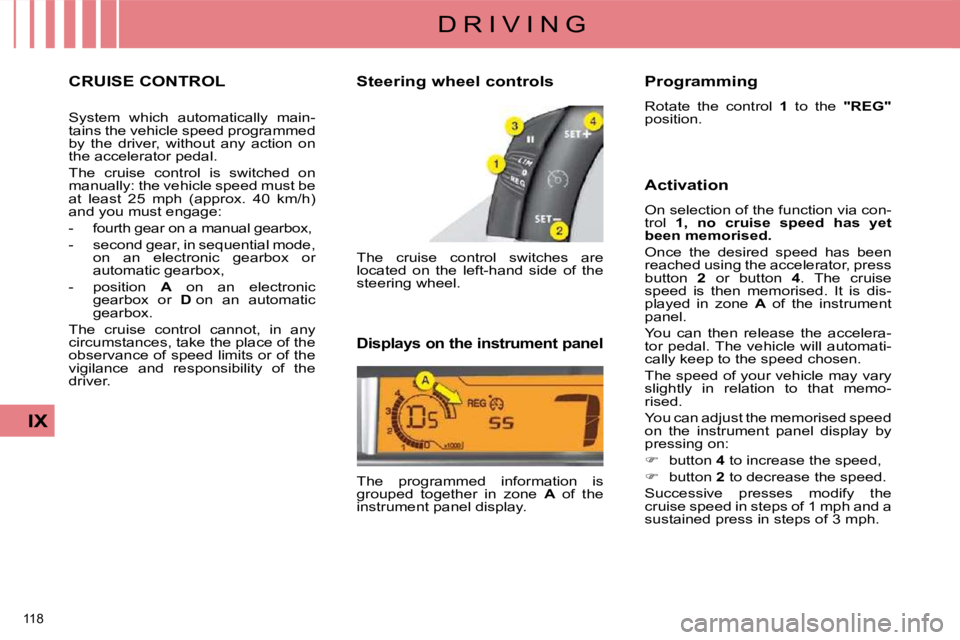
driver. Steering wheel controls
The cruise control switches are
located on the left-hand side of the
steering wheel.
Displays on the instrument panel
The programmed information is
grouped together in zone
A of the
instrument panel display. Programming
Rotate the control
1 to the "REG"
position.
Activation
On selection of the function via con-
trol 1, no cruise speed has yet
been memorised.
Once the desired speed has been
reached using the accelerator, press
button 2 or button 4 . The cruise
speed is then memorised. It is dis-
played in zone A of the instrument
panel.
You can then release the accelera-
tor pedal. The vehicle will automati-
cally keep to the speed chosen.
The speed of your vehicle may vary
slightly in relation to that memo-
rised.
You can adjust the memorised speed
on the instrument panel display by
pressing on:
button 4 to increase the speed,
button 2 to decrease the speed.
Successive presses modify the
cruise speed in steps of 1 mph and a
sustained press in steps of 3 mph.
Page 124 of 279
119
IX
D R I V I N G
Deactivation
Either by pressing on the brake
pedal or on the clutch pedal.
Or by pressing button 3 .
Or if either the ESP or the ASR
system is active.
The cruise control is not active if the
gear lever is in neutral.
These actions cause the information
"OFF" to appear on the instrument
panel display.
These actions do not cancel the
cruise speed which remains dis-
played in the instrument panel.
Reactivation
By recall of the memorised
speed
After a disengagement, press on button 3 . Your vehicle automati-
cally returns to the memorised
cruise speed which is displayed
in zone A .
If the memorised cruise speed is higher than the current speed,
the vehicle will accelerate to
reach the former.
By selection of the current
speed
Press on button 2 or 4 once the
desired speed has been reached.
The information "OFF" will then
disappear from the instrument
panel display. Overriding the programmed
speed
During the operation of cruise con-
trol, it is always possible to use the
accelerator to go faster than the
cruise speed (for example to over-
take another vehicle). The speed
displayed in zone
A fl ashes.
You have only to release the acce-
lerator pedal to return to the cruise
speed.
Return to normal driving
By an action on the control 1 from
position "REG" to position 0 .
By the engine stopping.
The cruise speed previously chosen
is no longer memorised. Operating fault
If there is a malfunction, a message
will display accompanied by an
audible signal and lighting of the
service warning lamp.
Have it checked by a CITROËN
dealer.
If during the operation of cruise
control, the system is unable to
keep within the memorised speed
(for example on a steep descent),
then the speed fl ashes. Adapt your
speed as necessary. Cruise control should only be used
when the driving conditions allow
you to drive at a constant speed.
Do not use it in heavy traffi c, or on
dangerous or slippery roads.
The driver must remain attentive
and in full control of his vehicle.
You are recommended to keep your
feet within range of the pedals.
To avoid any risk of interfering with
the pedals:
- check that the fl oor mat is cor-
rectly positioned,
- never use more than one fl oor mat.
Page 127 of 279

122
D R I V I N G
In bad weather or in winter, ensure
that the sensors are not covered
with mud, ice or snow. When re-
verse gear is engaged, an audible
signal (long beep) indicates that
the sensors may be dirty.
When the vehicle is being driven
at a speed below approximately
6 mph (10 km/h), certain sourc-
es of noise (motorcycles, lorries,
pneumatic drills, ...) may trigger the
reversing audible signal.
Reactivation
Press button A again, the warning
lamp switches off, the system is
reactivated.
Deactivation Operating fault
If an operating fault occurs, this warn-
ing lamp is displayed on the instrument
panel and/or a message appears on
the multifunction screen, accompa-
nied by an audible signal (short beep),
when reverse gear is engaged.
Consult a CITROËN dealer.
Press button A , the warning lamp
comes on, the system is fully de-
activated.
The system will be deactivated au-
tomatically when a trailer is being
towed or when a bicycle carrier is
fi tted (vehicle fi tted with a towbar
or bicycle carrier recommended by
CITROËN).
Page 133 of 279
129
X
C H E C K S
CHECKING LEVELS
Check all of these levels regularly
and top them up if necessary, unless
otherwise indicated.
If a level drops signifi cantly, have the
corresponding system checked by a
CITROËN dealer.
Oil level
Oil change
Refer to the Maintenance and
Warranty Guide for details of the in-
terval for this operation. Oil specifi cation
The oil must correspond to your engine
and conform to the manufacturer's
recommendations.
Brake fluid level
Fluid change
Refer to the Maintenance and
Warranty Guide for details of the in-
terval for this operation.
This fl uid must be changed regu-
larly. Fluid which has been used for
too long may cause a loss of braking
effi ciency.
Fluid specifi cation
The brake fl uid must conform to the
manufacturer's recommendations and
fulfi l the DOT4 standards.
Coolant level
Draining the system
The coolant does not have to be
changed.
Fluid specifi cation
The coolant must conform to the
manufacturer's recommendations.
The reading will only be
correct if the vehicle is on
level ground and the engine
has been off for more than
15 minutes.
The check is carried out either when
the ignition is switched on using the
oil level indicator on the instrument
panel, or using the dipstick.
Between two oil changes, the con-
sumption should not exceed 0.5 litre
per 600 miles (approx. 1 000 km).
Check this level also between each
scheduled service and before long
journeys. The brake fl uid level should
be close to the "MAX" mark.
If it is not, check the brake
pad wear.
The coolant level should be
close to the "MAX" mark but
should never exceed it.
When the engine is warm, the tem-
perature of the coolant is regulated
by the fan. This can operate with the
ignition off.
On vehicles which are fi tted with
a particle emission fi lter, the fan
may operate after the vehicle has
been switched off, even if the en-
gine is cold.
In addition, as the cooling system is
pressurised, wait at least one hour
after switching off the engine before
carrying out any work.
To avoid any risk of scalding, unscrew
the cap by two turns to allow the pres-
sure to drop. When the pressure has
dropped, remove the cap and top up
the level.
In order to maintain the re-
liability of the engine and
emission control system,
the use of additives in the engine
oil is prohibited.
Page 153 of 279
148
XI
P R A C T I C A L I N F O R M A T I O N
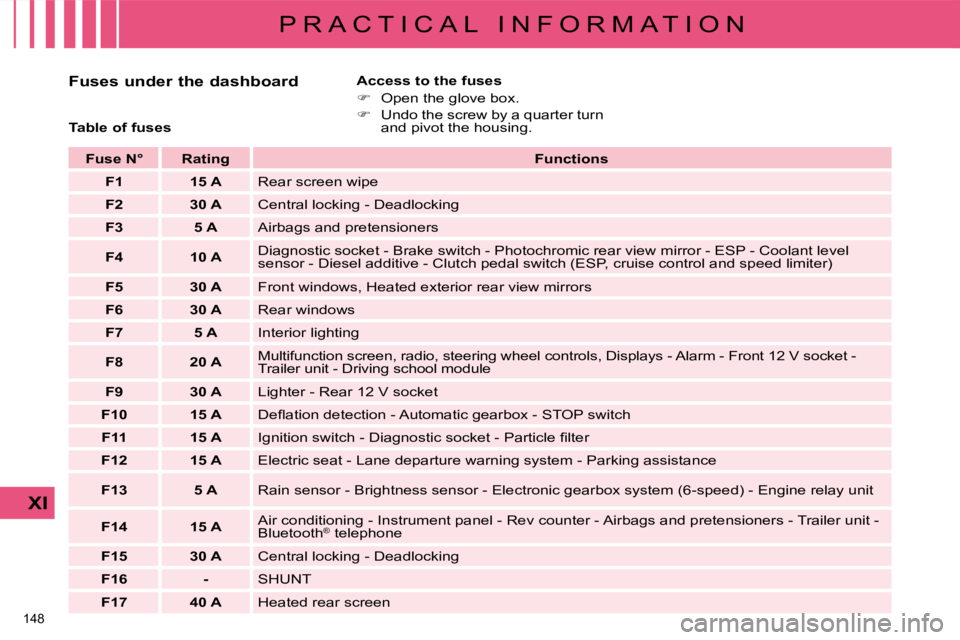
Fuses under the dashboard Access to the fuses
Open the glove box.
Undo the screw by a quarter turn
and pivot the housing.
Table of fuses
Fuse N° Rating
Functions
F1 15 A Rear screen wipe
F2 30 A Central locking - Deadlocking
F3 5 A Airbags and pretensioners
F4 10 A Diagnostic socket - Brake switch - Photochromic rear view mirror - ESP - Cool
ant level
sensor - Diesel additive - Clutch pedal switch (ESP, cruise control a nd speed limiter)
F5 30 A Front windows, Heated exterior rear view mirrors
F6 30 A Rear windows
F7 5 A Interior lighting
F8 20 A Multifunction screen, radio, steering wheel contro
ls, Displays - Alarm - Front 12 V socket -
Trailer unit - Driving school module
F9 30 A Lighter - Rear 12 V socket
F10 15 A Defl ation detection - Automatic gearbox - STOP switch
F11 15 A Ignition switch - Diagnostic socket - Particle fi lter
F12 15 A Electric seat - Lane departure warning system - Parking assistance
F13 5 A Rain sensor - Brightness sensor - Electronic gearbox system (6-speed) - Engin e relay unit
F14 15 A Air conditioning - Instrument panel - Rev counter - Airbags and p
retensioners - Trailer unit -
Bluetooth ®
telephone
F15 30 A Central locking - Deadlocking
F16 - SHUNT
F17 40 A Heated rear screen
Page 269 of 279
64
IV
A C C E S S
Reinitialisation
If a window does not rise automatically,
its operation must be reinitialised:
pull the control until the window
stops,
release the control and pull it
again until the window closes
fully,
continue to hold the control for
approximately one second after
the window has closed,
press the control to lower the
window automatically to the low
position,
when the window has reached
the low position, press the con-
trol again for approximately
one second.
The safety anti-pinch function is not
operational during these operations.
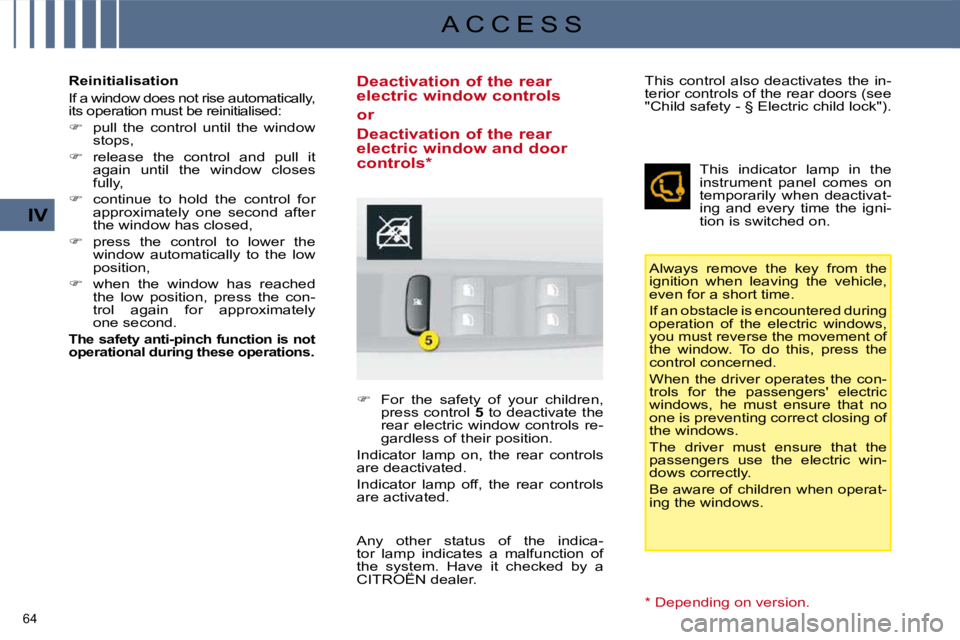
Deactivation of the rear
electric window controls
or
Deactivation of the rear
electric window and door
controls *
For the safety of your children,
press control 5 to deactivate the
rear electric window controls re-
gardless of their position.
Indicator lamp on, the rear controls
are deactivated.
Indicator lamp off, the rear controls
are activated. Always remove the key from the
ignition when leaving the vehicle,
even for a short time.
If an obstacle is encountered during
operation of the electric windows,
you must reverse the movement of
the window. To do this, press the
control concerned.
When the driver operates the con-
trols for the passengers' electric
windows, he must ensure that no
one is preventing correct closing of
the windows.
The driver must ensure that the
passengers use the electric win-
dows correctly.
Be aware of children when operat-
ing the windows.
This control also deactivates the in-
terior controls of the rear doors (see
"Child safety - § Electric child lock").
This indicator lamp in the
instrument panel comes on
temporarily when deactivat-
ing and every time the igni-
tion is switched on.
Any other status of the indica-
tor lamp indicates a malfunction of
the system. Have it checked by a
CITROËN dealer.
* Depending on version.
Page 271 of 279

122
IX
D R I V I N G In bad weather or in winter, ensure
that the sensors are not covered
with mud, ice or snow. When re-
verse gear is engaged, an audible
signal (long beep) indicates that
the sensors may be dirty.
When the vehicle is being driven
at a speed below approximately
6 mph (10 km/h), certain sour-
ces of noise (motorcycles, lorries,
pneumatic drills, ...) may trigger the
audible reversing signal.
The system will be deactivated
automatically when a trailer is being
towed or when a bicycle carrier is
fi tted (vehicle fi tted with a towbar
or bicycle carrier recommended by
CITROËN).
Deactivation
Depending on version:
Press button A , the warning lamp
comes on, the system is comple-
tely deactivated.
or
Deactivate rear parking assis-
tance in the vehicle confi guration
menu.
Reactivation
Depending on version:
Press button A again, the warning
lamp switches off, the system is
activate.
or
In the vehicle confi guration menu,
activate rear parking assistance.
Rear parking assistance Front and rear parking
assistance
Deactivation
Press button A , the warning lamp
comes on, the system is comple-
tely deactivated.
The system will be deactivated
automatically when a trailer is being
towed or when a bicycle carrier is
fi tted (vehicle fi tted with a towbar
or bicycle carrier recommended by
CITROËN).
Reactivation
Press button A again, the war-
ning lamp goes off, the system is
active. OPERATING FAULT
If an operating fault occurs, this
warning lamp is displayed on the
instrument panel and/or a message
appears on the multifunction screen,
accompanied by an audible signal
(short beep), when reverse gear is
engaged.
Consult a CITROËN dealer.