service CITROEN C4 2007 Owner's Manual
[x] Cancel search | Manufacturer: CITROEN, Model Year: 2007, Model line: C4, Model: CITROEN C4 2007Pages: 279, PDF Size: 12.3 MB
Page 135 of 279
131
X
C H E C K S
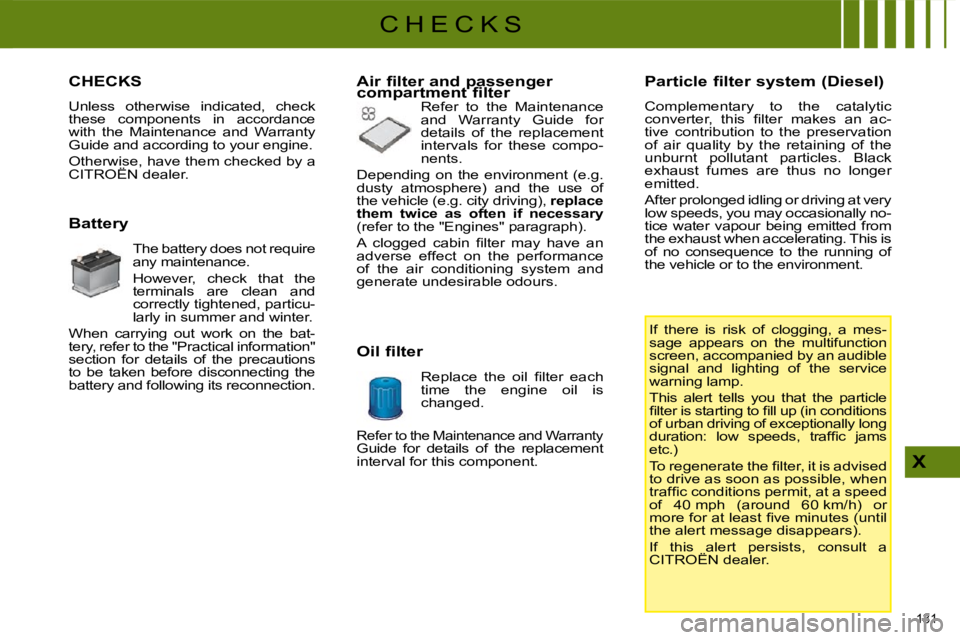
CHECKS
Unless otherwise indicated, check
these components in accordance
with the Maintenance and Warranty
Guide and according to your engine.
Otherwise, have them checked by a
CITROËN dealer.
Battery The battery does not require
any maintenance.
However, check that the
terminals are clean and
correctly tightened, particu-
larly in summer and winter.
When carrying out work on the bat-
tery, refer to the "Practical information"
section for details of the precautions
to be taken before disconnecting the
battery and following its reconnection. Air filter and passenger
compartment filter
Refer to the Maintenance
and Warranty Guide for
details of the replacement
intervals for these compo-
nents.
Depending on the environment (e.g.
dusty atmosphere) and the use of
the vehicle (e.g. city driving), replace
them twice as often if necessary
(refer to the "Engines" paragraph).
A clogged cabin fi lter may have an
adverse effect on the performance
of the air conditioning system and
generate undesirable odours.
Oil filter
Replace the oil fi lter each
time the engine oil is
changed. Particle filter system (Diesel)
Complementary to the catalytic
converter, this fi lter makes an ac-
tive contribution to the preservation
of air quality by the retaining of the
unburnt pollutant particles. Black
exhaust fumes are thus no longer
emitted.
After prolonged idling or driving at very
low speeds, you may occasionally no-
tice water vapour being emitted from
the exhaust when accelerating. This is
of no consequence to the running of
the vehicle or to the environment.
If there is risk of clogging, a mes-
sage appears on the multifunction
screen, accompanied by an audible
signal and lighting of the service
warning lamp.
This alert tells you that the particle
fi lter is starting to fi ll up (in conditions
of urban driving of exceptionally long
duration: low speeds, traffi c jams
etc.)
To regenerate the fi lter, it is advised
to drive as soon as possible, when
traffi c conditions permit, at a speed
of 40 mph (around 60 km/h) or
more for at least fi ve minutes (until
the alert message disappears).
If this alert persists, consult a
CITROËN dealer.
Refer to the Maintenance and Warranty Guide for details of the replacement
interval for this component.
Page 136 of 279
132
X
C H E C K S
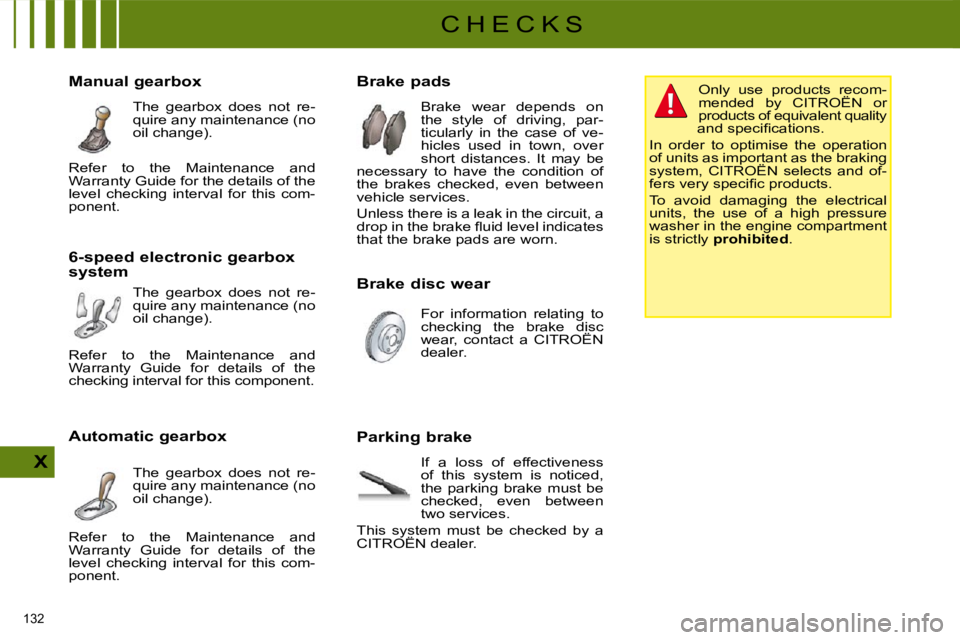
Brake pads Brake wear depends on
the style of driving, par-
ticularly in the case of ve-
hicles used in town, over
short distances. It may be
necessary to have the condition of
the brakes checked, even between
vehicle services.
Unless there is a leak in the circuit, a
drop in the brake fl uid level indicates
that the brake pads are worn.
Manual gearbox
The gearbox does not re-
quire any maintenance (no
oil change).
6-speed electronic gearbox
system The gearbox does not re-
quire any maintenance (no
oil change).
Automatic gearbox The gearbox does not re-
quire any maintenance (no
oil change). Brake disc wear
For information relating to
checking the brake disc
wear, contact a CITROËN
dealer.
Parking brake If a loss of effectiveness
of this system is noticed,
the parking brake must be
checked, even between
two services.
This system must be checked by a
CITROËN dealer. Only use products recom-
mended by CITROËN or
products of equivalent quality
and specifi cations.
In order to optimise the operation
of units as important as the braking
system, CITROËN selects and of-
fers very specifi c products.
To avoid damaging the electrical
units, the use of a high pressure
washer in the engine compartment
is strictly prohibited .
Refer to the Maintenance and
Warranty Guide for the details of the
level checking interval for this com-
ponent.
Refer to the Maintenance and
Warranty Guide for details of the
checking interval for this component.
Refer to the Maintenance and
Warranty Guide for details of the
level checking interval for this com-
ponent.
Page 189 of 279
182
11
66
22
77
44
99
55
1010
33
88
05
Saisir code authentiication01OKDel23456789_
BLUETOOTH FUNCTIONS
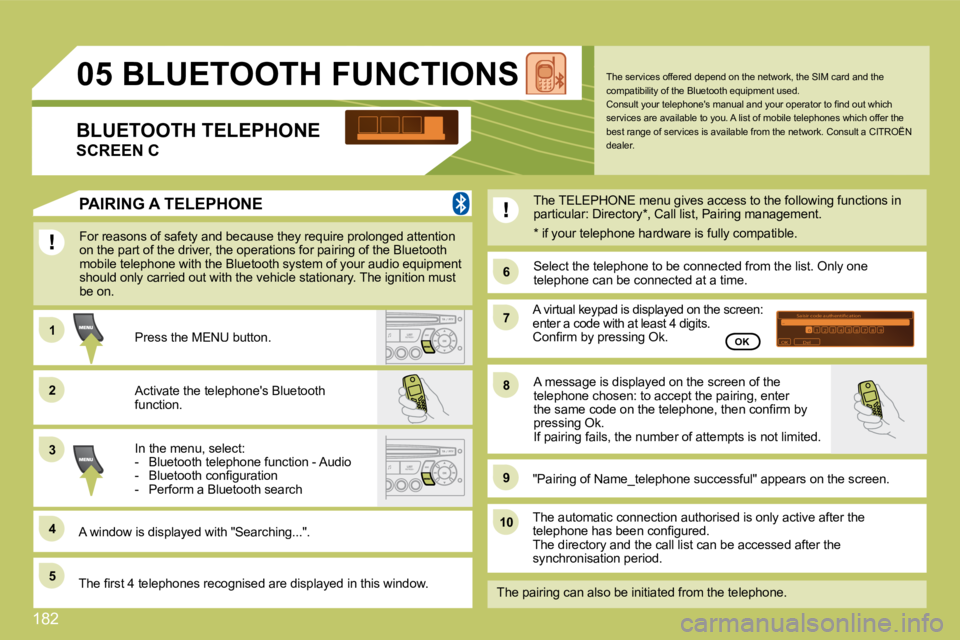
For reasons of safety and because they require prolonged attention on the part of the driver, the operations for pairing of the Bluetooth mobile telephone with the Bluetooth system of your audio equipment should only carried out with the vehicle stationary. The ignition must be on.
Activate the telephone's Bluetooth function.
A window is displayed with "Searching...".
Press the MENU button.
In the menu, select: - Bluetooth telephone function - Audio - Bluetooth confi guration - Perform a Bluetooth search
The services offered depend on the network, the SIM card and the compatibility of the Bluetooth equipment used. Consult your telephone's manual and your operator to fi nd out which services are available to you. A list of mobile telephones which offer the best range of services is available from the networ k. Consult a CITROËN dealer. BLUETOOTH TELEPHONE
SCREEN C
The TELEPHONE menu gives access to the following f unctions in particular: Directory * , Call list, Pairing management.
The fi rst 4 telephones recognised are displayed in this window.
"Pairing of Name_telephone successful" appears on the screen.
The automatic connection authorised is only active after the telephone has been confi gured. The directory and the call list can be accessed after the synchronisation period.
OK
PAIRING A TELEPHONE
The pairing can also be initiated from the telepho ne.
A virtual keypad is displayed on the screen: enter a code with at least 4 digits. Confi rm by pressing Ok.
Select the telephone to be connected from the list . Only one telephone can be connected at a time.
A message is displayed on the screen of the telephone chosen: to accept the pairing, enter the same code on the telephone, then confi rm by pressing Ok. If pairing fails, the number of attempts is not limited.
* if your telephone hardware is fully compatibl e.
Page 198 of 279
2
2
8
16
18 17711 14 3
5 9 4
15 12
13
61
10
01
FIRST STEPS
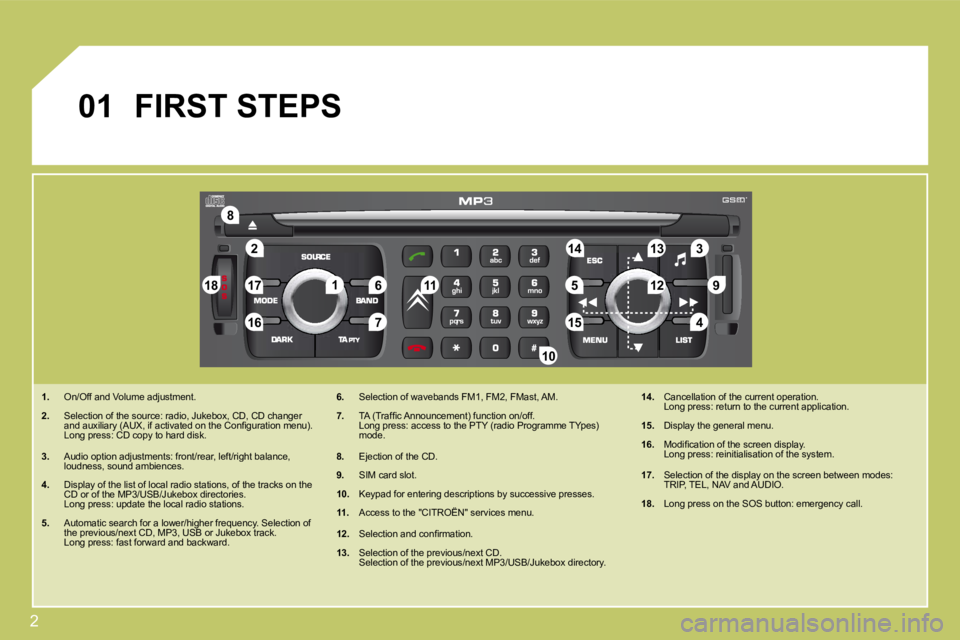
1. On/Off and Volume adjustment.
2. Selection of the source: radio, Jukebox, CD, CD cha
nger and auxiliary (AUX, if activated on the Confi guration menu). Long press: CD copy to hard disk.
3. Audio option adjustments: front/rear, left/right b alance, loudness, sound ambiences.
4. Display of the list of local radio stations, of the tracks on the CD or of the MP3/USB/Jukebox directories. Long press: update the local radio stations.
5. Automatic search for a lower/higher frequency. Sele ction of the previous/next CD, MP3, USB or Jukebox track. Long press: fast forward and backward.
6. Selection of wavebands FM1, FM2, FMast, AM.
7. TA (Traffi c Announcement) function on/off. Long press: access to the PTY (radio Programme TYp es) mode.
8. Ejection of the CD.
9. SIM card slot.
10. Keypad for entering descriptions by successive presses.
11. Access to the "CITROËN" services menu.
12. Selection and confi rmation.
13. Selection of the previous/next CD. Selection of the previous/next MP3/USB/Jukebox dire ctory.
14. Cancellation of the current operation. Long press: return to the current application.
15. Display the general menu.
16. Modifi cation of the screen display. Long press: reinitialisation of the system.
17. Selection of the display on the screen between modes: TRIP, TEL, NAV and AUDIO.
18. Long press on the SOS button: emergency call.
Page 207 of 279
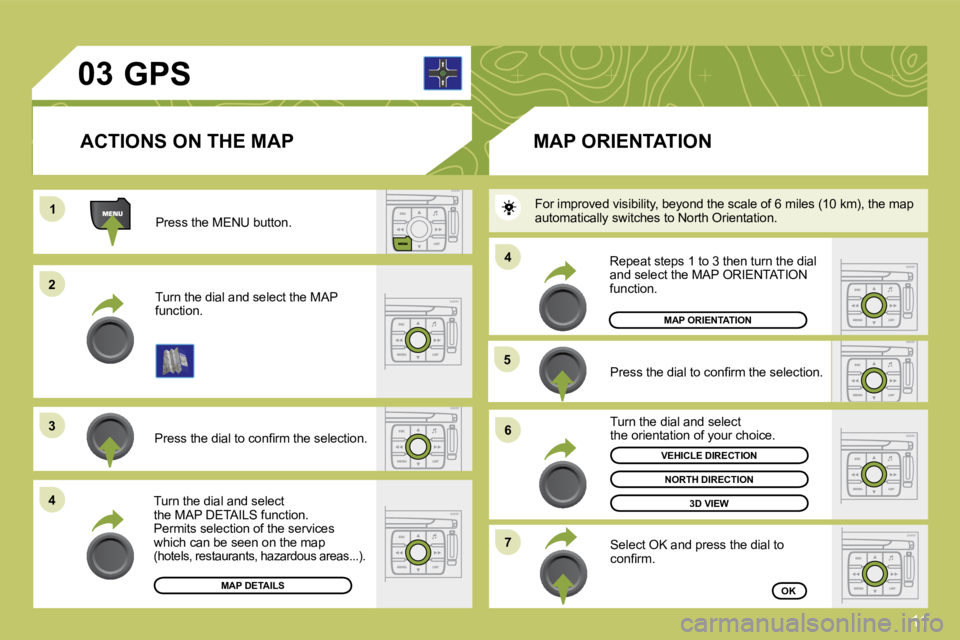
11
03
11
22
33
44
55
66
77
44
Press the MENU button.
Turn the dial and select the MAP function.
Press the dial to confi rm the selection.
Turn the dial and select the MAP DETAILS function. Permits selection of the services which can be seen on the map (hotels, restaurants, hazardous areas...).
ACTIONS ON THE MAP
MAP DETAILS
GPS
Press the dial to confi rm the selection.
Turn the dial and select the orientation of your choice.
Select OK and press the dial to confi rm.
Repeat steps 1 to 3 then turn the dial and select the MAP ORIENTATION function.
MAP ORIENTATION
MAP ORIENTATION
3D VIEW
OK
NORTH DIRECTION
VEHICLE DIRECTION
For improved visibility, beyond the scale of 6 miles (10 km), the map automatically switches to North Orientation.
Page 222 of 279
26
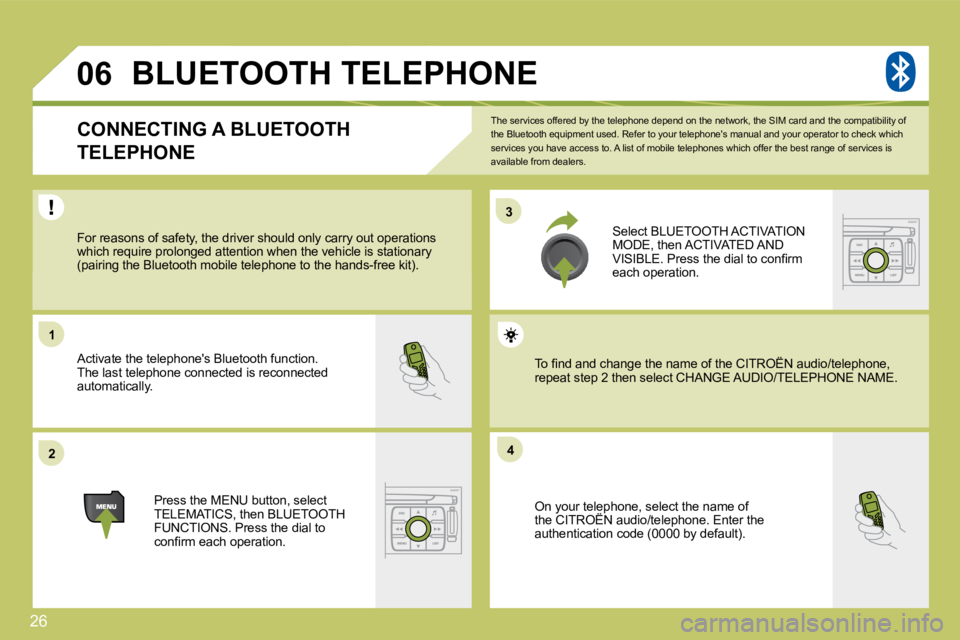
33
22
11
44
06
The services offered by the telephone depend on the network, the SIM card and the compatibility of the Bluetooth equipment used. Refer to your telepho ne's manual and your operator to check which services you have access to. A list of mobile telephones which offer the best range of services is available from dealers.
BLUETOOTH TELEPHONE
CONNECTING A BLUETOOTH
TELEPHONE
For reasons of safety, the driver should only carr y out operations which require prolonged attention when the vehicle is stationary (pairing the Bluetooth mobile telephone to the hands-free kit).
Activate the telephone's Bluetooth function. The last telephone connected is reconnected automatically.
Select BLUETOOTH ACTIVATION MODE, then ACTIVATED AND VISIBLE. Press the dial to confi rm each operation.
Press the MENU button, select TELEMATICS, then BLUETOOTH FUNCTIONS. Press the dial to confi rm each operation.
On your telephone, select the name of the CITROËN audio/telephone. Enter the On your telephone, select the name of r telep
authentication code (0000 by default).
To fi nd and change the name of the CITROËN audio/t elephone, To fi nd and change the name of the CITROËN audio/telephone, repeat step 2 then select CHANGE AUDIO/TELEPHONPHONE NAME.
Page 233 of 279
37
1
4
2
3
3
3
4
4
2
4
3
4
4
4
4
4
3
2
3
4
4
4
4
3
3
3
3
4
4
3
3
5
5
5
3
3
2
3
5
5
3
2
4
3
5
4
3
4
3
4
4
3
3
4
4
4
4
4
3
5
4
5
5
2
3
4
4
current track
eject CD
receive by infrared
exchange with SIM card
send all records to SIM
send one record to SIM
receive all SIM fi les
receive a SIM fi le
exchange with Bluetooth
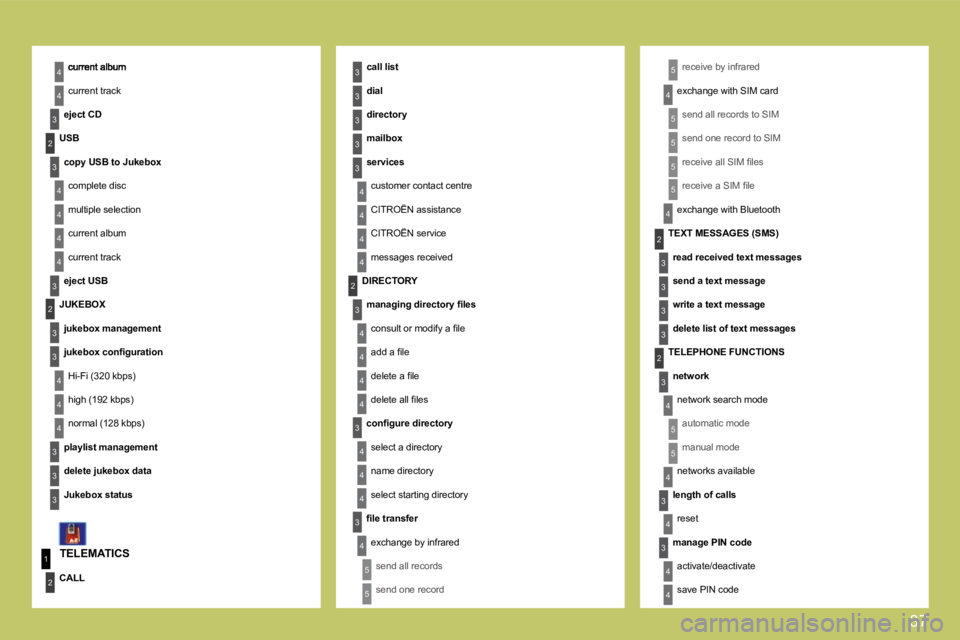
TELEMATICS
call list
dial
directory
mailbox
services
customer contact centre
CITROËN assistance
CITROËN service
messages received
USB
copy USB to Jukebox
complete disc
multiple selection
current album
current track
eject USB
CALL
DIRECTORY
managing directory fi les
consult or modify a fi le
add a fi le
delete a fi le
delete all fi les
confi gure directory
select a directory
name directory
select starting directory
fi le transfer
exchange by infrared
send all records
send one record
TEXT MESSAGES (SMS)
read received text messages
send a text message
write a text message
delete list of text messages
TELEPHONE FUNCTIONS
network
network search mode
automatic mode
manual mode
networks available
length of calls
reset
manage PIN code
activate/deactivate
save PIN code
JUKEBOX
jukebox management
jukebox confi guration
Hi-Fi (320 kbps)
high (192 kbps)
normal (128 kbps)
playlist management
delete jukebox data
Jukebox status
Page 257 of 279
18
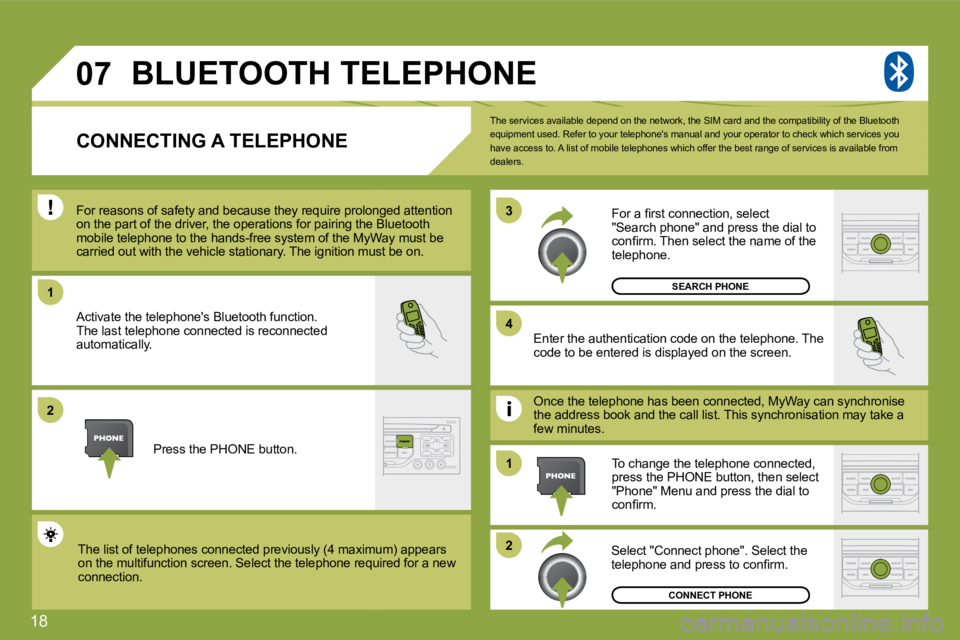
07
1
4
3
2
1
2
The services available depend on the network, the SIM card and the compatibility of the Bluetooth equipment used. Refer to your telephone's manual an d your operator to check which services you have access to. A list of mobile telephones which offer the best range of services is available from dealers.
BLUETOOTH TELEPHONE
CONNECTING A TELEPHONE
For reasons of safety and because they require pro longed attention For reasons of safety and because they require prolonged attention on the part of the driver, the operations for pairing the Bluetooth on the part of the driver, the operations for pairing the Bluetooth mobile telephone to the hands-free system of the My Wa MyWay must be carried out with the vehicle stationary. The ignition must be on. carried out with the vehicle stationary. The ignition must be on.
Activate the telephone's Bluetooth function. The last telephone connected is reconnected automatically. Enter the authentication code on the telephone. Th e code to be entered is displayed on the screen.
To change the telephone connected, press the PHONE button, then select "Phone" Menu and press the dial to confi rm.
Once the telephone has been connected, MyWay can s can synchronise the address book and the call list. This synchronisation ation may take a few minutes.
Select "Connect phone". Select the telephone and press to confi rm. The list of telephones connected previously (4 max imum) appears The list of telephones connected previously (4 maximum) appears on the multifunction screen. Select the telephone requir required for a new connection.
Press the PHONE button.
For a fi rst connection, select "Search phone" and press the dial to confi rm. Then select the name of the telephone.
SEARCH PHONE
CONNECT PHONE