time Citroen C4 2012 2.G Owner's Guide
[x] Cancel search | Manufacturer: CITROEN, Model Year: 2012, Model line: C4, Model: Citroen C4 2012 2.GPages: 332, PDF Size: 28.33 MB
Page 61 of 332
2
MULTIFUNCTION SCREENS
59
TRIP COMPUTER
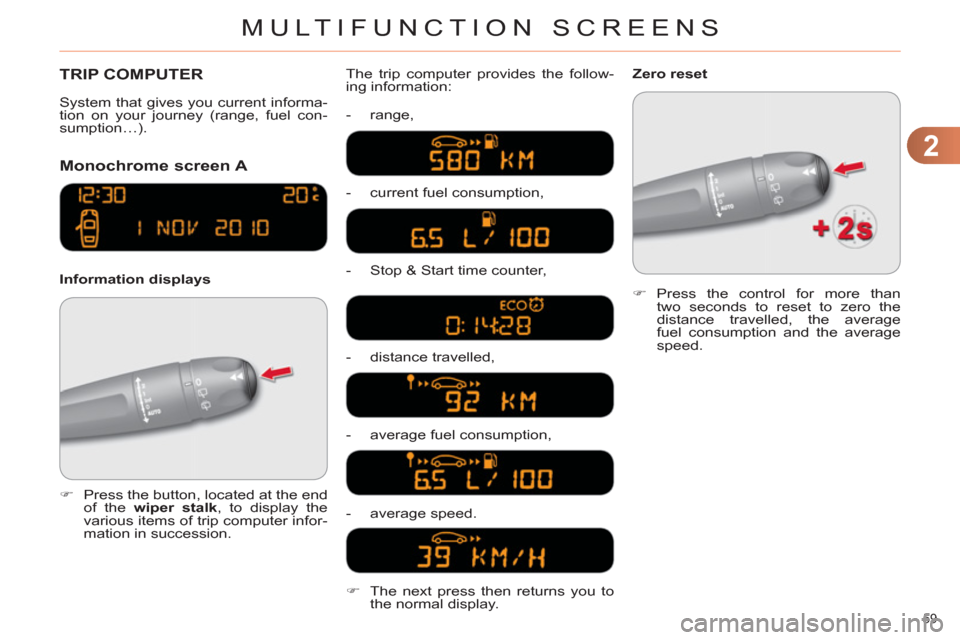
Monochrome screen A
Information displays The trip computer provides the follow-
ing information:
- range,
- current fuel consumption,
- Stop & Start time counter,
- distance travelled,
- average fuel consumption,
- average speed.
)
Press the button, located at the end
of the wiper stalk
, to display the
various items of trip computer infor-
mation in succession.
System that gives you current informa-
tion on your journey (range, fuel con-
sumption…).
)
Press the control for more than
two seconds to reset to zero the
distance travelled, the average
fuel consumption and the average
speed.
Zero reset
)
The next press then returns you to
the normal display.
Page 62 of 332
2
MULTIFUNCTION SCREENS
60
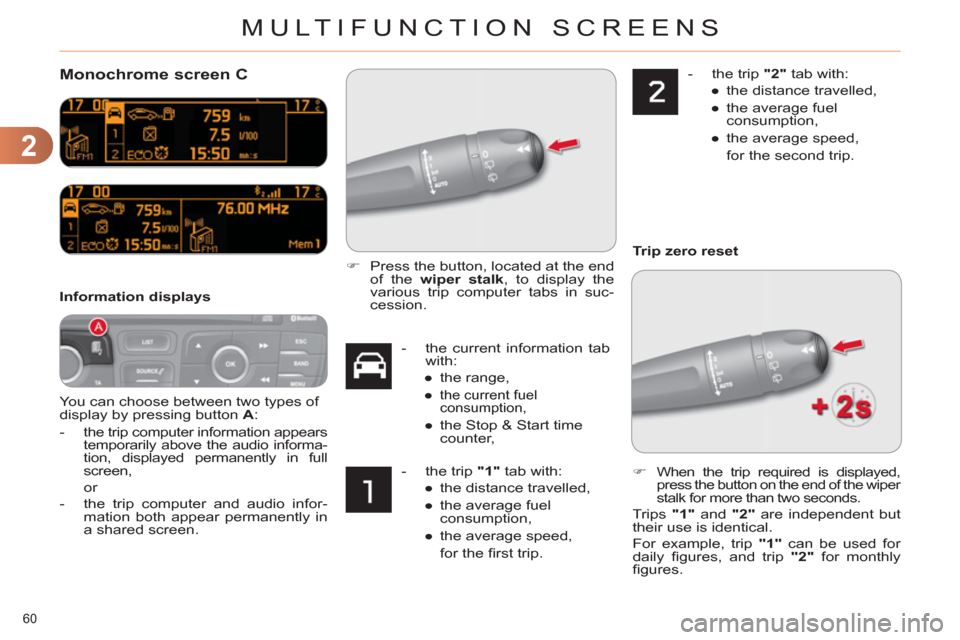
Monochrome screen C
You can choose between two types of
display by pressing button A
:
-
the trip computer information appears
temporarily above the audio informa-
tion, displayed permanently in full
screen,
or
- the trip computer and audio infor-
mation both appear permanently in
a shared screen.
Information displays
- the current information tab
with:
●
the range,
●
the current fuel
consumption,
●
the Stop & Start time
counter,
- the trip "1"
tab with:
●
the distance travelled,
●
the average fuel
consumption,
●
the average speed,
for the fi rst trip.
- the trip "2"
tab with:
●
the distance travelled,
●
the average fuel
consumption,
●
the average speed,
for the second trip.
)
Press the button, located at the end
of the wiper stalk
, to display the
various trip computer tabs in suc-
cession.
)
When the trip required is displayed,
press the button on the end of the wiper
stalk for more than two seconds.
Trips "1"
and "2"
are independent but
their use is identical.
For example, trip "1"
can be used for
daily fi gures, and trip "2"
for monthly
fi gures.
Trip zero reset
Page 63 of 332
2
MULTIFUNCTION SCREENS
61
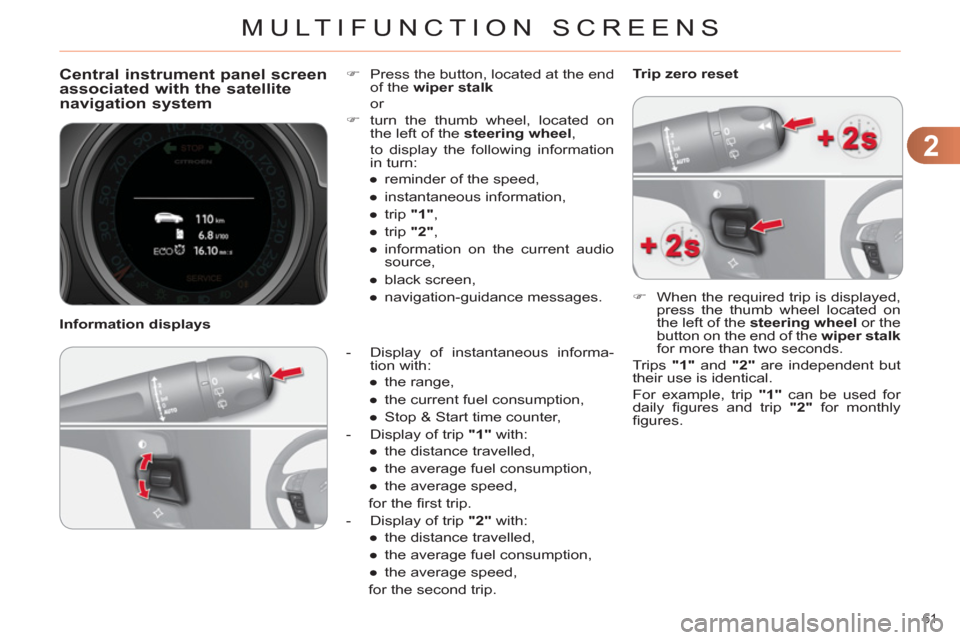
Central instrument panel screen
associated with the satellite
navigation system
- Display of instantaneous informa-
tion with:
●
the range,
●
the current fuel consumption,
●
Stop & Start time counter,
- Display of trip "1"
with:
●
the distance travelled,
●
the average fuel consumption,
●
the average speed,
for the fi rst trip.
- Display of trip "2"
with:
●
the distance travelled,
●
the average fuel consumption,
●
the average speed,
for the second trip.
)
Press the button, located at the end
of the wiper stalk
or
)
turn the thumb wheel, located on
the left of the steering wheel
,
to display the following information
in turn:
●
reminder of the speed,
●
instantaneous information,
●
trip "1"
,
●
trip "2"
,
●
information on the current audio
source,
●
black screen,
●
navigation-guidance messages.
Information displays
)
When the required trip is displayed,
press the thumb wheel located on
the left of the steering wheel
or the
button on the end of the wiper stalk
for more than two seconds.
Trips "1"
and "2"
are independent but
their use is identical.
For example, trip "1"
can be used for
daily fi gures and trip "2"
for monthly
fi gures.
Trip zero reset
Page 64 of 332
2
MULTIFUNCTION SCREENS
62
A few definitions…
This value may vary following a
change in the style of driving or
the relief, resulting in a signifi -
cant change in the current fuel
consumption.
If dashes are displayed continu-
ously while driving in place of the
digits, contact a CITROËN dealer
or a qualifi ed workshop. This function is only displayed
from 20 mph (30 km/h).
Range
(miles or km)
This indicates the distance
which can still be travelled
with the fuel remaining in the tank in
relation to the average fuel consump-
tion over the last few miles (kilometres)
travelled.
When the range falls below 20 miles
(30 km), dashes are displayed. After
fi lling with at least 5 litres of fuel, the
range is recalculated and is displayed
when it exceeds 60 miles (100 km).
Current fuel consumption
(mpg or l/100 km or km/l)
This is the average fuel con-
sumption during the last few
seconds.
Average fuel consumption
(mpg or l/100 km or km/l)
This is the average fuel con-
sumption since the last trip
computer zero reset.
Average speed
(mph or km/h)
This is the average speed calcu-
lated since the last trip computer
zero reset (ignition on).
Distance travelled
(miles or km)
This indicates the distance
travelled since the last trip
computer zero reset.
Stop & Start time counter
(minutes/seconds or hours/
minutes)
If your vehicle is fi tted with Stop & Start,
a time counter calculates the time spent
in STOP mode during a journey.
It resets to zero every time the ignition
is switched on with the key.
The fuel consumption of your
vehicle will be higher than
the offi cial fi gures obtained
by CITROËN during the fi rst
3 000 miles (5 000 km) of the
vehicle's life.
Page 73 of 332
3
COMFORT
71
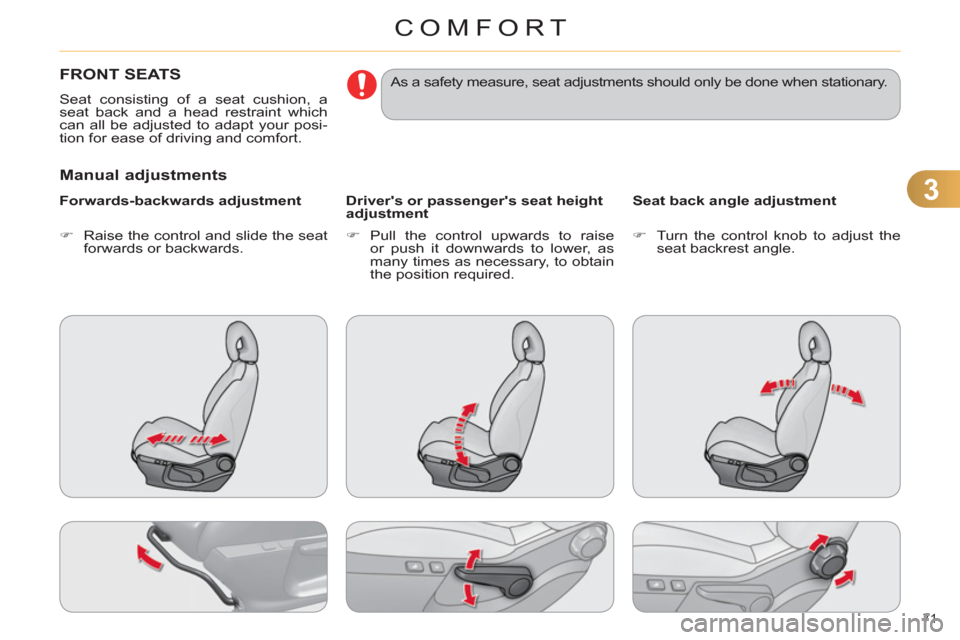
FRONT SEATS
Seat consisting of a seat cushion, a
seat back and a head restraint which
can all be adjusted to adapt your posi-
tion for ease of driving and comfort.
Manual adjustments
Forwards-backwards adjustment
Driver's or passenger's seat height
adjustment
Seat back angle adjustment
)
Raise the control and slide the seat
forwards or backwards.
)
Pull the control upwards to raise
or push it downwards to lower, as
many times as necessary, to obtain
the position required.
)
Turn the control knob to adjust the
seat backrest angle.
As a safety measure, seat adjustments should only be done when stationary.
Page 75 of 332
3
COMFORT
73
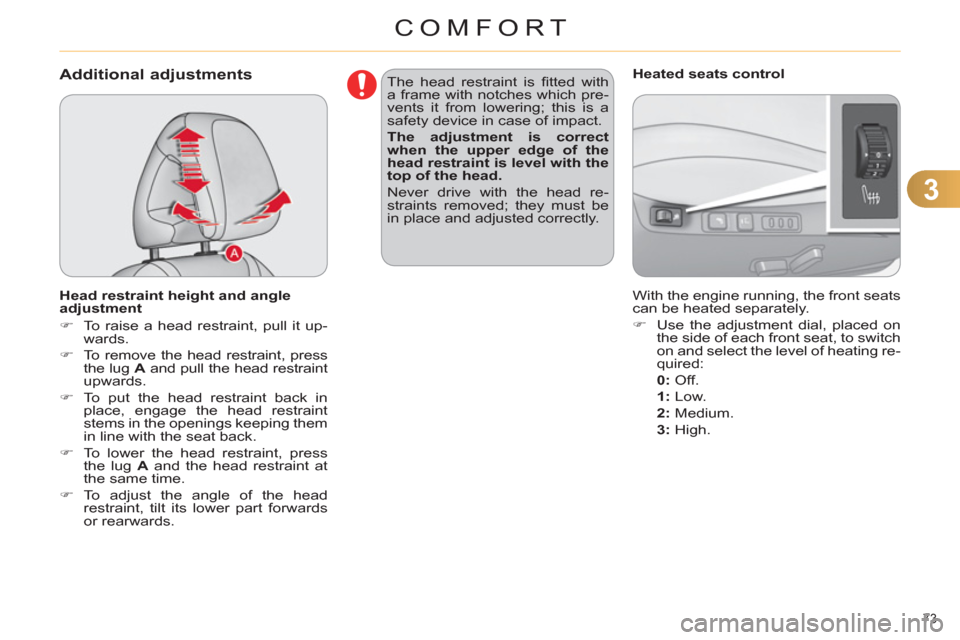
Additional adjustments
Head restraint height and angle
adjustment
)
To raise a head restraint, pull it up-
wards.
)
To remove the head restraint, press
the lug A
and pull the head restraint
upwards.
)
To put the head restraint back in
place, engage the head restraint
stems in the openings keeping them
in line with the seat back.
)
To lower the head restraint, press
the lug A
and the head restraint at
the same time.
)
To adjust the angle of the head
restraint, tilt its lower part forwards
or rearwards. The head restraint is fi tted with
a frame with notches which pre-
vents it from lowering; this is a
safety device in case of impact.
The adjustment is correct
when the upper edge of the
head restraint is level with the
top of the head.
Never drive with the head re-
straints removed; they must be
in place and adjusted correctly.
With the engine running, the front seats
can be heated separately.
)
Use the adjustment dial, placed on
the side of each front seat, to switch
on and select the level of heating re-
quired:
0:
Off.
1
:
Low.
2
:
Medium.
3
:
High.
Heated seats control
Page 76 of 332
3
COMFORT
74
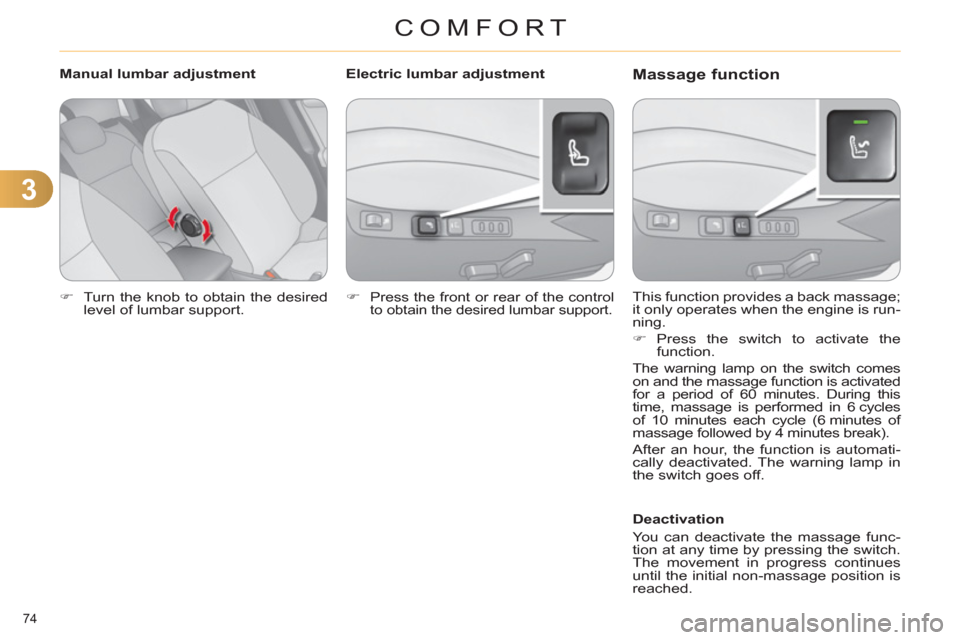
)
Turn the knob to obtain the desired
level of lumbar support.
This function provides a back massage;
it only operates when the engine is run-
ning.
)
Press the switch to activate the
function.
The warning lamp on the switch comes
on and the massage function is activated
for a period of 60 minutes. During this
time, massage is performed in 6 cycles
of 10 minutes each cycle (6 minutes of
massage followed by 4 minutes break).
After an hour, the function is automati-
cally deactivated. The warning lamp in
the switch goes off.
Deactivation
You can deactivate the massage func-
tion at any time by pressing the switch.
The movement in progress continues
until the initial non-massage position is
reached.
Manual lumbar adjustment
Massage function
Electric lumbar adjustment
)
Press the front or rear of the control
to obtain the desired lumbar support.
Page 82 of 332
4
ACCESS
80
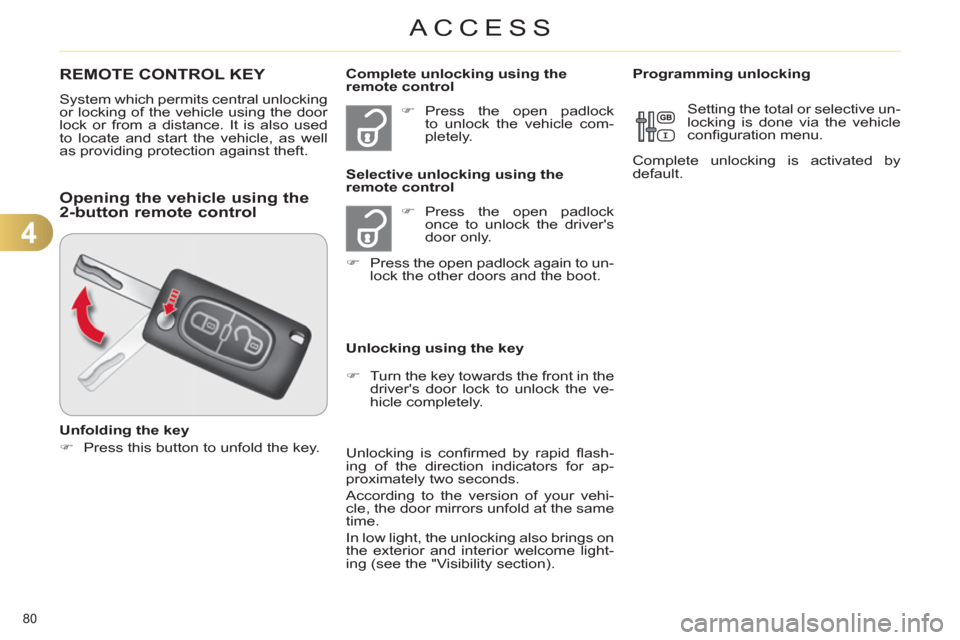
REMOTE CONTROL KEY
System which permits central unlocking
or locking of the vehicle using the door
lock or from a distance. It is also used
to locate and start the vehicle, as well
as providing protection against theft.
)
Press the open padlock
once to unlock the driver's
door only.
)
Press the open padlock again to un-
lock the other doors and the boot.
Selective unlocking using the
remote control
)
Turn the key towards the front in the
driver's door lock to unlock the ve-
hicle completely.
Complete unlocking using the
remote control
)
Press the open padlock
to unlock the vehicle com-
pletely.
Opening the vehicle using the
2-button remote control
Unfolding the key
)
Press this button to unfold the key.
Unlocking using the key
Unlocking is confi rmed by rapid fl ash-
ing of the direction indicators for ap-
proximately two seconds.
According to the version of your vehi-
cle, the door mirrors unfold at the same
time.
In low light, the unlocking also brings on
the exterior and interior welcome light-
ing (see the "Visibility section).
Programming unlocking
Setting the total or selective un-
locking is done via the vehicle
confi guration menu.
Complete unlocking is activated by
default.
Page 83 of 332
4
ACCESS
81
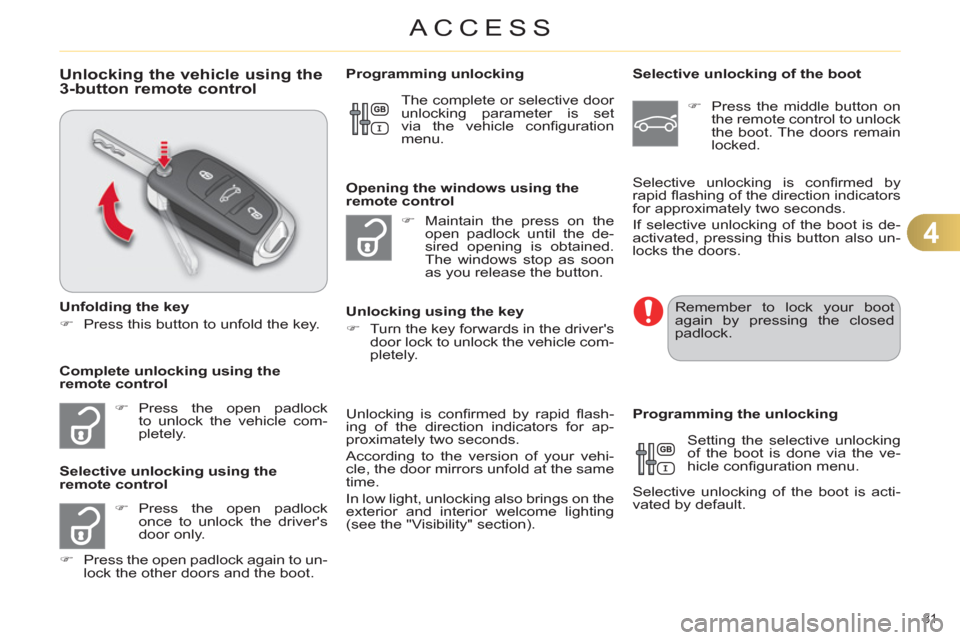
Unlocking the vehicle using the
3-button remote control
Unfolding the key
)
Press this button to unfold the key.
)
Press the open padlock
to unlock the vehicle com-
pletely.
)
Press the open padlock
once to unlock the driver's
door only.
)
Press the open padlock again to un-
lock the other doors and the boot.
Selective unlocking using the
remote control
)
Maintain the press on the
open padlock until the de-
sired opening is obtained.
The windows stop as soon
as you release the button.
Opening the windows using the
remote control
Unlocking using the key
)
Turn the key forwards in the driver's
door lock to unlock the vehicle com-
pletely.
Programming unlocking
Unlocking is confi rmed by rapid fl ash-
ing of the direction indicators for ap-
proximately two seconds.
According to the version of your vehi-
cle, the door mirrors unfold at the same
time.
In low light, unlocking also brings on the
exterior and interior welcome lighting
(see the "Visibility" section).
Selective unlocking of the boot
)
Press the middle button on
the remote control to unlock
the boot. The doors remain
locked.
Setting the selective unlocking
of the boot is done via the ve-
hicle confi guration menu.
Selective unlocking of the boot is acti-
vated by default.
Programming the unlocking
Complete unlocking using the
remote control Selective unlocking is confi rmed by
rapid fl ashing of the direction indicators
for approximately two seconds.
If selective unlocking of the boot is de-
activated, pressing this button also un-
locks the doors. The complete or selective door
unlocking parameter is set
via the vehicle confi guration
menu.
Remember to lock your boot
again by pressing the closed
padlock.
Page 84 of 332
4
ACCESS
82
Locking the vehicle
)
Press the closed padlock to
lock the vehicle.
Normal locking using the remote
control
Normal locking using the key
)
Turn the key towards the rear in the
driver's door lock to lock the vehicle.
Locating your vehicle
This function allows you to identify your
vehicle from a distance, particularly in
poor light. Your vehicle must be locked.
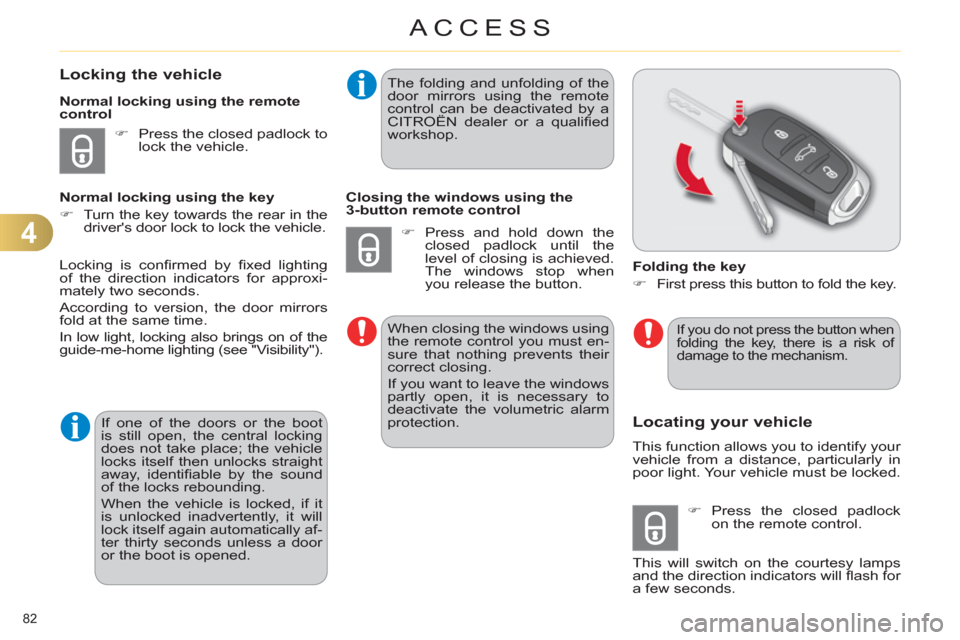
Folding the key
)
First press this button to fold the key.
)
Press the closed padlock
on the remote control.
This will switch on the courtesy lamps
and the direction indicators will fl ash for
a few seconds.
Locking is confi rmed by fi xed lighting
of the direction indicators for approxi-
mately two seconds.
According to version, the door mirrors
fold at the same time.
In low light, locking also brings on of the
guide-me-home lighting (see "Visibility").
If one of the doors or the boot
is still open, the central locking
does not take place; the vehicle
locks itself then unlocks straight
away, identifi able by the sound
of the locks rebounding.
When the vehicle is locked, if it
is unlocked inadvertently, it will
lock itself again automatically af-
ter thirty seconds unless a door
or the boot is opened. The folding and unfolding of the
door mirrors using the remote
control can be deactivated by a
CITROËN dealer or a qualifi ed
workshop.
Closing the windows using the
3-button remote control
)
Press and hold down the
closed padlock until the
level of closing is achieved.
The windows stop when
you release the button.
When closing the windows using
the remote control you must en-
sure that nothing prevents their
correct closing.
If you want to leave the windows
partly open, it is necessary to
deactivate the volumetric alarm
protection.
If you do not press the button when
folding the key, there is a risk of
damage to the mechanism.