time Citroen C4 2012 2.G Repair Manual
[x] Cancel search | Manufacturer: CITROEN, Model Year: 2012, Model line: C4, Model: Citroen C4 2012 2.GPages: 332, PDF Size: 28.33 MB
Page 170 of 332
9
DRIVING
168
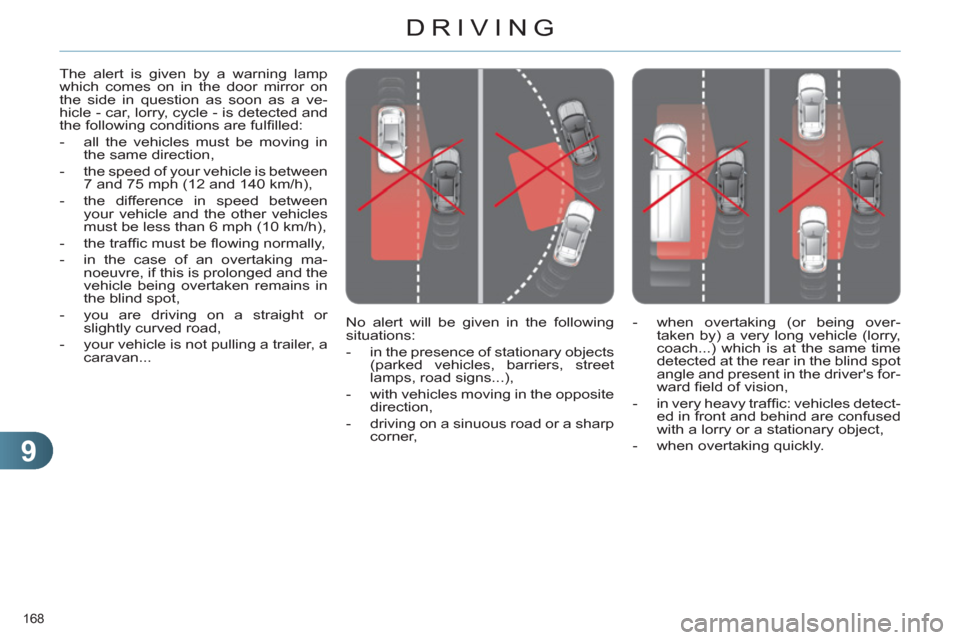
No alert will be given in the following
situations:
- in the presence of stationary objects
(parked vehicles, barriers, street
lamps, road signs...),
- with vehicles moving in the opposite
direction,
- driving on a sinuous road or a sharp
corner, The alert is given by a warning lamp
which comes on in the door mirror on
the side in question as soon as a ve-
hicle - car, lorry, cycle - is detected and
the following conditions are fulfi lled:
- all the vehicles must be moving in
the same direction,
- the speed of your vehicle is between
7 and 75 mph (12 and 140 km/h),
- the difference in speed between
your vehicle and the other vehicles
must be less than 6 mph (10 km/h),
- the traffi c must be fl owing normally,
- in the case of an overtaking ma-
noeuvre, if this is prolonged and the
vehicle being overtaken remains in
the blind spot,
- you are driving on a straight or
slightly curved road,
- your vehicle is not pulling a trailer, a
caravan...
- when overtaking (or being over-
taken by) a very long vehicle (lorry,
coach...) which is at the same time
detected at the rear in the blind spot
angle and present in the driver's for-
ward fi eld of vision,
- in very heavy traffi c: vehicles detect-
ed in front and behind are confused
with a lorry or a stationary object,
- when overtaking quickly.
Page 175 of 332
9
DRIVING
173
The cruise control system can-
not, in any circumstances, re-
place the need to respect speed
limits, nor can it replace the need
for vigilance and responsibility
on the part of the driver.
You are advised to keep your
feet near the pedals at all times.
CRUISE CONTROL
System which automatically maintains
the speed of the vehicle at the value
programmed by the driver, without any
action on the accelerator pedal.
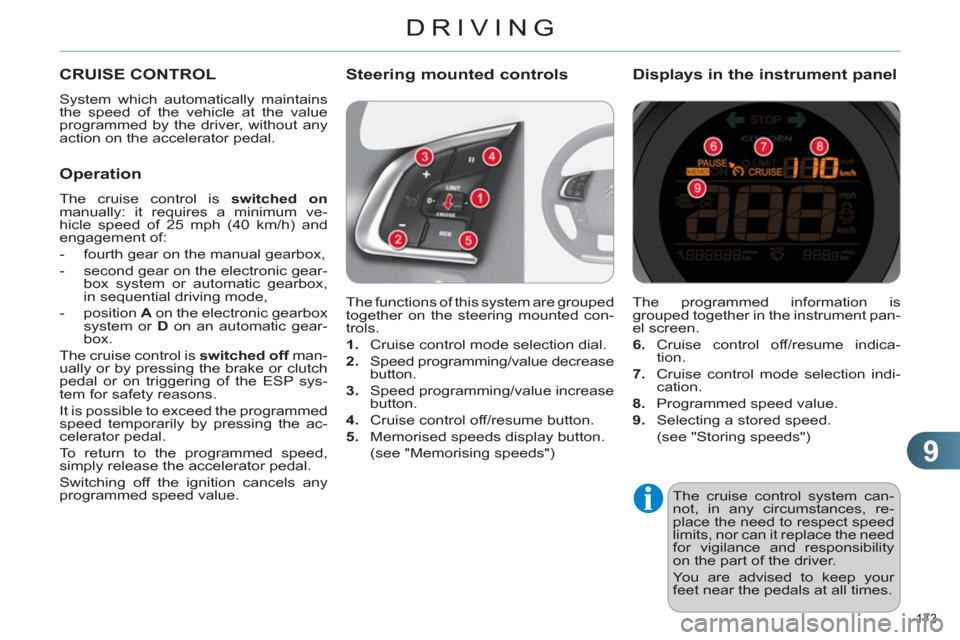
The functions of this system are grouped
together on the steering mounted con-
trols.
1.
Cruise control mode selection dial.
2.
Speed programming/value decrease
button.
3.
Speed programming/value increase
button.
4.
Cruise control off/resume button.
5.
Memorised speeds display button.
(see "Memorising speeds")
Steering mounted controls
The programmed information is
grouped together in the instrument pan-
el screen.
6.
Cruise control off/resume indica-
tion.
7.
Cruise control mode selection indi-
cation.
8.
Programmed speed value.
9.
Selecting a stored speed.
(see "Storing speeds")
Displays in the instrument panel
Operation
The cruise control is switched on
manually: it requires a minimum ve-
hicle speed of 25 mph (40 km/h) and
engagement of:
- fourth gear on the manual gearbox,
- second gear on the electronic gear-
box system or automatic gearbox,
in sequential driving mode,
- position A
on the electronic gearbox
system or D
on an automatic gear-
box.
The cruise control is switched off
man-
ually or by pressing the brake or clutch
pedal or on triggering of the ESP sys-
tem for safety reasons.
It is possible to exceed the programmed
speed temporarily by pressing the ac-
celerator pedal.
To return to the programmed speed,
simply release the accelerator pedal.
Switching off the ignition cancels any
programmed speed value.
Page 179 of 332

9
DRIVING
177
PARKING SENSORS
This system indicates the proximity of an
obstacle (person, vehicle, tree, gate, etc.)
which comes within the fi eld of detection
of sensors located in the bumper.
Certain types of obstacle (stake, road-
works cone, etc.) detected initially will
no longer be detected at the end of the
manoeuvre due to the presence of blind
spots.
This function cannot, in any cir-
cumstances, take the place of
the vigilance and responsibility
of the driver.
The system is switched on by engaging
reverse gear. This is accompanied by
an audible signal.
The system is switched off when you
exit reverse gear.
Rear parking sensors
Audible assistance
The proximity information is given by an
intermittent audible signal, the frequen-
cy of which increases as the vehicle ap-
proaches the obstacle.
The sound emitted by the speaker (right
or left) indicates the side on which the
obstacle is located.
When the distance between the vehicle
and the obstacle becomes less than
approximately thirty centimetres, the
audible signal becomes continuous.
Visual assistance
This supplements the audible signal
by displaying bars in the multifunction
screen which move progressively near-
er to the vehicle. When the obstacle is
near, the "Danger" symbol is also dis-
played in the screen.
Page 183 of 332
10
CHECKS
181
RUNNING OUT OF FUEL
(DIESEL)
1.6 litre HDi engine
)
Fill the fuel tank with at least fi ve
litres of diesel.
)
Open the bonnet.
)
If necessary, unclip the styling cover
for access to the priming pump.
)
Squeeze and release the priming
pump repeatedly until resistance is
felt (there may be resistance at the
fi rst press).
)
Operate the starter until the engine
starts (if the engine does not start
at the fi rst attempt, wait around
15 seconds before trying again).
)
If the engine does not start after a
few attempts, operate the priming
pump again then start the engine.
)
Clip the styling cover back in place.
)
Close the bonnet.
2 litre HDi engine
)
Fill the fuel tank with at least fi ve litres
of Diesel.
)
Open the bonnet.
)
Unclip the style cover for access to
the priming pump.
)
Slacken the bleed screw.
)
Squeeze and release the priming
pump repeatedly until fuel appears
in the transparent pipe with the
green connector.
)
Tighten the bleed screw.
)
Operate the starter until the engine
starts.
)
Put the style cover back in position
and clip it in place, ensuring that it
has clipped correctly.
)
Close the bonnet.
If the engine does not start fi rst
time, don't keep trying. Start the
procedure again from the begin-
ning.
On vehicle fi tted with HDi engines, the
fuel system must be primed if you run
out of fuel; refer to the engine com-
partment view on the "Diesel engine"
page.
If the tank on your vehicle is fi tted with
a misfuel prevention device, refer to the
section "Access - § Misfuel prevention
(Diesel)".
Page 188 of 332
10
CHECKS
186
CHECKS
Unless otherwise indicated, check
these components in accordance with
the servicing booklet and according to
your engine.
Otherwise, have them checked by a
CITROËN dealer or a qualifi ed workshop.
Battery
The battery does not require
any maintenance.
However, check that the ter-
minals are clean and correctly
tightened, particularly in sum-
mer and winter.
When carrying out work on the battery,
refer to the "Practical information" sec-
tion for details of the precautions to be
taken before disconnecting the battery
and following its reconnection.
Air filter and passenger compartment filter
Refer to the servicing booklet
for details of the replacement
intervals for these compo-
nents.
Oil filter
Replace the oil fi lter each time
the engine oil is changed.
Refer to the servicing booklet
for details of the replacement
interval for this component.
Particle emission filter (Diesel)
According to your version of instrument
panel, the start of saturation of the par-
ticle emissions fi lter is indicated by:
- fi xed illumination of the par-
ticle emissions fi lter warning
lamp, accompanied by an au-
dible signal and a message
that there is a risk of blockage
of the particle emissions fi lter,
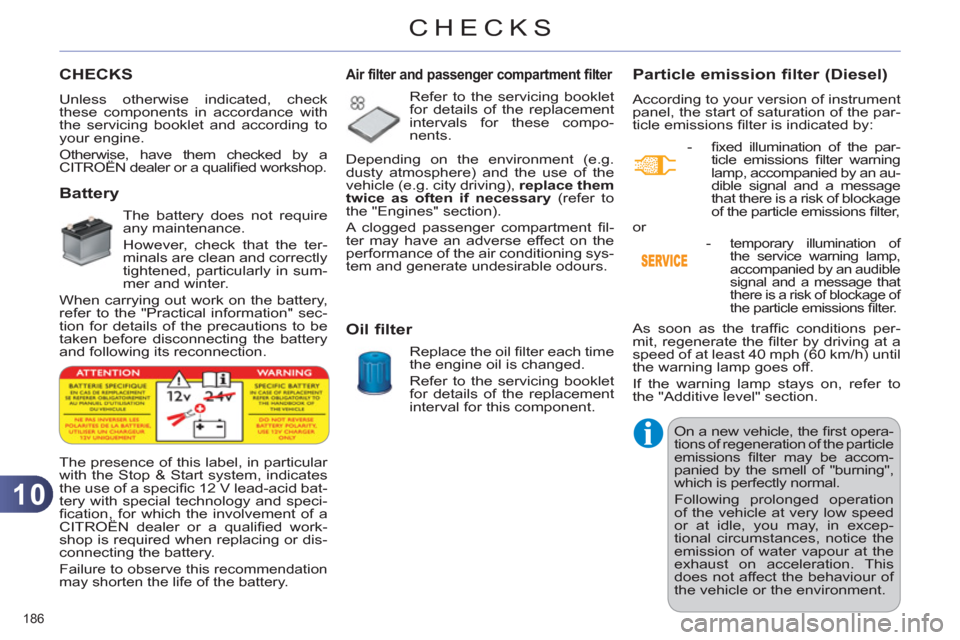
The presence of this label, in particular
with the Stop & Start system, indicates
the use of a specifi c 12 V lead-acid bat-
tery with special technology and speci-
fi cation, for which the involvement of a
CITROËN dealer or a qualifi ed work-
shop is required when replacing or dis-
connecting the battery.
Failure to observe this recommendation
may shorten the life of the battery.
Depending on the environment (e.g.
dusty atmosphere) and the use of the
vehicle (e.g. city driving), replace them
twice as often if necessary
(refer to
the "Engines" section).
A clogged passenger compartment fi l-
ter may have an adverse effect on the
performance of the air conditioning sys-
tem and generate undesirable odours.
As soon as the traffi c conditions per-
mit, regenerate the fi lter by driving at a
speed of at least 40 mph (60 km/h) until
the warning lamp goes off.
If the warning lamp stays on, refer to
the "Additive level" section.
On a new vehicle, the fi rst opera-
tions of regeneration of the particle
emissions fi lter may be accom-
panied by the smell of "burning",
which is perfectly normal.
Following prolonged operation
of the vehicle at very low speed
or at idle, you may, in excep-
tional circumstances, notice the
emission of water vapour at the
exhaust on acceleration. This
does not affect the behaviour of
the vehicle or the environment. or
-
temporary illumination of
the service warning lamp,
accompanied by an audible
signal and a message that
there is a risk of blockage of
the particle emissions fi lter.
Page 199 of 332
11
PRACTICAL INFORMATION
197
CHANGING A BULB
The headlamps are fi tted with
polycarbonate glass with a pro-
tective coating:
)
do not clean them using a
dry or abrasive cloth, nor
with a detergent or solvent
product,
)
use a sponge and soapy water,
)
when using a high pressure
washer on persistent marks,
do not keep the lance direct-
ed towards the lamps or their
edges for too long, so as not
to damage their protective
coating and seals.
)
Do not touch the bulb directly
with your fi ngers, use lint-
free cloths.
Changing a bulb should only be
done after the headlamp has been
switched off for a few minutes (risk
of serious burns).
It is imperative to use only anti-
ultraviolet (UV) type bulbs in
order not to damage the head-
lamp.
Always replace a failed bulb with
a new bulb with the same type
and specifi cation.
Risk of electrocution
Xenon bulbs (D1S-35W) must be
replaced by a CITROËN dealer
or a qualifi ed workshop.
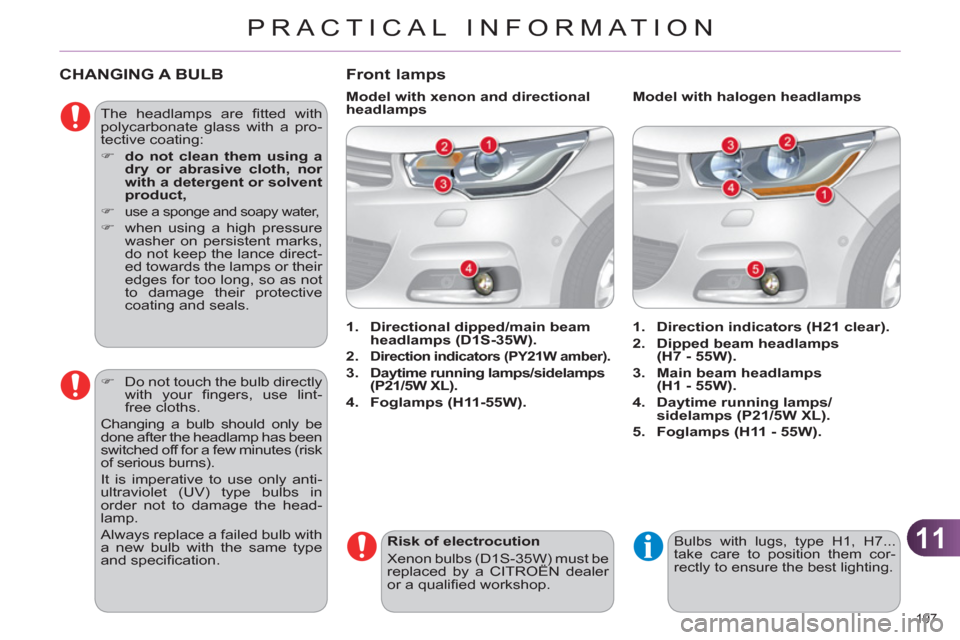
Front lamps
1.
Direction indicators (H21 clear).
2.
Dipped beam headlamps
(H7 - 55W).
3.
Main beam headlamps
(H1 - 55W).
4.
Daytime running lamps/
sidelamps (P21/5W XL).
5.
Foglamps (H11 - 55W).
1.
Directional dipped/main beam
headlamps (D1S-35W).
2.
Direction indicators (PY21W amber).
3.
Daytime running lamps/sidelamps
(P21/5W XL).
4.
Foglamps (H11-55W).
Model with halogen headlamps
Model with xenon and directional
headlamps
Bulbs with lugs, type H1, H7...
take care to position them cor-
rectly to ensure the best lighting.
Page 201 of 332
11
PRACTICAL INFORMATION
199
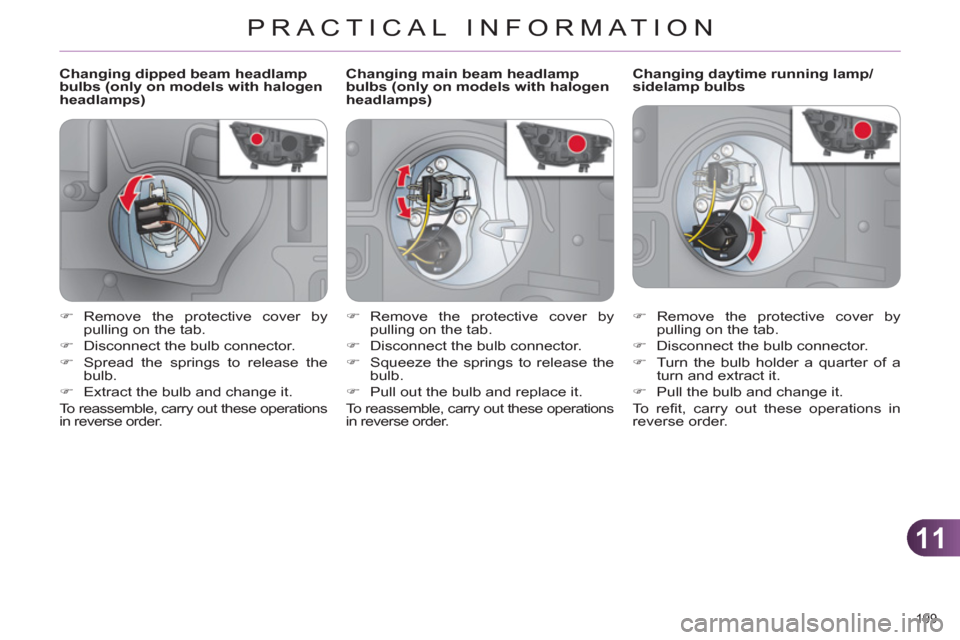
Changing dipped beam headlamp
bulbs (only on models with halogen
headlamps)
Changing daytime running lamp/
sidelamp bulbs
)
Remove the protective cover by
pulling on the tab.
)
Disconnect the bulb connector.
)
Turn the bulb holder a quarter of a
turn and extract it.
)
Pull the bulb and change it.
To r efi t, carry out these operations in
reverse order.
)
Remove the protective cover by
pulling on the tab.
)
Disconnect the bulb connector.
)
Spread the springs to release the
bulb.
)
Extract the bulb and change it.
To reassemble, carry out these operations
in reverse order.
Changing main beam headlamp
bulbs (only on models with halogen
headlamps)
)
Remove the protective cover by
pulling on the tab.
)
Disconnect the bulb connector.
)
Squeeze the springs to release the
bulb.
)
Pull out the bulb and replace it.
To reassemble, carry out these operations
in reverse order.
Page 211 of 332
11
PRACTICAL INFORMATION
209
LOAD REDUCTION MODE
System which manages the use of cer-
tain functions according to the level of
charge remaining in the battery.
When the vehicle is being driven, the
load reduction function temporarily deac-
tivates certain functions, such as the air
conditioning, the heated rear screen...
The deactivated functions are reactivat-
ed automatically as soon as conditions
permit.
ENERGY ECONOMY MODE
System which manages the period of
use of certain functions to conserve a
suffi cient level of charge in the battery.
After the engine has stopped, you can
still use functions such as the audio
equipment, windscreen wipers, dipped
beam headlamps, courtesy lamps, etc.
for a maximum combined period of thirty
minutes.
Switching to economy mode
Once this period has elapsed, a message
appears in the screen indicating that the ve-
hicle has switched to economy mode and
the active functions are put on standby.
If the telephone is being used at
the same time on the navigation
system, it will be interrupted after
10 minutes.
A fl at battery prevents the engine
from starting (refer to the corre-
sponding paragraph).
Exiting economy mode
These functions are reactivated auto-
matically the next time the vehicle is
driven.
)
In order to resume the use of these
functions immediately, start the engine
and let it run for a few minutes.
The time available to you will then be
double the period for which the engine
is left running. However, this period will
always be between fi ve and thirty minutes.
This period may be greatly re-
duced if the battery is not fully
charged.
CHANGING A WIPER BLADE
Before removing a front wiper
blade
)
Within one minute after switching off
the ignition, operate the wiper stalk
to position the wiper blades verti-
cally on the windscreen.
Removing
)
Raise the corresponding wiper arm.
)
Unclip the wiper blade and remove it.
Fitting
)
Put the corresponding new wiper
blade in place and clip it.
)
Fold down the wiper arm carefully.
After fitting a front wiper blade
)
Switch on the ignition.
)
Operate the wiper stalk again to
park the wiper blades.
Page 214 of 332
11
PRACTICAL INFORMATION
212
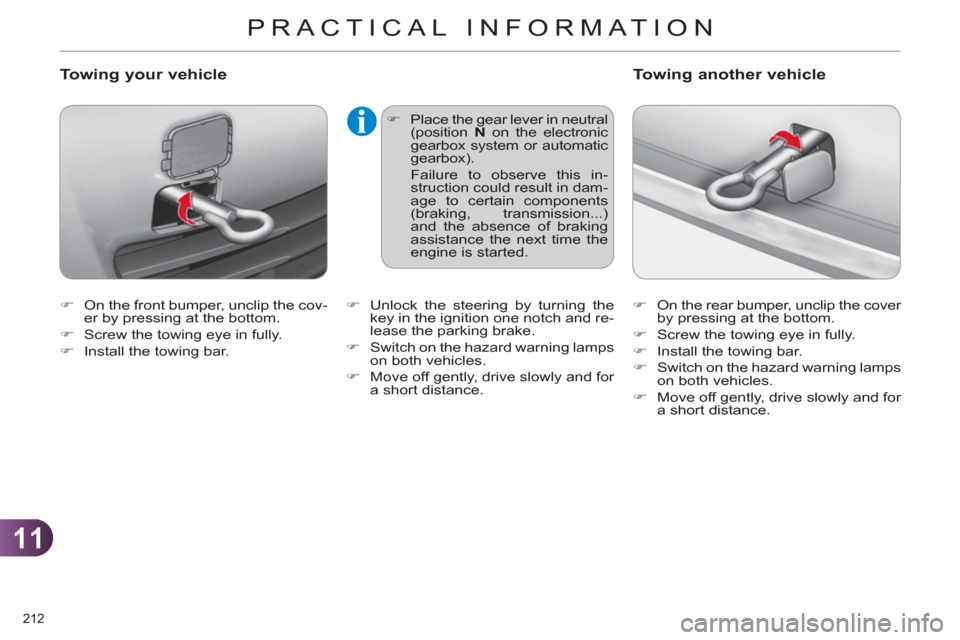
)
On the front bumper, unclip the cov-
er by pressing at the bottom.
)
Screw the towing eye in fully.
)
Install the towing bar.
Towing your vehicle
)
Place the gear lever in neutral
(position N
on the electronic
gearbox system or automatic
gearbox).
Failure to observe this in-
struction could result in dam-
age to certain components
(braking, transmission...)
and the absence of braking
assistance the next time the
engine is started.
)
On the rear bumper, unclip the cover
by pressing at the bottom.
)
Screw the towing eye in fully.
)
Install the towing bar.
)
Switch on the hazard warning lamps
on both vehicles.
)
Move off gently, drive slowly and for
a short distance.
Towing another vehicle
)
Unlock the steering by turning the
key in the ignition one notch and re-
lease the parking brake.
)
Switch on the hazard warning lamps
on both vehicles.
)
Move off gently, drive slowly and for
a short distance.
Page 218 of 332
11
PRACTICAL INFORMATION
216
Installation of radio
communication transmitters
Before installing any after-market ra-
dio communication transmitter, you
can contact a CITROËN dealer for
the specifi cation of transmitters which
can be fi tted (frequency, maximum
power, aerial position, specifi c instal-
lation requirements), in line with the
Vehicle Electromagnetic Compatibility
Directive (2004/104/EC).
Depending on the legislation in
force in the country, it may be
compulsory to have a high vis-
ibility safety vest, warning triangle
and spare bulbs and fuses available
in the vehicle.
The fi tting of electrical equipment or
accessories which are not recom-
mended by CITROËN may result in
a failure of your vehicle's electronic
system and excessive electrical
consumption.
Please note this precaution.
You are advised to contact a
CITROËN representative to be
shown the range of recommend-
ed equipment and accessories.
"Multimedia":
audio systems, steering mounted audio
controls, speakers, Hi-Fi module, Bluetooth
hands-free system, portable satellite naviga-
tion system, semi-integral support bracket for
portable navigation system, speed camera
detector, USB Box, reversing camera, por-
table video screen, portable video support
bracket, 230 V/50 Hz socket, 230 V/50 Hz
adaptor, Wi-Fi on board...
By going to a CITROËN dealer, you can
also obtain cleaning and maintenance
products (interior and exterior) - including
ecological products in the "TECHNATURE"
range -, products for topping up (screen-
wash...), touch-up pens and paint aero-
sols for the exact colour of your vehicle,
recharges (cartridge for the temporary
puncture repair kit...), ...