audio Citroen C4 2014 2.G Owner's Guide
[x] Cancel search | Manufacturer: CITROEN, Model Year: 2014, Model line: C4, Model: Citroen C4 2014 2.GPages: 340, PDF Size: 28.99 MB
Page 177 of 340
9
DRIVING
175
MEMORISING SPEEDS
This memorisation of speeds applies
to both the speed limiter and the cruise
control.
You can memorise up to 5 speeds in
the system. By default, a few speeds
are already memorised.
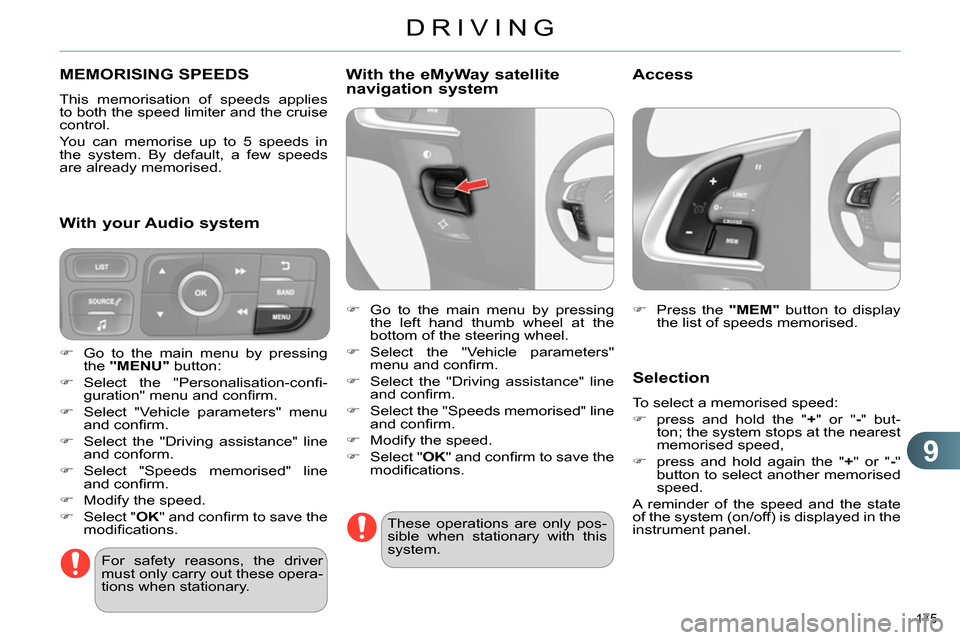
Press the "MEM"
button to display
the list of speeds memorised.
Selection
To select a memorised speed:
press and hold the " +
" or " -
" but-
ton; the system stops at the nearest
memorised speed,
press and hold again the " +
" or " -
"
button to select another memorised
speed.
A reminder of the speed and the state
of the system (on/off) is displayed in the
instrument panel.
For safety reasons, the driver
must only carry out these opera-
tions when stationary.
Go to the main menu by pressing
the "MENU"
button:
Select the "Personalisation-confi -
guration" menu and confi rm.
Select "Vehicle parameters" menu
and confi rm.
Select the "Driving assistance" line
and conform.
Select "Speeds memorised" line
and confi rm.
Modify the speed.
Select " OK
" and confi rm to save the
modifi cations.
With your Audio system
With the eMyWay satellite
navigation system
Go to the main menu by pressing
the left hand thumb wheel at the
bottom of the steering wheel.
Select the "Vehicle parameters"
menu and confi rm.
Select the "Driving assistance" line
and confi rm.
Select the "Speeds memorised" line
and confi rm.
Modify the speed.
Select " OK
" and confi rm to save the
modifi cations.
These operations are only pos-
sible when stationary with this
system.
Access
Page 212 of 340
11
PRACTICAL INFORMATION
210
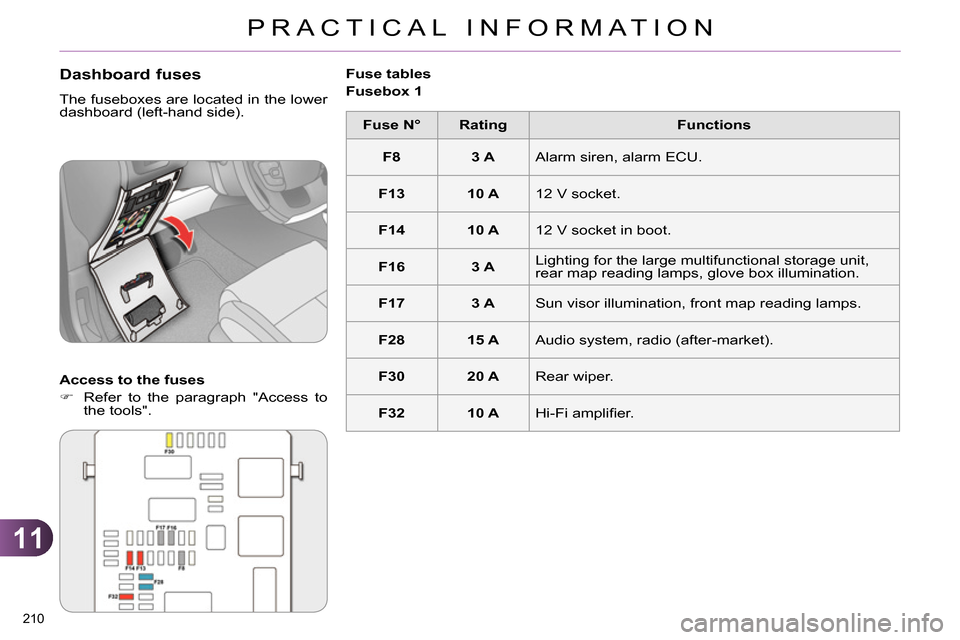
Dashboard fuses
The fuseboxes are located in the lower
dashboard (left-hand side).
Access to the fuses
Refer to the paragraph "Access to
the tools".
Fuse tables
Fusebox 1
Fuse N°
Rating
Functions
F8
3 A
Alarm siren, alarm ECU.
F13
10 A
12 V socket.
F14
10 A
12 V socket in boot.
F16
3 A
Lighting for the large multifunctional storage unit,
rear map reading lamps, glove box illumination.
F17
3 A
Sun visor illumination, front map reading lamps.
F28
15 A
Audio system, radio (after-market).
F30
20 A
Rear wiper.
F32
10 A
Hi-Fi amplifi er.
Page 217 of 340
11
PRACTICAL INFORMATION
215
Charging the battery using a
battery charger
It is advisable to disconnect the
battery if the vehicle is to be left
unused for more than one month.
The batteries contain harmful
substances such as sulphuric
acid and lead. They must be
disposed of in accordance with
regulations and must not, in any
circumstances, be discarded
with household waste.
Take used remote control bat-
teries and vehicle batteries to a
special collection point.
Disconnect the battery from the vehicle.
Follow the instructions for use pro-
vided by the manufacturer of the
charger.
Connect the battery starting with the
negative terminal (-).
Check that the terminals and con-
nectors are clean. If they are covered
with sulphate (whitish or greenish
deposit), remove them and clean
them.
Protect your eyes and face be-
fore handling the battery.
All operations on the battery
must be carried out in a well
ventilated area and away from
naked fl ames and sources of
sparks, so as to avoid the risk of
explosion or fi re.
Do not try to charge a frozen
battery; the battery must fi rst
be thawed out to avoid the risk
of explosion. If the battery has
been frozen, before charging
have it checked by a CITROËN
dealer or a qualifi ed workshop
who will check that the inter-
nal components have not been
damaged and the casing is not
cracked, which could cause a
leak of toxic and corrosive acid.
Do not reverse the polarity and
use only a 12 V charger.
Do not disconnect the terminals
while the engine is running.
Do not charge the batteries with-
out disconnecting the terminals
fi rst.
Wash your hands afterwards.
Reinitialisation after
reconnection
After any reconnection of the battery,
switch on the ignition and wait at least
one minute before starting, to allow
time for the initialisation of the electron-
ic systems.
By referring to the corresponding sec-
tions, you should set or initialise the fol-
lowing systems yourself:
- one-touch electric windows,
- time and date,
- audio and navigation system set-
tings.
Check that no alert message or warn-
ing lamp comes on after switching on
the ignition.
However, if minor problems persist af-
ter carrying out these operations, con-
tact a CITROËN dealer or a qualifi ed
workshop.
Some functions are not available
if the battery is not suffi ciently
charged.
Do not push the vehicle to start
the engine if you have an elec-
tronic or automatic gearbox.
With Stop & Start, the battery
does not have to be disconnect-
ed for charging.
Page 218 of 340
11
PRACTICAL INFORMATION
216
LOAD REDUCTION MODE
System which manages the use of cer-
tain functions according to the level of
charge remaining in the battery.
When the vehicle is being driven, the
load reduction function temporarily de-
activates certain functions, such as the
air conditioning, the heated rear screen...
The deactivated functions are reactivat-
ed automatically as soon as conditions
permit.
ENERGY ECONOMY MODE
System which manages the period of
use of certain functions to conserve a
suffi cient level of charge in the battery.
After the engine has stopped, you can
still use functions such as the audio
equipment, windscreen wipers, dipped
beam headlamps, courtesy lamps, etc.
for a maximum combined period of thirty
minutes.
Switching to economy mode
Once this period has elapsed, a message
appears in the screen indicating that the
vehicle has switched to economy mode
and the active functions are put on standby.
If the telephone is being used at
the same time on the navigation
system, it will be interrupted after
10 minutes.
A fl at battery prevents the en-
gine from starting (refer to the
corresponding paragraph).
Exiting economy mode
These functions are reactivated auto-
matically the next time the vehicle is
driven.
In order to resume the use of these
functions immediately, start the engine
and let it run for a few minutes.
The time available to you will then be
double the period for which the engine
is left running. However, this period will
always be between fi ve and thirty minutes.
This period may be greatly re-
duced if the battery is not fully
charged.
CHANGING A WIPER BLADE
Before removing a front wiper
blade
Within one minute after switching
off the ignition, operate the wiper
stalk to position the wiper blades
vertically on the windscreen.
Removing
Raise the corresponding wiper arm.
Unclip the wiper blade and remove it.
Fitting
Put the corresponding new wiper
blade in place and clip it.
Fold down the wiper arm carefully.
After fitting a front wiper blade
Switch on the ignition.
Operate the wiper stalk again to
park the wiper blades.
Page 223 of 340
11
PRACTICAL INFORMATION
221
AUDIO PRE-EQUIPMENT
Your vehicle is equipped with certain
factory-fi tted audio equipment:
- a dual-function aerial at the rear of
the roof,
- a coaxial aerial cable,
- basic interference suppression,
- cabling for speakers in the front doors
and tweeters in the dashboard,
- cabling for speakers in the rear
doors,
- two 8-way connectors.
Before installing a radio unit or
speakers in your vehicle, contact
a CITROËN dealer or a qualifi ed
workshop to obtain a suitable
wiring harness.
Never use a separate wire to
connect the (+) of your audio
equipment (risk of discharging of
the battery).
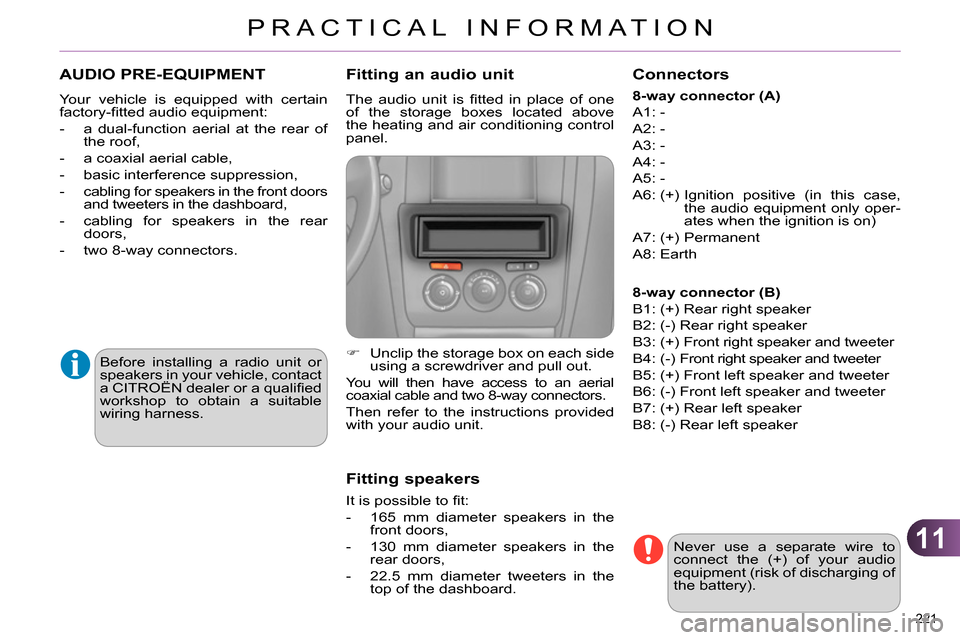
Fitting an audio unit
The audio unit is fi tted in place of one
of the storage boxes located above
the heating and air conditioning control
panel.
Unclip the storage box on each side
using a screwdriver and pull out.
You will then have access to an aerial
coaxial cable and two 8-way connectors.
Then refer to the instructions provided
with your audio unit.
Fitting speakers
It is possible to fi t:
- 165 mm diameter speakers in the
front doors,
- 130 mm diameter speakers in the
rear doors,
- 22.5 mm diameter tweeters in the
top of the dashboard.
Connectors
8-way connector (A)
A1: -
A2: -
A3: -
A4: -
A5: -
A6: (+) Ignition positive (in this case,
the audio equipment only oper-
ates when the ignition is on)
A7: (+) Permanent
A8: Earth
8-way connector (B)
B1: (+) Rear right speaker
B2: (-) Rear right speaker
B3: (+) Front right speaker and tweeter
B4: (-) Front right speaker and tweeter
B5: (+) Front left speaker and tweeter
B6: (-) Front left speaker and tweeter
B7: (+) Rear left speaker
B8: (-) Rear left speaker
Page 225 of 340
11
PRACTICAL INFORMATION
223
Installation of radio
communication transmitters
Before installing any after-market
radio communication transmit-
ter, you can contact a CITROËN
dealer for the specifi cation of
transmitters which can be fi tted
(frequency, maximum power, aer-
ial position, specifi c installation re-
quirements), in line with the Vehicle
Electromagnetic Compatibility
Directive (2004/104/EC).
Depending on the legislation in
force in the country, it may be
compulsory to have a high vis-
ibility safety vest, warning tri-
angle, breathalyzers and spare
bulbs and fuses available in the
vehicle.
The fi tting of electrical equip-
ment or accessories which are
not recommended by CITROËN
may result in a failure of your ve-
hicle's electronic system and ex-
cessive electrical consumption.
Please note this precaution.
You are advised to contact a
CITROËN representative to be
shown the range of recommend-
ed equipment and accessories.
"Multimedia":
audio systems, steering mounted au-
dio controls, speakers, Hi-Fi module,
Bluetooth hands-free system, port-
able satellite navigation system, semi-
integral support bracket for portable
navigation system, mapping update
CD, driving assistant, portable video
screen, portable video support bracket,
230 V/50 Hz socket, 230 V/50 Hz adap-
tor, iPhone
® compatible mobile phone
charger, mobile phone/smartphone
bracket, Wi-Fi on board...
By going to a CITROËN dealer, you
can also obtain cleaning and mainte-
nance products (interior and exterior) -
including ecological products in the
"TECHNATURE" range -, products for
topping up (screenwash...), touch-up
pens and paint aerosols for the exact
colour of your vehicle, recharges (car-
tridge for the temporary puncture repair
kit...), ...
Page 237 of 340
235
The system is protected in such a way that it will only
operate in your vehicle.
eMyWay
01 First steps - Control panel
For safety reasons, the driver must only carry out
operations which require prolonged attention while the
vehicle is stationary.
When the engine is switched off and to prevent
discharging of the battery, the system switches off
following the activation of the energy economy mode.
CONTENTS
02 Steering mounted controls
03 General operation
04 Navigation - Guidance
05 Traffic information
06 Using the telephone
07 Radio
08 Music media players
09 Audio settings
10 Configuration
11 Screen menu map
Frequently asked questions p.
p.
p.
p.
p.
p.
p.
p.
p.
p.
p.
p.
236
238
239
241
254
257
267
271
277
278
279
283
SATELLITE NAVIGATION SYSTEM
MULTIMEDIA BLUETOOTH
TELEPHONE AUDIO SYSTEM
Page 238 of 340
01
236
FIRST STEPS
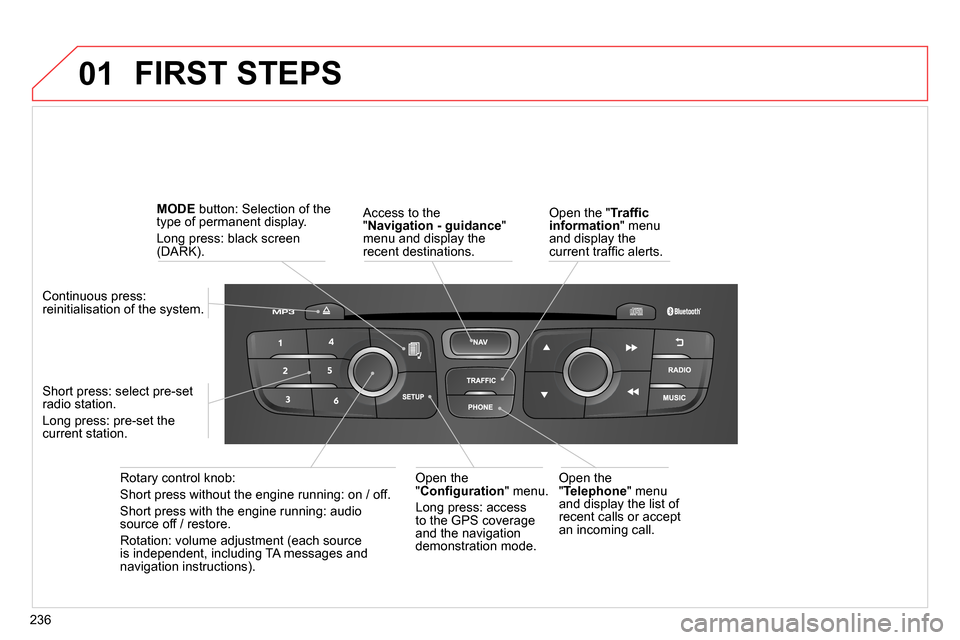
Access to the
" Navigation - guidance
"
menu and display the
recent destinations.
Rotary control knob:
Short press without the engine running: on / off.
Short press with the engine running: audio
source off / restore.
Rotation: volume adjustment (each source
is independent, including TA messages and
navigation instructions).
Continuous press:
reinitialisation of the system.
Short press: select pre-set
radio station.
Long press: pre-set the
current station.
MODE
button: Selection of the
type of permanent display.
Long press: black screen
(DARK).
Open the
" Telephone
" menu
and display the list of
recent calls or accept
an incoming call.
Open the
" Confi guration
" menu.
Long press: access
to the GPS coverage
and the navigation
demonstration mode.
Open the " Traffi c
information
" menu
and display the
current traffi c alerts.
Page 239 of 340
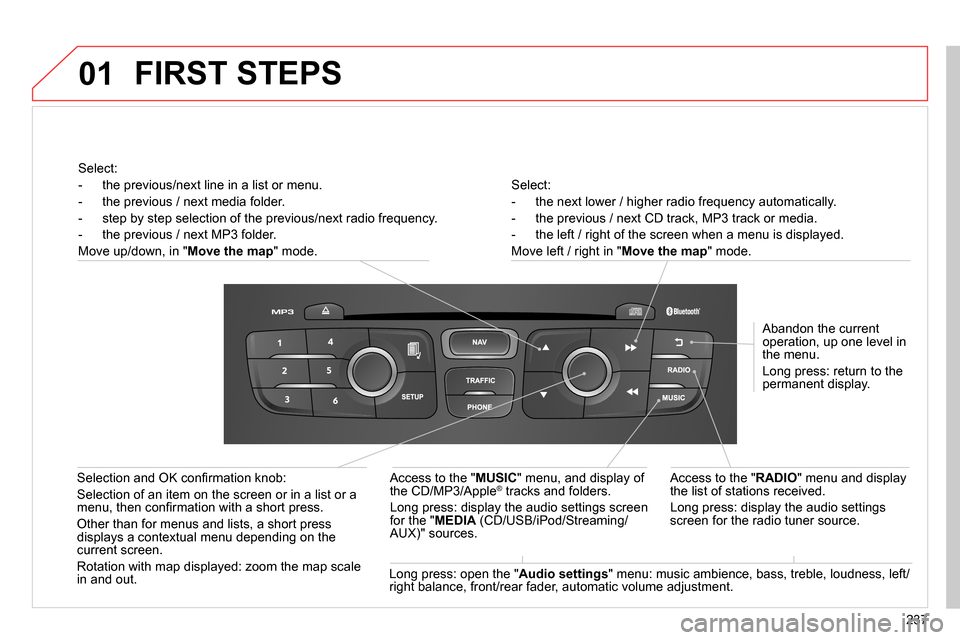
01
237
Select:
- the next lower / higher radio frequency automatically.
- the previous / next CD track, MP3 track or media.
- the left / right of the screen when a menu is displayed.
Move left / right in " Move the map
" mode.
Abandon the current
operation, up one level in
the menu.
Long press: return to the
permanent display.
Access to the " RADIO
" menu and display
the list of stations received.
Long press: display the audio settings
screen for the radio tuner source.
Long press: open the " Audio settings
" menu: music ambience, bass, treble, loudness, left/
right balance, front/rear fader, automatic volume adjustment.
Access to the " MUSIC
" menu, and display of
the CD/MP3/Apple
® tracks and folders.
Long press: display the audio settings screen
for the " MEDIA
(CD/USB/iPod/Streaming/
AUX)" sources.
Selection and OK confi rmation knob:
Selection of an item on the screen or in a list or a
menu, then confi rmation with a short press.
Other than for menus and lists, a short press
displays a contextual menu depending on the
current screen.
Rotation with map displayed: zoom the map scale
in and out.
Select:
- the previous/next line in a list or menu.
- the previous / next media folder.
- step by step selection of the previous/next radio frequency.
- the previous / next MP3 folder.
Move up/down, in " Move the map
" mode.
FIRST STEPS
Page 240 of 340
02
238
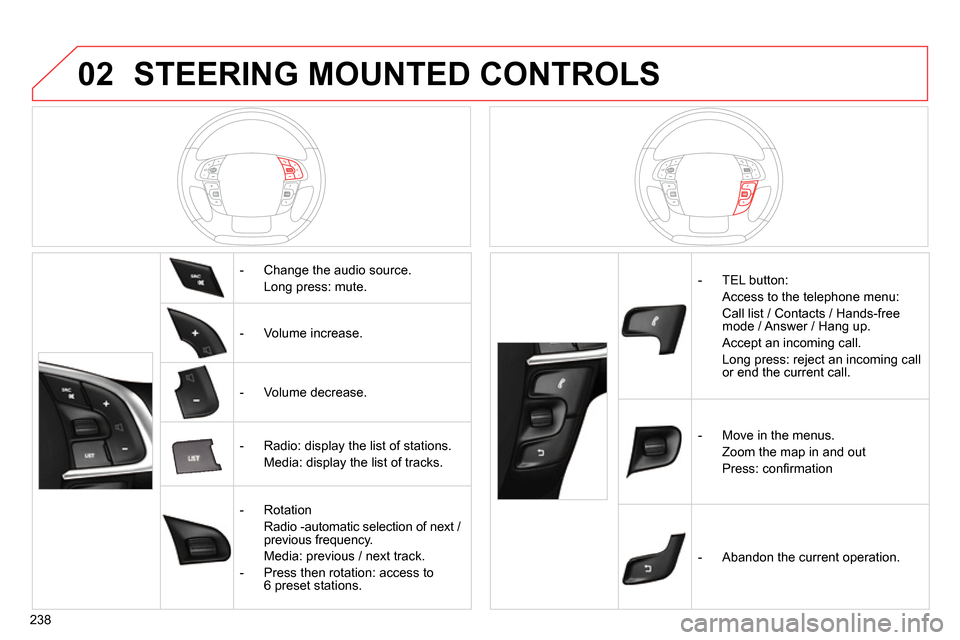
STEERING MOUNTED CONTROLS
- Change the audio source.
Long press: mute.
- Volume increase.
- Volume decrease.
- Radio: display the list of stations.
Media: display the list of tracks.
- Rotation
Radio -automatic selection of next /
previous frequency.
Media: previous / next track.
- Press then rotation: access to
6 preset stations.
- TEL button:
Access to the telephone menu:
Call list / Contacts / Hands-free
mode / Answer / Hang up.
Accept an incoming call.
Long press: reject an incoming call
or end the current call.
- Move in the menus.
Zoom the map in and out
Press: confi rmation
- Abandon the current operation.