AUX Citroen C4 2014.5 2.G User Guide
[x] Cancel search | Manufacturer: CITROEN, Model Year: 2014.5, Model line: C4, Model: Citroen C4 2014.5 2.GPages: 494, PDF Size: 21.47 MB
Page 358 of 494
01
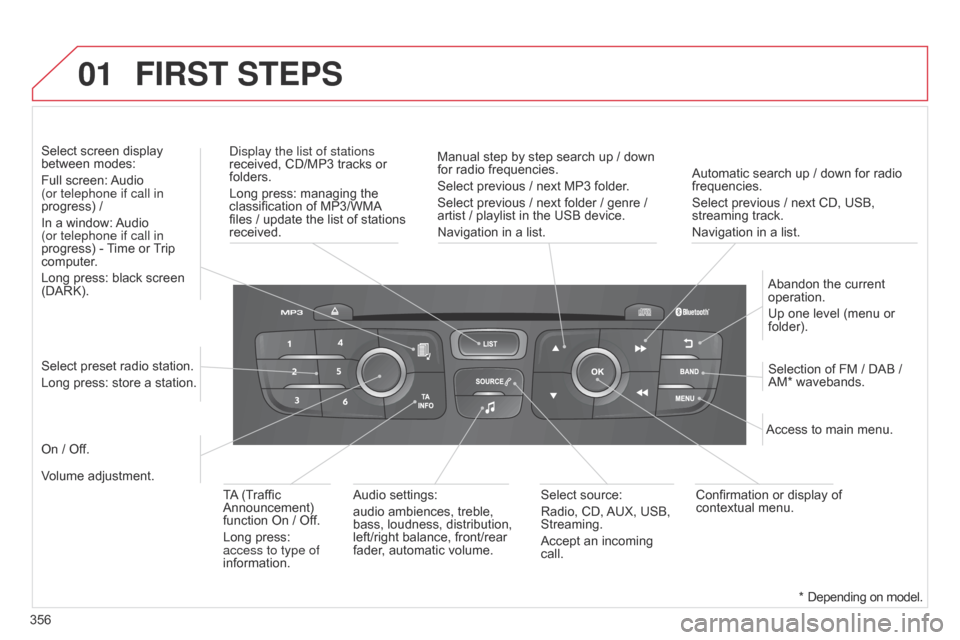
356Automatic search up / down for radio
frequencies.
Select
previous / next CD, USB,
streaming
track.
Navigation in a list.
d
isplay the list of stations
received, CD/MP3 tracks or
folders.
Long
press: managing the
classification
of MP3/WMA
files
/ update the list of stations
received.
Abandon
the current
operation.
Up
one level (menu or
folder).
On
/ Off.
Selection of FM / DAB /
AM*
wavebands.
Select preset radio station.
Long press: store a station.
Select screen display
between
modes:
Full screen:
Audio
(or telephone if call in
progress) /
In a window:
Audio
(or telephone if call in
progress)
-
T
ime or
T
rip
computer
.
Long press: black screen
(DARK).
Audio
settings:
audio ambiences, treble,
bass,
loudness, distribution,
left/right
balance, front/rear
fader
, automatic volume.Access to main menu.
TA
(Traffic
Announcement)
function
On / Off.
Long press:
access to type of
information.
Select
source:
Radio, CD,
AUX,
USB,
Streaming.
Accept
an incoming
call.
Confirmation
or display of
contextual
menu.
Manual step by step search up / down
for
radio frequencies.
Select previous / next MP3 folder.
Select previous / next folder / genre /
artist
/ playlist in the USB device.
Navigation in a list.
Volume adjustment.
FIRST STEPS
* Depending
on model.
Page 370 of 494
04
368
AUDIO
APPLE® players or portable player
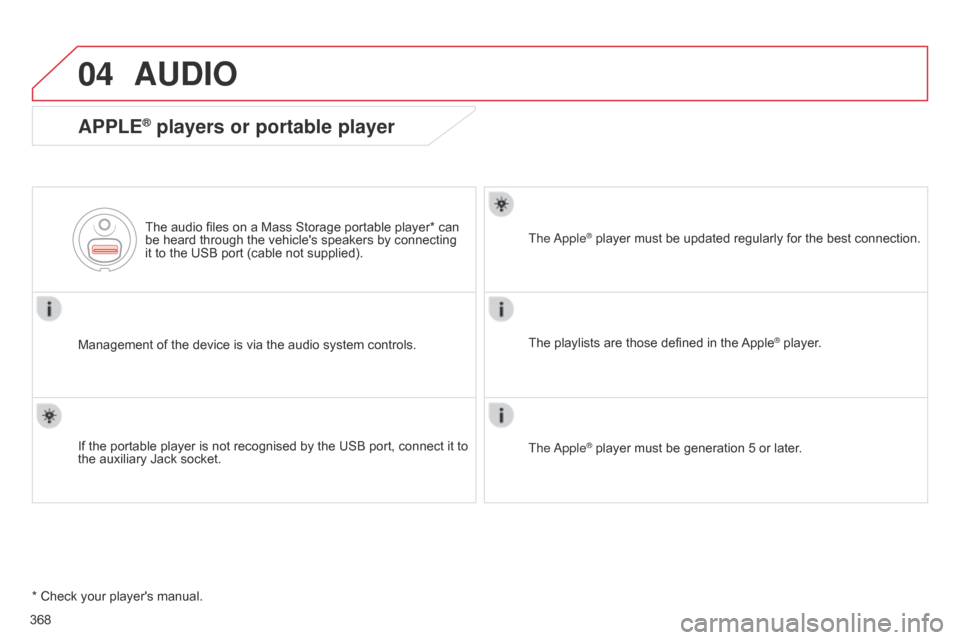
Management of the device is via the audio system controls.
The audio files on a Mass Storage portable player* can
be
heard through the vehicle's speakers by connecting
it
to the USB port (cable not supplied).
If the portable player is not recognised by the USB port, connect it to
the
auxiliary Jack socket. The
a
pple
® player
must be updated regularly for the best connection.
The
playlists are those defined in the
Apple® player.
The
a
pple
® player must be generation 5 or later.
*
Check
your
player's
manual.
Page 371 of 494
04
369
AUDIO
Auxiliary socket (AUX)
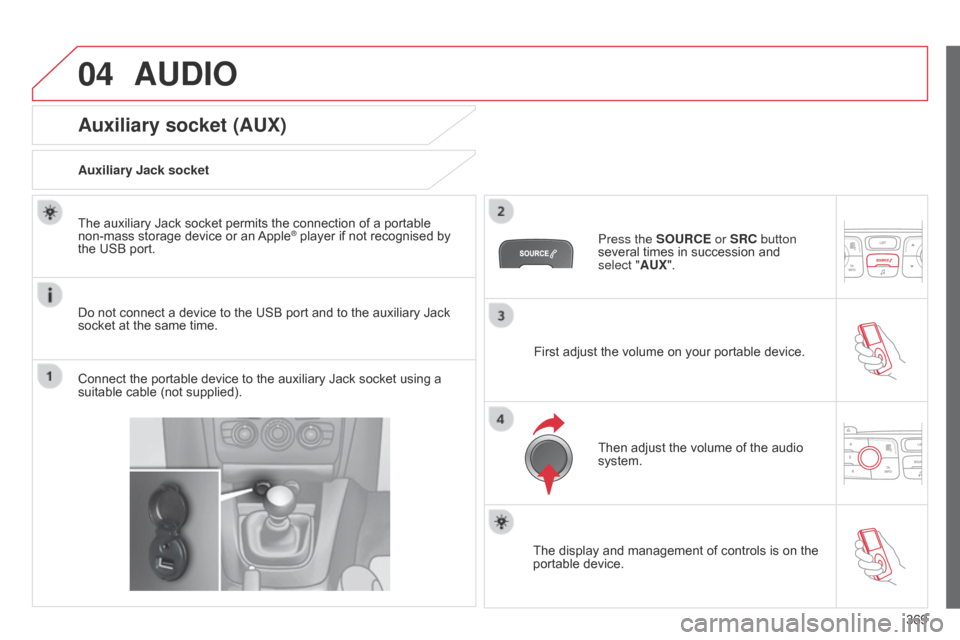
Auxiliary Jack socket
Do not connect a device to the USB port and to the auxiliary Jack
socket
at the same time.
The
auxiliary Jack socket permits the connection of a portable
non-mass
storage device or an
Apple® player if not recognised by the
USB
port.
Connect
the
portable
device
to
the
auxiliary Jack socket using a
suitable
cable
(not
supplied). Press the SOURCE or SRC button
several
times in succession and
select
"AUX".
First
adjust the volume on your portable device.
Then
adjust the volume of the audio
system.
The
display and management of controls is on the
portable
device.
Page 389 of 494
387
FREqUENTLY ASKED q UESTIONS
qUESTION ANSWER SOLUTION
The
message "USB
peripheral error"
or "Peripheral not
recognised"
is displayed
in
the
screen. The
USB memory stick is not recognised.
The
memory stick may be corrupt. Reformat
the memory stick (FAT32).
a telephone connects
automatically
,
disconnecting
another
telephone. Automatic
connection overrides manual connection.Modify
the telephone settings to remove automatic
connection.
The
a
pple
® player is
not
recognised when
connecting
to the USB
port. The
a pple® player is of a generation that is not compatible with a USB connection. Connect
the a pple® player to the AUX Jack socket using
a
suitable
cable (not supplied).
The
hard
disk
or
device
is
not
recognised
when
connecting
to
the
USB
port. Some
hard
disks
and
devices
need
a
power
supply
greater
than
is
provided
by
the
audio
system. Connect
the
device
to the 230 V socket, the 12 V
socket
or
an
external power supply.
Caution:
ensure
that the device does not transmit
a
voltage
greater
than 5 V (risk of destruction of
the
system).
When
streaming,
the
sound
cuts
momentarily. Some
telephones
prioritise
connection
of
the
"hands-free"
profile. Delete
the
"hands-free" connection profile to
improve
streaming.
In
"Random
all"
play,
not
all
of
the
tracks
are
played. In
"Random
all"
play,
the
system
can
only
take
into
account
up
to
999
tracks.
Page 391 of 494
389
ABS and EBFD systems ..............................14 8ac
cessories .............................. ...................269
ac
cessory position
...................................... 16
5
Accessory
socket, 12V
......... 1
01, 104, 110, 113
Additive,
Ad
Blue
.............................. 2
3, 217-224
Adjusting
h
eadlamps
................................... 12
2
Adjusting
head restraints
...............................93
A
djusting seat belt height
.....................15
1,
15
3
Adjusting
the steering wheel
.........................99
A
dvice on driving
..............................
...........159
Airbags
...............
.................................... 22, 155
Airbags,
c
urtain
..................................... 15
7,
15
8
Airbags,
front........................................ 15 6,
15
8
Airbags,
la
teral
...................................... 15
7,
15
8
Air
c
onditioning
...............................
...............10
Air
c
onditioning,
d
igital
...................... 8
0, 81, 84
Air
c
onditioning,
m
anual
.......................... 8
0, 82
ai
r filter
...............
........................................... 215
ai
r flow
..............................
....................... 82, 86
ai
r vents
..............................
...........................79
Alarm
.............................................................. 67
A
nti-lock braking
system
(ABS)
............................................. 14
8
Anti-pinch
................................................. 7
6, 78
Anti-theft
..............................
........................166
Armrest,
front
....................................... 10
6,
10
7
Armrest,
rear
................................................. 11
0
as
sistance call
............................. 1
50, 283, 284
Audible
w
arning
............................................ 14
7
Audio
cable
.......................................... 3
06, 368
Audio
streaming
(
b
lu
etooth)
......................... 3
02, 305, 370, 372
Audio
system
...............................
..... 37, 39, 355
bat
tery
...............................
............ 215, 252-255
Battery,
c
harging
...............................
... 254, 255
Battery,
remote control
...................... 5
8, 63, 64
Black
pan
el..................................................... 36
Blind
spot sensors
.......................................19
2
bl
ue H
di
...............
......................... 186, 217-224
Bluetooth
(hands-free)
................. 3
42, 343, 371
bl
uetooth (telephone)
................... 3
42, 343, 371
bo
nnet
...............
...........................................208
bo
nnet stay
..................................................20
8
b
oot
........
.................................................. 72, 73
Boot
lamp
..............................................1
13,
13
1
Brake
discs
...................................................2
16
Brake
lamps
...............................
..................244
Brake
p
ads
...............................
....................216
Braking
assistance system
..........................14
8
A
B
Automatic illumination of headlamps .................................. 1 16, 120, 121
Automatic
operation of hazard warning
lam
ps
..............................
............................147
Automatic
rain sensitive windscreen
w
ipers
...............
................................. 125,
12
6
Auxiliary
socket
....................1
02, 302, 306, 369CD
MP3 ................ ........................ 302, 365, 366
Central
locking ................................... 5 4, 60, 65
Centre console
............................................. 10
3
Changing
a bu
lb
....................................2
38-246
Changing
a f
use
.....................................2
47- 2 51
Changing
a wheel
...............................
..230-236
Changing
a wiper blade
....................... 1
28, 257
Changing
the date
.............................. 3
8, 43, 48
Changing
the remote
control battery .................................. 58,
63, 64
Changing
t
he
t
ime
........................ 3
4, 38, 43, 48
Checking
levels
......................................21
1-214
Checking
the engine
oil level
...............
...................................29, 211
Checking
tyre pressures
(using
the kit)
..............................
...............229
Checks
...............
...................................209 -224
Child
lock
...............................
.......................146
Children
...............................
.. 132-146, 154, 156
Child
seats
..............................
.............132-14 5
Child
seats, ISOFIX
..............................14
2-14 4
Child
seats, conventional
.............................13
8
C
ITR
oËn
Localised
as
sistance Call
..........................................28
4
C
ITR
oËn
Localised
Emergency
C
all
.........................................28
4
CITROËN
M
ULTICITY
C
ONNECT
..............3
37
Clock
...............
...............................................34
Closing
the boot
...............................
.........7 2 -74
Closing
the doors
...............................
.............71
Cold
climate screen
.....................................25
8
Colour screen
...............................
........ 286, 287
Connectors,
audio
........ 1
02, 303, 307, 367, 369
Coolant level
..............................
...................213
Capacity,
fuel tank
..............................
.........204
C
d
..............................
.......................... 302, 364
C
.
alphabetical index
Page 408 of 494
Fittings
4
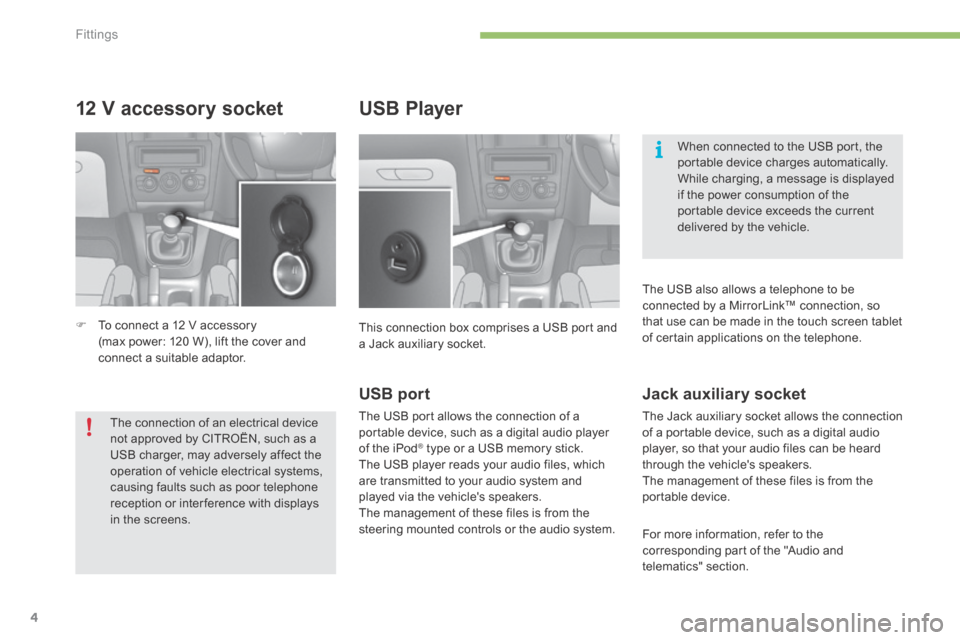
12 V accessory socket
To connect a 12 V accessory (max power: 120 W), lift the cover and connect a suitable adaptor.
USB Player
This connection box comprises a USB port and a Jack auxiliary socket.
When connected to the USB port, the portable device charges automatically. While charging, a message is displayed if the power consumption of the portable device exceeds the current delivered by the vehicle.
The connection of an electrical device not approved by CITROËN, such as a USB charger, may adversely affect the operation of vehicle electrical systems, causing faults such as poor telephone reception or inter ference with displays in the screens.
USB port
The USB port allows the connection of a portable device, such as a digital audio player of the iPod ® type or a USB memory stick. ® type or a USB memory stick. ®
The USB player reads your audio files, which are transmitted to your audio system and played via the vehicle's speakers. The management of these files is from the steering mounted controls or the audio system.
Jack auxiliary socket
The Jack auxiliary socket allows the connection of a portable device, such as a digital audio player, so that your audio files can be heard through the vehicle's speakers. The management of these files is from the portable device.
For more information, refer to the corresponding part of the "Audio and telematics" section.
The USB also allows a telephone to be connected by a MirrorLink™ connection, so that use can be made in the touch screen tablet of certain applications on the telephone.
Page 426 of 494
.
Audio and Telematics 23
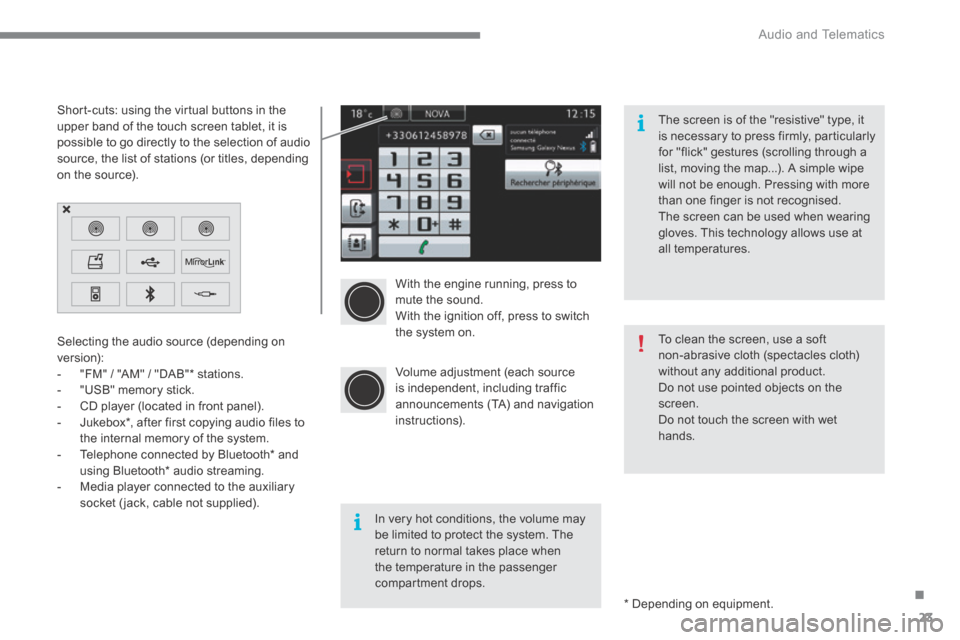
With the engine running, press to mute the sound. With the ignition off, press to switch the system on.
Volume adjustment (each source is independent, including traffic announcements (TA) and navigation instructions).
Selecting the audio source (depending on version): - "FM" / "AM" / "DAB" * stations. - "USB" memory stick. - CD player (located in front panel). - Jukebox * , after first copying audio files to
the internal memory of the system. - Telephone connected by Bluetooth * and using Bluetooth * audio streaming. - Media player connected to the auxiliary socket (jack, cable not supplied).
* Depending on equipment.
Short-cuts: using the virtual buttons in the upper band of the touch screen tablet, it is possible to go directly to the selection of audio source, the list of stations (or titles, depending on the source).
The screen is of the "resistive" type, it is necessary to press firmly, particularly for "flick" gestures (scrolling through a list, moving the map...). A simple wipe will not be enough. Pressing with more than one finger is not recognised. The screen can be used when wearing gloves. This technology allows use at all temperatures.
In very hot conditions, the volume may be limited to protect the system. The return to normal takes place when the temperature in the passenger compartment drops.
To clean the screen, use a soft non-abrasive cloth (spectacles cloth) without any additional product. Do not use pointed objects on the screen. Do not touch the screen with wet
hands.
Page 444 of 494
.
Audio and Telematics 41
Level 1Level 2Comments
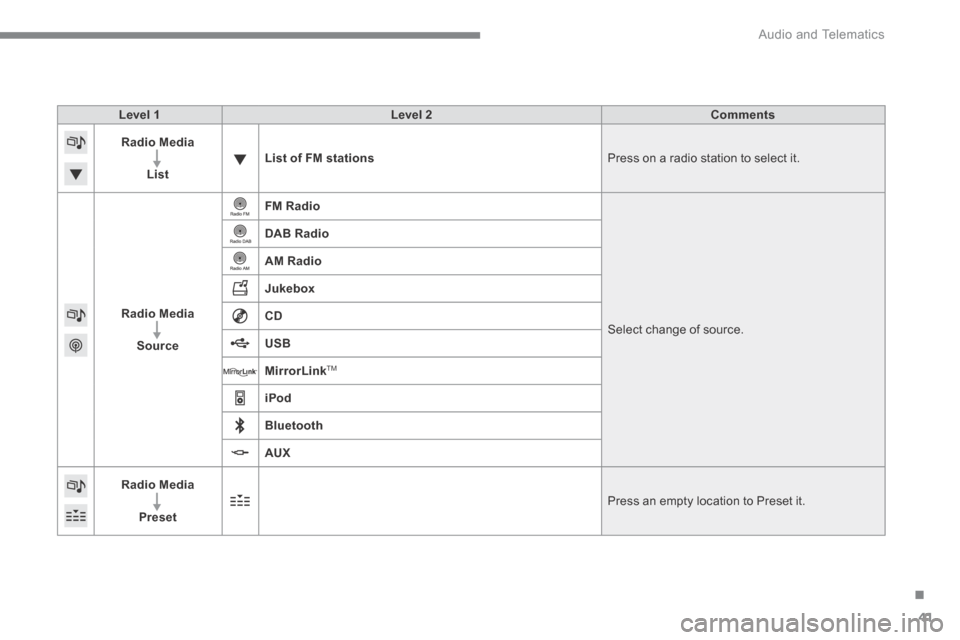
Radio Media
ListList of FM stations Press on a radio station to select it.
Radio Media
Source
FM Radio
Select change of source .
DAB Radio
AM Radio
Jukebox
CD
USB
MirrorLinkTM
iPod
Bluetooth
AUX
Radio Media
Preset Press an empty location to Preset it.
Page 448 of 494
.
Audio and Telematics 45
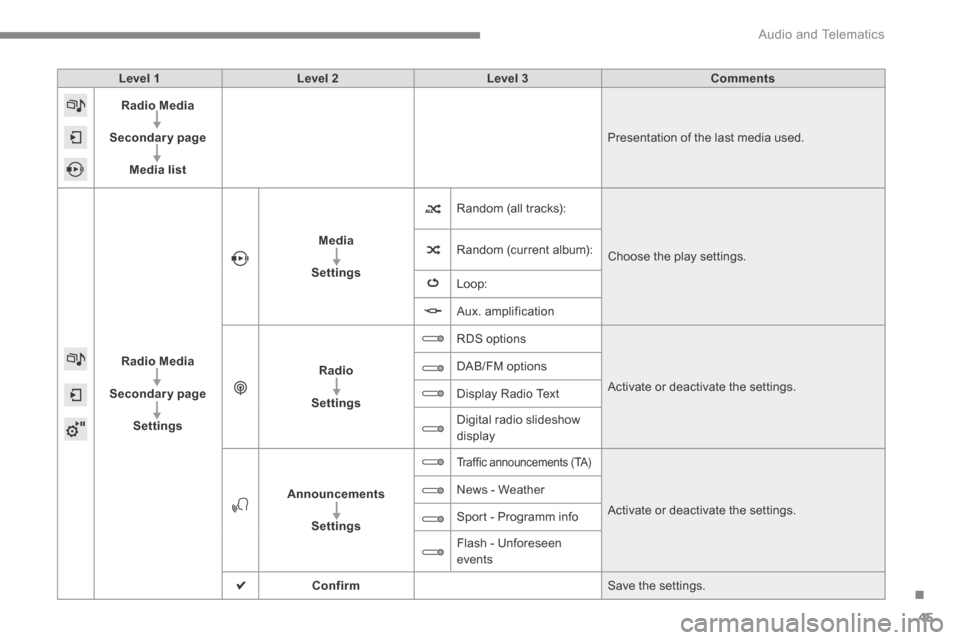
Level 1Level 2Level 3Comments
Radio Media
Secondary page
Media list
Presentation of the last media used.
Radio Media
Secondary page
Settings
Media
Settings
Random (all tracks):
Choose the play settings. Random (current album):
Loop:
Aux. amplification
Radio
Settings
RDS options
Activate or deactivate the settings.
DAB/FM options
Display Radio Text
Digital radio slideshow display
Announcements
Settings
Traffic announcements (TA)
Activate or deactivate the settings.
News - Weather
Sport - Programm info
Flash - Unforeseen events
Confirm Save the settings.
Page 453 of 494
Audio and Telematics
50
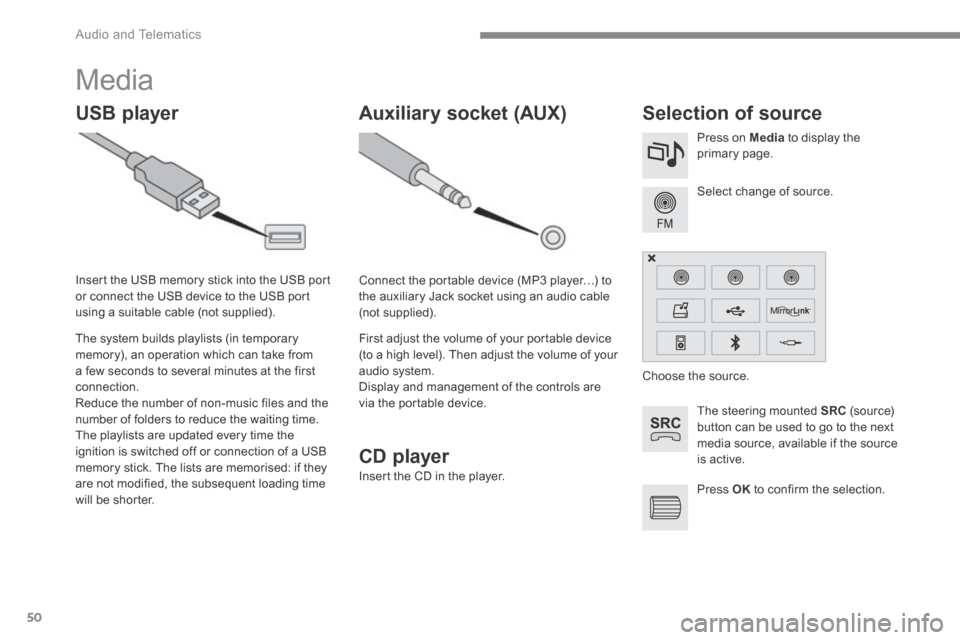
Media
USB player Selection of source
The steering mounted SRC (s o u r c e) button can be used to go to the next media source, available if the source is active.
Select change of source.
Press on Media to display the primary page.
The system builds playlists (in temporary memory), an operation which can take from a few seconds to several minutes at the first connection. Reduce the number of non-music files and the number of folders to reduce the waiting time. The playlists are updated every time the ignition is switched off or connection of a USB memory stick. The lists are memorised: if they are not modified, the subsequent loading time will be shorter.
Insert the USB memory stick into the USB port or connect the USB device to the USB port using a suitable cable (not supplied).
Auxiliary socket (AUX)
Connect the portable device (MP3 player…) to the auxiliary Jack socket using an audio cable (not supplied).
First adjust the volume of your portable device (to a high level). Then adjust the volume of your audio system. Display and management of the controls are via the portable device.
Choose the source.
Press OK to confirm the selection.
CD player
Insert the CD in the player.