Bass Citroen C4 2014.5 2.G Owner's Manual
[x] Cancel search | Manufacturer: CITROEN, Model Year: 2014.5, Model line: C4, Model: Citroen C4 2014.5 2.GPages: 494, PDF Size: 21.47 MB
Page 336 of 494
06
334
CONFIGURATION
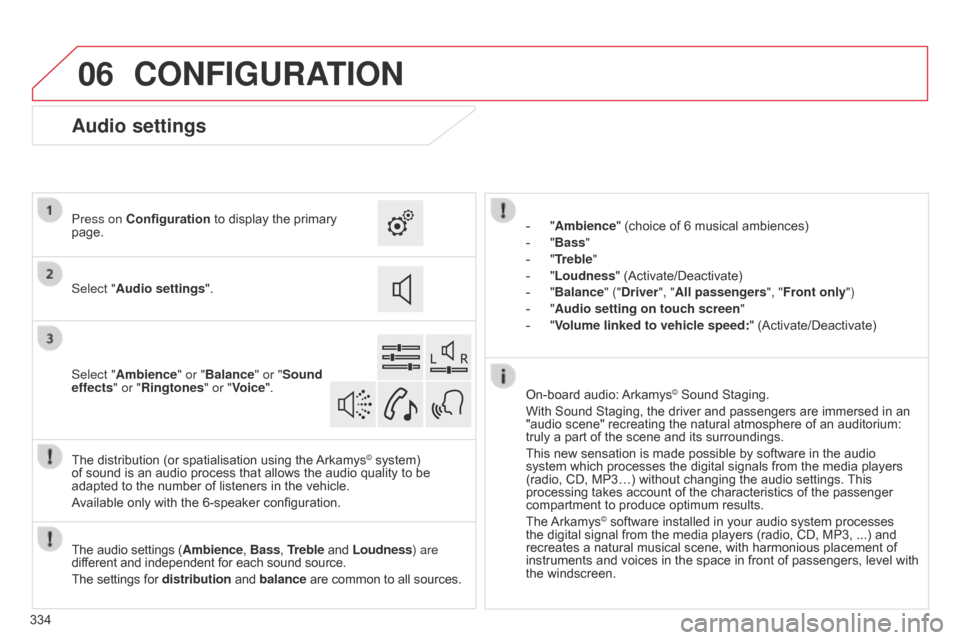
- "Ambience" (choice of 6 musical ambiences)
-
"
Bass "
-
"
Treble"
-
"
Loudness" (Activate/Deactivate)
-
"
Balance" ("Driver ", "All passengers", "Front only ")
-
"
Audio setting on touch screen "
-
"
Volume linked to vehicle speed: "
(Activate/Deactivate)
The
audio
settings
(Ambience, Bass, Treble
and
Loudness) are
different
and
independent
for
each
sound
source.
The
settings
for
distribution
and
balance
are
common
to
all
sources.
The
distribution
(or
spatialisation
using
the
Arkamys© system) of
sound
is
an
audio
process
that
allows
the
audio
quality to be
adapted
to
the
number
of
listeners
in
the
vehicle.
Available
only
with
the
6-speaker
configuration. On-board
audio:
Arkamys© Sound Staging.
With
Sound
Staging,
the
driver and passengers are immersed in an
"audio
scene"
recreating
the natural atmosphere of an auditorium:
truly
a
part
of
the
scene
and its surroundings.
This
new
sensation
is
made possible by software in the audio
system
which
processes
the digital signals from the media players
(radio,
CD,
MP3…)
without changing the audio settings.
This
processing
takes
account
of the characteristics of the passenger
compartment
to
produce
optimum results.
The
Arkamys© software installed in your audio system processes the
digital
signal from the media players (radio, CD, MP3, ...) and
recreates
a
natural musical scene, with harmonious placement of
instruments
and voices in the space in front of passengers, level with
the
windscreen.
Audio settings
Select "Audio settings ".
Press on Configuration
to display the primary
page.
Select "
Ambience" or "Balance" or "Sound
effects " or "Ringtones" or "Voice".
Page 352 of 494
FREqUENTLY ASKED q UESTIONS
350
q
UESTION
ANSWER SOLUTION
Some contacts are
duplicated
in the list.
The options for synchronizing contacts are synchronizing the contacts
on
the SIM card, the contacts on the telephone, or both. When both
synchronizations
are selected, some contacts may be duplicated.
Select "Display SIM card contacts" or "Display
telephone
contacts".
Contacts are not shown
in alphabetical order.
Some telephones offer display options. Depending on the settings
chosen,
contacts can be transferred in a specific order.
Modify the display setting in the telephone
directory
.
The system does not receive
SMS text messages.The Bluetooth mode does not permit sending SMS text messages to the system.
CD, MP3
The
CD
is
ejected
automatically
or
is
not
played
by
the
player. The
CD is inserted upside down, is unplayable, does not contain any
audio
data or contains an audio format which the player cannot play.-
Check
that the CD is inserted in the player the
right
way up.
-
Check
the condition of the CD: the CD cannot
be
played if it is too damaged.
-
Check
the content in the case of a recorded
CD:
refer to the advice in the "AUDIO" section.
-
The audio system's CD player does not play DVDs.
- Some recorded CDs will not be played by the audio system because they are not of the correct quality.
The CD has been recorded in a format that is not compatible with the player (udf, ...).
The
CD is protected by an anti-pirating protection system which is not
recognised
by the audio system.
There is a long waiting period following the insertion of a C
d or connection of a
USB
memory stick.When a new medium is inserted, the system reads a certain amount of data (directory, title, artist, etc.). This may take from a few seconds to a
few
minutes. This
phenomenon is normal.
The
CD
player
sound
is
poor
. The
CD used is scratched or of poor quality. Insert
good quality CDs and store them in suitable
conditions.
The
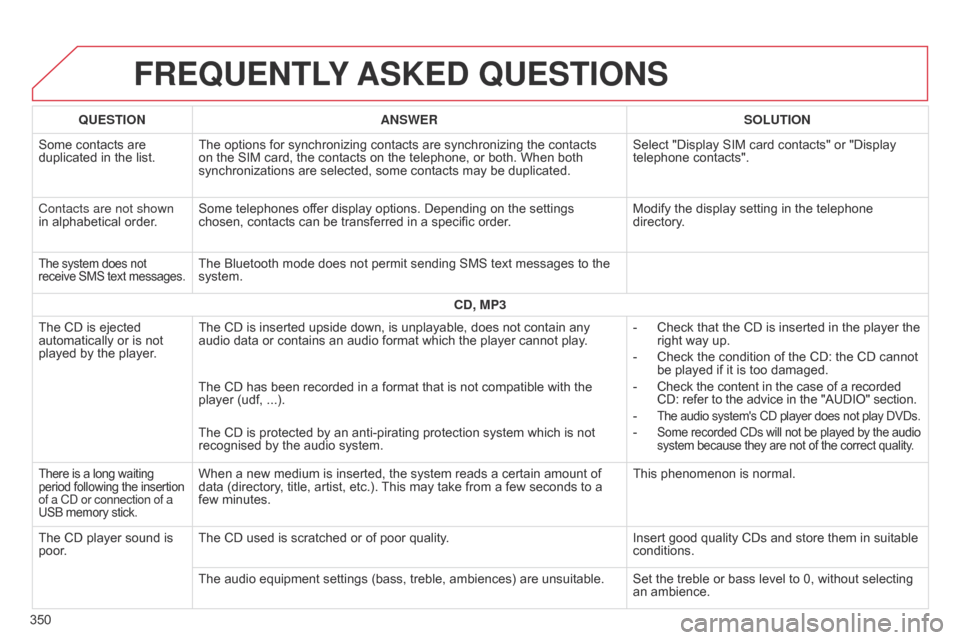
audio equipment settings (bass, treble, ambiences) are unsuitable. Set the treble or bass level to 0, without selecting
an
ambience.
Page 354 of 494
FREqUENTLY ASKED q UESTIONS
352
q
UESTION
ANSWER SOLUTION
Settings, configuration
In changing the setting
of
treble and bass the
equalizer
setting is
deselected.
The
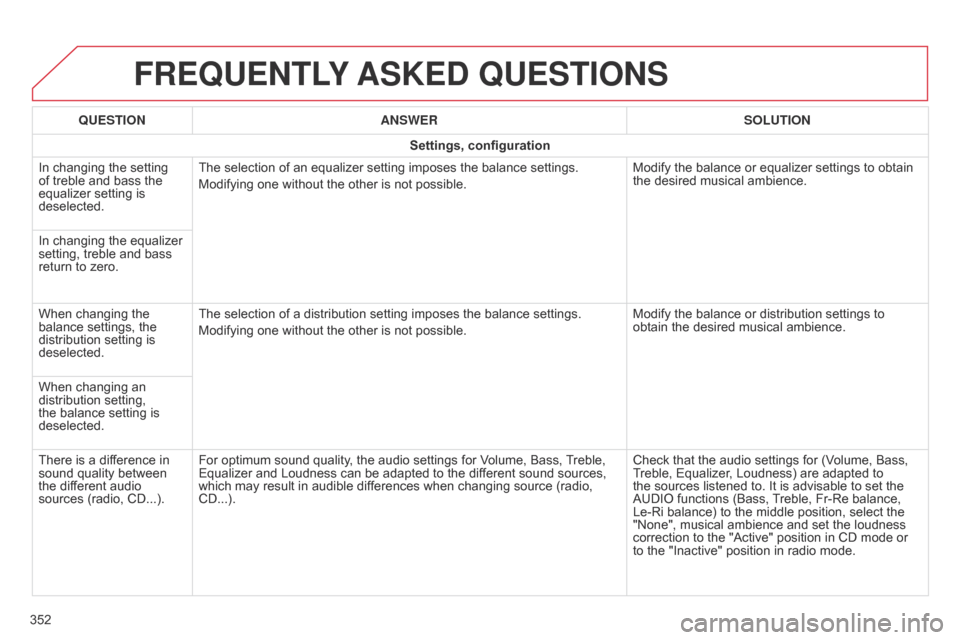
selection of an equalizer setting imposes the balance settings.
Modifying one without the other is not possible.
Modify the balance or equalizer settings to obtain
the
desired musical ambience.
In changing the equalizer
setting,
treble and bass
return
to zero.
When changing the
balance
settings, the
distribution
setting is
deselected.
The
selection of a distribution setting imposes the balance settings.
Modifying one without the other is not possible.
Modify the balance or distribution settings to
obtain
the desired musical ambience.
When changing an
distribution
setting,
the
balance setting is
deselected.
There
is a difference in
sound
quality between
the
different audio
sources
(radio, CD...).
For optimum sound quality, the audio settings for Volume, Bass,
T
reble,
Equalizer
and Loudness can be adapted to the different sound sources,
which
may result in audible differences when changing source (radio,
CD...).
Check
that the audio settings for (Volume, Bass,
T
reble, Equalizer, Loudness) are adapted to
the
sources listened to. It is advisable to set the
AUDIO
functions (Bass,
T
reble, Fr-Re balance,
Le-Ri
balance) to the middle position, select the
"None",
musical ambience and set the loudness
correction
to the "Active" position in CD mode or
to
the "Inactive" position in radio mode.
Page 358 of 494
01
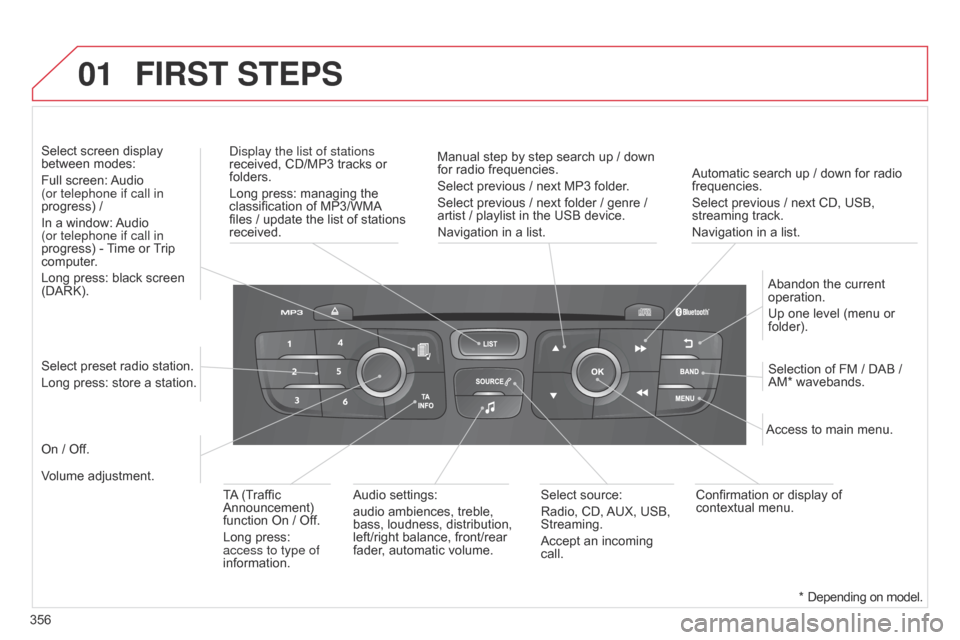
356Automatic search up / down for radio
frequencies.
Select
previous / next CD, USB,
streaming
track.
Navigation in a list.
d
isplay the list of stations
received, CD/MP3 tracks or
folders.
Long
press: managing the
classification
of MP3/WMA
files
/ update the list of stations
received.
Abandon
the current
operation.
Up
one level (menu or
folder).
On
/ Off.
Selection of FM / DAB /
AM*
wavebands.
Select preset radio station.
Long press: store a station.
Select screen display
between
modes:
Full screen:
Audio
(or telephone if call in
progress) /
In a window:
Audio
(or telephone if call in
progress)
-
T
ime or
T
rip
computer
.
Long press: black screen
(DARK).
Audio
settings:
audio ambiences, treble,
bass,
loudness, distribution,
left/right
balance, front/rear
fader
, automatic volume.Access to main menu.
TA
(Traffic
Announcement)
function
On / Off.
Long press:
access to type of
information.
Select
source:
Radio, CD,
AUX,
USB,
Streaming.
Accept
an incoming
call.
Confirmation
or display of
contextual
menu.
Manual step by step search up / down
for
radio frequencies.
Select previous / next MP3 folder.
Select previous / next folder / genre /
artist
/ playlist in the USB device.
Navigation in a list.
Volume adjustment.
FIRST STEPS
* Depending
on model.
Page 381 of 494
06
379
AUDIO SETTINGS
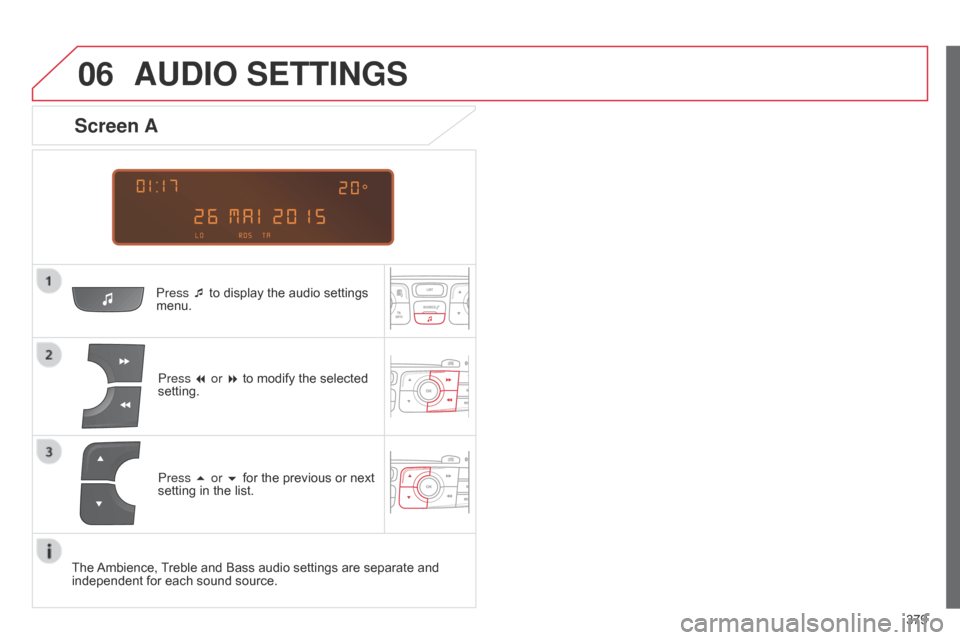
Press ¯ to display the audio settings menu.
Press
7 or 8 to modify the selected
setting.
Screen A
Press 5 or 6 for the previous or next setting in the list.
The
Ambience,
T
reble and Bass audio settings are separate and
independent
for each sound source.
Page 382 of 494
06
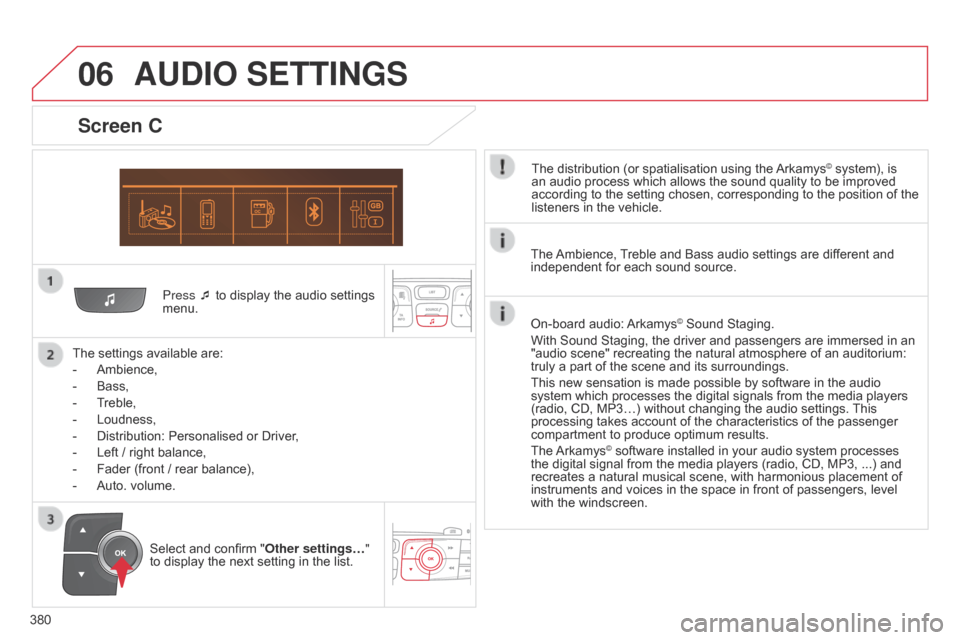
380Press ¯ to display the audio settings
menu.
The
settings available are:
-
Ambience,
-
Bass,
-
T
reble,
-
Loudness,
-
Distribution:
Personalised or Driver,
-
Left
/ right balance,
-
Fader
(front / rear balance),
-
Auto.
volume.
Screen C
The distribution (or spatialisation using the Arkamys© system), is an
audio
process
which
allows
the
sound
quality
to
be improved
according
to
the
setting
chosen,
corresponding
to
the position of the
listeners
in
the
vehicle.
AUDIO SETTINGS
Select and confirm " Other settings… "
to display the next setting in the list. The
Ambience,
T
reble and Bass audio settings are different and
independent
for each sound source.
On-board audio:
Arkamys© Sound Staging.
With
Sound
Staging,
the
driver and passengers are immersed in an
"audio
scene"
recreating
the natural atmosphere of an auditorium:
truly
a
part
of
the
scene
and its surroundings.
This
new
sensation
is
made possible by software in the audio
system
which
processes
the digital signals from the media players
(radio,
CD,
MP3…)
without changing the audio settings.
This
processing
takes
account
of the characteristics of the passenger
compartment
to
produce
optimum results.
The
Arkamys© software installed in your audio system processes the
digital
signal from the media players (radio, CD, MP3, ...) and
recreates
a
natural musical scene, with harmonious placement of
instruments
and voices in the space in front of passengers, level
with
the
windscreen.
Page 386 of 494
384
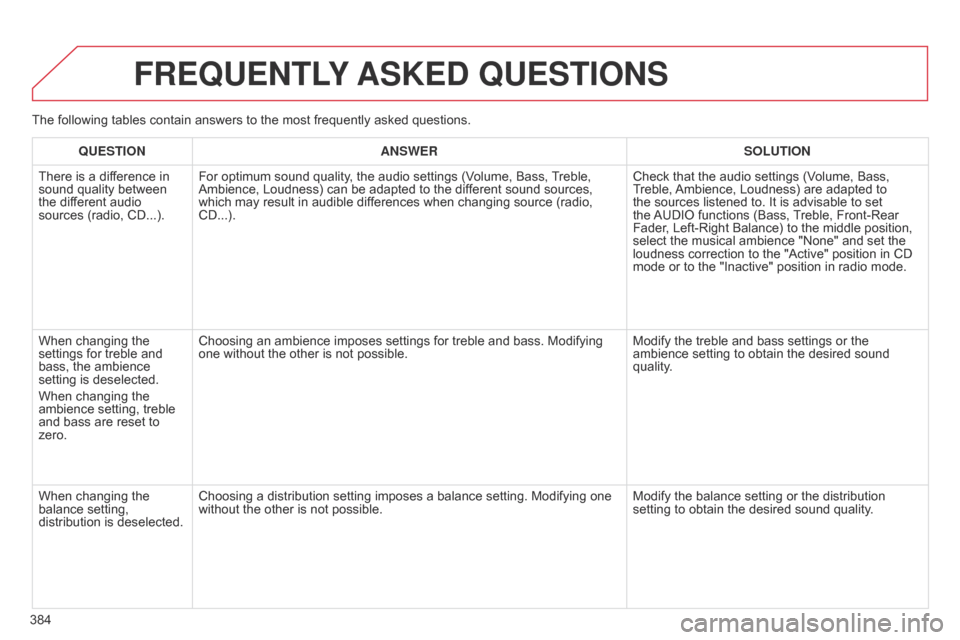
FREqUENTLY ASKED q UESTIONS
qUESTION ANSWER SOLUTION
There
is a difference in
sound
quality between
the
different audio
sources
(radio, CD...). For
optimum sound quality, the audio settings (Volume, Bass,
T
reble,
Ambience,
Loudness) can be adapted to the different sound sources,
which
may result in audible differences when changing source (radio,
CD...).Check
that the audio settings (Volume, Bass,
T
reble,
Ambience,
Loudness) are adapted to
the
sources listened to. It is advisable to set
the
AUDIO
functions (Bass,
T
reble, Front-Rear
Fader
, Left-Right Balance) to the middle position,
select
the musical ambience "None" and set the
loudness
correction to the "Active" position in CD
mode
or to the "Inactive" position in radio mode.
When
changing the
settings
for treble and
bass,
the ambience
setting
is deselected.
When
changing the
ambience
setting, treble
and
bass are reset to
zero. Choosing
an ambience imposes settings for treble and bass. Modifying
one
without the other is not possible.Modify
the treble and bass settings or the
ambience
setting to obtain the desired sound
quality
.
When
changing the
balance
setting,
distribution
is deselected. Choosing
a distribution setting imposes a balance setting. Modifying one
without
the other is not possible. Modify
the balance setting or the distribution
setting
to obtain the desired sound quality.
The
following tables contain answers to the most frequently asked questions.
Page 388 of 494
386
FREqUENTLY ASKED q UESTIONS
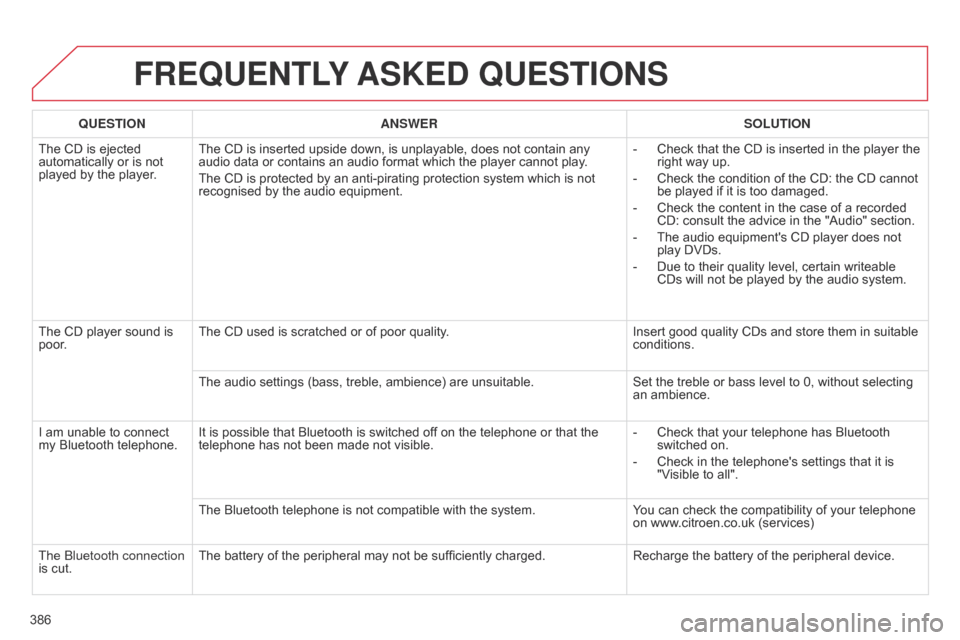
qUESTION ANSWER SOLUTION
The
CD is ejected
automatically
or is not
played
by the player. The
CD is inserted upside down, is unplayable, does not contain any
audio
data or contains an audio format which the player cannot play.
The
CD is protected by an anti-pirating protection system which is not
recognised
by the audio equipment. -
Check
that the CD is inserted in the player the
right
way up.
-
Check
the condition of the CD: the CD cannot
be
played if it is too damaged.
-
Check
the content in the case of a recorded
CD:
consult the advice in the "Audio" section.
-
The
audio equipment's CD player does not
play
DVDs.
-
Due
to their quality level, certain writeable
CDs
will not be played by the audio system.
The
CD player sound is
poor
. The
CD used is scratched or of poor quality.Insert
good quality CDs and store them in suitable
conditions.
The
audio settings (bass, treble, ambience) are unsuitable.Set
the treble or bass level to 0, without selecting
an
ambience.
I
am
unable to connect
my
Bluetooth telephone. It
is possible that Bluetooth is switched off on the telephone or that the
telephone
has not been made not visible.-
Check
that your telephone has Bluetooth
switched
on.
-
Check
in the telephone's settings that it is
"V
isible to all".
The
Bluetooth telephone is not compatible with the system.You
can check the compatibility of your telephone
on
www.citroen.co.uk (services)
The
b
luetooth connection
is
cut. The
battery of the peripheral may not be sufficiently charged.Recharge
the battery of the peripheral device.
Page 463 of 494
Audio and Telematics
60
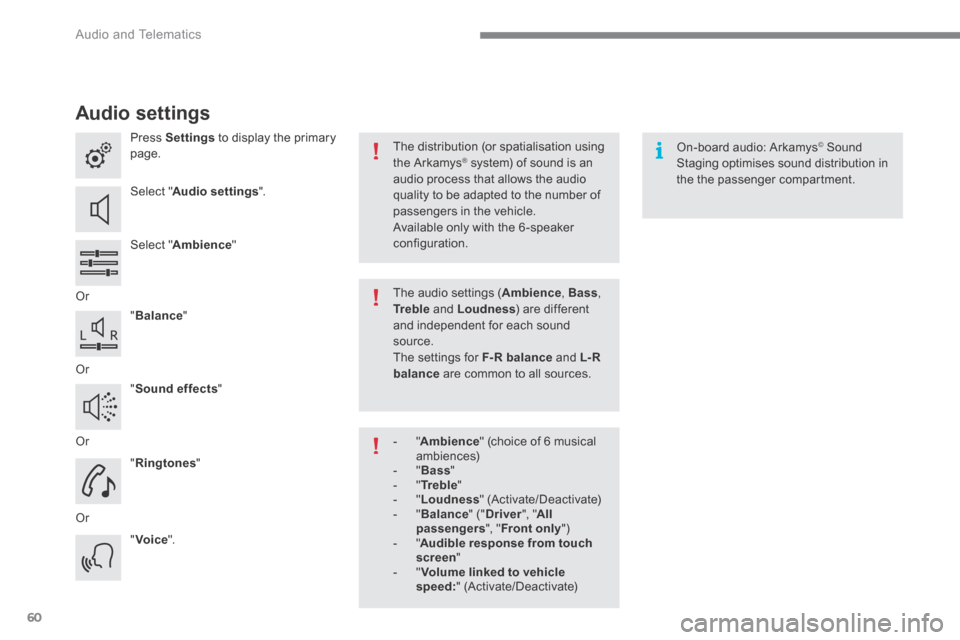
Audio settings
Press Settings to display the primary page.
Select " Audio settings ".
Select " Ambience "
Or
" Balance "
Or
" Sound effects "
Or
" Ringtones "
Or
" Voice ".
On-board audio: Arkamys © Sound © Sound ©
Staging optimises sound distribution in the the passenger compartment.
The distribution (or spatialisation using the Arkamys ® system) of sound is an ® system) of sound is an ®
audio process that allows the audio quality to be adapted to the number of passengers in the vehicle.
Available only with the 6 -speaker configuration.
The audio settings ( Ambience , Bass , Tr e b l e and Loudness ) are different and independent for each sound source. The settings for F-R balance and L- R balance are common to all sources.
- " Ambience " (choice of 6 musical ambiences) - " Bass " - " Tr e b l e " - " Loudness " (Activate/Deactivate) - " Balance " (" Driver ", " All passengers ", " Front only " ) - " Audible response from touch screen " - " Volume linked to vehicle speed: " (Activate/Deactivate)
Page 483 of 494
Audio and Telematics
80
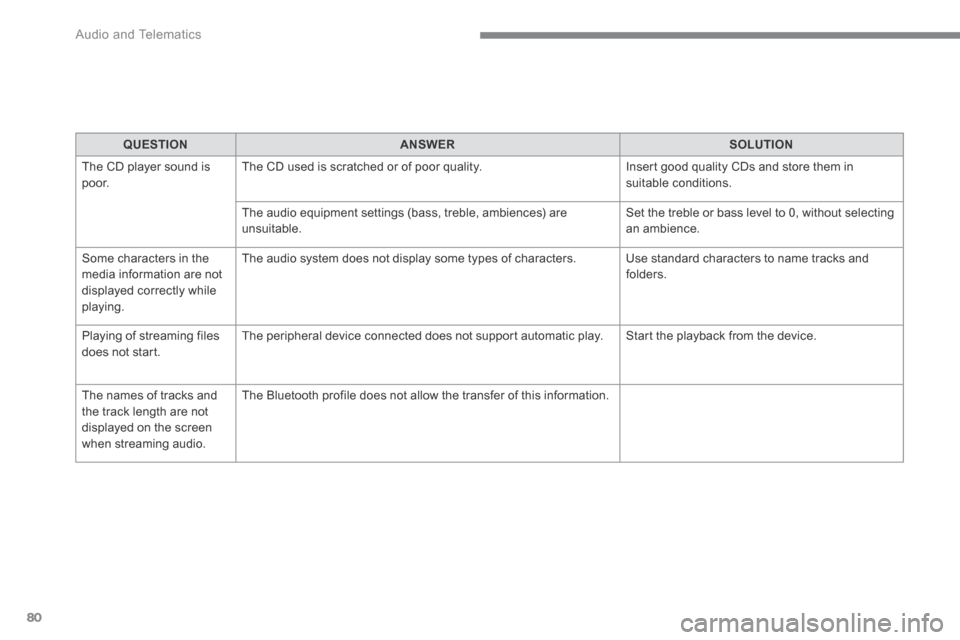
QUESTIONANSWERSOLUTION
The CD player sound is p o o r. The CD used is scratched or of poor quality. Insert good quality CDs and store them in suitable conditions.
The audio equipment settings (bass, treble, ambiences) are unsuitable. Set the treble or bass level to 0, without selecting an ambience.
Some characters in the media information are not displayed correctly while playing.
The audio system does not display some types of characters. Use standard characters to name tracks and folders.
Playing of streaming files does not start. The peripheral device connected does not support automatic play. Start the playback from the device.
The names of tracks and the track length are not displayed on the screen when streaming audio.
The Bluetooth profile does not allow the transfer of this information.