cruise control Citroen C4 2015 2.G Owner's Manual
[x] Cancel search | Manufacturer: CITROEN, Model Year: 2015, Model line: C4, Model: Citroen C4 2015 2.GPages: 494, PDF Size: 20.49 MB
Page 5 of 494
C4-2_en_Chap00a_sommaire_ed01-2015
C4-2_en_Chap00a_sommaire_ed01-2015
Technical data
Checks
Practical
i
nformation
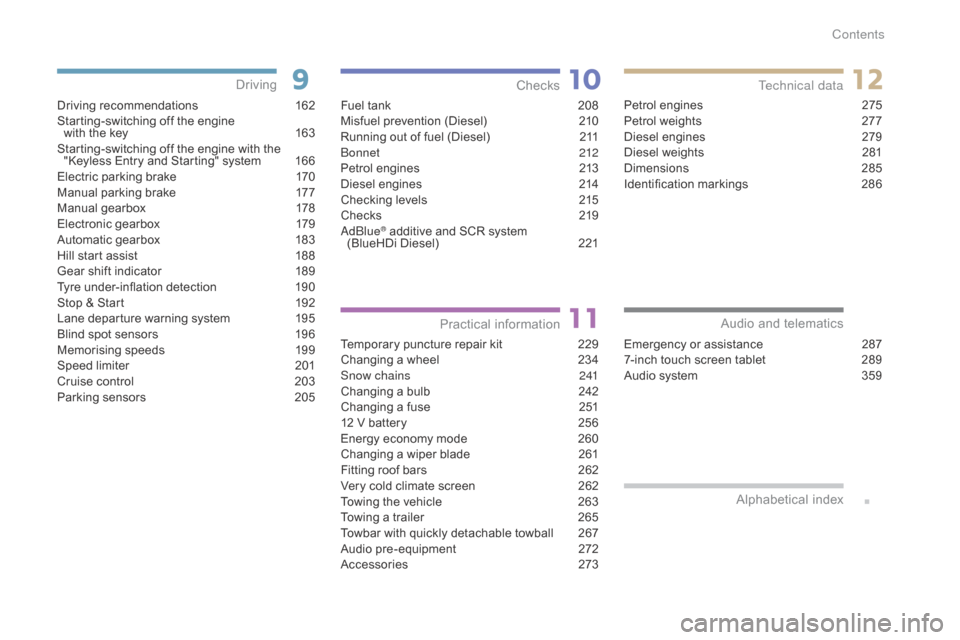
Driving recommendations 1 62
Starting-switching off the engine
with
the key
1
63
Starting-switching
off the engine with the
"
Keyless Entry and Starting" system
1
66
Electric
parking brake
1
70
Manual
par
king
b
rake
1
77
Manual
g
earbox
1
78
Electronic
gearbox
1
79
Automatic
gearbox
1
83
Hill
start assist
1
88
Gear
shift indicator
1
89
Tyre
under-inflation detection
1
90
Stop
& Start
1
92
Lane
departure warning system
1
95
Blind
spot sensors
1
96
Memorising
speeds
1
99
Speed
l
imiter
20
1
Cruise
control
2
03
Parking
sensors
2
05
Driving
Emergency or assistance 2 87
7-inch touch screen tablet 2 89
Audio
system
3
59
Audio and telematics
Alphabetical
in
dex
Fuel tank 2 08
Misfuel prevention (Diesel) 2 10
Running
out of fuel (Diesel)
2
11
bo
nnet
212
Petrol
engines
2
13
Diesel
engines
2
14
Checking
levels
2
15
Checks
2
19
a
d
blu
e
® additive and SCR system
(
BlueHDi Diesel) 2 21
Temporary
puncture repair kit
2
29
Changing
a wheel
2
34
Snow chains
2
41
Changing
a bulb
2
42
Changing
a fuse
2
51
12
V
battery
2
56
Energy
economy mode
2
60
Changing
a wiper blade
2
61
Fitting
roof bars
2
62
Very
cold climate screen
2
62
Towing
the vehicle
2
63
Towing
a trailer
2
65
Towbar
with quickly detachable towball
2
67
Audio
pre-equipment
2
72
Accessories
2
73Petrol
engines
2
75
Petrol weights
2
77
Diesel engines
2
79
Diesel weights
2
81
Dimensions
2
85
Identification
ma
rkings
2
86
Contents
Page 9 of 494
7
C4-2_en_Chap00b_vue-ensemble_ed01-2015
C4-2_en_Chap00b_vue-ensemble_ed01-2015
Instruments and controls
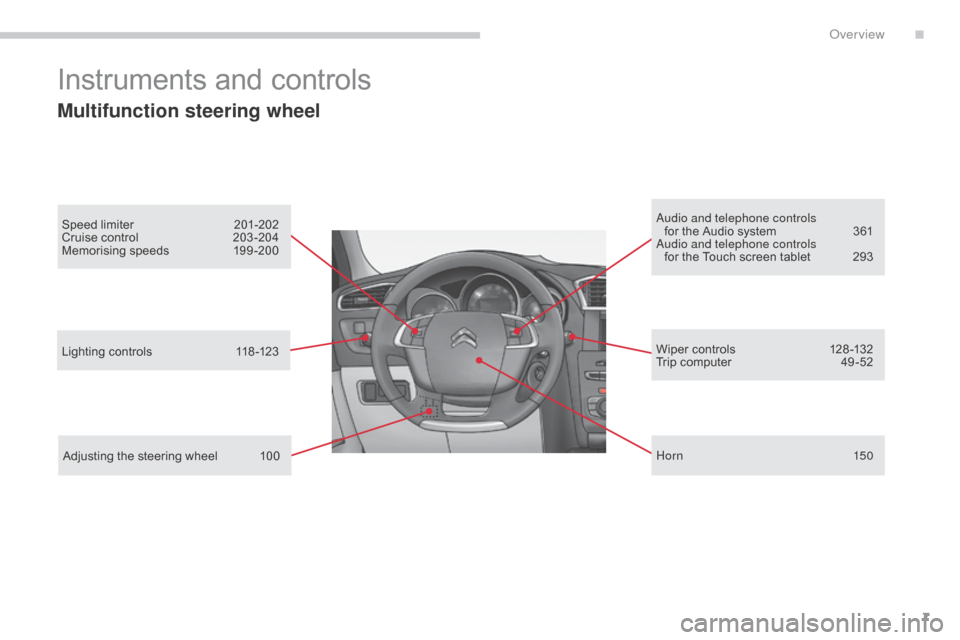
Multifunction steering wheel
Speed limiter 201-202
Cruise control 2 03 -204
Memorising
speeds
1
99 -200au dio and telephone controls
for the Audio system 3 61
au
dio and telephone controls
for
the Touch screen tablet
2
93
Lighting
controls
1
18 -123
Adjusting
the steering wheel
1
00 Wiper
controls
1
28 -132
Trip
computer
4
9 -52
Hor n
150
.
Over view
Page 12 of 494
10
C4-2_en_Chap00c_eco-conduite_ed01-2015
C4-2_en_Chap00c_eco-conduite_ed01-2015
Eco-driving is a range of everyday practices that allow the motorist to optimise their fuel consumption and CO2 emissions.
Optimise the use of your gearbox
With a manual gearbox, move off gently and change up without waiting. During acceleration change up early.
With
an automatic or electronic gearbox, give preference to automatic
m
ode and avoid pressing the accelerator pedal heavily or suddenly.
Drive smoothly
Maintain a safe distance between vehicles, use engine braking rather than the brake pedal, and press the accelerator progressively. These
p
ractices contribute towards a reduction in fuel consumption and CO
2
emissions
and
also
helps
reduce
the
background
traffic
noise.
If
your
vehicle
has
cruise
control,
make
use
of
the
system
at
speeds
a
bove
25
mph
(40
km/h)
when
the
traffic
is
flowing
well.
Control the use of your electrical
equipment
Before moving off, if the passenger compartment is too warm, ventilate it b y opening the windows and air vents before using the air conditioning.
Above
30 mph (50 km/h), close the windows and leave the air vents
ope
n.
Remember
to make use of equipment that can help keep the
t
emperature in the passenger compartment down (sunroof and window
b
linds...).
Switch
off the air conditioning, unless it has automatic regulation, as
s
oon as the desired temperature is attained.
Switch
off the demisting and defrosting controls, if not automatic.
Switch
off the heated seat as soon as possible.
Switch
off the headlamps and front foglamps when the level of light
d
oes not require their use.
Avoid
running the engine before moving off, particularly in winter; your
v
ehicle will warm up much faster while driving.
As
a passenger, if you avoid connecting your multimedia devices
(
film, music, video game...), you will contribute towards limiting the
c
onsumption of electrical energy, and so of fuel.
Disconnect
your portable devices before leaving the vehicle.
Eco-driving
The gear shift indicator invites you engage the most suitable gear: as soon as the indication is displayed in the instrument panel, follow it
s
traight away.
For
vehicles fitted with an electronic or automatic gearbox, this
i
ndicator appears only in manual mode.
Eco-driving
Page 38 of 494
36
C4-2_en_Chap01_controle-de-marche_ed01-2015
C4-2_en_Chap01_controle-de-marche_ed01-2015
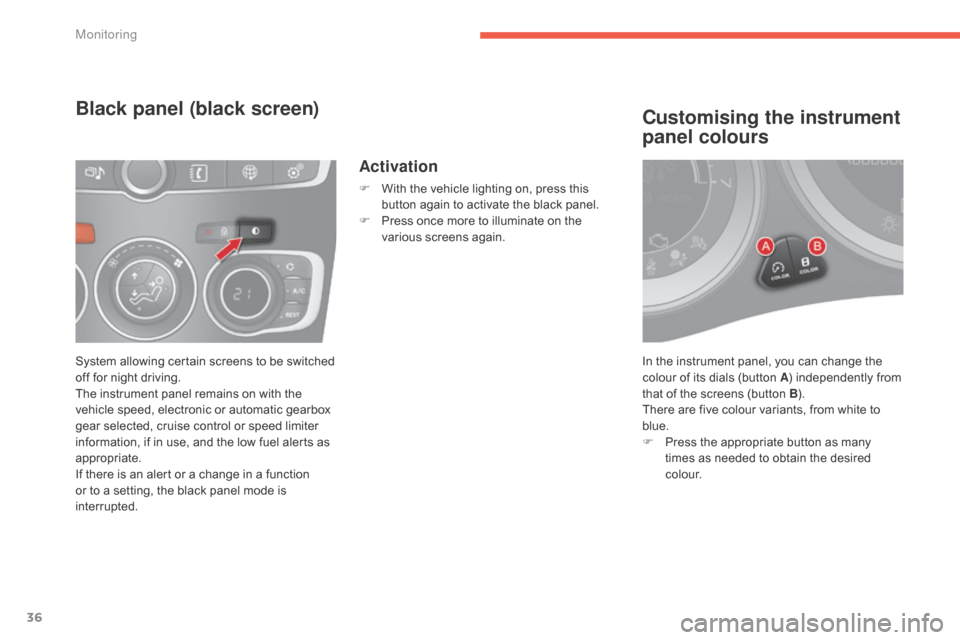
In the instrument panel, you can change the colour of its dials (button A)
independently from
t
hat of the screens (button B).
There
are five colour variants, from white to
b
lue.
F
P
ress the appropriate button as many
t
imes as needed to obtain the desired
c
o l o u r.
Customising the instrument
panel colours
System allowing certain screens to be switched off for night driving.
The
instrument panel remains on with the
v
ehicle speed, electronic or automatic gearbox
g
ear selected, cruise control or speed limiter
i
nformation, if in use, and the low fuel alerts as
a
ppropriate.
If
there is an alert or a change in a function
o
r to a setting, the black panel mode is
i
nterrupted.
Black panel (black screen)
Activation
F With the vehicle lighting on, press this b
utton again to activate the black panel.
F
P
ress once more to illuminate on the
v
arious screens again.
Monitoring
Page 48 of 494
46
C4-2_en_Chap02_ecran-multifonction_ed01-2015
C4-2_en_Chap02_ecran-multifonction_ed01-2015
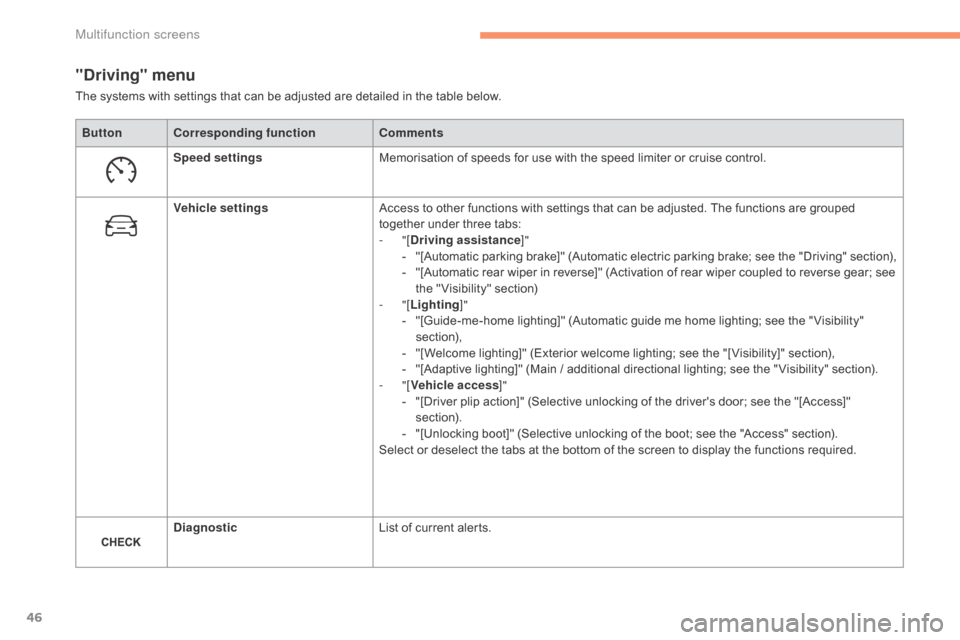
"Driving" menu
ButtonCorresponding function Comments
Speed settings Memorisation
of speeds for use with the speed limiter or cruise control.
Vehicle settings Access
to other functions with settings that can be adjusted. The functions are grouped
t
ogether under three tabs:
-
"[Driving assistance ]"
-
"
[Automatic
p
arking
b
rake]"
(
Automatic
e
lectric
p
arking
b
rake;
s
ee
t
he
"
Driving"
s
ection),
-
"
[Automatic rear wiper in reverse]" (Activation of rear wiper coupled to reverse gear; see
t
he " Visibility" section)
-
"[Lighting ]"
-
"
[Guide-me-home lighting]" (Automatic guide me home lighting; see the " Visibility"
s
ection),
-
"
[Welcome lighting]" (Exterior welcome lighting; see the "[ Visibility]" section),
-
"
[Adaptive lighting]" (Main / additional directional lighting; see the " Visibility" section).
-
"[Vehicle access ]"
-
"
[Driver plip action]" (Selective unlocking of the driver's door; see the "[Access]"
s
ection).
-
"
[Unlocking boot]" (Selective unlocking of the boot; see the "Access" section).
Select
or deselect the tabs at the bottom of the screen to display the functions required.
Diagnostic List
of current alerts.
The
systems with settings that can be adjusted are detailed in the table below.
Multifunction screens
Page 112 of 494
110
C4-2_en_Chap05_amenagement_ed01-2015
C4-2_en_Chap05_amenagement_ed01-2015
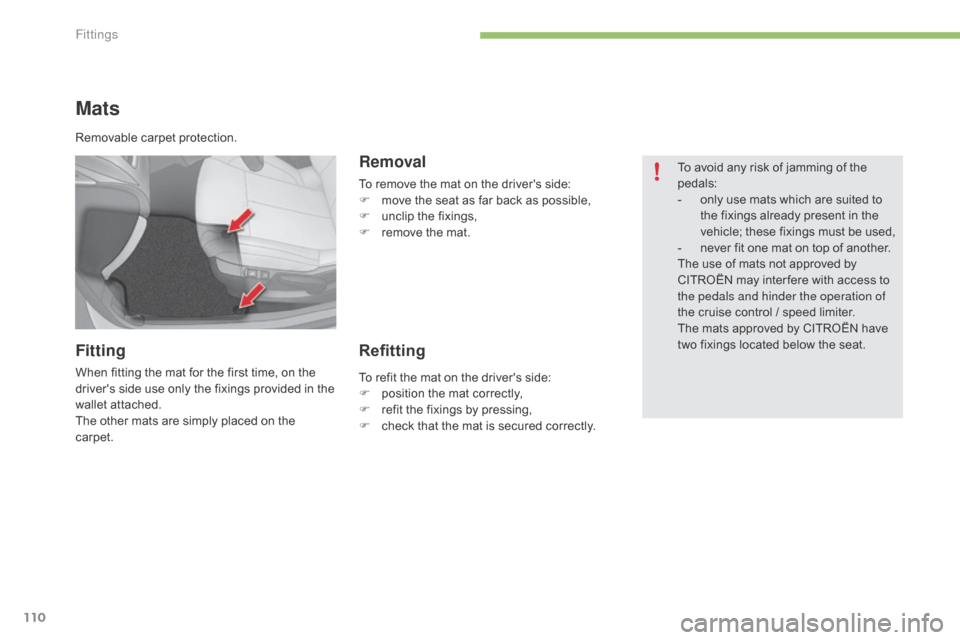
Mats
Fitting
When fitting the mat for the first time, on the driver's side use only the fixings provided in the
w
allet attached.
The
other mats are simply placed on the
c
arpet.
Removal
To remove the mat on the driver's side:
F m ove the seat as far back as possible,
F
u
nclip the fixings,
F
r
emove the mat.
Refitting
To avoid any risk of jamming of the pedals:
-
o
nly use mats which are suited to
t
he fixings already present in the
v
ehicle; these fixings must be used,
-
n
ever fit one mat on top of another.
The
use of mats not approved by
C
ITROËN may inter fere with access to
t
he pedals and hinder the operation of
the
cruise control / speed limiter.
The
mats approved by CITROËN have
t
wo fixings located below the seat.
Removable
carpet
protection.
To
refit
the
mat
on
the
driver's
side:
F
p
osition
the
mat
correctly,
F
r
efit
the
fixings
by
pressing,
F
c
heck
that
the
mat
is
secured
correctly.
Fittings
Page 201 of 494
199
C4-2_en_Chap09_conduite_ed01-2015
C4-2_en_Chap09_conduite_ed01-2015
Memorising speeds
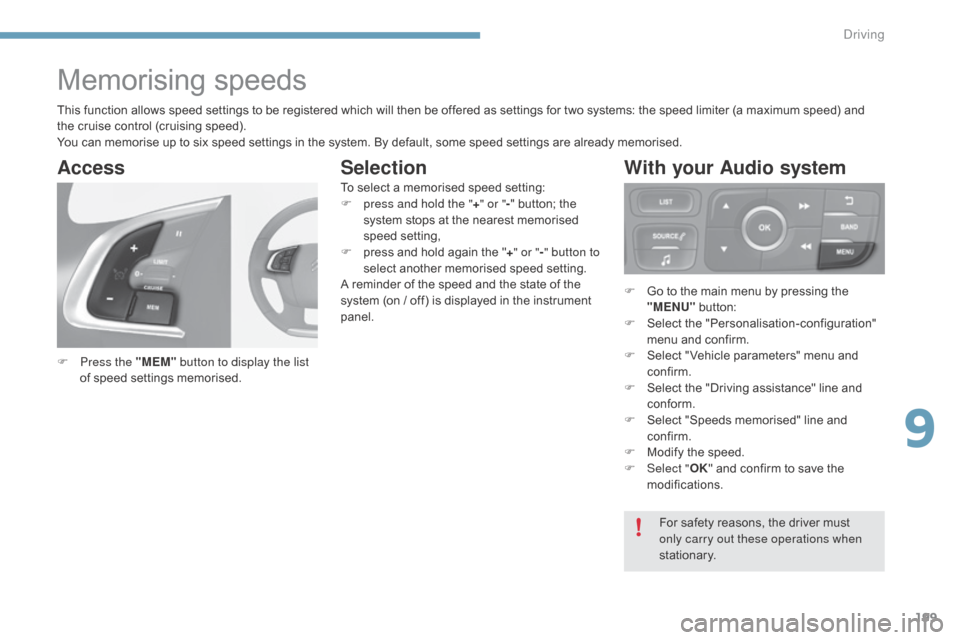
F Press the "MEM" button to display the list
of speed settings memorised.
Access
For safety reasons, the driver must only carry out these operations when
stationary.
This
function
allows
speed
settings
to
be
registered
which
will
then
be
offered
as
settings
for
two
systems:
the
speed limiter (a maximum speed) and
t
he
cruise
control
(cruising
speed).
You
can
memorise
up
to
six
speed
settings
in
the
system.
By
default,
some
speed
settings
are
already
memorised.
F
G
o to the main menu by pressing the
"
MENU"
b
utton:
F
Sel
ect
t
he
"
Personalisation-configuration"
m
enu and confirm.
F
S
elect " Vehicle parameters" menu and
c
onfirm.
F
S
elect the "Driving assistance" line and
c
onform.
F
S
elect "Speeds memorised" line and
c
onfirm.
F
M
odify the speed.
F
Sel
ect "
OK" and confirm to save the
m
odifications.
To
select
a
memorised
speed
setting:
F
p
ress and hold the "
+" or " -"
button;
the
s
ystem
stops
at
the
nearest
memorised
s
peed
setting,
F
p
ress
and
hold
again
the
"
+ " or " -" button to
select
another
memorised
speed
setting.
A
reminder
of
the
speed
and
the
state
of
the
s
ystem
(on
/
off)
is
displayed
in
the
instrument
pan
el.
With your Audio system
Selection
9
driving
Page 205 of 494
203
C4-2_en_Chap09_conduite_ed01-2015
C4-2_en_Chap09_conduite_ed01-2015
Cruise control
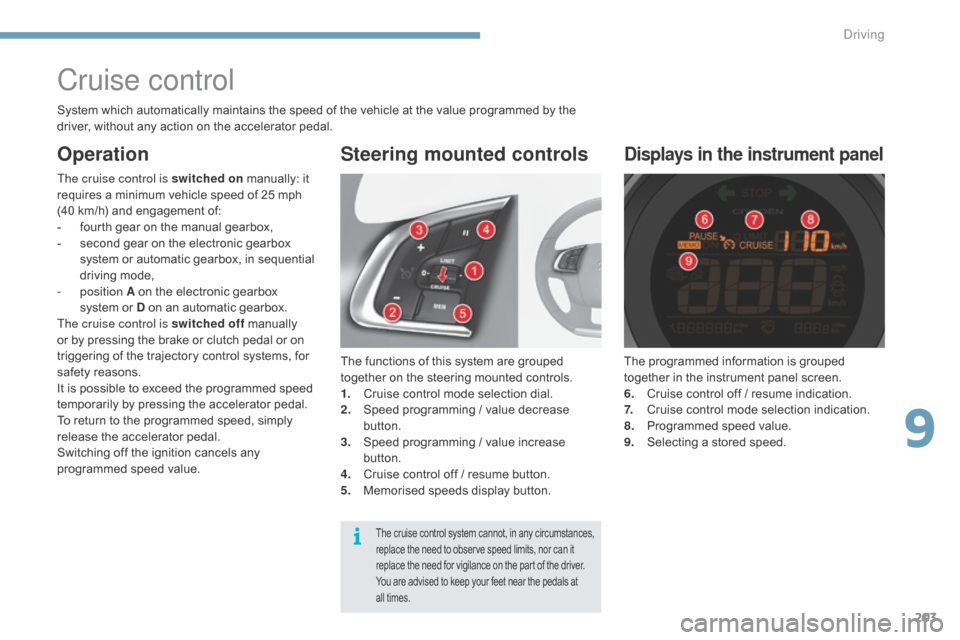
The functions of this system are grouped together on the steering mounted controls.
1.
C
ruise control mode selection dial.
2.
S
peed programming / value decrease
b
utton.
3.
S
peed programming / value increase
b
utton.
4.
C
ruise control off / resume button.
5.
M
emorised speeds display button.
Steering mounted controls
The programmed information is grouped together in the instrument panel screen.
6.
C
ruise control off / resume indication.
7.
C
ruise control mode selection indication.
8.
P
rogrammed speed value.
9.
S
electing a stored speed.
Displays in the instrument panel
The cruise control is switched on m anually: it r
equires a minimum vehicle speed of 25 mph
(
40 km/h) and engagement of:
-
f
ourth gear on the manual gearbox,
-
s
econd gear on the electronic gearbox
s
ystem or automatic gearbox, in sequential
d
riving mode,
-
position A
on the electronic gearbox
s
ystem or D on an automatic gearbox.
The cruise control is switched off
m
anually
o
r by pressing the brake or clutch pedal or on
t
riggering of the trajectory control systems, for
s
afety reasons.
It
is possible to exceed the programmed speed
t
emporarily by pressing the accelerator pedal.
To
return to the programmed speed, simply
r
elease the accelerator pedal.
Switching
off the ignition cancels any
p
rogrammed speed value.
The cruise control system cannot, in any circumstances, replace the need to observe speed limits, nor can it r
eplace the need for vigilance on the part of the driver.
You
are advised to keep your feet near the pedals at
a
ll times.
System which automatically maintains the speed of the vehicle at the value programmed by the driver, without any action on the accelerator pedal.
Operation
9
driving
Page 206 of 494
204
C4-2_en_Chap09_conduite_ed01-2015
C4-2_en_Chap09_conduite_ed01-2015
Programming
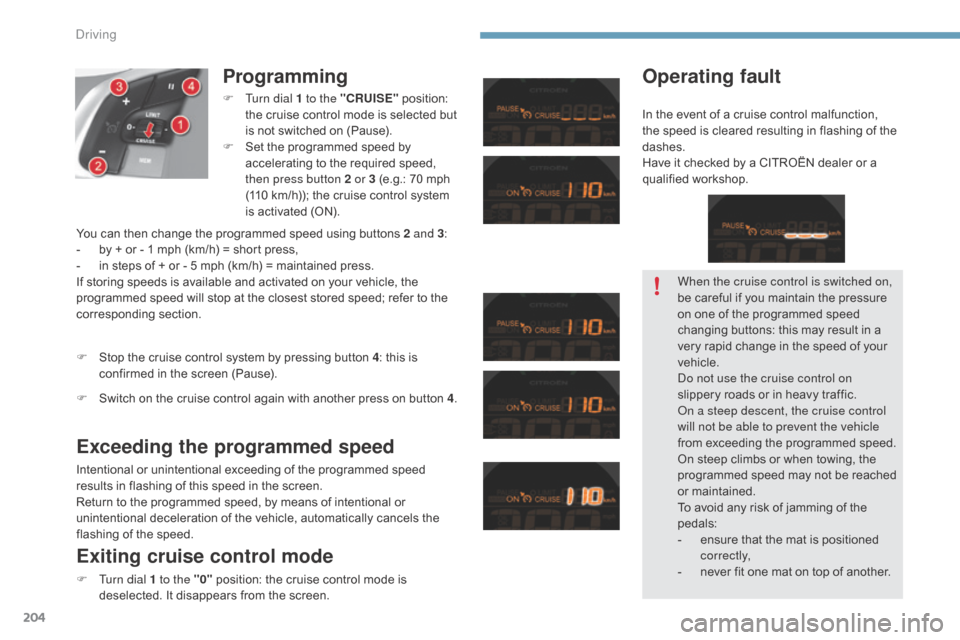
F Turn dial 1 to the "CRUISE" position: t
he cruise control mode is selected but
i
s not switched on (Pause).
F
S
et the programmed speed by
a
ccelerating to the required speed,
t
hen press button 2 or 3 (e.g.: 70 mph
(
110 km/h)); the cruise control system
i
s activated (ON).
Exceeding the programmed speed
Intentional or unintentional exceeding of the programmed speed results in flashing of this speed in the screen.
Return
to the programmed speed, by means of intentional or
u
nintentional deceleration of the vehicle, automatically cancels the
f
lashing of the speed.
Exiting cruise control mode
F Turn dial 1 to the "0" position: the cruise control mode is d
eselected. It disappears from the screen.
F
S
top the cruise control system by pressing button 4
: this is
c
onfirmed in the screen (Pause).
Operating fault
You can then change the programmed speed using buttons 2 and 3
:
- b y + or - 1 mph (km/h) = short press,
-
i
n steps of + or - 5 mph (km/h) = maintained press.
If
storing speeds is available and activated on your vehicle, the
p
rogrammed speed will stop at the closest stored speed; refer to the
c
orresponding
s
ection.
F
S
witch on the cruise control again with another press on button 4. When the cruise control is switched on,
be
careful if you maintain the pressure
o
n one of the programmed speed
c
hanging buttons: this may result in a
v
ery rapid change in the speed of your
v
ehicle.
do n
ot use the cruise control on
slippery
roads or in heavy traffic.
on a s
teep descent, the cruise control
will not be able to prevent the vehicle
from
exceeding the programmed speed.
On
steep climbs or when towing, the
p
rogrammed speed may not be reached
o
r maintained.
To
avoid any risk of jamming of the
ped
als:
-
e
nsure that the mat is positioned
c
o r r e c t l y,
-
n
ever fit one mat on top of another.
In
the event of a cruise control malfunction,
t
he speed is cleared resulting in flashing of the
das
hes.
Have it checked by a CITROËN dealer or a
q
ualified
w
orkshop.
Driving
Page 275 of 494
273
C4-2_en_Chap11_info-pratique_ed01-2015
C4-2_en_Chap11_info-pratique_ed01-2015
accessories
Conversion kits
You can obtain an "Enterprise" kit to convert a trade vehicle to a private car and vice-versa.
"Comfort":
door deflectors, side window blinds, rear
screen blind, insulated module, coat hanger
f
ixed to head restraint, reading lamp, mirror for
c
aravan, cruise control, scented air freshener
and
cartridges, parking sensors...
"Transport systems":
boot carpet, boot liner, boot net, boot spacers,
transverse roof bars, bicycle carrier, ski carrier,
r
oof boxes, towbars, towbar wiring harnesses...
"Styling":
gear lever knobs, aluminium foot rest, alloy wheels, wheel embellishers, chrome mirror
s
hells, chrome door
a
perture finishers, door sill
f
inishers, tailgate lower chrome finisher...
*
T
o avoid any risk of jamming the pedals:
-
e
nsure that mats are correctly positioned
a
nd secured,
-
n
ever fit one mat on top of
a
nother.
"Security and safety":
anti-intrusion alarm, microwave sensor, anti-tilt sensor, stolen vehicle tracking system, child
sea
ts and booster cushions, breathalyser, first
aid
kit, fire extinguisher, warning triangle, high
v
isibility vest, dog guard, pet seat belt, wheel
s
ecurity bolts, snow chains, non-slip covers,
front
foglamp kit...
"Protection":
mats*, seat covers compatible with l ateral a
irbags, door sill protectors, mud flaps, door
p
rotective rubbing strips, bumper protection
s
trips, protective covers for pets, vehicle
cover...
If
a
towbar
and
wiring
harness
are
fitted
o
utside
the
CITROËN
dealer
network,
t
he
installation
must
be
done
using
t
he
vehicle's
electrical
pre-equipment
a
nd
in
line
with
the
manufacturer's
r
ecommendations.
A
wide
range
of
accessories
and
genuine
parts
is
available
from
the
CITROËN
dealer
network.
These
accessories
and
parts
are
all
suitable
for
your
vehicle
and
benefit
from
CITROËN's
recommendation and warranty.
11
Practical information