gearbox Citroen C4 2015 2.G Owner's Manual
[x] Cancel search | Manufacturer: CITROEN, Model Year: 2015, Model line: C4, Model: Citroen C4 2015 2.GPages: 494, PDF Size: 20.49 MB
Page 5 of 494
C4-2_en_Chap00a_sommaire_ed01-2015
C4-2_en_Chap00a_sommaire_ed01-2015
Technical data
Checks
Practical
i
nformation
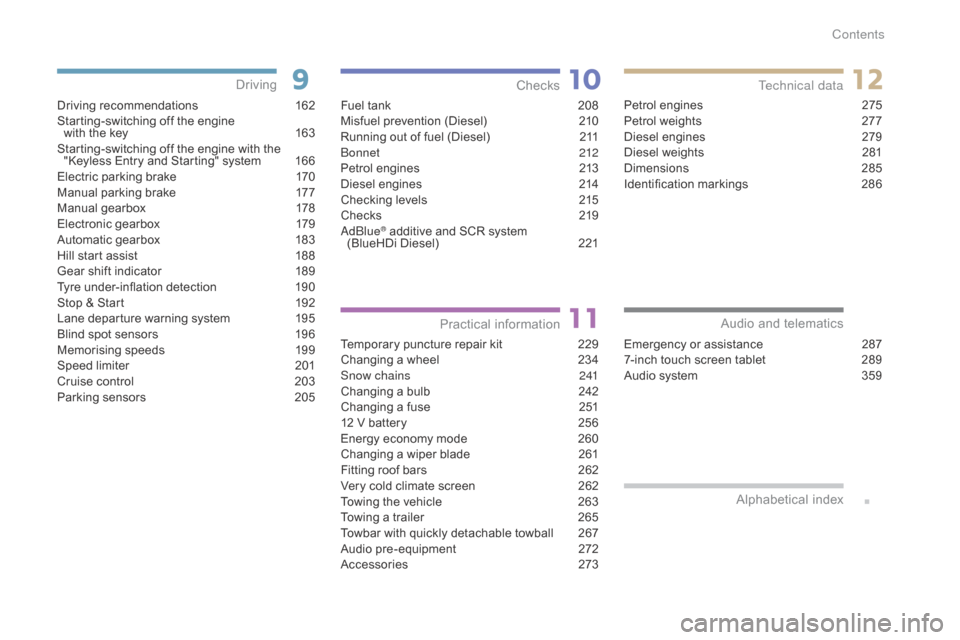
Driving recommendations 1 62
Starting-switching off the engine
with
the key
1
63
Starting-switching
off the engine with the
"
Keyless Entry and Starting" system
1
66
Electric
parking brake
1
70
Manual
par
king
b
rake
1
77
Manual
g
earbox
1
78
Electronic
gearbox
1
79
Automatic
gearbox
1
83
Hill
start assist
1
88
Gear
shift indicator
1
89
Tyre
under-inflation detection
1
90
Stop
& Start
1
92
Lane
departure warning system
1
95
Blind
spot sensors
1
96
Memorising
speeds
1
99
Speed
l
imiter
20
1
Cruise
control
2
03
Parking
sensors
2
05
Driving
Emergency or assistance 2 87
7-inch touch screen tablet 2 89
Audio
system
3
59
Audio and telematics
Alphabetical
in
dex
Fuel tank 2 08
Misfuel prevention (Diesel) 2 10
Running
out of fuel (Diesel)
2
11
bo
nnet
212
Petrol
engines
2
13
Diesel
engines
2
14
Checking
levels
2
15
Checks
2
19
a
d
blu
e
® additive and SCR system
(
BlueHDi Diesel) 2 21
Temporary
puncture repair kit
2
29
Changing
a wheel
2
34
Snow chains
2
41
Changing
a bulb
2
42
Changing
a fuse
2
51
12
V
battery
2
56
Energy
economy mode
2
60
Changing
a wiper blade
2
61
Fitting
roof bars
2
62
Very
cold climate screen
2
62
Towing
the vehicle
2
63
Towing
a trailer
2
65
Towbar
with quickly detachable towball
2
67
Audio
pre-equipment
2
72
Accessories
2
73Petrol
engines
2
75
Petrol weights
2
77
Diesel engines
2
79
Diesel weights
2
81
Dimensions
2
85
Identification
ma
rkings
2
86
Contents
Page 8 of 494
6
C4-2_en_Chap00b_vue-ensemble_ed01-2015
C4-2_en_Chap00b_vue-ensemble_ed01-2015
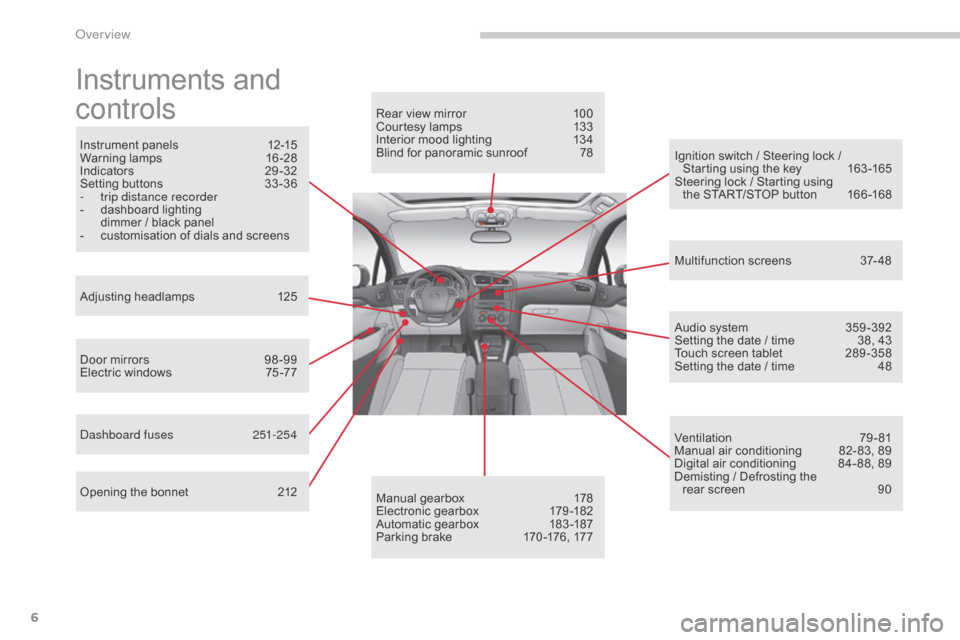
Instruments and
c
ontrols
Instrument panels 1 2-15
Warning lam ps 1 6-28
Indicators
2
9-32
Setting
buttons
3
3 -36
-
t
rip distance recorder
-
d
ashboard lighting
d
immer / black panel
-
c
ustomisation of dials and screens
Adjusting
h
eadlamps
1
25
Door
mirrors
9
8 -99
Electric
windows
7
5 -77
da
shboard fuses
2
51-254
Opening
the bonnet
2
12 Audio
system
3
59 -392
Setting
the date / time
3
8, 43
Touch
screen tablet
2
89 -358
Setting
the date / time
4
8
Manual
g
earbox
1
78
Electronic
gearbox
1
79 -182
Automatic
gearbox
1
83 -187
Parking
brake
1
70 -176, 177
Rear
view mirror
1
00
Courtesy lamps
1
33
Interior mood lighting 1 34
Blind for panoramic sunroof 7 8
Multifunction
screens
3
7- 48
Ventilation
7
9-81
Manual
air conditioning
8
2- 83, 89
Digital
air conditioning
8
4- 88, 89
Demisting
/ Defrosting the
rear
screen
9
0
Ignition
switch / Steering lock /
S
tarting using the key
1
63 -165
Steering
lock / Starting using
the
START/STOP button
1
66 -168
over view
Page 12 of 494
10
C4-2_en_Chap00c_eco-conduite_ed01-2015
C4-2_en_Chap00c_eco-conduite_ed01-2015
Eco-driving is a range of everyday practices that allow the motorist to optimise their fuel consumption and CO2 emissions.
Optimise the use of your gearbox
With a manual gearbox, move off gently and change up without waiting. During acceleration change up early.
With
an automatic or electronic gearbox, give preference to automatic
m
ode and avoid pressing the accelerator pedal heavily or suddenly.
Drive smoothly
Maintain a safe distance between vehicles, use engine braking rather than the brake pedal, and press the accelerator progressively. These
p
ractices contribute towards a reduction in fuel consumption and CO
2
emissions
and
also
helps
reduce
the
background
traffic
noise.
If
your
vehicle
has
cruise
control,
make
use
of
the
system
at
speeds
a
bove
25
mph
(40
km/h)
when
the
traffic
is
flowing
well.
Control the use of your electrical
equipment
Before moving off, if the passenger compartment is too warm, ventilate it b y opening the windows and air vents before using the air conditioning.
Above
30 mph (50 km/h), close the windows and leave the air vents
ope
n.
Remember
to make use of equipment that can help keep the
t
emperature in the passenger compartment down (sunroof and window
b
linds...).
Switch
off the air conditioning, unless it has automatic regulation, as
s
oon as the desired temperature is attained.
Switch
off the demisting and defrosting controls, if not automatic.
Switch
off the heated seat as soon as possible.
Switch
off the headlamps and front foglamps when the level of light
d
oes not require their use.
Avoid
running the engine before moving off, particularly in winter; your
v
ehicle will warm up much faster while driving.
As
a passenger, if you avoid connecting your multimedia devices
(
film, music, video game...), you will contribute towards limiting the
c
onsumption of electrical energy, and so of fuel.
Disconnect
your portable devices before leaving the vehicle.
Eco-driving
The gear shift indicator invites you engage the most suitable gear: as soon as the indication is displayed in the instrument panel, follow it
s
traight away.
For
vehicles fitted with an electronic or automatic gearbox, this
i
ndicator appears only in manual mode.
Eco-driving
Page 14 of 494
12
C4-2_en_Chap01_controle-de-marche_ed01-2015
C4-2_en_Chap01_controle-de-marche_ed01-2015
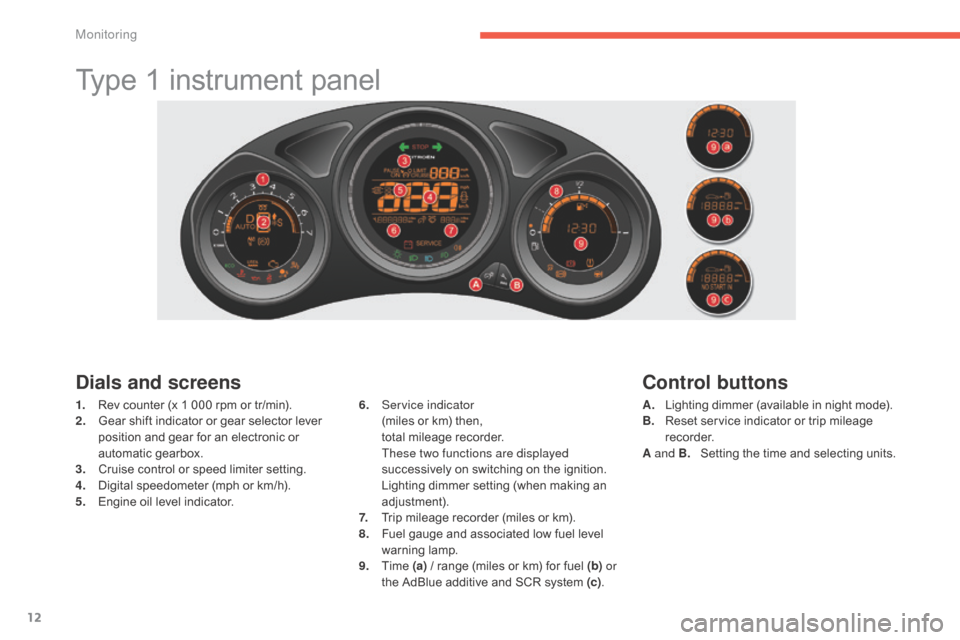
Type 1 instrument panel
Dials and screens
1. Rev counter (x 1 000 rpm or tr/min).
2. G ear shift indicator or gear selector lever
p
osition and gear for an electronic or
a
utomatic gearbox.
3.
C
ruise control or speed limiter setting.
4.
D
igital speedometer (mph or km/h).
5.
E
ngine oil level indicator. 6. S
ervice indicator (
miles or km) then,
t
otal mileage recorder.
T
hese two functions are displayed
successively
on switching on the ignition.
L
ighting dimmer setting (when making an
adj
ustment).
7.
T
rip mileage recorder (miles or km).
8.
F
uel gauge and associated low fuel level
w
arning
lam
p.
9.
T
ime (a)
/ range (miles or km) for fuel (b) or
the
AdBlue additive and SCR system (c).
Control buttons
A. Lighting dimmer (available in night mode).
B. R eset service indicator or trip mileage
re
corder.
A and B.
S
etting the time and selecting units.
Monitoring
Page 15 of 494
13
C4-2_en_Chap01_controle-de-marche_ed01-2015
C4-2_en_Chap01_controle-de-marche_ed01-2015
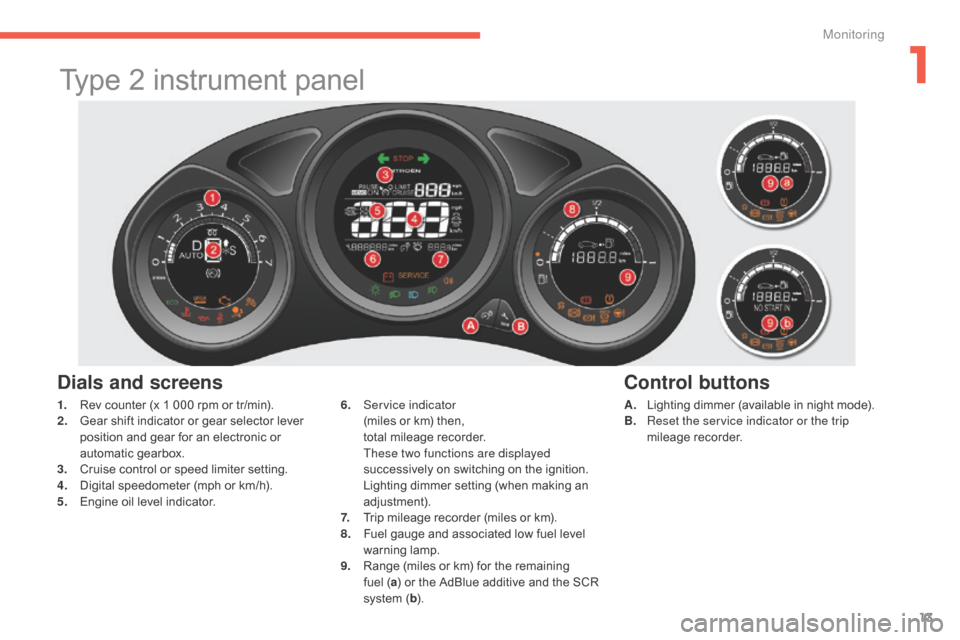
Type 2 instrument panel
Dials and screens
A. Lighting dimmer (available in night mode).
B. R eset the service indicator or the trip
mileage
re
corder.
6. S
ervice indicator (
miles
or
km)
then,
t
otal
mileage
recorder.
T
hese two functions are displayed
successively
on
switching
on
the
ignition.
L
ighting
dimmer
setting
(when
making
an
adj
ustment).
7.
T
rip
mileage
recorder
(miles
or
km).
8.
F
uel
gauge
and
associated
low
fuel
level
w
arning
lam
p.
9.
R
ange
(miles
or
km)
for
the
remaining
f
uel ( a)
or
the
AdBlue
additive
and
the
SCR
s
ystem
( b ).
Control buttons
1. Rev counter (x 1 000 rpm or tr/min).
2. G ear shift indicator or gear selector lever
p
osition and gear for an electronic or
a
utomatic gearbox.
3.
C
ruise control or speed limiter setting.
4.
D
igital speedometer (mph or km/h).
5.
E
ngine oil level indicator.
1
Monitoring
Page 16 of 494
14
C4-2_en_Chap01_controle-de-marche_ed01-2015
C4-2_en_Chap01_controle-de-marche_ed01-2015
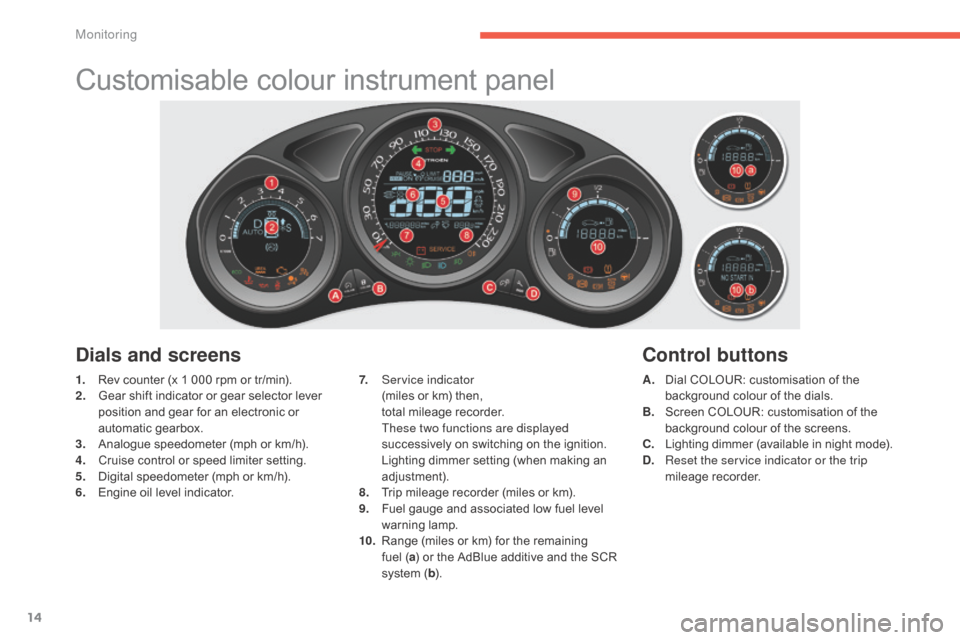
Customisable colour instrument panel
1. Rev counter (x 1 000 rpm or tr/min).
2. G ear shift indicator or gear selector lever
p
osition and gear for an electronic or
a
utomatic gearbox.
3.
A
nalogue speedometer (mph or km/h).
4.
C
ruise control or speed limiter setting.
5.
D
igital speedometer (mph or km/h).
6.
E
ngine oil level indicator. A. D
ial COLOUR: customisation of the b
ackground colour of the dials.
B.
S
creen COLOUR: customisation of the
b
ackground colour of the screens.
C.
L
ighting dimmer (available in night mode).
D.
R
eset the service indicator or the trip
mileage
re
corder.
Dials and screens
7. Service indicator (miles or km) then,
t
otal mileage recorder.
T
hese two functions are displayed
successively
on switching on the ignition.
L
ighting dimmer setting (when making an
adj
ustment).
8.
T
rip mileage recorder (miles or km).
9.
F
uel gauge and associated low fuel level
w
arning
lam
p.
10.
R
ange (miles or km) for the remaining
f
uel (a)
or the AdBlue additive and the SCR
s
ystem (b ).
Control buttons
Monitoring
Page 20 of 494
18
C4-2_en_Chap01_controle-de-marche_ed01-2015
C4-2_en_Chap01_controle-de-marche_ed01-2015
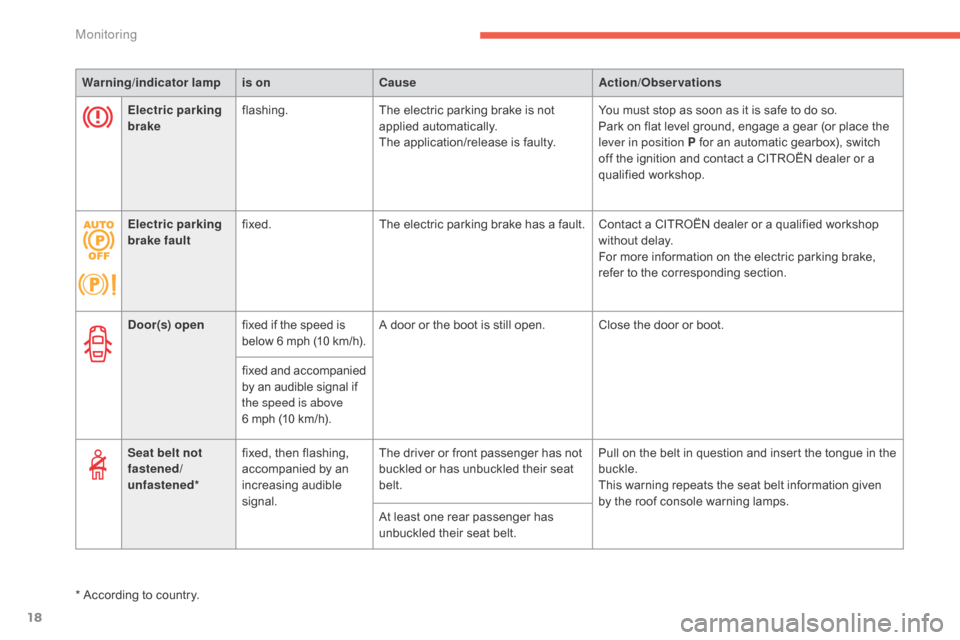
Warning/indicator lampis on Cause Action/Observations
Door(s) open fixed
if the speed is
b
elow
6 m
ph
(
10
k
m/h).A
door or the boot is still open. Close the door or boot.
fixed
a
nd
a
ccompanied
b
y an audible signal if
t
he speed is above
6
mph (10 km/h).
Seat belt not
fastened/
unfastened* fixed,
then flashing,
a
ccompanied by an
inc
reasing
a
udible
s
ignal.The
driver or front passenger has not
b
uckled or has unbuckled their seat
bel
t.Pull
on the belt in question and insert the tongue in the
buc
kle.
This
warning repeats the seat belt information given
b
y the roof console warning lamps.
At
least one rear passenger has
u
nbuckled their seat belt.
*
According to country.
Electric parking
brake
flashing.
The
electric parking brake is not
a
pplied
a
utomatically.
The
application/release is faulty.You
must stop as soon as it is safe to do so.
Park
on flat level ground, engage a gear (or place the
l
ever in position P for an automatic gearbox), switch
o
ff the ignition and contact a CITROËN dealer or a
q
ualified
w
orkshop.
Electric parking
brake fault fixed.
The
electric parking brake has a fault. Contact a CITROËN dealer or a qualified workshop
w
ithout delay.
For
more information on the electric parking brake,
r
efer to the corresponding section.
Monitoring
Page 21 of 494
19
C4-2_en_Chap01_controle-de-marche_ed01-2015
C4-2_en_Chap01_controle-de-marche_ed01-2015
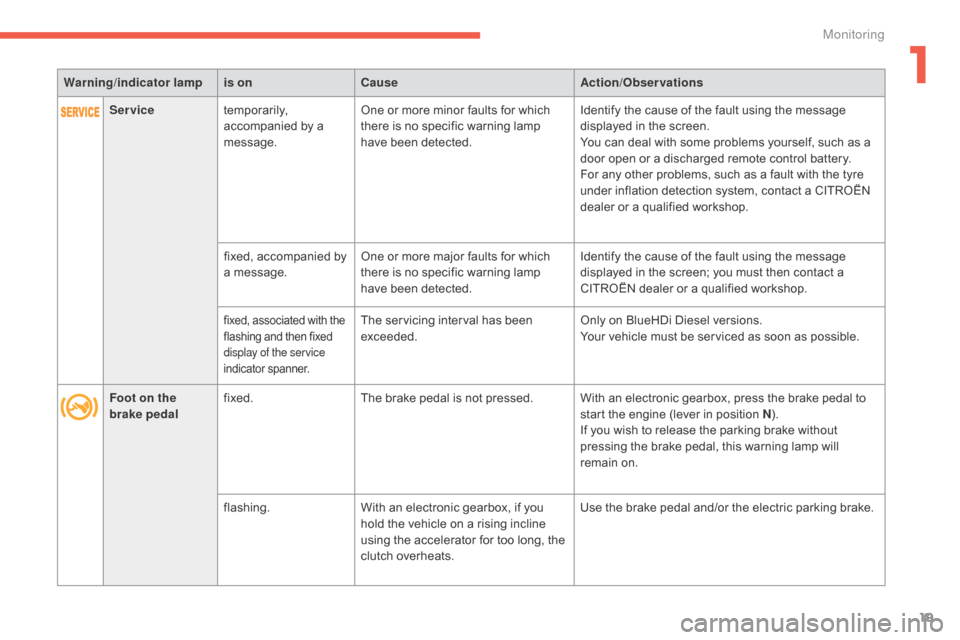
Warning/indicator lampis on Cause Action/Observations
Foot on the
brake pedal fixed.
The
brake pedal is not pressed. With an electronic gearbox, press the brake pedal to
s
tart the engine (lever in position N).
If
you wish to release the parking brake without
p
ressing the brake pedal, this warning lamp will
r
emain on.
flashing. With
an electronic gearbox, if you
h
old the vehicle on a rising incline
u
sing the accelerator for too long, the
c
lutch overheats.Use
the brake pedal and/or the electric parking brake.
Service
temporarily,
a
ccompanied by a
m
essage.One
or more minor faults for which
t
here is no specific warning lamp
h
ave been detected.Identify
the cause of the fault using the message
d
isplayed in the screen.
You
can deal with some problems yourself, such as a
d
oor open or a discharged remote control battery.
For
any other problems, such as a fault with the tyre
u
nder inflation detection system, contact a CITROËN
d
ealer or a qualified workshop.
fixed,
accompanied by
a
message.One
or more major faults for which
t
here is no specific warning lamp
h
ave been detected.Identify
the cause of the fault using the message
d
isplayed in the screen; you must then contact a
C
ITROËN dealer or a qualified workshop.
fixed, associated with the flashing and then fixed d
isplay of the service
indicator
span
ner.The servicing interval has been exceeded. Only
on BlueHDi Diesel versions.
Your vehicle must be serviced as soon as possible.
1
Monitoring
Page 28 of 494
26
C4-2_en_Chap01_controle-de-marche_ed01-2015
C4-2_en_Chap01_controle-de-marche_ed01-2015
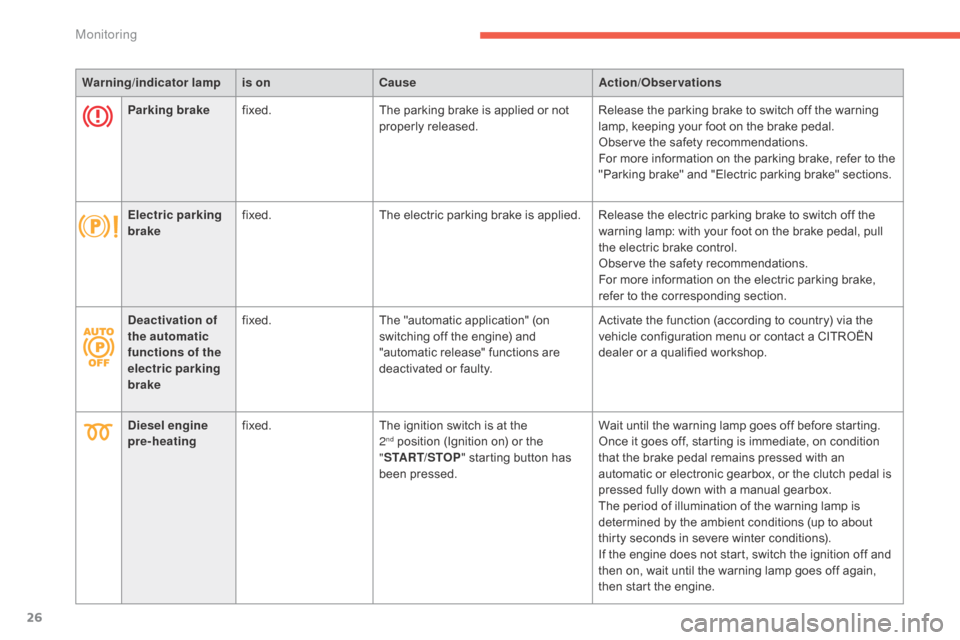
Warning/indicator lampis on Cause Action/Observations
Parking brake fixed. The
parking brake is applied or not
p
roperly
r
eleased.Release
the parking brake to switch off the warning
l
amp, keeping your foot on the brake pedal.
Observe
the safety recommendations.
For
more information on the parking brake, refer to the
"
Parking brake" and "Electric parking brake" sections.
Electric parking
brake fixed.
The
electric parking brake is applied. Release the electric parking brake to switch off the
w
arning lamp: with your foot on the brake pedal, pull
t
he electric brake control.
Observe
the safety recommendations.
For
more information on the electric parking brake,
r
efer to the corresponding section.
Deactivation of
the automatic
functions of the
electric parking
brake fixed.
The
"automatic application" (on
s
witching off the engine) and
"
automatic release" functions are
d
eactivated or faulty.Activate
the function (according to country) via the
v
ehicle configuration menu or contact a CITROËN
d
ealer or a qualified workshop.
Diesel engine
pre-heating fixed.
The
ignition switch is at the
2nd position (Ignition on) or the "ST
ART/STOP "
starting button has
b
een pressed. Wait
until the warning lamp goes off before starting.
Once it goes off, starting is immediate, on condition t
hat the brake pedal remains pressed with an
a
utomatic or electronic gearbox, or the clutch pedal is
p
ressed fully down with a manual gearbox.
The
period of illumination of the warning lamp is
d
etermined by the ambient conditions (up to about
t
hirty seconds in severe winter conditions).
If
the engine does not start, switch the ignition off and
t
hen on, wait until the warning lamp goes off again,
t
hen start the engine.
Monitoring
Page 38 of 494
36
C4-2_en_Chap01_controle-de-marche_ed01-2015
C4-2_en_Chap01_controle-de-marche_ed01-2015
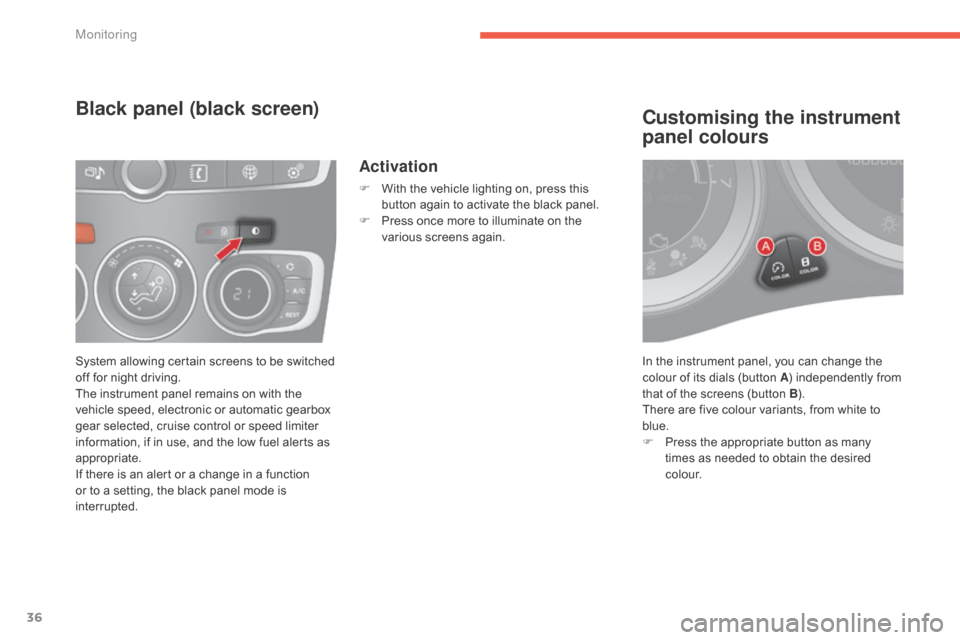
In the instrument panel, you can change the colour of its dials (button A)
independently from
t
hat of the screens (button B).
There
are five colour variants, from white to
b
lue.
F
P
ress the appropriate button as many
t
imes as needed to obtain the desired
c
o l o u r.
Customising the instrument
panel colours
System allowing certain screens to be switched off for night driving.
The
instrument panel remains on with the
v
ehicle speed, electronic or automatic gearbox
g
ear selected, cruise control or speed limiter
i
nformation, if in use, and the low fuel alerts as
a
ppropriate.
If
there is an alert or a change in a function
o
r to a setting, the black panel mode is
i
nterrupted.
Black panel (black screen)
Activation
F With the vehicle lighting on, press this b
utton again to activate the black panel.
F
P
ress once more to illuminate on the
v
arious screens again.
Monitoring