light Citroen C4 2015 2.G Owner's Manual
[x] Cancel search | Manufacturer: CITROEN, Model Year: 2015, Model line: C4, Model: Citroen C4 2015 2.GPages: 494, PDF Size: 20.49 MB
Page 4 of 494
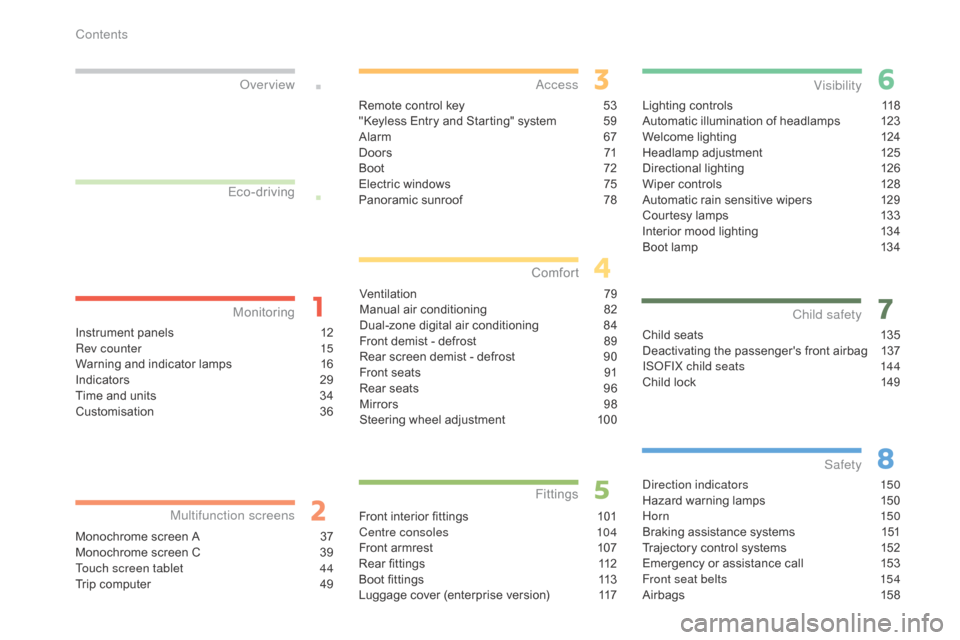
C4-2_en_Chap00a_sommaire_ed01-2015
C4-2_en_Chap00a_sommaire_ed01-2015
Lighting controls 118
Automatic illumination of headlamps 1 23
Welcome
lighting
1
24
Headlamp
adj
ustment
1
25
Directional
l
ighting
1
26
Wiper
controls
1
28
Automatic
rain sensitive wipers
1
29
Courtesy
lamps
1
33
Interior
mood lighting
1
34
Boot
lamp
1
34
Visibility
Child seats 1 35
Deactivating the passenger's front airbag 1 37
IS
oF
IX child seats
1
44
Child
lock
1
49
Child safety
direction indicators 150
Hazard warning lamps 1 50
Hor n
150
Braking
assistance systems
1
51
Trajectory
control systems
1
52
Emergency
or assistance call
1
53
Front seat belts
1
54
Airbags
1
58
Safety
Instrument panels 1 2
Rev counter 1 5
Warning
and indicator lamps
1
6
Indicators
2
9
Time
and units
3
4
Customisation
3
6
Monitoring
ove
r view
Monochrome screen A 3
7
Monochrome screen C 3 9
Touch screen tablet
4
4
Trip
computer
4
9
Multifunction screens
Remote control key 53
"Keyless Entry and Starting" system 5 9
Alarm
6
7
D o o r s
71
Boo
t
7
2
Electric
windows
7
5
Panoramic
sunroof
7
8
access
Ventilation 7 9
Manual a ir c onditioning 8 2
Dual-zone
d
igital
a
ir
c
onditioning
8
4
Front
demist - defrost
8
9
Rear
screen demist - defrost
9
0
Front
seats
9
1
Rear
seats
9
6
Mirrors
9
8
Steering
wheel adjustment
1
00
Comfort
Front interior fittings 1 01
Centre consoles 1 04
Front
armrest
1
07
Rear
fittings
1
12
Boot
fittings
1
13
Luggage
cover (enterprise version)
1
17
Fittings
Eco-driving
Contents
Page 6 of 494
4
C4-2_en_Chap00b_vue-ensemble_ed01-2015
C4-2_en_Chap00b_vue-ensemble_ed01-2015
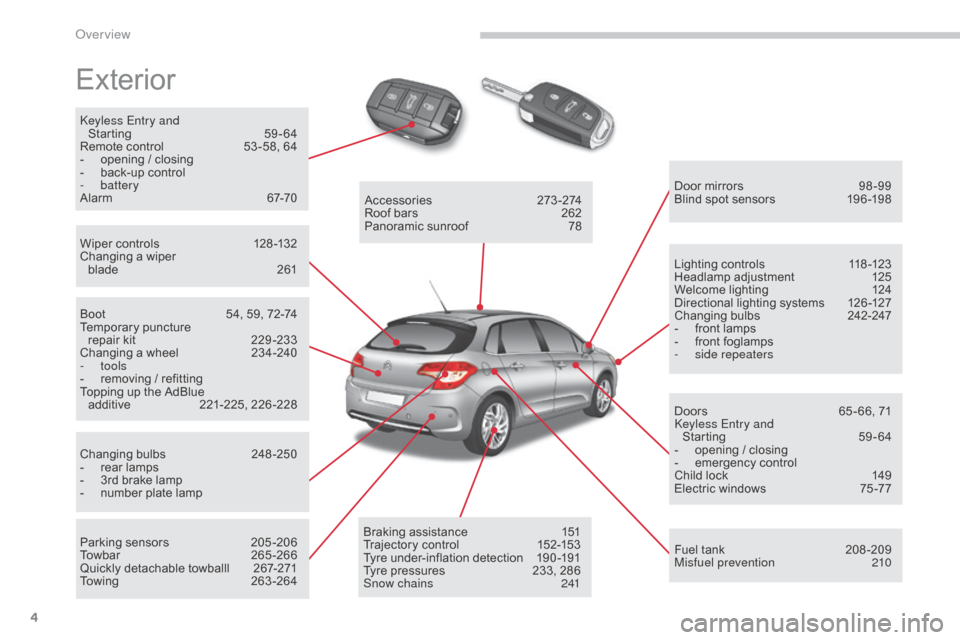
Exterior
keyless Entry and Starting 5 9-64
Remote
control
5
3 -58, 64
-
o
pening / closing
-
b
ack-up control
-
battery
Alarm
6
7-70
Wiper
controls
1
28 -132
Changing
a wiper
blade
2
61 Door
mirrors
9
8 -99
Blind
spot sensors
1
96 -198
Boot
5
4, 59, 72-74
Temporary
pu
ncture
r
epair kit
2
29 -233
Changing
a wheel
2
34-240
-
tools
-
r
emoving / refitting
Topping
up the AdBlue
a
dditive
2
21-225,
2
26-228
Changing
bu
lbs
2
48-250
-
r
ear lamps
-
3
rd brake lamp
-
n
umber plate lamp
Parking
sensors
2
05 -206
Towbar
26
5-266
Quickly
detachable towballl
2
67-271
Towing
26
3-264Accessories
2
73-274
Roof
bars
2
62
Panoramic
sunroof
7
8
Braking
assistance
1
51
Trajectory
control
1
52-153
Tyre
under-inflation detection
1
90 -191
Tyre
pressures
2
33, 286
Snow chains
2
41Lighting
controls
1
18 -123
Headlamp
adj
ustment
1
25
Welcome
lighting
1
24
Directional
lighting systems
1
26 -127
Changing
bu
lbs
2
42-247
-
f
ront lamps
-
f
ront foglamps
-
si
de repeaters
Doors
6
5 - 66, 71
ke
yless Entry and
Starting
5
9-64
-
o
pening / closing
-
em
ergency
c
ontrol
Child
lock
1
49
Electric
windows
7
5 -77
Fuel
tank
2
08 -209
Misfuel prevention
2
10
over view
Page 8 of 494
6
C4-2_en_Chap00b_vue-ensemble_ed01-2015
C4-2_en_Chap00b_vue-ensemble_ed01-2015
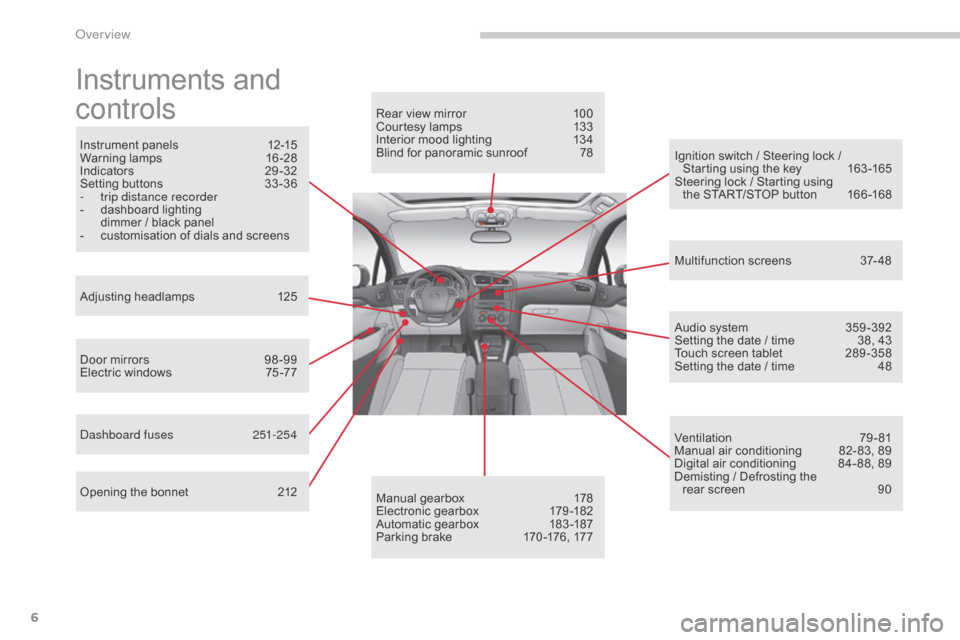
Instruments and
c
ontrols
Instrument panels 1 2-15
Warning lam ps 1 6-28
Indicators
2
9-32
Setting
buttons
3
3 -36
-
t
rip distance recorder
-
d
ashboard lighting
d
immer / black panel
-
c
ustomisation of dials and screens
Adjusting
h
eadlamps
1
25
Door
mirrors
9
8 -99
Electric
windows
7
5 -77
da
shboard fuses
2
51-254
Opening
the bonnet
2
12 Audio
system
3
59 -392
Setting
the date / time
3
8, 43
Touch
screen tablet
2
89 -358
Setting
the date / time
4
8
Manual
g
earbox
1
78
Electronic
gearbox
1
79 -182
Automatic
gearbox
1
83 -187
Parking
brake
1
70 -176, 177
Rear
view mirror
1
00
Courtesy lamps
1
33
Interior mood lighting 1 34
Blind for panoramic sunroof 7 8
Multifunction
screens
3
7- 48
Ventilation
7
9-81
Manual
air conditioning
8
2- 83, 89
Digital
air conditioning
8
4- 88, 89
Demisting
/ Defrosting the
rear
screen
9
0
Ignition
switch / Steering lock /
S
tarting using the key
1
63 -165
Steering
lock / Starting using
the
START/STOP button
1
66 -168
over view
Page 9 of 494
7
C4-2_en_Chap00b_vue-ensemble_ed01-2015
C4-2_en_Chap00b_vue-ensemble_ed01-2015
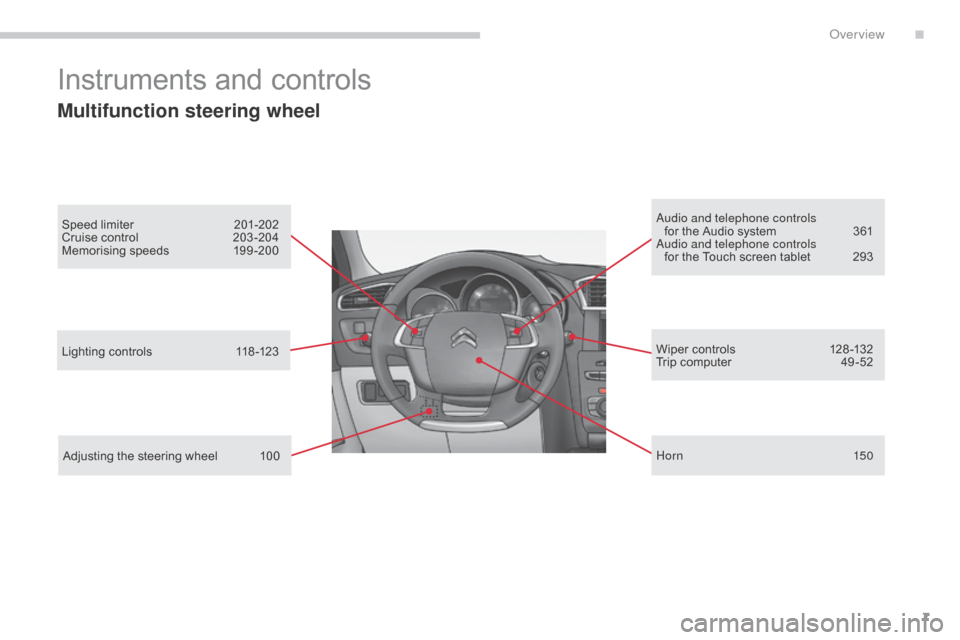
Instruments and controls
Multifunction steering wheel
Speed limiter 201-202
Cruise control 2 03 -204
Memorising
speeds
1
99 -200au dio and telephone controls
for the Audio system 3 61
au
dio and telephone controls
for
the Touch screen tablet
2
93
Lighting
controls
1
18 -123
Adjusting
the steering wheel
1
00 Wiper
controls
1
28 -132
Trip
computer
4
9 -52
Hor n
150
.
Over view
Page 12 of 494
10
C4-2_en_Chap00c_eco-conduite_ed01-2015
C4-2_en_Chap00c_eco-conduite_ed01-2015
Eco-driving is a range of everyday practices that allow the motorist to optimise their fuel consumption and CO2 emissions.
Optimise the use of your gearbox
With a manual gearbox, move off gently and change up without waiting. During acceleration change up early.
With
an automatic or electronic gearbox, give preference to automatic
m
ode and avoid pressing the accelerator pedal heavily or suddenly.
Drive smoothly
Maintain a safe distance between vehicles, use engine braking rather than the brake pedal, and press the accelerator progressively. These
p
ractices contribute towards a reduction in fuel consumption and CO
2
emissions
and
also
helps
reduce
the
background
traffic
noise.
If
your
vehicle
has
cruise
control,
make
use
of
the
system
at
speeds
a
bove
25
mph
(40
km/h)
when
the
traffic
is
flowing
well.
Control the use of your electrical
equipment
Before moving off, if the passenger compartment is too warm, ventilate it b y opening the windows and air vents before using the air conditioning.
Above
30 mph (50 km/h), close the windows and leave the air vents
ope
n.
Remember
to make use of equipment that can help keep the
t
emperature in the passenger compartment down (sunroof and window
b
linds...).
Switch
off the air conditioning, unless it has automatic regulation, as
s
oon as the desired temperature is attained.
Switch
off the demisting and defrosting controls, if not automatic.
Switch
off the heated seat as soon as possible.
Switch
off the headlamps and front foglamps when the level of light
d
oes not require their use.
Avoid
running the engine before moving off, particularly in winter; your
v
ehicle will warm up much faster while driving.
As
a passenger, if you avoid connecting your multimedia devices
(
film, music, video game...), you will contribute towards limiting the
c
onsumption of electrical energy, and so of fuel.
Disconnect
your portable devices before leaving the vehicle.
Eco-driving
The gear shift indicator invites you engage the most suitable gear: as soon as the indication is displayed in the instrument panel, follow it
s
traight away.
For
vehicles fitted with an electronic or automatic gearbox, this
i
ndicator appears only in manual mode.
Eco-driving
Page 14 of 494
12
C4-2_en_Chap01_controle-de-marche_ed01-2015
C4-2_en_Chap01_controle-de-marche_ed01-2015
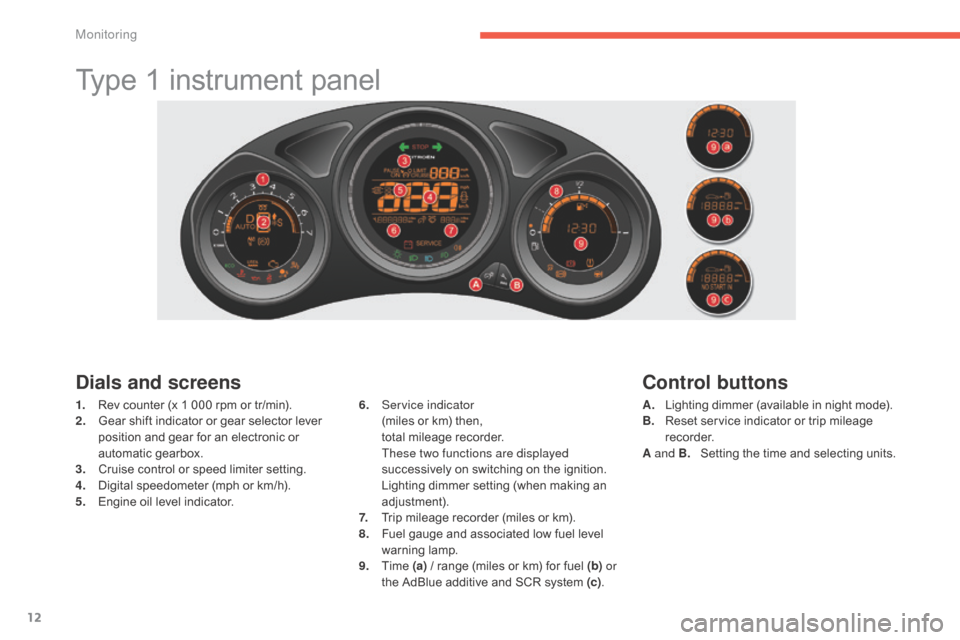
Type 1 instrument panel
Dials and screens
1. Rev counter (x 1 000 rpm or tr/min).
2. G ear shift indicator or gear selector lever
p
osition and gear for an electronic or
a
utomatic gearbox.
3.
C
ruise control or speed limiter setting.
4.
D
igital speedometer (mph or km/h).
5.
E
ngine oil level indicator. 6. S
ervice indicator (
miles or km) then,
t
otal mileage recorder.
T
hese two functions are displayed
successively
on switching on the ignition.
L
ighting dimmer setting (when making an
adj
ustment).
7.
T
rip mileage recorder (miles or km).
8.
F
uel gauge and associated low fuel level
w
arning
lam
p.
9.
T
ime (a)
/ range (miles or km) for fuel (b) or
the
AdBlue additive and SCR system (c).
Control buttons
A. Lighting dimmer (available in night mode).
B. R eset service indicator or trip mileage
re
corder.
A and B.
S
etting the time and selecting units.
Monitoring
Page 15 of 494
13
C4-2_en_Chap01_controle-de-marche_ed01-2015
C4-2_en_Chap01_controle-de-marche_ed01-2015
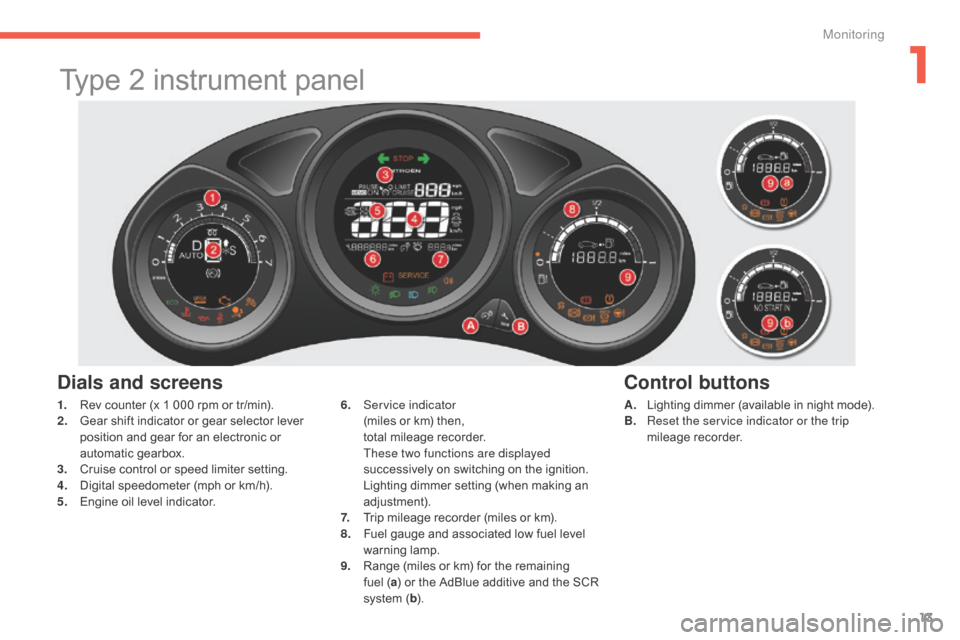
Type 2 instrument panel
Dials and screens
A. Lighting dimmer (available in night mode).
B. R eset the service indicator or the trip
mileage
re
corder.
6. S
ervice indicator (
miles
or
km)
then,
t
otal
mileage
recorder.
T
hese two functions are displayed
successively
on
switching
on
the
ignition.
L
ighting
dimmer
setting
(when
making
an
adj
ustment).
7.
T
rip
mileage
recorder
(miles
or
km).
8.
F
uel
gauge
and
associated
low
fuel
level
w
arning
lam
p.
9.
R
ange
(miles
or
km)
for
the
remaining
f
uel ( a)
or
the
AdBlue
additive
and
the
SCR
s
ystem
( b ).
Control buttons
1. Rev counter (x 1 000 rpm or tr/min).
2. G ear shift indicator or gear selector lever
p
osition and gear for an electronic or
a
utomatic gearbox.
3.
C
ruise control or speed limiter setting.
4.
D
igital speedometer (mph or km/h).
5.
E
ngine oil level indicator.
1
Monitoring
Page 27 of 494
25
C4-2_en_Chap01_controle-de-marche_ed01-2015
C4-2_en_Chap01_controle-de-marche_ed01-2015
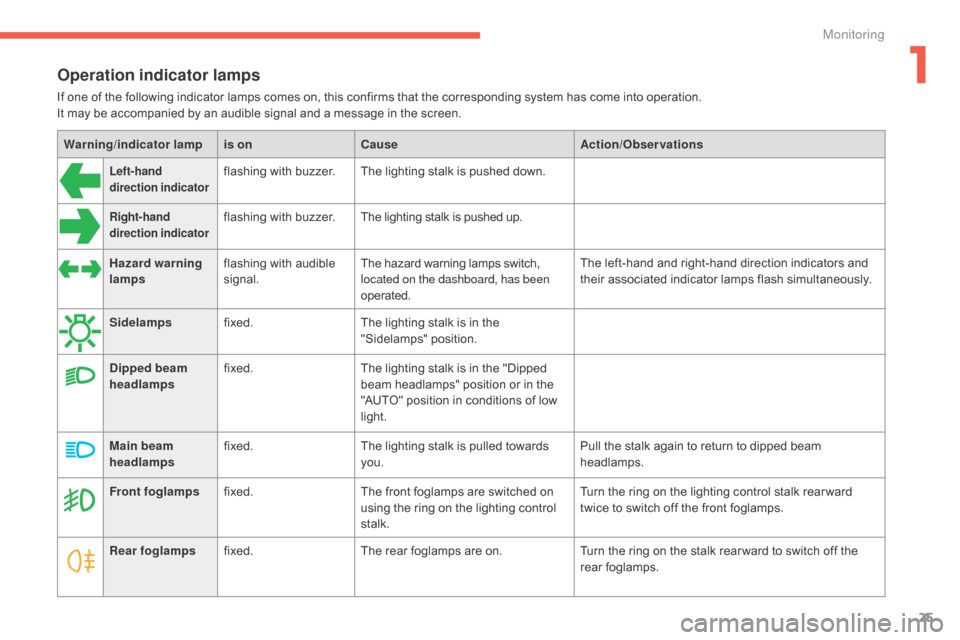
Operation indicator lamps
If one of the following indicator lamps comes on, this confirms that the corresponding system has come into operation.
I t may be accompanied by an audible signal and a message in the screen.
Warning /indicator lampis on Cause Action/Observations
Left-hand
direction indicatorflashing with buzzer.The lighting stalk is pushed down.
Right-hand
direction indicatorflashing with buzzer.The lighting stalk is pushed up.
Hazard warning
lamps flashing
with audible
s
ignal. The
hazard warning lamps switch,
l
ocated on the dashboard, has been
operated. The
left-hand and right-hand direction indicators and
t
heir associated indicator lamps flash simultaneously.
Sidelamps fixed. The
lighting stalk is in the
"
Sidelamps"
p
osition.
Dipped beam
headlamps fixed.
The
lighting stalk is in the "Dipped
b
eam headlamps" position or in the
"
AUTO" position in conditions of low
l
ight.
Main beam
headlamps fixed.
The
lighting stalk is pulled towards
yo
u. Pull
the stalk again to return to dipped beam
h
eadlamps.
Front foglamps fixed. The
front foglamps are switched on
u
sing the ring on the lighting control
st
alk. Turn
the ring on the lighting control stalk rear ward
t
wice to switch off the front foglamps.
Rear foglamps fixed. The
rear foglamps are on.Turn
the ring on the stalk rear ward to switch off the
r
ear
fo
glamps.
1
Monitoring
Page 29 of 494
27
C4-2_en_Chap01_controle-de-marche_ed01-2015
C4-2_en_Chap01_controle-de-marche_ed01-2015
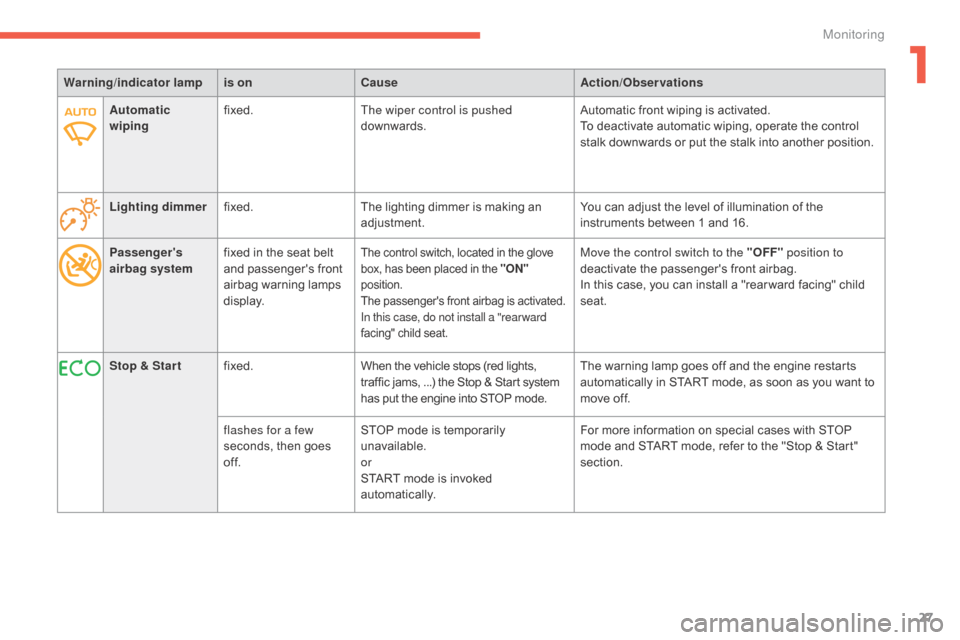
Passenger's
airbag systemfixed
in the seat belt a
nd passenger's front
a
irbag
w
arning
lam
ps
d
isplay.The control switch, located in the glove box, has been placed in the "ON"
position.
The
passenger's front airbag is activated.
In this case, do not install a "rear ward
facing"
child seat.Move the control switch to the "OFF" position to
deactivate the passenger's front airbag.
In
this case, you can install a "rear ward facing" child
sea
t.
Warning
/indicator lampis on Cause Action/Observations
Stop & Star t fixed. When
the
vehicle
stops
(red
lights,
t
raffic
jams,
...)
the
Stop
&
Start
system
h
as
put
the
engine
into
STOP
mode. The
warning lamp goes off and the engine restarts
a
utomatically in START mode, as soon as you want to
m
ove off.
flashes for a few
seconds,
then
goes
o
f f. STOP
mode
is
temporarily
u
navailable.
or
START
mode
is
invoked
au
tomatically. For
more information on special cases with STOP
m
ode and START mode, refer to the "Stop & Start"
s
ection.
Automatic
wiping
fixed.
The wiper control is pushed
downwards. Automatic front wiping is activated.
To deactivate automatic wiping, operate the control
s
talk downwards or put the stalk into another position.
Lighting dimmer fixed. The
lighting
dimmer
is
making
an
adj
ustment.
You can adjust the level of illumination of the
i
nstruments between 1 and 16.
1
Monitoring
Page 37 of 494
35
C4-2_en_Chap01_controle-de-marche_ed01-2015
C4-2_en_Chap01_controle-de-marche_ed01-2015
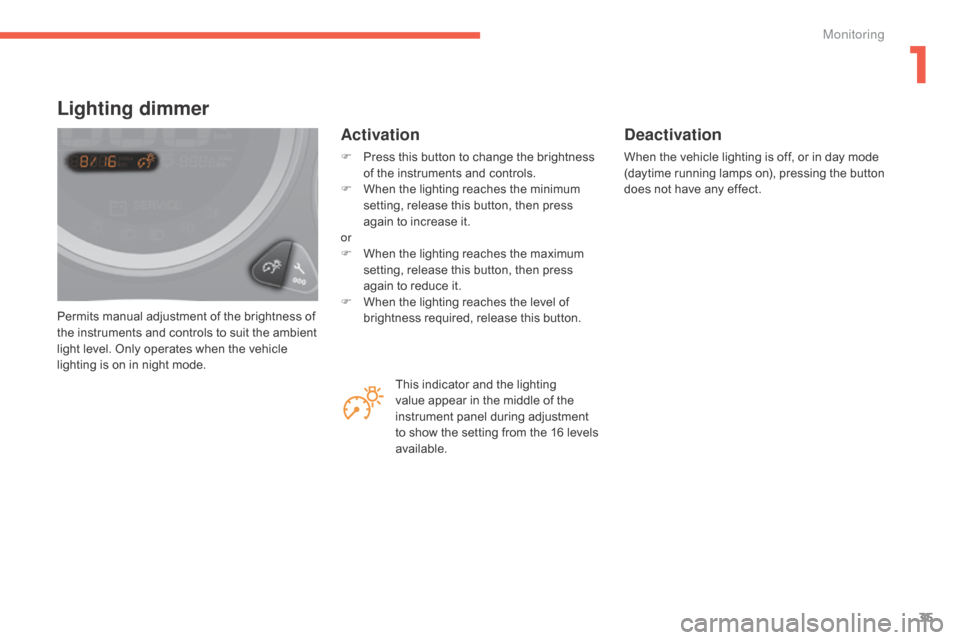
Permits manual adjustment of the brightness of the instruments and controls to suit the ambient
l
ight level. Only operates when the vehicle
l
ighting is on in night mode.
Lighting dimmer
Activation
F Press this button to change the brightness o
f the instruments and controls.
F
W
hen the lighting reaches the minimum
s
etting, release this button, then press
a
gain to increase it.
or
F
W
hen the lighting reaches the maximum
s
etting, release this button, then press
a
gain to reduce it.
F
W
hen the lighting reaches the level of
b
rightness required, release this button.
Deactivation
When the vehicle lighting is off, or in day mode (daytime running lamps on), pressing the button d
oes not have any effect.
This
indicator
and
the
lighting
v
alue
appear
in
the
middle
of
the
i
nstrument
panel
during
adjustment
t
o
show
the
setting
from
the
16
levels
a
vailable.
1
Monitoring