steering Citroen C4 2015 2.G Owner's Manual
[x] Cancel search | Manufacturer: CITROEN, Model Year: 2015, Model line: C4, Model: Citroen C4 2015 2.GPages: 494, PDF Size: 20.49 MB
Page 4 of 494
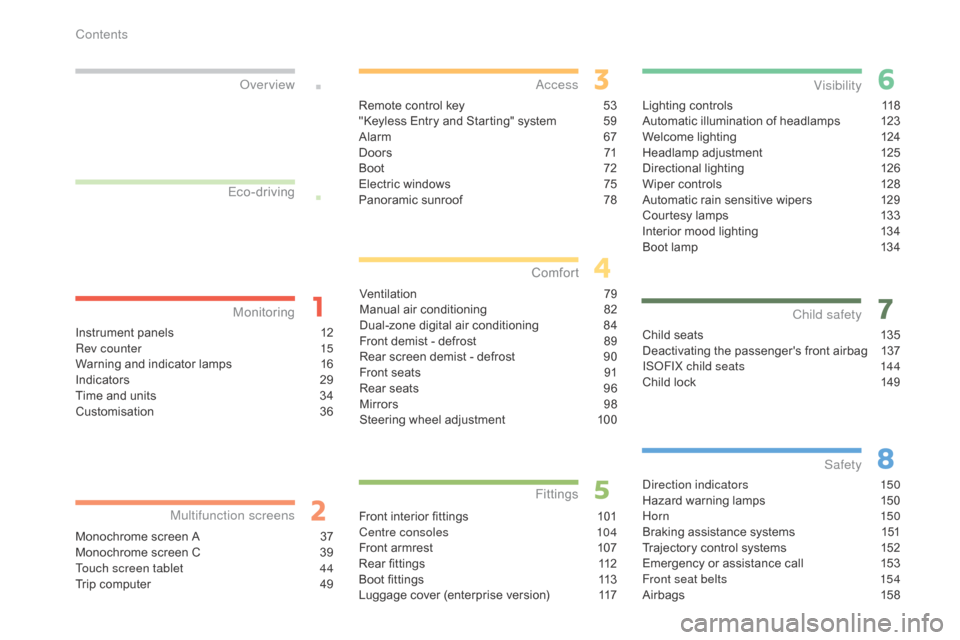
C4-2_en_Chap00a_sommaire_ed01-2015
C4-2_en_Chap00a_sommaire_ed01-2015
Lighting controls 118
Automatic illumination of headlamps 1 23
Welcome
lighting
1
24
Headlamp
adj
ustment
1
25
Directional
l
ighting
1
26
Wiper
controls
1
28
Automatic
rain sensitive wipers
1
29
Courtesy
lamps
1
33
Interior
mood lighting
1
34
Boot
lamp
1
34
Visibility
Child seats 1 35
Deactivating the passenger's front airbag 1 37
IS
oF
IX child seats
1
44
Child
lock
1
49
Child safety
direction indicators 150
Hazard warning lamps 1 50
Hor n
150
Braking
assistance systems
1
51
Trajectory
control systems
1
52
Emergency
or assistance call
1
53
Front seat belts
1
54
Airbags
1
58
Safety
Instrument panels 1 2
Rev counter 1 5
Warning
and indicator lamps
1
6
Indicators
2
9
Time
and units
3
4
Customisation
3
6
Monitoring
ove
r view
Monochrome screen A 3
7
Monochrome screen C 3 9
Touch screen tablet
4
4
Trip
computer
4
9
Multifunction screens
Remote control key 53
"Keyless Entry and Starting" system 5 9
Alarm
6
7
D o o r s
71
Boo
t
7
2
Electric
windows
7
5
Panoramic
sunroof
7
8
access
Ventilation 7 9
Manual a ir c onditioning 8 2
Dual-zone
d
igital
a
ir
c
onditioning
8
4
Front
demist - defrost
8
9
Rear
screen demist - defrost
9
0
Front
seats
9
1
Rear
seats
9
6
Mirrors
9
8
Steering
wheel adjustment
1
00
Comfort
Front interior fittings 1 01
Centre consoles 1 04
Front
armrest
1
07
Rear
fittings
1
12
Boot
fittings
1
13
Luggage
cover (enterprise version)
1
17
Fittings
Eco-driving
Contents
Page 8 of 494
6
C4-2_en_Chap00b_vue-ensemble_ed01-2015
C4-2_en_Chap00b_vue-ensemble_ed01-2015
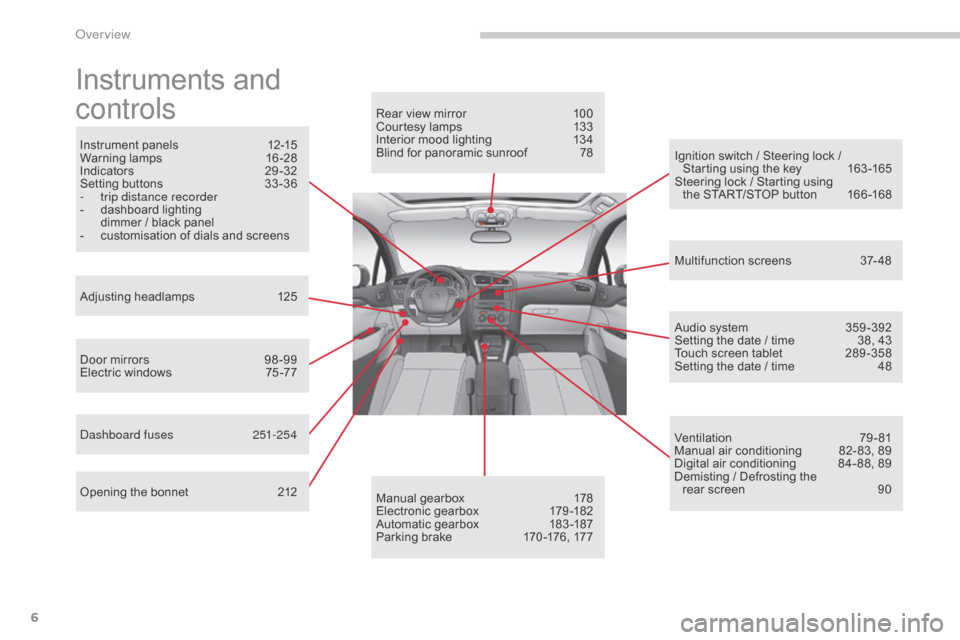
Instruments and
c
ontrols
Instrument panels 1 2-15
Warning lam ps 1 6-28
Indicators
2
9-32
Setting
buttons
3
3 -36
-
t
rip distance recorder
-
d
ashboard lighting
d
immer / black panel
-
c
ustomisation of dials and screens
Adjusting
h
eadlamps
1
25
Door
mirrors
9
8 -99
Electric
windows
7
5 -77
da
shboard fuses
2
51-254
Opening
the bonnet
2
12 Audio
system
3
59 -392
Setting
the date / time
3
8, 43
Touch
screen tablet
2
89 -358
Setting
the date / time
4
8
Manual
g
earbox
1
78
Electronic
gearbox
1
79 -182
Automatic
gearbox
1
83 -187
Parking
brake
1
70 -176, 177
Rear
view mirror
1
00
Courtesy lamps
1
33
Interior mood lighting 1 34
Blind for panoramic sunroof 7 8
Multifunction
screens
3
7- 48
Ventilation
7
9-81
Manual
air conditioning
8
2- 83, 89
Digital
air conditioning
8
4- 88, 89
Demisting
/ Defrosting the
rear
screen
9
0
Ignition
switch / Steering lock /
S
tarting using the key
1
63 -165
Steering
lock / Starting using
the
START/STOP button
1
66 -168
over view
Page 9 of 494
7
C4-2_en_Chap00b_vue-ensemble_ed01-2015
C4-2_en_Chap00b_vue-ensemble_ed01-2015
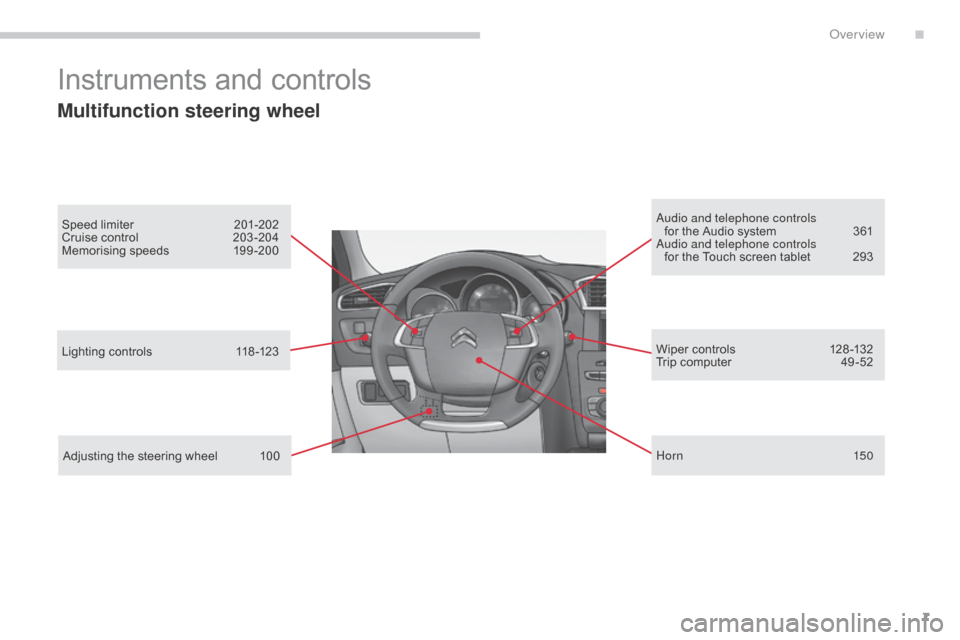
Instruments and controls
Multifunction steering wheel
Speed limiter 201-202
Cruise control 2 03 -204
Memorising
speeds
1
99 -200au dio and telephone controls
for the Audio system 3 61
au
dio and telephone controls
for
the Touch screen tablet
2
93
Lighting
controls
1
18 -123
Adjusting
the steering wheel
1
00 Wiper
controls
1
28 -132
Trip
computer
4
9 -52
Hor n
150
.
Over view
Page 11 of 494
9
C4-2_en_Chap00b_vue-ensemble_ed01-2015
C4-2_en_Chap00b_vue-ensemble_ed01-2015
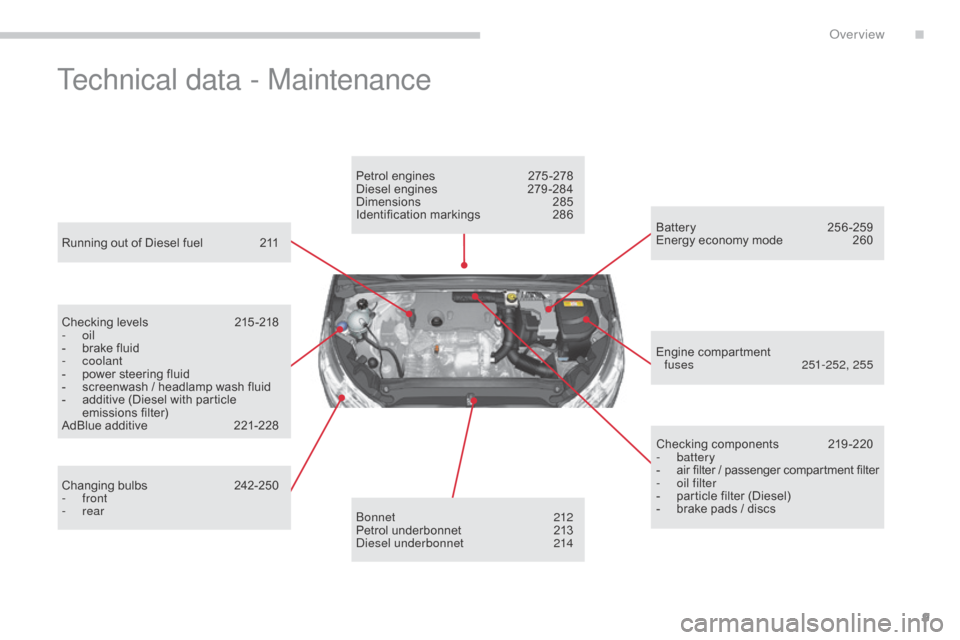
Technical data - Maintenance
Running out of Diesel fuel 211
Checking levels
2
15 -218
-
oil
-
b
rake fluid
-
coolant
-
p
ower steering fluid
-
s
creenwash / headlamp wash fluid
-
a
dditive (Diesel with particle
e
missions
f
ilter)
AdBlue
additive
2
21-228
Changing
bu
lbs
2
42-250
-
front
-
rear Petrol
engines
2
75 -278
Diesel engines
2
79 -284
Dimensions
2
85
Identification
ma
rkings
2
86
bo
nnet
212
Petrol
underbonnet
2
13
di
esel underbonnet
2
14Checking
c
omponents
2
19-220
-
battery
-
a
ir filter / passenger compartment filter
-
o
il filter
-
p
article filter (Diesel)
-
b
rake pads / discs
Battery 2
56-259
Energy economy mode 2 60
Engine
c
ompartment
f
uses
25
1-252, 255
.
over view
Page 18 of 494
16
C4-2_en_Chap01_controle-de-marche_ed01-2015
C4-2_en_Chap01_controle-de-marche_ed01-2015
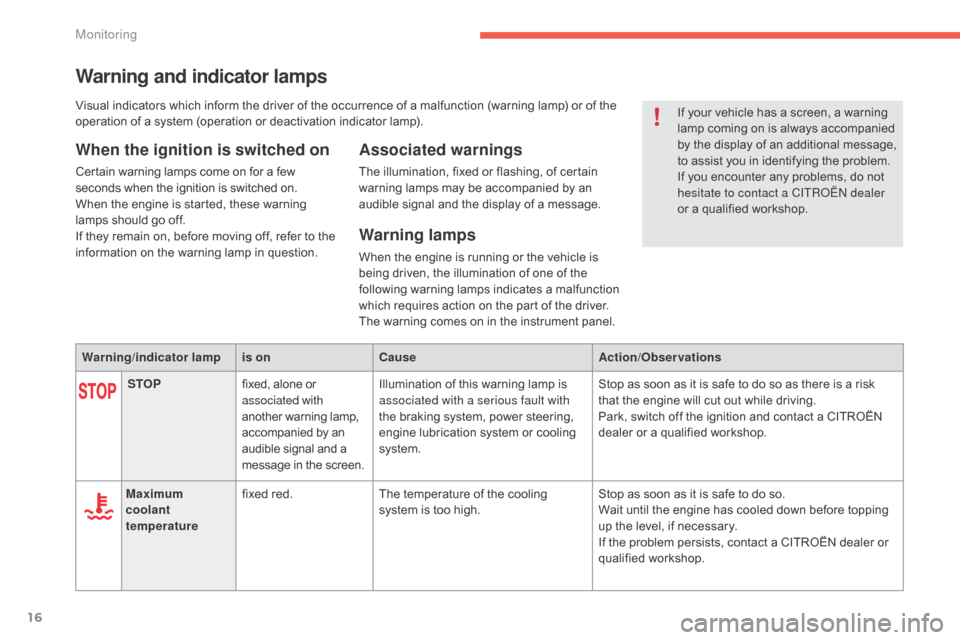
Warning and indicator lamps
When the ignition is switched on
Certain warning lamps come on for a few seconds when the ignition is switched on.
When
the engine is started, these warning
l
amps should go off.
If
they remain on, before moving off, refer to the
i
nformation on the warning lamp in question.
Associated warnings
The illumination, fixed or flashing, of certain warning lamps may be accompanied by an
a
udible signal and the display of a message.
Warning lamps
When the engine is running or the vehicle is being driven, the illumination of one of the
fo
llowing
w
arning
lam
ps
in
dicates
a m
alfunction
w
hich requires action on the part of the driver.
The
warning comes on in the instrument panel.
Warning /indicator lampis on Cause Action/Observations
STOP fixed,
alone
or
a
ssociated with
another
w
arning
lam
p,
a
ccompanied
by
an
a
udible
signal
and
a
m
essage
in
the
screen. Illumination
of this warning lamp is
a
ssociated with a serious fault with
the
braking system, power steering,
e
ngine lubrication system or cooling
s
ystem. Stop
as soon as it is safe to do so as there is a risk
t
hat the engine will cut out while driving.
Park,
switch off the ignition and contact a CITROËN
d
ealer or a qualified workshop.
Maximum
coolant
temperature fixed
red. The
temperature of the cooling
s
ystem is too high. Stop
as soon as it is safe to do so.
Wait
until the engine has cooled down before topping
u
p the level, if necessary.
If
the problem persists, contact a CITROËN dealer or
q
ualified
w
orkshop.If
your vehicle has a screen, a warning
l
amp coming on is always accompanied
b
y the display of an additional message,
t
o assist you in identifying the problem.
If you encounter any problems, do not
h
esitate to contact a CITR
oËn
dealer
or a qualified workshop.
Visual
indicators
which
inform
the
driver
of
the
occurrence of a malfunction (warning lamp) or of the
o
peration
of
a
system
(operation
or
deactivation
indicator lamp).
Monitoring
Page 23 of 494
21
C4-2_en_Chap01_controle-de-marche_ed01-2015
C4-2_en_Chap01_controle-de-marche_ed01-2015
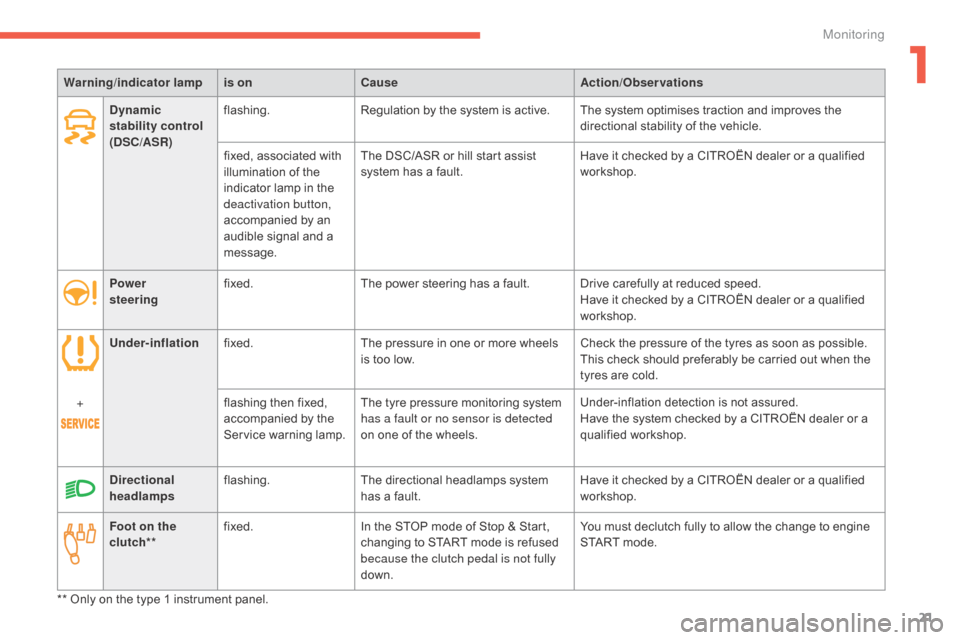
Warning/indicator lampis on Cause Action/Observations
Foot on the
clutch** fixed.
In
the STOP mode of Stop & Start,
c
hanging to START mode is refused
b
ecause the clutch pedal is not fully
down. You
must declutch fully to allow the change to engine
S
TART mode.
**
Only on the type 1 instrument panel.
Dynamic
stability control
(DSC/ASR)
flashing.
Regulation
by the system is active. The system optimises traction and improves the
d
irectional stability of the vehicle.
fixed,
associated with
i
llumination of the
i
ndicator lamp in the
d
eactivation button,
accompanied
by an
a
udible signal and a
m
essage.The
DSC/ASR or hill start assist
s
ystem has a fault.Have
it checked by a CITROËN dealer or a qualified
w
orkshop.
Power
steering fixed.
The
power steering has a fault. Drive carefully at reduced speed.
Have
it checked by a CITROËN dealer or a qualified
w
orkshop.
Under-inflation fixed. The
pressure in one or more wheels
i
s too low.Check
the pressure of the tyres as soon as possible.
This
check should preferably be carried out when the
t
yres are cold.
+ flashing
then fixed,
a
ccompanied by the
S
ervice warning lamp.The
tyre pressure monitoring system
h
as a fault or no sensor is detected
on
one of the wheels.Under-inflation
detection is not assured.
Have
the system checked by a CITROËN dealer or a
q
ualified
w
orkshop.
Directional
headlamps flashing.
The
directional headlamps system
h
as a fault.Have
it checked by a CITROËN dealer or a qualified
w
orkshop.
1
Monitoring
Page 66 of 494
64
C4-2_en_Chap03_ouvertures_ed01-2015
C4-2_en_Chap03_ouvertures_ed01-2015
Remote control
The high frequency remote control is a sensitive system; do not operate it while it is in your pocket as there is a possibility that it may unlock the vehicle, without you being aware of it.
Do
not repeatedly press the buttons of your remote control out of range and out of sight of your vehicle. You run the risk of stopping it from
w
orking and the remote control would have to be reinitialised.
The
remote control does not operate when the key is in the ignition, even when the ignition is switched off.
Locking the vehicle
Driving with the doors locked may make access to the passenger compartment by the emergency services more difficult in an emergency.
A s a safety precaution (with children on board), remove the key from the ignition or take the electronic key when you leave the vehicle, even for
a
short time.
Electrical interference
The Keyless Entry and Starting electronic key may not operate if close to certain electronic devices: telephone, laptop computer, strong magnetic fields, ...
Anti-theft protection
Do not make any modifications to the electronic engine immobiliser system; this could cause malfunctions.
D on't forget to turn the steering to engage the steering lock.
Lost keys, remote control, electronic key
Visit a CITROËN dealer with the vehicle's V5 registration document and your personal identification documents.
T he CITROËN dealer will be able to retrieve the key code and the transponder code required to order a replacement.
Do
not throw the remote control batteries away, they contain metals which are harmful to the environment.
Take
them to an approved collection point.
When purchasing a second-hand vehicle
Have the key codes memorised by a CITROËN dealer, to ensure that the keys in your possession are the only ones which can start the vehicle.
Access
Page 102 of 494
100
C4-2_en_Chap04_confort_ed01-2015
C4-2_en_Chap04_confort_ed01-2015
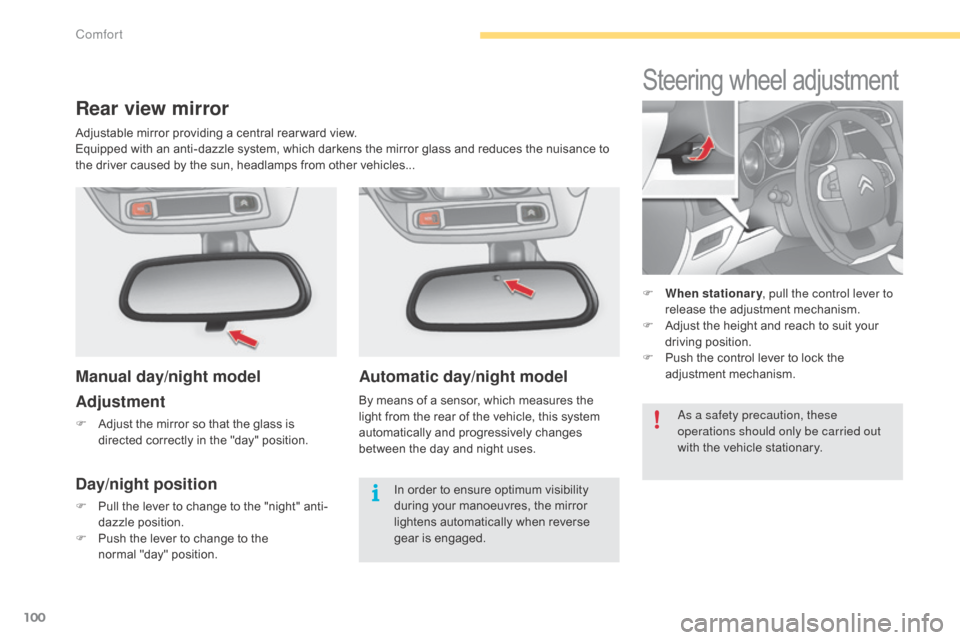
Automatic day/night model
By means of a sensor, which measures the light from the rear of the vehicle, this system
a
utomatically and progressively changes
b
etween the day and night uses.
Steering wheel adjustment
F When stationary , pull the control lever to
release the adjustment mechanism.
F
A
djust the height and reach to suit your
d
riving position.
F
P
ush the control lever to lock the
a
djustment
m
echanism.
Rear view mirror
Manual day/night model
Adjustment
F Adjust the mirror so that the glass is
directed correctly in the "day" position.
Day/night position
F Pull the lever to change to the "night" anti-
dazzle position.
F
P
ush the lever to change to the
normal
"day" position.
as a s
afety precaution, these
operations should only be carried out
with the vehicle stationary.
In order to ensure optimum visibility d
uring your manoeuvres, the mirror l
ightens automatically when reverse
g
ear
i
s
enga
ged.
Adjustable
mirror providing a central rear ward view.
Equipped with an anti-dazzle system, which darkens the mirror glass and reduces the nuisance to
t
he driver caused by the sun, headlamps from other vehicles...
Comfort
Page 105 of 494
103
C4-2_en_Chap05_amenagement_ed01-2015
C4-2_en_Chap05_amenagement_ed01-2015
USB port / auxiliary socket
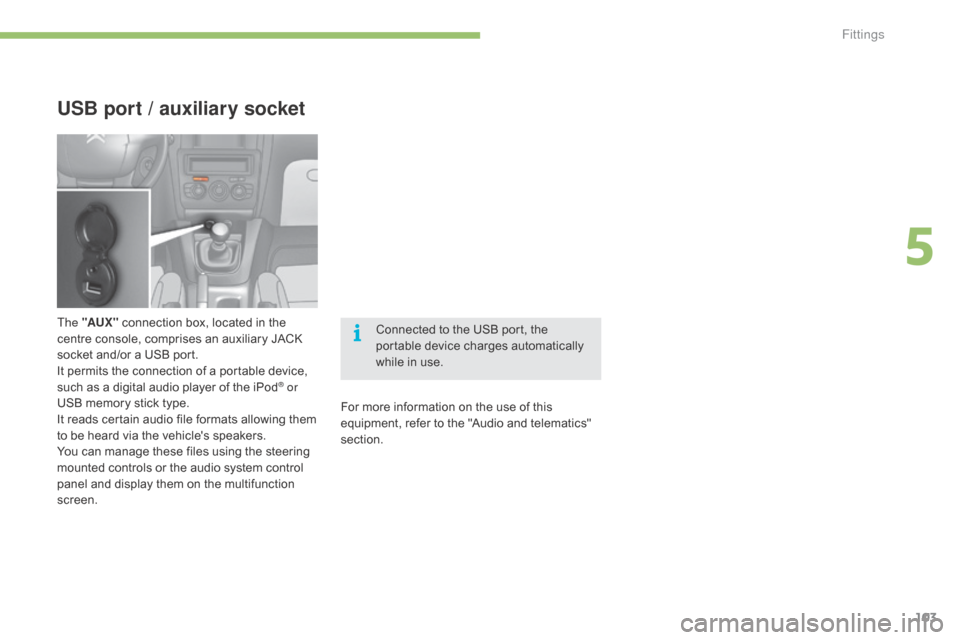
The "AUX " connection box, located in the c
entre console, comprises an auxiliary JACK
s
ocket and/or a USB port.
It
permits the connection of a portable device,
s
uch as a digital audio player of the iPod
® or
USB
memory
stick
type.
It
reads
certain
audio
file
formats
allowing them
t
o
be
heard
via
the
vehicle's
speakers.
You
can
manage
these
files
using
the
steering
m
ounted
controls
or
the
audio
system
control
p
anel
and
display
them
on
the
multifunction
sc
reen. Connected
to the USB port, the
p
ortable device charges automatically
w
hile in use.
For more information on the use of this
e
quipment, refer to the "Audio and telematics"
s
ection.
5
Fittings
Page 154 of 494
152
C4-2_en_Chap08_securite_ed01-2015
C4-2_en_Chap08_securite_ed01-2015
Trajectory control systems
Anti-slip regulation (ASR)
and dynamic stability
control (DSC)
The anti-slip regulation (also known as traction control) optimises traction to prevent skidding
o
f the wheels, by acting on the brakes of the
d
riving wheels and on the engine.
The electronic stability control acts on the
brake
of one or more wheels and on the engine
t
o keep the vehicle on the trajectory required
b
y the driver, within the limits of the laws of
p
hysics.
Activation
These systems are activated automatically each time the vehicle is started.
They
come into operation in the event of a grip
o
r
t
rajectory
pro
blem.
This
is indicated by flashing of this
w
arning lamp in the instrument panel.
Intelligent traction control
system ("Snow motion")
Deactivation
In extremely severe conditions (deep snow, mud, ...), if you are unable to move off, it may
b
e useful to temporarily deactivate these
s
ystems so that the wheels can spin freely and
a
llow the vehicle to move.
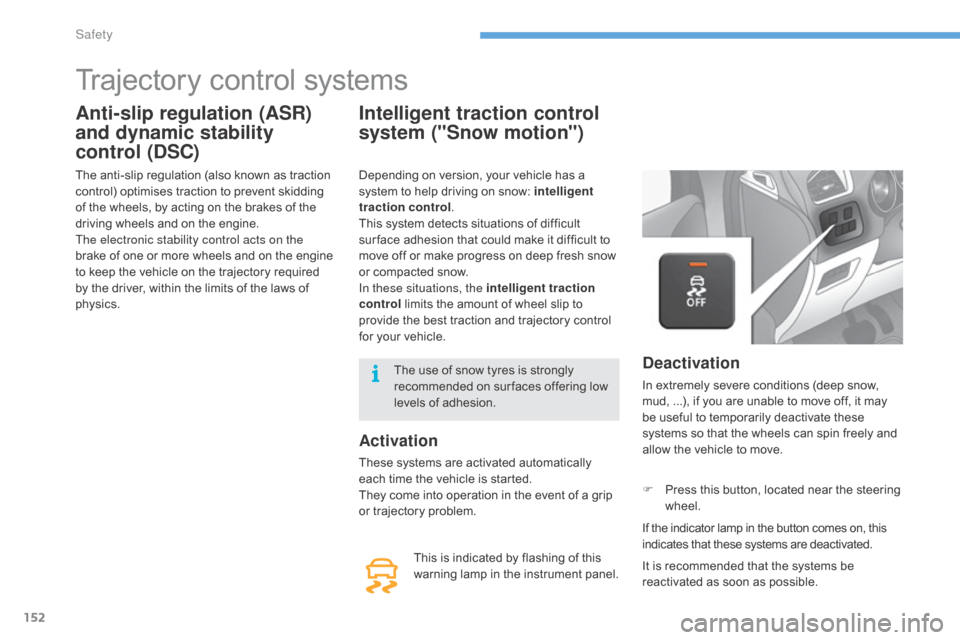
F
P
ress this button, located near the steering
w
heel.
If
the indicator lamp in the button comes on, this
i
ndicates that these systems are deactivated.
Depending
on
version,
your
vehicle
has
a
s
ystem
to
help
driving
on
snow:
intelligent
traction control .
This
system
detects
situations
of
difficult
s
ur face
adhesion
that
could
make
it
difficult
to
m
ove
off
or
make
progress
on
deep
fresh
snow
o
r
compacted
snow.
In these situations, the intelligent traction
control
limits
the
amount
of
wheel
slip
to
p
rovide
the
best
traction
and
trajectory
control
f
or
your
vehicle.
It is recommended that the systems be
r
eactivated as soon as possible.
The
use
of
snow
tyres
is
strongly
r
ecommended
on
sur faces
offering
low
l
evels
of
adhesion.
Safety