buttons Citroen C4 2015 2.G Owner's Manual
[x] Cancel search | Manufacturer: CITROEN, Model Year: 2015, Model line: C4, Model: Citroen C4 2015 2.GPages: 494, PDF Size: 20.49 MB
Page 8 of 494
6
C4-2_en_Chap00b_vue-ensemble_ed01-2015
C4-2_en_Chap00b_vue-ensemble_ed01-2015
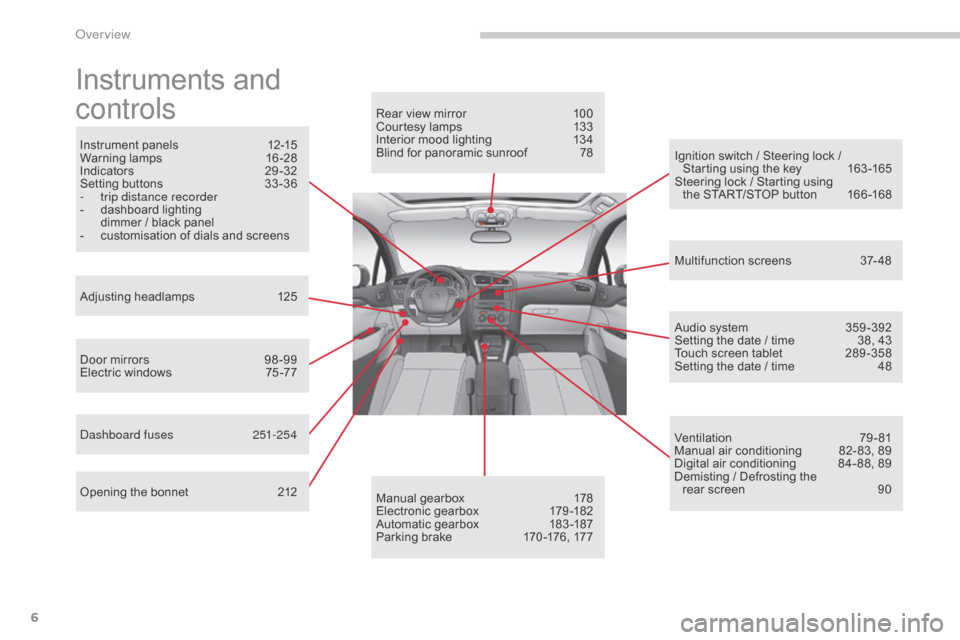
Instruments and
c
ontrols
Instrument panels 1 2-15
Warning lam ps 1 6-28
Indicators
2
9-32
Setting
buttons
3
3 -36
-
t
rip distance recorder
-
d
ashboard lighting
d
immer / black panel
-
c
ustomisation of dials and screens
Adjusting
h
eadlamps
1
25
Door
mirrors
9
8 -99
Electric
windows
7
5 -77
da
shboard fuses
2
51-254
Opening
the bonnet
2
12 Audio
system
3
59 -392
Setting
the date / time
3
8, 43
Touch
screen tablet
2
89 -358
Setting
the date / time
4
8
Manual
g
earbox
1
78
Electronic
gearbox
1
79 -182
Automatic
gearbox
1
83 -187
Parking
brake
1
70 -176, 177
Rear
view mirror
1
00
Courtesy lamps
1
33
Interior mood lighting 1 34
Blind for panoramic sunroof 7 8
Multifunction
screens
3
7- 48
Ventilation
7
9-81
Manual
air conditioning
8
2- 83, 89
Digital
air conditioning
8
4- 88, 89
Demisting
/ Defrosting the
rear
screen
9
0
Ignition
switch / Steering lock /
S
tarting using the key
1
63 -165
Steering
lock / Starting using
the
START/STOP button
1
66 -168
over view
Page 14 of 494
12
C4-2_en_Chap01_controle-de-marche_ed01-2015
C4-2_en_Chap01_controle-de-marche_ed01-2015
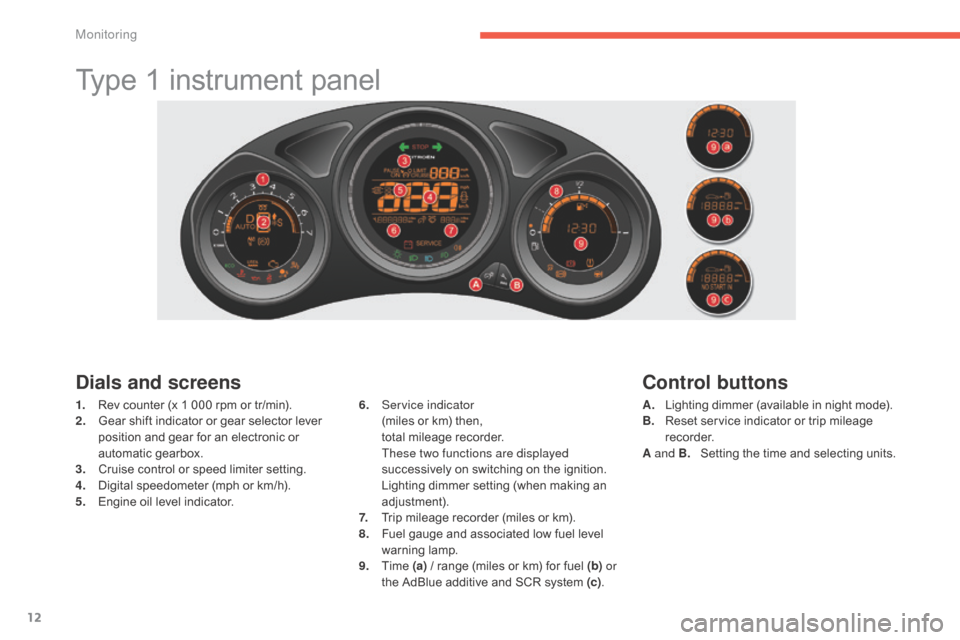
Type 1 instrument panel
Dials and screens
1. Rev counter (x 1 000 rpm or tr/min).
2. G ear shift indicator or gear selector lever
p
osition and gear for an electronic or
a
utomatic gearbox.
3.
C
ruise control or speed limiter setting.
4.
D
igital speedometer (mph or km/h).
5.
E
ngine oil level indicator. 6. S
ervice indicator (
miles or km) then,
t
otal mileage recorder.
T
hese two functions are displayed
successively
on switching on the ignition.
L
ighting dimmer setting (when making an
adj
ustment).
7.
T
rip mileage recorder (miles or km).
8.
F
uel gauge and associated low fuel level
w
arning
lam
p.
9.
T
ime (a)
/ range (miles or km) for fuel (b) or
the
AdBlue additive and SCR system (c).
Control buttons
A. Lighting dimmer (available in night mode).
B. R eset service indicator or trip mileage
re
corder.
A and B.
S
etting the time and selecting units.
Monitoring
Page 15 of 494
13
C4-2_en_Chap01_controle-de-marche_ed01-2015
C4-2_en_Chap01_controle-de-marche_ed01-2015
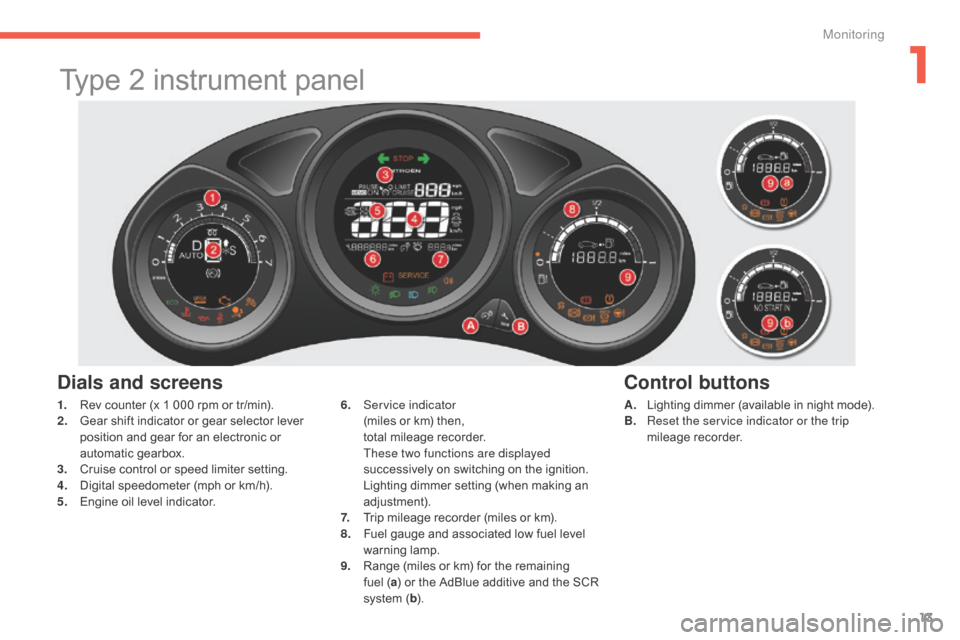
Type 2 instrument panel
Dials and screens
A. Lighting dimmer (available in night mode).
B. R eset the service indicator or the trip
mileage
re
corder.
6. S
ervice indicator (
miles
or
km)
then,
t
otal
mileage
recorder.
T
hese two functions are displayed
successively
on
switching
on
the
ignition.
L
ighting
dimmer
setting
(when
making
an
adj
ustment).
7.
T
rip
mileage
recorder
(miles
or
km).
8.
F
uel
gauge
and
associated
low
fuel
level
w
arning
lam
p.
9.
R
ange
(miles
or
km)
for
the
remaining
f
uel ( a)
or
the
AdBlue
additive
and
the
SCR
s
ystem
( b ).
Control buttons
1. Rev counter (x 1 000 rpm or tr/min).
2. G ear shift indicator or gear selector lever
p
osition and gear for an electronic or
a
utomatic gearbox.
3.
C
ruise control or speed limiter setting.
4.
D
igital speedometer (mph or km/h).
5.
E
ngine oil level indicator.
1
Monitoring
Page 16 of 494
14
C4-2_en_Chap01_controle-de-marche_ed01-2015
C4-2_en_Chap01_controle-de-marche_ed01-2015
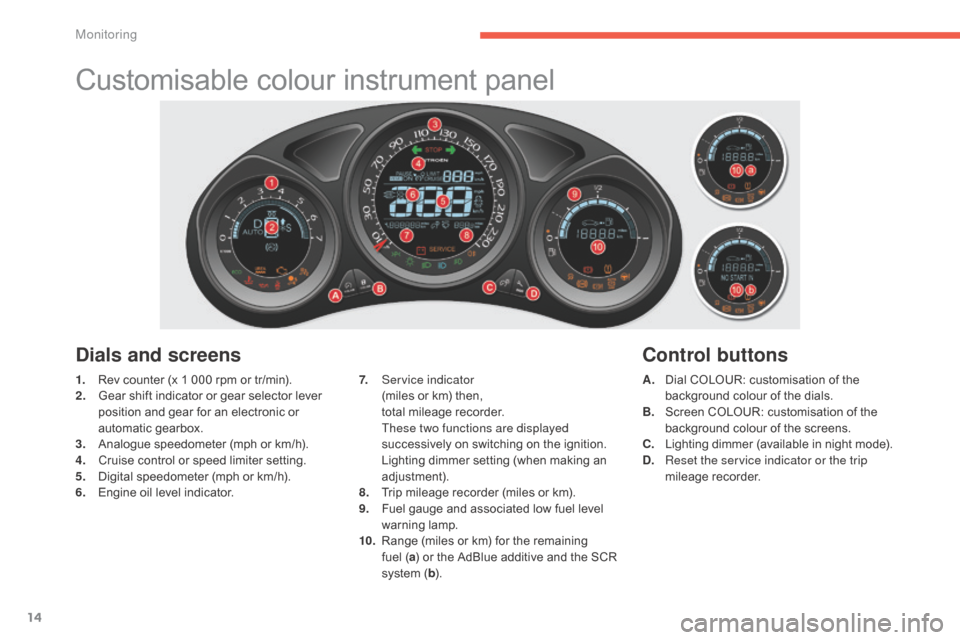
Customisable colour instrument panel
1. Rev counter (x 1 000 rpm or tr/min).
2. G ear shift indicator or gear selector lever
p
osition and gear for an electronic or
a
utomatic gearbox.
3.
A
nalogue speedometer (mph or km/h).
4.
C
ruise control or speed limiter setting.
5.
D
igital speedometer (mph or km/h).
6.
E
ngine oil level indicator. A. D
ial COLOUR: customisation of the b
ackground colour of the dials.
B.
S
creen COLOUR: customisation of the
b
ackground colour of the screens.
C.
L
ighting dimmer (available in night mode).
D.
R
eset the service indicator or the trip
mileage
re
corder.
Dials and screens
7. Service indicator (miles or km) then,
t
otal mileage recorder.
T
hese two functions are displayed
successively
on switching on the ignition.
L
ighting dimmer setting (when making an
adj
ustment).
8.
T
rip mileage recorder (miles or km).
9.
F
uel gauge and associated low fuel level
w
arning
lam
p.
10.
R
ange (miles or km) for the remaining
f
uel (a)
or the AdBlue additive and the SCR
s
ystem (b ).
Control buttons
Monitoring
Page 36 of 494
34
C4-2_en_Chap01_controle-de-marche_ed01-2015
C4-2_en_Chap01_controle-de-marche_ed01-2015
Setting the time and the time
format in the instrument
panel with the clock
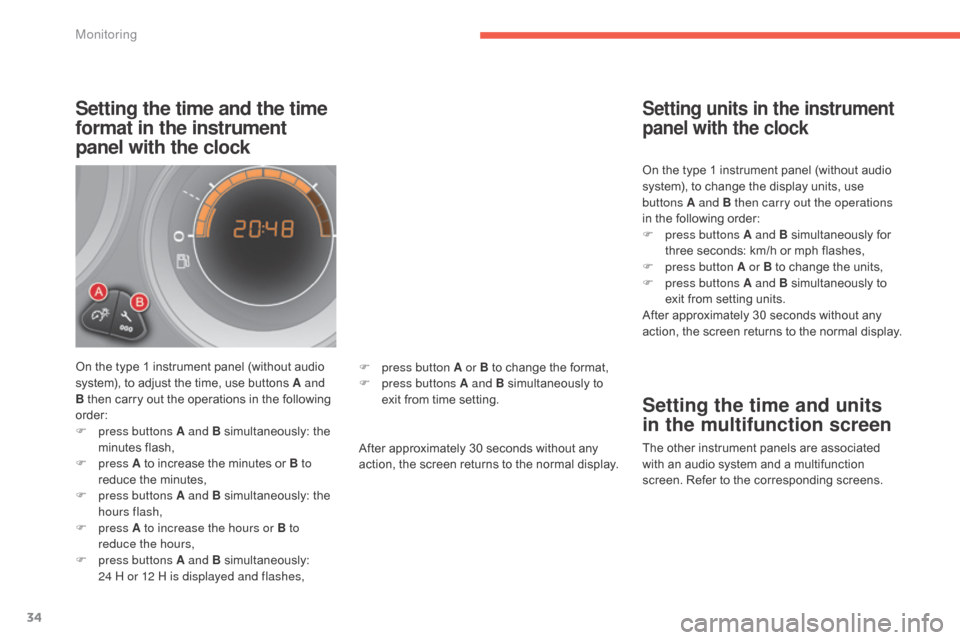
On the type 1 instrument panel (without audio system), to adjust the time, use buttons A and
B
then carry out the operations in the following
o
rder:
F
p
ress buttons A and B
s
imultaneously:
t
he
m
inutes
f
lash,
F
press A
to increase the minutes or B to
reduce
the minutes,
F
p
ress buttons A and B
s
imultaneously:
t
he
h
ours flash,
F
press A to increase the hours or B to
reduce the hours,
F
p
ress buttons A and B
s
imultaneously:
2
4 H or 12 H is displayed and flashes, After
approximately 30 seconds without any
a
ction, the screen returns to the normal display.On
the type 1 instrument panel (without audio
s
ystem), to change the display units, use
b
uttons A and B then carry out the operations
in the following order:
F
p
ress buttons A and B
s
imultaneously
fo
r
t
hree seconds: km/h or mph flashes,
F
p
ress button A or B to change the units,
F
p
ress buttons A and B simultaneously to
e
xit from setting units.
After approximately 30 seconds without any
a
ction, the screen returns to the normal display.
Setting units in the instrument
panel with the clock
Setting the time and units
in the multifunction screen
The other instrument panels are associated w
ith an audio system and a multifunction
s
creen. Refer to the corresponding screens.
F
p
ress button A or B
to
change
the
format,
F
p
ress buttons A and B
simultaneously
to
e
xit
from
time
setting.
Monitoring
Page 39 of 494
37
C4-2_en_Chap02_ecran-multifonction_ed01-2015
C4-2_en_Chap02_ecran-multifonction_ed01-2015
Monochrome screen A
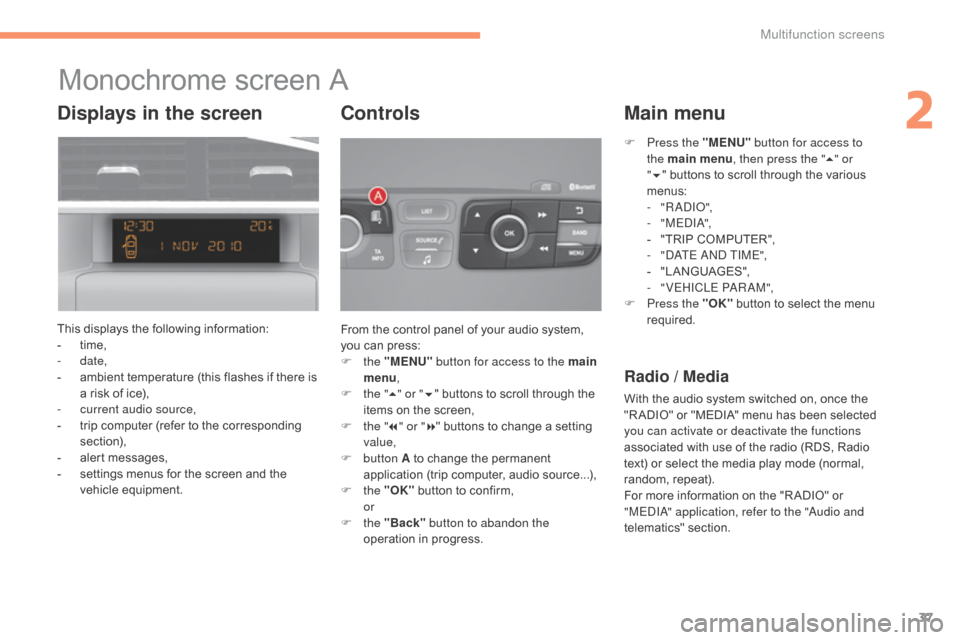
This displays the following information:
- t ime,
-
date,
-
a
mbient temperature (this flashes if there is
a
risk of ice),
-
c
urrent audio source,
-
t
rip computer (refer to the corresponding
s
ection),
-
a
lert messages,
-
s
ettings menus for the screen and the
v
ehicle
e
quipment. From
the control panel of your audio system,
y
ou can press:
F
the "MENU" button for access to the main
menu ,
F
t
he "5" or " 6"
buttons to scroll through the
i
tems on the screen,
F
t
he "7" or " 8"
buttons to change a setting
va
lue,
F
button A
to change the permanent
a
pplication (trip computer, audio source...),
F
the "OK"
button to confirm,
or
F
the "Back" button to abandon the
operation
in progress.
Controls
F Press the "MENU" button for access to
the main menu , then press the " 5" or
" 6 "
buttons to scroll through the various
m
enus:
-
" R
a
d
Io"
,
-
" M E
dIa
",
-
"
TRIP COMPUTER",
-
"d
a
T
E and TIME",
-
"
LANGUAGES",
-
"
VEHICLE P
aRaM
",
F
P
ress the "OK"
button to select the menu
r
equired.
Main menu
Radio / Media
With the audio system switched on, once the "R ADIO" or "MEDIA" menu has been selected
y
ou can activate or deactivate the functions
associated
with use of the radio (RDS, Radio
t
ext) or select the media play mode (normal,
r
andom,
r
epeat).
For
more information on the "R ADIO" or
"
ME
dIa" a
pplication, refer to the "
au
dio and
telematics"
se
ction.
Displays in the screen
2
Multifunction screens
Page 40 of 494
38
C4-2_en_Chap02_ecran-multifonction_ed01-2015
C4-2_en_Chap02_ecran-multifonction_ed01-2015
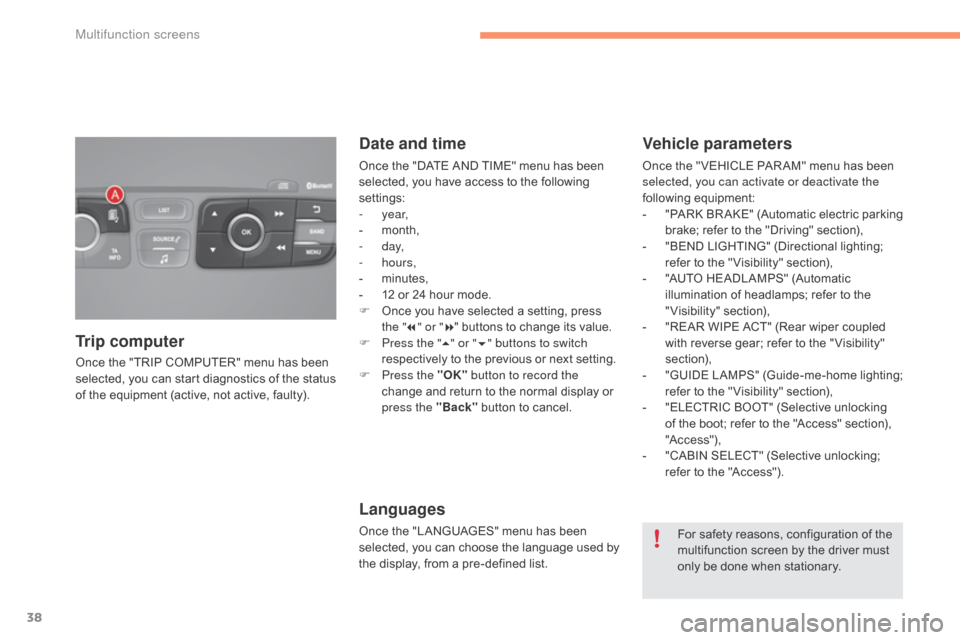
Once the "TRIP COMPUTER" menu has been selected, you can start diagnostics of the status
o
f the equipment (active, not active, faulty).
Trip computer Date and time
Once the "DATE AND TIME" menu has been s
elected, you have access to the following
se
ttings:
-
year,
-
m
onth,
-
d ay,
-
hours,
-
m
inutes,
-
1
2 or 24 hour mode.
F
O
nce you have selected a setting, press
t
he "7" or " 8"
buttons to change its value.
F
P
ress the " 5" or " 6" buttons to switch
respectively
to the previous or next setting.
F
P
ress the "OK" button to record the
change
and return to the normal display or
p
ress the "Back"
button to cancel.
Languages
Once the "LANGUAGES" menu has been selected, you can choose the language used by
t
he display, from a pre-defined list.
Vehicle parameters
Once the " VEHICLE PAR AM" menu has been selected, you can activate or deactivate the
following
e
quipment:
-
"
PARK
B
R AKE"
(
Automatic
e
lectric
p
arking
b
rake; refer to the "Driving" section),
-
"
BEND LIGHTING" (Directional lighting;
r
efer to the " Visibility" section),
-
"
AUTO HEADLAMPS" (Automatic
i
llumination of headlamps; refer to the
"
Visibility"
s
ection),
-
"
REAR WIPE ACT" (Rear wiper coupled
w
ith reverse gear; refer to the " Visibility"
s
ection),
-
"
GUIDE
L
AMPS"
(
Guide-me-home
l
ighting;
r
efer to the " Visibility" section),
-
"
ELECTRIC BOOT" (Selective unlocking
o
f the boot; refer to the "Access" section),
"A
c c ess"),
-
"
CABIN SELECT" (Selective unlocking;
r
efer to the "Access").
For
safety reasons, configuration of the
m
ultifunction screen by the driver must
o
nly be done when stationary.
Multifunction screens
Page 41 of 494
39
C4-2_en_Chap02_ecran-multifonction_ed01-2015
C4-2_en_Chap02_ecran-multifonction_ed01-2015
Monochrome screen C
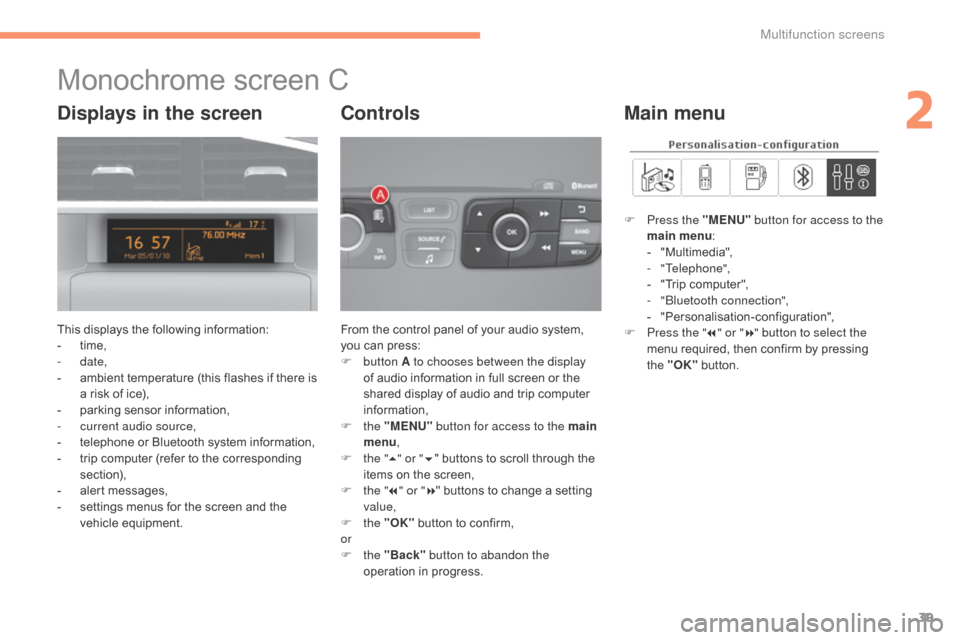
This displays the following information:
- t ime,
-
date,
-
a
mbient temperature (this flashes if there is
a
risk of ice),
-
p
arking sensor information,
-
c
urrent audio source,
-
t
elephone or Bluetooth system information,
-
t
rip computer (refer to the corresponding
s
ection),
-
a
lert messages,
-
s
ettings menus for the screen and the
v
ehicle
e
quipment. From
the control panel of your audio system, y
ou can press:
F
button A to chooses between the display
of
audio information in full screen or the
s
hared display of audio and trip computer
i
nformation,
F
the "MENU" button for access to the main
menu ,
F
t
he "5" or " 6"
buttons to scroll through the
i
tems on the screen,
F
t
he "7" or " 8"
buttons to change a setting
va
lue,
F
the "OK"
button to confirm,
or
F
the "Back" button to abandon the
operation
in progress.
Controls
F Press the "MENU" button for access to the
main menu :
-
"
Multimedia",
-
"Telephone",
-
"
Trip computer",
-
"bl
uetooth connection",
-
"
Personalisation-configuration",
F
P
ress the " 7" or " 8" button to select the
menu
required, then confirm by pressing
t
he "OK"
button.
Main menuDisplays in the screen
2
Multifunction screens
Page 44 of 494
42
C4-2_en_Chap02_ecran-multifonction_ed01-2015
C4-2_en_Chap02_ecran-multifonction_ed01-2015
Choice of language
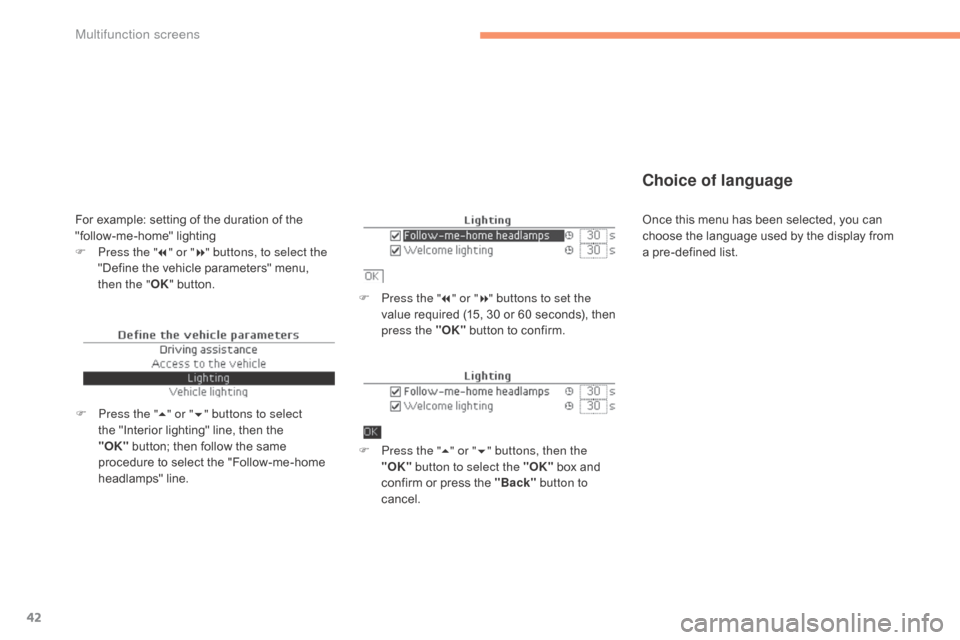
F Press the "7" or " 8" buttons to set the
value required (15, 30 or 60 seconds), then
p
ress the "OK"
button to confirm.
F
P
ress the " 5" or " 6" buttons, then the
"OK" button to select the "OK"
box and
c
onfirm or press the "Back" button to
cancel.
F
P
ress the " 5" or " 6" buttons to select
the
"Interior
lighting"
line,
then
the
"O
K" button;
then
follow
the
same
p
rocedure
to
select
the
"Follow-me-home
h
eadlamps"
l
ine.
For example: setting of the duration of the " follow-me-home" l ighting
F
P
ress the " 7" or " 8" buttons, to select the
"Define
the vehicle parameters" menu,
t
hen the " OK"
button. Once
this menu has been selected, you can c
hoose the language used by the display from
a
pre-defined list.
Multifunction screens
Page 46 of 494
44
C4-2_en_Chap02_ecran-multifonction_ed01-2015
C4-2_en_Chap02_ecran-multifonction_ed01-2015
Touch screen tablet
General operation
Principles
Press the virtual buttons in the touch screen
tablet.
Each menu is displayed over one or two pages
(
primary page and secondary page).
For reasons of safety, the driver
should only carr y out operations
that require close attention, with the
vehicle stationary.
Some
functions
are
not
accessible
w
hen
d
riving.
This
system
gives
access
to:
-
m
enus
for
adjusting
settings
for
vehicle
f
unctions
and
systems,
-
a
udio
and
display
settings
menus,
-
a
udio
system
and
telephone
controls
and
t
he
display
of
associated
information.
-
t
he
display
of
alert
messages,
-
t
he
display
of
the
ambient
temperature
(a
blue
snowflake
appears
if
there
is
a
risk
o
f
ice),
-
t
he
display
of
the
trip
computer.
And,
depending
on
equipment,
it
also
allows:
-
t
he
display
of
visual
parking
sensors
i
nformation,
-
a
ccess
to
the
controls
for
the
navigation
s
ystem
and
Internet
services,
and
the
d
isplay
of
associated
information.
Recommendations
It is necessary to press firmly, particularly for " flick" gestures (scrolling through lists, moving
t
he
m
ap...).
A
light wipe is not enough.
The
screen does not recognise pressing with
m
ore than one finger.
This
technology allows use at all temperatures
a
nd when wearing gloves.
Do
not use pointed objects on the touch screen
t
ablet.
do n
ot touch the touch screen tablet with wet
hands.
Uses
a soft clean cloth to clean the touch
s
creen
t
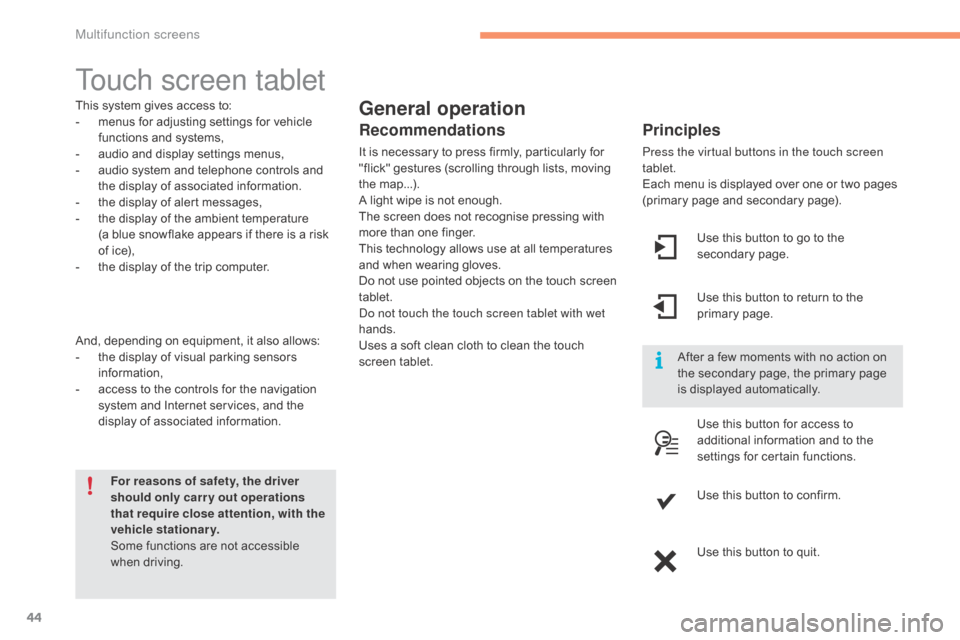
ablet. Use
this button to go to the
s
econdary
pag
e.
After
a few moments with no action on
t
he secondary page, the primary page
i
s displayed automatically.
Use
this button to return to the
p
rimary
pag
e.
Use
this button for access to
a
dditional information and to the
s
ettings for certain functions.
Use
this button to confirm.
Use
this button to quit.
Multifunction screens