door lock Citroen C4 2016 2.G User Guide
[x] Cancel search | Manufacturer: CITROEN, Model Year: 2016, Model line: C4, Model: Citroen C4 2016 2.GPages: 396, PDF Size: 10.22 MB
Page 65 of 396
63
C4-2_en_Chap02_ouvertures_ed02-2015
Locking the vehicle
Normal locking
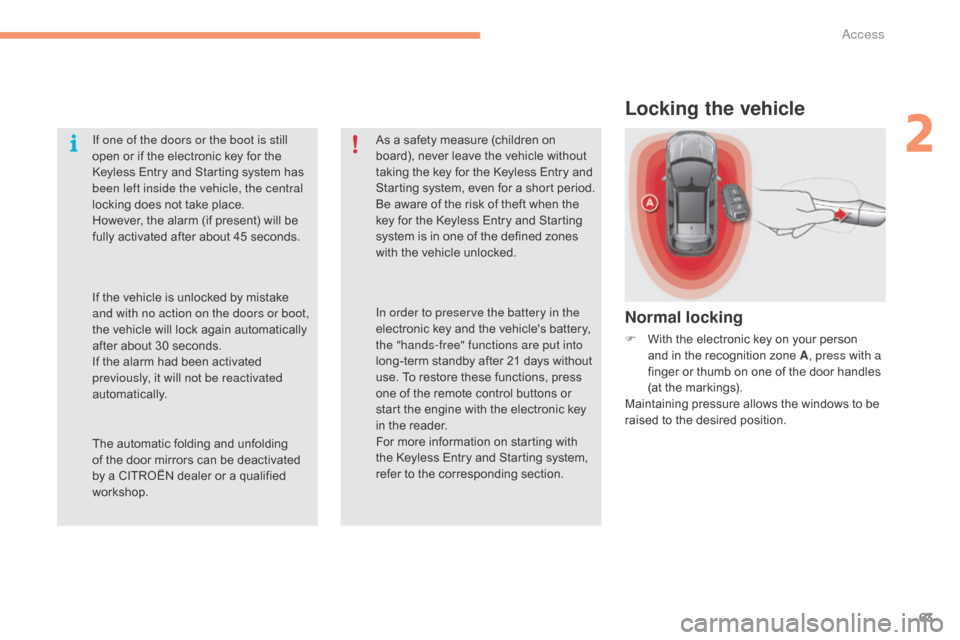
F With the electronic key on your person a
nd in the recognition zone A, press with a
finger
or thumb on one of the door handles
(
at the markings).
Maintaining
pressure allows the windows to be
r
aised to the desired position.
If one of the doors or the boot is still
open
or
if
the
electronic
key
for
the
K
eyless
Entry
and
Starting
system
has
b
een left inside the vehicle, the central
locking
does
not
take
place.
However,
the
alarm
(if
present)
will
be
f
ully
activated
after
about
45
seconds.
As
a
safety
measure
(children
on
b
oard),
never
leave
the
vehicle
without
t
aking
the
key
for
the
Keyless
Entry
and
S
tarting
system,
even
for
a
short
period.
Be
aware
of
the
risk
of
theft
when
the
k
ey
for
the
Keyless
Entry
and
Starting
s
ystem
is
in
one
of
the
defined
zones
w
ith
the
vehicle
unlocked.
The
automatic
folding
and
unfolding
o
f
the
door
mirrors
can
be
deactivated
b
y
a
CITROËN
dealer
or
a
qualified
w
orkshop. In order to preserve the battery in the
electronic
key
and
the
vehicle's
battery,
t
he "hands-free" functions are put into
long-term
standby
after
21
days
without
u
se.
To
restore
these
functions,
press
o
ne
of
the
remote
control
buttons
or
s
tart
the
engine
with
the
electronic
key
i
n
the
reader.
For
more
information
on
starting
with
t
he
Keyless
Entry
and
Starting
system,
r
efer
to
the
corresponding
section.
If
the
vehicle
is
unlocked
by
mistake
a
nd with no action on the doors or boot,
the
vehicle
will
lock
again
automatically
a
fter
about
30
seconds.
If
the
alarm
had
been
activated
p
reviously, it will not be reactivated
automatically.
2
Access
Page 66 of 396
64
C4-2_en_Chap02_ouvertures_ed02-2015
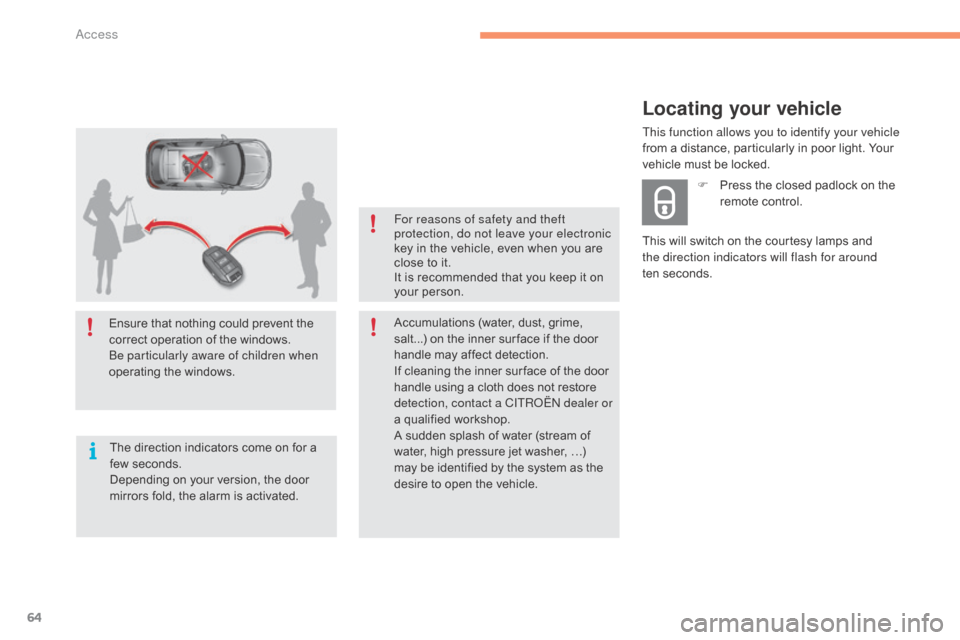
Ensure that nothing could prevent the correct operation of the windows.
Be particularly aware of children when
operating
t
he
w
indows.
The
direction indicators come on for a
f
ew seconds.
Depending
on your version, the door
m
irrors fold, the alarm is activated. For reasons of safety and theft
protection, do not leave your electronic
key
in the vehicle, even when you are
c
lose to it.
It is recommended that you keep it on
y
our person.
Accumulations (water, dust, grime, s
alt...) on the inner sur face if the door
h
andle may affect detection.
If
cleaning the inner sur face of the door
h
andle using a cloth does not restore
d
etection, contact a CITROËN dealer or
a
qualified workshop.
A
sudden splash of water (stream of
w
ater, high pressure jet washer, …)
m
ay be identified by the system as the
d
esire to open the vehicle.
Locating your vehicle
This will switch on the courtesy lamps and the direction indicators will flash for around
ten seconds. F
P
ress the closed padlock on the
r
emote control.
This function allows you to identify your vehicle
from a distance, particularly in poor light. Your
v
ehicle must be locked.
Access
Page 67 of 396
65
C4-2_en_Chap02_ouvertures_ed02-2015
Back-up key
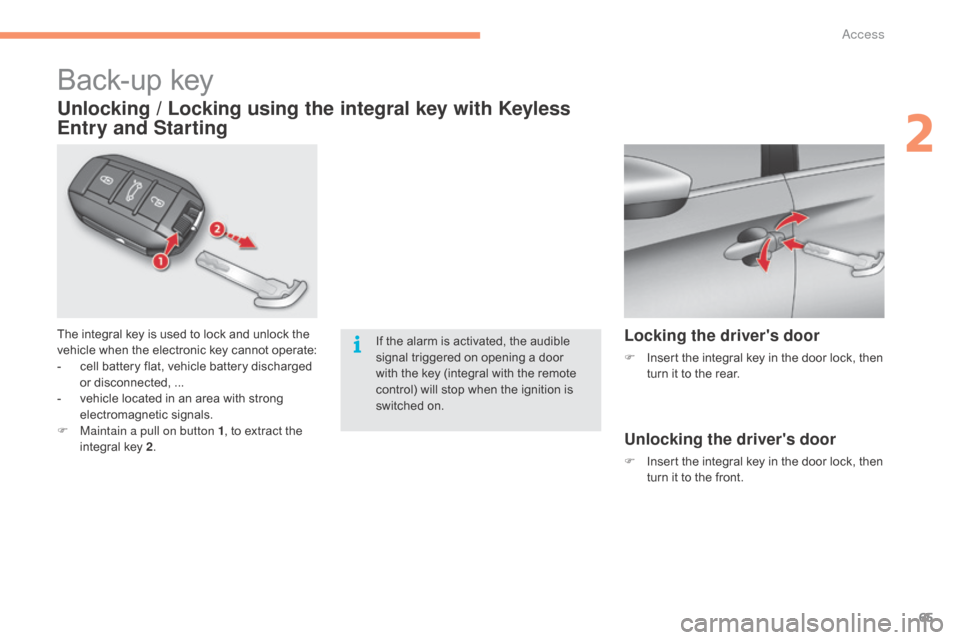
The integral key is used to lock and unlock the vehicle when the electronic key cannot operate:
-
c
ell battery flat, vehicle battery discharged
o
r disconnected, ...
-
v
ehicle located in an area with strong
e
lectromagnetic
si
gnals.
F
M
aintain a pull on button 1 ,
to extract the
i
ntegral key 2.
Unlocking / Locking using the integral key with Keyless
Entry and Starting
If the alarm is activated, the audible s
ignal triggered on opening a door
w
ith the key (integral with the remote
c
ontrol) will stop when the ignition is
s
witched on.Locking the driver's door
F Insert the integral key in the door lock, then t
urn it to the rear.
Unlocking the driver's door
F Insert the integral key in the door lock, then t
urn it to the front.
2
Access
Page 68 of 396
66
C4-2_en_Chap02_ouvertures_ed02-2015
Locking the passenger doors
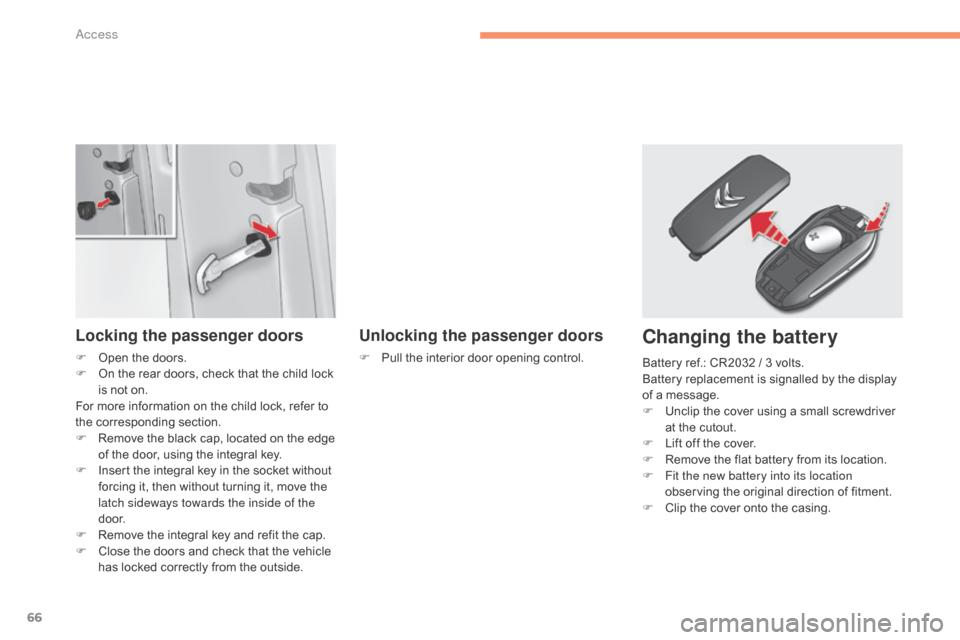
F Open the doors.
F O n the rear doors, check that the child lock
i
s not on.
For
more information on the child lock, refer to
t
he corresponding section.
F
R
emove the black cap, located on the edge
o
f the door, using the integral key.
F
I
nsert the integral key in the socket without
f
orcing it, then without turning it, move the
l
atch sideways towards the inside of the
d o o r.
F
R
emove the integral key and refit the cap.
F
C
lose the doors and check that the vehicle
h
as locked correctly from the outside.
Unlocking the passenger doors
F Pull the interior door opening control.
Changing the battery
Battery ref.: CR2032 / 3 volts.
B attery replacement is signalled by the display
o
f a message.
F
U
nclip the cover using a small screwdriver
a
t the cutout.
F
L
ift off the cover.
F
R
emove the flat battery from its location.
F
F
it the new battery into its location
observing
the original direction of fitment.
F
C
lip the cover onto the casing.
Access
Page 70 of 396
68
C4-2_en_Chap02_ouvertures_ed02-2015
Remote control
The high frequency remote control is a sensitive system; do not operate it while it is in your pocket as there is a possibility that it may unlock the vehicle, without you being aware of it.
Do
not repeatedly press the buttons of your remote control out of range and out of sight of your vehicle. You run the risk of stopping it from
w
orking and the remote control would have to be reinitialised.
The
remote control does not operate when the key is in the ignition, even when the ignition is switched off.
Locking the vehicle
Driving with the doors locked may make access to the passenger compartment by the emergency services more difficult in an emergency.
A s a safety precaution (with children on board), remove the key from the ignition or take the electronic key when you leave the vehicle, even for
a
short time.
Electrical interference
The Keyless Entry and Starting electronic key may not operate if close to certain electronic devices: telephone, laptop computer, strong magnetic fields, ...
Anti-theft protection
Do not make any modifications to the electronic engine immobiliser system; this could cause malfunctions.
D on't forget to turn the steering to engage the steering lock.
Lost keys, remote control, electronic key
Visit a CITROËN dealer with the vehicle's registration certificate, your personal identification documents and if possible, the label bearing the key code.
The
CITROËN dealer will be able to retrieve the key code and the transponder code required to order a new key
Do
not throw the remote control batteries away, they contain metals which are harmful to the environment.
Take
them to an approved collection point.
When purchasing a second-hand vehicle
Have the key codes memorised by a CITROËN dealer, to ensure that the keys in your possession are the only ones which can start the vehicle.
Access
Page 71 of 396

69
C4-2_en_Chap02_ouvertures_ed02-2015
Central locking control
Locking
F Press this button to lock the vehicle.
The red indicator lamp in the button comes on.
Unlocking
F Press the button again to unlock the v
ehicle.
The
red indicator lamp in the button goes off.
This
control
allows
the
simultaneous
locking
or
unlocking of the doors and boot from inside the
v
ehicle.
If one of the doors is open, central
locking
from
the
inside
does
not
take
p
lace. If
the vehicle is locked from the outside,
t
his button is inactive.
F
I
n this case, use the remote control
o
r the key to unlock the vehicle or
p
ull an interior door handle to open
a
door.
2
Access
Page 72 of 396

70
C4-2_en_Chap02_ouvertures_ed02-2015
Activation / Deactivation
You can activate or deactivate this function
permanently.
F
W
ith the ignition on, press this button
u
ntil an audible signal starts and a
c
orresponding message is displayed.
The
state of the system stays in memory when
s
witching off the ignition.
Anti-intrusion security
Operation
If one of the doors or the boot is open, the
automatic central locking does not take place.
This
system allows automatic simultaneous locking of the doors and boot as soon as the speed of
t
he vehicle exceeds 6 mph (10 km/h).
Pressing the central locking button unlocks the
v
ehicle.
Above
6 mph (10 km/h), this unlocking is
t
e m p o r a r y. This
is signalled by the sound of
t
he locks rebounding, accompanied
b
y illumination of this symbol in the
i
nstrument panel, an audible signal
a
nd the display of an alert message.
Carrying long and voluminous
objects
If you want to drive with the boot open,
you
should press the central locking
b
utton to lock the the doors. Other wise,
e
very time the speed of the vehicle
e
xceeds 6 mph (10 km/h), the locks
w
ill rebound and the alerts mentioned
a
bove will appear.
Access
Page 74 of 396
72
C4-2_en_Chap02_ouvertures_ed02-2015
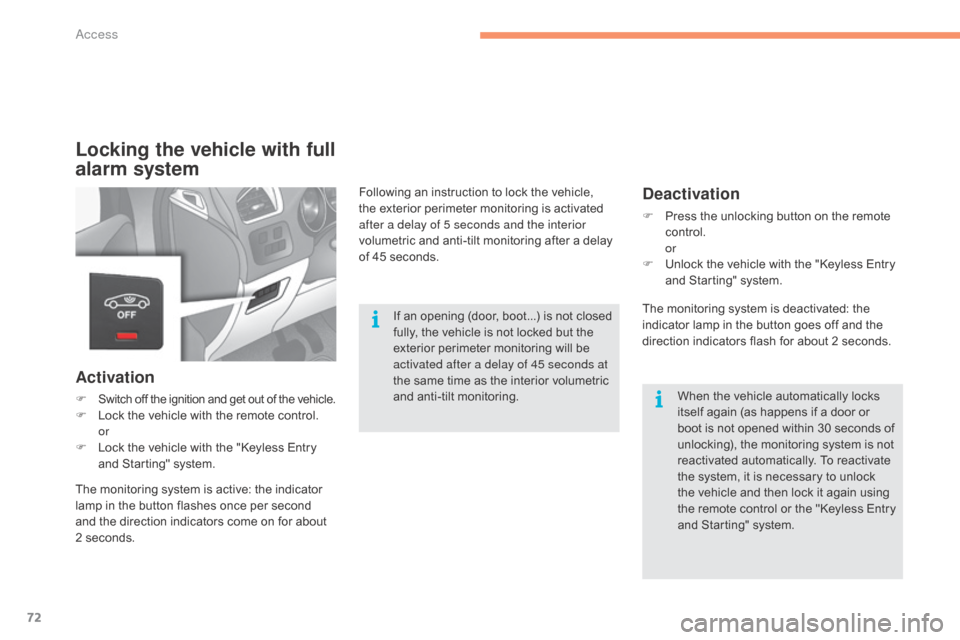
Locking the vehicle with full
alarm system
Activation
F Switch off the ignition and get out of the vehicle.F Lock the vehicle with the remote control.
or
F
L
ock the vehicle with the "Keyless Entry
a
nd Starting" system.
Deactivation
F Press the unlocking button on the remote c
ontrol.
or
F
U
nlock the vehicle with the "Keyless Entry
a
nd Starting" system.
If
an
opening
(door,
boot...)
is
not
closed
f
ully,
the
vehicle
is
not
locked
but
the
e
xterior
perimeter
monitoring
will
be
a
ctivated after a delay of 45 seconds at
the
same
time
as
the
interior
volumetric
a
nd
anti-tilt
monitoring. When
the vehicle automatically locks
i
tself again (as happens if a door or
b
oot is not opened within 30 seconds of
u
nlocking), the monitoring system is not
r
eactivated automatically. To reactivate
t
he system, it is necessary to unlock
t
he vehicle and then lock it again using
t
he remote control or the "Keyless Entry
a
nd Starting" system.
Following
an
instruction
to
lock
the
vehicle,
t
he
exterior
perimeter
monitoring
is
activated
a
fter a delay of 5 seconds and the interior
volumetric
and
anti-tilt
monitoring
after
a
delay
o
f
45 seconds.
The
monitoring
system
is
active:
the
indicator
l
amp
in
the
button
flashes
once
per
second
a
nd
the
direction
indicators
come
on
for
about
2
seconds. The
monitoring system is deactivated: the
i
ndicator lamp in the button goes off and the
d
irection indicators flash for about 2 seconds.
Access
Page 76 of 396
74
C4-2_en_Chap02_ouvertures_ed02-2015
Operating fault
When the ignition is switched on, fixed illumination of the indicator lamp in the button
i
ndicates a fault with the system.
Have
it checked by a CITROËN dealer or a
q
ualified
w
orkshop.
Failure of the remote control
To deactivate the monitoring functions:
F
u
nlock the vehicle using the key (integral to
t
he
remote
control)
in
the
driver's
door
lock,
F
o
pen the door; the alarm is triggered,
F
s
witch on the ignition; the alarm stops; the
i
ndicator lamp in the button goes off.
Locking the vehicle without
activating the alarm
F Lock or deadlock the vehicle using the k
ey(integral to the remote control) in the
d
river's door lock.
Triggering of the alarm
This is indicated by sounding of the siren and flashing of the direction indicators for
t
hirty seconds.
The
monitoring functions remain active until
t
he alarm has been triggered eleven times in
s
uccession.
When
the vehicle is unlocked using the remote
c
ontrol or the Keyless Entry and Starting
s
ystem, rapid flashing of the indicator lamp
i
n the button informs you that the alarm was
t
riggered during your absence. When the
i
gnition is switched on, this flashing stops
i
mmediately.
Access
Page 77 of 396

75
C4-2_en_Chap02_ouvertures_ed02-2015
Electric windows
1. Driver's electric window.
2. Passenger's electric window.
3.
R
ear right electric window.
4.
R
ear left electric window.
5.
D
eactivation of the rear electric window
controls. There
are two options:
-
m
anual mode
F
P
ress or pull the control gently. The
w
indow stops when the control is
released.
-
a
utomatic mode
F P ress or pull the control firmly. The w
indow opens or closes fully when the
control
is released.
F
P
ressing the control again stops the
m
ovement of the window.
One-touch electric windows
The electric window controls remain operational for approximately
4
5 seconds after the ignition is switched
o
ff or until the vehicle is locked after a
d
oor is opened.
If
one of the passenger windows cannot
b
e operated from the driver's door
c
ontrol panel, carry out the operation
from
the control panel of the passenger
d
oor in question.
After
approximately ten consecutive
c
omplete opening/closing movements
o
f the window, a protection function is
activated
which only authorises closing
o
f the window to prevent damage to the
e
lectric window motor.
Once the window is closed, the controls
will
become operational again after
a
pproximately 40 minutes.
Fitted
with
a
safety
anti-pinch
system
and
a
deactivation
system
for
the
rear
controls.
2
Access