ECO mode Citroen C4 2016 2.G Owner's Guide
[x] Cancel search | Manufacturer: CITROEN, Model Year: 2016, Model line: C4, Model: Citroen C4 2016 2.GPages: 396, PDF Size: 10.22 MB
Page 278 of 396
276
C4-2_en_Chap09_caracteristiques_ed02-2015
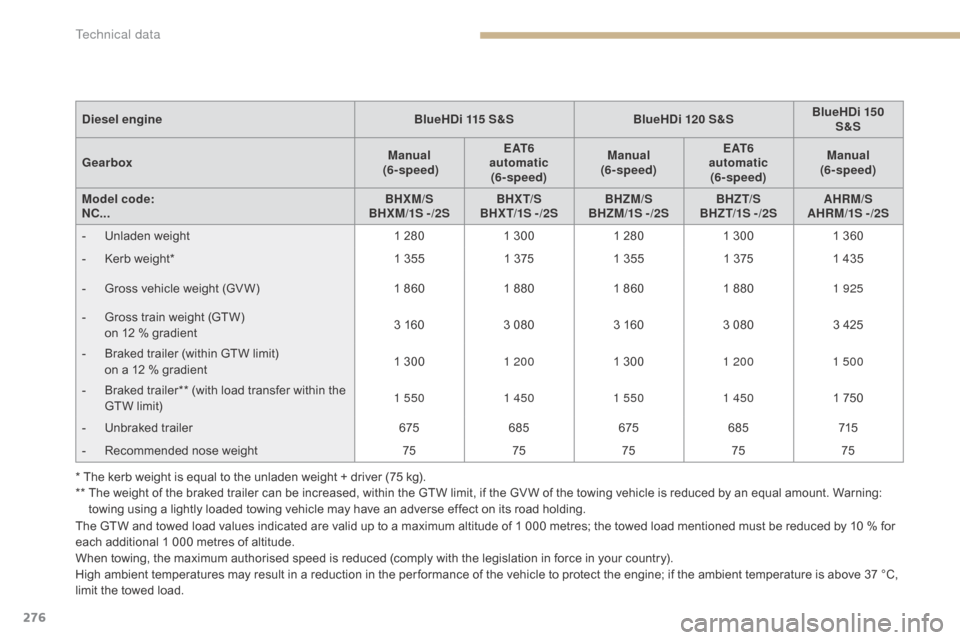
The GTW and towed load values indicated are valid up to a maximum altitude of 1 000 metres; the towed load mentioned must be reduced by 10 % for each additional 1 000 metres of altitude.
When
towing, the maximum authorised speed is reduced (comply with the legislation in force in your country).
High
ambient temperatures may result in a reduction in the per formance of the vehicle to protect the engine; if the ambient temperature is above 37 °C,
l
imit the towed load.
Diesel engine
BlueHDi 115 S&SBlueHDi 120 S&SBlueHDi 150
S&S
Gearbox Manual
(6- speed) E AT 6
automatic (6- speed) Manual
(6- speed) E AT 6
automatic (6- speed) Manual
(6- speed)
Model code:
NC... BHXM/S
BHXM/1S -/2S BHX T/S
BHX T/1S - /2S BHZM/S
BHZM/1S - /2S BHZT/S
BHZ T/1S - /2S AHRM/S
AHRM/1S -/2S
-
U
nladen weight
1 280
1 300
1 280
1 300
1 360
-
K
erb weight*
1 355
1 375
1 355
1 375
1 435
-
G
ross vehicle weight (GV W)
1 860
1 880
1 860
1 880
1 925
-
G
ross train weight (GTW)
o
n 12 % gradient
3 160
3 080
3 160
3 080
3 425
-
B
raked trailer (within GTW limit)
o
n a 12 % gradient
1 300
1 200 1 300
1 200 1 500
-
B
raked trailer** (with load transfer within the
G
TW limit)
1 550
1 4501 550 1 450 1 750
-
U
nbraked trailer
675685 675685 715
-
R
ecommended nose weight
7575757575
* The kerb weight is equal to the unladen weight + driver (75 kg).
**
T
he weight of the braked trailer can be increased, within the GTW limit, if the GV W of the towing vehicle is reduced by an equal amount. Warning:
t
owing using a lightly loaded towing vehicle may have an adverse effect on its road holding.
Technical data
Page 279 of 396
277
C4-2_en_Chap09_caracteristiques_ed02-2015
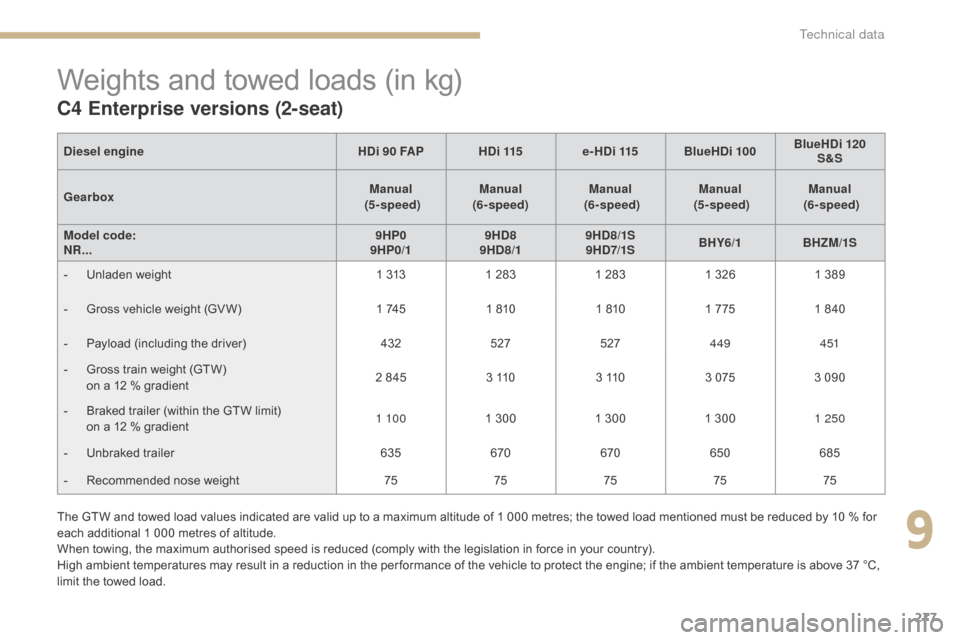
Weights and towed loads (in kg)
C4 Enterprise versions (2-seat)
The GTW and towed load values indicated are valid up to a maximum altitude of 1 000 metres; the towed load mentioned must be reduced by 10 % for each additional 1 000 metres of altitude.
When
towing, the maximum authorised speed is reduced (comply with the legislation in force in your country).
High
ambient temperatures may result in a reduction in the per formance of the vehicle to protect the engine; if the ambient temperature is above 37 °C,
l
imit the towed load.
Diesel
engine HDi 90 FAPHDi 115 e-HDi 115 BlueHDi 100 BlueHDi 120
S&S
Gearbox Manual
(5 - speed) Manual
(6- speed) Manual
(6- speed) Manual
(5 - speed) Manual
(6- speed)
Model code:
NR... 9HP0
9HP0/1 9HD8
9HD8/1 9HD8/1S
9 HD7/1S BHY6/1
BHZM/1S
-
U
nladen weight
1 313
1 283
1 283
1 326
1 389
-
G
ross vehicle weight (GV W)
1 745
1 810
1 810
1 775
1 840
-
P
ayload (including the driver)
432527527449 4 51
-
G
ross train weight (GTW)
o
n a 12 % gradient
2 845
3 110
3 110
3 075
3 090
-
B
raked trailer (within the GTW limit)
o
n a 12 % gradient
1 10 0
1 300
1 300
1 300
1 250
-
U
nbraked trailer
635670670650 685
-
R
ecommended nose weight
7575757575
9
Technical data
Page 285 of 396
283
C4-2_en_Chap10b_SMEGplus_ed02-2015
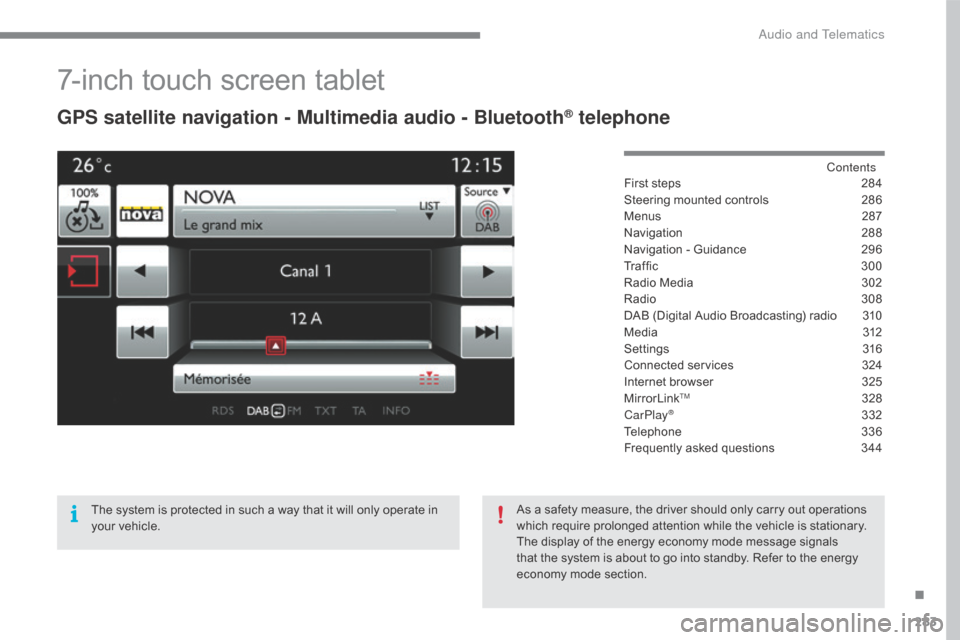
7-inch touch screen tablet
GPS satellite navigation - Multimedia audio - Bluetooth® telephone
Contents
First
steps
2 84
Steering
mounted
controls
2
86
Menus
2
87
Navigation
2
88
Navigation
-
Guidance
2
96
Tr a f fi c
3
0 0
Radio
Media
3
02
Radio
308
D
AB
(Digital
Audio
Broadcasting)
radio
3
10
M edia
3
12
Settings
3
16
Connected
services
3
24
Internet
browser
3
25
MirrorLink
TM 32 8
CarPlay® 3 32
Telephone
3
36
Frequently
asked questions
3
44
The
system
is
protected
in
such
a
way
that
it
will
only
operate
in
y
our
vehicle. As
a
safety
measure,
the
driver should only carry out operations
w
hich
require
prolonged
attention while the vehicle is stationary.
The
display
of
the
energy
economy mode message signals
t
hat
the
system
is
about
to
go into standby. Refer to the energy
ec
onomy
mo
de
s
ection.
.
Audio and Telematics
Page 291 of 396
289
C4-2_en_Chap10b_SMEGplus_ed02-2015
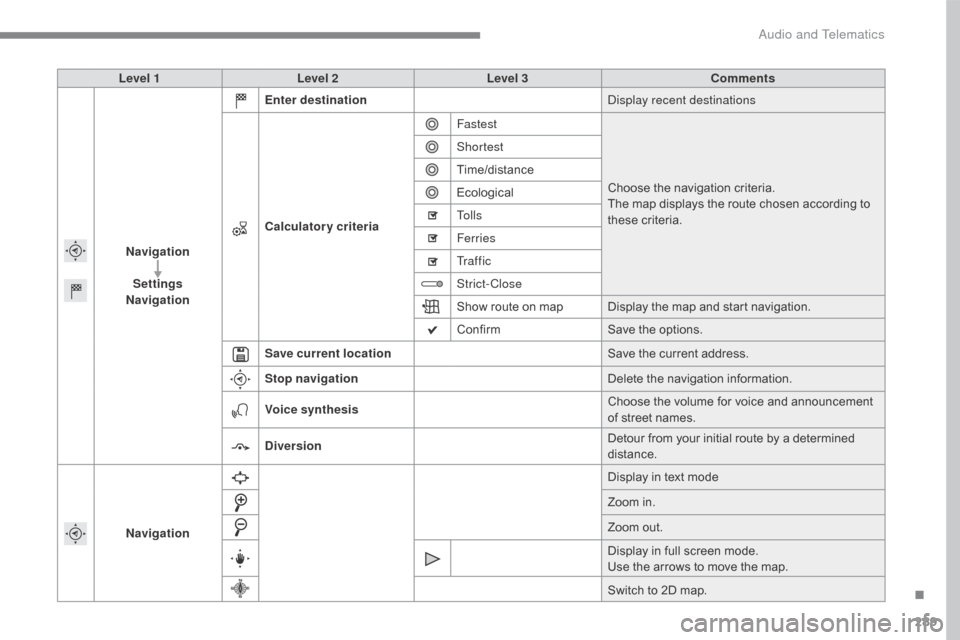
Level 1Level 2 Level 3 Comments
Navigation Settings
Navigation Enter destination
Display recent destinations
Calculatory criteria Fastest
Choose
the navigation criteria.
The
map displays the route chosen according to
t
hese
c
riteria.
Shortest
Time/distance
Ecological
To l l s
Ferries
Tr a f f i c
Strict-Close
Show
route on map Display the map and start navigation.
Confirm Save
the options.
Save current location Save
the current address.
Stop navigation Delete
the navigation information.
Voice synthesis Choose
the volume for voice and announcement
o
f street names.
Diversion Detour
from your initial route by a determined
di
stance.
Navigation Display
in text mode
Zoom
in.
Zoom
out.
Display
in full screen mode.
Use
the arrows to move the map.
Switch
to 2D map.
.
Audio and Telematics
Page 307 of 396
305
C4-2_en_Chap10b_SMEGplus_ed02-2015
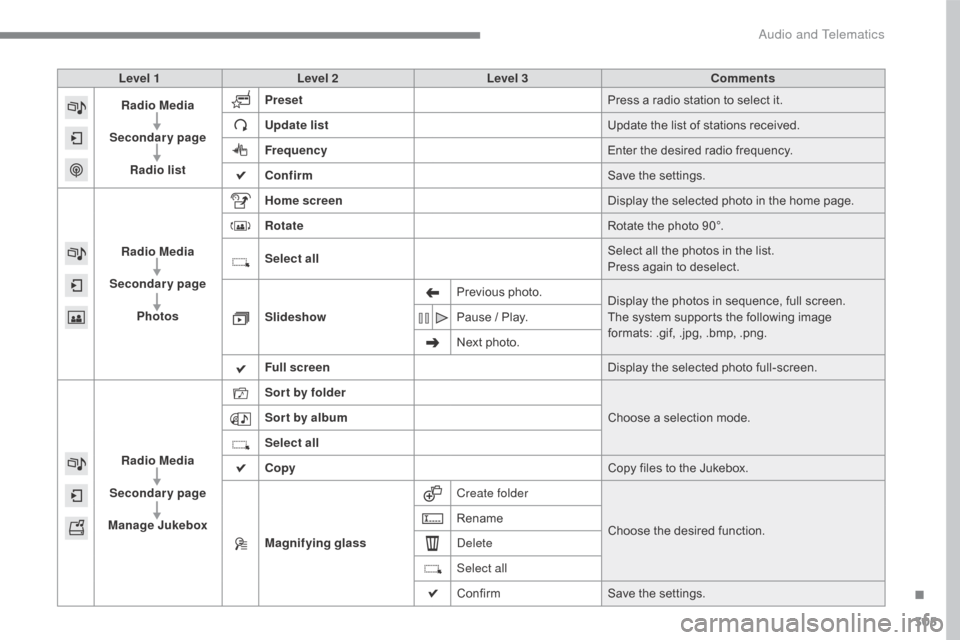
Level 1Level 2 Level 3 Comments
Radio Media
Secondary page Radio list Preset
Press
a radio station to select it.
Update list Update
the list of stations received.
Frequency Enter
the desired radio frequency.
Confirm Save
the settings.
Radio Media
Secondary page Photos Home screen
Display
the selected photo in the home page.
Rotate Rotate
the photo 90°.
Select all Select
all the photos in the list.
Press
again to deselect.
Slideshow Previous
pho
to.Display
the photos in sequence, full screen.
The
system supports the following image
f
ormats: .gif, .jpg, .bmp, .png.
Pause
/ Play.
Next
photo.
Full screen Display
the selected photo full-screen.
Radio Media
Secondary page
Manage Jukebox Sor t by folder
Choose
a selection mode.
Sor t by album
Select all
Copy Copy
files to the Jukebox.
Magnifying glass Create folder
Choose
the desired function.
Rename
Delete
Select all
Confirm
Save
the settings.
.
Audio and Telematics
Page 310 of 396
308
C4-2_en_Chap10b_SMEGplus_ed02-2015
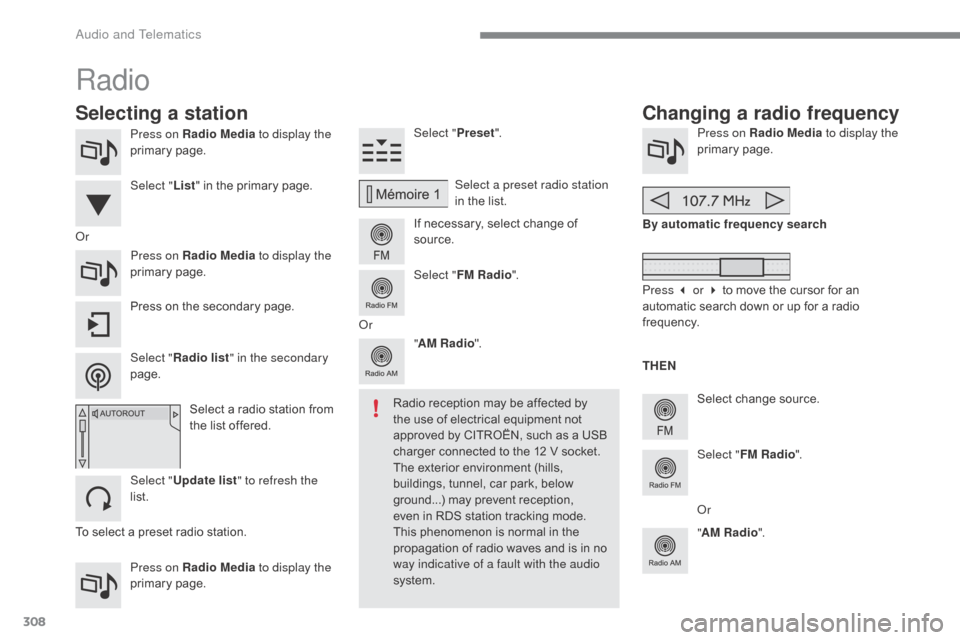
Press on Radio Media to display the
primary pag e.
Press on Radio Media to display the
primary
pag
e. Select "
Preset".
If necessary, select change of
s
ource.Press on Radio Media
to display the
primary pag e.
Select
change source.
"
AM Radio ". By automatic frequency search
Select "FM Radio ".
" AM Radio ".
Press
on the secondary page. Select a preset radio station
in
the list.
Select " FM Radio ".
Select
a radio station from
t
he list offered.
Select " Update list " to refresh the
list. Select " List"
in the primary page.
Press on Radio Media to display the
primary
pag
e.
Radio
Changing a radio frequency
Selecting a station
To select a preset radio station. TH EN
Radio reception may be affected by
t
he use of electrical equipment not
a
pproved by CITROËN, such as a USB
c
harger connected to the 12 V socket.
The exterior environment (hills,
b
uildings, tunnel, car park, below
g
round...) may prevent reception, e
ven in RDS station tracking mode. T
his phenomenon is normal in the
p
ropagation of radio waves and is in no
w
ay indicative of a fault with the audio
system.
Or
Select "Radio list " in the secondary
page. Or
Press 3 or 4 to move the cursor for an
a
utomatic search down or up for a radio
f
requency.
Or
Audio and Telematics
Page 315 of 396
313
C4-2_en_Chap10b_SMEGplus_ed02-2015
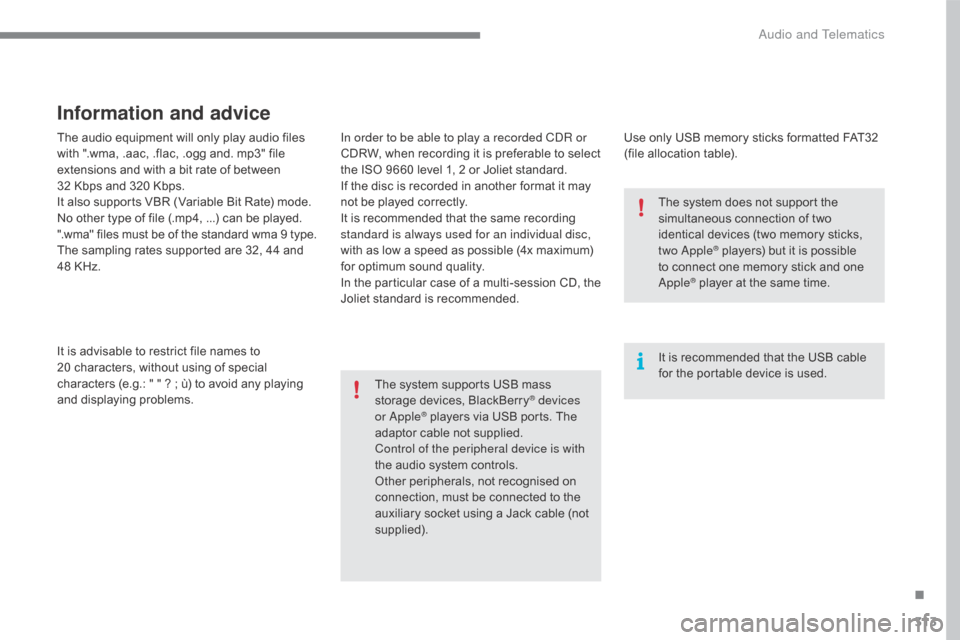
The audio equipment will only play audio files with ".wma, .aac, .flac, .ogg and. mp3" file
e
xtensions and with a bit rate of between
32
Kbps and 320 Kbps.
It
also supports VBR (Variable Bit Rate) mode.
No
other type of file (.mp4, ...) can be played.
".wma"
files must be of the standard wma 9 type.
The
sampling rates supported are 32, 44 and
4
8 KHz.
It
is advisable to restrict file names to
2
0 characters, without using of special
c
haracters (e.g.: " " ? ; ù) to avoid any playing
a
nd
d
isplaying
pro
blems.
Information and advice
Use only USB memory sticks formatted FAT32 (file allocation table).
The
system
supports
USB
mass
s
torage
devices,
BlackBerry
® devices
or Apple® players via USB ports. The a
daptor
cable not supplied.
Control of the peripheral device is with
the
audio
system controls.
Other
peripherals, not recognised on
c
onnection, must be connected to the
a
uxiliary
socket using a Jack cable (not
sup
plied). It
is recommended that the USB cable
f
or the portable device is used.
The system does not support the
s
imultaneous connection of two
i
dentical devices (two memory sticks,
t
wo Apple
® players) but it is possible t
o
connect
one memory stick and one
A
pple
® player at the same time.
I
n order to be able to play a recorded CDR or
CDRW,
when
recording
it
is
preferable
to
select
t
he
ISO
9660
level
1,
2
or
Joliet
standard.
If
the
disc
is
recorded
in
another
format
it
may
n
ot
be
played
correctly.
It
is
recommended
that
the
same
recording
s
tandard is always used for an individual disc,
with
as
low
a
speed
as
possible
(4x
maximum)
f
or
optimum
sound
quality.
In
the
particular
case
of
a
multi-session
CD,
the
J
oliet
standard
is
recommended.
.
Audio and Telematics
Page 316 of 396
314
C4-2_en_Chap10b_SMEGplus_ed02-2015
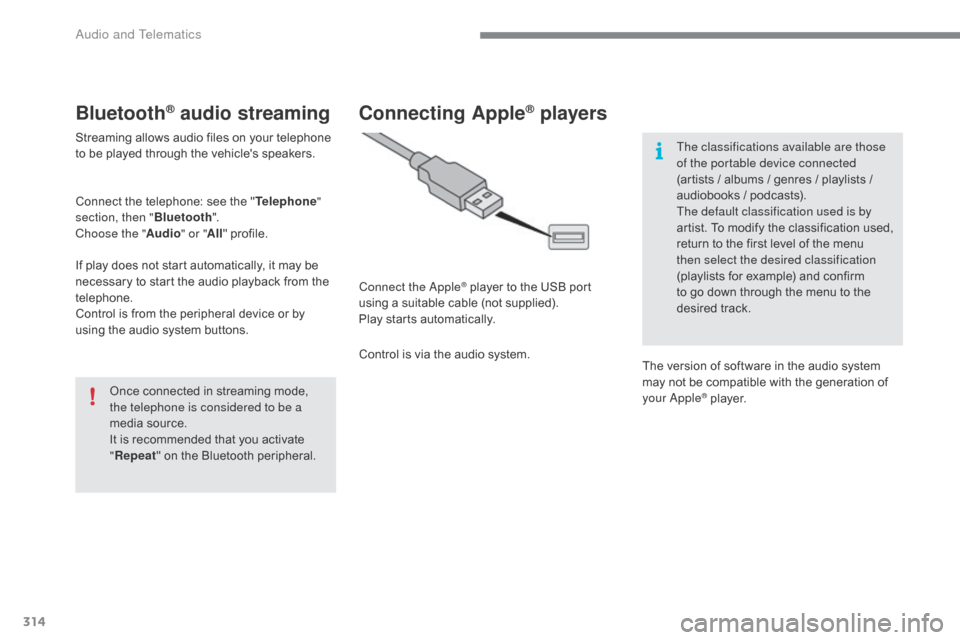
Bluetooth® audio streaming
Streaming allows audio files on your telephone to be played through the vehicle's speakers.
Connect
the telephone: see the "Telephone "
section, then " Bluetooth".
Choose the " Audio" or "All"
pro
file.
If
play does not start automatically, it may be
n
ecessary to start the audio playback from the
t
elephone.
Control
is from the peripheral device or by
u
sing the audio system buttons.
Once
connected in streaming mode,
t
he telephone is considered to be a
media
source.
It
is recommended that you activate
"R
epeat"
on the Bluetooth peripheral.
Connecting Apple® players
Connect the Apple® player to the USB port u
sing
a
suitable
cable (not supplied).
Play
starts
automatically.
Control
is
via
the
audio system. The classifications available are those
of the portable device connected
(artists
/ albums / genres / playlists /
a
udiobooks / podcasts).
The default classification used is by
artist. To modify the classification used,
r
eturn to the first level of the menu
t
hen select the desired classification
(playlists for example) and confirm t
o go down through the menu to the
de
sired
t
rack.
The
version of software in the audio system
m
ay not be compatible with the generation of
y
our Apple
® player.
Audio and Telematics
Page 343 of 396
341
C4-2_en_Chap10b_SMEGplus_ed02-2015
The services available depend on
the network, the SIM card and the
c
ompatibility of the Bluetooth telephone
u
sed. Check the telephone manual and
w
ith your network provider for details of
t
he services available to you.
The
ability of the system to connect
w
ith only one profile depends on the
telephone.
The three profiles may all
c
onnect by default.
Visit
www.citroen.co.uk for more information
(
compatibility, additional help, ...).
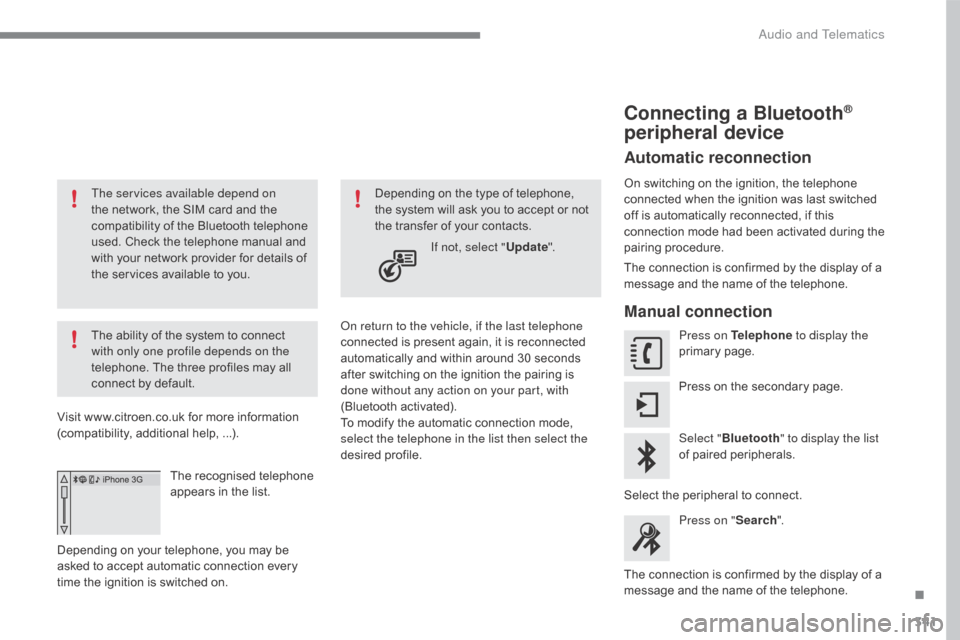
The
recognised telephone
a
ppears in the list.
Depending
on your telephone, you may be
a
sked
to accept automatic connection every
t
ime
the ignition is switched on. On return to the vehicle, if the last telephone
connected
is present again, it is reconnected
a
utomatically and within around 30 seconds
a
fter switching on the ignition the pairing is
d
one without any action on your part, with
(Bluetooth
a
ctivated).
To
modify the automatic connection mode,
s
elect the telephone in the list then select the
desired
p
rofile.
Depending
on the type of telephone, t
he system will ask you to accept or not
t
he transfer of your contacts.
If not, select " Update".
Connecting a Bluetooth®
peripheral device
Automatic reconnection
On switching on the ignition, the telephone c
onnected when the ignition was last switched
o
ff is automatically reconnected, if this
c
onnection mode had been activated during the
pa
iring
p
rocedure.
The
connection is confirmed by the display of a
m
essage and the name of the telephone.
Manual connection
Press on Telephone to display the
primary pag e.
Press
on the secondary page.
Select " Bluetooth " to display the list
of
paired peripherals.
Select
the peripheral to connect.
Press on " Search".
The
connection is confirmed by the display of a
m
essage
and the name of the telephone.
.
Audio and Telematics
Page 352 of 396
350
C4-2_en_Chap10b_SMEGplus_ed02-2015
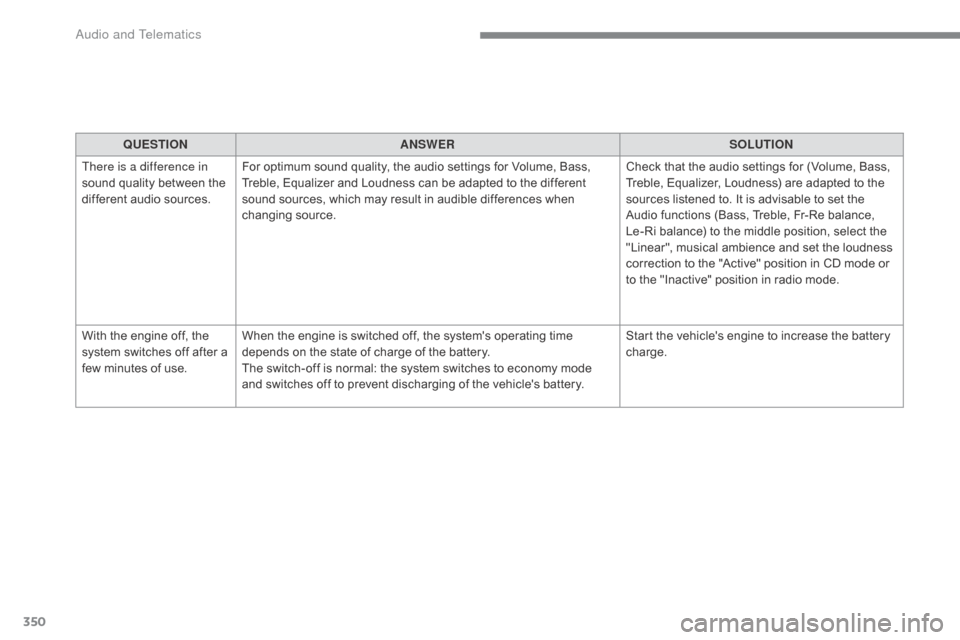
QUESTIONANSWER SOLUTION
There is a difference in
sound
quality between the
d
ifferent audio sources. For
optimum sound quality, the audio settings for Volume, Bass,
T
reble, Equalizer and Loudness can be adapted to the different
s
ound sources, which may result in audible differences when
c
hanging
s
ource. Check
that the audio settings for (Volume, Bass,
T
reble, Equalizer, Loudness) are adapted to the
s
ources listened to. It is advisable to set the
A
udio functions (Bass, Treble, Fr-Re balance,
L
e-Ri balance) to the middle position, select the
"
Linear", musical ambience and set the loudness
c
orrection to the "Active" position in CD mode or
t
o the "Inactive" position in radio mode.
With
the engine off, the
s
ystem
switches off after a
f
ew
minutes of use. When
the engine is switched off, the system's operating time
d
epends on the state of charge of the battery.
The
switch-off is normal: the system switches to economy mode
a
nd switches off to prevent discharging of the vehicle's battery.Start
the vehicle's engine to increase the battery
c
harge.
Audio and Telematics