ECO mode Citroen C4 2016 2.G Owner's Guide
[x] Cancel search | Manufacturer: CITROEN, Model Year: 2016, Model line: C4, Model: Citroen C4 2016 2.GPages: 396, PDF Size: 10.22 MB
Page 189 of 396
187
C4-2_en_Chap06_conduite_ed02-2015
Gear shift indicator*
Depending on the driving situation and your vehicle's equipment, the system may advise
y
ou to skip one (or more) gear(s). You can
f
ollow this instruction without engaging the
i
ntermediate
g
ears.
The
gear engagement recommendations must
n
ot be considered compulsory. In fact, the
c
onfiguration of the road, the amount of traffic
a
nd safety remain determining factors when
c
hoosing the best gear. Therefore, the driver
r
emains responsible for deciding whether or not
t
o follow the advice given by the system.
This
function cannot be deactivated. -
Y
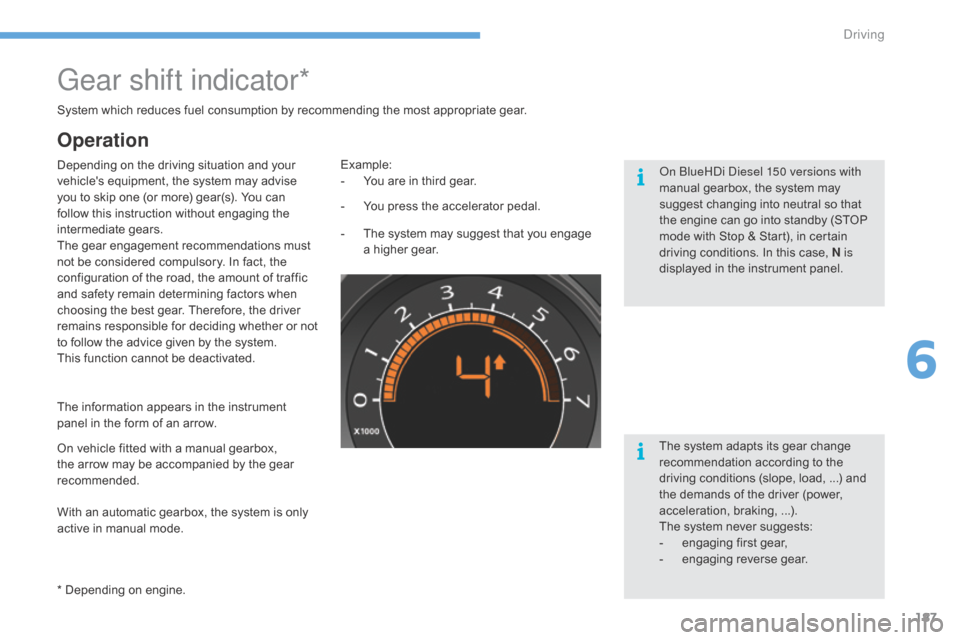
ou press the accelerator pedal.
Example:
-
Y ou are in third gear.
-
T
he system may suggest that you engage
a
higher gear.
The
information appears in the instrument
p
anel in the form of an arrow.
System
which reduces fuel consumption by recommending the most appropriate gear.
With an automatic gearbox, the system is only
a
ctive in manual mode.
* Depending
on engine.
On
vehicle fitted with a manual gearbox,
t
he arrow may be accompanied by the gear
re
commended. The
system adapts its gear change
r
ecommendation according to the
d
riving conditions (slope, load, ...) and
t
he demands of the driver (power,
a
cceleration, braking, ...).
The
system never suggests:
-
e
ngaging first gear,
-
enga
ging
r
everse
g
ear.
Operation
On BlueHDi Diesel 150 versions with
manual gearbox, the system may
s
uggest changing into neutral so that
t
he engine can go into standby (STOP
m
ode with Stop & Start), in certain
d
riving conditions. In this case, N is
displayed
in the instrument panel.
6
Driving
Page 190 of 396
188
C4-2_en_Chap06_conduite_ed02-2015
Stop & Start
Operation
Going into engine STOP mode
The "ECO" warning lamp comes on i
n the instrument panel and the engine g
oes into standby automatically:
-
w
ith a manual gearbox , at speeds below
12
m
ph
(
20
k
m/h),
o
r
v
ehicle
s
tationary
w
ith
P
ureTech 130 petrol and BlueHDi 115 and
1
20
Diesel versions, when you put the gear
l
ever into neutral and release the clutch
pedal,
If your vehicle is fitted with the
system,
a time counter calculates
t
he sum of the periods in STOP
m
ode during a journey. It resets
i
tself to zero every time the
i
gnition is switched on with the
k
ey or the "START/STOP" button.
-
w
ith an automatic gearbox, vehicle
stationary,
when you press the brake pedal
o
r
place the gear selector in position N.
Special cases: STOP mode
unavailable
STOP mode is not invoked when:
- t he vehicle is on a steep slope (up or
d
ow n),
-
t
he driver's door is open,
-
t
he driver's seat belt is not fastened,
-
t
he vehicle has not exceeded 6 mph
(
10 km/h) since the last engine start (using
t
he key or the "START/STOP" button),
-
t
he electric parking brake is applied or
be
ing
a
pplied,
-
t
he engine is needed to maintain a
c
omfortable temperature in the passenger
c
ompartment,
-
d
emisting is active,
-
s
ome special conditions (battery charge,
e
ngine temperature, braking assistance,
a
mbient temperature...) where the engine is
n
eeded to assure control of a system.
In this case, the "ECO"
warning lamp
f
lashes for a few seconds, then goes
o
f f.
This operation is perfectly normal.
The
Stop
&
Start system
puts
the
engine
temporarily
into
standby
-
STOP
mode
-
during
stops
in
the
traffic (red lights, traffic jams, or other...). The
e
ngine
restarts
automatically
-
START
mode
-
as
soon
as
you
want
to
move
off.
The
restart
takes
place
instantly, quickly and silently.
Per fect
for
urban
use,
the
Stop
&
Start
system
reduces
fuel
consumption
and
exhaust
emissions
as
well
as the noise level when stationary.
Never
refuel
with
the
engine
in
STOP
m
ode;
you
must
switch
off
the
ignition
w
ith
the
key
or
the
"START/STOP"
b
utton.
STOP
mode
does
not
affect
the
f
unctionality of the vehicle, such as
braking,
power
steering,
for
example.
Driving
Page 191 of 396
189
C4-2_en_Chap06_conduite_ed02-2015
Deactivation
Going into engine START mode
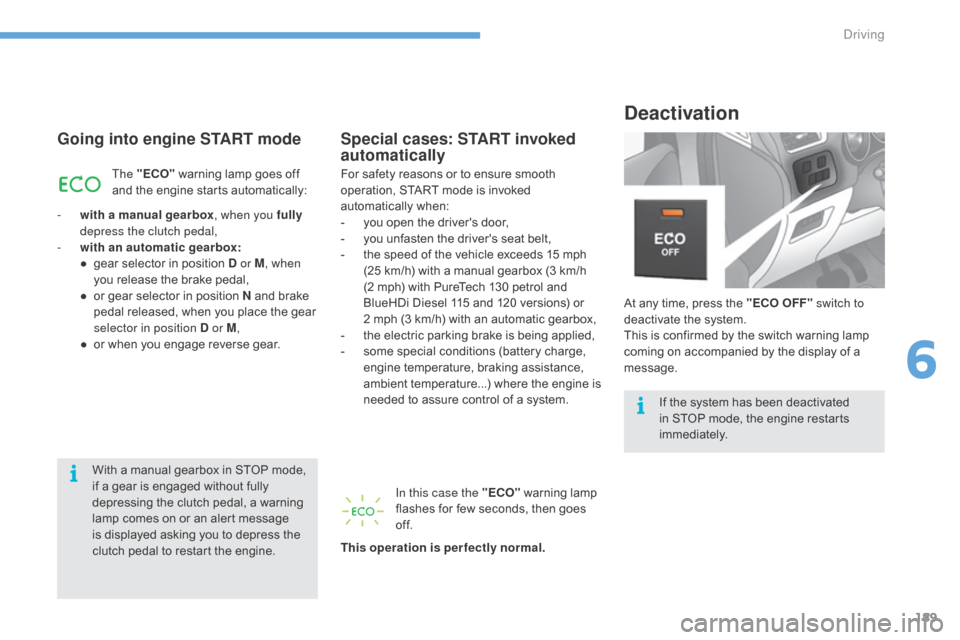
At any time, press the "ECO OFF" switch to
d eactivate the system.
This
is confirmed by the switch warning lamp
c
oming on accompanied by the display of a
m
essage.
Special cases: START invoked
automatically
The "ECO" warning lamp goes off a
nd the engine starts automatically:
-
w
ith a manual gearbox , when you fully
depress the clutch pedal,
-
w
ith an automatic gearbox:
●
g
ear selector in position D or M, when
you
release the brake pedal,
●
o
r
gear selector in position N and brake
p
edal released, when you place the gear
s
elector in position D or M ,
●
o
r
when you engage reverse gear.For
safety reasons or to ensure smooth o
peration, START mode is invoked
a
utomatically
w
hen:
-
y
ou open the driver's door,
-
y
ou unfasten the driver's seat belt,
-
t
he speed of the vehicle exceeds 15 mph
(
25 km/h) with a manual gearbox (3 km/h
(
2 mph) with PureTech 130 petrol and
B
lueHDi Diesel 115 and 120 versions) or
2 m
ph (3 km/h) with an automatic gearbox,
-
t
he electric parking brake is being applied,
-
s
ome special conditions (battery charge,
e
ngine temperature, braking assistance,
a
mbient temperature...) where the engine is
n
eeded to assure control of a system.
In this case the "ECO"
warning lamp
f
lashes for few seconds, then goes
o
f f.
This operation is perfectly normal.
With
a manual gearbox in STOP mode,
i
f
a
gear is engaged without fully
d
epressing the clutch pedal, a warning
l
amp comes on or an alert message
i
s
displayed asking you to depress the
c
lutch pedal to restart the engine. If
the system has been deactivated
i
n STOP mode, the engine restarts
i
mmediately.
6
Driving
Page 192 of 396
190
C4-2_en_Chap06_conduite_ed02-2015
Maintenance
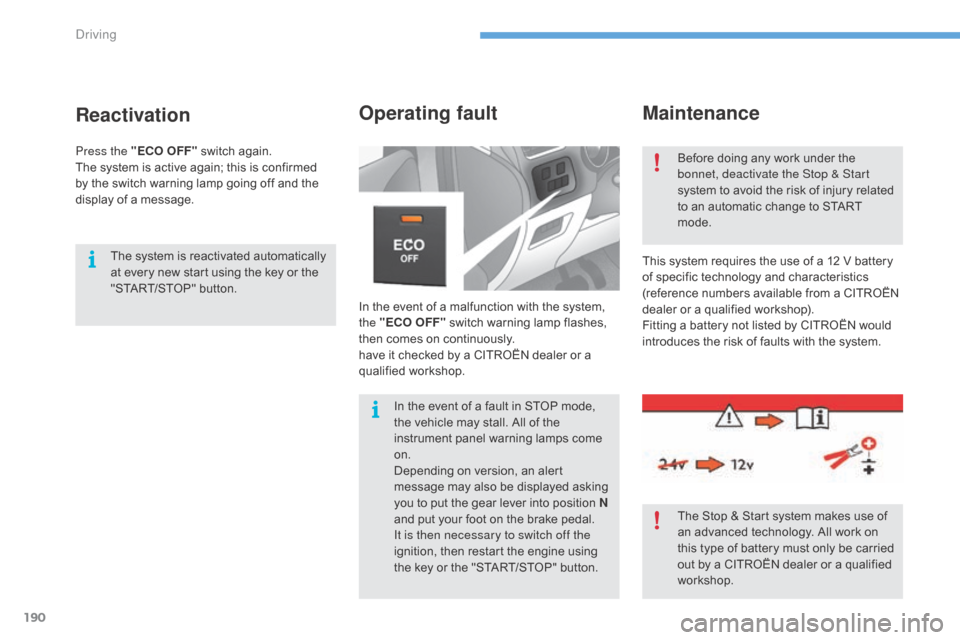
In the event of a malfunction with the system, the "ECO OFF" switch warning lamp flashes,
t
hen comes on continuously.
have
it checked by a CITROËN dealer or a
q
ualified
w
orkshop.
Operating fault
This system requires the use of a 12 V battery of specific technology and characteristics
(
reference numbers available from a CITROËN
d
ealer or a qualified workshop).
Fitting
a battery not listed by CITROËN would
i
ntroduces the risk of faults with the system.
Before
doing any work under the
b
onnet, deactivate the Stop & Start
system to avoid the risk of injury related
t
o an automatic change to START
m
ode.
The Stop & Start system makes use of
a
n advanced technology. All work on
t
his type of battery must only be carried
o
ut by a CITROËN dealer or a qualified
w
orkshop.
In
the
event
of
a
fault
in
STOP
mode,
t
he
vehicle
may
stall.
All
of
the
i
nstrument
panel
warning
lamps
come
o
n.
Depending
on
version,
an
alert
m
essage
may
also
be
displayed
asking
y
ou
to
put
the
gear
lever
into
position
N
and
put
your
foot
on
the
brake
pedal.
It is then necessary to switch off the
ignition,
then
restart
the
engine
using
t
he
key
or
the
"START/STOP"
button.
Reactivation
The system is reactivated automatically a t every new start using the key or the
"
START/STOP" button.
Press the "ECO OFF"
switch again.
The
system is active again; this is confirmed
b
y
the
switch warning lamp going off and the
d
isplay of a message.
Driving
Page 203 of 396

201
C4-2_en_Chap06_conduite_ed02-2015
Cruise control
1. Cruise control mode selection wheel.
2. B utton for setting the current speed of the
v
ehicle as the cruise setting or lowering the
c
ruise
se
tting.
3.
B
utton for setting the current speed of the
v
ehicle as the cruise setting or raising the
c
ruise
se
tting.
4.
C
ruise control pause / resume button.
5.
D
isplay memorised speed settings button.
Steering mounted controls
6. Cruise control pause / resume indication.
7. C ruise control mode selected indication.
8.
C
ruise speed setting.
9.
S
electing a memorised cruise speed.
Displays in the instrument panel
The operation of the cruise control can be
interrupted (pause):
-
b
y pressing control 4 or by pressing the
b
rake or clutch pedal,
-
a
utomatically, if operation of the dynamic
s
tability control system is triggered.
Switching
off the ignition cancels any
p
rogrammed speed setting.
The cruise control is switched on
manually.
It requires a minimum vehicle speed of
2
5 mph (40 km/h) as well as:
-
w
ith a manual gearbox, the
e
ngagement of fourth gear or
h
igher,
-
w
ith an automatic gearbox, the gear
s
elector at position D or second
gear or higher in manual mode.
System which automatically maintains the cruising speed of the vehicle at a setting programmed by
t
he driver, without any action on the accelerator pedal.
The cruise control system is a driving aid
t
hat cannot, in any circumstances, replace
t
he need to observe speed limits, nor the
n
eed for vigilance on the part of the driver.As
a safety measure, you are advised
t
o keep your feet near the pedals at all
ti
mes.
6
Driving
Page 204 of 396
202
C4-2_en_Chap06_conduite_ed02-2015
Switching on
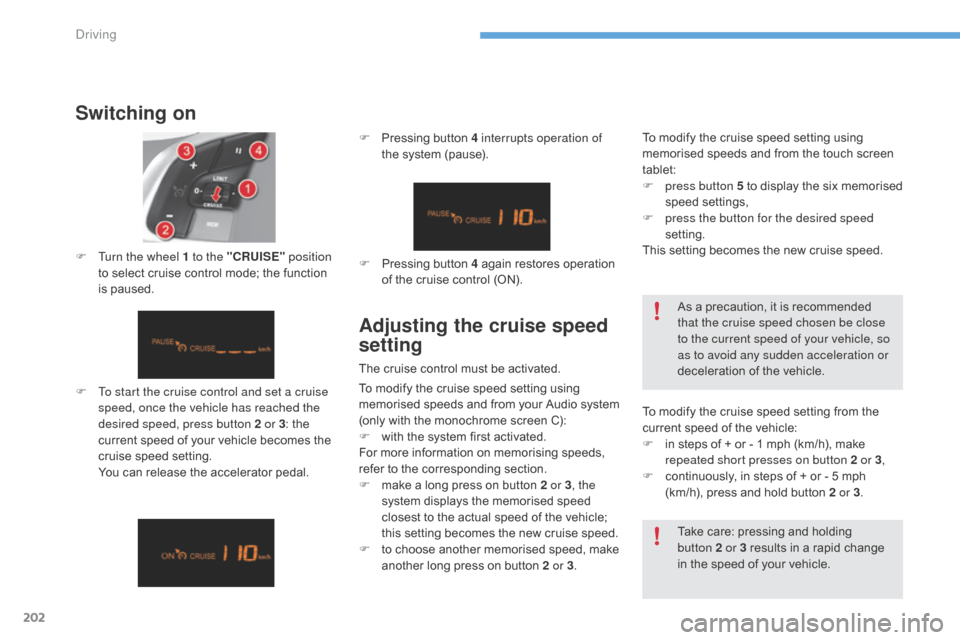
F To start the cruise control and set a cruise speed, once the vehicle has reached the
desired speed, press button 2 or 3 :
the
c
urrent speed of your vehicle becomes the
c
ruise speed setting.
Y
ou can release the accelerator pedal.
F
T
urn the wheel 1 to the "CRUISE"
position
to select cruise control mode; the function
i
s paused. F
P
ressing button 4 interrupts operation of
the system (pause).
Take care: pressing and holding
b
utton 2 or 3 results in a rapid change
i
n the speed of your vehicle.
F
P
ressing button 4 again restores operation
o
f the cruise control (ON).
As a precaution, it is recommended
t
hat the cruise speed chosen be close
to the current speed of your vehicle, so
as to avoid any sudden acceleration or
deceleration of the vehicle.
Adjusting the cruise speed
setting
The cruise control must be activated.
T o modify the cruise speed setting from the
c
urrent speed of the vehicle:
F
i
n steps of + or - 1 mph (km/h), make
r
epeated short presses on button 2 or 3,
F
c
ontinuously, in steps of + or - 5 mph
(
km/h), press and hold button 2 or 3.
To
modify the cruise speed setting using
m
emorised speeds and from the touch screen
t
ablet:
F
p
ress button 5 to display the six memorised
s
peed
se
ttings,
F
p
ress the button for the desired speed
setting.
This setting becomes the new cruise speed.
To modify the cruise speed setting using
m
emorised
s
peeds
a
nd
f
rom
y
our
A
udio
s
ystem
(
only with the monochrome screen C):
F
w
ith the system first activated.
For
more information on memorising speeds,
r
efer to the corresponding section.
F
m
ake a long press on button 2 or 3, the
system
displays the memorised speed
c
losest to the actual speed of the vehicle;
t
his setting becomes the new cruise speed.
F
t
o choose another memorised speed, make
a
nother long press on button 2 or 3.
Driving
Page 221 of 396
219
C4-2_en_Chap07_infos-pratiques_ed02-2015
Load reduction modeE nergy ec onomy m ode
Switching to economy mode
Once this period has elapsed, a message a
ppears in the screen indicating that the
v
ehicle has switched to economy mode and the
a
ctive functions are put on standby.
Exiting economy mode
These functions are reactivated automatically the next time the vehicle is driven.
F
I
n order to resume the use of these
f
unctions immediately, start the engine and
l
et it run for a few minutes.
The
time available to you will then be double
t
he period for which the engine is left running.
H
owever, this period will always be between
five
and thirty minutes.
System
which
manages
the
use
of
certain
f
unctions
according
to
the
level
of
charge
r
emaining
in
the
battery.
When
the
vehicle
is
being
driven,
the
load
r
eduction
function
temporarily
deactivates
c
ertain
functions,
such
as
the
air
conditioning,
t
he
heated
rear
screen...
The deactivated functions are reactivated
automatically
as
soon
as
conditions
permit. System
which
manages
the
period
of
use
of
certain
functions to conserve a sufficient level of
c
harge
in
the
battery.
After
the
engine
has
stopped,
you
can
still
use
functions such as the audio equipment, windscreen
w
ipers,
dipped
beam
headlamps, courtesy
lamps,
etc. for a maximum combined period of
t
hirty minutes.
A flat battery prevents the engine from
s
tarting.
For
more information on the 12 V
b
attery, refer to the corresponding
s
ection.
This
period
may
be
greatly
reduced
if
t
he
battery
is
not
fully
charged.
If
the
telephone
is
being
used
at
the
s
ame
time
with
the
touch
screen
tablet,
i
t
will
be
interrupted
after
10
minutes.
7
Practical information
Page 225 of 396
223
C4-2_en_Chap07_infos-pratiques_ed02-2015
Bonnet
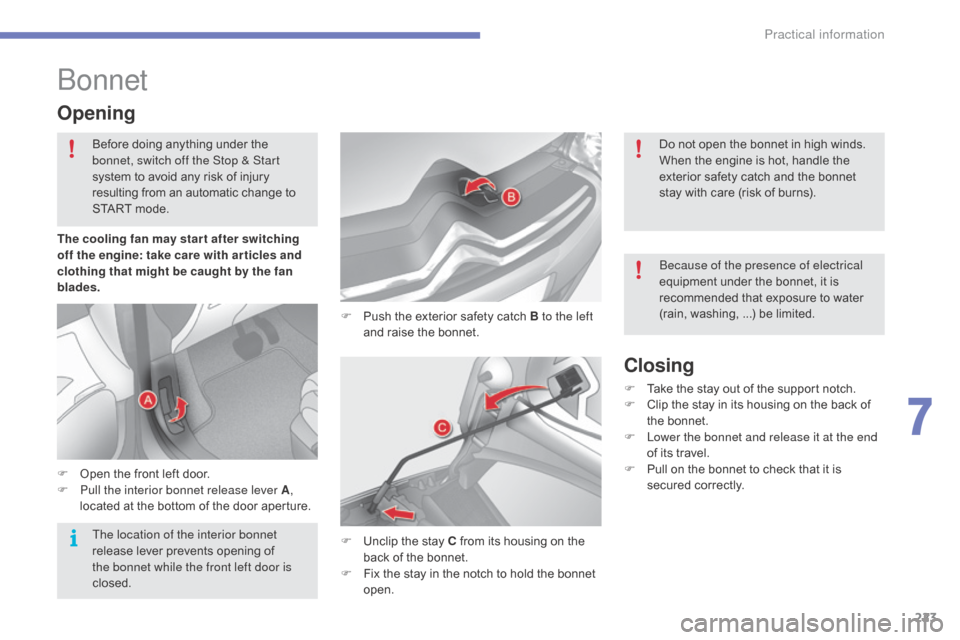
F Push the exterior safety catch B to the left
and raise the bonnet.
Opening
F Open the front left door.
F P ull the interior bonnet release lever A,
located
at the bottom of the door aperture.
F
U
nclip the stay C from its housing on the
b
ack of the bonnet.
F
F
ix the stay in the notch to hold the bonnet
ope
n.
Closing
F Take the stay out of the support notch.
F C lip the stay in its housing on the back of
t
he bonnet.
F
L
ower the bonnet and release it at the end
of
its travel.
F
P
ull on the bonnet to check that it is
s
ecured
c
orrectly.
The cooling fan may star t after switching
off the engine: take care with ar ticles and
clothing that might be caught by the fan
blades.
Before
doing
anything
under
the
b
onnet, switch off the Stop & Start
system
to
avoid
any
risk
of
injury
r
esulting
from
an
automatic
c
hange
t
o
S
TART
mode.
Do not open the bonnet in high winds.
When the engine is hot, handle the
e
xterior safety catch and the bonnet
s
tay with care (risk of burns).
Because of the presence of electrical
equipment under the bonnet, it is
r
ecommended that exposure to water
(
rain,
w
ashing, ...) be limited.
The location of the interior bonnet
release
lever
prevents
opening
of
t
he bonnet while the front left door is
closed.
7
Practical information
Page 274 of 396
272
C4-2_en_Chap09_caracteristiques_ed02-2015
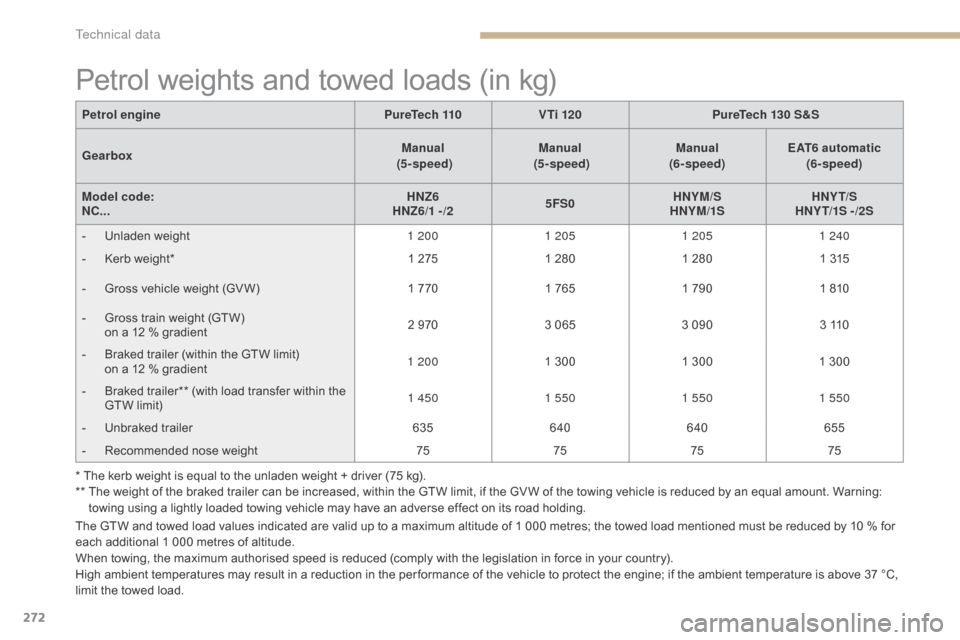
Petrol weights and towed loads (in kg)
The GTW and towed load values indicated are valid up to a maximum altitude of 1 000 metres; the towed load mentioned must be reduced by 10 % for each additional 1 000 metres of altitude.
When
towing, the maximum authorised speed is reduced (comply with the legislation in force in your country).
High
ambient temperatures may result in a reduction in the per formance of the vehicle to protect the engine; if the ambient temperature is above 37 °C,
l
imit the towed load.
Petrol engine
PureTech 110 V Ti 120 PureTech 130 S&S
Gearbox Manual
(5 - speed) Manual
(5 - speed) Manual
(6- speed) EAT6 automatic
(6- speed)
Model code:
NC... HNZ6
HNZ6/1 -/2 5FS0HNYM/S
HNYM/1S HNY T/S
HNY T/1S - /2S
-
U
nladen weight
1 2001 2051 205 1 240
-
K
erb weight*
1 275
1 280
1 280
1 315
-
G
ross vehicle weight (GV W)
1 770
1 765
1 790
1 810
-
G
ross train weight (GTW)
o
n a 12 % gradient
2 970
3 065
3 090
3 110
-
B
raked trailer (within the GTW limit)
o
n a 12 % gradient
1 200
1 300
1 300
1 300
-
B
raked trailer** (with load transfer within the
G
TW limit)
1 450
1 550 1 5501 550
-
U
nbraked trailer
635640 640 655
-
R
ecommended nose weight
75757575
* The kerb weight is equal to the unladen weight + driver (75 kg).
**
T
he weight of the braked trailer can be increased, within the GTW limit, if the GV W of the towing vehicle is reduced by an equal amount. Warning:
t
owing using a lightly loaded towing vehicle may have an adverse effect on its road holding.
Technical data
Page 277 of 396
275
C4-2_en_Chap09_caracteristiques_ed02-2015
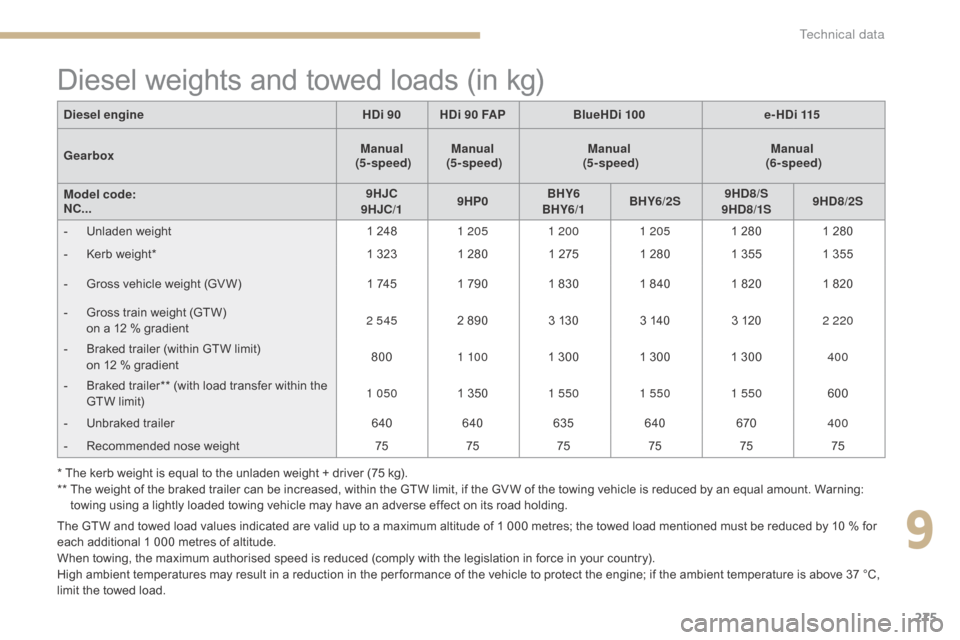
Diesel weights and towed loads (in kg)
The GTW and towed load values indicated are valid up to a maximum altitude of 1 000 metres; the towed load mentioned must be reduced by 10 % for each additional 1 000 metres of altitude.
When
towing, the maximum authorised speed is reduced (comply with the legislation in force in your country).
High
ambient temperatures may result in a reduction in the per formance of the vehicle to protect the engine; if the ambient temperature is above 37 °C,
l
imit the towed load.
Diesel engine
HDi 90HDi 90 FAP BlueHDi 100 e-HDi 115
Gearbox Manual
(5 - speed) Manual
(5 - speed) Manual
(5 - speed) Manual
(6- speed)
Model code:
NC... 9HJC
9HJC/1 9HP0BHY6
BHY6/1 BHY6/2S 9HD8/S
9HD8/1S 9HD8/2S
-
U
nladen weight
1 248
1 205 1 200 1 2051 280
1 280
-
K
erb weight*
1 323 1 280 1 275
1 280
1 355
1 355
-
G
ross vehicle weight (GV W)
1 745
1 790 1 830 1 840
1 820
1 820
-
G
ross train weight (GTW)
o
n a 12 % gradient
2 545
2 890 3 130
3 140
3 120
2 220
-
B
raked trailer (within GTW limit)
o
n 12 % gradient
800
1 10 0 1 300 1 300 1 300
400
-
B
raked trailer** (with load transfer within the
G
TW limit)
1 050
1 350
1 550 1 550 1 550 600
-
U
nbraked trailer
640640 635 640 670400
-
R
ecommended nose weight
757575 757575
* The kerb weight is equal to the unladen weight + driver (75 kg).
**
T
he weight of the braked trailer can be increased, within the GTW limit, if the GV W of the towing vehicle is reduced by an equal amount. Warning:
t
owing using a lightly loaded towing vehicle may have an adverse effect on its road holding.
9
Technical data