lock Citroen C4 2016 2.G Repair Manual
[x] Cancel search | Manufacturer: CITROEN, Model Year: 2016, Model line: C4, Model: Citroen C4 2016 2.GPages: 396, PDF Size: 10.22 MB
Page 237 of 396
235
C4-2_en_Chap07_infos-pratiques_ed02-2015
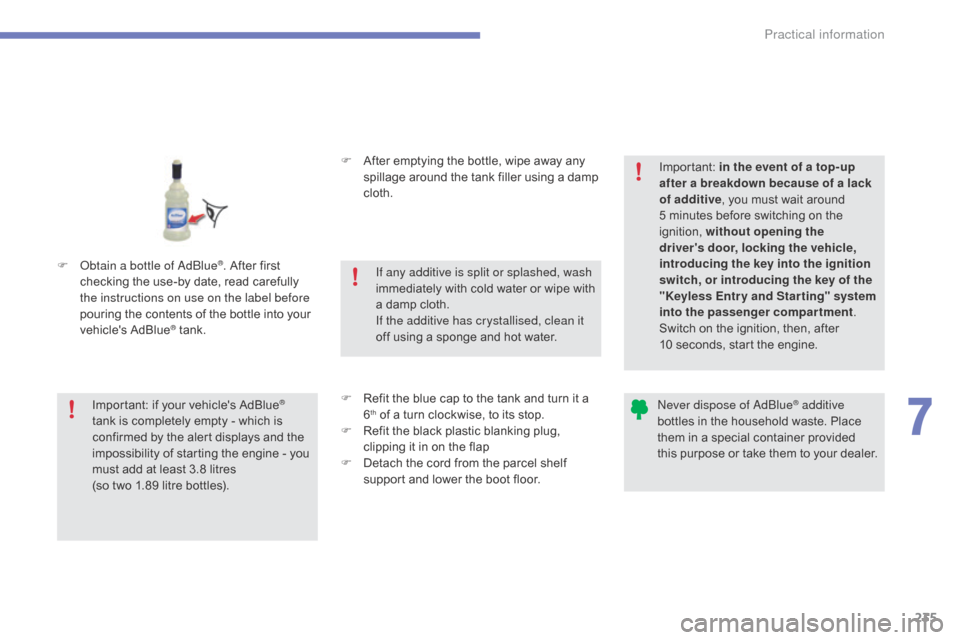
F Obtain a bottle of AdBlue®. After first c
hecking
the
use-by
date,
read carefully
t
he instructions on use on the label before
pouring
the
contents
of
the bottle into your
v
ehicle's
Ad
Blue
® tank. F
A
fter emptying the bottle, wipe away any
s
pillage around the tank filler using a damp
c
loth.
F
R
efit the blue cap to the tank and turn it a
6th of a turn clockwise, to its stop.
F
R
efit the black plastic blanking plug,
c
lipping it in on the flap
F
D
etach the cord from the parcel shelf
s
upport and lower the boot floor.
Important:
if
your
vehicle's
AdBlue®
tank
is
completely
empty
-
which
is
c
onfirmed
by
the
alert
displays
and
the
i
mpossibility
of
starting
the
engine
- you
m
ust
add
at
least
3.8
litres
(so
two
1.89 litre
bottles). If any additive is split or splashed, wash
immediately
w
ith
c
old
w
ater
o
r
w
ipe
w
ith
a
damp cloth.
If the additive has crystallised, clean it
off using a sponge and hot water.Important:
i
n the event of a top-up
after a breakdown because of a lack
of additive , you must wait around
5 minutes before switching on the
ig
nition,
w
ithout opening the
driver's door, locking the vehicle,
introducing the key into the ignition
switch, or introducing the key of the
"Keyless Entr y and Star ting" system
into the passenger compartment .
Switch on the ignition, then, after
10 seconds, start the engine.
Never dispose of AdBlue® additive
bottles
in
the
household
waste. Place
t
hem
in
a
special
container provided
t
his
p
urpose
o
r
t
ake
t
hem
t
o
y
our
d
ealer.
7
Practical information
Page 249 of 396
247
C4-2_en_Chap08_en-cas-de-panne_ed02-2015
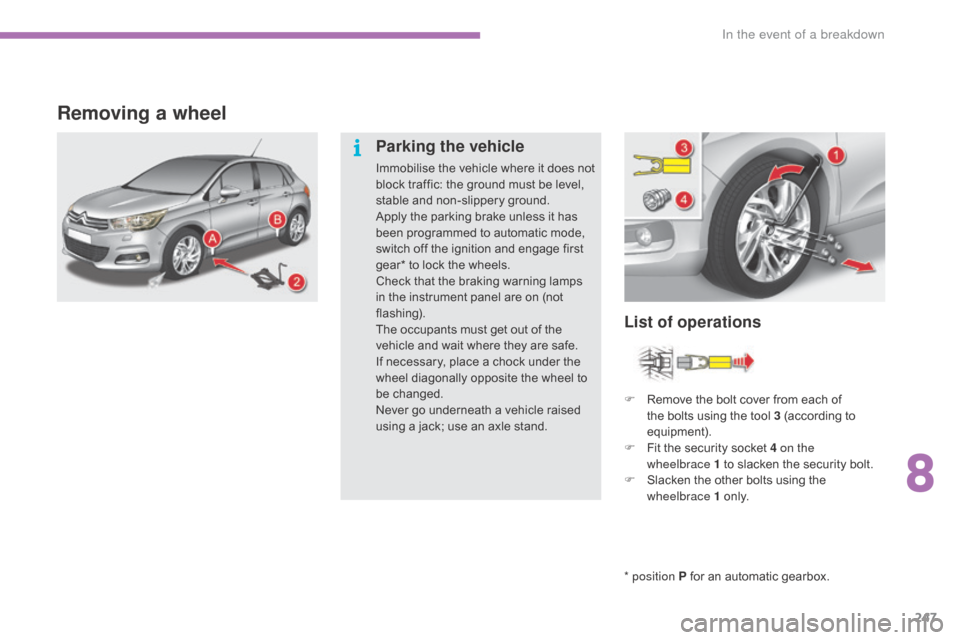
Removing a wheel
* position P for an automatic gearbox.
List of operations
Parking the vehicle
Immobilise the vehicle where it does not b
lock traffic: the ground must be level,
s
table and non-slippery ground.
Apply
the parking brake unless it has
b
een programmed to automatic mode,
s
witch off the ignition and engage first
g
ear* to lock the wheels.
Check
that the braking warning lamps
i
n the instrument panel are on (not
f
lashing).
The
occupants must get out of the
v
ehicle and wait where they are safe.
If
necessary, place a chock under the
w
heel diagonally opposite the wheel to
be c
hanged.
Never
go underneath a vehicle raised
u
sing a jack; use an axle stand.F
R
emove the bolt cover from each of
t
he bolts using the tool 3 (according to
e
quipment).
F
F
it the security socket 4 on the
wheelbrace
1 to slacken the security bolt.
F
S
lacken the other bolts using the
w
heelbrace 1
o
n l y.
8
In the event of a breakdown
Page 269 of 396
267
C4-2_en_Chap08_en-cas-de-panne_ed02-2015
Charging the battery using
a battery charger
F Disconnect the battery from the vehicle.
F F ollow the instructions for use provided by
the
manufacturer of the charger.
F
C
onnect the battery starting with the
n
egative terminal (-).
F
C
heck that the terminals and connectors
a
re clean. If they are covered
w
ith
s
ulphate
(
whitish or greenish deposit), remove them
a
nd clean them.
Reinitialisation after
reconnection
After any reconnection of the battery, switch on
the ignition and wait at least one minute before
s
tarting, to allow time for the initialisation of the
e
lectronic systems.
By
referring to the corresponding sections, you
s
hould set or initialise the following systems
y
ourself:
-
o
ne-touch electric windows,
-
t
ime and date,
-
a
udio and navigation system settings.
Check
that no alert message or warning lamp
c
omes on after switching on the ignition.
However,
if minor problems persist after
c
arrying out these operations, contact a
C
ITROËN dealer or a qualified workshop.
Reconnecting the (+) cable
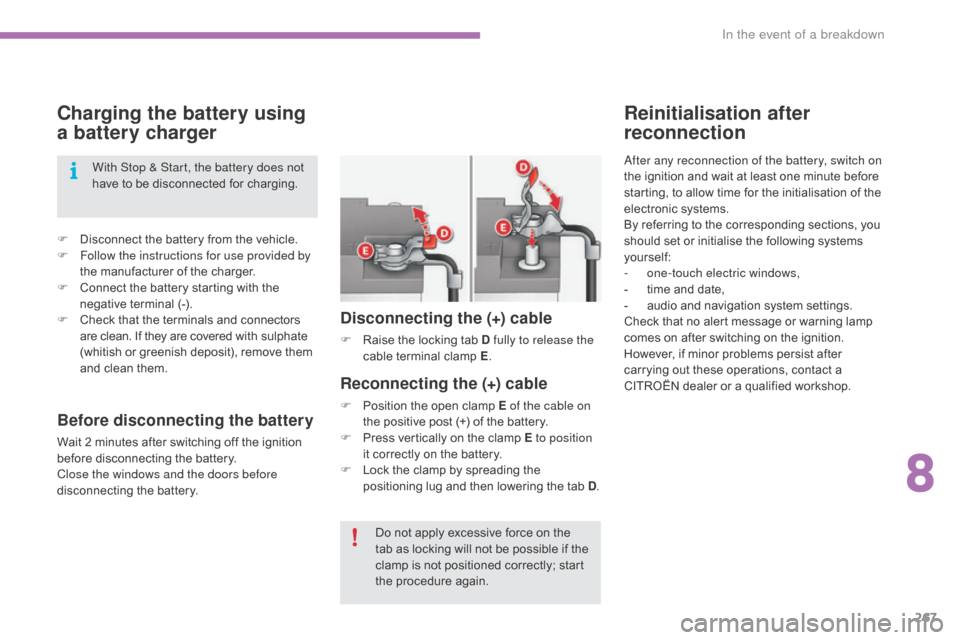
F Position the open clamp E of the cable on
the positive post (+) of the battery.
F
P
ress vertically on the clamp E to position
it
correctly on the battery.
F
L
ock the clamp by spreading the
p
ositioning lug and then lowering the tab D.
Disconnecting the (+) cable
F Raise the locking tab D fully to release the
cable t erminal c lamp E.
D
o not apply excessive force on the
t
ab as locking will not be possible if the
c
lamp is not positioned correctly; start
t
he procedure again.
With Stop & Start, the battery does not
have
to
be
disconnected
for
charging.
Before disconnecting the battery
Wait 2 minutes after switching off the ignition b
efore disconnecting the battery.
Close the windows and the doors before
disconnecting
the battery.
8
In the event of a breakdown
Page 271 of 396
269
C4-2_en_Chap08_en-cas-de-panne_ed02-2015
Towing the vehicle
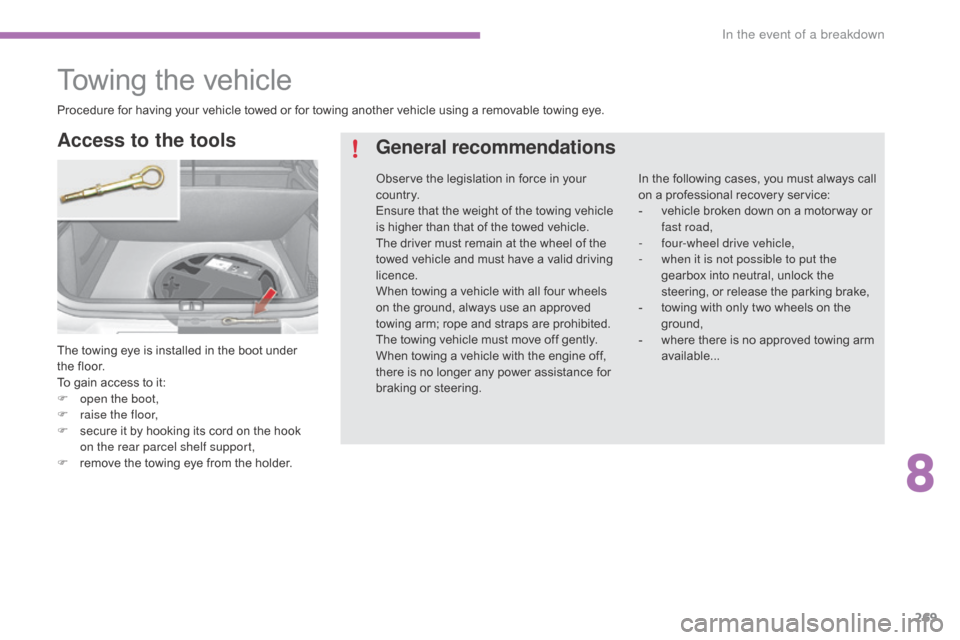
The towing eye is installed in the boot under the floor.
To
gain access to it:
F
o
pen the boot,
F
r
aise the floor,
F
s
ecure it by hooking its cord on the hook
o
n the rear parcel shelf support,
F
r
emove the towing eye from the holder.
Access to the tools General recommendations
In the following cases, you must always call o
n a professional recovery service:
-
v
ehicle broken down on a motor way or
f
ast road,
-
f
our-wheel drive vehicle,
-
w
hen it is not possible to put the
gearbox
into neutral, unlock the
s
teering, or release the parking brake,
-
t
owing with only two wheels on the
g
round,
-
w
here there is no approved towing arm
a
vailable...
Procedure
for
having
your
vehicle
towed
or
for
towing
another
vehicle
using
a
removable
towing
eye.
Observe
the
legislation
in
force
in
your
c
o unt r y.
Ensure
that
the
weight
of
the
towing
vehicle
i
s
higher
than
that
of
the
towed
vehicle.
The
driver
must
remain
at
the
wheel
of
the
t
owed
vehicle
and
must
have
a
valid
driving
l
icence.
When
towing
a
vehicle
with
all
four
wheels
o
n
the
ground,
always
use
an
approved
t
owing
arm;
rope
and
straps
are
prohibited.
The
towing
vehicle
must
move
off
gently.
When
towing
a
vehicle
with
the
engine
off,
t
here
is
no
longer
any
power
assistance
for
b
raking
or
steering.
8
In the event of a breakdown
Page 272 of 396
270
C4-2_en_Chap08_en-cas-de-panne_ed02-2015
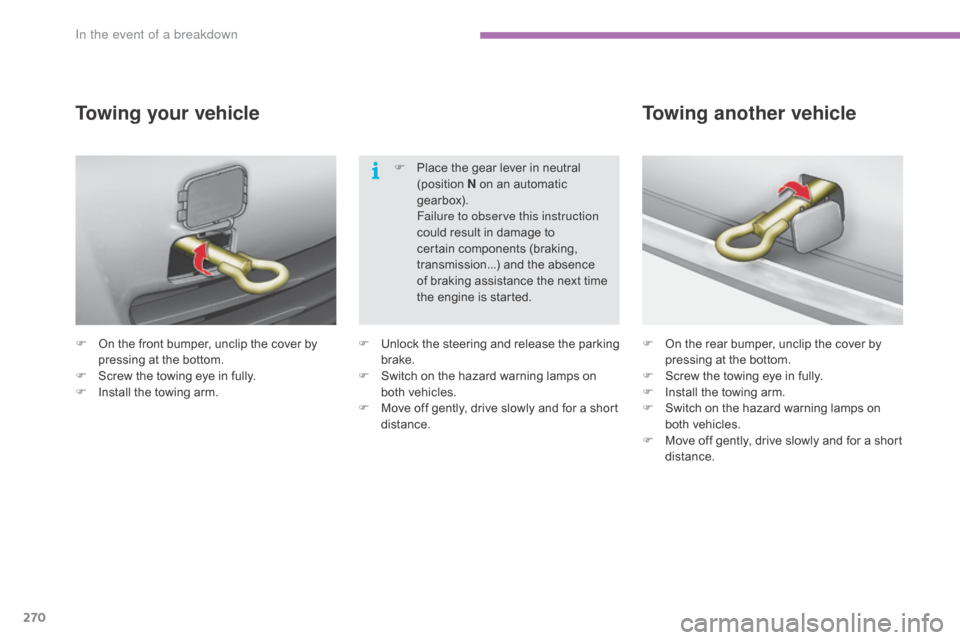
F On the front bumper, unclip the cover by p
ressing at the bottom.
F
S
crew the towing eye in fully.
F
I
nstall the towing arm.
Towing your vehicle
F On the rear bumper, unclip the cover by p
ressing at the bottom.
F
S
crew the towing eye in fully.
F
I
nstall the towing arm.
F
S
witch on the hazard warning lamps on
b
oth vehicles.
F
M
ove off gently, drive slowly and for a short
di
stance.
Towing another vehicle
F Unlock t he s teering a nd r elease t he p arking b
rake.
F
S
witch on the hazard warning lamps on
b
oth vehicles.
F
M
ove off gently, drive slowly and for a short
di
stance.F
P
lace the gear lever in neutral
(
position
N
on an automatic
g
earbox).
F
ailure to observe this instruction
could result in damage to
c
ertain components (braking,
t
ransmission...) and the absence
o
f braking assistance the next time
t
he engine is started.
In the event of a breakdown
Page 331 of 396
329
C4-2_en_Chap10b_SMEGplus_ed02-2015
As a safety measure and because it requires sustained attention by the
d
river, using a smartphone when
d
riving is prohibited.
All
operations must be done with the
v
ehicle stationary .
The synchronisation of a
smartphone
allows applications on a
s
martphone that are adapted to the
M
irrorLink
TM technology to be displayed i
n
the
vehicle's screen.
As the principles and standards are
constantly
evolving, it is recommended
t
hat
you
update the operating system of
y
our
smartphone.
For
the
list
of eligible smartphones,
c
onnect
to
the brand's internet website
i
n
your
country. Please
note:
-
i
f your smartphone is supported, to
m
ake it "MirrorLink
TM" compatible, s
ome
phone
manufacturers
n
evertheless invite you to first
download
a
dedicated application.
When connecting a smartphone to the system, it is recommended that Bluetooth®
be
started
on
the
smartphone
Start the application on the
smartphone (optional, depending
o
n the smartphone and operating
s
yste m). During
the procedure, several screen
p
ages relating to certain functions
a
re displayed.
Accept to start and end the
connection.
Connect a USB cable. The
s
martphone charges when
c
onnected by a USB cable.
Press " MirrorLink
TM" to start
the
application
in
the system. Once connection is established, an
"
Applications " page is displayed with the
l
ist of applications already downloaded to
your smartphone and adapted to MirrorLink
TM
technology.
If only one application has been downloaded to
the
smartphone,
it
starts
automatically.
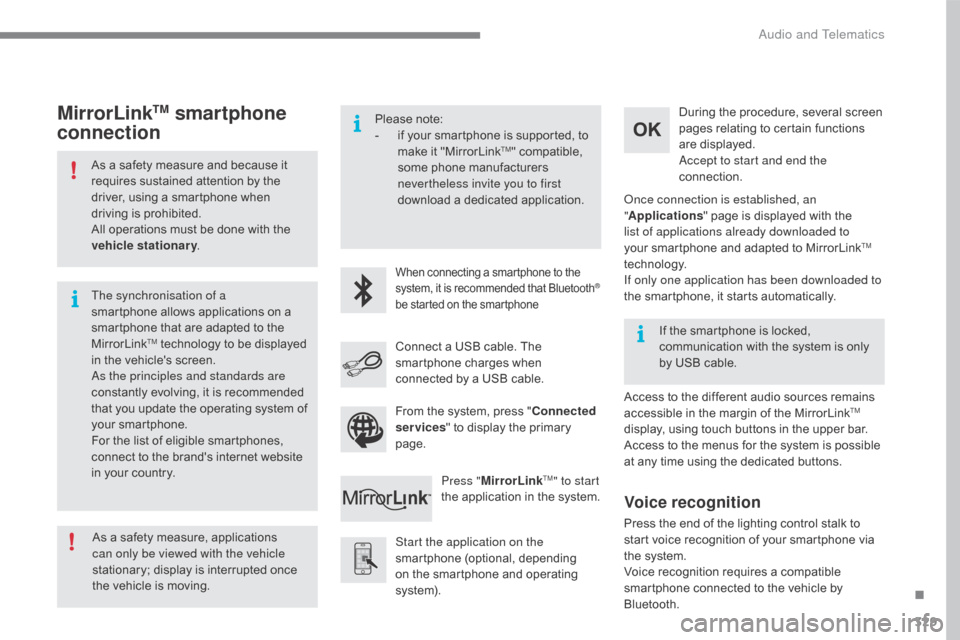
MirrorLinkTM smartphone
connection
Access to the different audio sources remains a
ccessible in the margin of the MirrorLinkTM
display,
using
touch
buttons
in
the
upper
bar.
Access
to
the
menus
for
the
system
is
possible
a
t
any
time
using
the
dedicated
buttons.
If
the
smartphone
is
locked,
c
ommunication
with
the
system
is
only
b
y
USB
cable.
From
the
system,
press
"
Connected
services "
to
display
the
primary
pag
e.
As
a
safety
measure,
applications
c
an only be viewed with the vehicle
stationary;
display
is
interrupted
once
t
he
vehicle
is
moving.
Voice recognition
Press the end of the lighting control stalk to s tart voice recognition of your smartphone via
t
he system.
Voice
recognition requires a compatible
s
martphone connected to the vehicle by
Bl
uetooth.
.
Audio and Telematics
Page 348 of 396
346
C4-2_en_Chap10b_SMEGplus_ed02-2015
Radio
QUESTIONANSWER SOLUTION
The
quality of reception of
t
he radio station listened
to
gradually deteriorates
o
r the stored stations do
not
function (no sound,
87
.5 Mhz is displayed...). The
vehicle is too far from the transmitter used by the station
l
istened to or there is no transmitter in the geographical area
t
hrough which the vehicle is travelling.Activate
the "RDS" function by means of the
s
hort-cut menu to enable the system to check
w
hether there is a more power ful transmitter in
t
he geographical area.
The
environment (hills, buildings, tunnels, basement car parks...)
b
lock reception, including in RDS mode.This
phenomenon is normal and does not
i
ndicate a fault with the audio system.
The
aerial is absent or has been damaged (for example when going
t
hrough a car wash or into an underground car park).Have
the aerial checked by a CITROËN dealer.
I
cannot find some radio
s
tations in the list of
stations
r
eceived. The
station is not received or its name has changed in the list.Press
and hold the "List" button at the steering
m
ounted controls to update the list of stations
r
eceived or press on the system update function:
"
Update list".
Some
radio stations send other information in place of their name
(
the title of the song for example).
The
system interprets this information as the name of the station.
The
name of the radio
s
tation
c
hanges.
Audio and Telematics
Page 380 of 396
378
C4-2_en_Chap10c_RD5_ed02-2015
QUESTIONANSWER SOLUTION
The
quality of reception of
t
he radio station listened
to
gradually deteriorates
o
r the stored stations do
not
function (no sound,
87
.5 MHz is displayed...). The
vehicle is too far from the transmitter used by the station
l
istened to or there is no transmitter in the geographical area
t
hrough which the vehicle is travelling.Activate
the RDS function to enable the system
t
o check whether there is a more power ful
t
ransmitter in the geographical area.
The
environment (hills, buildings, tunnels, basement car parks...)
b
lock reception, including in RDS mode.This
phenomenon is normal and does not
i
ndicate a failure of the audio equipment.
The
aerial is absent or has been damaged (for example when going
t
hrough an automatic car wash or in an underground car park).Have
the aerial checked by a CITROËN dealer.
Sound cut-outs of 1 to
2 seconds
in radio mode.During
this brief sound cut-out, the RDS searches for another
f
requency giving better reception of the station.Deactivate
the RDS function if the phenomenon
i
s too frequent and always on the same route.
The
traffic announcement
(
TA)
is
displayed. I
d
o
n
ot receive any traffic
information. The
radio station does not broadcast traffic information.Tune to a radio station which broadcasts traffic
information.
The stored stations are not
found
(no sound, 87.5 MHz
i
s
displayed...). An
incorrect waveband is selected.Press the BAND button to return to the waveband
on
which the stations are stored.
Audio and Telematics
Page 384 of 396
382
C4-2_en_Chap11_index-alpha_ed02-2015
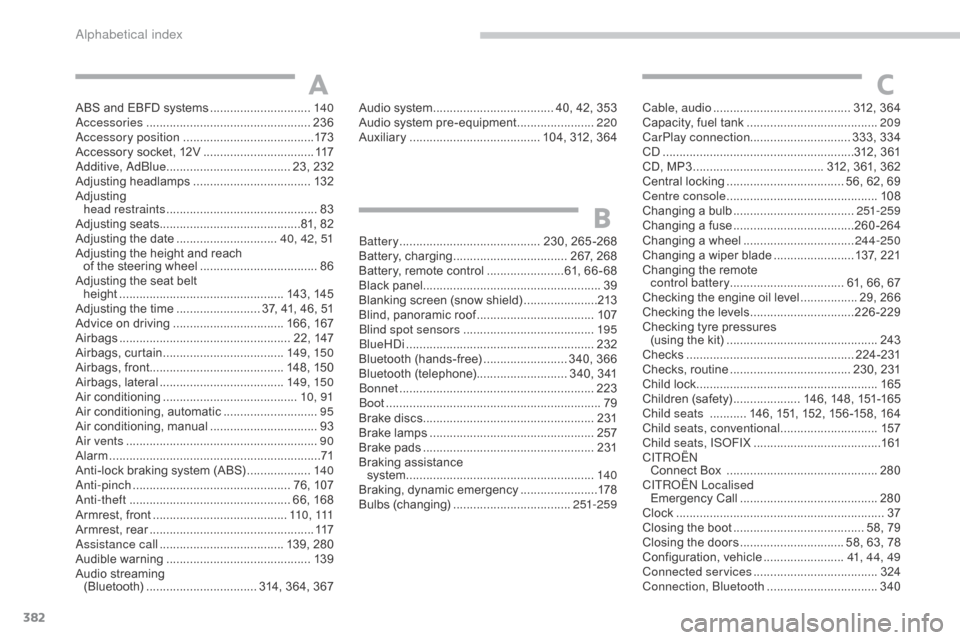
ABS and EBFD systems ..............................14 0
Accessories .............................. ...................236
Accessory position
....................................... 17
3
Accessory
socket, 12V
.................................11
7
Additive, AdBlue
..................................... 2
3, 232
Adjusting
h
eadlamps
................................... 13
2
Adjusting
h
ead restraints
...............................
..............83
Adjusting
s
eats
..........................................8
1, 82
Adjusting
the date
.............................. 4
0, 42, 51
Adjusting
the height and reach
of
the steering wheel
...................................86
A
djusting the seat belt
height
...............
.................................. 143,
14
5
Adjusting
the time
......................... 3
7, 41, 46, 51
Advice
on driving
..............................
...166,
16
7
Airbags
...............
.................................... 22, 147
Airbags,
c
urtain
.................................... 14
9, 15 0
Airbags,
front........................................ 148, 150
Airbags,
la
teral
..................................... 14
9, 15 0
Air
c
onditioning
...............................
.........10, 91
Air
conditioning, automatic
............................95
A
ir
c
onditioning,
m
anual
................................ 93
A
ir vents
..............................
...........................90
Alarm
............................................................... 71
A
nti-lock braking system (ABS)
...................14
0
Anti-pinch
............................................... 7
6, 107
Anti-theft
..............................
.................. 66, 168
Armrest,
front
........................................ 11
0 , 111
Armrest,
rear
................................................. 11
7
Assistance call
...............................
...... 139, 280
Audible
w
arning
........................................... 13
9
Audio
streaming
(Bluetooth)
..............................
... 314, 364, 367Battery
...............................
...........230,
26
5-268
Battery,
c
harging
...............................
... 267, 268
Battery,
remote control
.......................6
1, 66 - 68
Black
pan
el..................................................... 39
Blanking
screen (snow shield)
......................2
13
Blind,
panoramic roof
...................................10
7
Blind spot sensors
....................................... 19
5
BlueHDi
...............................
.........................232
Bluetooth
(hands-free)
......................... 3
40, 366
Bluetooth
(
telephone)
........................... 3
40, 341
Bonnet
...............
...........................................223
Boot
........
........................................................79
Brake
discs
...................................................2
31
Brake
lamps
...............................
..................257
Brake
p
ads
...............................
....................231
Braking
assistance
system
................
........................................140
Braking,
d
ynamic
em
ergency
.......................17
8
Bulbs
(
changing)
...............................
....251-259
A
B
Audio system ............................... ..... 40, 42, 353
Audio system pre-equipment .......................2
20
Auxiliary
....................................... 1
04, 312, 364Cable, audio ......................................... 3
12, 364
Capacity, fuel tank .............................. .........209
CarPlay connection ..............................333,
33
4
CD
..............................
...........................312, 361
CD,
MP3
....................................... 3
12, 361, 362
Central
locking
................................... 5
6, 62, 69
Centre console
............................................. 10
8
Changing
a bu
lb
....................................25
1-259
Changing
a f
use
....................................26
0-264
Changing
a wheel
...............................
..244-250
Changing
a wiper blade
........................ 1
37, 221
Changing
the remote
control battery .................................. 61,
66, 67
Checking
the engine oil level
................. 2
9, 266
Checking
the levels
...............................2
26-229
Checking
tyre pressures
(using
the kit)
..............................
...............243
Checks
...............
...................................224 -231
Checks,
routine
.................................... 2
30, 231
Child
lock
...............................
.......................165
Children
(
safety)
.................... 1
46, 148, 151-165
Child seats
........... 1
46, 151, 152, 156 -158, 164
Child seats, conventional
............................. 15
7
Child seats, ISOFIX
......................................16
1
C
ITROËN
Connect
Box
.............................................28
0
C
ITROËN
L
ocalised
Emergency
C
all
.........................................28
0
Clock
...............
...............................................37
Closing
the boot
...............................
........ 58, 79
Closing
the doors
............................... 5
8, 63, 78
Configuration,
v
ehicle
........................4
1, 44, 49
Connected services
..................................... 3
24
Connection, Bluetooth
................................. 3
40
C
Alphabetical index
Page 387 of 396
385
C4-2_en_Chap11_index-alpha_ed02-2015
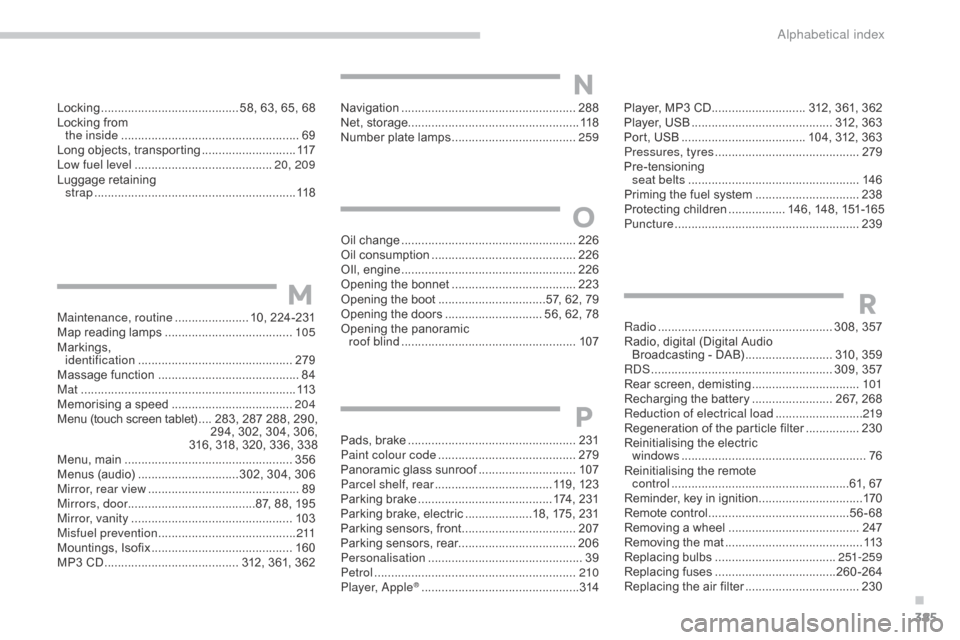
Locking ......................................... 58, 63, 65, 68
Locking from
the inside
..............................
.......................69
Long
objects, transporting
............................11
7
Low fuel level
..............................
...........20, 209
Luggage
retaining
strap
............................................................ 11
8 Player,
MP3 CD ............................ 3 12, 361, 362
Player,
USB .......................................... 3 12, 363
Port,
USB
..................................... 1
04, 312, 363
Pressures, tyres
........................................... 2
79
Pre-tensioning
sea
t belts
..............................
.....................146
Priming
the fuel system
...............................23
8
Protecting
children
................. 1
46, 148, 151-165
Puncture
................
.......................................239
Radio
...............
..................................... 308, 357
Radio,
digital (Digital Audio
Broadcasting
- DAB)
.......................... 3
10, 359
RDS
................
...................................... 309, 357
Rear
s
creen,
d
emisting
................................10
1
Recharging
the battery
........................ 2
67, 268
Reduction of electrical load
.......................... 2
19
Regeneration
of the particle filter
................23
0
Reinitialising
the electric
windows
....................................................... 76
R
einitialising the remote
control
.....................................................6
1, 67
Reminder,
key in ignition
...............................17
0
Remote
control
..........................................56
-68
Removing
a wheel
..............................
.........247
Removing
the mat
...............................
..........113
Replacing
bu
lbs
..............................
......251-259
Replacing
f
uses
..............................
......260-264
Replacing
the air filter
..................................23
0
RMaintenance, routine ...................... 10, 224-231
Map reading lamps ...................................... 10
5
Markings,
id
entification
.............................................. 2
79
Massage
function
...............................
...........84
Mat
.......
......................................................... 113
Memorising
a speed
.................................... 20
4
Menu
(touch screen tablet)
.... 2
83, 287 288, 290,
2
94, 302, 304, 306,
316,
318, 320, 336, 338
Menu,
main
..............................
....................356
Menus
(audio)
..............................3
02, 304, 306
Mirror, rear view
............................................. 89
M
irrors, door ......................................87,
88, 195
Mirror, vanity
..............................
..................103
Misfuel prevention
...............................
..........2 11
Mountings,
I
sofix
...............................
...........160
MP3
CD
................
........................ 312, 361, 362Oil
change
...............................
.....................
226
Oil consumption
...........................................
2
26
OIl,
eng
ine
...............................
.....................
226
Opening the bonnet
.....................................
2
23
Opening the boot
..............................
..57, 62, 79
Opening the doors ............................. 5 6, 62, 78
Opening the panoramic
roof blind
.................................................... 10
7
M
O
Navigation ....................................................288
Net, storage................................................... 118
Number
plate lamps
..................................... 25
9
N
Pads, brake ..................................................2 31
Paint colour code ......................................... 2
79
Panoramic
glass sunroof
.............................10
7
Parcel shelf, rear
................................... 1
19, 123
Parking
brake
........................................ 1
74, 231
Parking
brake, electric
....................1
8, 175, 231
Parking
sensors, front
..................................2
07
Parking
sensors, rear................................... 206
Personalisation
...............................
...............39
Petrol
...............................
.............................210
Player, Apple
® .............................. .................314
P
.
Alphabetical index