lock CITROEN C4 2018 User Guide
[x] Cancel search | Manufacturer: CITROEN, Model Year: 2018, Model line: C4, Model: CITROEN C4 2018Pages: 317, PDF Size: 9.31 MB
Page 44 of 317
42
C4-cactus_en_Chap02_ouvertures_ed01-2016
If the problem persists, contact a CITROËN dealer as soon as possible.
If the battery is flat, you are
informed
by illumination of this
Changing the battery
In the event of a fault with the remote control, y
ou can no longer unlock, lock or locate
y
our vehicle.
F
F
irst of all, use the key in the lock to unlock
o
r lock your vehicle.
F
T
hen, reinitialise the remote control.
Fault with the remote
control
Reinitialisation
F Switch off the ignition and remove the ig
nition k ey.
F
P
ress the closed padlock immediately for a
f
ew seconds.
F
T
urn the key to position 2 (Ignition on).
F
S
witch off the ignition and remove the key
f
rom the ignition switch.
The
remote control is fully operational again.Battery
ref.: CR2032 / 3 volts.
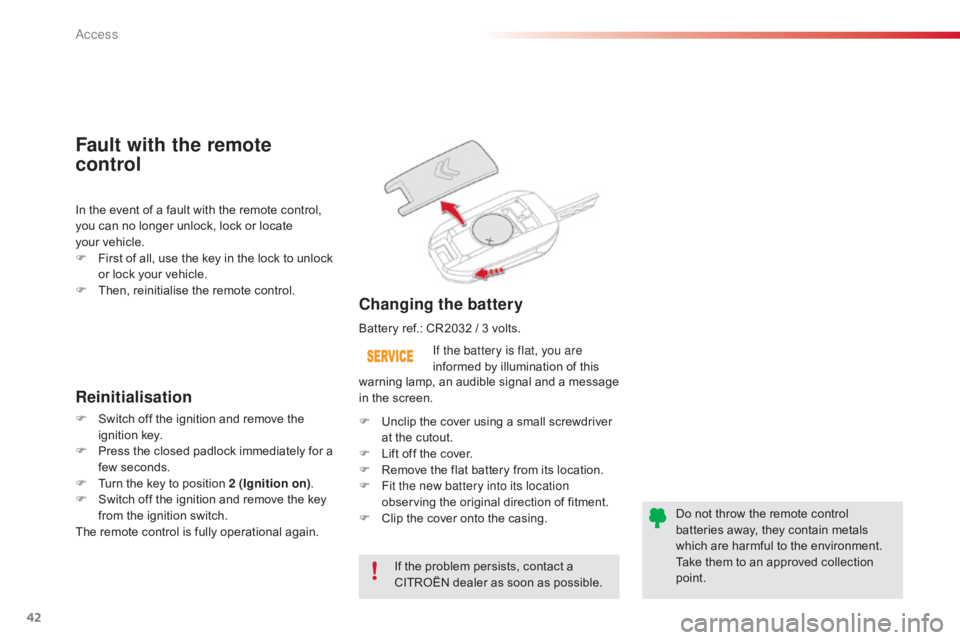
F U nclip the cover using a small screwdriver
a
t the cutout.
F
L
ift off the cover.
F
R
emove the flat battery from its location.
F
F
it the new battery into its location
observing
the original direction of fitment.
F
C
lip the cover onto the casing.Do
not throw the remote control
b
atteries away, they contain metals
w
hich are harmful to the environment.
Take
them to an approved collection
po
int.
warning
lamp, an audible signal and a message
i
n the screen.
Access
Page 45 of 317
43
C4-cactus_en_Chap02_ouvertures_ed01-2016
Lost keys
Go to a CITROËN dealer with the vehicle's registration document, your personal identification documents and if possible the key code label.
The
CITROËN dealer will be able to look up the key code and the transponder code
r
equired to order a new key.
Remote control
The high frequency remote control is a sensitive system; do not operate it while it is in your pocket as there is a possibility that it may unlock the vehicle, without you being aware of it.
Do
not repeatedly press the buttons of your remote control out of range and out of sight of
y
our vehicle. You run the risk of stopping it from working and the remote control would have
t
o be reinitialised.
No
remote control can operate when the key is in the ignition switch, even when the ignition
i
s switched off, except for reinitialisation.
Locking the vehicle
Driving with the doors locked may make access to the passenger compartment by the emergency services more difficult in an emergency.
As
a safety precaution, never leave children alone in the vehicle, except for a very short period.
In
all cases, it is essential to remove the key from the ignition switch when leaving the
v
ehicle.
Anti-theft protection
Do not make any modifications to the electronic engine immobiliser system; this could c ause m alfunctions.
When purchasing a second-hand vehicle
Have the pairing of all of the keys in your possession checked by a CITROËN dealer, to ensure that only your keys can be used to open and start the vehicle.
2
Access
Page 46 of 317
44
C4-cactus_en_Chap02_ouvertures_ed01-2016
Manual central locking
Central locking
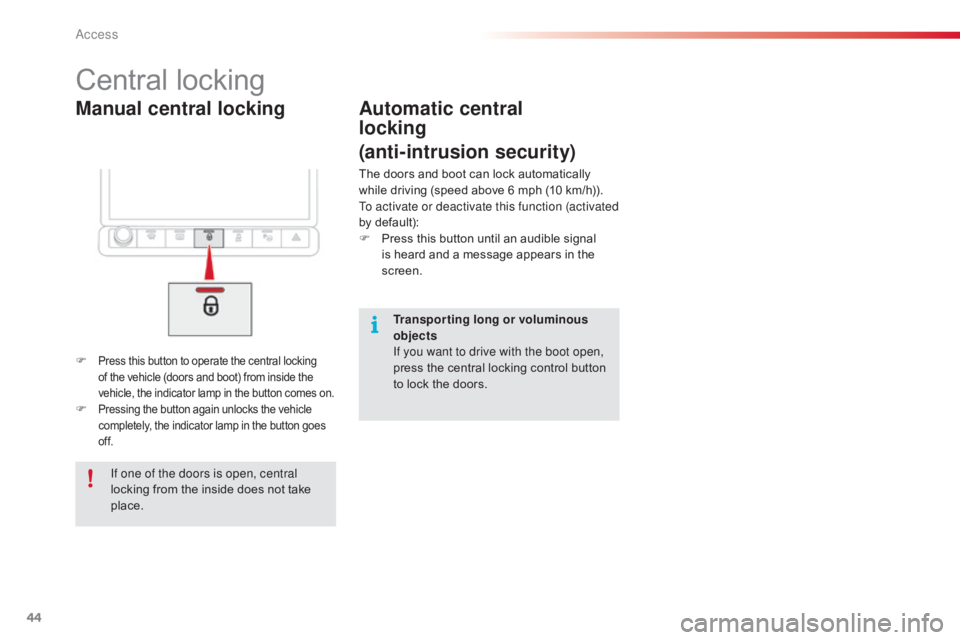
F Press this button to operate the central locking of the vehicle (doors and boot) from inside the v
ehicle, the indicator lamp in the button comes on.
F Pressing the button again unlocks the vehicle c
ompletely, the indicator lamp in the button goes o
f f.
Automatic central
locking
(anti-intrusion security)
The doors and boot can lock automatically while driving (speed above 6 mph (10 km/h)).
To activate or deactivate this function (activated
by
default):
F
P
ress this button until an audible signal
i
s heard and a message appears in the
sc
reen.
If one of the doors is open, central
locking
from
the
inside
does
not
take
p
lace. Transporting long or voluminous
objects
If you want to drive with the boot open,
press
the central locking control button
t
o lock the doors.
Access
Page 47 of 317
45
C4-cactus_en_Chap02_ouvertures_ed01-2016
Doors
From outside
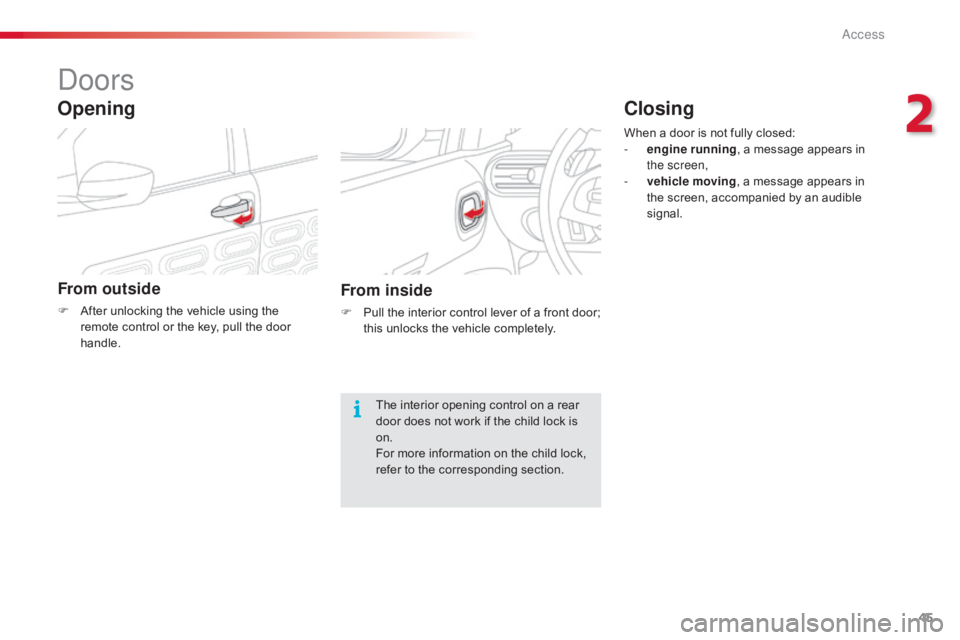
F After unlocking the vehicle using the r
emote control or the key, pull the door
han
dle.
Opening
From inside
F Pull the interior control lever of a front door; t
his unlocks the vehicle completely.
The
interior opening control on a rear
d
oor does not work if the child lock is
o
n.
For
more information on the child lock,
r
efer to the corresponding section.When
a door is not fully closed:
-
e
ngine running
, a message appears in
t
he screen,
-
v
ehicle moving
, a message appears in
t
he screen, accompanied by an audible
s
ignal.
Closing
2
Access
Page 48 of 317
46
C4-cactus_en_Chap02_ouvertures_ed01-2016
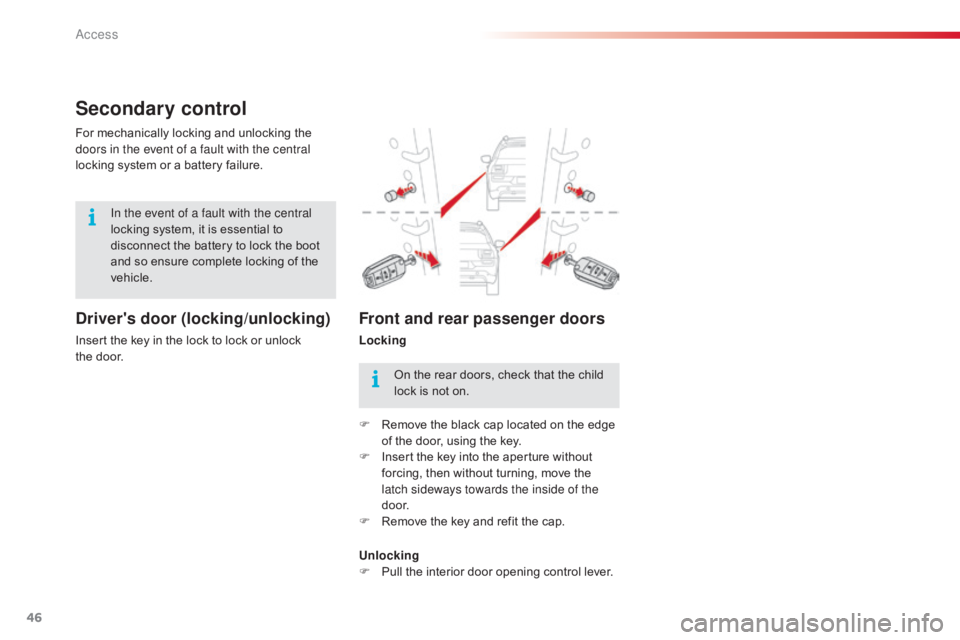
Secondary control
Driver's door (locking/unlocking)
Insert the key in the lock to lock or unlock the door.
For
mechanically locking and unlocking the
d
oors in the event of a fault with the central
locking system or a battery failure.
Front and rear passenger doors
Locking
In the event of a fault with the central
locking
system,
it
is
essential
to
d
isconnect
the
battery
to
lock
the
boot
a
nd
so
ensure
complete
locking
of
the
v
ehicle.
On the rear doors, check that the child
l
ock is not on.
F
R
emove the black cap located on the edge
o
f the door, using the key.
F
I
nsert the key into the aperture without
f
orcing, then without turning, move the
l
atch sideways towards the inside of the
d o o r.
F
R
emove the key and refit the cap.
Unlocking
F
P
ull the interior door opening control lever.
Access
Page 49 of 317
47
C4-cactus_en_Chap02_ouvertures_ed01-2016
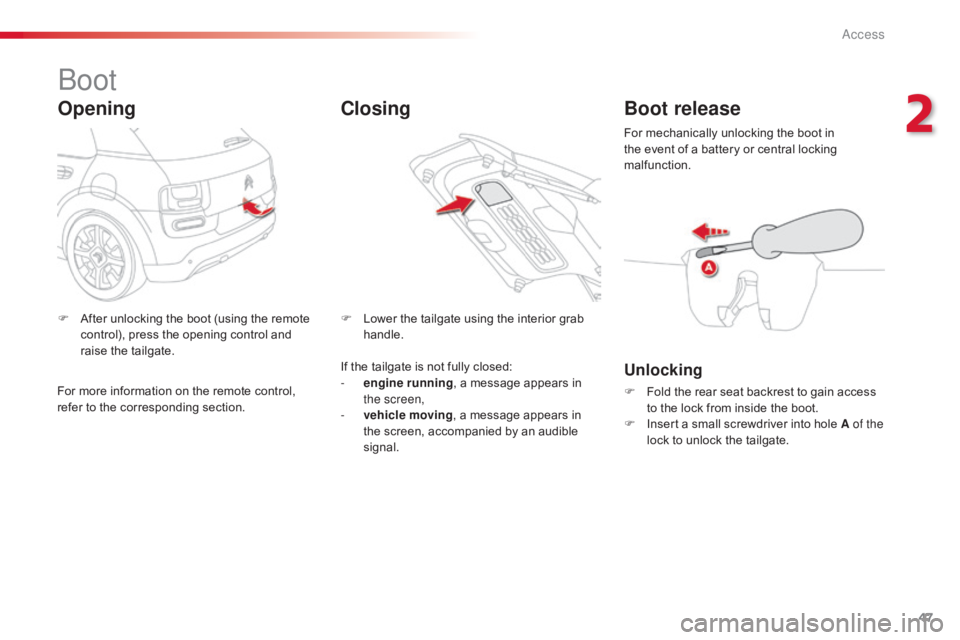
Boot
Opening
F After unlocking the boot (using the remote c
ontrol), press the opening control and
r
aise the tailgate. F
L ower the tailgate using the interior grab han
dle.
ClosingBoot release
Unlocking
F Fold the rear seat backrest to gain access t
o the lock from inside the boot.
F
I
nsert a small screwdriver into hole A of the
lock
to unlock the tailgate.
For
mechanically unlocking the boot in
t
he event of a battery or central locking
m
alfunction.
If
the
tailgate
is
not
fully
closed:
-
e
ngine running
,
a
message
appears
in
t
he screen,
-
v
ehicle moving ,
a
message
appears
in
t
he
screen,
accompanied
by
an
audible
s
ignal.
For
more
information
on
the
remote
control,
r
efer
to
the
corresponding
section.
2
Access
Page 56 of 317
54
C4-cactus_en_Chap03_Ergonomie-et-confort_ed01-2016
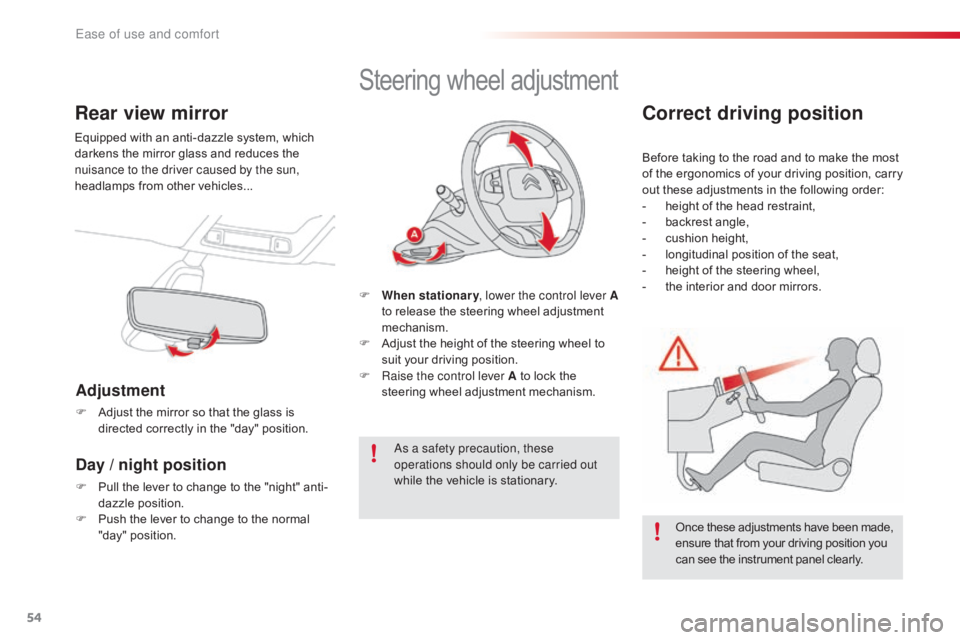
Rear view mirror
Equipped with an anti-dazzle system, which darkens the mirror glass and reduces the
n
uisance to the driver caused by the sun,
headlamps
from other vehicles...
Adjustment
F Adjust the mirror so that the glass is d
irected correctly in the "day" position.
Day / night position
F Pull the lever to change to the "night" anti-
dazzle position.
F
P
ush the lever to change to the normal
"
day" position.
Steering wheel ad justment
F When stationary , lower the control lever A
to release the steering wheel adjustment
m
echanism.
F
A
djust the height of the steering wheel to
s
uit your driving position.
F
Ra
ise the control lever A to lock the
s
teering wheel adjustment mechanism.
As a safety precaution, these
operations should only be carried out
while
the vehicle is stationary.
Correct driving position
Before taking to the road and to make the most of t he e rgonomics o f y our d riving p osition, c arry
o
ut these adjustments in the following order:
-
h
eight of the head restraint,
-
b
ackrest angle,
-
c
ushion height,
-
l
ongitudinal position of the seat,
-
h
eight of the steering wheel,
-
t
he interior and door mirrors.
Once
these adjustments have been made,
e
nsure that from your driving position you
c
an see the instrument panel clearly.
Ease of use and comfort
Page 69 of 317
67
C4-cactus_en_Chap03_Ergonomie-et-confort_ed01-2016
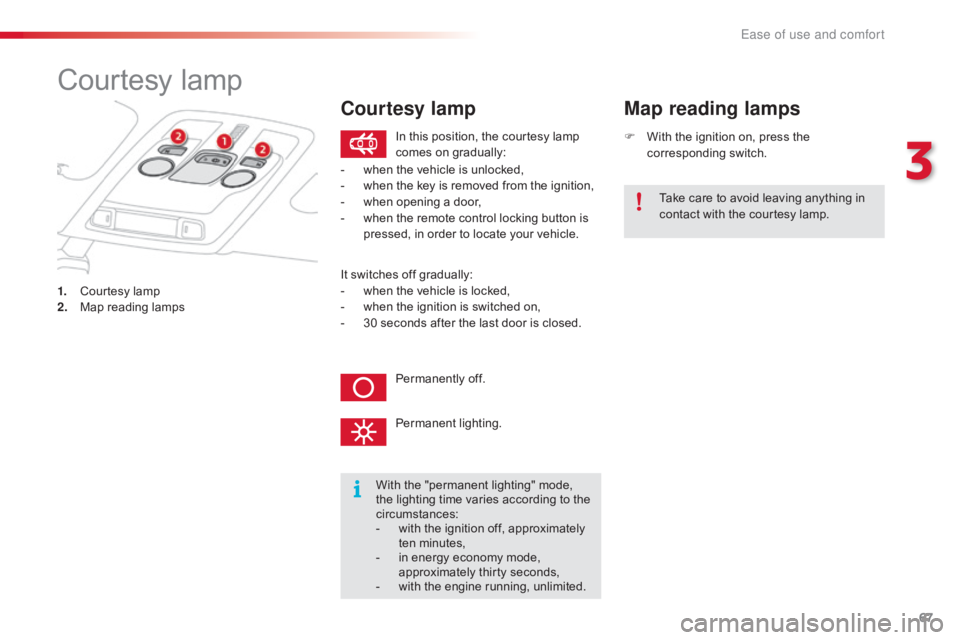
Courtesy lamp
1. Courtesy lamp
2. M ap reading lamps F
W
ith the ignition on, press the
c
orresponding
s
witch.
Map reading lamps
With the "permanent lighting" mode, t
he lighting time varies according to the
c
ircumstances:
-
w
ith the ignition off, approximately
t
en
m
inutes,
-
i
n energy economy mode,
a
pproximately thirty seconds,
-
w
ith the engine running, unlimited.
In
this position, the courtesy lamp
c
omes on gradually:
Permanently off.
Permanent
l
ighting.
-
w
hen the vehicle is unlocked,
-
w
hen the key is removed from the ignition,
-
w
hen opening a door,
-
w
hen the remote control locking button is
p
ressed, in order to locate your vehicle.
Take care to avoid leaving anything in
c
ontact with the courtesy lamp.
Courtesy lamp
It switches off gradually:
- w hen the vehicle is locked,
-
w
hen the ignition is switched on,
-
3
0 seconds after the last door is closed.
3
Ease of use and comfort
Page 93 of 317
91
C4-cactus_en_Chap05_securite_ed01-2016
Electronic stability control (ESC) incorporating the following systems:
-
a
nti-lock braking system (ABS) and
e
lectronic brake force distribution (EBFD),
-
e
mergency braking assistance (EBA),
-
w
heel anti-slip regulation (ASR) or traction
c
ontrol,
-
d
ynamic stability control (DSC).
Electronic stability control (ESC)
Definitions
Anti-lock braking system (ABS)
and electronic brake force
distribution (EBFD)
This system improves the stability and manoeuvrability of your vehicle when braking
a
nd contributes towards improved control on
c
orners, in particular on poor or slippery road
surfaces.
The
ABS prevents wheel lock in the event of
em
ergency
b
raking.
The
EBFD manages the braking pressure
w
heel by wheel.
Emergency braking assistance
(EBA)
In an emergency, this system enables you to reach the optimum braking pressure more
q
uickly and therefore reduce the stopping
di
stance.
It
is triggered according to the speed at which
t
he brake pedal is pressed. This is felt by a
r
eduction in the resistance of the pedal and an
increase
in the effectiveness of the braking.
Anti-slip regulation (ASR)
The ASR system (also known as Traction Control) optimises traction in order to limit
w
heel slip by acting on the brakes of the driving
w
heels and on the engine. It also improves
t
he directional stability of the vehicle on
acceleration.
Dynamic stability control (DSC)
If there is a difference between the path
followed by the vehicle and that required by
t
he driver, the DSC monitors each wheel and
a
utomatically acts on the brake of one or more
w
heels and on the engine to return the vehicle
t
o the required path, within the limits of the laws
o
f physics.
5
Safety
Page 94 of 317
92
C4-cactus_en_Chap05_securite_ed01-2016
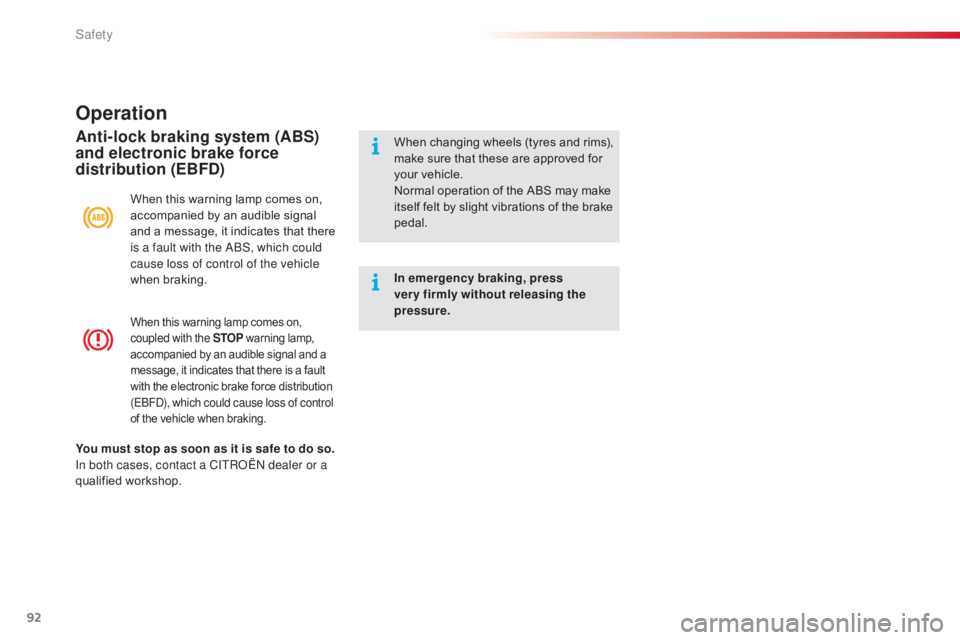
When this warning lamp comes on, coupled with the STOP w arning lam p, a
ccompanied by an audible signal and a
m
essage, it indicates that there is a fault
w
ith the electronic brake force distribution
(
EBFD), which could cause loss of control
of
the vehicle when braking.
Operation
When this warning lamp comes on, accompanied by an audible signal
a
nd a message, it indicates that there
i
s a fault with the ABS, which could
cause loss of control of the vehicle
when
b
raking.
Anti-lock braking system (ABS)
and electronic brake force
distribution (EBFD)When changing w heels ( tyres a nd r ims), m
ake sure that these are approved for
y
our vehicle.
Normal
operation of the ABS may make
i
tself felt by slight vibrations of the brake
ped
al.
In emergency braking, press
very firmly without releasing the
pressure.
You must stop as soon as it is safe to do so.
In both cases, contact a CITROËN dealer or a
qualified
w
orkshop.
Safety