tow CITROEN C4 2018 Service Manual
[x] Cancel search | Manufacturer: CITROEN, Model Year: 2018, Model line: C4, Model: CITROEN C4 2018Pages: 317, PDF Size: 9.31 MB
Page 199 of 317
197
C4-cactus_en_Chap08_En-cas-de-panne_ed01-2016
Changing a bulb
Front lamps
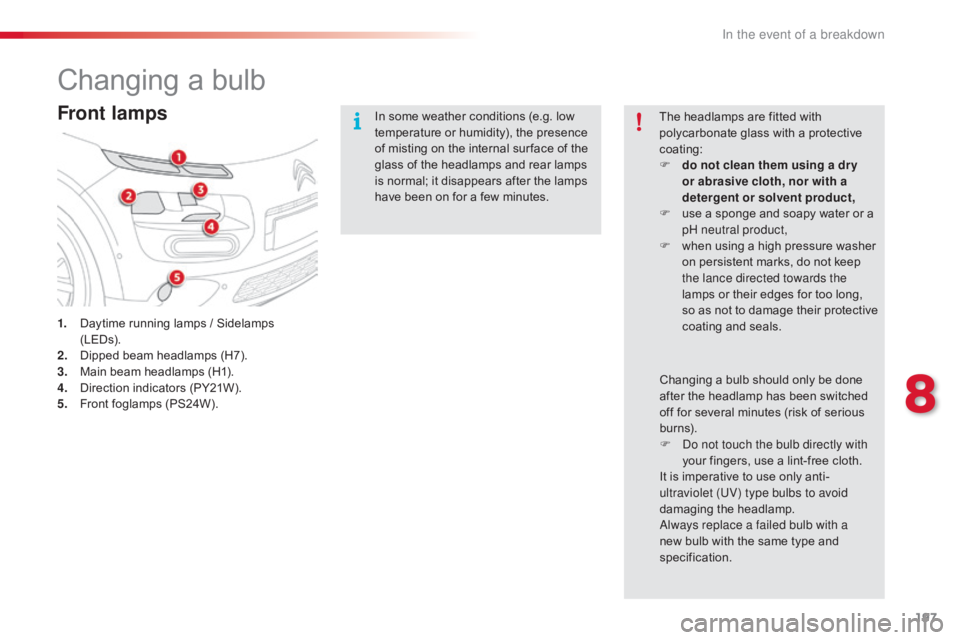
1. Daytime running lamps / Sidelamps (LE
Ds).
2.
D
ipped beam headlamps (H7).
3.
M
ain beam headlamps (H1).
4.
D
irection indicators (PY21W).
5.
F
ront foglamps (PS24W). In
some weather conditions (e.g. low
t
emperature or humidity), the presence
o
f misting on the internal sur face of the
g
lass of the headlamps and rear lamps
i
s normal; it disappears after the lamps
h
ave been on for a few minutes.
The headlamps are fitted with
p
olycarbonate glass with a protective
c
oating:
F
d
o not clean them using a dr y
or abrasive cloth, nor with a
detergent or solvent product,
F
u
se a sponge and soapy water or a
p
H neutral product,
F
w
hen using a high pressure washer
o
n persistent marks, do not keep
t
he lance directed towards the
lamps or their edges for too long, s
o as not to damage their protective c
oating a nd sea ls.
Changing
a bulb should only be done
a
fter the headlamp has been switched
o
ff for several minutes (risk of serious
b
urns).
F
D
o not touch the bulb directly with
your
fingers, use a lint-free cloth.
It
is imperative to use only anti-
ultraviolet (UV) type bulbs to avoid
damaging
t
he
h
eadlamp.
Always replace a failed bulb with a
new
bulb with the same type and
s
pecification.
8
In the event of a breakdown
Page 201 of 317
199
C4-cactus_en_Chap08_En-cas-de-panne_ed01-2016
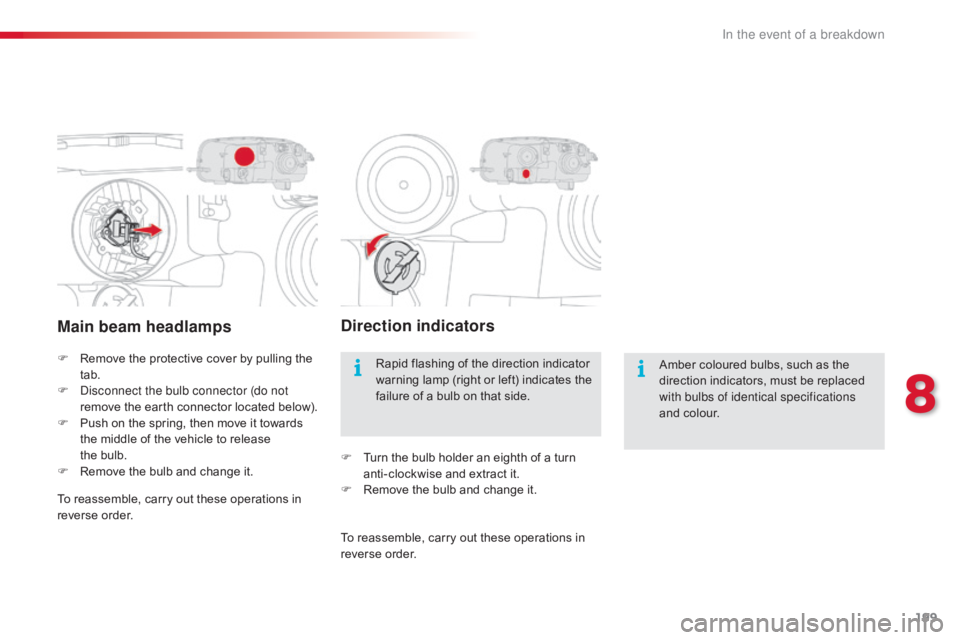
Main beam headlamps
F Remove the protective cover by pulling the t
ab.
F
D
isconnect the bulb connector (do not
remove
t
he
e
arth
c
onnector
lo
cated
belo
w).
F
P
ush on the spring, then move it towards
t
he middle of the vehicle to release
t
he bulb.
F
R
emove the bulb and change it.
Direction indicators
Amber coloured bulbs, such as the direction indicators, must be replaced
w
ith bulbs of identical specifications
and
colour.
Rapid
flashing
of
the
direction
indicator
w
arning
lamp
(right
or
left)
indicates
the
f
ailure
of
a
bulb
on
that
side.
F
T
urn
the
bulb
holder
an
eighth
of
a
turn
a
nti-clockwise
and
extract
it.
F
R
emove
the
bulb
and
change
it.
To
reassemble,
carry
out
these
operations
in
r
everse
o
rder. To
reassemble,
carry
out
these
operations
in
r
everse
o
rder.
8
In the event of a breakdown
Page 204 of 317
202
C4-cactus_en_Chap08_En-cas-de-panne_ed01-2016
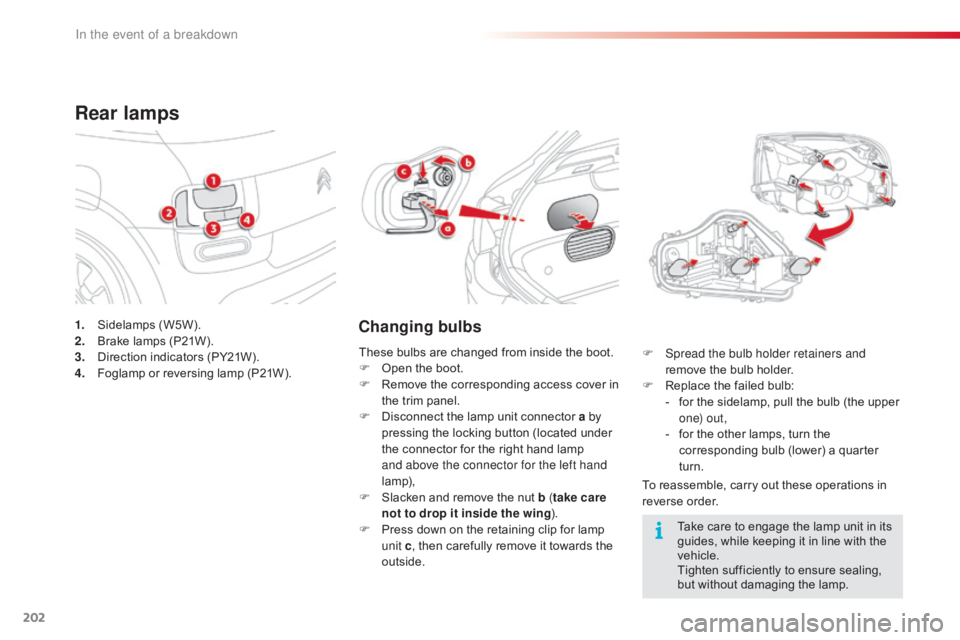
1. Sidelamps (W5W).
2. B rake lamps (P21W).
3.
D
irection indicators (PY21W).
4.
F
oglamp or reversing lamp (P21W).
Rear lamps
Changing bulbs
To reassemble, carry out these operations in reverse o rder.
F
S
pread the bulb holder retainers and
remove the bulb holder.
F
R
eplace the failed bulb:
-
f
or the sidelamp, pull the bulb (the upper
o
n e) o u t ,
-
f
or the other lamps, turn the
c
orresponding bulb (lower) a quarter
t
urn.
These
bulbs
are
changed
from
inside
the
boot.
F
O
pen
the
boot.
F
R
emove
the
corresponding
access
cover
in
t
he
trim
panel.
F
D
isconnect
the
lamp
unit
connector
a by
pressing
the
locking
button
(located
under
t
he
connector
for
the
right
hand
lamp
a
nd above the connector for the left hand
lamp),
F
S
lacken
and
remove
the
nut
b ( take care
not to drop it inside the wing ).
F
P
ress
down
on
the
retaining
clip
for
lamp
u
nit c,
then
carefully
remove
it
towards
the
o
utside. Take
care to engage the lamp unit in its
g
uides, while keeping it in line with the
v
ehicle.
Tighten
sufficiently to ensure sealing,
b
ut without damaging the lamp.
In the event of a breakdown
Page 218 of 317
216
C4-cactus_en_Chap08_En-cas-de-panne_ed01-2016
To w i n g
General recommendations
Observe the legislation in force in your country.
E nsure that the weight of the towing vehicle is higher than that of the towed vehicle.
The
driver must remain at the wheel of the towed vehicle and must have a valid driving licence.
When
towing a vehicle with all four wheels on the ground, always use an approved towing arm;
r
ope and straps are prohibited.
The
towing vehicle must move off gently.
When
towing a vehicle with the engine off, there is no longer any power assistance for braking
o
r steering.
In
the following cases, you must always call on a professional recovery service:
-
v
ehicle broken down on a motor way or fast road,
-
f
our-wheel drive vehicle,
-
w
hen it is not possible to put the gearbox into neutral, unlock the steering, or release the
par
king
b
rake,
-
t
owing with only two wheels on the ground,
-
w
here there is no approved towing arm available...
Procedure
for
having
your
vehicle
towed
or
for
towing
another vehicle using a removable towing eye.
The towing eye is stowed under the boot floor,
or
may
be
located
under
the
front
passenger
sea
t, d
epending o
n v
ersion.
In the event of a breakdown
Page 219 of 317
217
C4-cactus_en_Chap08_En-cas-de-panne_ed01-2016
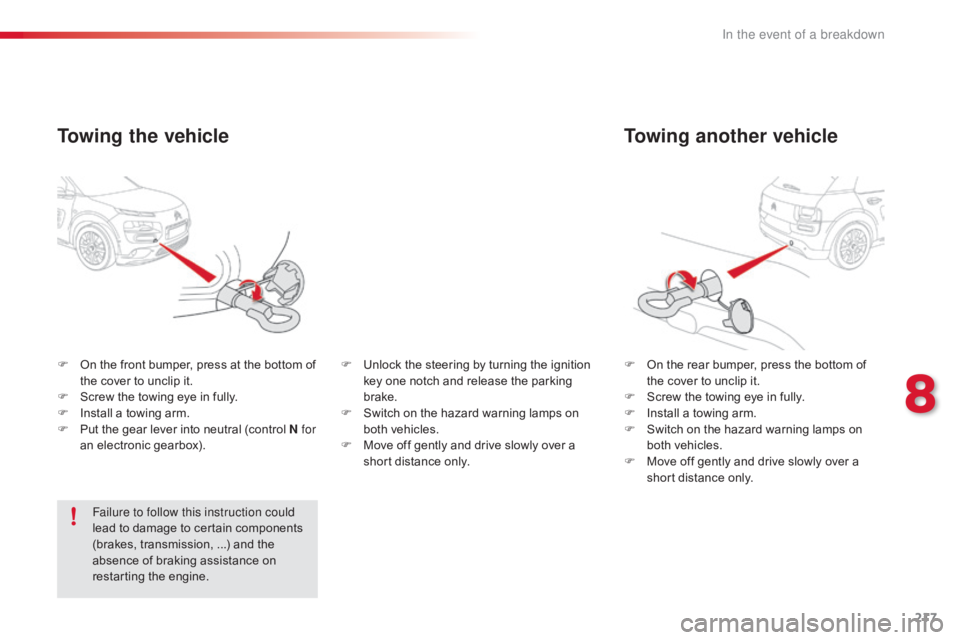
Towing another vehicle
F On the rear bumper, press the bottom of t
he cover to unclip it.
F
S
crew the towing eye in fully.
F
I
nstall a towing arm.
F
S
witch on the hazard warning lamps on
b
oth vehicles.
F
M
ove off gently and drive slowly over a
s
hort distance only.
F
O
n
the
front
bumper,
press
at
the
bottom
of
t
he
cover
to
unclip
it.
F
S
crew
the
towing
eye
in
fully.
F
I
nstall
a
towing
arm.
F
P
ut
the
gear
lever
into
neutral
(control
N for
an
electronic
gearbox).
Towing the vehicle
Failure to follow this instruction could
lead to damage to certain components
(
brakes, transmission, ...) and the
a
bsence of braking assistance on
r
estarting the engine. F
U
nlock the steering by turning the ignition
k
ey one notch and release the parking
b
rake.
F
S
witch on the hazard warning lamps on
b
oth vehicles.
F
M
ove off gently and drive slowly over a
s
hort distance only.
8
In the event of a breakdown
Page 222 of 317
220
C4-cactus_en_Chap09_caracteristiques-techniques_ed01-2016
EnginePureTech 75PureTech 82 PureTech 82 S&SPureTech 110 S&S
Gearbox Manual
(5-speed) Manual
(5-speed) ETG electronic
(5-speed) Manual
(5-speed)
Model code 0PHMU0PHMZ0PHNZ
Unladen
weight 965965 9751 020
Kerb
weight* 1 0401 040 1
0501
095
Gross
vehicle weight
(GV W) 1
5001
5001
5101
555
Gross
train weight (GTW)
on
a 12 % gradient 1
9001
9001
9102
155
Braked
trailer**
o
n a 10 % or 12 % gradient 720
720 725825
Unbraked
t
railer** 520520 525545
Recommended
nose weight (towbar) 55555555
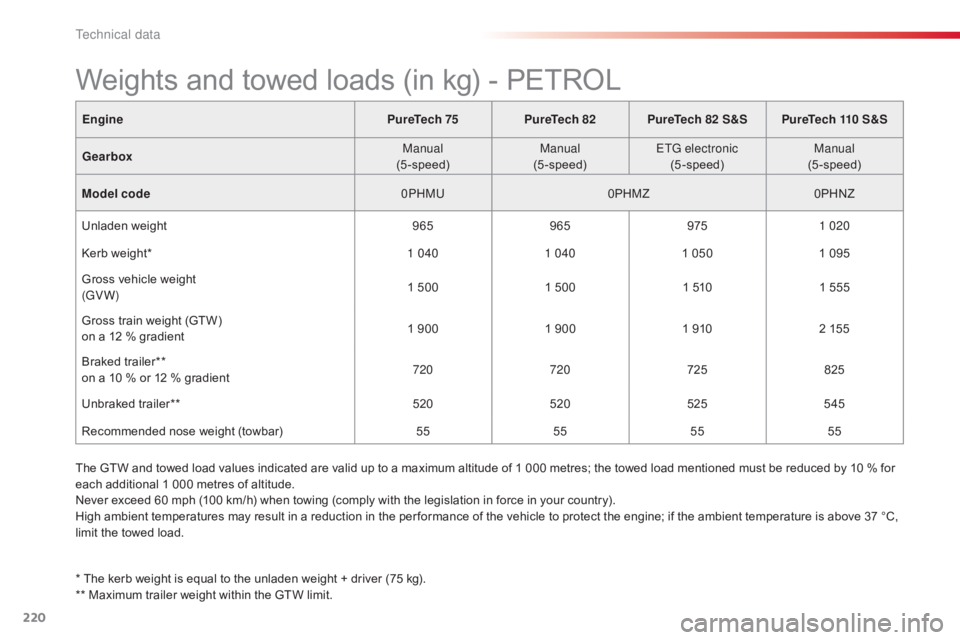
Weights and towed loads (in kg) - PETROL
The GTW and towed load values indicated are valid up to a maximum altitude of 1 000 metres; the towed load mentioned must be reduced by 10 % for e
ach additional 1 000 metres of altitude.
Never
exceed 60 mph (100 km/h) when towing (comply with the legislation in force in your country).
High
ambient temperatures may result in a reduction in the per formance of the vehicle to protect the engine; if the ambient temperature is above 37 °C,
l
imit the towed load.
*
The kerb weight is equal to the unladen weight + driver (75 kg).
**
Maximum trailer weight within the GTW limit.
Technical data
Page 224 of 317
222
C4-cactus_en_Chap09_caracteristiques-techniques_ed01-2016
Enginee-HDi 92BlueHDi 100 BlueHDi 100 S&S
Gearbox ETG6 electronic
(6-speed) Manual
(5-speed) Manual
(5-speed) ETG6 electronic
(6-speed)
Model code 0B9HP0BBHY 0BBHY
Unladen
weight 1
0551 068 1 0701
085
Kerb
weight* 1
1301
1431
1451 160
Gross
vehicle weight (GV W) 1
6051 610 1 6101
630
Gross
train weight (GTW)
o
n a 12% gradient 2
2052 210 2 2102
230
Braked
trailer (within GTW limit)
on
a 10% or 12% gradient 825
825825825
Unbraked
t
railer 565570570580
Recommended
nose weight (towbar) 55555555
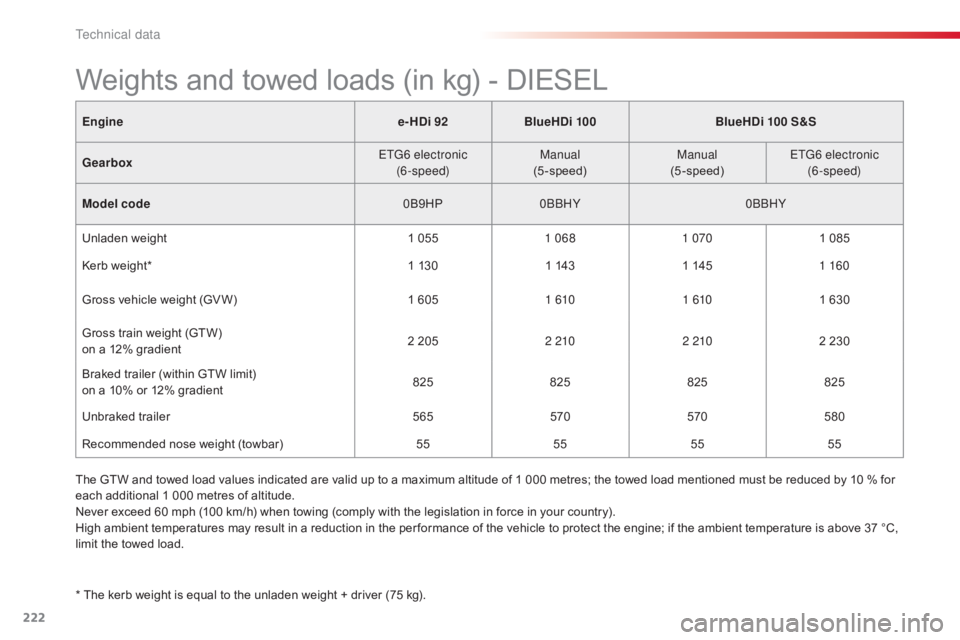
Weights and towed loads (in kg) - DIESEL
* The kerb weight is equal to the unladen weight + driver (75 kg).
T he GTW and towed load values indicated are valid up to a maximum altitude of 1 000 metres; the towed load mentioned must be reduced by 10 % for
e
ach additional 1 000 metres of altitude.
Never exceed 60 mph (100 km/h) when towing (comply with the legislation in force in your country).
High ambient temperatures may result in a reduction in the per formance of the vehicle to protect the engine; if the ambient temperature is above 37 °C,
l
imit the towed load.
Technical data
Page 255 of 317
253
C4-cactus_en_Chap10b_SMEGplus_ed01-2016
Level 1Level 2 Level 3 Comments
Navigation
Secondary page
Enter destination Address
Current
loc.
Address
se
ttings
Point of interest
Town center
Save Save
the current address.
Add waypoint Add
a waypoint to the route.
Navigate
toPress
to calculate the route.
Contacts Addresses
Select
a contact then calculate the route.
Add contact
Add waypoint
Search for contact
Navigate
to
On the map Display
the map and zoom to view the roads.
Itinerary Create, add or delete a waypoint or view the
itinerary.
Stop Delete
n
avigation
i
nformation.
Navigate to Press
to calculate the route.
.
Audio and Telematics
Page 260 of 317
258
C4-cactus_en_Chap10b_SMEGplus_ed01-2016
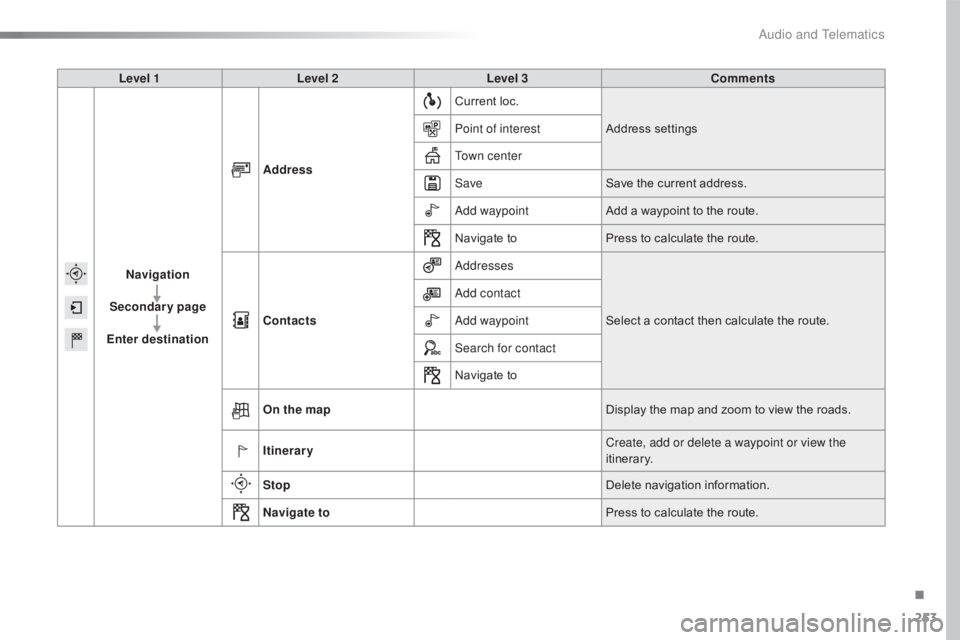
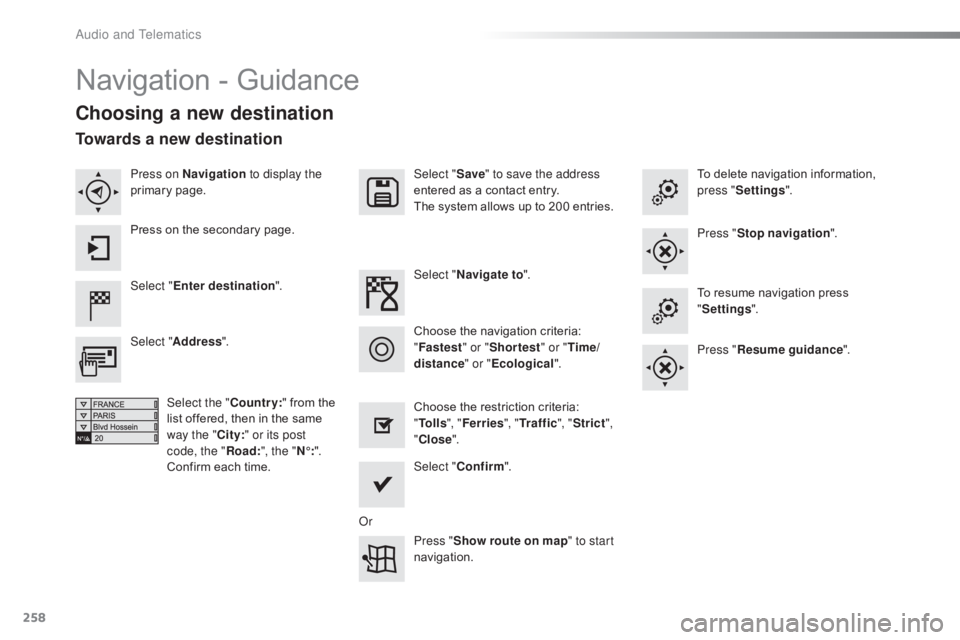
Navigation - Guidance
Choosing a new destination
Select "Enter destination ". Select "
Save" to save the address
entered as a contact entry.
The system allows up to 200 entries.
Select " Confirm ".
Press " Show route on map " to start
navigation.
Select "
Address ".
Select the " Country:"
from the
l
ist offered, then in the same
w
ay the "City:" or its post
code, the " Road:", the " N°:".
Confirm
each time. Select "
Navigate to ".
Choose the restriction criteria:
"T
o l l s", "Ferries ", "Tr a f f i c ", "Strict ",
" Close ".
Choose
the navigation criteria:
"F
astest" or "Shortest " or "Time/
distance " or "Ecological". To
delete navigation information,
p
ress "
Settings ".
Press " Stop navigation ".
To resume navigation press
"S
ettings".
Press " Resume guidance ".
Press on Navigation
to display the
primary
pag
e.
Press on the secondary page.
Towards a new destination
Or
Audio and Telematics
Page 261 of 317
259
C4-cactus_en_Chap10b_SMEGplus_ed01-2016
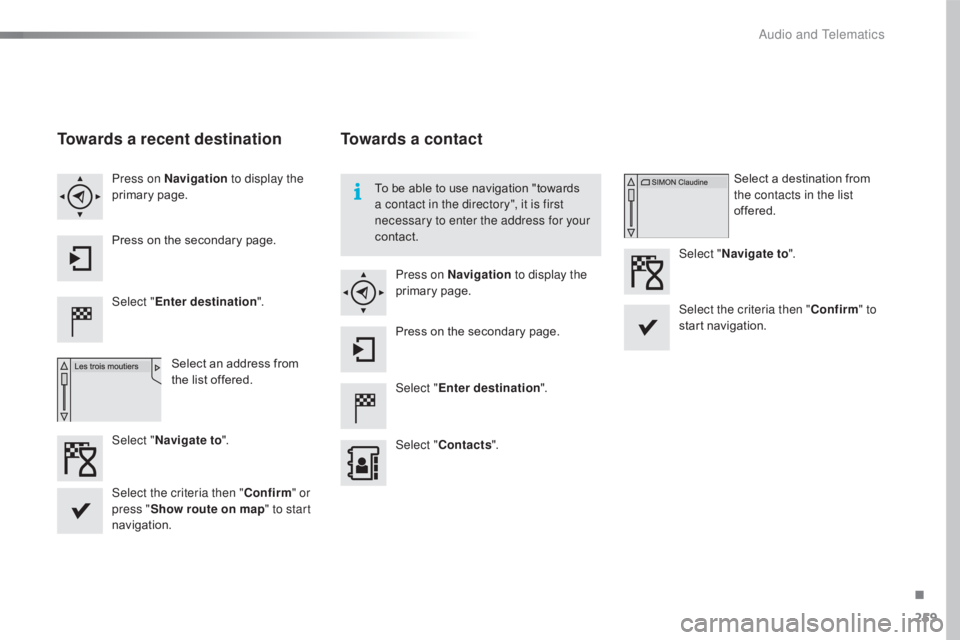
Towards a recent destination
Select "Enter destination ".
Select an address from
t
he list offered.
Press on Navigation
to display the
primary
pag
e.
Press on the secondary page.
Select " Navigate to ".
Towards a contact
Select "Enter destination ".
Select " Contacts ".
Press on Navigation
to display the
primary
pag
e.
Press on the secondary page. Select a destination from
t
he contacts in the list
offered.
Select " Navigate to ".
Select the criteria then " Confirm" to
start
n
avigation.
To
be able to use navigation "towards
a c
ontact in the directory", it is first
necessary to enter the address for your
contact.
Select the criteria then " Confirm" or
press " Show route on map " to start
navigation.
.
Audio and Telematics