ESP CITROEN C4 2019 User Guide
[x] Cancel search | Manufacturer: CITROEN, Model Year: 2019, Model line: C4, Model: CITROEN C4 2019Pages: 317, PDF Size: 9.31 MB
Page 33 of 317
31
C4-cactus_en_Chap01_Instruments-de-bord_ed01-2016
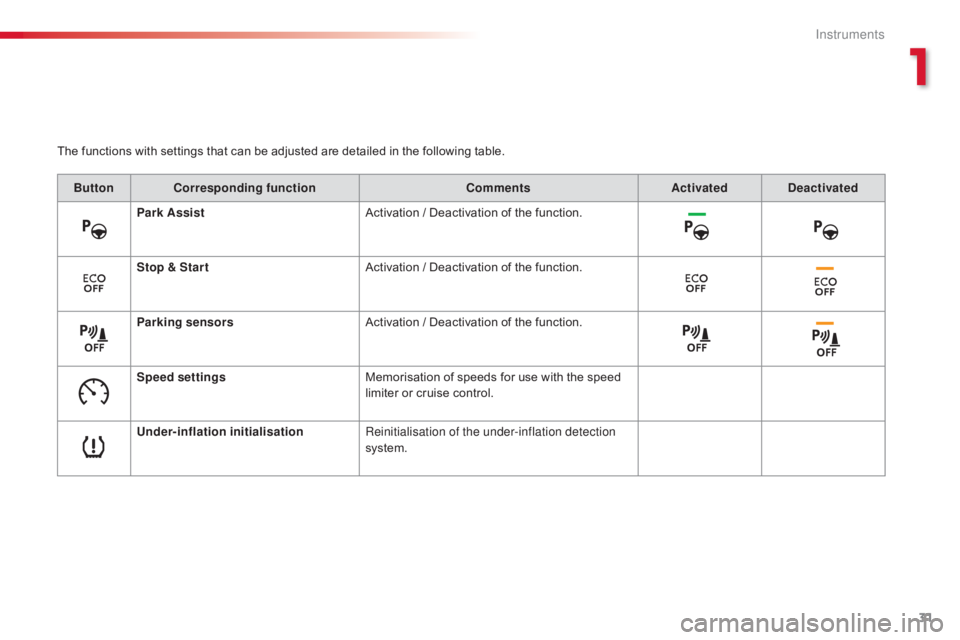
The functions with settings that can be adjusted are detailed in the following table.
Bu tton Corresponding function CommentsActivated Deactivated
Park Assist Activation
/ Deactivation of the function.
Stop & Star t Activation
/ Deactivation of the function.
Parking sensors Activation
/ Deactivation of the function.
Speed settings Memorisation
of speeds for use with the speed
l
imiter or cruise control.
Under-inflation initialisation Reinitialisation of the under-inflation detection
system.
1
Instruments
Page 34 of 317
32
C4-cactus_en_Chap01_Instruments-de-bord_ed01-2016
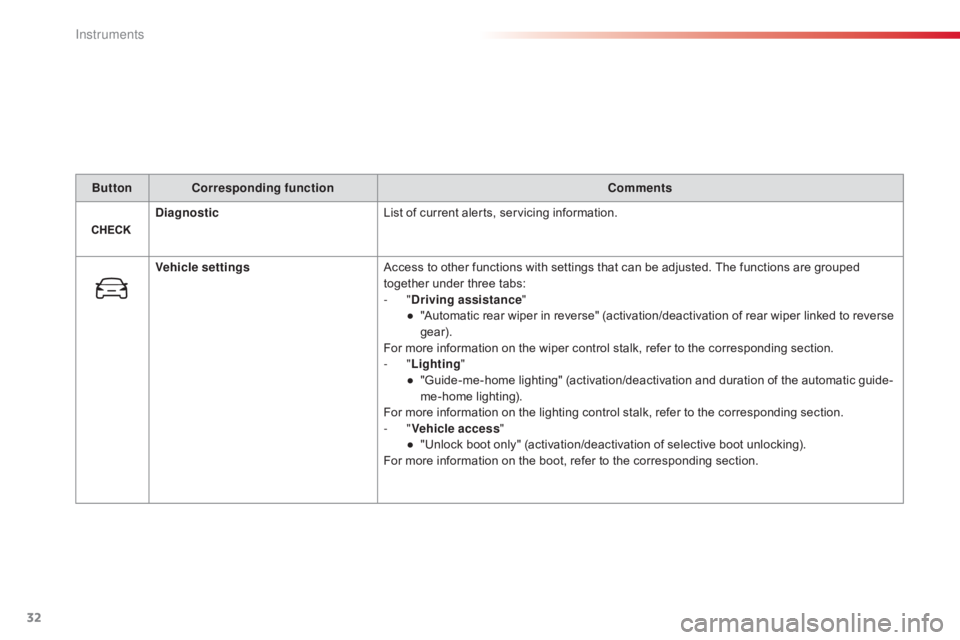
ButtonCorresponding function Comments
Diagnostic List
of current alerts, servicing information.
Vehicle settings Access
to other functions with settings that can be adjusted. The functions are grouped
t
ogether under three tabs:
-
"Driving assistance "
●
"
Automatic rear wiper in reverse" (activation/deactivation of rear wiper linked to reverse
g
ear).
For
more information on the wiper control stalk, refer to the corresponding section.
-
"Lighting "
●
"
Guide-me-home lighting" (activation/deactivation and duration of the automatic guide-
me-home
l
ighting).
For
more information on the lighting control stalk, refer to the corresponding section.
-
"Vehicle access "
●
"
Unlock boot only" (activation/deactivation of selective boot unlocking).
For
more information on the boot, refer to the corresponding section.
Instruments
Page 35 of 317
33
C4-cactus_en_Chap01_Instruments-de-bord_ed01-2016
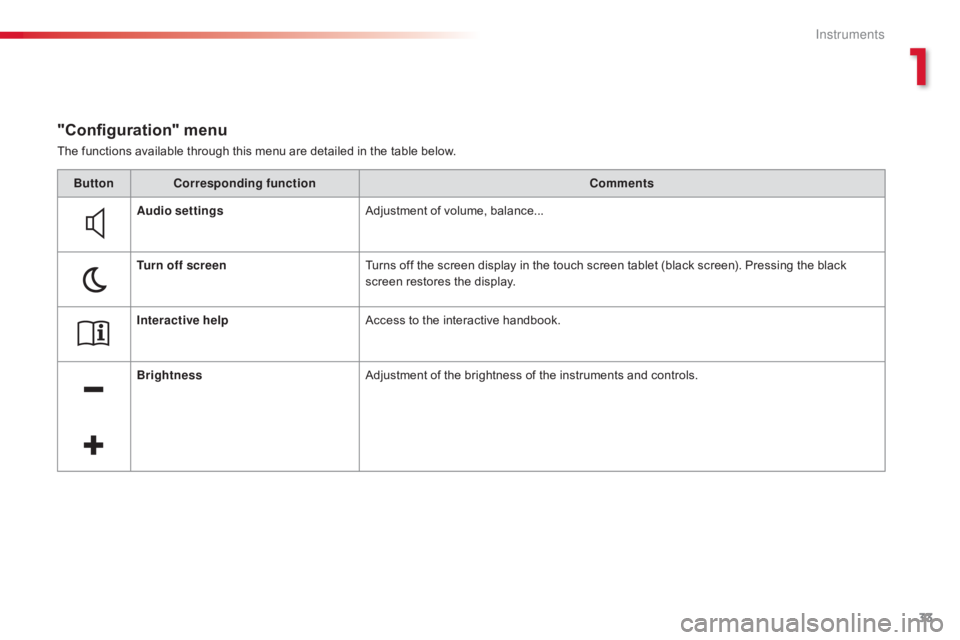
The functions available through this menu are detailed in the table below.
"Configuration" menu
ButtonCorresponding function Comments
Audio settings Adjustment
of volume, balance...
Turn off screen Turns
off the screen display in the touch screen tablet (black screen). Pressing the black
s
creen restores the display.
Interactive help Access
to the interactive handbook.
Brightness Adjustment
of the brightness of the instruments and controls.
1
Instruments
Page 36 of 317
34
C4-cactus_en_Chap01_Instruments-de-bord_ed01-2016
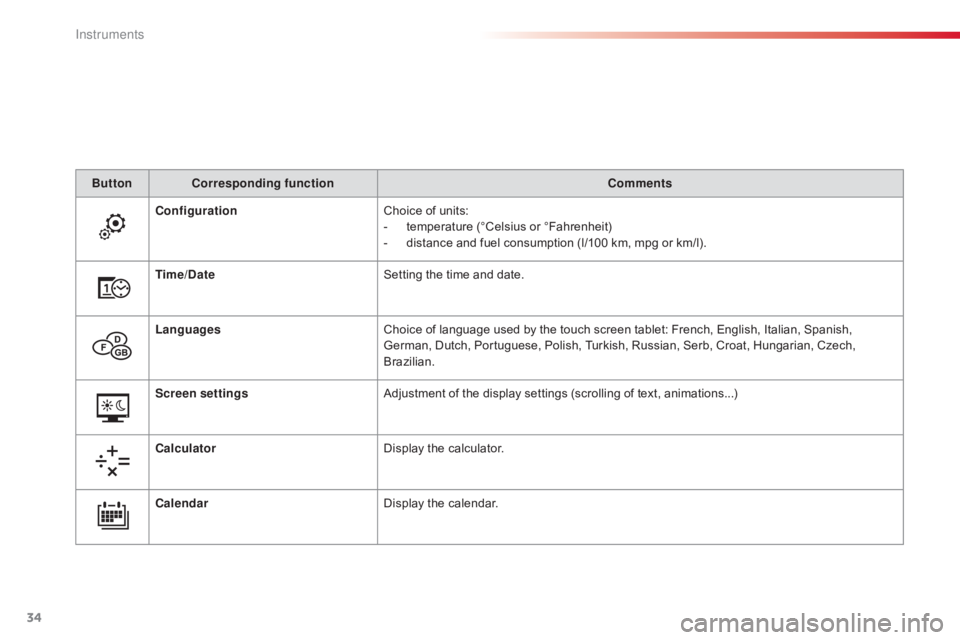
ButtonCorresponding function Comments
Configuration Choice
of units:
-
t
emperature (°Celsius or °Fahrenheit)
-
d
istance and fuel consumption (l/100 km, mpg or km/l).
Time/Date Setting
the time and date.
Languages Choice
of language used by the touch screen tablet: French, English, Italian, Spanish,
G
erman, Dutch, Portuguese, Polish, Turkish, Russian, Serb, Croat, Hungarian, Czech,
B
razilian.
Screen settings Adjustment
of the display settings (scrolling of text, animations...)
Calculator Display
the calculator.
Calendar Display
the calendar.
Instruments
Page 43 of 317
41
C4-cactus_en_Chap02_ouvertures_ed01-2016
If one of the doors or the boot is still
open, the central locking does not
t
ake place; the vehicle locks then
i
mmediately unlocks, identifiable by the
s
ound of the locks rebounding.
When
the vehicle is locked, if it is
u
nlocked inadvertently, it will lock
a
gain automatically after thirty seconds
u
nless a door or the boot is open.
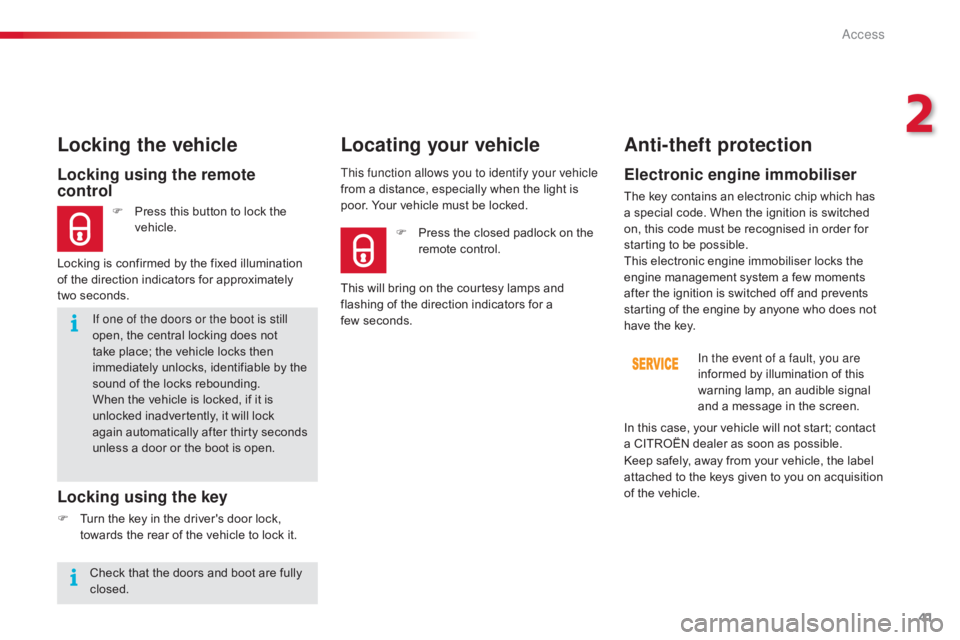
Locking using the remote
control
F Press this button to lock the v
ehicle.
Locking the vehicle
Locking is confirmed by the fixed illumination
o f the direction indicators for approximately
two
seconds.
Locking using the key
F Turn the key in the driver's door lock, t
owards the rear of the vehicle to lock it.This function allows you to identify your vehicle
from
a distance, especially when the light is
p
oor. Your vehicle must be locked.
Locating your vehicle
Anti-theft protection
Electronic engine immobiliser
The key contains an electronic chip which has a
special code. When the ignition is switched
o
n, this code must be recognised in order for
s
tarting to be possible.
This
electronic engine immobiliser locks the
e
ngine management system a few moments
a
fter the ignition is switched off and prevents
s
tarting of the engine by anyone who does not
h
ave the key.In the event of a fault, you are
informed
by illumination of this
w
arning lamp, an audible signal
a
nd a message in the screen.
F
P
ress
the
closed
padlock
on
the
r
emote
control.
This
will
bring
on
the
courtesy
lamps
and
f
lashing
of
the
direction
indicators
for
a
f
ew seconds.
Keep
safely, away from your vehicle, the label
a
ttached to the keys given to you on acquisition
o
f the vehicle.
In
this case, your vehicle will not start; contact
a
CITROËN dealer as soon as possible.
Check
that
the
doors
and
boot
are
fully
c
losed.
2
Access
Page 47 of 317
45
C4-cactus_en_Chap02_ouvertures_ed01-2016
Doors
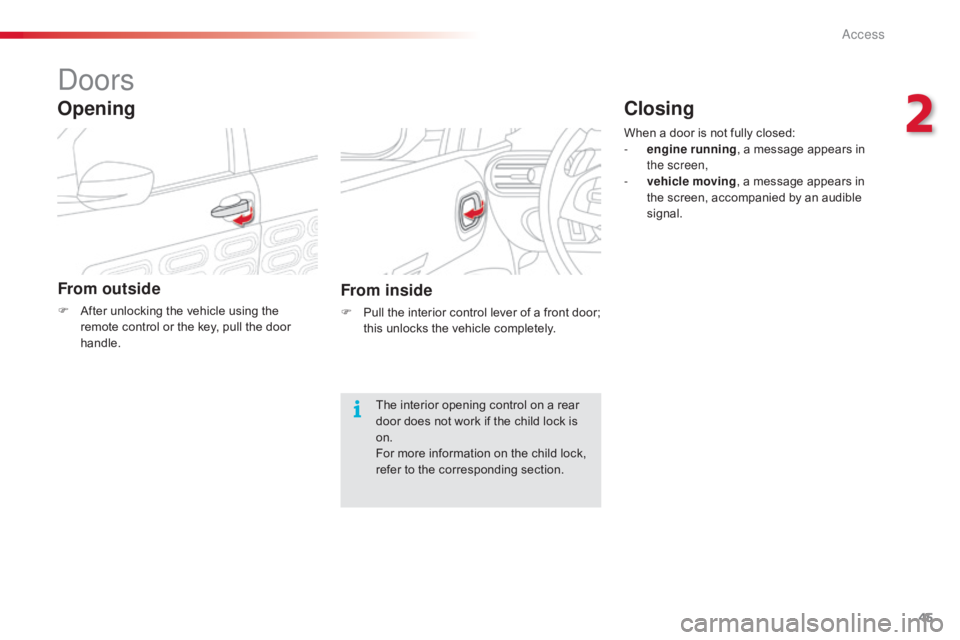
From outside
F After unlocking the vehicle using the r
emote control or the key, pull the door
han
dle.
Opening
From inside
F Pull the interior control lever of a front door; t
his unlocks the vehicle completely.
The
interior opening control on a rear
d
oor does not work if the child lock is
o
n.
For
more information on the child lock,
r
efer to the corresponding section.When
a door is not fully closed:
-
e
ngine running
, a message appears in
t
he screen,
-
v
ehicle moving
, a message appears in
t
he screen, accompanied by an audible
s
ignal.
Closing
2
Access
Page 49 of 317
47
C4-cactus_en_Chap02_ouvertures_ed01-2016
Boot
Opening
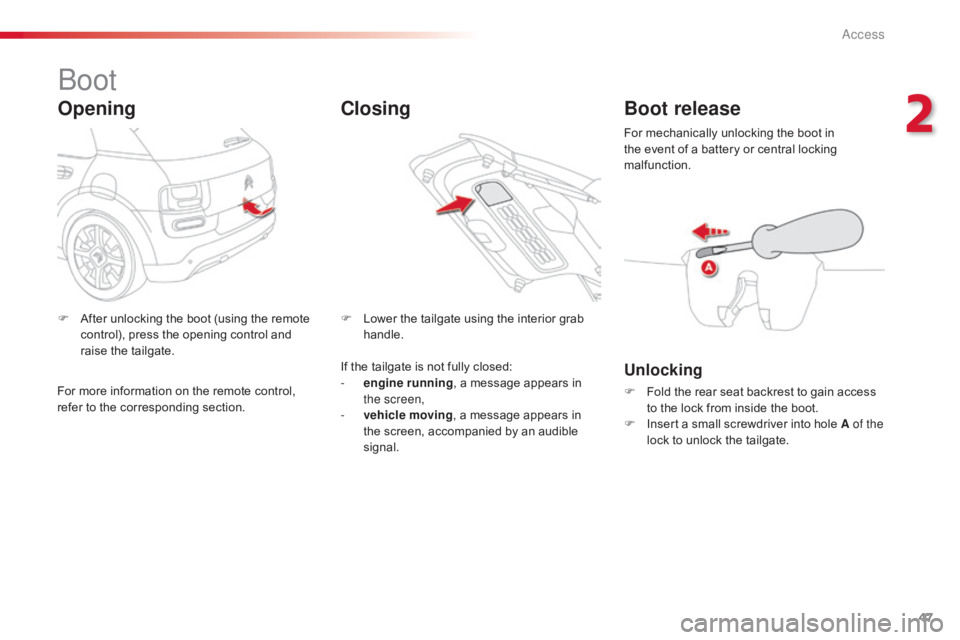
F After unlocking the boot (using the remote c
ontrol), press the opening control and
r
aise the tailgate. F
L ower the tailgate using the interior grab han
dle.
ClosingBoot release
Unlocking
F Fold the rear seat backrest to gain access t
o the lock from inside the boot.
F
I
nsert a small screwdriver into hole A of the
lock
to unlock the tailgate.
For
mechanically unlocking the boot in
t
he event of a battery or central locking
m
alfunction.
If
the
tailgate
is
not
fully
closed:
-
e
ngine running
,
a
message
appears
in
t
he screen,
-
v
ehicle moving ,
a
message
appears
in
t
he
screen,
accompanied
by
an
audible
s
ignal.
For
more
information
on
the
remote
control,
r
efer
to
the
corresponding
section.
2
Access
Page 50 of 317
48
C4-cactus_en_Chap02_ouvertures_ed01-2016
Front electric window controls
The electric window switches
remain operational for approximately
4
5 seconds after the ignition is
s
witched off or until a front door
is
opened. If, during this period of
4
5 seconds, you open a door while
o
perating a window, the window stops.
T
he window switch will then only be
operative
after the ignition is switched
o
n again.
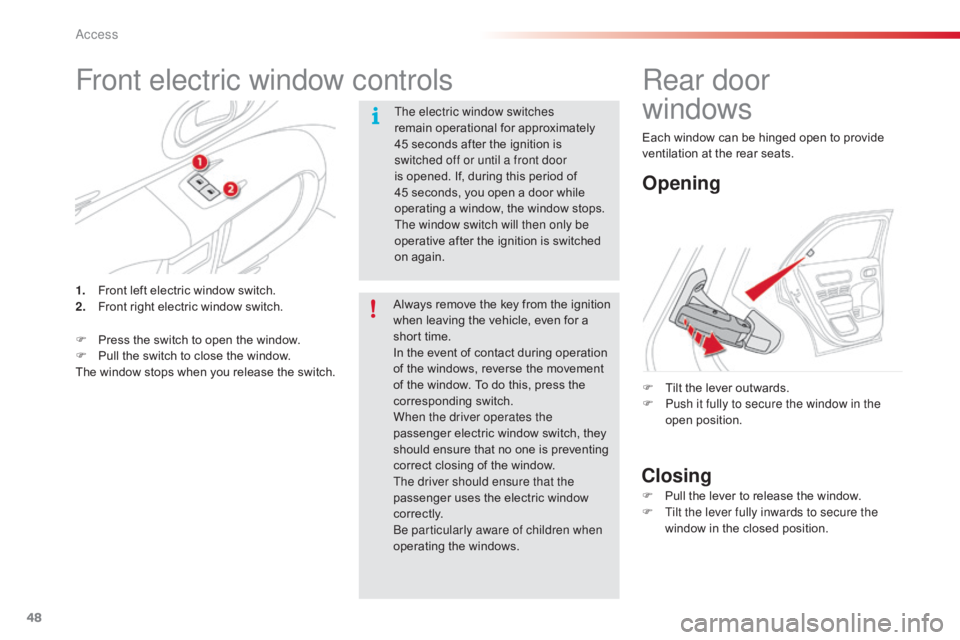
1.
F
ront
left
electric
window
switch.
2.
F
ront
right
electric
window
switch.
F
P
ress
the
switch
to
open
the
window.
F
P
ull
the
switch
to
close
the
window.
The
window
stops
when
you
release
the
switch. Always
remove the key from the ignition
w
hen leaving the vehicle, even for a
s
hort time.
In
the event of contact during operation
o
f the windows, reverse the movement
o
f the window. To do this, press the
c
orresponding
s
witch.
When the driver operates the
passenger
electric window switch, they
s
hould ensure that no one is preventing
c
orrect closing of the window.
The driver should ensure that the
passenger
uses the electric window
c
o r r e c t l y.
Be particularly aware of children when
operating
t
he
w
indows.
Rear door
windows
Opening
Closing
F Tilt the lever outwards.
F P ush it fully to secure the window in the
open
p
osition.
F
P
ull the lever to release the window.
F
T
ilt the lever fully inwards to secure the
window
in the closed position.
Each
window can be hinged open to provide
v
entilation at the rear seats.
Access
Page 53 of 317
51
C4-cactus_en_Chap03_Ergonomie-et-confort_ed01-2016
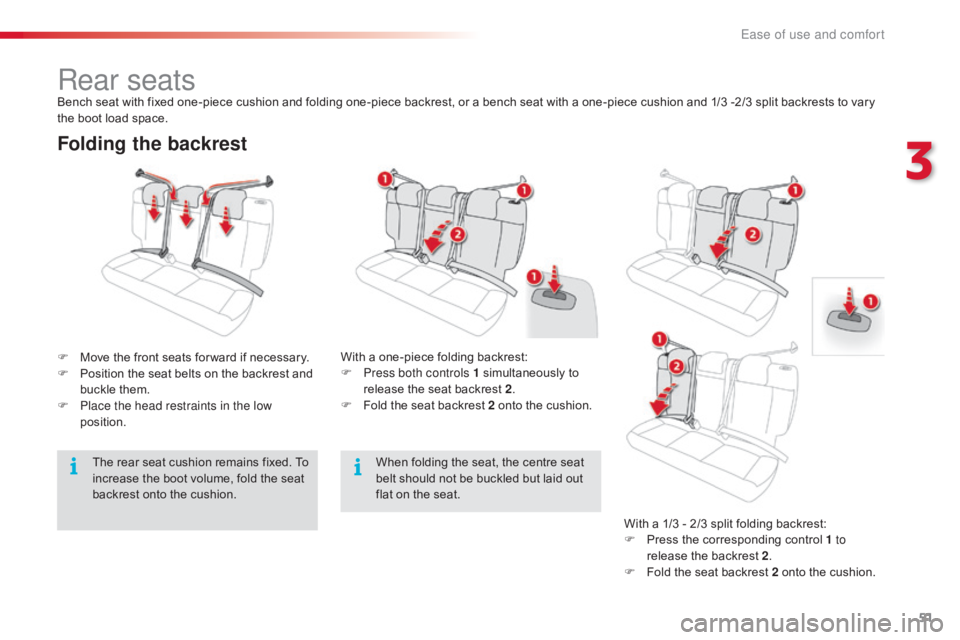
Folding the backrest
F Move the front seats for ward if necessary.
F P osition the seat belts on the backrest and
b
uckle them.
F
P
lace the head restraints in the low
position. With
a one-piece folding backrest:
F P ress both controls 1 simultaneously to
r
elease the seat backrest 2.
F
F
old the seat backrest 2 onto the cushion.
Rear seatsBench seat with fixed one-piece cushion and folding one-piece backrest, or a bench seat with a one-piece cushion and 1/3 -2/3 split backrests to vary the boot load space.
When
folding the seat, the centre seat
b
elt should not be buckled but laid out
f
lat on the seat.With
a 1/3 - 2/3 split folding backrest:
F
P
ress the corresponding control 1 to
release
the backrest 2.
F
F
old the seat backrest 2 onto the cushion.
The
rear seat cushion remains fixed. To
i
ncrease the boot volume, fold the seat
b
ackrest onto the cushion.
3
Ease of use and comfort
Page 55 of 317
53
C4-cactus_en_Chap03_Ergonomie-et-confort_ed01-2016
Mirrors
Each fitted with an adjustable mirror glass providing the lateral rear ward vision necessary
f
or overtaking or parking. They can also be
f
olded for parking in confined spaces.
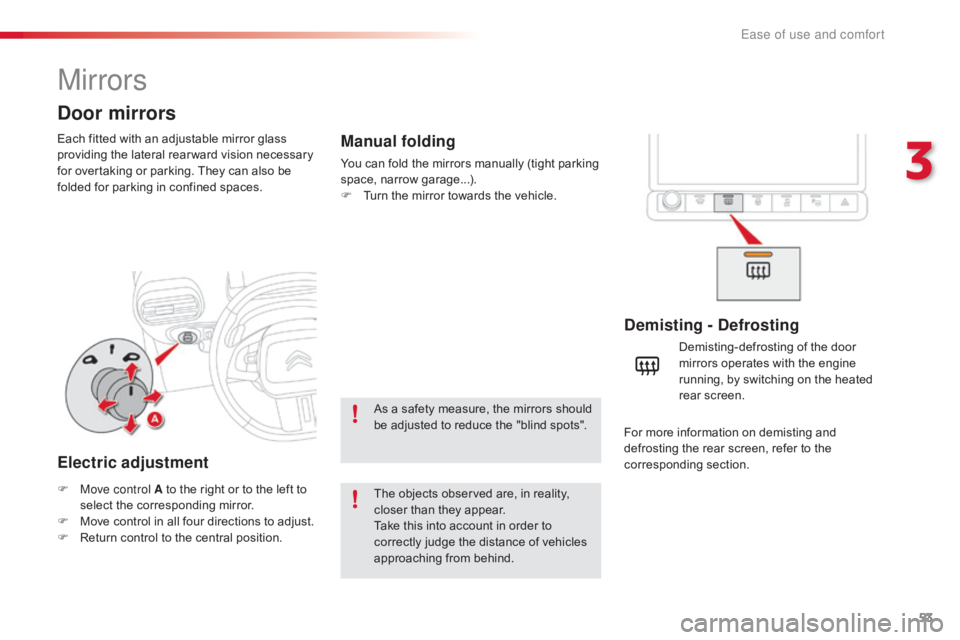
Door mirrors
Demisting - Defrosting
F Move control A to the right or to the left to s
elect the corresponding mirror.
F
M
ove control in all four directions to adjust.
F
R
eturn control to the central position. Demisting-defrosting
of the door
m
irrors operates with the engine
r
unning, by switching on the heated
re
ar
sc
reen.
Electric adjustment
The objects observed are, in reality, c
loser than they appear.
Take
this into account in order to
c
orrectly judge the distance of vehicles
a
pproaching from behind.
Manual folding
You can fold the mirrors manually (tight parking space, nar row g arage...).
F
T
urn the mirror towards the vehicle.
As
a safety measure, the mirrors should
b
e adjusted to reduce the "blind spots".For
more information on demisting and
d
efrosting the rear screen, refer to the
c
orresponding
s
ection.
3
Ease of use and comfort