steering CITROEN C4 2019 User Guide
[x] Cancel search | Manufacturer: CITROEN, Model Year: 2019, Model line: C4, Model: CITROEN C4 2019Pages: 317, PDF Size: 9.31 MB
Page 129 of 317
127
C4-cactus_en_Chap06_conduite_ed01-2016
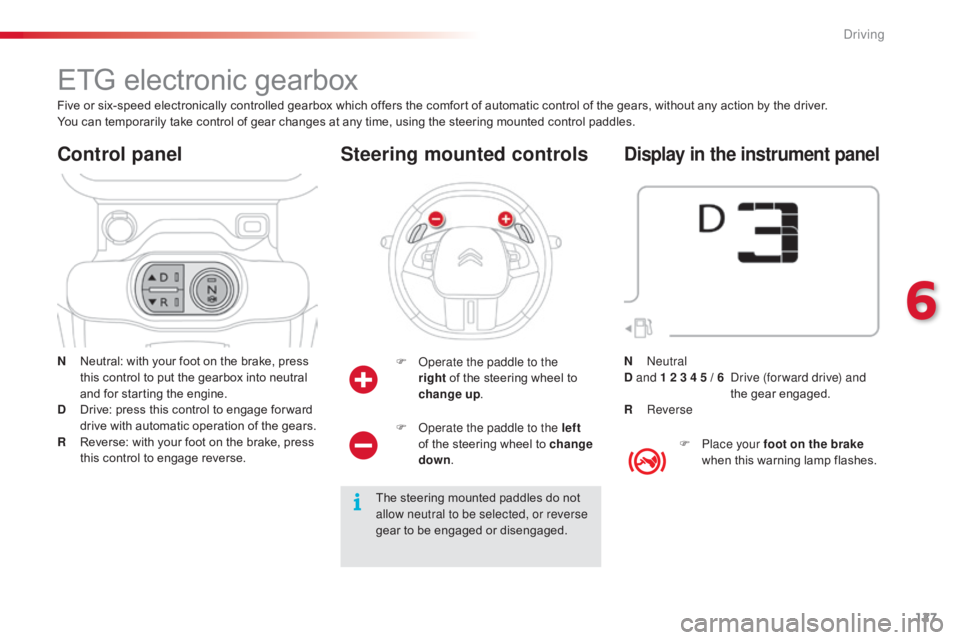
ETG electronic gearbox
N Neutral: with your foot on the brake, press t
his control to put the gearbox into neutral
a
nd for starting the engine.
D
D
rive: press this control to engage for ward
d
rive with automatic operation of the gears.
R
R
everse: with your foot on the brake, press
t
his control to engage reverse.
Control panel
F Operate the paddle to the right of the steering wheel to
ch
ange
up.
Steering mounted controls
The steering mounted paddles do not a
llow neutral to be selected, or reverse
gear
to be engaged or disengaged.
Five
or
six-speed
electronically
controlled
gearbox
which
offers the comfort of automatic control of the gears, without any action by the driver.
You
can
temporarily
take
control
of
gear
changes
at
any
time, using the steering mounted control paddles.
F
O
perate the paddle to the left
of the steering wheel to change
down .
Display in the instrument panel
F Place your foot on the brake
when this warning lamp flashes.
N
Neutral
D and 1 2 3 4 5 / 6
D
rive (for ward drive) and
the
g
ear
enga
ged.
R
Reverse
6
Driving
Page 131 of 317
129
C4-cactus_en_Chap06_conduite_ed01-2016
Never select neutral (position N) when
moving.
Forward drive
F Press control D . T
he indicator lamp in the control comes on.
D
and the gear engaged appear in
t
he instrument panel.
The
gearbox then operates in auto-adaptive
m
ode, without any action on the part of the
d
river. It continuously selects the most suitable
g
ear taking account of:
-
o
ptimisation of fuel consumption,
-
d
riving style,
-
r
oad conditions,
-
v
ehicle load.
For
optimum acceleration, when
ov
ertaking another vehicle for example,
p
ress the accelerator pedal fully down,
beyond
the point of resistance.
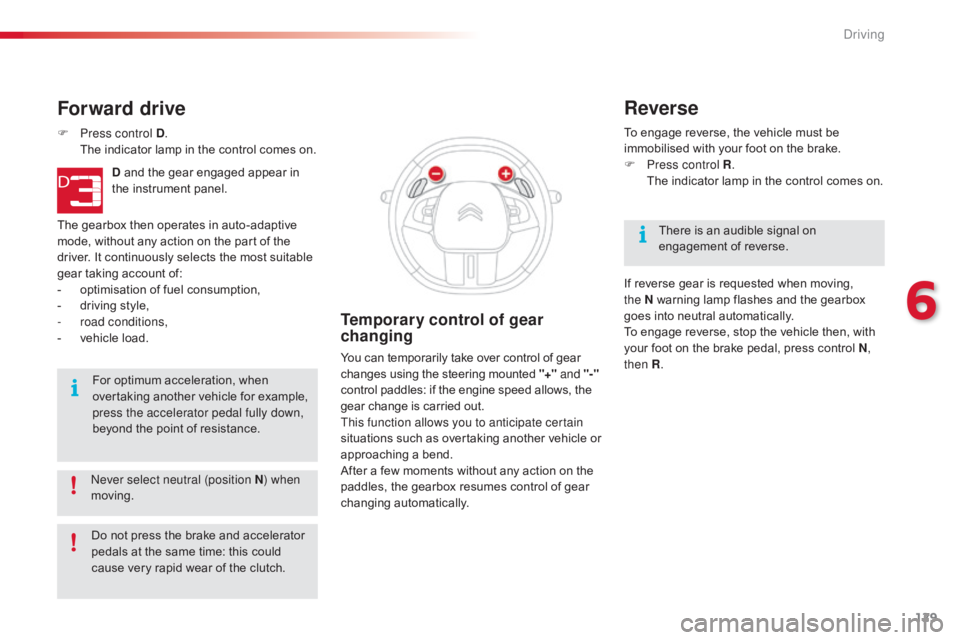
Temporary control of gear
changing
You can temporarily take over control of gear changes using the steering mounted "+" and
"-"
control
paddles: if the engine speed allows, the
g
ear change is carried out.
This function allows you to anticipate certain
situations
s
uch
a
s
ov
ertaking
a
nother
v
ehicle
o
r
a
pproaching a bend.
After
a few moments without any action on the
p
addles, the gearbox resumes control of gear
c
hanging
a
utomatically. To
engage reverse, the vehicle must be
i
mmobilised with your foot on the brake.
F
P
ress control R
.
T
he indicator lamp in the control comes on.
Reverse
There is an audible signal on enga
gement o f r everse.
If
reverse gear is requested when moving,
t
he
N
warning lamp flashes and the gearbox
g
oes
into neutral automatically.
To
engage reverse, stop the vehicle then, with
y
our
foot on the brake pedal, press control N,
then R .
Do
not
press
the
brake
and
accelerator
p
edals
at
the
same
time:
this
could
c
ause
very
rapid
wear
of
the
clutch.
6
Driving
Page 134 of 317
132
C4-cactus_en_Chap06_conduite_ed01-2016
Stop & Start
Operation
Going into engine STOP
mode
The "ECO" warning lamp comes on i
n the instrument panel and the engine g
oes into standby automatically:
-
w
ith a manual gearbox , when stationary,
in neutral, and you release the clutch
pedal.
-
w
ith an electronic gearbox , when
stationary
or at speeds below 5 mph
(
8 km/h) (depending on version), in neutral
(
control on N )
or when you press the brake
ped
al. Never
refuel with the engine in STOP
m
ode; you must switch off the ignition.
For
your comfort, during parking
m
anoeuvres, STOP mode is not
a
vailable for a few seconds after
coming
out of reverse gear.
The
Stop & Start system does not affect
t
he the vehicle's other systems, such as
f
or example braking, power steering...
The
Stop
&
Start system
puts
the
engine
t
emporarily
into
standby
-
STOP
mode
-
during
s
tops
in
the
traffic
(red
lights,
traffic
jams,
or
o
ther...).
The
engine
restarts
automatically
-
S
TART
mode
-
as
soon
as
you
want
to
move
o
ff.
The
restart
takes
place
instantly,
quickly
a
nd
silently.
Per fect
for
urban
use,
the
Stop
&
Start
system
r
educes
fuel
consumption
and
exhaust
e
missions
as
well
as
the
noise
level
when
s
tationary.
Stop & Start time
counter
A cumulative time counter for periods i n STOP mode during a journey.
It
is
displayed in the trip computer (accessible
v
ia the " Driving assistance "
menu of the
t
ouch
screen tablet).
It
resets
to zero every time the ignition is
s
witched
on.
The
Stop
&
Start
system
requires
t
he use of a 12 V battery of special
technology
and
specification.
All
w
ork
on
this
type
of
battery
must
o
nly be done by a CITROËN dealer
or
a
qualified
workshop.
For
more
i
nformation
on
the
12
V
battery,
refer
to
t
he
corresponding
section.
Driving
Page 137 of 317
135
C4-cactus_en_Chap06_conduite_ed01-2016
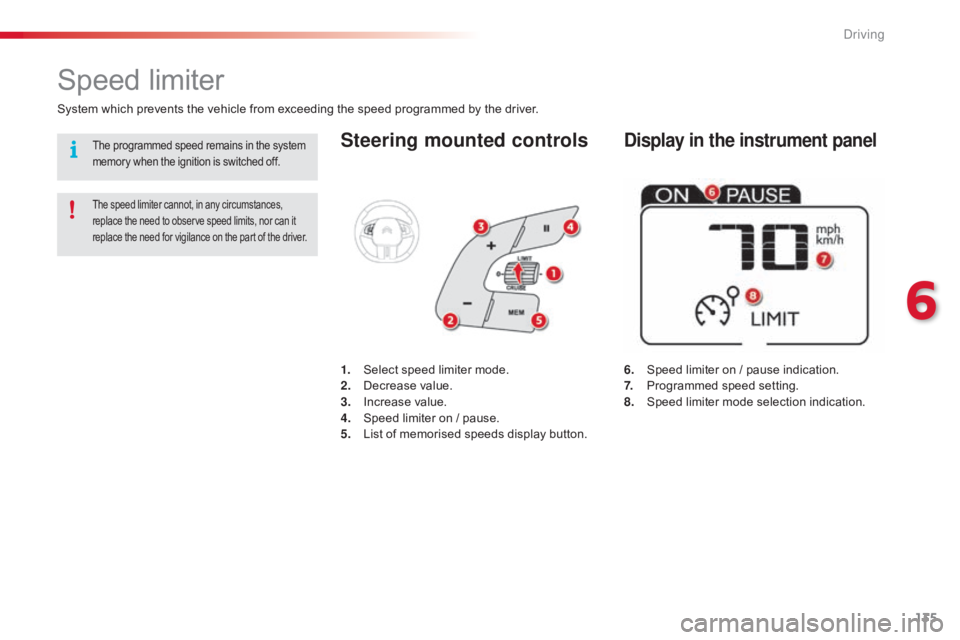
Steering mounted controls
6. Speed limiter on / pause indication.
7. P rogrammed speed setting.
8.
S
peed limiter mode selection indication.
Speed limiter
System which prevents the vehicle from exceeding the speed programmed by the driver.
The speed limiter cannot, in any circumstances, replace the need to observe speed limits, nor can it r
eplace the need for vigilance on the part of the driver.
1. Select speed limiter mode.
2. D ecrease value.
3.
In
crease
v
alue.
4.
S
peed limiter on / pause.
5.
L
ist of memorised speeds display button.
Display in the instrument panelThe programmed speed remains in the system memory when the ignition is switched off.
6
Driving
Page 140 of 317
138
C4-cactus_en_Chap06_conduite_ed01-2016
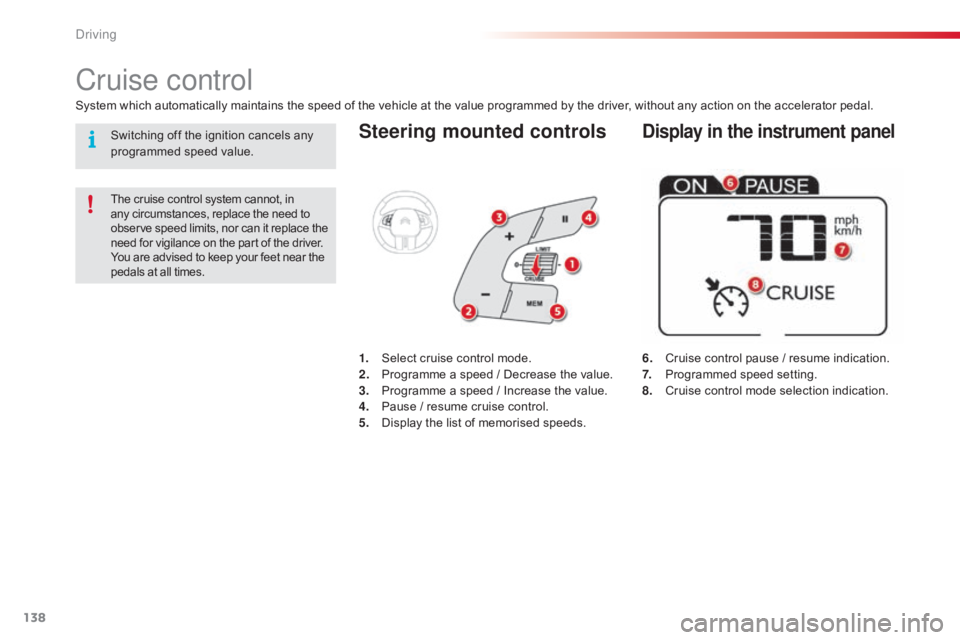
Steering mounted controls
6. Cruise control pause / resume indication.
7. P rogrammed speed setting.
8.
C
ruise control mode selection indication.
Cruise control
System which automatically maintains the speed of the vehicle at the value programmed by the driver, without any action on the accelerator pedal.
The cruise control system cannot, in any circumstances, replace the need to o
bserve speed limits, nor can it replace the
n
eed for vigilance on the part of the driver.
You
are advised to keep your feet near the
p
edals at all times.
1. Select cruise control mode.
2. P rogramme a speed / Decrease the value.
3.
P
rogramme a speed / Increase the value.
4.
P
ause / resume cruise control.
5.
D
isplay the list of memorised speeds.
Display in the instrument panelSwitching off the ignition cancels any programmed speed value.
Driving
Page 147 of 317
145
C4-cactus_en_Chap06_conduite_ed01-2016
Park Assist
This system provides active assistance with parking, detecting a parking space then controlling the steering to park in the space.
I t controls the steering while the driver manages the accelerator, brakes, gears and clutch (manual gearbox). During phases of entry into and exit from
a
parking space, the system provides visual and audible information to the driver in order to make the manoeuvre safe. It may be necessary to move
f
or wards and backwards more than once.
The
Park Assist system cannot in any
c
ircumstances replace the need for
v
igilance on the part of the driver.
The
driver must remain in control of
t
heir vehicle ensuring that the space
r
emains clear during the manoeuvre.
In
some circumstances, the sensors
m
ay not detect small obstacles located
i
n their blind spots. Changing
tyre sizes (out-size tyres,
w
inter tyres, ...) can inter fere with
t
he correct operation of the parking
a
ssistance system.
During
a manoeuvre the steering wheel
t
urns quickly: do not hold the steering
w
heel, do not place your hand between
the
spokes of the steering wheel and
t
ake care with loose and bulky clothing,
s
carves, handbags... There is a risk of
in
jury. For
entry into a parking space (parallel
p
arking) the system does not detect
s
paces which are clearly much smaller
o
r larger than the size of the vehicle.
This
"parking assistance" system
i
s activated automatically during
m
anoeuvres; it is therefore possible
t
hat a symbol comes on in the screen,
a
ccompanied by an audible signal,
w
ithout affecting the manoeuvre.The
selection of the type of manoeuvre
(
entering or exiting a parallel parking
s
pace) prevents a change to STOP
m
ode of Stop & Start.
In
STOP mode, this selection restarts
t
he
eng
ine.
The
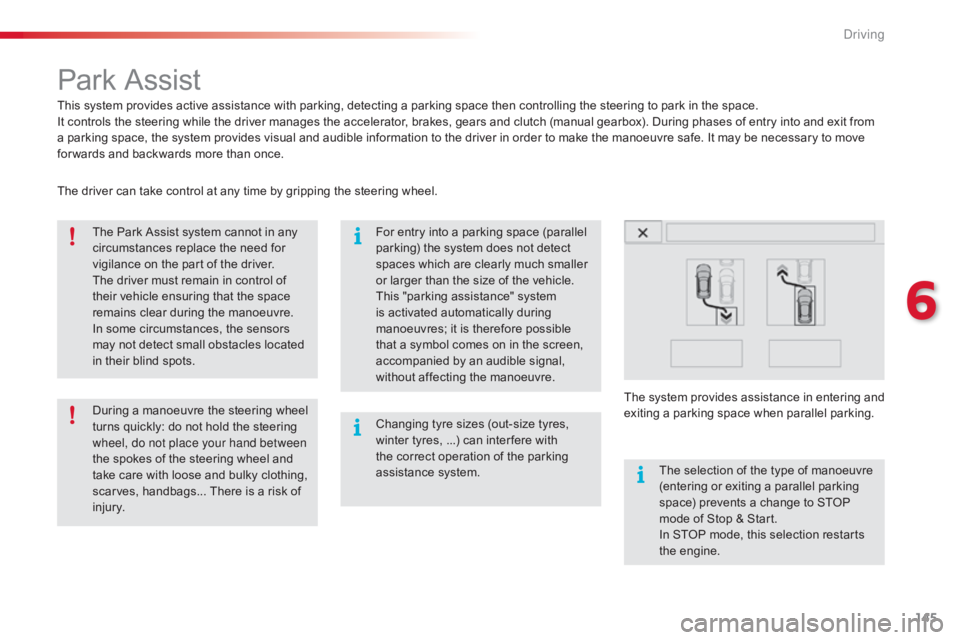
driver can take control at any time by gripping the steering wheel.
The
s
ystem
p
rovides
a
ssistance
i
n
e
ntering
a
nd
e
xiting
a par
king
spa
ce
w
hen
par
allel
par
king.
6
Driving
Page 149 of 317
147
C4-cactus_en_Chap06_conduite_ed01-2016
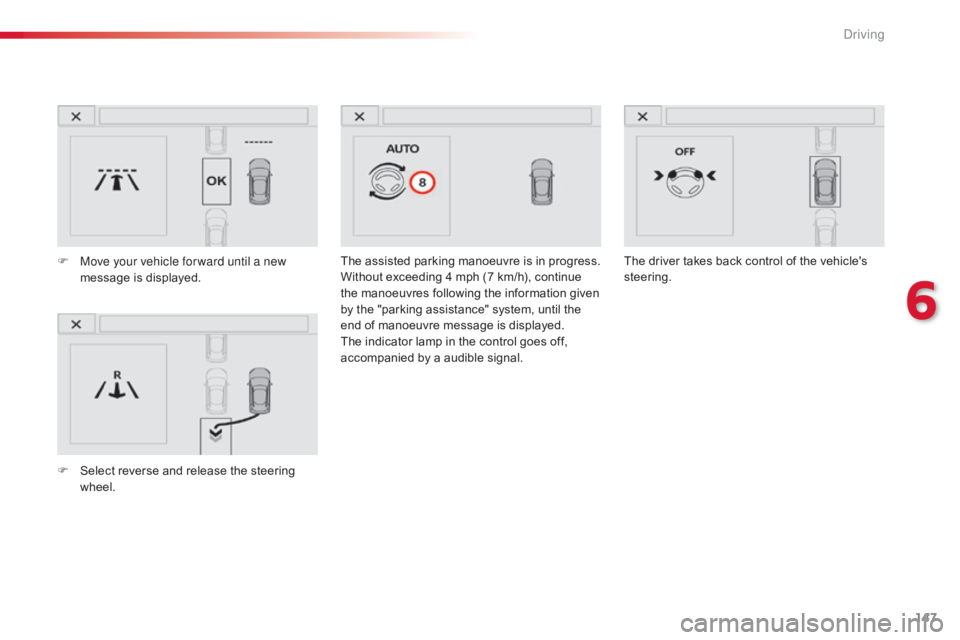
The assisted parking manoeuvre is in progress.
W ithout exceeding 4 mph (7 km/h), continue
t
he manoeuvres following the information given
b
y the "parking assistance" system, until the
e
nd of manoeuvre message is displayed.
The
indicator lamp in the control goes off,
a
ccompanied by a audible signal.
F
M
ove your vehicle for ward until a new
message
is
displayed.
F
S
elect
reverse
and
release
the
steering
w
heel. The
driver takes back control of the vehicle's s
teering.
6
Driving
Page 150 of 317
148
C4-cactus_en_Chap06_conduite_ed01-2016
Exit from a parallel parking space
With the vehicle stationary, to activate the Park Assist system:
F
W
hen you want to exit from a parallel
p
arking space, start the engine.
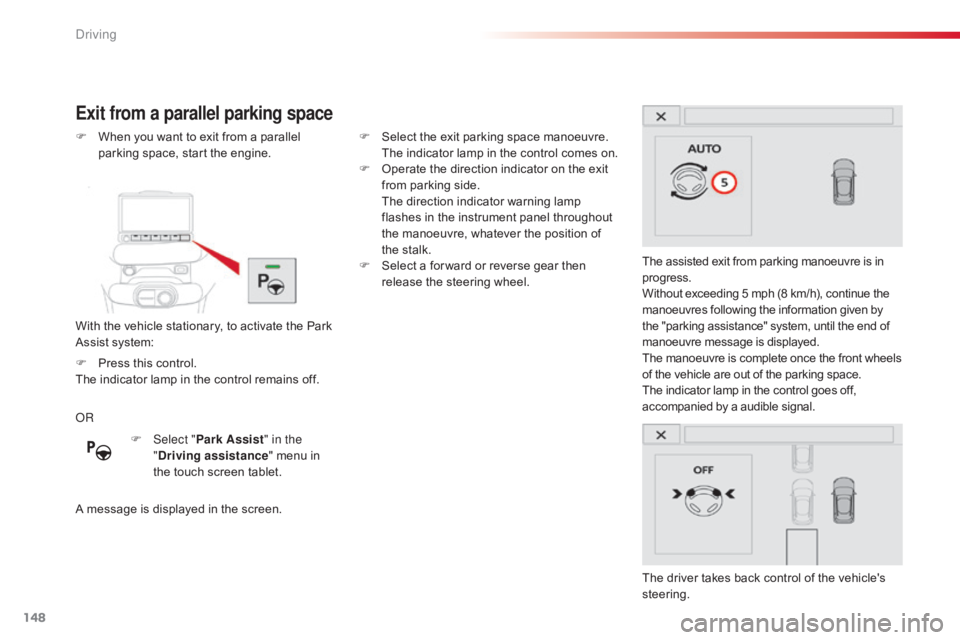
The assisted exit from parking manoeuvre is in
p
rogress.
Without exceeding 5 mph (8 km/h), continue the
m
anoeuvres following the information given by
t
he "parking assistance" system, until the end of m
anoeuvre message is displayed.
The
manoeuvre is complete once the front wheels
o
f the vehicle are out of the parking space.
The
indicator lamp in the control goes off,
a
ccompanied by a audible signal.
The
driver takes back control of the vehicle's
s
teering.
OR
A
message is displayed in the screen.F
S
elect the exit parking space manoeuvre.
T
he indicator lamp in the control comes on.
F
O
perate the direction indicator on the exit
f
rom parking side.
T
he direction indicator warning lamp
f
lashes in the instrument panel throughout
t
he manoeuvre, whatever the position of
t
he stalk.
F
S
elect a for ward or reverse gear then
r
elease the steering wheel.
F
Sel
ect "Park Assist " in the
" Driving assistance "
menu in
t
he touch screen tablet.
F
P
ress this control.
The
indicator lamp in the control remains off.
Driving
Page 153 of 317
151
C4-cactus_en_Chap06_conduite_ed01-2016
Under-inflation alertReinitialisation
Before reinitialising the system, ensure t
hat the pressures of the four tyres are
correct for the use of the vehicle and in
line
with the recommendations on the
t
yre pressure label.
The under-inflation alert can only
be relied on if the reinitialisation of
the
system has been done with the
p
ressures in the four tyres correctly
adjusted.
The
under-inflation detection system
d
oes not give a warning if a pressure is
i
ncorrect at the time of reinitialisation.
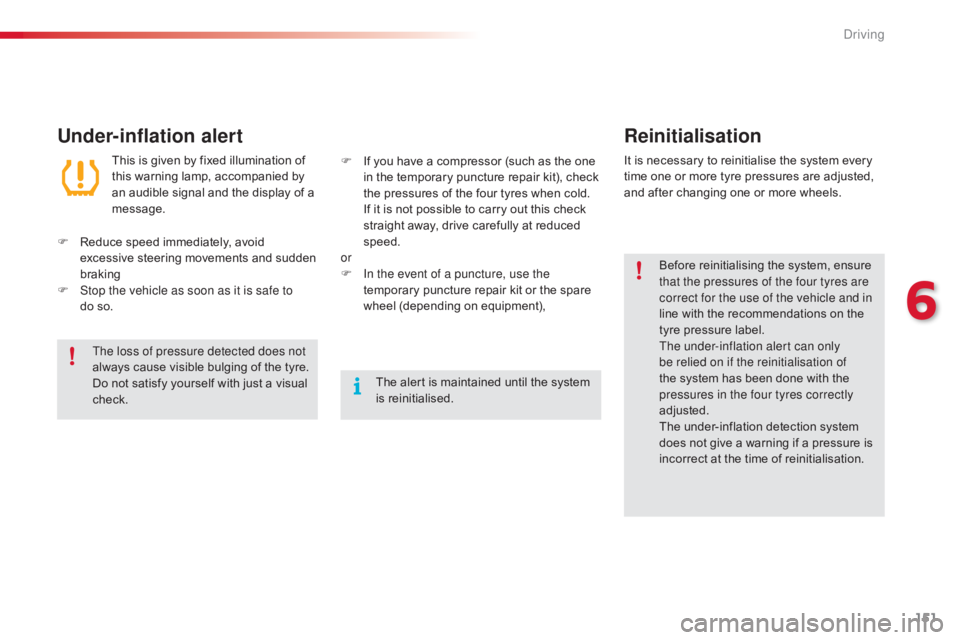
This
is
given
by
fixed
illumination
of
t
his
warning
lamp,
accompanied
by
a
n
audible
signal
and
the
display
of
a
m
essage.
It
is
necessary to reinitialise the system every
t
ime
one or more tyre pressures are adjusted,
a
nd
after changing one or more wheels.
F
R
educe
speed
immediately,
avoid
e
xcessive
steering
movements
and
sudden
b
raking
F
S
top the vehicle as soon as it is safe to
do so. F
I
f
you
have
a
compressor
(such
as
the
one
i
n
the
temporary
puncture
repair
kit),
check
t
he
pressures
of
the
four
tyres
when
cold.
I
f
it
is
not
possible
to
carry
out
this
check
s
traight
away,
drive
carefully
at
reduced
s
peed.
or
F
I
n the event of a puncture, use the
temporary
puncture
repair
kit
or
the
spare
w
heel
(depending
on
equipment),
The loss of pressure detected does not
always
cause
visible
bulging
of
the
tyre.
D
o
not
satisfy
yourself
with
just
a
visual
c
heck. The
alert
is
maintained
until
the
system
i
s
r
einitialised.
6
Driving
Page 188 of 317
186
C4-cactus_en_Chap08_En-cas-de-panne_ed01-2016
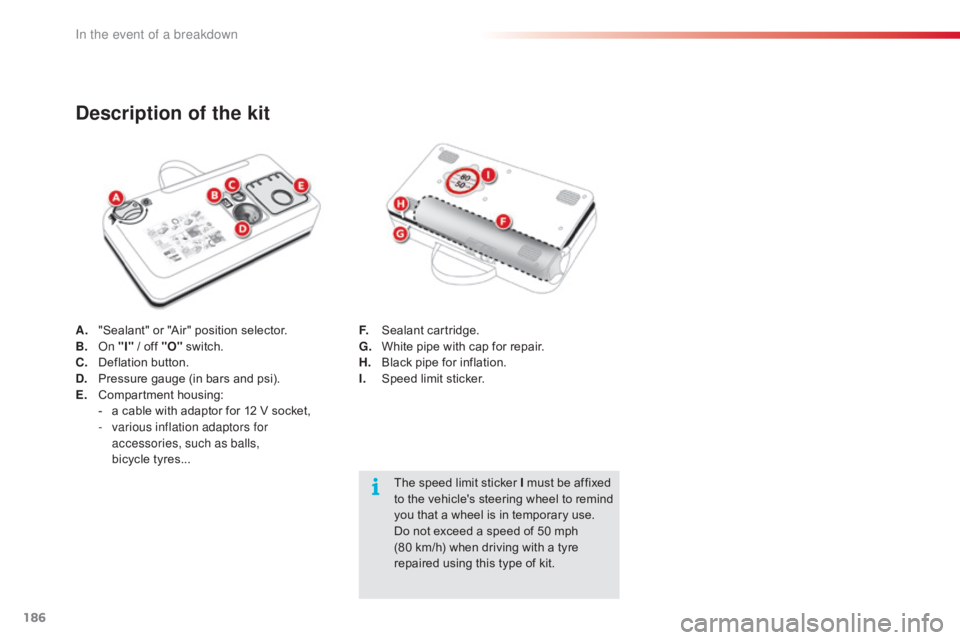
A. "Sealant" or "Air" position selector.
B. On "I"
/ off "O" s witch.
C.
D
eflation button.
D.
P
ressure gauge (in bars and psi).
E.
C
ompartment
h
ousing:
-
a
cable with adaptor for 12 V socket,
-
v
arious inflation adaptors for
accessories, such as balls,
bicycle tyres...
Description of the kit
The speed limit sticker I must be affixed t o the vehicle's steering wheel to remind
y
ou that a wheel is in temporary use.
Do
not exceed a speed of 50 mph
(
80 km/h) when driving with a tyre
r
epaired using this type of kit.
F.
S
ealant
c
artridge.
G.
W
hite pipe with cap for repair.
H.
B
lack pipe for inflation.
I.
S
peed limit sticker.
In the event of a breakdown