ad blue CITROEN C4 2019 Owner's Guide
[x] Cancel search | Manufacturer: CITROEN, Model Year: 2019, Model line: C4, Model: CITROEN C4 2019Pages: 317, PDF Size: 9.31 MB
Page 250 of 317
248
C4-cactus_en_Chap10b_SMEGplus_ed01-2016
Bluetooth® audio streaming
Streaming allows audio files on your telephone to be played through the vehicle's spx`eakers.
Connect
the telephone: see the "Telephone "
section, then " Bluetooth".
Choose the " Audio" or "All"
pro
file.
If
play does not start automatically, it may be
n
ecessary to start the audio playback from the
t
elephone.
Control
is from the peripheral device or by
u
sing the audio system buttons.
Once
connected in streaming mode,
t
he telephone is considered to be a
media
source.
It
is recommended that you activate
"R
epeat"
on the Bluetooth peripheral.
Connecting Apple® players
Connect the Apple® player to the USB port
using
a
suitable
cable (not supplied).
Play
starts
automatically.
Control
is
via
the
audio system. The classifications available are those
of the portable device connected
(artists
/ albums / genres / playlists /
a
udiobooks / podcasts).
The default classification used is by
artist. To modify the classification used,
r
eturn to the first level of the menu
t
hen select the desired classification
(playlists for example) and confirm t
o go down through the menu to the
de
sired
t
rack.
The
version of software in the audio system
m
ay not be compatible with the generation of
y
our Apple
® player.
Audio and Telematics
Page 274 of 317
272
C4-cactus_en_Chap10b_SMEGplus_ed01-2016
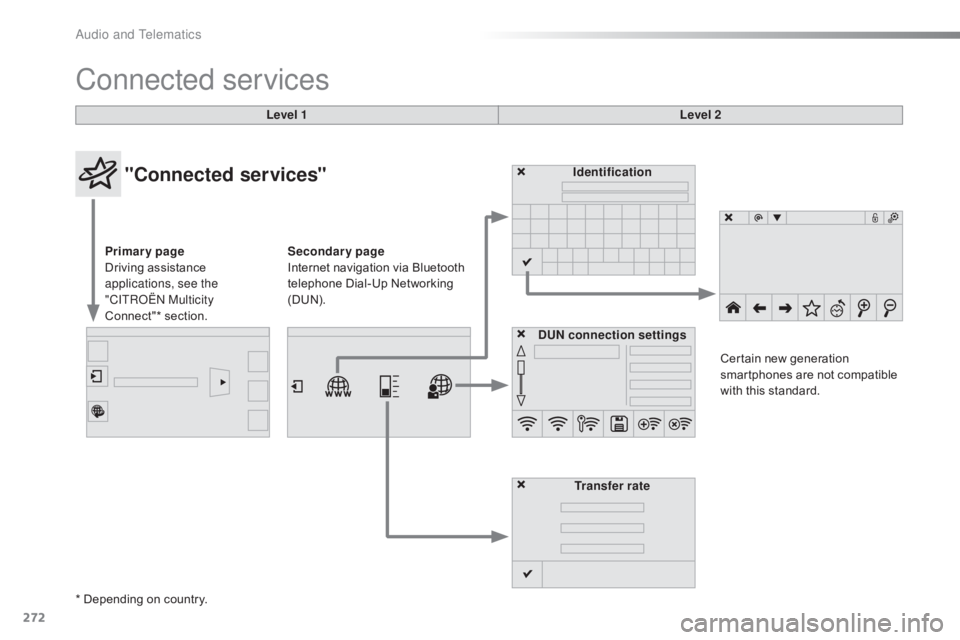
Connected services
Level 1Level 2
"Connected services"
Primary page
Driving assistance
a
pplications, see the
"CITROËN Multicity
Connect"*
s
ection. Identification
DUN connection settings Transfer rate Certain
new generation
s
martphones are not compatible
w
ith this standard.
Secondary page
Internet navigation via Bluetooth
t
elephone Dial-Up Networking
(
DUN).
* Depending
on country.
Audio and Telematics
Page 278 of 317
276
C4-cactus_en_Chap10b_SMEGplus_ed01-2016
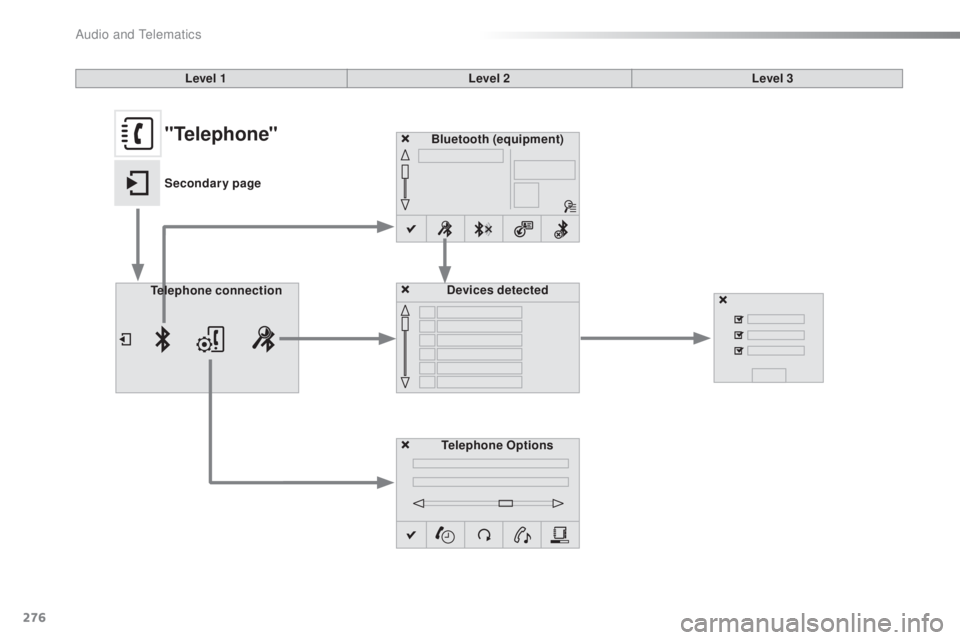
Bluetooth (equipment)
Telephone Options Devices detected
Telephone connection
Level 1
Level 2Level 3"Telephone"
Secondary page
Audio and Telematics
Page 279 of 317
277
C4-cactus_en_Chap10b_SMEGplus_ed01-2016
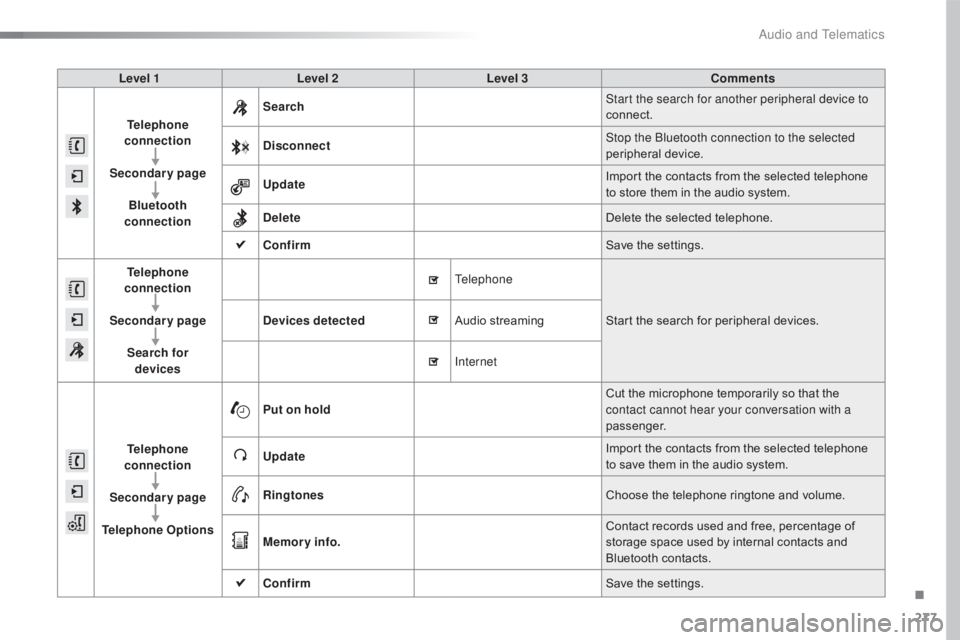
Level 1Level 2 Level 3 Comments
Telephone
connection
Secondary page Bluetooth
connection Search
Start the search for another peripheral device to
connect.
Disconnect Stop the Bluetooth connection to the selected
peripheral
d
evice.
Update Import
the contacts from the selected telephone
t
o store them in the audio system.
Delete Delete
the selected telephone.
Confirm Save
the settings.
Telephone
conn ection
Secondary page Search for devices Devices detected
Telephone
Start
the search for peripheral devices.
Audio
s
treaming
Internet
Telephone
connection
Secondary page
Telephone Options Put on hold
Cut
the microphone temporarily so that the
c
ontact cannot hear your conversation with a
passenger.
Update Import
the contacts from the selected telephone
t
o save them in the audio system.
Ringtones Choose
the telephone ringtone and volume.
Memory info. Contact
records used and free, percentage of
s
torage space used by internal contacts and
Bl
uetooth
c
ontacts.
Confirm Save
the settings.
.
Audio and Telematics
Page 280 of 317
278
C4-cactus_en_Chap10b_SMEGplus_ed01-2016
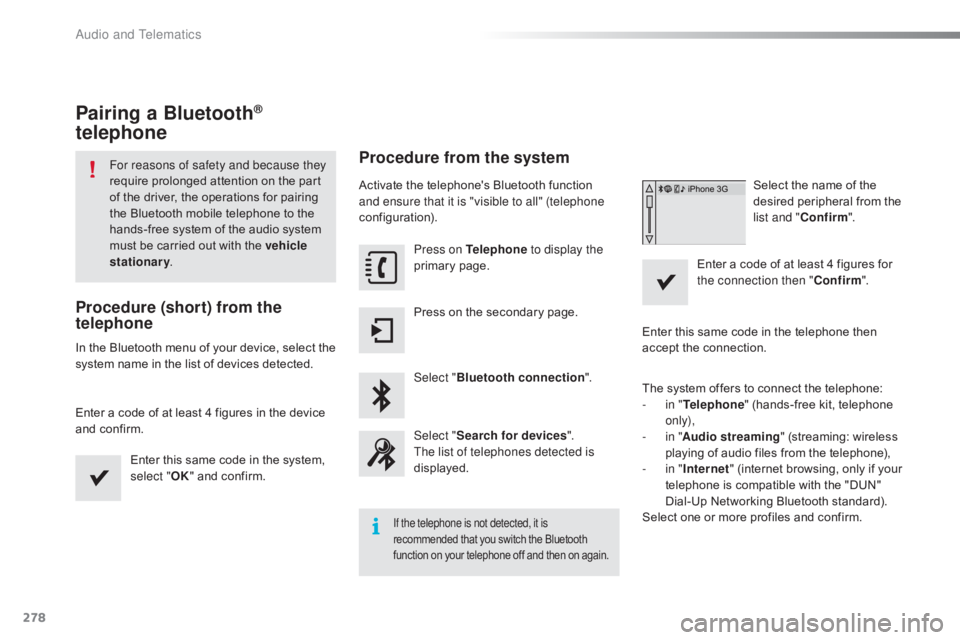
Pairing a Bluetooth®
telephone
For reasons of safety and because they
require
prolonged attention on the part
o
f the driver, the operations for pairing
t
he Bluetooth mobile telephone to the
h
ands-free system of the audio system
m
ust be carried out with the vehicle
stationary .
Procedure (short) from the
telephone
In the Bluetooth menu of your device, select the s
ystem name in the list of devices detected.
Enter
a code of at least 4 figures in the device
a
nd confirm. Enter
this same code in the system,
s
elect "OK"
and confirm.
Procedure from the system
Activate the telephone's Bluetooth function and ensure that it is "visible to all" (telephone
configuration).
Press on Telephone to display the
primary
pag
e.
Press
on the secondary page.
Select " Bluetooth connection ".
Select " Search for devices ".
The list of telephones detected is
displayed.
If the telephone is not detected, it is
recommended that you switch the Bluetooth f
unction on your telephone off and then on again.
Select the name of the desired peripheral from the
l
ist and " Confirm ".
Enter
a
code of at least 4 figures for
t
he connection then " Confirm".
Enter
this
same
code in the telephone then
a
ccept
the
connection.
The
system
offers
to connect the telephone:
-
i
n " Telephone "
(hands-free kit, telephone
o
nly),
-
i
n " Audio streaming "
(streaming: wireless
p
laying
of
audio
files from the telephone),
-
i
n " Internet "
(internet browsing, only if your
t
elephone
is
compatible with the "DUN"
D
ial-Up
Networking Bluetooth standard).
Select
one
or
more
profiles and confirm.
Audio and Telematics
Page 281 of 317
279
C4-cactus_en_Chap10b_SMEGplus_ed01-2016
The services available depend on
the network, the SIM card and the
c
ompatibility of the Bluetooth telephone
u
sed. Check the telephone manual and
w
ith your network provider for details of
t
he services available to you.
The
ability of the system to connect
w
ith only one profile depends on the
telephone.
The three profiles may all
c
onnect by default.
Visit
www.citroen.co.uk for more information
(
compatibility, additional help, ...).
The
recognised telephone
a
ppears in the list.
Depending
on your telephone, you may be
a
sked
to accept automatic connection every
t
ime
the ignition is switched on. On return to the vehicle, if the last telephone
connected
is present again, it is reconnected
a
utomatically and within around 30 seconds
a
fter switching on the ignition the pairing is
d
one without any action on your part, with
(Bluetooth
a
ctivated).
To
modify the automatic connection mode,
s
elect the telephone in the list then select the
desired
p
rofile.
Depending
on the type of telephone, t
he system will ask you to accept or not
t
he transfer of your contacts.
If not, select " Update".
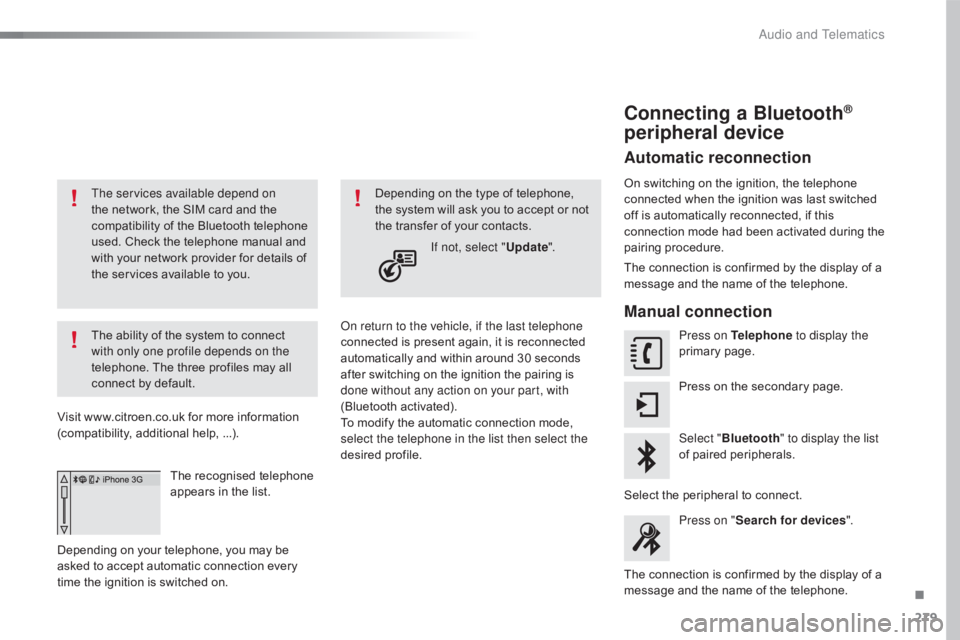
Connecting a Bluetooth®
peripheral device
Automatic reconnection
On switching on the ignition, the telephone c
onnected when the ignition was last switched
o
ff is automatically reconnected, if this
c
onnection mode had been activated during the
pa
iring
p
rocedure.
The
connection is confirmed by the display of a
m
essage and the name of the telephone.
Manual connection
Press on Telephone to display the
primary pag e.
Press
on the secondary page.
Select " Bluetooth " to display the list
of
paired peripherals.
Select
the peripheral to connect.
Press on " Search for devices ".
The
connection is confirmed by the display of a
m
essage
and the name of the telephone.
.
Audio and Telematics
Page 282 of 317
280
C4-cactus_en_Chap10b_SMEGplus_ed01-2016
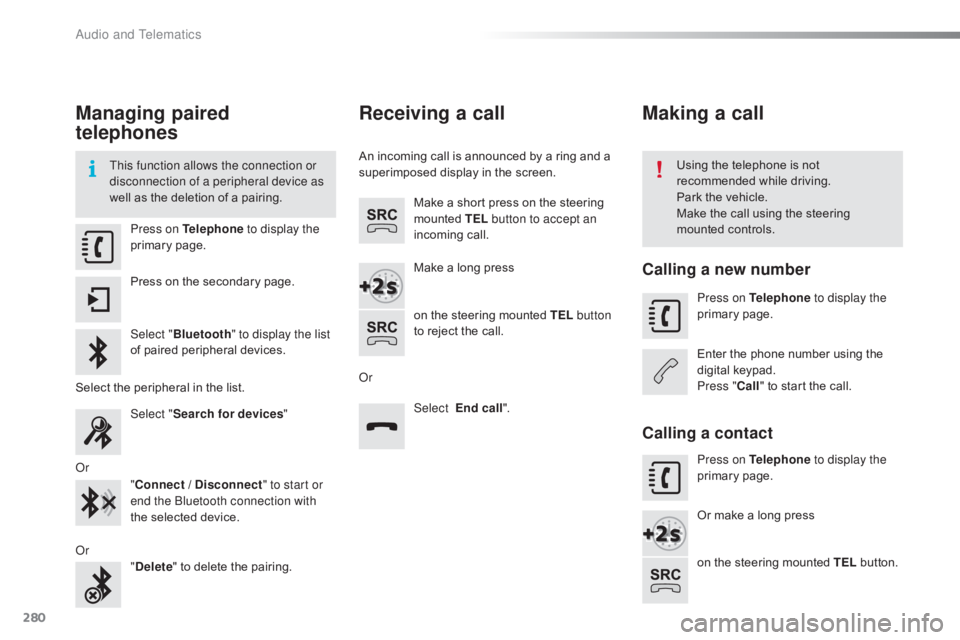
Managing paired
telephones
This function allows the connection or
disconnection of a peripheral device as
well as the deletion of a pairing. Using
the telephone is not r
ecommended while driving.
Park
the vehicle.
Make
the call using the steering
m
ounted controls.
Press on Telephone
to display the
primary
pag
e.
Press
on the secondary page.
Select " Bluetooth " to display the list
of
paired peripheral devices.
Select
the peripheral in the list.
Select " Search for devices "
Or "Connect / Disconnect " to start or
end the Bluetooth connection with
the
selected device.
Or "Delete "
to delete the pairing.
Receiving a call
An incoming call is announced by a ring and a superimposed display in the screen.
Make
a short press on the steering
m
ounted TEL button to accept an
incoming
c
all.
Make
a long press
on
the steering mounted TEL button
to
reject the call.
Or Select End call".
Making a call
Calling a new number
Press on Telephone to display the
primary pag e.
Enter
the phone number using the
d
igital
k
eypad.
Press " Call"
to start the call.
Calling a contact
Press on Telephone to display the
primary pag e.
Or
make a long press
on
the steering mounted TEL
button.
Audio and Telematics
Page 288 of 317
286
C4-cactus_en_Chap10b_SMEGplus_ed01-2016
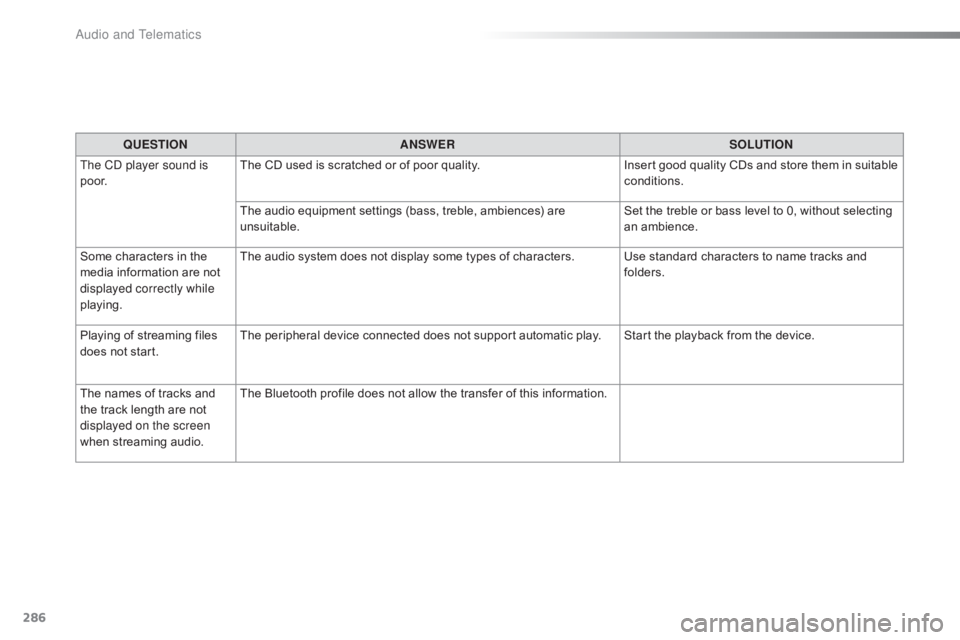
QUESTIONANSWER SOLUTION
The CD player sound is
p o o r. The
CD used is scratched or of poor quality.Insert
good quality CDs and store them in suitable
c
onditions.
The
audio equipment settings (bass, treble, ambiences) are
un
suitable. Set
the treble or bass level to 0, without selecting
an am
bience.
Some
characters in the
m
edia
information are not
d
isplayed correctly while
playing. The
audio system does not display some types of characters. Use standard characters to name tracks and
f
olders.
Playing
of streaming files
d
oes
not start. The
peripheral device connected does not support automatic play. Start the playback from the device.
The
names of tracks and
t
he
track length are not
d
isplayed on the screen
when
s
treaming
a
udio. The
Bluetooth profile does not allow the transfer of this information.
Audio and Telematics
Page 291 of 317
289
C4-cactus_en_Chap10b_SMEGplus_ed01-2016
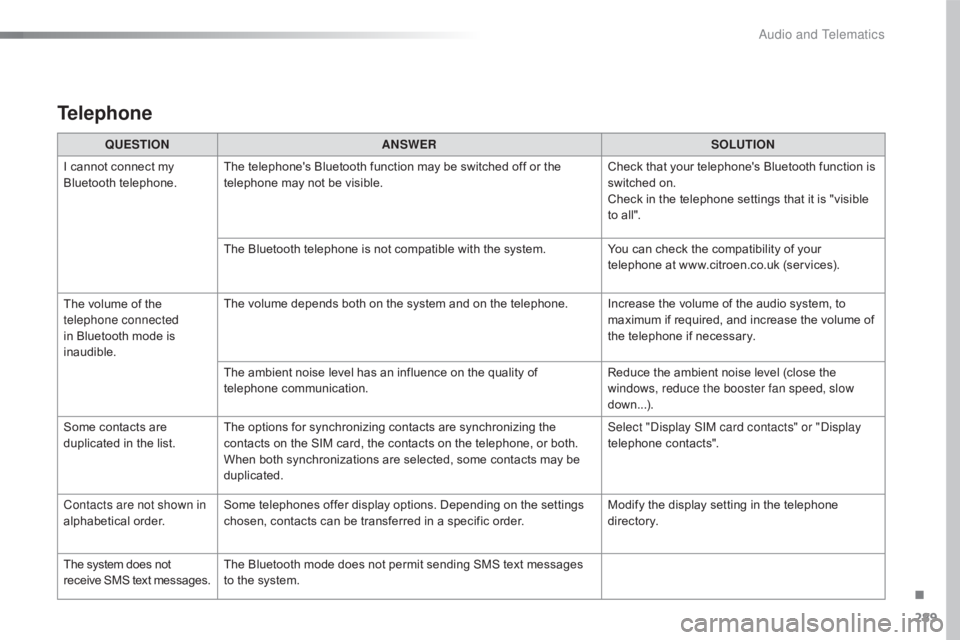
Telephone
QUESTIONANSWER SOLUTION
I
cannot connect my
B
luetooth
t
elephone. The
telephone's Bluetooth function may be switched off or the
t
elephone may not be visible. Check
that your telephone's Bluetooth function is
s
witched on.
Check
in the telephone settings that it is "visible
t
o all".
The
Bluetooth telephone is not compatible with the system.You
can check the compatibility of your
t
elephone at www.citroen.co.uk (services).
The
volume of the
t
elephone connected
in
Bluetooth mode is
ina
udible. The
volume depends both on the system and on the telephone. Increase the volume of the audio system, to
m
aximum if required, and increase the volume of
t
he telephone if necessary.
The
ambient noise level has an influence on the quality of
t
elephone
c
ommunication. Reduce
the ambient noise level (close the
w
indows, reduce the booster fan speed, slow
down...).
Some
contacts are
d
uplicated in the list. The
options for synchronizing contacts are synchronizing the
c
ontacts on the SIM card, the contacts on the telephone, or both.
W
hen both synchronizations are selected, some contacts may be
dup
licated. Select "Display SIM card contacts" or "Display
telephone
c
ontacts".
Contacts are not shown in
alphabetical
o
rder. Some
telephones offer display options. Depending on the settings
c
hosen, contacts can be transferred in a specific order.Modify
the display setting in the telephone
d
i r e c to r y.
The
system does not
r
eceive
SMS
text
messages. The
Bluetooth mode does not permit sending SMS text messages
t
o the system.
.
Audio and Telematics
Page 292 of 317
290
C4-cactus_en_Chap11_index-alpha_ed01-2016
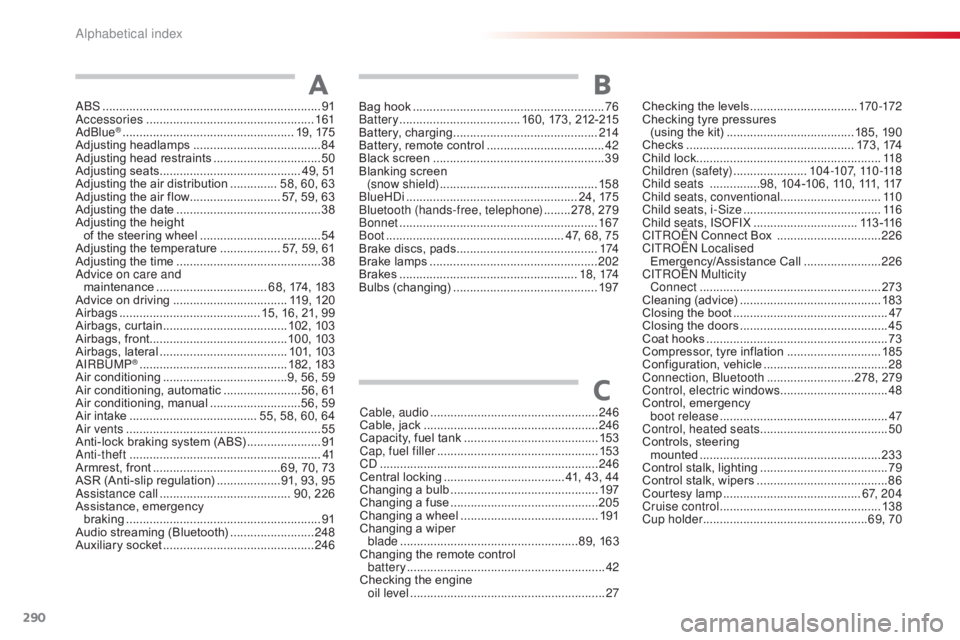
ABS .................................................................91
Accessories .............................. ....................161
AdBlue
® ............................... .................... 19, 175
Adjusting h eadlamps ...................................... 84
A
djusting head restraints
................................ 50
A
djusting
s
eats
.......................................... 4
9, 51
Adjusting
the air distribution
.............. 5
8, 60, 63
Adjusting
the air flow
........................... 5
7, 59, 63
Adjusting
the date
........................................... 38
A
djusting the height
of
the
steering wheel
.................................... 54
A
djusting the temperature
.................. 5
7, 59, 61
Adjusting
the time
........................................... 38
A
dvice on care and
maintenance
................................. 6
8, 174, 183
Advice
on driving
..............................
.... 119, 120
Airbags
...............
........................... 15, 16, 21, 99
Airbags,
c
urtain
..................................... 10
2,
10
3
Airbags,
front......................................... 10 0,
10
3
Airbags,
la
teral
...................................... 10
1,
10
3
AIRBUMP
® ............................................ 18 2, 18 3
Air c
onditioning ............................... ......9, 56, 59
Air
conditioning, automatic
.......................5
6, 61
Air
c
onditioning,
m
anual
...........................5
6, 59
Air
intake
...............
....................... 55, 58, 60, 64
Air vents
..............................
............................ 55
Anti-lock
braking system (ABS)
......................91
A
nti-theft
..............................
...........................41
Armrest,
front
......................................6
9, 70, 73
ASR
(Anti-slip regulation)
...................9
1, 93, 95
Assistance call
...............................
........ 90, 226
Assistance,
em
ergency
b
raking
...............
........................................... 91
Audio
streaming (Bluetooth)
.........................24
8
Auxiliary
socket
............................................. 24
6
AChecking the levels ................................17 0 -172
Checking tyre pressures
(using
the kit)
..............................
........185, 190
Checks
...............
................................... 173 ,
17
4
Child
lock
...............................
........................118
Children (safety)
...................... 10
4 -107, 110 -118
Child seats
...............9
8, 104-106, 110, 111, 117
Child seats, conventional
.............................. 11
0
Child seats, i-Size
...............................
..........11 6
Child seats, ISOFIX
...............................11
3 -11 6
C
ITROËN
Connect Box
...............................2
26
C
ITROËN
L
ocalised
Emergency/Assistance
C
all
.......................2
26
CITROËN Multicity Connect
...............
....................................... 273
Cleaning
(
advice)
.......................................... 18
3
Closing
the boot
...............................
...............47
Closing
the doors
...............................
.............45
Coat
hooks
...............................
.......................73
Compressor,
tyre inflation
............................18
5
Configuration,
v
ehicle
..................................... 28
C
onnection, Bluetooth
..........................2
78, 279
Control, electric windows
................................ 48
C
ontrol,
em
ergency
b
oot release
...............................
...................47
Control, heated seats
...................................... 50
C
ontrols, steering
mounted
...................................................... 23
3
Control
stalk, lighting
...................................... 79
C
ontrol stalk, wipers
....................................... 86
C
ourtesy lamp
...............................
..........6 7, 2 0 4
Cruise control
................................................ 13
8
Cup holder
...............................
..................69, 70
Cable, audio
..................................................
24
6
Cable,
jack
..............................
...................... 246
Capacity,
fuel
tank
..............................
.......... 153
Cap, fuel filler
................................................ 15
3
CD
..............................
................................... 246
Central
locking
.................................... 4
1,
43,
44
Changing
a bu
lb
............................................ 19
7
Changing
a f
use
............................................ 20
5
Changing
a
wheel
...............................
.......... 191
Changing
a
wiper
blade
...............
......................................89,
163
Changing
the
remote
control
battery
........................................................... 42
C
hecking
the
engine
oil level
...............
........................................... 27
C
Bag hook ............................... ..........................76
Battery ............................... ..... 160, 173, 212-215
Battery,
c
harging
...............................
............214
Battery,
remote control
...................................42
B
lack screen
..............................
.....................39
Blanking
screen
(snow shield)
...............................
................15 8
BlueHDi
...............................
.................... 24, 175
Bluetooth (hands-free, telephone)
........2
78, 279
Bonnet
...............
............................................ 167
Boot
........
............................................. 47, 68, 75
Brake
discs, pads
...............................
...........174
Brake
lamps
...............................
...................202
Brakes
..................................................... 1
8 , 174
Bulbs
(
changing)
...............................
............197
B
Alphabetical index