key battery CITROEN C4 2020 User Guide
[x] Cancel search | Manufacturer: CITROEN, Model Year: 2020, Model line: C4, Model: CITROEN C4 2020Pages: 260, PDF Size: 7.12 MB
Page 90 of 260

88
Driving
while pressing the "START/STOP" button to
assist unlocking of the steering column.
Petrol engines
With Petrol engines, after a cold start,
pre-heating the catalytic converter can cause
noticeable engine vibrations, for anything up
to 2 minutes (accelerated idle speed).
If the engine stalls, release the clutch
pedal and fully depress it again, the
engine will restart automatically.
Switching off
► Immobilise the vehicle using the parking
brake.
►
With a
manual gearbox, ideally put the gear
lever into neutral.
►
With an
automatic gearbox, ideally select
mode
P or N.
►
Press the "
START/STOP" button.
In some circumstances, it is necessary to turn
the steering wheel to lock the steering column.
On certain versions with an automatic gearbox
(EAT8), the steering column does not lock, but
the gearbox locks in mode P.
If the vehicle is not immobilised, the
engine will not stop.
With the engine off, the braking and
steering assistance systems are also cut
off - risk of loss of control of the vehicle!
Never leave your vehicle with the
electronic key still inside.
Switching on the ignition
without starting the engine
With the electronic key in the passenger
compartment, pressing the " START/STOP"
button, without depressing any of the pedals ,
allows the ignition to be switched on without
starting the engine.
►
Press this button again to switch off the
ignition and allow the vehicle to be locked.
Key not detected
Back-up starting
A back-up reader is fitted to the steering column,
to enable the engine to be started if the system
fails to detect the key in the recognition zone, or
if the battery in the electronic key is flat.
► Place and hold the remote control against the
reader .
►
W
ith a manual gearbox, place the gear lever
in neutral, then fully depress the clutch pedal.
►
W
ith an automatic gearbox or a drive
selector, select mode
P, then depress the brake
pedal.
►
Press the "
START/STOP" button.
The engine starts.
Back-up switch-off
If the electronic key is not detected or is no
longer in the recognition zone, a message
Page 100 of 260

98
Driving
– The level of charge in the battery must be
sufficient.
–
The temperature of the engine must be within
its nominal operating range.
–
The outside temperature must be between
0°C and 35°C.
Putting the engine into standby
(STOP mode)
The engine automatically enters standby mode
as soon as the driver indicates their intention to
stop:
–
W
ith a manual gearbox: with the gear lever
in neutral and the clutch pedal released.
–
W
ith an automatic gearbox: with the gear
selector in mode D or M, the brake pedal
depressed until the vehicle stops or the gear
selector in mode N, with the vehicle stationary.
Time counter
A time counter adds up the time spent in standby
during the journey. It is reset to zero every time
the ignition is switched on.
Special cases:
The engine will not go into standby if the
conditions for operation are not met and in the
following cases:
–
Steep slope (ascending or descending).
–
V
ehicle has not exceeded 6 mph (10 km/h)
since the last engine start (with the key or the
START/STOP button).
– Needed to maintain a comfortable temperature
in the passenger compartment.
–
Demisting active.
In these cases, this indicator lamp flashes
for a few seconds, then goes off.
After the engine has restarted, STOP mode is not available until the vehicle
has reached a speed of 5 mph (8
km/h).
During parking manoeuvres, STOP mode
is not available for a few seconds after
coming out of reverse gear or turning the
steering wheel.
Restarting the engine (START mode)
The engine automatically restarts as soon as the
driver indicates the intention of moving off again:
With a manual gearbox: with the clutch pedal
fully depressed.
With an automatic gearbox:
–
With the selector in mode
D or M: with the
brake pedal released.
–
With the selector in mode
N and the brake
pedal released: with the selector at D or M.
–
With the selector in mode
P and the brake
pedal depressed: with the selector at R, N, D
or M.
–
With reverse gear engaged.
Special cases
The engine will restart automatically if the
conditions for operation are met again and in the
following cases:
–
With a manual gearbox: vehicle speed
exceeds 2.5 mph (4
km/h).
–
With an automatic gearbox, in mode N
, vehicle
speed exceeds 0.6 mph (1
km/h).
In these cases, this indicator lamp flashes
for a few seconds, then goes off.
Malfunctions
In the event of a fault with the system, this
warning lamp flashes for a few moments
on the instrument panel, then remains on,
accompanied by the display of a message.
Have it checked by a CITROËN dealer or a
qualified workshop.
The vehicle stalls in STOP mode
All of the instrument panel warning lamps come
on if there is a fault.
►
Switch off the ignition then start the engine
again with the key or the " ST
ART/STOP" button.
12 V battery
The Stop & Start system requires a
12 V battery of specific technology and
specification.
All work must be carried out only by a
CITROËN dealer or a qualified workshop
Page 143 of 260
141
Practical information
7State of charging
indicator lampMeaning
Fixed white Welcome lighting on
opening the flap and
disconnecting the
charging cable.
Fixed blue Deferred charging.
Flashing green Charging.
Fixed green Charging complete.
The charging
indicator lamp goes
off after about 2
minutes as the
vehicle's functions go
into standby.
The indicator lamp
comes on again
when the vehicle is
unlocked with the
Keyless Entry and
Start system or when
a door is opened
to indicate that
the battery is fully
charged.State of charging
indicator lampMeaning
Fixed red Malfunction.
In case of impact, even light, against the
charging flap, do not use it.
Do not dismantle or modify the charging
connector - risk of electrocution and/or fire!
Contact a CITROËN dealer or a qualified
workshop.
Charging cables, sockets
and chargers
The charging cable supplied with the vehicle
(depending on version) is compatible with the
electrical systems in the country of sale. When
travelling abroad, check the compatibility of local
electrical systems with the charging cable.
A full range of charging cables is available from
your dealer.
Contact a CITROËN dealer or a qualified
workshop for more information and to obtain
suitable charging cables.
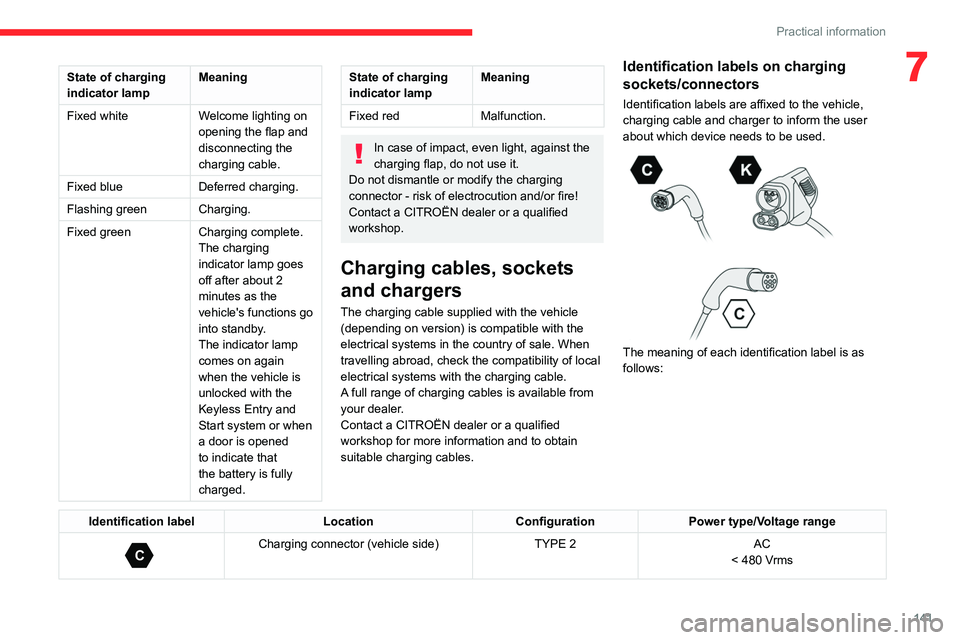
Identification labels on charging
sockets/connectors
Identification labels are affixed to the vehicle,
charging cable and charger to inform the user
about which device needs to be used.
The meaning of each identification label is as
follows:
Identification label LocationConfigurationPower type/Voltage range
C
Charging connector (vehicle side) TYPE 2AC
< 480 Vrms
Page 180 of 260

178
In the event of a breakdown
Reconnecting the (+) terminal
► Raise lever A fully.
► Refit open clamp B on the (+) terminal.
►
Push clamp
B fully down.
►
Lower lever
A
to lock clamp B.
►
Depending on equipment, lower the plastic
cover on the
(+) terminal.
Do not force the lever when pressing on
it, as if the clamp is not positioned
correctly, locking will then not be possible.
Start the procedure again.
Following reconnection
After reconnecting the battery, turn on the
ignition and wait 1 minute before starting the
engine, to enable the electronic systems to
initialise.
If minor problems nevertheless persist following
this operation, contact a CITROËN dealer or a
qualified workshop.
Referring to the relevant section, reinitialise
certain equipment:
–
Remote control key or electronic key
(depending on version).
–
Sunroof.
–
Electric windows.
–
Date and time.
–
Preset radio stations.
The Stop & Start system may not be operational during the trip following the
first engine start.
In this case, the system will only be available
again after a continuous period with the
vehicle immobilised, the duration of which
depends on the exterior temperature and the
state of charge of the battery (up to about 8
hours).
Towing the vehicle
General recommendations
Observe the legislation in force in the
country where you are driving.
Ensure that the weight of the towing vehicle is
higher than that of the towed vehicle.
The driver must remain at the wheel of the
towed vehicle and must have a valid driving
licence.
When towing a vehicle with all four wheels on
the ground, always use an approved towing
arm; rope and straps are prohibited.
The towing vehicle must move off gently.
When the vehicle is towed with its engine
off, there is no longer braking and steering
assistance.
A professional towing service must be
called if:
–
Broken down on a motorway or main road.
–
Not possible to put
the gearbox into neutral,
unlock the steering, or release the parking
brake.
–
Not possible to tow a vehicle with an
automatic gearbox, with the engine running.
–
T
owing with only two wheels on the ground.
–
Four-wheel drive vehicle.
–
No approved towbar available.
Before towing the vehicle, it is essential
to put the vehicle in free-wheeling mode.
For more information on Free-wheeling, refer
to the corresponding section.
Electric motor
An electric vehicle cannot under any
circumstances be used to tow another
vehicle.
However, it may be used, for example, to exit
a rut.
Page 236 of 260

234
Event data recorders
Recording event data
Electronic control units are installed in your
vehicle. These control units process data
received from the vehicle's sensors, for example,
or data they generate themselves or exchange
with each other. Some of these control units are
required for the correct operation of your vehicle,
some others assist you while driving (driving or
manoeuvring aids), while others provide comfort
or infotainment functions.
The following contains general information about
how data is processed within the vehicle.
You will find additional information about the
specific data which is downloaded, stored
and transmitted to third parties and what it is
used for in your vehicle under the keyword
"Data protection". This information is directly
associated with the references for the functions
in question contained in the corresponding
vehicle handbook, or in the general terms and
conditions of sale.
This information is also available online.
Vehicle operating data
The control units process the data used for the
operation of the vehicle.
This data includes, for example:
–
Information about the state of the vehicle
(e.g.
speed, travel time, lateral acceleration,
wheel rotation rate, fastened seat belts display).
–
Environmental conditions (e.g.
temperature,
rain sensor, distance sensor). As a general rule, this data is temporary, is
not stored for longer than one operating cycle
and is only used within the vehicle itself. The
control units often record this data (including the
vehicle's key). This function allows either the
temporary or permanent storage of information
about the state of the vehicle, stresses on
components, servicing requirements, as well as
events and technical errors.
Depending on the vehicle's equipment level, the
data stored is as follows:
–
Operating state of system components
(e.g.
filling level, tyre pressures, battery charge
status).
–
Faults and malfunctions in important system
components (e.g.
lamps, brakes).
–
System reactions in specific driving situations
(e.g.
deployment of an airbag, triggering of
stability control and braking systems).
–
Information about events which have
damaged the vehicle.
–
For electric and rechargeable hybrid vehicles,
the traction battery charge level and the
estimated driving range.
In particular circumstances (e.g.
if the vehicle
has detected a malfunction), it may be necessary
to record data which would otherwise simply not
be stored.
When taking your vehicle in for servicing
(e.g.
repairs, maintenance), the stored operating
data may be read along with the vehicle's
identification number and used if necessary.
The personnel working for the servicing network (e.g.
garages, manufacturers) or third parties
(e.g. roadside assistance agents) may read
the vehicle's data. This also applies to work
carried out under warranty and quality assurance
measures.
This data is generally read via the OBD
(On-Board Diagnostics) port fitted by law to
the vehicle. It is used to report on the technical
state of the vehicle or its components and
facilitates the diagnosis of malfunctions, in
compliance with warranty obligations and for
quality improvement. This data, in particular the
information relating to stress on components,
technical events, operator errors and other
malfunctions, is sent to the Manufacturer, if
necessary, along with the vehicle's identification
number. The Manufacturer's liability may also be
engaged. The Manufacturer may also use the
operating data taken from the vehicle for product
recalls. This data may also be used to check the
customer's warranty and any claims made under
warranty.
Any malfunctions stored in the vehicle may be
reset by an after-sales service company during
servicing or repair work, or at your request.
Comfort and infotainment
functions
Comfort settings and personalised settings
may be saved in the vehicle and modified or
reinitialised at any time.
Page 242 of 260

240
Alphabetical index
Instrument panel, LCD 9
Internet browser
218, 221
ISOFIX mountings
78, 81–82
J
Jack 165–166, 169, 224
Jump starting
176
K
Key 28–29, 32–33
Key, electronic
30–31
Keyless Entry and Starting
28, 30–31, 87–88
Key not recognised
88–89
Key with remote control
28, 86
Kit, hands-free
201–202, 226
Kit, puncture repair
166
Kit, temporary puncture repair
165–168
L
Labels, identification 185
Lamp, boot
56
Lamps, parking
58
Lamps, rear
174
Lams with Full LED technology
61
Lane assist
109, 113–115
Lane departure warning active
11 8
Leather (care) 163
LEDs - Light-emitting diodes
58, 172, 174
Level, AdBlue®
158
Level, brake fluid
157
Level, Diesel additive
158
Level, engine coolant
19, 157
Level, engine oil
19, 156
Levels and checks
155–157
Level, screenwash fluid
63, 157
Light-emitting diodes - LEDs
58, 172, 174
Lighting, cornering
61
Lighting dimmer
23
Lighting, exterior
57, 60
Lighting, guide-me home
29, 59–60
Lighting, interior
55
Lighting, mood
55
Lighting, welcome
59
Loading
152–153
Load reduction mode
154
Locking
29, 31
Locking from the inside
32
Locking the doors
32
Low fuel level
137
Lumbar
41
M
Mains socket (domestic network) 141
Maintenance (advice)
139, 162
Maintenance, routine
102, 158–160
Manoeuvring aids (recommendations)
101
Map reading lamps 55
Markings, identification
185
Massage function
41
Mat
54, 102
Menu, main
26
Menus (audio)
197–198, 210–211
Menu short cuts
26
Messages
228
Messages, quick
228
Minimum traction battery charge
level (Electric)
21
Mirror, rear view
43
Mirrors, door
43, 51, 121
Mirror, vanity
52
Misfuel prevention
138
Mobile application
27, 51, 148
Motor, electric
89, 156, 184
Mountings, ISOFIX
78, 81–82
Multimedia support
52
N
Navigation 215–217
Navigation, connected
218–220
O
Obstacle detection 126
Oil change
156
Oil consumption
156
Page 243 of 260

241
Alphabetical index
OIl, engine 156
On-board tools
56, 165–166
Opening the bonnet
154
Opening the boot
30, 35
Opening the doors
30, 35
Opening the windows
28
P
Pads, brake 159
Paint
163, 185
Paint colour code
185
Park Assist
132
Parking brake
89, 159
Parking brake, electric
90–92, 159
Parking sensors, audible and visual
126
Parking sensors, front
127
Parking sensors, rear
126
Passenger compartment temperature pre-
conditioning (Electric)
27, 51
Pedestrian horn (Electric)
67, 85
Personalisation
10
Plates, identification
185
Player, Apple®
200, 225
Player, USB
200, 224
Port, USB
52, 200, 203, 220, 224
Post Collision Safety Brake
70
Power
21
Power indicator (Electric)
8, 21
Pressures, tyres
159, 167, 185
Pre-tensioning seat belts
72
Priming the fuel system 165
Profiles
229
Protecting children
74–80
Proximity Keyless Entry & Start
30
Public fast charging station
141, 147
Puncture
166–167, 169
R
Radar (warnings) 101
Radio
198, 223
Radio, digital (Digital Audio
Broadcasting - DAB)
199–200, 224
Range, AdBlue®
20, 158
RDS
199, 223
Reading lamps
55
Rear screen, demisting
51
Recharging the battery
175–176
Recharging the traction battery
(Electric)
138, 142, 145, 147–148
Recirculation, air
50
Recovery
178–180
Recovery of the vehicle
178–179
Reduction of electrical load
154
Regeneration of the particle filter
158
Regenerative braking (deceleration
by engine braking)
94–95
Reinitialisation of the under-inflation
detection system
99–100
Reinitialising the remote control
34
Reminder, key in ignition
87
Reminder, lighting on 57–58
Remote control
28–32
Remotely operable functions
(Electric)
27, 51, 148
Removing a wheel
169–171
Removing the mat
54
Replacing bulbs
171–172, 174
Replacing fuses
174
Replacing the air filter
158
Replacing the oil filter
158
Replacing the passenger compartment
filter
158
Reservoir, screenwash
157
Reset trip
24
Retractable support
52
Rev counter
9–10
Reversing camera
102, 127–130
Reversing lamps
174
Roof bars
152–153
Roof, opening
38–39
Running out of fuel (Diesel)
165
S
Safety, children 74–80
Saturation of the particle filter (Diesel)
158
Screenwash
63
Screenwash, front
62
SCR (Selective Catalytic Reduction)
21, 160
Seat angle
41
Seat belts
71–72, 78