light CITROEN C4 2020 Manual PDF
[x] Cancel search | Manufacturer: CITROEN, Model Year: 2020, Model line: C4, Model: CITROEN C4 2020Pages: 260, PDF Size: 7.12 MB
Page 189 of 260
187
Touch screen BLUETOOTH audio system
10Long press: display the call log.
Short press during an incoming call: accept the
call.
Short press during a call in progress: end the
call.
Confirm a selection.
Increase volume.
Decrease volume.
Mute/restore sound by simultaneously
pressing the increase and decrease
volume buttons.
Steering mounted controls -
Type 2
Voice commands:
This control is located on the steering
wheel or at the end of the lighting control stalk
(depending on equipment).
Short press, smartphone voice commands via
the system.
Increase volume.
Decrease volume.
Mute by pressing the volume increase
and decrease buttons simultaneously
(depending on equipment). Restore the sound by pressing one of the two
volume buttons.
Change the multimedia source.
Short press: display the calls log.
Short press during an incoming call:
accept the call.
Long press during an incoming call: reject the
call.
Short press during a call in progress: end the
call.
Radio (rotate): previous/next preset
station.
Media (rotate): previous/next track, move in a
list.
Short press: confirm a selection; if nothing
selected, access to presets.
Radio: display the list of stations.
Media: display the list of tracks.
Menus
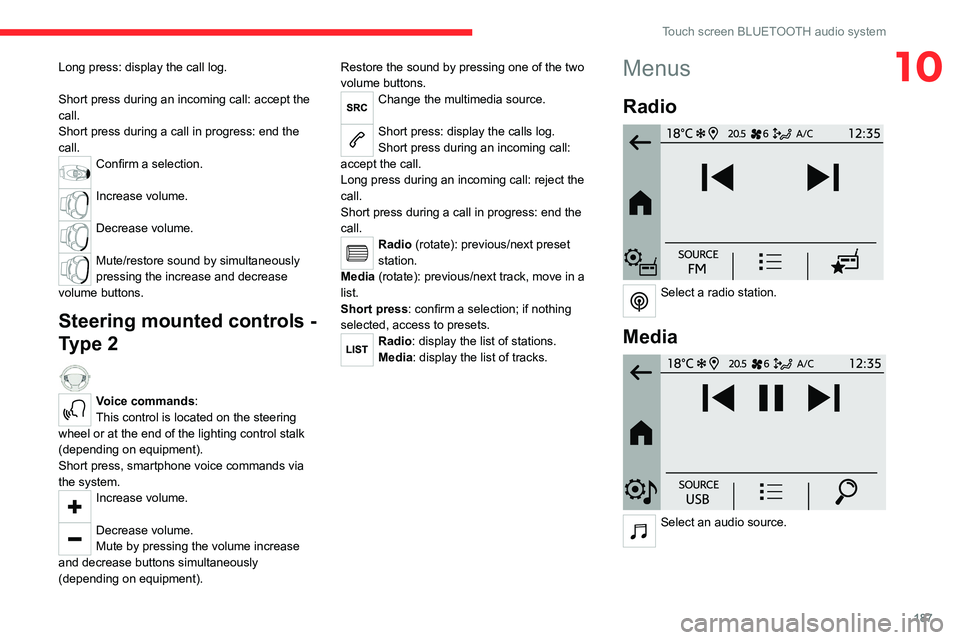
Radio
Select a radio station.
Media
Select an audio source.
Page 212 of 260

210
CITROËN Connect Nav
– Media player connected via the auxiliary
socket (depending on equipment).
–
V
ideo (depending on equipment).
In the "Settings" menu, it is possible to
create a profile for an individual or for a
group of people with shared interests, and
configure a wide range of settings (radio
presets, audio settings, navigation history,
favourite contacts, etc.). Settings are applied
automatically.
In very hot conditions, the volume may
be limited to protect the system. It may
enter standby mode (with the screen and
sound off) for 5 minutes or more.
The system will resume normal operation
when the temperature in the passenger
compartment has dropped.
Steering mounted controls
Voice control:
This control is located on the steering
wheel or at the end of the lighting control stalk
(depending on equipment).
Short press, system voice control.
Long press, voice commands from smartphone
or CarPlay
®, Android Auto via the system.Increase volume.
Decrease volume.
Mute by pressing the volume increase
and decrease buttons simultaneously
(depending on equipment).
Restore the sound by pressing one of the two
volume buttons.
Media (short press): change the
multimedia source.
Telephone (short press): start telephone
call.
Call in progress (short press): access
telephone menu.
Telephone (long press): reject an incoming call,
end call; when no call is in progress, access
telephone menu.
Radio (rotate): automatic search for the
previous/next station.
Media (rotate): previous/next track, move
through a list.
Short press: confirm a selection; if nothing
selected, access presets.
Radio: display the list of stations. Media: display the list of tracks.
Radio (press and hold): update the list of
detected stations.
Menus
Connected navigation
Enter navigation settings and choose a
destination.
Use real-time services, depending on equipment.
Page 214 of 260
212
CITROËN Connect Nav
Voice commands
Steering wheel-mounted
controls
Voice commands:
Voice commands can be issued from any
screen page after a short press on the "Voice
commands" button located on the steering
wheel or at the end of the lighting control stalk
(depending on equipment), as long as there is no
telephone call in progress.
To ensure that voice commands are always recognised by the system, please
follow these recommendations:
–
use natural language in a normal tone
without breaking up words or raising your
voice.
–
always wait for the "beep" (audible signal)
before speaking.
–
for best results, closing the windows and
sunroof is recommended, to avoid extraneous
interference (depending on version).
–
before issuing a voice command, ask any
other passengers to refrain from speaking.
First steps
Example of a "voice command" for
navigation:
"Navigate to address 11 regent street,
London"
Example of a "voice command" for the radio and
media:
"Play artist Madonna"
Example of a "voice command" for the
telephone:
"Call David Miller"
The voice commands, with a choice of 17 languages (Arabic, Brazilian, Czech,
Danish, Dutch, English, Farsi, French,
German, Italian, Norwegian, Polish,
Portuguese, Russian, Spanish, Swedish,
Turkish), are made using the language
previously chosen and set in the system.
For some voice commands, there are
alternative synonyms.
Example: Guide to / Navigate to / Go to / ...
The voice commands in Arabic for: "Navigate
to address" and "Display POI in the city", are
not available.
Information - Using the
system
When voice commands are activated, by
briefly pressing the button, help is
displayed on the touch screen, offering various
menus and enabling voice-based interaction with
the system.
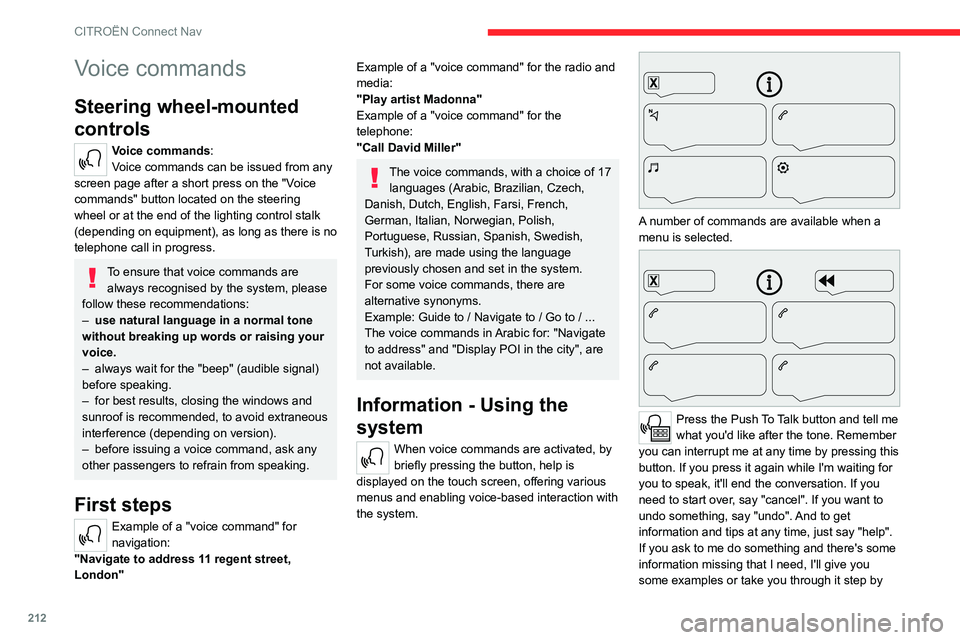
A number of commands are available when a
menu is selected.
Press the Push To Talk button and tell me
what you'd like after the tone. Remember
you can interrupt me at any time by pressing this
button. If you press it again while I'm waiting for
you to speak, it'll end the conversation. If you
need to start over, say "cancel". If you want to
undo something, say "undo". And to get
information and tips at any time, just say "help".
If you ask to me do something and there's some
information missing that I need, I'll give you
some examples or take you through it step by
Page 237 of 260

235
Event data recorders
13Depending on the vehicle's equipment level, this
may include:
–
Seat and steering wheel position settings.
–
Chassis and air conditioning settings.
–
Personalised settings such as the interior
lighting.
Y
ou can enter your own data into the functions
of your vehicle's audio and telematic system, as
part of the selected functionalities.
Depending on the vehicle's equipment level,
this
may
include:
–
Multimedia data such as music, videos or
photos to be read by an integrated multimedia
system.
–
Address book data to be used with an
integrated hands-free system or with an
integrated navigation system.
–
Entered destinations.
–
Data regarding the use of online services.
This data for the comfort and infotainment
functions may be stored locally in the vehicle
or saved to a device that you have connected
to the vehicle (e.g.
smartphone, USB memory
stick or MP3 player). Data that you have entered
yourself may be deleted at any time.
This data may also be transmitted outside the
vehicle at your request, particularly when using
online services in line with the settings that you
have selected. Smartphone integration
(e.g.
Android
Auto
® or
Apple
®CarPlay®)
If your vehicle is equipped accordingly, you can
connect your smartphone or another mobile
device to the vehicle in order to operate it using
the vehicle's integrated controls. Images and
sounds from the smartphone can be transmitted
through the audio and telematics system.
Specific information is simultaneously sent
to your smartphone. Depending on the type
of
integration, this includes data such as location,
day/night mode and other general information
about the vehicle. For more information, please
refer to the user instructions for the vehicle or the
audio and telematics system.
Integrating a smartphone allows you to use
its applications, such as a navigation app or
music player. No other
integration between
the smartphone and the vehicle is possible, in
particular active access to vehicle data. How the
data is processed subsequently is determined
by the supplier of the application being used.
The ability the change settings depends on the
application in question and on the operating
system installed on your smartphone.
Online services
If your vehicle is connected to a wireless
network, data can be exchanged between
your vehicle and other systems. Connection
to a wireless network is made possible
via a transmitter located in your vehicle or a mobile
device that you have provided (e.g.
smartphone).
The online services can be used via this wireless
connection.
These include online services and
applications (apps) provided to you by the
Manufacturer or other suppliers.
Exclusive services
As regards the Manufacturer's online services,
the corresponding functions are described by
the Manufacturer in an appropriate medium
(e.g.
handbook, Manufacturer's website) and the
information about data protection is provided.
Personal data may be used for online services.
The exchange of data for this purpose takes
place over a secure connection, using for
example the Manufacturer's dedicated computer
systems. The collection, processing and use of
personal data for the development of services
are carried out solely on the basis of a legal
authorisation, for example in the case of a
legal emergency call system or a contractual
agreement or else under a consent agreement.
You can activate or deactivate the services and
functions (some may be chargeable) and, in
some cases, the vehicle's entire connection to
the wireless network. This does not include the
statutory functions and services such as the
emergency or assistance call system.
Third-party services
If you use online services provided by other
(third-party) suppliers, these services are subject
Page 240 of 260

238
Alphabetical index
Charging connector (Electric) 140, 145,
147–148
Charging flap (Electric)
140, 145, 147–148
Charging system (Electric)
5, 8, 26, 138, 156
Charging the traction battery
(Electric)
21, 138, 142, 145, 147–148
CHECK
22
Checking the engine oil level
19
Checking the levels
156–157
Checking tyre pressures
(using the kit)
166, 168
Checks
155, 158–160
Checks, routine
158–159
Child lock
83
Children
72, 78–80
Children (safety)
83
Child seats
72, 75–78
Child seats, conventional
78, 81–82
Child seats, i-Size
80–82
Child seats, ISOFIX
78–79, 81–82
Cleaning (advice)
139, 162–163
Closing the boot
31, 35
Closing the doors
31, 35
Collision Risk Alert
122–123
Configuration, vehicle
25–26
Connected applications
221
ConnectedCAM Citroën™
100
Connection, Bluetooth
201–202,
221–222, 226–227
Connection, Wi-Fi network
222
Connectivity
220
Consumption figures
26Container, AdBlue® 160–161
Control, emergency boot release
35
Control, emergency door
32–33
Control, heated seats
42, 45
Controls, steering mounted
93–94
Control stalk, lighting
57–58
Control stalk, wipers
62–63
Control unit
141–142
Courtesy lamps
55
Cruise control
104–105, 107–108
Cruise control, adaptive
104–105, 109
Cruise control by speed limit
recognition
104–105
D
DAB (Digital Audio Broadcasting) -
Digital radio
199–200, 224
Date (setting)
206, 229
Daytime running lamps
58, 173
Deactivating the passenger airbag
74, 77
Deadlocking
29, 31
Deferred charging
27
Deferred charging
(Electric)
26–27, 140, 145, 148
Defrosting
43, 50
Defrosting, front
50
Demisting
43, 50
Demisting, front
50
Demisting, rear
51
Demisting, rear screen
51
Dials and gauges 9–10
Digital instrument panel
10
Dimensions
185
Dipstick
19, 156
Direction indicators
58, 173–174
Display, head-up
11
Display screen, instrument panel
9
Domestic charging
(Electric)
142, 147–148, 184
Doors
35
Drive Assist Plus
109
Driver’s attention warning
125
Drive selector (Electric)
94
Driving
84–85
Driving aids camera (warnings)
101
Driving aids (recommendations)
101
Driving economically
7
Driving modes
95–96
Dynamic stability control (DSC)
70
E
EBFD 69
Eco-driving (advice)
7
ECO mode
96
Economy mode
153
Electric motor
5, 8, 22, 26, 138,
150, 156, 175, 178, 184
Electric windows
37
Electronic brake force distribution (EBFD)
69
Emergency braking assistance (EBA)
70
Page 241 of 260

239
Alphabetical index
Emergency call 67–68
Emergency switching off
88–89
Emergency warning lamps
66, 165
Emissions control system, SCR
21, 160
Energy economy mode
153
Energy flows
22, 26
Energy recovery
21, 95
Engine
160
Engine compartment
155
Engine, Diesel
137, 155, 165, 183
Engine, petrol
155, 182
Engines
181–183
Environment
7, 34, 85
ESC (electronic stability control)
69
Expanded traffic sign recognition
105
Exterior lighting
60
F
Fatigue detection 125
Filling the AdBlue® tank
158, 161
Filling the fuel tank
137–138
Filter, air
158
Filter, oil
158
Filter, particle
158
Filter, passenger compartment
46, 158
Fitting a wheel
169, 171
Fitting roof bars
152–153
Fittings, boot
55
Fittings, interior
52
Flap, fuel filler
137–138
Flashing indicators 58, 173
Floor, boot, adjustable
56
Fluid, brake
157
Fluid, engine coolant
157
Foglamp, rear
57, 174
Foglamps, front
57, 61
Folding the rear seats
44–45
Frequency (radio)
223
Fuel
7, 137
Fuel consumption
7
Fuel tank
137–138
Fuses
174
G
Gauge, fuel 137
Gearbox, automatic
92–94, 96, 159, 175
Gearbox, manual
92, 96, 159
Gear lever, manual gearbox
92
Gear shift indicator ~ Gear efficiency
indicator
97
Glove box
52
G.P.S.
217
H
Hazard warning lamps 66, 165
Headlamp adjustment
59
Headlamps, automatic dipping
60–61
Headlamps, automatic illumination
59
Headlamps, dipped beam 173
Headlamps, halogen
59, 173
Headlamps, main beam
60, 173
Head restraints, front
40
Head restraints, rear
44–45
Head-up display
10–11
Heated steering wheel
42
Heating
45, 47
Heating, programmable
27, 51
Hi-Fi system
54
High voltage
138
Hill start assist
96–97
Histogramme, fuel consumption
26–27
Horn
67
I
Ignition 88, 227
Ignition on
88
Ignition switch
86–87
Immobiliser, electronic
86
Indicator, AdBlue® range
20
Indicator, coolant temperature
19
Indicator, engine oil level
19
Indicators, direction
58, 173
Inflating tyres
159, 185
Inflating tyres and accessories
(using the kit)
166, 168
Information, vehicle
9, 234
Infrared camera
102
Instrument panel
9, 22, 24, 102
Page 242 of 260

240
Alphabetical index
Instrument panel, LCD 9
Internet browser
218, 221
ISOFIX mountings
78, 81–82
J
Jack 165–166, 169, 224
Jump starting
176
K
Key 28–29, 32–33
Key, electronic
30–31
Keyless Entry and Starting
28, 30–31, 87–88
Key not recognised
88–89
Key with remote control
28, 86
Kit, hands-free
201–202, 226
Kit, puncture repair
166
Kit, temporary puncture repair
165–168
L
Labels, identification 185
Lamp, boot
56
Lamps, parking
58
Lamps, rear
174
Lams with Full LED technology
61
Lane assist
109, 113–115
Lane departure warning active
11 8
Leather (care) 163
LEDs - Light-emitting diodes
58, 172, 174
Level, AdBlue®
158
Level, brake fluid
157
Level, Diesel additive
158
Level, engine coolant
19, 157
Level, engine oil
19, 156
Levels and checks
155–157
Level, screenwash fluid
63, 157
Light-emitting diodes - LEDs
58, 172, 174
Lighting, cornering
61
Lighting dimmer
23
Lighting, exterior
57, 60
Lighting, guide-me home
29, 59–60
Lighting, interior
55
Lighting, mood
55
Lighting, welcome
59
Loading
152–153
Load reduction mode
154
Locking
29, 31
Locking from the inside
32
Locking the doors
32
Low fuel level
137
Lumbar
41
M
Mains socket (domestic network) 141
Maintenance (advice)
139, 162
Maintenance, routine
102, 158–160
Manoeuvring aids (recommendations)
101
Map reading lamps 55
Markings, identification
185
Massage function
41
Mat
54, 102
Menu, main
26
Menus (audio)
197–198, 210–211
Menu short cuts
26
Messages
228
Messages, quick
228
Minimum traction battery charge
level (Electric)
21
Mirror, rear view
43
Mirrors, door
43, 51, 121
Mirror, vanity
52
Misfuel prevention
138
Mobile application
27, 51, 148
Motor, electric
89, 156, 184
Mountings, ISOFIX
78, 81–82
Multimedia support
52
N
Navigation 215–217
Navigation, connected
218–220
O
Obstacle detection 126
Oil change
156
Oil consumption
156
Page 243 of 260

241
Alphabetical index
OIl, engine 156
On-board tools
56, 165–166
Opening the bonnet
154
Opening the boot
30, 35
Opening the doors
30, 35
Opening the windows
28
P
Pads, brake 159
Paint
163, 185
Paint colour code
185
Park Assist
132
Parking brake
89, 159
Parking brake, electric
90–92, 159
Parking sensors, audible and visual
126
Parking sensors, front
127
Parking sensors, rear
126
Passenger compartment temperature pre-
conditioning (Electric)
27, 51
Pedestrian horn (Electric)
67, 85
Personalisation
10
Plates, identification
185
Player, Apple®
200, 225
Player, USB
200, 224
Port, USB
52, 200, 203, 220, 224
Post Collision Safety Brake
70
Power
21
Power indicator (Electric)
8, 21
Pressures, tyres
159, 167, 185
Pre-tensioning seat belts
72
Priming the fuel system 165
Profiles
229
Protecting children
74–80
Proximity Keyless Entry & Start
30
Public fast charging station
141, 147
Puncture
166–167, 169
R
Radar (warnings) 101
Radio
198, 223
Radio, digital (Digital Audio
Broadcasting - DAB)
199–200, 224
Range, AdBlue®
20, 158
RDS
199, 223
Reading lamps
55
Rear screen, demisting
51
Recharging the battery
175–176
Recharging the traction battery
(Electric)
138, 142, 145, 147–148
Recirculation, air
50
Recovery
178–180
Recovery of the vehicle
178–179
Reduction of electrical load
154
Regeneration of the particle filter
158
Regenerative braking (deceleration
by engine braking)
94–95
Reinitialisation of the under-inflation
detection system
99–100
Reinitialising the remote control
34
Reminder, key in ignition
87
Reminder, lighting on 57–58
Remote control
28–32
Remotely operable functions
(Electric)
27, 51, 148
Removing a wheel
169–171
Removing the mat
54
Replacing bulbs
171–172, 174
Replacing fuses
174
Replacing the air filter
158
Replacing the oil filter
158
Replacing the passenger compartment
filter
158
Reservoir, screenwash
157
Reset trip
24
Retractable support
52
Rev counter
9–10
Reversing camera
102, 127–130
Reversing lamps
174
Roof bars
152–153
Roof, opening
38–39
Running out of fuel (Diesel)
165
S
Safety, children 74–80
Saturation of the particle filter (Diesel)
158
Screenwash
63
Screenwash, front
62
SCR (Selective Catalytic Reduction)
21, 160
Seat angle
41
Seat belts
71–72, 78
Page 245 of 260
243
Alphabetical index
USB 200, 203, 220, 224
V
Vehicle data recording and privacy 234
Ventilation
45–47
Video
225
Visibility
50
Vision, 180° forward
131
Vision 360°
128
Voice commands
212–215
W
Wallbox (Electric) 141
Warning and indicator lamps
12
Warning lamp, driver's seat belt
not fastened
72
Warning lamps
12, 22
Warning lamp, seat belts
72
Warnings and indicators
12
Washing
102
Washing (advice)
139, 162–163
Weights
181–183
Welcome lighting
29, 60
Wheel, spare
159, 165–166, 169
Windscreen, heated
50–51
Windscreen wipers
62–63
Wiper blades (changing)
64
Wipers
62
Wipers, automatic rain sensitive
63