lock CITROEN C4 2020 Owners Manual
[x] Cancel search | Manufacturer: CITROEN, Model Year: 2020, Model line: C4, Model: CITROEN C4 2020Pages: 260, PDF Size: 7.12 MB
Page 4 of 260
2
Contents
■
Overview
■
Eco-driving
1InstrumentsDriver information 9
Instrument panels 9
Head-up display 10
Warning and indicator lamps 12
Indicators 18
Manual test 22
Total distance recorder 23
Lighting dimmer 23
Trip computer 23
Touch screen BLUETOOTH audio system 24
10-inch touch screen 25
Remotely operable functions (Electric) 27
2AccessElectronic key with remote control function and
built-in key 28
Proximity Keyless Entry and Start 30
Central locking 32
Back-up procedures 32
Doors 35
Boot 35
Alarm 35
Electric windows 37
Sunroof 38
3Ease of use and comfortFront seats 40
Steering wheel adjustment 42
Heated steering wheel 42
Mirrors 43
Rear bench seat 44
Heating and Ventilation 45
Manual air conditioning 47
Dual-zone automatic air conditioning 47
Front demisting - defrosting 50
Heated windscreen 50
Rear screen demisting/defrosting 51
Temperature conditioning (Electric) 51
Interior fittings 52
Courtesy lamps 55
Interior ambient lighting 55
Boot fittings 55
4Lighting and visibilityLighting control stalk 57
Direction indicators 58
Automatic illumination of headlamps 59
Headlamp beam height adjustment 59
Guide-me-home and welcome lighting 59
Automatic lighting systems - General
recommendations
60
Automatic headlamp dipping 60
Cornering lighting 61
Wiper control stalk 62
Intermittent wipers 63
Automatic wipers 63
Changing a wiper blade 64
5SafetyGeneral safety recommendations 66
Hazard warning lamps 66
Horn 67
Pedestrian horn (Electric) 67
Emergency or assistance 67
Electronic stability control (ESC) 69
Seat belts 71
Airbags 73
Child seats 75
Deactivating the front passenger airbag 77
ISOFIX child seats 78
i-Size child seats 80
Installing child seats 81
Child lock 83
6DrivingDriving recommendations 84
Starting / Switching off the engine with the key 86
Starting/Switching off the engine with
Keyless Entry and Start
87
Manual parking brake 89
Electric parking brake 90
6-speed manual gearbox 92
Automatic gearbox 92
Drive selector (Electric) 94
Driving modes 95
Hill start assist 96
Gear shift indicator 97
Stop & Start 97
Tyre under-inflation detection 99
ConnectedCAM Citroën 100
Driving and manoeuvring aids - General
recommendations
101
Road signs recognition 102
Speed limiter 105
Cruise control - Specific recommendations 107
Cruise control 107
Highway Driver Assist 109
Adaptive cruise control 109
Lane positioning assist 11 3
Page 6 of 260
4
Overview
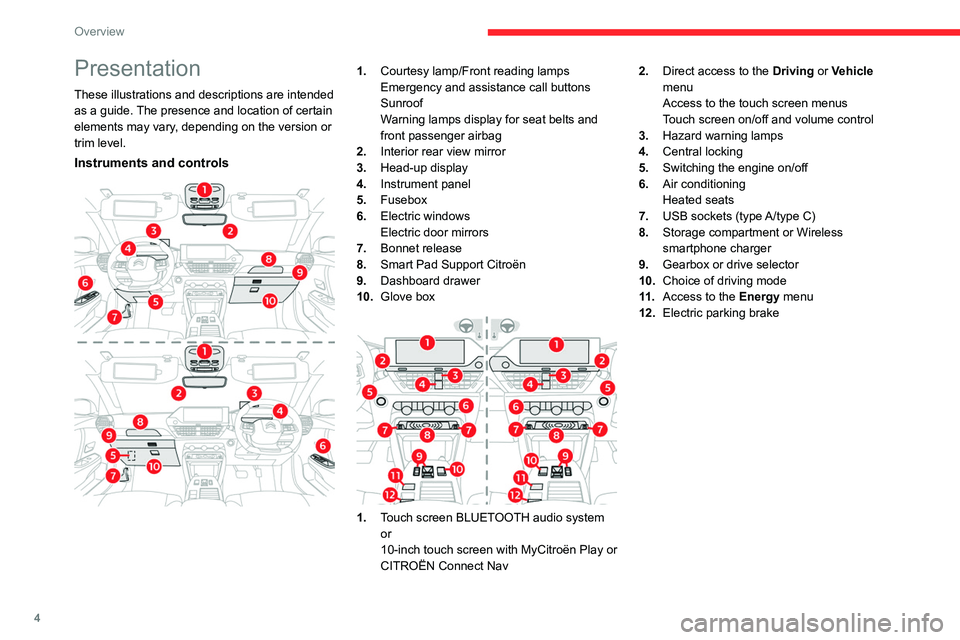
Presentation
These illustrations and descriptions are intended
as a guide. The presence and location of certain
elements may vary, depending on the version or
trim level.
Instruments and controls
1.Courtesy lamp/Front reading lamps
Emergency and assistance call buttons
Sunroof
Warning lamps display for seat belts and
front passenger airbag
2. Interior rear view mirror
3. Head-up display
4. Instrument panel
5. Fusebox
6. Electric windows
Electric door mirrors
7. Bonnet release
8. Smart Pad Support Citroën
9. Dashboard drawer
10. Glove box
1.Touch screen BLUETOOTH audio system
or
10-inch touch screen with MyCitroën Play or
CITROËN Connect Nav 2.
Direct access to the Driving or Vehicle
menu
Access to the touch screen menus
Touch screen on/off and volume control
3. Hazard warning lamps
4. Central locking
5. Switching the engine on/off
6. Air conditioning
Heated seats
7. USB sockets (type A/type C)
8. Storage compartment or Wireless
smartphone charger
9. Gearbox or drive selector
10. Choice of driving mode
11 . Access to the Energy menu
12. Electric parking brake
Page 16 of 260
14
Instruments
Malfunction (with electric parking brake)Fixed, accompanied by the
message "Parking brake fault".
The vehicle cannot be immobilised with the
engine running.
If manual application and release commands are
not working, the electric parking brake control
lever is faulty.
The automatic functions must be used at all
times and are automatically re-enabled in the
event of a control lever fault.
Carry out (2).
Fixed, accompanied by the
message "Parking brake
fault".
The parking brake is faulty: manual and
automatic functions may not be working.
When stationary, to immobilise the vehicle:
►
Pull and hold the control lever for
approximately 7 to 15 seconds, until the indicator
lamp comes on on the instrument panel.
If this procedure does not work, secure the
vehicle:
►
Park on a level surface.
►
With a manual gearbox, engage a gear
.
►
With an automatic gearbox or drive selector
,
select
P, then place the supplied chock against
one of the wheels.
Then carry out (2).
Automatic functions deactivated (electric
parking brake)
Fixed.
The "automatic application" (on switching
off the engine) and "automatic release" (on
acceleration) functions are deactivated.
If automatic application/release is no longer
possible:
►
Start the engine.
►
Use the control to apply the electric parking
brake.
►
T
ake your foot fully off the brake pedal.
►
Hold the control pressed in the release
direction for between 10 and 15 seconds.
►
Release the control.
►
Depress and hold the brake pedal.
►
Pull the control in the application direction for
2
seconds.
►
Release the control and the brake pedal.
Anti-lock braking system (ABS)Fixed.
The anti-lock braking system has a fault.
The vehicle retains conventional braking.
Drive carefully at moderate speed, then carry
out (3).
Power steeringFixed.
The power steering has a fault.
Drive carefully at moderate speed, then carry
out (3).
Engine self-diagnostic system (Petrol or
Diesel)
Flashing.
The engine management system has a
fault.
There is a risk that the catalytic converter will be
destroyed.
You must carry out (2).
Fixed.
The emissions control system has a fault.
The warning lamp should go off when the engine
is started.
Carry out (3) without delay.
Fixed.
A minor engine fault has been
detected.
Carry out (3).
Dynamic stability control (DSC)/Anti-slip
regulation (ASR)
Flashing.
DSC/ASR regulation is activated in the
event of a loss of grip or trajectory.
Fixed.
The DSC/ASR system has a fault.
Carry out (3).
Emergency brake malfunction (with
electric parking brake)
Fixed, accompanied by the
message "Parking brake fault".
Emergency braking does not deliver optimal
performance.
Page 17 of 260

15
Instruments
1If automatic release is not available, use manual
release or carry out (3).
Hill start assistFixed, accompanied by the
message "Anti roll-back system
fault".
The system has a fault.
Carry out (3).
Dynamic stability control (DSC)/Anti-slip
regulation (ASR)
Fixed.
The system is deactivated.
The DSC/ASR system is reactivated
automatically when the vehicle is restarted,
and at speeds above approximately 31 mph
(50
km/h).
At speeds below 31
mph (50 km/h), it can be
reactivated manually.
Under-inflationFixed.
The pressure in one or more tyres is too
low.
Check the pressure of the tyres as soon as
possible.
Reinitialise the detection system after adjusting
the pressure.
Under-inflation warning lamp
flashing then fixed and Service
warning lamp fixed.
The tyre pressure monitoring system is faulty.
Under-inflation detection is no longer monitored. Check the tyre pressures as soon as possible
and carry out (3).
Engine pre-heating (Diesel)Temporarily on
(up to approximately 30 seconds in
severe weather conditions).
When switching on the ignition, if the weather
conditions and the engine temperature make it
necessary.
Wait until the warning lamp goes off before
starting.
When the warning lamp goes off, starting will
occur immediately if you press and hold:
–
the clutch pedal with a manual gearbox.
–
the brake pedal with an automatic gearbox.
If the engine does not start, make the engine
starting request again, while keeping your foot
on the pedal.
Particle filter (Diesel)Fixed, accompanied by an audible signal
and a message about the risk of particle
filter blockage.
The particle filter is nearing saturation.
As soon as traffic conditions permit, regenerate
the filter by driving at a speed of at least 37
mph
(60
km/h) until the warning lamp goes off.
Fuel filter (Diesel)Fixed.
The Diesel fuel filter contains water.
Carry out (2) without delay. Risk of damaging the
fuel injection system!
AirbagsFixed.
One of the airbags or seat belt
pyrotechnic pretensioners is faulty.
Carry out (3).
Front passenger airbag (ON)Fixed.
The front passenger airbag is activated.
The control is in the "ON" position.
In this case, do NOT install a "rearward
facing" child seat on the front passenger seat
- risk of serious injury!
Front passenger airbag (OFF)Fixed.
The front passenger airbag is deactivated.
The control is set to the “OFF ” position.
A "rearward facing" child seat can be installed,
unless there is a fault with the airbags (Airbags
warning lamp on).
Low fuel level (Petrol or Diesel)Fixed, with the reserve level shown in red,
accompanied by an audible signal and
the display of a message.
When it first comes on, you have approximately
6 litres of fuel remaining in the tank (reserve).
Until the fuel level is topped up, this alert will
be repeated every time the ignition is switched
on, with increasing frequency as the fuel level
decreases and approaches zero.
Refuel without delay to avoid running out of fuel.
Page 21 of 260

19
Instruments
1
► Press and hold the button located on the end
of the lighting control stalk.
►
Switch on the ignition without starting the
engine; a temporary
display window appears and
a countdown begins.
►
When the display indicates =0, release the
lighting control stalk button; the spanner symbol
disappears.
If you disconnect the battery following
this operation, lock the vehicle and wait
at least 5 minutes for the reset to be
registered.
Reminder of the servicing information
You can view the servicing information by pressing the " Check" button in the
Driving/Vehicle touch screen menu.
Engine oil level indicator
(Depending on version)
On versions fitted with an electric gauge, the
engine oil level status is displayed on the
instrument panel for a few seconds when
the ignition is switched on, after the servicing
information.
The level read will only be correct if the vehicle is on level ground and the engine
has been off for more than 30 minutes.
Oil level correct
This is indicated by the display of " OIL OK" or by
the message "Oil level correct" (depending on
the instrument panel).
Low oil level
This is indicated by the display of " OIL" or by
the message "Oil level incorrect" (depending
on the instrument panel), accompanied by the
lighting of the Service warning lamp and an
audible signal.
If a low oil level is confirmed by a check using
the dipstick, the level must be topped up to avoid
damage to the engine.
For more information on Checking levels, refer
to the corresponding section.
Oil gauge malfunction
This is indicated by the display of " OIL_ _"
or by the message "Oil level measurement
invalid " (depending on the instrument panel),
accompanied by the lighting of the Service
warning lamp and an audible signal.
Contact a CITROËN dealer or a qualified
workshop.
In the event of a malfunction of the
electric gauge, the oil level is no longer
monitored.
If the system is faulty, you must check the
engine oil level using the manual dipstick
located in the engine compartment.
For more information on Checking levels,
refer to the corresponding section.
Coolant temperature
indicator
Depending on the type of instrument panel, this
information is only available in the instrument
panel's customisable area.
With the engine running:
– In zone A, the temperature is correct.
–
In zone
B, the temperature is too high.
The associated warning lamp and the
STOP
warning lamp light up in red on the
instrument panel, accompanied by the display of
a message and an audible signal.
You must stop the vehicle as soon as it is
safe to do so.
Wait a few minutes before switching off the
engine.
Page 25 of 260
23
Instruments
1This information is also displayed automatically every time the ignition is
switched on.
Total distance recorder
The total distance recorder measures the total
distance travelled by the vehicle since its initial
registration.
With the ignition on, the total distance is
displayed at all times. It remains displayed for
30
seconds after switching off the ignition. It is
displayed when the driver's door is opened, and
when the vehicle is locked or unlocked.
When travelling abroad, you may have to
change the distance units (km or miles):
the road speed must be displayed in the local
country’s official unit (km/h or mph).
The unit is changed via the screen
configuration menu, with the vehicle
stationary.
Lighting dimmer
This system allows the brightness of the
instruments and controls to be adjusted manually
to suit the ambient light level.
With BLUETOOTH touch
screen audio system
► Press on the Settings menu.
► Select "Display".
► Adjust the brightness by
pressing the buttons.
You can also switch off the screen:
► Select " Turn off screen".
The screen goes off completely.
►
Press the screen again (anywhere on its
surface) to activate it.
With MyCitroën Play
/ ► Press Settings from the
status bar or from the menus
buttons.
/ ► Select " Brightness" or
"Screen configuration ",
depending on equipment.
► Adjust the instrument panel and
screen brightness by using the arrows or
moving the slider
.
/ ► Press this button to save and
exit, depending on equipment.
Y
ou can also switch off the screen:
/ ► Press Settings from the
status bar or from the menus
buttons.
► Select " Turn off screen" or "Dark",
depending on equipment.
The screen goes off completely.
►
Press the screen again (anywhere on its
surface) to turn it on.
With CITROËN Connect Nav
With the lamps switched on:► Press this button to select the
Settings menu.
►
Select "
OPTIONS".
► Select " Screen configuration".
►
Select the "
Brightness” tab.
► Adjust the instrument panel and
screen brightness by using the arrows or
moving the slider
.
► Press this button to save and exit.
You can also switch off the screen:
► Press this button to select the
Settings menu.
► Select " Turn off screen".
The screen goes off completely.
►
Press the screen again (anywhere on its
surface) to turn it on.
Trip computer
Displays information related to the current trip
(range, fuel consumption, average speed, etc.).
Page 30 of 260
28
Access
Electronic key with
remote control function
and built-in key
Remote control function
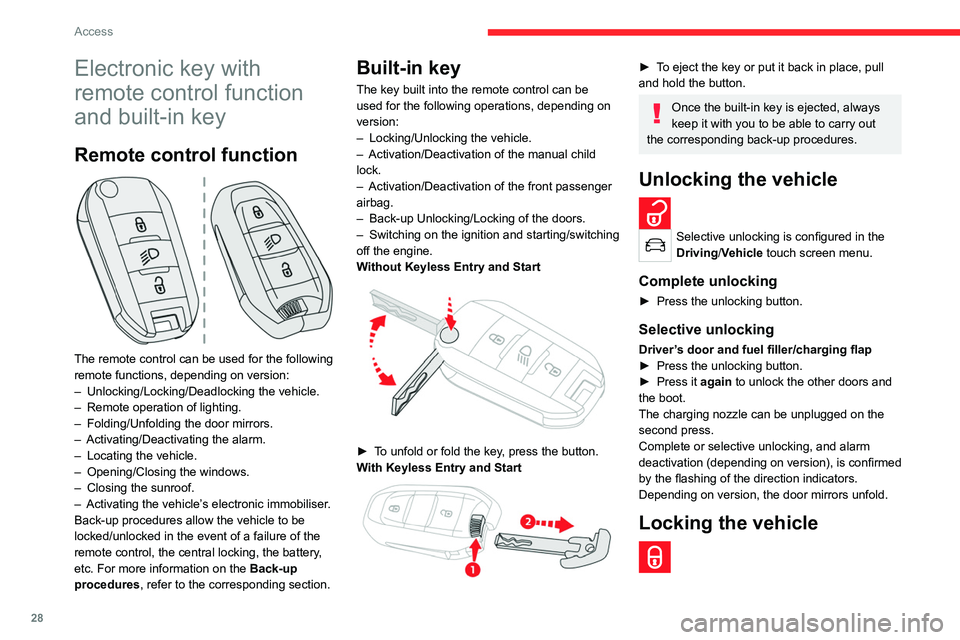
The remote control can be used for the following
remote functions, depending on version:
–
Unlocking/Locking/Deadlocking the vehicle.
–
Remote operation of lighting.
–
Folding/Unfolding the door mirrors.
–
Activating/Deactivating the alarm.
–
Locating the vehicle.
–
Opening/Closing the windows.
–
Closing the sunroof.
–
Activating the vehicle’
s electronic immobiliser.
Back-up procedures allow the vehicle to be
locked/unlocked in the event of a failure of the
remote control, the central locking, the battery,
etc. For more information on the Back-up
procedures, refer to the corresponding section.
Built-in key
The key built into the remote control can be
used for the following operations, depending on
version:
–
Locking/Unlocking the vehicle.
–
Activation/Deactivation of the manual child
lock.
–
Activation/Deactivation of the front passenger
airbag.
–
Back-up Unlocking/Locking of the doors.
–
Switching on the ignition and starting/switching
off the engine.
W
ithout Keyless Entry and Start
► To unfold or fold the key, press the button.
With Keyless Entry and Start
► To eject the key or put it back in place, pull
and hold the button.
Once the built-in key is ejected, always
keep it with you to be able to carry out
the corresponding back-up procedures.
Unlocking the vehicle
Selective unlocking is configured in the
Driving/Vehicle touch screen menu.
Complete unlocking
► Press the unlocking button.
Selective unlocking
Driver’s door and fuel filler/charging flap
► Press the unlocking button.
►
Press it
again to unlock the other doors and
the boot.
The charging nozzle can be unplugged on the
second press.
Complete or selective unlocking, and alarm
deactivation (depending on version), is confirmed
by the flashing of the direction indicators.
Depending on version, the door mirrors unfold.
Locking the vehicle
Page 31 of 260
29
Access
2Normal locking
► Press the locking button.
The locking, and the activation of the alarm
depending on version, is confirmed by the
lighting of the direction indicators.
Depending on version, the door mirrors fold.
An access (door or boot) that is not properly closed prevents locking of the
vehicle. However, if the vehicle is fitted with
an alarm, it will be activated after 45
seconds.
If the vehicle is unlocked but the doors or boot
are not subsequently opened,
the vehicle
will automatically lock itself again after about
30
seconds. If the vehicle is fitted with an
alarm, it will be reactivated automatically.
Deadlocking
Deadlocking renders the interior door
controls inoperative. It also disables the
central locking button.
The horn remains operational.
Never leave anyone inside the vehicle
when it is deadlocked.
►
Press the locking button.
►
Press the locking button again within 3
seconds to deadlock the vehicle (confirmed by
the temporary lighting of the direction indicators).
For the vehicles equipped with the Proximity
Keyless Entry and Start system, a double
audible signal indicates that the vehicle is not
deadlocked.
Opening / Closing the
windows
Opening the windows
► Press the unlocking button for more
than 3 seconds.
Depending on version, the windows stop when
the button is released or by pressing the button
a second time.
Closing the windows and sunroof
(depending on version)
► Press the locking button for more than
3 seconds.
Depending on version, the windows and the
sunroof stop when the button is released or by
pressing the button a second time.
Ensure that no person or object could
prevent the correct closing of the
windows and sunroof.
If, on versions with alarm, you want to
leave the windows and/or sunroof partially
open, you must first deactivate the interior
volumetric alarm protection.
For more information on the Alarm, refer to
the corresponding section.
Remote lighting of the
lamps
► Press this button. The sidelamps,
dipped beam headlamps, number plate
lamps and door mirror spotlamps come on for 30
seconds.
Pressing again before the end of the timed
period switches off the lamps immediately.
Advice
Remote control
The remote control is a sensitive, high-
frequency device; avoid handling it in your
pocket, due to the risk of unintentionally
unlocking the vehicle.
Avoid pressing the remote control buttons
while out of range of the vehicle, due to
the risk of rendering the remote control
inoperative. It would then be necessary to
reset it.
The remote control does not work
when the
key is in the ignition switch, even when the
ignition is switched off.
Anti-theft protection
Do not modify the electronic vehicle
immobiliser, as this might result in
malfunctions.
For vehicles with a key ignition switch,
remember to remove the key and turn the
steering wheel to engage the steering lock.
Page 32 of 260
30
Access
Locking the vehicle
Driving with the doors locked could make
it more difficult for the emergency services
to enter the passenger compartment in an
emergency.
As a safety precaution, remove the key from
the ignition or take the electronic key with you
when leaving the vehicle, even for a short
time.
Purchasing a second-hand vehicle
Have the key codes memorised by a
CITROËN dealer, to ensure that the keys in
your possession are the only ones able to
start the vehicle.
Proximity Keyless Entry
and Start
This is a Keyless Entry and Start system.
It enables automatic vehicle locking/unlocking
simply by detecting the electronic key.
As long as the driver has the electronic key
on their person, the vehicle unlocks as they
approach and locks when they walk away.
If the electronic key is present in an area
between 2 and 7 m from the vehicle for more
than 30 minutes, the system is deactivated to
preserve the battery.
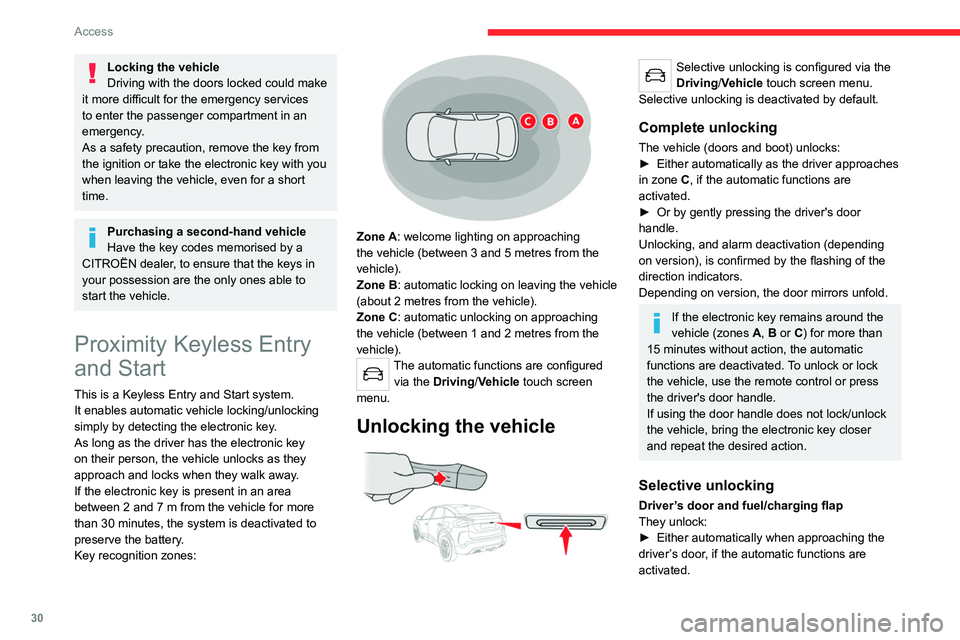
Key recognition zones:
Zone A: welcome lighting on approaching
the vehicle (between 3 and 5 metres from the
vehicle).
Zone B: automatic locking on leaving the vehicle
(about 2
metres from the vehicle).
Zone C: automatic unlocking on approaching
the vehicle (between 1 and 2
metres from the
vehicle).
The automatic functions are configured via the Driving/Vehicle touch screen
menu.
Unlocking the vehicle
Selective unlocking is configured via the
Driving/Vehicle touch screen menu.
Selective unlocking is deactivated by default.
Complete unlocking
The vehicle (doors and boot) unlocks:
► Either automatically as the driver approaches
in zone
C, if the automatic functions are
activated.
►
Or by gently pressing the driver's door
handle.
Unlocking, and alarm deactivation (depending
on version), is confirmed by the flashing of the
direction indicators.
Depending on version, the door mirrors unfold.
If the electronic key remains around the
vehicle (zones A, B or C) for more than
15 minutes without action, the automatic
functions are deactivated. To unlock or lock
the vehicle, use the remote control or press
the driver's door handle.
If using the door handle does not lock/unlock
the vehicle, bring the electronic key closer
and repeat the desired action.
Selective unlocking
Driver’s door and fuel/charging flap
They unlock:
►
Either automatically when approaching the
driver
’s door, if the automatic functions are
activated.
Page 33 of 260
31
Access
2► Or by gently pressing the driver's door
handle.
►
Once inside the vehicle, to unlock all
accesses, press the central locking button or pull
the opening control on any door
.
Locking the vehicle
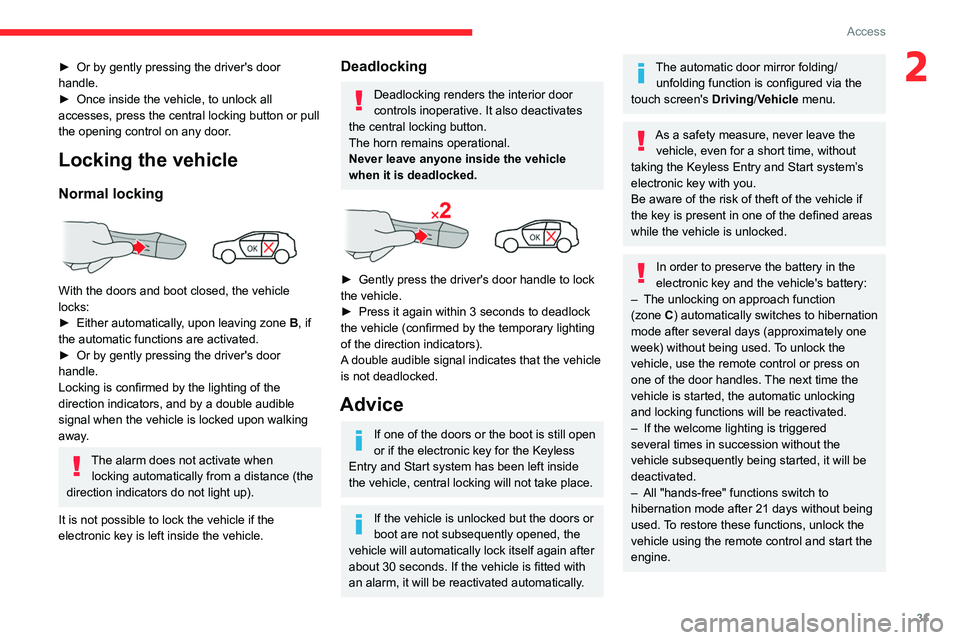
Normal locking
With the doors and boot closed, the vehicle
locks:
►
Either automatically
, upon leaving zone B, if
the automatic functions are activated.
►
Or by gently pressing the driver's door
handle.
Locking is confirmed by the lighting of the
direction indicators, and by a double audible
signal when the vehicle is locked upon walking
away
.
The alarm does not activate when locking automatically from a distance (the
direction indicators do not light up).
It is not possible to lock the vehicle if the
electronic key is left inside the vehicle.
Deadlocking
Deadlocking renders the interior door
controls inoperative. It also deactivates
the central locking button.
The horn remains operational.
Never leave anyone inside the vehicle
when it is deadlocked.
► Gently press the driver's door handle to lock
the vehicle.
►
Press it again within 3
seconds to deadlock
the vehicle (confirmed by the temporary lighting
of the direction indicators).
A double audible signal indicates that the vehicle
is not deadlocked.
Advice
If one of the doors or the boot is still open
or if the electronic key for the Keyless
Entry and Start
system has been left inside
the vehicle, central locking will not take place.
If the vehicle is unlocked but the doors or
boot are not subsequently opened, the
vehicle will automatically lock itself again after
about 30
seconds. If the vehicle is fitted with
an alarm, it will be reactivated automatically.
The automatic door mirror folding/ unfolding function is configured via the
touch screen's
Driving/Vehicle menu.
As a safety measure, never leave the vehicle, even for a short time, without
taking the Keyless Entry and Start system’s
electronic key with you.
Be aware of the risk of theft of the vehicle if
the key is present in one of the defined areas
while the vehicle is unlocked.
In order to preserve the battery in the
electronic key and the vehicle's battery:
–
The unlocking
on approach function
(zone
C) automatically switches to hibernation
mode after several days (approximately one
week) without being used. To unlock the
vehicle, use the remote control or press on
one of the door handles. The next time the
vehicle is started, the automatic unlocking
and locking functions will be reactivated.
–
If the welcome lighting is triggered
several times in succession without the
vehicle subsequently being started, it will be
deactivated.
–
All "hands-free" functions switch to
hibernation mode after 21 days without being
used.
To restore these functions, unlock the
vehicle using the remote control and start the
engine.