lock Citroen C4 CACTUS 2016 1.G Owner's Manual
[x] Cancel search | Manufacturer: CITROEN, Model Year: 2016, Model line: C4 CACTUS, Model: Citroen C4 CACTUS 2016 1.GPages: 308, PDF Size: 7.96 MB
Page 4 of 308
.
.
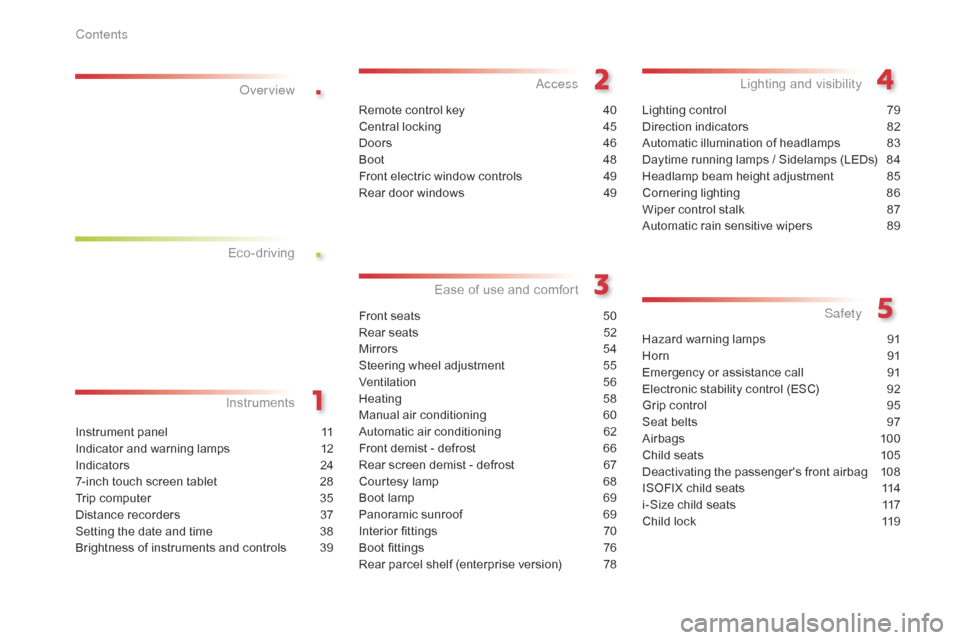
Instrument panel 11
Indicator and warning lamps
1
2
Indicators
2
4
7-inch
touch screen tablet
2
8
Trip
computer
3
5
Distance
recorders
3
7
Setting
the date and time
3
8
Brightness
of instruments and controls
3
9
InstrumentsOver view
Remote control key 4
0
Central locking
4
5
Doors
4
6
Boot
4
8
Front
electric window controls
4
9
Rear
door windows
4
9
Access
Front seats 50
Rear seats
5
2
Mirrors
5
4
Steering
wheel adjustment
5
5
Ventilation
5
6
Heating
5
8
Manual
a
ir
c
onditioning
6
0
Automatic
air conditioning
6
2
Front
demist - defrost
6
6
Rear
screen demist - defrost
6
7
Courtesy
lamp
6
8
Boot
lamp
6
9
Panoramic
sunroof
6
9
Interior
fittings
7
0
Boot
fittings
7
6
Rear
parcel shelf (enterprise version)
7
8
Ease of use a nd c omfort
Lighting control 7 9
Direction indicators
8
2
Automatic
illumination of headlamps
8
3
Daytime
running lamps / Sidelamps (LEDs)
8
4
Headlamp
beam height adjustment
8
5
Cornering
lighting
8
6
Wiper
control stalk
87
A
utomatic rain sensitive wipers
8
9
Lighting and v isibility
Hazard warning lamps 9 1
Horn
91
E
mergency or assistance call
9
1
Electronic
stability control (ESC)
9
2
Grip
control
9
5
Seat
belts
9
7
Airbags
1
00
Child
seats
1
05
Deactivating
the passenger's front airbag
1
08
ISOFIX
child seats
1
14
i-Size
child seats
1
17
Child
lock
1
19
Safety
Eco-driving
Contents
Page 6 of 308
4
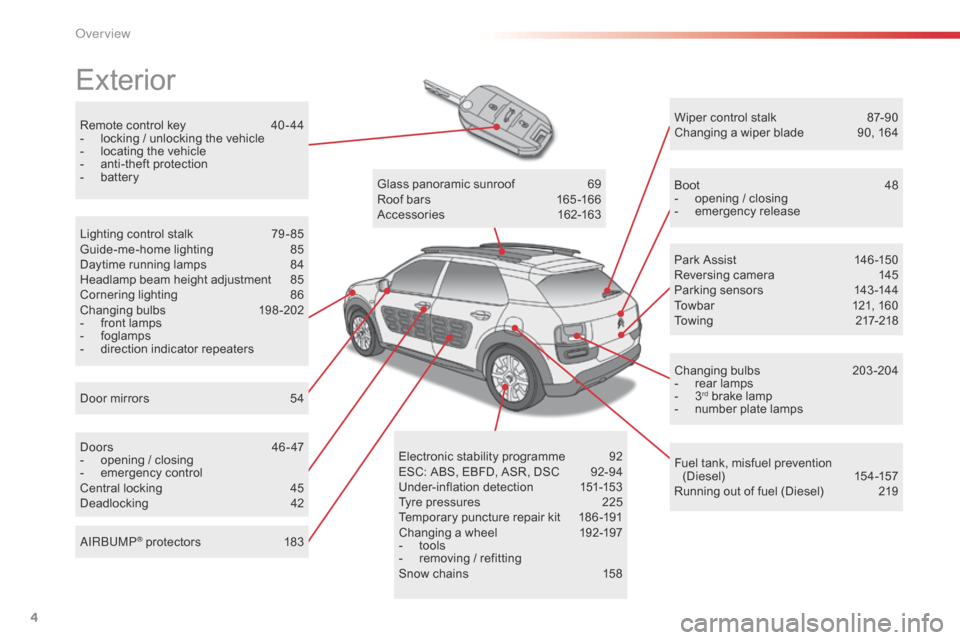
Remote control key 40 - 44
- l ocking / unlocking the vehicle
-
l
ocating the vehicle
-
a
nti-theft protection
-
b
attery
Exterior
Door mirrors 5 4
Lighting control stalk
7
9 - 85
Guide-me-home lighting
8
5
Daytime running lamps
8
4
Headlamp beam height adjustment
8
5
Cornering lighting
8
6
Changing
bu
lbs
1
98-202
-
f
ront lamps
-
fo
glamps
-
d
irection indicator repeaters
Doors
4
6 - 47
-
o
pening / closing
-
em
ergency
c
ontrol
Central
locking
4
5
Deadlocking
4
2Glass
panoramic sunroof
6
9
Roof bars
1
65 -166
Accessories
1
62-163
Wiper control stalk
87
-90
Changing a wiper blade
9
0, 164
Boot
4
8
-
o
pening / closing
-
em
ergency
r
elease
Park Assist
1
46 -150
Reversing camera
1
45
Parking sensors
1
43 -144
Towbar
1
21, 160
Towing
21
7-218
Changing
bu
lbs
2
03-204
- r ear lamps
- 3rd brake lamp
-
n
umber plate lamps
Fuel
tank, misfuel prevention
(
Diesel)
15
4 -157
Running
out of fuel (Diesel)
2
19
Electronic
s
tability
pro
gramme
9
2
ESC:
ABS,
EBFD,
ASR,
DSC
9
2-94
Under-inflation
d
etection
1
51-153
Tyre
pressures
2
25
Temporary
puncture
repair
kit
1
86 -191
Changing
a
wheel
1
92-197
-
t
ools
-
r
emoving
/
refitting
Snow
chains
1
58
AIRBUMP
® protectors 1
83
Over view
Page 7 of 308
5
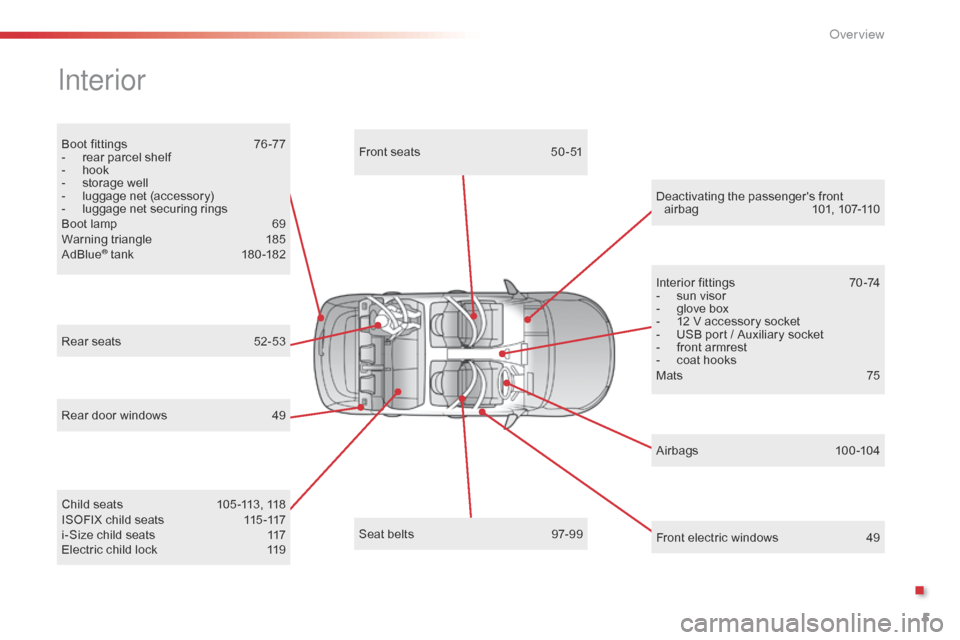
Boot fittings 76 -77
- r ear parcel shelf
-
h
ook
-
s
torage well
-
l
uggage net (accessory)
-
l
uggage net securing rings
Boot
lamp
6
9
Warning
triangle
1
85
AdBlue
® tank 18 0 -182
Interior
Rear door windows 4 9
Electric child lock
1
19
Rear
seats
5
2-53
Airbags
10
0 -104
Front
electric windows
4
9
Deactivating
t
he
p
assenger's
f
ront
a
irbag
10
1,
10
7-110
Seat belts
9
7-99
Child
seats
1
05 -113, 118
ISOFIX
child seats
1
15 -117
i-Size
child seats
1
17Front
seats
5
0 -51
Interior fittings
7
0 -74
-
s
un visor
-
g
love box
-
1
2 V accessory socket
-
U
SB port / Auxiliary socket
-
f
ront armrest
-
c
oat hooks
Mats
75
.
Over view
Page 9 of 308
7
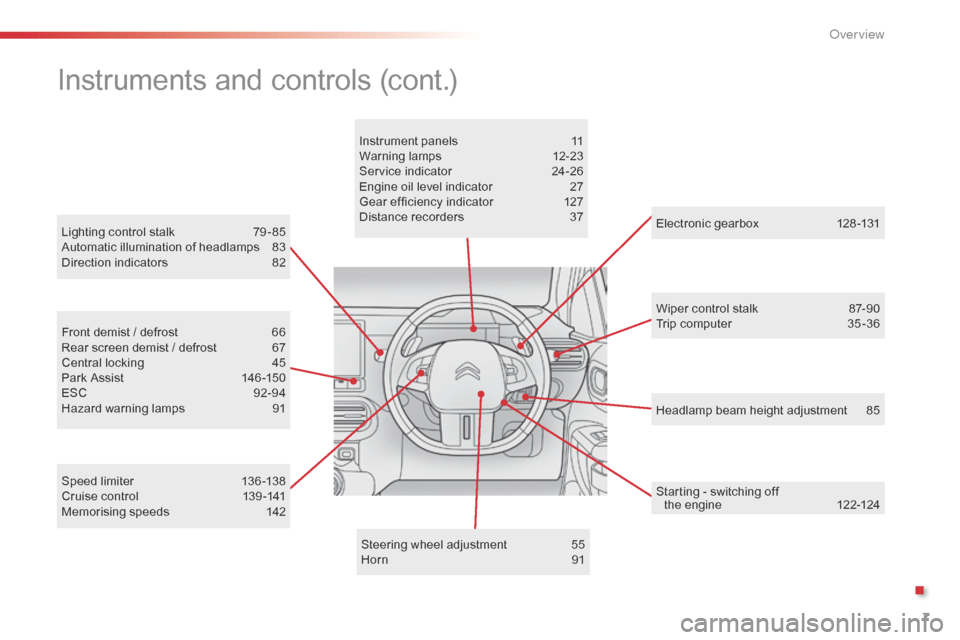
Headlamp beam height adjustment 85
Lighting
control
stalk
7
9 - 85
Automatic
illumination
of
headlamps
8
3
Direction
indicators
8
2
Electronic gearbox
1
28 -131
Wiper control stalk
87
-90
Trip computer
3
5 -36
Speed
limiter
1
36 -138
Cruise
control
1
39 -141
Memorising
speeds
1
42
Front
demist
/
defrost
6
6
Rear
screen
demist
/
defrost
6
7
Central
locking
4
5
Park
Assist
1
46 -150
ESC
9
2-94
Hazard
warning
lamps
9
1 Instrument
panels
1
1
Warning
lam
ps
1
2-23
Service
indicator
2
4-26
Engine
oil
level
indicator
2
7
Gear
efficiency
indicator
1
27
Distance
recorders
3
7
Steering
wheel
adjustment
5
5
Horn
91
Instruments and controls (cont.)
Starting - switching off t he engine 1 22-124
.
O
Page 20 of 308
18
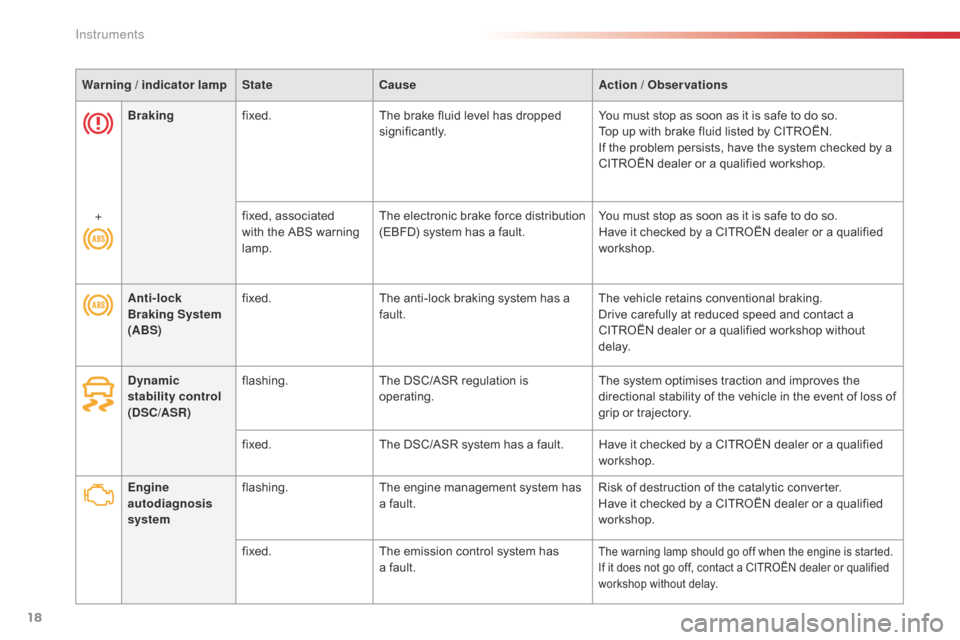
Warning / indicator lampStateCause Action / Observations
Engine
autodiagnosis
system flashing.
The
engine management system has
a
fault.Risk
of destruction of the catalytic converter.
Have
it checked by a CITROËN dealer or a qualified
w
orkshop.
fixed. The
emission control system has
a f
ault.
The warning lamp should go off when the engine is started.
I f it does not go off, contact a CITROËN dealer or qualified
w
orkshop without delay.
Anti-lock
Braking System
(ABS) fixed.
The anti-lock braking system has a f
ault.The
vehicle retains conventional braking.
Drive carefully at reduced speed and contact a
C
ITROËN dealer or a qualified workshop without
d
e l ay.
Dynamic
stability control
(DSC/ASR) flashing.
The
DSC/ASR regulation is
ope
rating.The
system optimises traction and improves the
d
irectional stability of the vehicle in the event of loss of
g
rip or trajectory.
fixed. The
DSC/ASR system has a fault. Have it checked by a CITROËN dealer or a qualified
w
orkshop.
Braking
fixed. The brake fluid level has dropped
s
ignificantly.
You must stop as soon as it is safe to do so.
Top up with brake fluid listed by CITROËN.
If the problem persists, have the system checked by a
C
ITROËN dealer or a qualified workshop.
+ fixed, associated
w
ith the ABS warning
lam
p.
The
e
lectronic
b
rake
f
orce
d
istribution
(
EBFD) system has a fault.
You must stop as soon as it is safe to do so.
Have it checked by a CITROËN dealer or a qualified
w
orkshop.
Instruments
Page 28 of 308
26
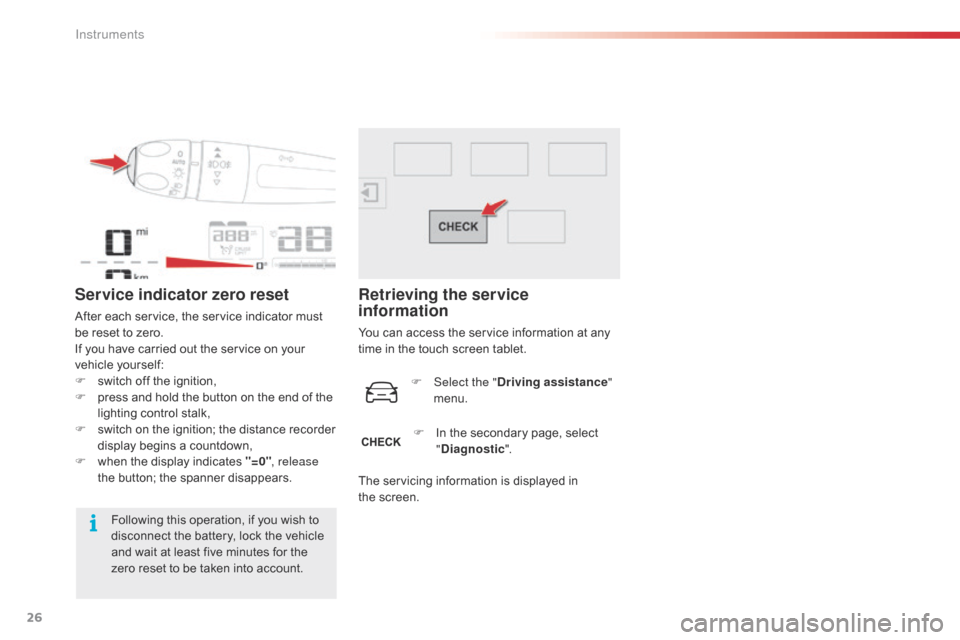
Service indicator zero reset
After each service, the service indicator must be reset to zero.
If
you have carried out the service on your
v
ehicle
y
ourself:
F
s
witch off the ignition,
F
p
ress and hold the button on the end of the
l
ighting control stalk,
F
s
witch
o
n
t
he
i
gnition;
t
he
d
istance
r
ecorder
d
isplay begins a countdown,
F
w
hen the display indicates "=0", release
the
button; the spanner disappears.
Following
this operation, if you wish to
d
isconnect the battery, lock the vehicle
a
nd wait at least five minutes for the
z
ero reset to be taken into account.
Retrieving the service
information
You can access the service information at any time in the touch screen tablet.
F
Sel
ect the "Driving assistance "
menu.
F
I
n the secondary page, select
"D
iagnostic".
The
servicing information is displayed in
t
he screen.
Instruments
Page 34 of 308
32
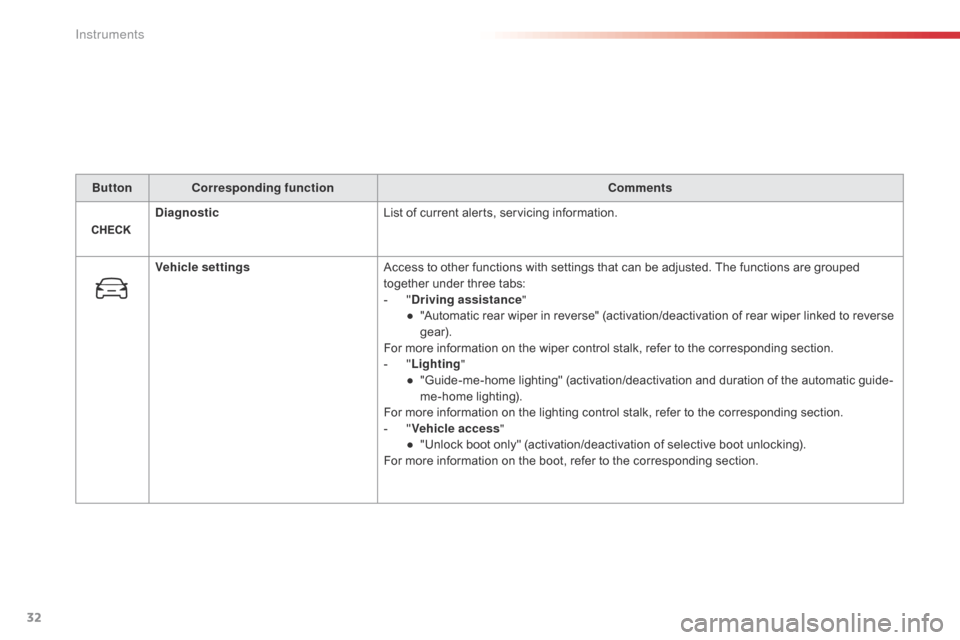
ButtonCorresponding function Comments
Diagnostic List
of current alerts, servicing information.
Vehicle settings Access
to other functions with settings that can be adjusted. The functions are grouped
t
ogether under three tabs:
-
"D
riving assistance"
●
"
Automatic rear wiper in reverse" (activation/deactivation of rear wiper linked to reverse
g
ear).
For
more information on the wiper control stalk, refer to the corresponding section.
-
"L
ighting"
●
"
Guide-me-home lighting" (activation/deactivation and duration of the automatic guide-
me-home
l
ighting).
For
more information on the lighting control stalk, refer to the corresponding section.
-
"V
ehicle access"
●
"
Unlock boot only" (activation/deactivation of selective boot unlocking).
For
more information on the boot, refer to the corresponding section.
Instruments
Page 39 of 308
37
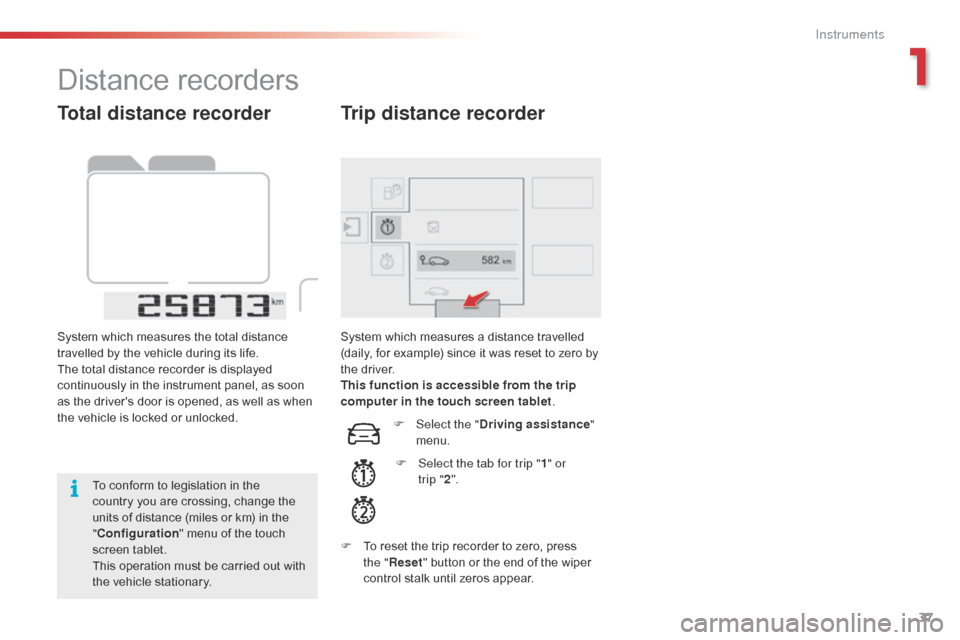
Total distance recorder
System which measures the total distance travelled by the vehicle during its life.
The
total distance recorder is displayed
c
ontinuously in the instrument panel, as soon
a
s the driver's door is opened, as well as when
t
he vehicle is locked or unlocked.
To
conform to legislation in the
c
ountry you are crossing, change the
u
nits of distance (miles or km) in the
"C
onfiguration "
menu of the touch
s
creen
t
ablet.
This
operation must be carried out with
t
he vehicle stationary. System
which measures a distance travelled (
daily, for example) since it was reset to zero by
t
he
d
river.
This function is accessible from the trip
computer in the touch screen tablet .
Trip distance recorder
F Select the "Driving assistance "
menu.
F
S
elect the tab for trip " 1" or
trip
"2 ".
F
T
o
reset the trip recorder to zero, press
t
he " Reset "
button or the end of the wiper
c
ontrol stalk until zeros appear.
Distance recorders
1
Instruments
Page 42 of 308

40
System which permits central unlocking or locking of the vehicle using the door lock or from a distance.
I t is also used to locate and start the vehicle, as well as providing protection against theft.
Remote control key
Unfolding / folding the key Unlocking the vehicle
Unlocking using the key
F Turn the key in the driver's door lock t
owards the front of the vehicle to unlock.
Unlocking using the remote
control
F Press this button to unlock the v
ehicle.
Unlocking
is confirmed by rapid
f
lashing of the direction indicators for
a
pproximately two seconds.
F
P
ress
this
button
to
unfold
or
fold
the
key.
Selective unlocking of the boot
F Make a long press on this button u
ntil the boot unlocks. The doors
r
emain locked.
If
selective unlocking of the boot is
d
eactivated, pressing this button also
u
nlocks the doors.
Don't
forget to lock the boot again by
p
ressing the closed padlock button.
The
activation or deactivation of selective boot
u
nlocking
is set in the touch screen tablet.
F
Sel
ect "Vehicle settings " in the
" Driving assistance "
menu of
t
he touch screen tablet.
Selective
unlocking of the boot is
a
ctivated by default.
If
you
do
not
press
the
button,
you
risk
d
amaging
the
remote
control.
Access
Page 43 of 308

41
If one of the doors or the boot is still open, the central locking does not
t
ake place; the vehicle locks then
i
mmediately unlocks, identifiable by the
s
ound of the locks rebounding.
When
the vehicle is locked, if it is
u
nlocked inadvertently, it will lock
a
gain automatically after thirty seconds
u
nless a door or the boot is open.
Locking using the remote
control
F Press this button to lock the v
ehicle.
Locking the vehicle
Locking is confirmed by the fixed illumination
o f the direction indicators for approximately
two
seconds.
Locking using the key
F Turn the key in the driver's door lock, t
owards the rear of the vehicle to lock it.This
function allows you to identify your vehicle
f
rom a distance, especially when the light is
p
oor. Your vehicle must be locked.
Locating your vehicle
Anti-theft protection
Electronic engine immobiliser
The key contains an electronic chip which has a
special code. When the ignition is switched
o
n, this code must be recognised in order for
s
tarting to be possible.
This
electronic engine immobiliser locks the
e
ngine management system a few moments
a
fter the ignition is switched off and prevents
s
tarting of the engine by anyone who does not
h
ave the key.In the event of a fault, you are
informed
by illumination of this
w
arning lamp, an audible signal
a
nd a message in the screen.
F
P
ress
the
closed
padlock
on
the
r
emote
control.
This
will
bring
on
the
courtesy
lamps
and
f
lashing
of
the
direction
indicators
for
a
f
ew seconds.
Keep
safely, away from your vehicle, the label
a
ttached to the keys given to you on acquisition
o
f the vehicle.
In
this case, your vehicle will not start; contact
a
CITROËN dealer as soon as possible.
Check
that
the
doors
and
boot
are
fully
c
losed.
2
Access