steering wheel Citroen C4 CACTUS 2016 1.G Owner's Manual
[x] Cancel search | Manufacturer: CITROEN, Model Year: 2016, Model line: C4 CACTUS, Model: Citroen C4 CACTUS 2016 1.GPages: 308, PDF Size: 7.96 MB
Page 4 of 308
.
.
Instrument panel 11
Indicator and warning lamps
1
2
Indicators
2
4
7-inch
touch screen tablet
2
8
Trip
computer
3
5
Distance
recorders
3
7
Setting
the date and time
3
8
Brightness
of instruments and controls
3
9
InstrumentsOver view
Remote control key 4
0
Central locking
4
5
Doors
4
6
Boot
4
8
Front
electric window controls
4
9
Rear
door windows
4
9
Access
Front seats 50
Rear seats
5
2
Mirrors
5
4
Steering
wheel adjustment
5
5
Ventilation
5
6
Heating
5
8
Manual
a
ir
c
onditioning
6
0
Automatic
air conditioning
6
2
Front
demist - defrost
6
6
Rear
screen demist - defrost
6
7
Courtesy
lamp
6
8
Boot
lamp
6
9
Panoramic
sunroof
6
9
Interior
fittings
7
0
Boot
fittings
7
6
Rear
parcel shelf (enterprise version)
7
8
Ease of use a nd c omfort
Lighting control 7 9
Direction indicators
8
2
Automatic
illumination of headlamps
8
3
Daytime
running lamps / Sidelamps (LEDs)
8
4
Headlamp
beam height adjustment
8
5
Cornering
lighting
8
6
Wiper
control stalk
87
A
utomatic rain sensitive wipers
8
9
Lighting and v isibility
Hazard warning lamps 9 1
Horn
91
E
mergency or assistance call
9
1
Electronic
stability control (ESC)
9
2
Grip
control
9
5
Seat
belts
9
7
Airbags
1
00
Child
seats
1
05
Deactivating
the passenger's front airbag
1
08
ISOFIX
child seats
1
14
i-Size
child seats
1
17
Child
lock
1
19
Safety
Eco-driving
Contents
Page 9 of 308
7
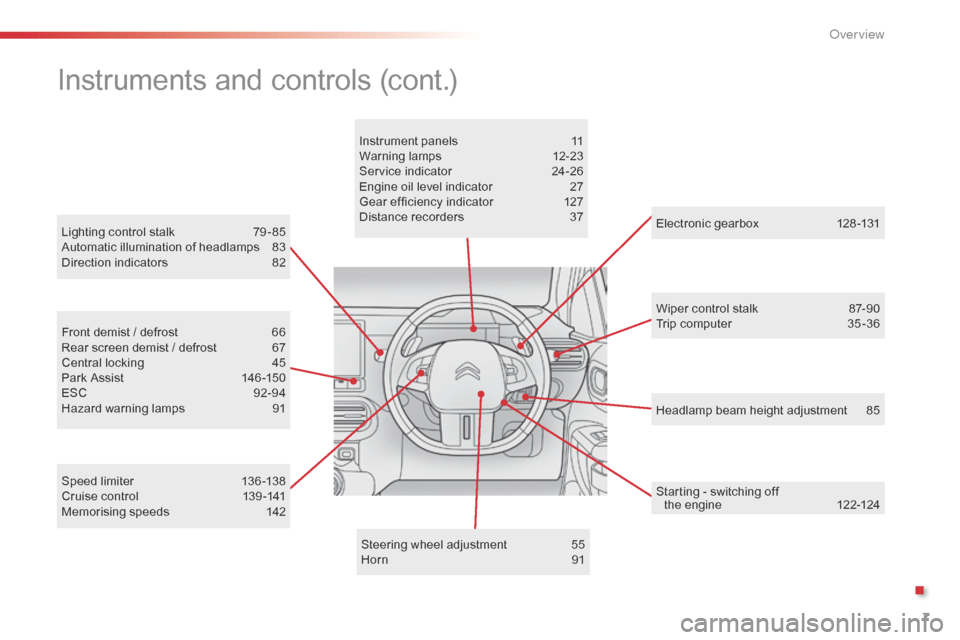
Headlamp beam height adjustment 85
Lighting
control
stalk
7
9 - 85
Automatic
illumination
of
headlamps
8
3
Direction
indicators
8
2
Electronic gearbox
1
28 -131
Wiper control stalk
87
-90
Trip computer
3
5 -36
Speed
limiter
1
36 -138
Cruise
control
1
39 -141
Memorising
speeds
1
42
Front
demist
/
defrost
6
6
Rear
screen
demist
/
defrost
6
7
Central
locking
4
5
Park
Assist
1
46 -150
ESC
9
2-94
Hazard
warning
lamps
9
1 Instrument
panels
1
1
Warning
lam
ps
1
2-23
Service
indicator
2
4-26
Engine
oil
level
indicator
2
7
Gear
efficiency
indicator
1
27
Distance
recorders
3
7
Steering
wheel
adjustment
5
5
Horn
91
Instruments and controls (cont.)
Starting - switching off t he engine 1 22-124
.
O
Page 57 of 308
55
Rear view mirror
Equipped with an anti-dazzle system, which darkens the mirror glass and reduces the
n
uisance to the driver caused by the sun,
h
eadlamps from other vehicles...
Adjustment
F Adjust the mirror so that the glass is d
irected correctly in the "day" position.
Day / night position
F Pull the lever to change to the "night" anti-
dazzle position.
F
P
ush the lever to change to the normal
"
day" position.
Steering wheel ad justment
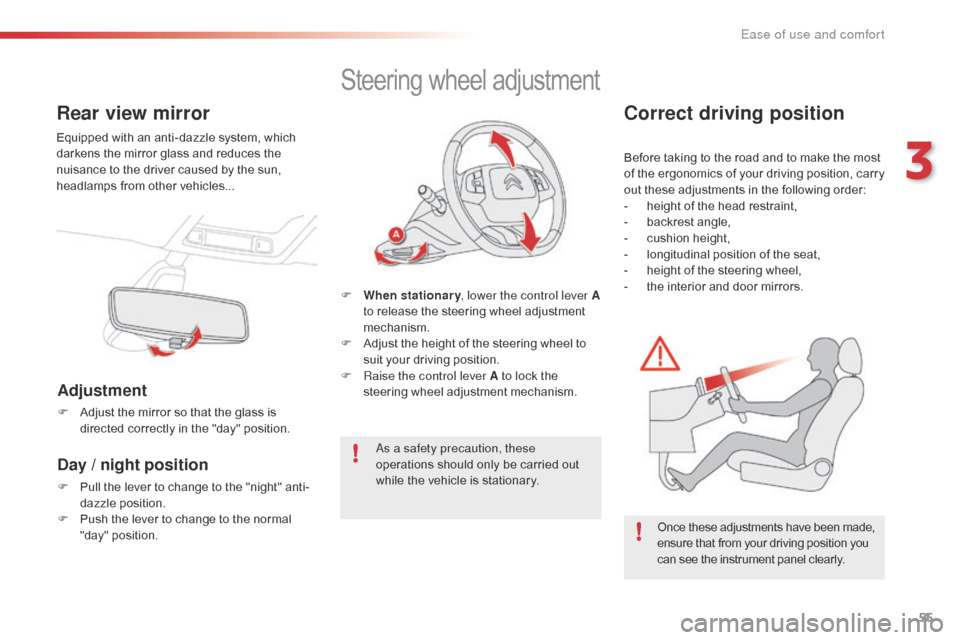
F When stationary , lower the control lever A
to release the steering wheel adjustment
m
echanism.
F
A
djust the height of the steering wheel to
s
uit your driving position.
F
Ra
ise the control lever A to lock the
s
teering wheel adjustment mechanism.
As a safety precaution, these
operations
should only be carried out
w
hile the vehicle is stationary.
Correct driving position
Before taking to the road and to make the most of t he e rgonomics o f y our d riving p osition, c arry
o
ut these adjustments in the following order:
-
h
eight of the head restraint,
-
b
ackrest angle,
-
c
ushion height,
-
l
ongitudinal position of the seat,
-
h
eight of the steering wheel,
-
t
he interior and door mirrors.
Once
these adjustments have been made,
e
nsure that from your driving position you
c
an see the instrument panel clearly.
3
Ease of use and comfort
Page 106 of 308
104
Sit in a normal upright position.
W ear a correctly adjusted seat belt.
Do
not leave anything between the
o
ccupants and the airbags (a child, pet,
o
bject...), nor fix or attach anything close to
t
he inflation trajectory of the airbags; this
c
ould cause injuries during their deployment.
Never
modify the original definition of your
v
ehicle, particularly in the area directly
a
round the airbags.
After
an accident or if the vehicle has been
s
tolen or broken into, have the airbag
s
ystems checked.
All
work on the airbag system must be
c
arried out by a CITROËN dealer or a
q
ualified
w
orkshop.
Even
if all of the precautions mentioned
a
re observed, a risk of injury or of minor
b
urns to the head, chest or arms when an
a
irbag is deployed cannot be ruled out. The
b
ag inflates almost instantly (within a few
m
illiseconds) then deflates within the same
t
ime discharging the hot gas via openings
p
rovided for this purpose.Front airbags
Do not drive holding the steering wheel by its spokes or resting your hands on the centre
p
art of the wheel.
Passengers
must not place their feet on the
das
hboard.
Do
not smoke as deployment of the airbags
c
an cause burns or the risk of injury from a
c
igarette or pipe.
Never
remove
or
pierce
the
steering
wheel
or
h
it it violently.
Do
not fit or attach anything to the steering
w
heel, the dashboard or the passenger's
s
un visor as this could cause injuries with
d
eployment of the airbags.
Advice
Lateral airbags
Use only approved covers on the seats, compatible with the deployment the lateral
a
irbags. For information on the range of seat
c
overs suitable for your vehicle, you can
contact
a CITROËN dealer.
For
more information on accessories, refer
t
o the corresponding section.
Do
not fix or attach anything to the seat
b
acks (clothing...). This could cause injury
t
o the chest or arms if the lateral airbag is
d
eployed.
Do
not sit with the upper part of the body any
n
earer to the door than necessary.
Curtain airbags
Do not fix or attach anything to the roof. This could cause injury to the head if the curtain
a
irbag is deployed.
If
fitted on your vehicle, do not remove the
g
rab handles installed on the roof, they play
a
part in securing the curtain airbags.
For the airbags to be fully effective, observe the safety recommendations below:
Safety
Page 124 of 308
122
Starting
The parking brake must be applied.
F
W
ith
a manual gearbox, place the gear
l
ever
in neutral then depress the clutch
p
edal
f
ully.
F
W
ith
an electronic gearbox, place the
c
ontrol at N then press the brake pedal
f
i r m l y.
F
I
nsert
the key into the ignition switch; the
s
ystem recognises the code.
F
U
nlock the steering column by simultaneously
t
urning the steering and the key.
In
certain cases, you may have to apply
m
ore force to the steering (wheels on
f
ull
lock, for example).
F
W
ith
a petrol engine, operate the starter
m
otor
by turning the key to position 3
without
pressing the accelerator pedal,
u
ntil
the engine starts. Once the engine is
r
unning, release the key.
Starting-switching off the engine
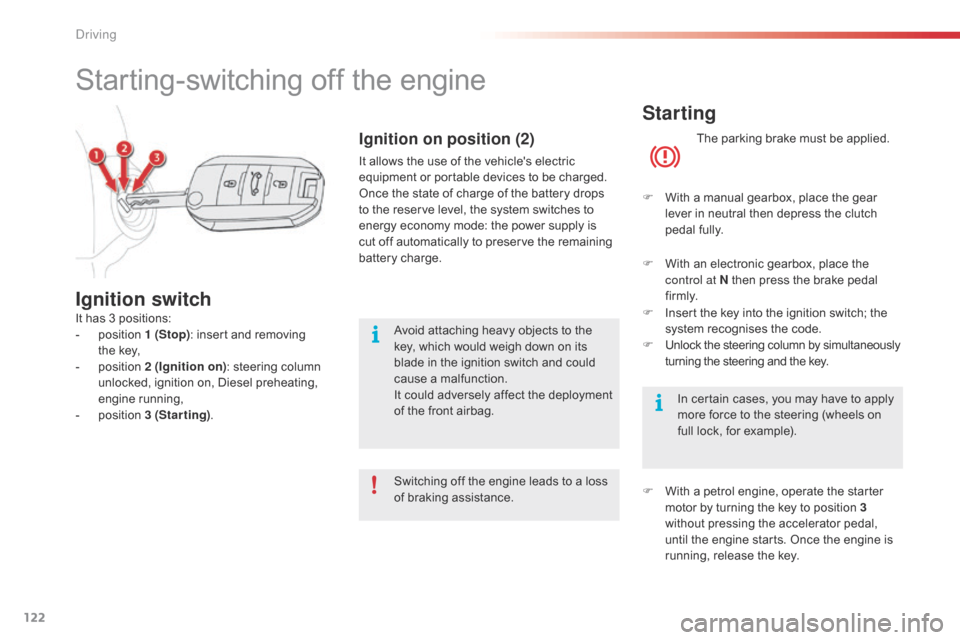
It has 3 positions:
- p osition 1 (Stop):
insert and removing
the
key,
-
p
osition 2 (Ignition on) :
steering column
u
nlocked, ignition on, Diesel preheating,
e
ngine
r
unning,
-
p
osition 3 (Starting).
Ignition switch
Switching off the engine leads to a loss o
f braking assistance.
Ignition on position (2)
It allows the use of the vehicle's electric equipment or portable devices to be charged.
Once
the state of charge of the battery drops
t
o the reserve level, the system switches to
e
nergy economy mode: the power supply is
c
ut off automatically to preserve the remaining
b
attery charge.
Avoid
attaching heavy objects to the
k
ey, which would weigh down on its
b
lade in the ignition switch and could
c
ause a malfunction.
It
could adversely affect the deployment
o
f the front airbag.
Driving
Page 130 of 308
128
ETG electronic gearbox
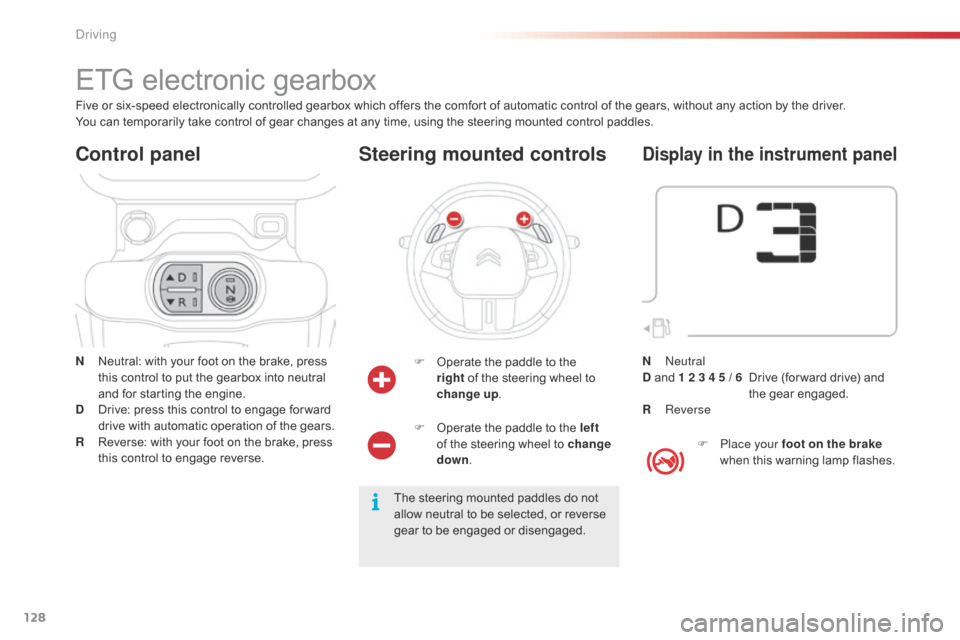
N Neutral: with your foot on the brake, press t
his control to put the gearbox into neutral
a
nd for starting the engine.
D
D
rive: press this control to engage for ward
d
rive with automatic operation of the gears.
R
R
everse: with your foot on the brake, press
t
his control to engage reverse.
Control panel
F Operate the paddle to the r
ight of the steering wheel to
ch
ange
up.
Steering mounted controls
The steering mounted paddles do not a
llow neutral to be selected, or reverse
g
ear to be engaged or disengaged.
Five
or
six-speed
electronically
controlled
gearbox
which
offers the comfort of automatic control of the gears, without any action by the driver.
You
can
temporarily
take
control
of
gear
changes
at
any
time, using the steering mounted control paddles.
F
O
perate the paddle to the left
of the steering wheel to change
down .
Display in the instrument panel
F Place your foot on the brake
when this warning lamp flashes.
N
Neutral
D
and
1 2 3 4 5 / 6
D
rive (for ward drive) and
t
he
g
ear
enga
ged.
R
Reverse
Driving
Page 148 of 308
146
Park Assist
This system provides active assistance with parking, detecting a parking space then controlling the steering to park in the space.
I t controls the steering while the driver manages the accelerator, brakes, gears and clutch (manual gearbox). During phases of entry into and exit from
a
parking space, the system provides visual and audible information to the driver in order to make the manoeuvre safe. It may be necessary to move
f
or wards and backwards more than once.
The
Park Assist system cannot in any
c
ircumstances replace the need for
v
igilance on the part of the driver.
The
driver must remain in control of
t
heir vehicle ensuring that the space
r
emains clear during the manoeuvre.
In
some circumstances, the sensors
m
ay not detect small obstacles located
i
n their blind spots. Changing
tyre sizes (out-size tyres,
w
inter tyres, ...) can inter fere with
t
he correct operation of the parking
a
ssistance system.
During
a manoeuvre the steering wheel
t
urns quickly: do not hold the steering
w
heel, do not place your hand between
t
he spokes of the steering wheel and
t
ake care with loose and bulky clothing,
s
carves, handbags... There is a risk of
in
jury. For
entry into a parking space (parallel
p
arking) the system does not detect
s
paces which are clearly much smaller
o
r larger than the size of the vehicle.
This
"parking assistance" system
i
s activated automatically during
m
anoeuvres; it is therefore possible
t
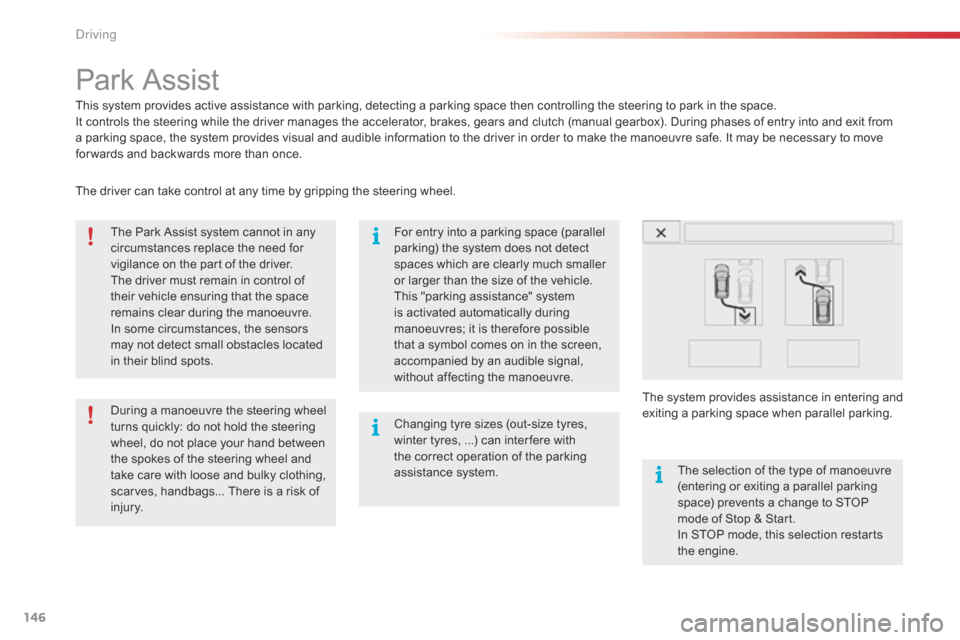
hat a symbol comes on in the screen,
a
ccompanied by an audible signal,
w
ithout affecting the manoeuvre.The
selection of the type of manoeuvre
(
entering or exiting a parallel parking
s
pace) prevents a change to STOP
m
ode of Stop & Start.
In
STOP mode, this selection restarts
t
he
eng
ine.
The
driver can take control at any time by gripping the steering wheel.
The
s
ystem
p
rovides
a
ssistance
i
n
e
ntering
a
nd
e
xiting
a par
king
spa
ce
w
hen
par
allel
par
king.
D
Page 151 of 308
149
Exit from a parallel parking space
With the vehicle stationary, to activate the Park Assist system:
F
W
hen you want to exit from a parallel
p
arking space, start the engine.
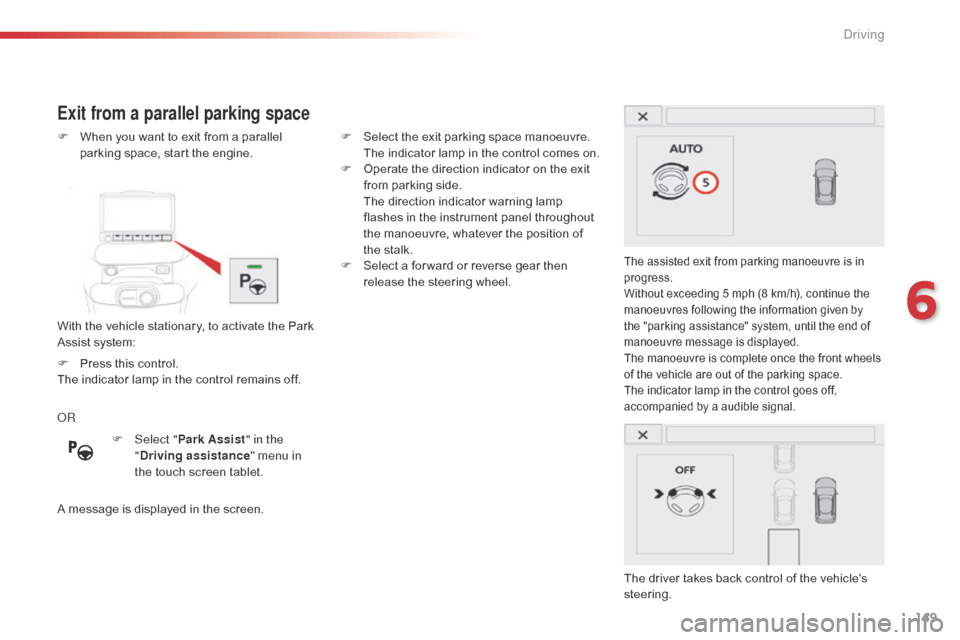
The assisted exit from parking manoeuvre is in p
rogress.
Without
exceeding 5 mph (8 km/h), continue the
m
anoeuvres following the information given by
t
he "parking assistance" system, until the end of
m
anoeuvre message is displayed.
The
manoeuvre is complete once the front wheels
o
f the vehicle are out of the parking space.
The
indicator lamp in the control goes off,
a
ccompanied by a audible signal.
The driver takes back control of the vehicle's steering.
OR
A
message
is
displayed
in
the
screen. F
S
elect
the
exit
parking
space
manoeuvre.
T
he
indicator
lamp
in
the
control
comes
on.
F
O
perate
the
direction
indicator
on
the
exit
f
rom
parking
side.
T
he
direction
indicator
warning
lamp
f
lashes
in
the
instrument
panel
throughout
t
he
manoeuvre,
whatever
the
position
of
t
he
stalk.
F
S
elect
a
for ward
or
reverse
gear
then
r
elease
the
steering
wheel.
F
Sel
ect "
Park Assist " in the
" Driving assistance "
menu
in
t
he
touch
screen
tablet.
F
P
ress
this
control.
The
indicator
lamp
in
the
control
remains
off.
6
Driving
Page 154 of 308
152
Under-inflation alertReinitialisation
Before reinitialising the system, ensure t
hat the pressures of the four tyres are
correct
for the use of the vehicle and in
l
ine with the recommendations on the
t
yre pressure label.
The
under-inflation alert can only
b
e relied on if the reinitialisation of
t
he system has been done with the
p
ressures in the four tyres correctly
adjusted.
The
under-inflation detection system
d
oes not give a warning if a pressure is
i
ncorrect at the time of reinitialisation.
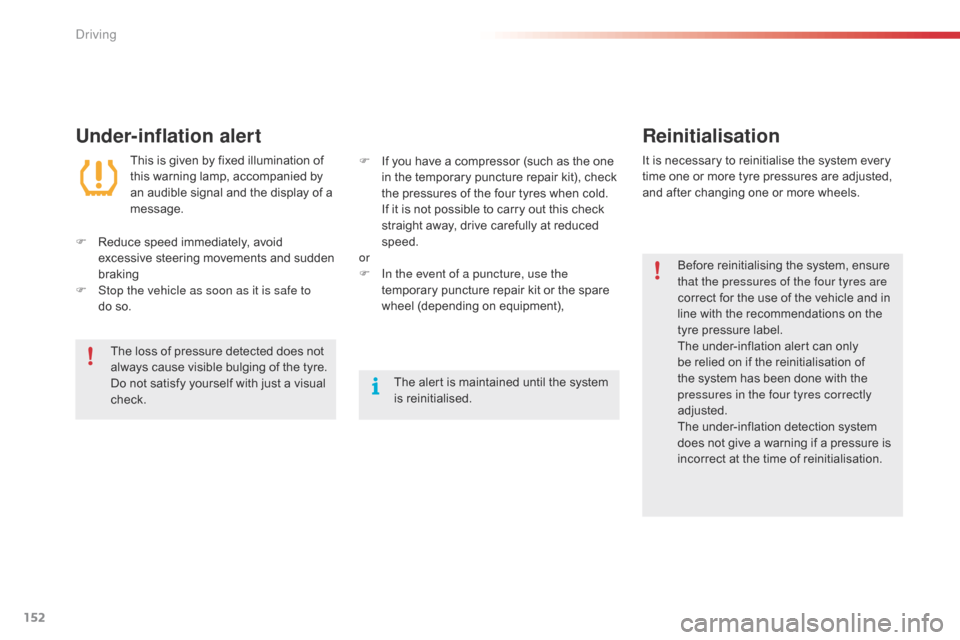
This
is
given
by
fixed
illumination
of
t
his
warning
lamp,
accompanied
by
a
n
audible
signal
and
the
display
of
a
m
essage.
It
is
necessary to reinitialise the system every
t
ime
one or more tyre pressures are adjusted,
a
nd
after changing one or more wheels.
F
R
educe
speed
immediately,
avoid
e
xcessive
steering
movements
and
sudden
b
raking
F
S
top the vehicle as soon as it is safe to
do so. F
I
f
you
have
a
compressor
(such
as
the
one
i
n
the
temporary
puncture
repair
kit),
check
t
he
pressures
of
the
four
tyres
when
cold.
I
f
it
is
not
possible
to
carry
out
this
check
s
traight
away,
drive
carefully
at
reduced
s
peed.
or
F
I
n the event of a puncture, use the
temporary
puncture
repair
kit
or
the
spare
w
heel
(depending
on
equipment),
The
loss
of
pressure
detected
does
not
a
lways
cause
visible
bulging
of
the
tyre.
D
o
not
satisfy
yourself
with
just
a
visual
c
heck. The
alert
is
maintained
until
the
system
i
s
r
einitialised.
Driving
Page 189 of 308
187
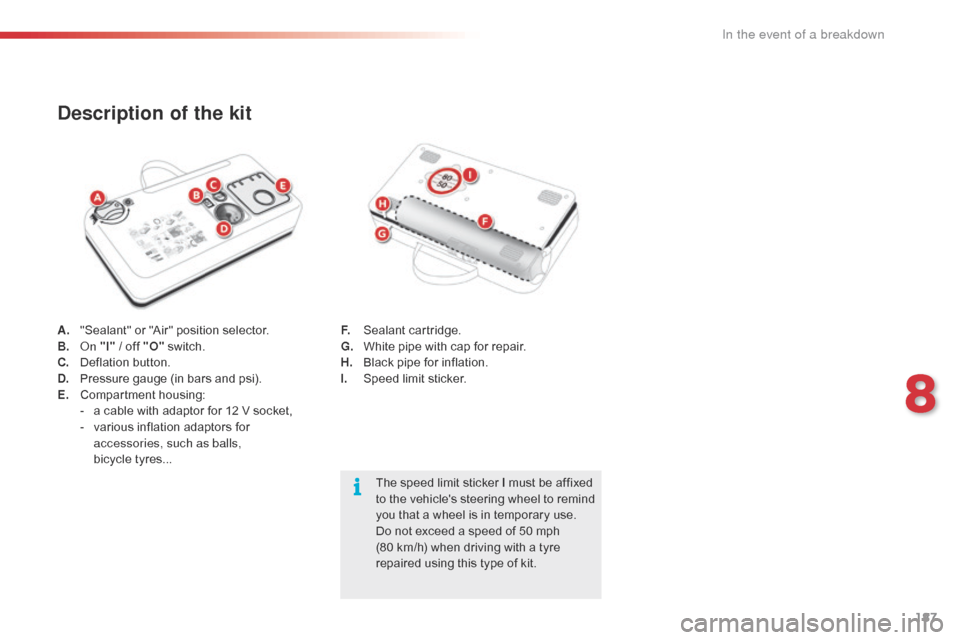
A. "Sealant" or "Air" position selector.
B. On "I"
/ off "O" s witch.
C.
D
eflation button.
D.
P
ressure gauge (in bars and psi).
E.
C
ompartment
h
ousing:
-
a
cable with adaptor for 12 V socket,
-
v
arious inflation adaptors for
a
ccessories, such as balls,
bicycle tyres...
Description of the kit
The speed limit sticker I must be affixed t o the vehicle's steering wheel to remind
y
ou that a wheel is in temporary use.
Do
not exceed a speed of 50 mph
(
80 km/h) when driving with a tyre
r
epaired using this type of kit.
F.
S
ealant
c
artridge.
G.
W
hite pipe with cap for repair.
H.
B
lack pipe for inflation.
I.
S
peed limit sticker.
8
In the event of a breakdown