change wheel CITROEN C4 CACTUS 2017 User Guide
[x] Cancel search | Manufacturer: CITROEN, Model Year: 2017, Model line: C4 CACTUS, Model: CITROEN C4 CACTUS 2017Pages: 256, PDF Size: 7.62 MB
Page 165 of 256
163
To refit, carry out these operations in reverse
o r d e r.
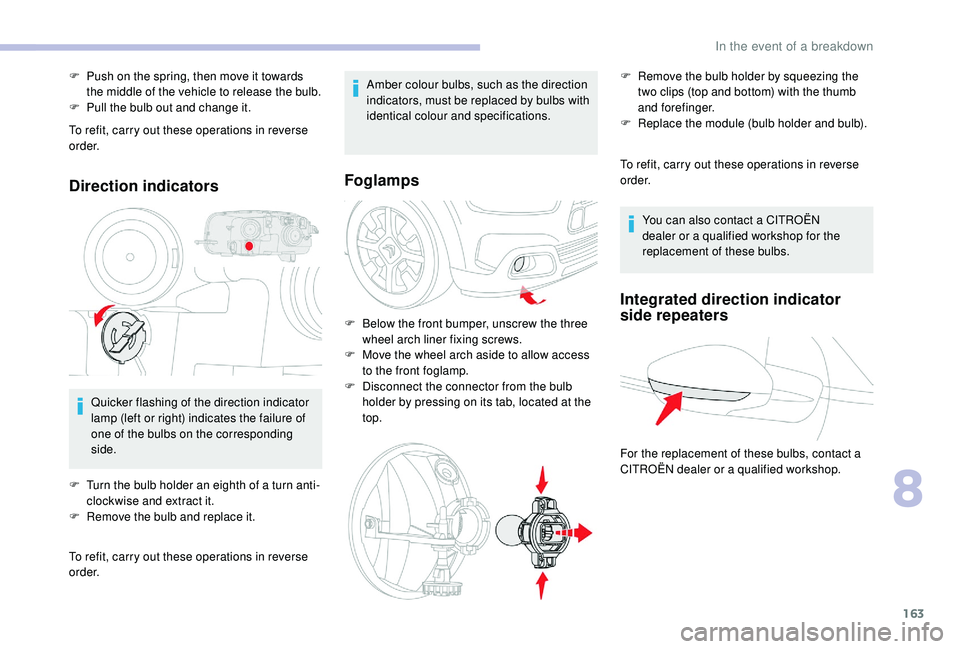
Direction indicators
Quicker flashing of the direction indicator
lamp (left or right) indicates the failure of
one of the bulbs on the corresponding
side.
F
T
urn the bulb holder an eighth of a turn anti-
clockwise and extract it.
F
R
emove the bulb and replace it.
To refit, carry out these operations in reverse
o r d e r. Amber colour bulbs, such as the direction
indicators, must be replaced by bulbs with
identical colour and specifications.
Foglamps
F Below the front bumper, unscrew the three
wheel arch liner fixing screws.
F
M
ove the wheel arch aside to allow access
to the front foglamp.
F
D
isconnect the connector from the bulb
holder by pressing on its tab, located at the
top. To refit, carry out these operations in reverse
o r d e r.
F
P
ush on the spring, then move it towards
the middle of the vehicle to release the bulb.
F
P
ull the bulb out and change it.
You can also contact a CITROËN
dealer or a qualified workshop for the
replacement of these bulbs.
Integrated direction indicator
side repeaters
For the replacement of these bulbs, contact a
CITROËN dealer or a qualified workshop. F
R
emove the bulb holder by squeezing the
two clips (top and bottom) with the thumb
and forefinger.
F
R
eplace the module (bulb holder and bulb).
8
In the event of a breakdown
Page 185 of 256
3
In the "Settings" menu you can create
a profile for just one person or a group
of people with shared interests, with
the possibility of entering multiple
settings (radio presets, audio settings,
navigation history, contact favourites,
etc.); these settings are taken into account
automatically.
In very hot conditions, the volume may
be limited to protect the system. It may go
into standby (screen and sound off) for at
least 5 minutes
The return to normal takes place when
the temperature in the passenger
compartment has dropped.
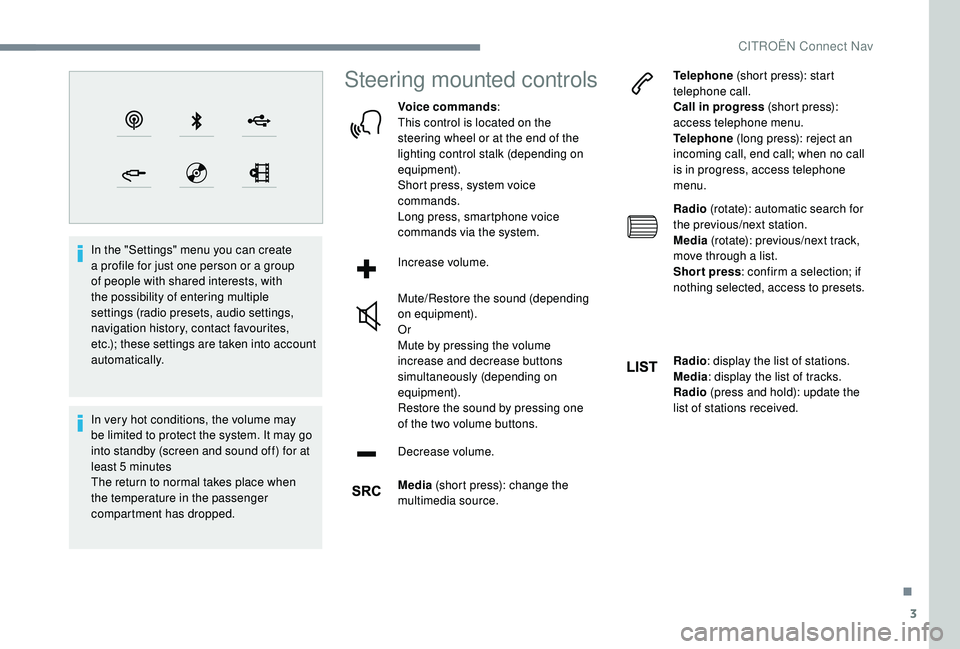
Steering mounted controls
Voice commands:
This control is located on the
steering wheel or at the end of the
lighting control stalk (depending on
equipment).
Short press, system voice
commands.
Long press, smartphone voice
commands via the system.
Increase volume.
Mute/Restore the sound (depending
on equipment).
Or
Mute by pressing the volume
increase and decrease buttons
simultaneously (depending on
equipment).
Restore the sound by pressing one
of the two volume buttons.
Decrease volume.
Media (short press): change the
multimedia source. Telephone
(short press): start
telephone call.
Call in progress (short press):
access telephone menu.
Telephone (long press): reject an
incoming call, end call; when no call
is in progress, access telephone
menu.
Radio (rotate): automatic search for
the previous/next station.
Media (rotate): previous/next track,
move through a list.
Short press : confirm a selection; if
nothing selected, access to presets.
Radio : display the list of stations.
Media : display the list of tracks.
Radio (press and hold): update the
list of stations received.
.
CITROËN Connect Nav
Page 225 of 256
3
In very hot conditions, the volume may
be limited to protect the system. It may go
into standby (screen and sound off) for at
least 5 minutes
The return to normal takes place when
the temperature in the passenger
compartment has dropped.
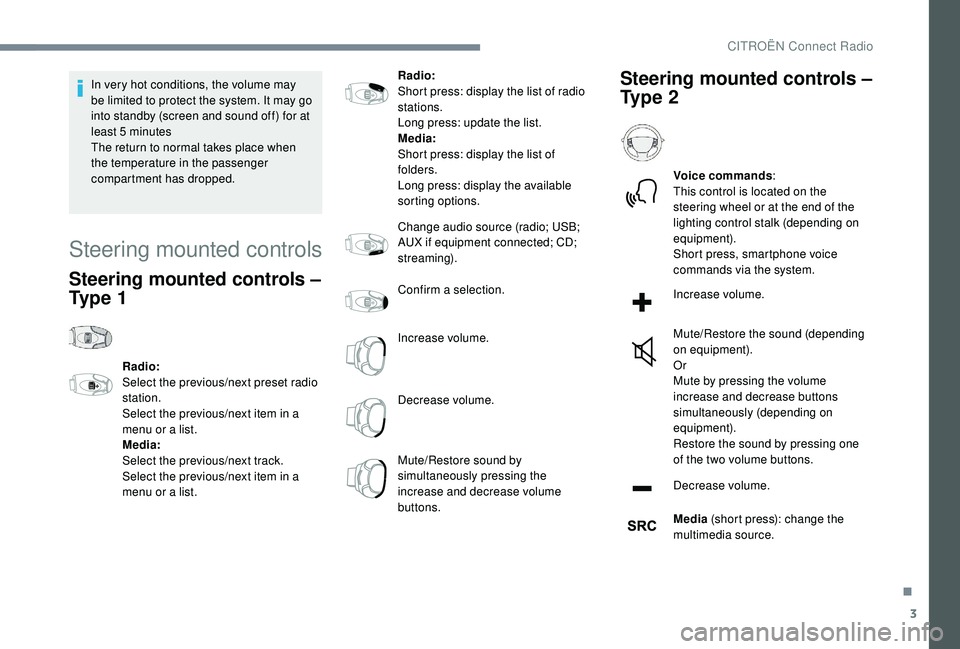
Steering mounted controls
Steering mounted controls –
Ty p e 1
Radio:
Select the previous/next preset radio
station.
Select the previous/next item in a
menu or a list.
Media:
Select the previous/next track.
Select the previous/next item in a
menu or a list.Radio:
Short press: display the list of radio
stations.
Long press: update the list.
Media:
Short press: display the list of
folders.
Long press: display the available
sorting options.
Change audio source (radio; USB;
AUX if equipment connected; CD;
streaming).
Confirm a selection.
Increase volume.
Decrease volume.
Mute/Restore sound by
simultaneously pressing the
increase and decrease volume
buttons.
Steering mounted controls –
Ty p e 2
Voice commands
:
This control is located on the
steering wheel or at the end of the
lighting control stalk (depending on
equipment).
Short press, smartphone voice
commands via the system.
Increase volume.
Mute/Restore the sound (depending
on equipment).
Or
Mute by pressing the volume
increase and decrease buttons
simultaneously (depending on
equipment).
Restore the sound by pressing one
of the two volume buttons.
Decrease volume.
Media (short press): change the
multimedia source.
.
CITROËN Connect Radio