air condition CITROEN C4 CACTUS 2022 User Guide
[x] Cancel search | Manufacturer: CITROEN, Model Year: 2022, Model line: C4 CACTUS, Model: CITROEN C4 CACTUS 2022Pages: 256, PDF Size: 7.62 MB
Page 52 of 256
50
Heating/Manual air
conditioning
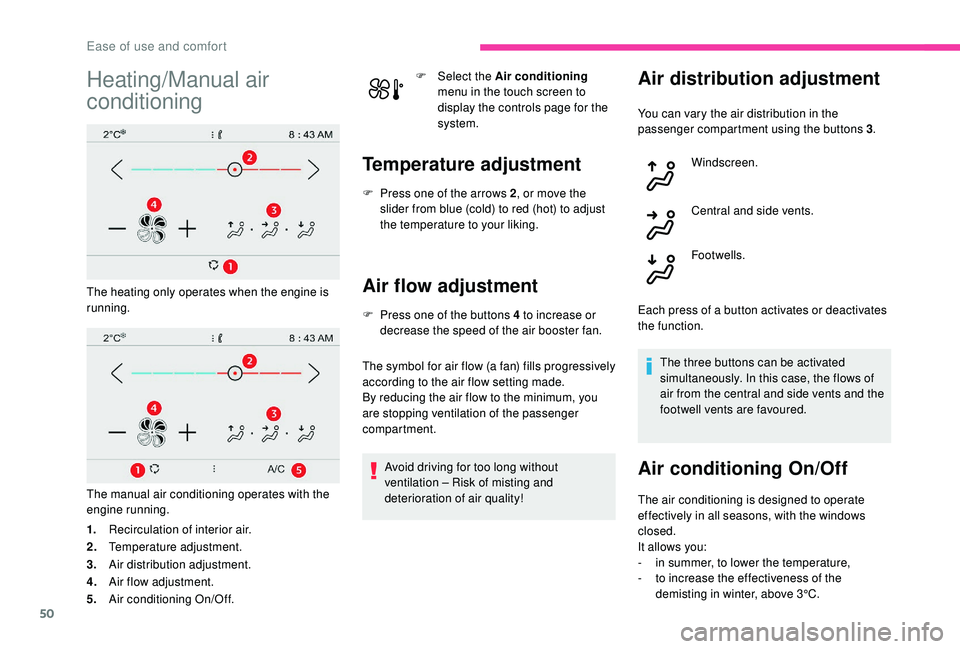
The heating only operates when the engine is
running.
The manual air conditioning operates with the
engine running.
1.Recirculation of interior air.
2. Temperature adjustment.
3. Air distribution adjustment.
4. Air flow adjustment.
5. Air conditioning On/Off. F
Sel
ect the
Air conditioning
menu in the touch screen to
display the controls page for the
system.
Temperature adjustment
F Press one of the arrows 2 , or move the
slider from blue (cold) to red (hot) to adjust
the temperature to your liking.
Air flow adjustment
F Press one of the buttons 4 to increase or decrease the speed of the air booster fan.
The symbol for air flow (a fan) fills progressively
according to the air flow setting made.
By reducing the air flow to the minimum, you
are stopping ventilation of the passenger
compartment.
Avoid driving for too long without
ventilation – Risk of misting and
deterioration of air quality!
Air distribution adjustment
You can vary the air distribution in the
passenger compartment using the buttons 3 .
Windscreen.
Central and side vents.
Footwells.
Each press of a button activates or deactivates
the function. The three buttons can be activated
simultaneously. In this case, the flows of
air from the central and side vents and the
footwell vents are favoured.
Air conditioning On/Off
The air conditioning is designed to operate
effectively in all seasons, with the windows
closed.
It allows you:
-
i
n summer, to lower the temperature,
-
t
o increase the effectiveness of the
demisting in winter, above 3°C.
Ease of use and comfort
Page 53 of 256
51
F Press button 5 to activate/deactivate the air conditioning system.
When the indicator lamp is on, the air
conditioning function is activated.
The air conditioning does not operate
when the air flow adjustment is inhibited.
Switching the system off
F Press this button; the indicator lamp in the button comes on.
This action switches off all of the functions of
the system.
The temperature is no longer controlled.
However, a slight flow of air, due to the
movement of the vehicle, can still be felt.
Pressing any button reactivates the system with
the settings that were previously in use. Avoid driving for long periods with
the system off – Risk of misting and
deterioration of air quality!
Automatic air conditioning
The air conditioning operates with the engine
running, but the ventilation and its controls are
available with the ignition on.
Operation of the air conditioning and regulation
of temperature, air flow and air distribution in
the passenger compartment are automatic.
F
Sel
ect the Air conditioning
menu in the touch screen to
display the controls page for the
system.
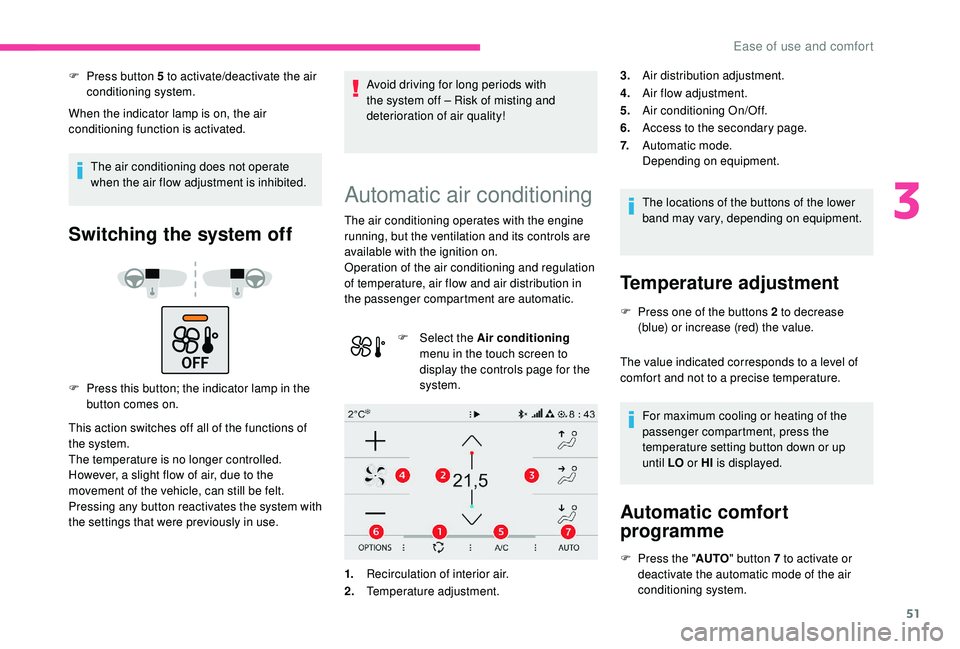
1. Recirculation of interior air.
2. Temperature adjustment. The locations of the buttons of the lower
band may vary, depending on equipment.
Temperature adjustment
F Press one of the buttons 2 to decrease
(blue) or increase (red) the value.
The value indicated corresponds to a level of
comfort and not to a precise temperature.
For maximum cooling or heating of the
passenger compartment, press the
temperature setting button down or up
until LO or HI is displayed.
Automatic comfort
programme
F Press the " AUTO" button 7 to activate or
deactivate the automatic mode of the air
conditioning system.
3.
Air distribution adjustment.
4. Air flow adjustment.
5. Air conditioning On/Off.
6. Access to the secondary page.
7. Automatic mode.
Depending on equipment.
3
Ease of use and comfort
Page 54 of 256
52
Mode AUTO
The air conditioning system operates
automatically: the system manages the
temperature, air flow and air distribution in
the passenger compartment in an optimum
way according to the comfort level you have
selected.
F
G
o to the secondary page by pressing
button 6 " OPTIONS " to adjust the automatic
comfort programme by choosing one of the
available settings.
F
T
o change the current setting,
press the button several times in
succession to access the desired
mode:
" Soft ": provides soft and quiet operation by
limiting air flow.
" Normal ": offers the best compromise between
a comfortable temperature and quiet operation
(default setting).
" Fast ": provides strong and effective air flow.
This setting is associated with AUTO mode
only. However, on deactivation of AUTO mode,
the last setting used remains set.
Changing the setting does not reactivate AUTO
mode if deactivated. In cold weather with the engine cold, the
air flow is increased gradually until the
comfort setting has been reached, in order
to limit the delivery of cold air into the
passenger compartment.
On entering the vehicle, if the interior
temperature is much colder or warmer
than the comfort setting requested, there
is no need to alter the value displayed
in order to reach more quickly the
required level of comfort. The system
compensates automatically and corrects
the temperature difference as quickly as
possible.
You can manually adjust the air flow and
distribution.
As soon as you modify a setting, the automatic
comfort programme is deactivated.
F
P
ress the "AUTO" button 7 to activate the
automatic comfort programme again.
Air flow adjustment
F Press one of the buttons 4 to increase or decrease the air flow from the system.
The symbol for air flow (a fan) fills progressively
according to the air flow setting made.
By reducing the air flow to minimum, you are
stopping ventilation.
" OFF " is displayed alongside the fan. Avoid driving for too long without
ventilation – Risk of misting and
deterioration of air quality!
Air distribution adjustment
You can vary the air distribution in the
passenger compartment using the buttons 3
.
Windscreen.
Central and side vents.
Footwells.
Each press of a button activates or deactivates
the function. The three buttons can be activated
simultaneously. In this case, the flows of
air from the central and side vents and the
footwell vents are favoured.
Ease of use and comfort
Page 55 of 256
53
Air conditioning On/Off
The air conditioning is designed to operate
effectively in all seasons, with the windows
closed.
It allows you:
-
i
n summer, to lower the temperature,
-
t
o increase the effectiveness of the
demisting in winter, above 3°C.
F
P
ress button 5 to activate/deactivate the air
conditioning system.
When the indicator lamp is on, the air
conditioning function is activated.
The air conditioning does not operate
when the air flow adjustment is inhibited.
Ventilation function with the
ignition on
When the ignition is switched on, you can
use the ventilation system to adjust the air
flow settings and the air distribution in the
passenger compartment for a duration which
depends on the battery charge.
This function does not operate the air
conditioning.
Switching the system off
F Press this button; the indicator lamp in the button comes on.
This action switches off all of the functions of
the system.
The temperature is no longer controlled.
However, a slight flow of air, due to the
movement of the vehicle, can still be felt.
Pressing any button reactivates the system with
the settings that were previously in use.
Avoid driving for long periods with
the system off – Risk of misting and
deterioration of air quality!
Recirculation of interior air
The intake of exterior air helps avoid and
eliminate misting of the windscreen and side
windows.
Recirculation of the interior air isolates the
passenger compartment from exterior odours
and fumes.When so required, this function also
allows faster heating or cooling of the air
in the passenger compartment.
F
P
ress button 1 to recirculate the interior air
or to permit the intake of outside air.
Avoid the prolonged use of interior
air recirculation – Risk of misting and
deterioration of air quality!
3
Ease of use and comfort
Page 56 of 256
54
Front demisting –
defrosting
On/Off
F Press this button to demist or defrost the windscreen and side windows as quickly as
possible. The indicator lamp in the button
comes on.
The system automatically manages the air
conditioning (depending on version), air
flow and air intake, and provides optimum
distribution towards the windscreen and side
windows.
F
T
o switch off demisting/defrosting, press this
button again. The indicator lamp goes off.
With Stop & Start, when demisting –
defrosting has been activated, STOP
mode is not available.
Rear screen demisting –
defrosting
On/Off
F Press this button to demist or defrost the rear screen and (depending on version)
the door mirrors. The indicator lamp in the
button comes on.
Demisting/defrosting switches off automatically
to prevent excessive electrical consumption.
F
I
t is possible to stop the demisting/
defrosting operation before it is switched off
automatically by pressing this button again.
The button indicator lamp goes off.
Switch off the demisting/defrosting of
the rear screen and door mirrors as
soon as appropriate, as lower current
consumption results in reduced fuel
consumption.
Rear screen demisting – defrosting can
only be operated when the engine is
running.
Courtesy lamps
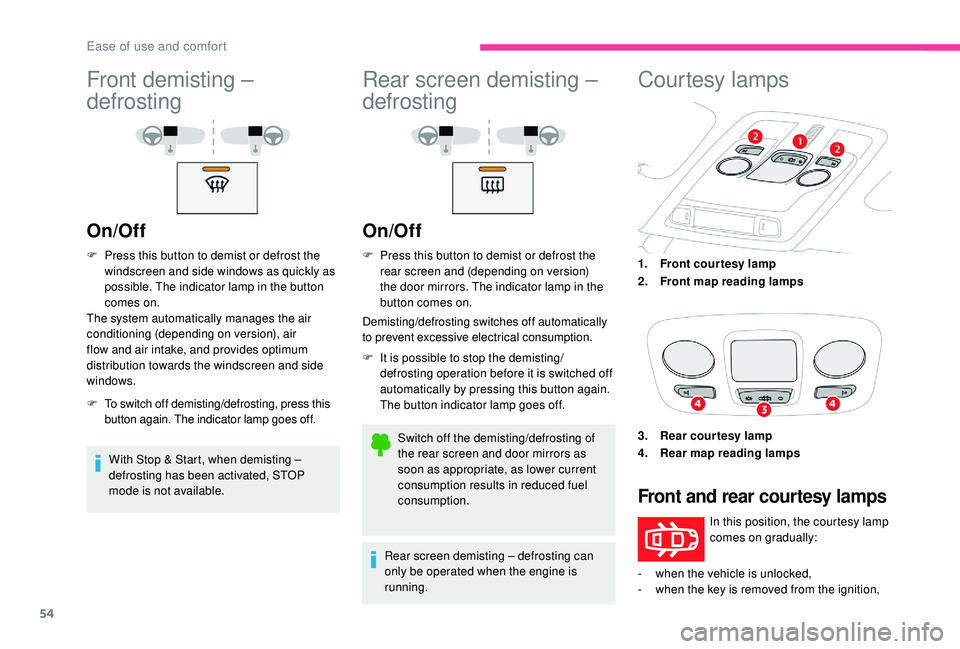
1. Front courtesy lamp
2. Front map reading lamps
3. Rear courtesy lamp
4. Rear map reading lamps
Front and rear courtesy lamps
In this position, the courtesy lamp
comes on gradually:
-
w
hen the vehicle is unlocked,
-
w
hen the key is removed from the ignition,
Ease of use and comfort
Page 73 of 256
71
** As per the geographic coverage of "Localised Emergency Call", "Localised
Assistance Call" and the official national
language chosen by the owner of the
vehicle.
T
he list of countries covered and of
Telematic services is available from
dealers or on the website for your country.
Operation of the system
When the ignition is switched on, the green
indicator lamp comes on for 3 seconds
indicating that the system is operating correctly.
For all countries except Russia, Belarus
and Kazakhstan.
If the red indicator lamp flashes then goes off:
there is a system fault.
If the red indicator lamp is on continuously:
replace the back-up battery.
For Russia, Belarus and Kazakhstan.
If the red indicator lamp is on continuously:
there is a system fault.
If the red indicator lamp flashes: replace the
back-up battery. *
I
n accordance with the general conditions
of ser vice available from dealers and
subject to technological and technical
limitations. In both cases, the emergency and assistance
calls ser vice may not work.
Contact a qualified repairer as soon as
possible.
The fault with the system does not prevent
the vehicle from being driven.
Localised Assistance Call
** As per the geographic coverage of "Localised Emergency Call", "Localised
Assistance Call" and the official national
language chosen by the owner of the
vehicle.
T
he list of countries covered and of
Telematic services is available from dealers
or on the website for your country. Press this button for more than
2 seconds to request assistance if
the vehicle breaks down.
A voice message confirms that the call has
been made**.
Pressing this button again immediately cancels
the request.
The cancellation is confirmed by a voice
message.
Geolocation
To reactivate geolocation, simultaneously press
the "Localised Emergency Call" and "Localised
Assistance Call" buttons again, followed
by pressing "Localised Assistance Call" to
confirm. You can deactivate geolocation by
simultaneously pressing the "Localised
Emergency Call" and "Localised Assistance
Call" buttons, followed by pressing "Localised
Assistance Call" to confirm.
If you purchased your vehicle outside the
CITROËN dealer network, we invite you to
have a dealer check the configuration of
these ser vices and, if desired, modify it to
suit your wishes. In a multilingual country,
configuration is possible in the official
national language of your choice.
For technical reasons and, in particular, to
improve the quality of Telematic ser vices
to customers, the manufacturer reserves
the right to carry out updates to the
vehicle's on-board telematic system.
5
Safety
Page 76 of 256

74
ASR/DSC
These systems offer increased safety
in normal driving, but they should not
encourage the driver to take extra risks or
drive at high speed.
It is in conditions of reduced grip (rain,
snow, ice) that the risk of loss of grip
increases. It is therefore important for your
safety to keep these systems activated in
all conditions, and particularly in difficult
conditions.
The correct operation of these
systems depends on obser vation of
the manufacturer's recommendations
regarding as much the wheels (tyres and
rims), braking and electronic components
as the assembly and repair procedures
used by CITROËN dealers.
To benefit in full from the effectiveness
of these systems in wintry conditions,
the vehicle must be fitted with four snow
tyres, allowing the vehicle to retain neutral
behaviour on the road.Grip control
Special patented traction control system which
improves traction on snow, mud and sand.
This system, the operation of which has been
optimised for each situation, allows you to
manoeuvre in most conditions of poor grip
(encountered when using a passenger car).
Associated with 205/50 R17 all-season M+S
(Mud and Snow) tyres, this system offers a
compromise between safety, grip and traction.
These tyres are efficient in winter and summer
conditions.
The accelerator pedal should be pressed
sufficiently to allow the system to use the power
of the engine. Operation at high engine speeds
is completely normal.
A five-position selector knob allows you to
choose the setting best suited to the driving
conditions encountered.
An indicator lamp associated with each mode
comes on to confirm your choice.
A specific and additional display appears
temporarily in the touch screen to confirm the
selection made with the knob.
Standard (ESC)
This mode is calibrated for a low level of wheel
spin, based on the different levels of grip
normally encountered on the road.F
P
lace the knob in this position.
Every time the ignition is switched off, the
system automatically resets to this mode.
Snow
This mode adapts its strategy to the conditions
of grip encountered for each of the two front
wheels on moving off.
(mode active up to 50 mph (80 km/h)) F
P
lace the knob in this position.
Safety
Page 80 of 256

78
Airbags
General information
System designed to contribute towards
improving passenger safety (with the exception
of the rear centre passenger) in the event of
violent collisions. The airbags supplement the
action of the seat belts fitted with force limiters
(all except the rear centre passenger).
If a collision occurs, the electronic detectors
record and analyse the front and side impacts
sustained in the impact detection zones:
-
i
n the case of a serious impact, the airbags
are deployed instantly and contribute
towards better protection of the occupants
of the vehicle (with the exception of the rear
centre passenger); immediately after the
impact, the airbags deflate rapidly so that
they do not hinder visibility or the exit of the
occupants,
-
i
n the case of a minor or rear impact or
in certain rollover conditions, the airbags
may not be deployed; the seat belt
alone contributes towards ensuring your
protection in these situations. The airbags do not operate when the
ignition is switched off.
This equipment will only deploy once. If a
second impact occurs (during the same or
a subsequent accident), the airbag will not
be deployed again.
Impact detection zones
A.
Front impact zone.
B. Side impact zone. The deployment of an airbag is
accompanied by a slight emission of
smoke and a noise, due to the detonation
of the pyrotechnic charge incorporated in
the system.
This smoke is not harmful, but sensitive
individuals may experience slight irritation.
The detonation noise associated with the
deployment of an airbag may result in a
slight loss of hearing for a short time.
Front airbags
System which protects the driver and front
passenger in the event of a serious front impact
in order to limit the risk of injury to the head and
thorax.
The driver's airbag is fitted in the centre of the
steering wheel; the front passenger airbag is
fitted in the dashboard above the glove box.
Safety
Page 133 of 256

131
The manoeuvring symbol is displayed in red,
accompanied by the "Manoeuvre cancelled "
message on the touch screen.
A message encourages the driver to take back
control of their vehicle.
The function is deactivated after a few seconds
and returns to the initial display.
End of the parking space entry or
exit manoeuvre
The vehicle stops as soon as the manoeuvre is
completed.
The manoeuvre symbol is displayed in red
accompanied by the message " Manoeuvre
completed " on the touch screen.
When deactivated, the indicator lamp in the
button goes off, accompanied by an audible
signal.
If entering a parking space, the driver may be
required to complete the manoeuvre.
Operating limits
- The system can suggest an inappropriate parking space (parking prohibited, work
in progress with damaged road sur face,
location alongside a ditch, etc.).
-
T
he system is not designed for per forming
the parking manoeuvre on a sharp curve. The vehicle's sensors and camera(s) may be
impaired by:
-
a
ccumulated snow or fallen leaves on the
road,
-
a
dverse weather conditions (heavy rain,
thick fog, falling snow),
-
nois
e interference from noisy vehicles and
machinery (lorries, pneumatic drills, etc.). Do not use the system:
-
A
longside a soft shoulder (ditch) or
quay or on a cliff edge.
-
W
hen carrying an object extending
beyond the vehicle size (ladder on the
roof bars, bike carrier on the tailgate,
e t c .) .
-
W
ith a non-approved tow ball in place.
-
W
ith snow chains fitted.
-
I
n the event of under-inflation of a tyre.
-
W
hen driving on a small-diameter or
"space-saver" type spare wheel.
-
W
hen the wheels fitted are different
from the original ones.
-
I
f one of the bumpers is damaged.
-
A
fter modifying one or both bumpers
(adding protection, etc.).
-
I
f a camera is faulty.
-
I
f the sensors have been repainted
outside the CITROËN dealer network.
-
W
ith sensors not approved for your
vehicle.
-
W
hen the road sur face is slippery (ice,
e t c .) .
-
T
he system does not detect spaces that are
much larger than the vehicle itself or that
are delimited by obstacles that are too low
(pavements, studs, etc.) or too thin (trees,
posts, wire fences, etc.).
-
C
ertain obstacles located in the sensors'
blind spots may not be detected or no
longer detected during the manoeuvre.
-
C
ertain materials (fabrics) absorb sound
waves: pedestrians may not be detected.
-
A f
ront or rear impact to the vehicle can
upset the sensor settings which is not
always detected by the system: distance
measurements may be falsified.
-
I
f the boot is heavily loaded, the tilt of the
vehicle towards the rear may inter fere with
the distance measurements.
6
Driving
Page 134 of 256

132
Recommendations on care
- Regularly check that the sensors and cameras are clean.
If necessary, clean the camera lenses with
a soft, dry cloth.
-
I
f using a high-pressure washer, do not
direct the lance less than 30 cm from the
sensors and cameras.
-
I
n bad weather, or during the winter, ensure
that the sensors and cameras are not
covered with mud, ice or snow.
Operating faults
When the function is not activated,
the button warning lamp flashing
and an audible signal indicates a
system fault.
If the fault occurs during the use of the system,
the warning lamp goes off.
If the fault in the parking sensors,
indicated by this warning lamp
coming on, occurs during use, it
causes the function to deactivate.
In the event of a fault, have the system checked
by a CITROËN dealer or a qualified workshop. In the event of a fault with the
power steering, this warning lamp
flashes in the instrument panel,
accompanied by a message.
You must stop as soon as it is safe to do so.
Contact a CITROËN dealer or a qualified
workshop.
Tyre under-inflation
detection
System which automatically checks the
pressures of the tyres while driving.
The system monitors the pressure in all four
tyres, as soon as the vehicle is moving.
It compares the information given by the
wheel speed sensors with reference values,
which must be reinitialised after ever y tyre
pressure adjustment or wheel change .
The system triggers an alert as soon as it
detects a drop in the pressure of one or more
tyres. The tyre under-inflation detection system
does not replace the need for vigilance on
the part of the driver.
This system still requires you to check the
tyre inflation pressure (including the spare
wheel) every month as well as before a
long journey.
Driving with under-inflated tyres impairs
handling, extends braking distances and
causes premature tyre wear, particularly
in adverse conditions (heavy loads, high
speeds, long journeys).
Driving with under-inflated tyres
increases fuel consumption.
The tyre pressure specifications for your
vehicle can be found on the tyre pressure
label.
For more information on the
Identification markings , refer to the
corresponding section.
Driving