mirror CITROEN C4 CACTUS 2023 Owner's Guide
[x] Cancel search | Manufacturer: CITROEN, Model Year: 2023, Model line: C4 CACTUS, Model: CITROEN C4 CACTUS 2023Pages: 196, PDF Size: 6.12 MB
Page 160 of 196
158
CITROËN Connect Nav
downloaded to the smartphone and compatible
with the MirrorLinkTM technology.
Access to the different audio sources remains
available in the margin of the MirrorLink
TM
display, using the touch buttons located in the
upper bar.
Access to the menus for the system is possible
at any time using the dedicated buttons.
There may be a wait for the availability of applications, depending on the quality of
the network.
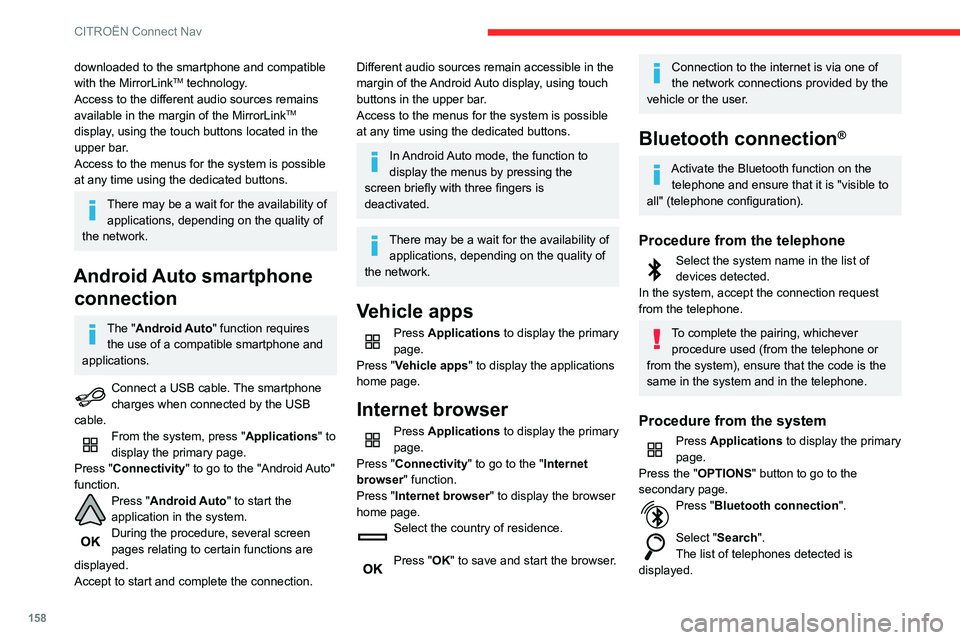
Android Auto smartphone connection
The "Android Auto" function requires
the use of a compatible smartphone and
applications.
Connect a USB cable. The smartphone
charges when connected by the USB
cable.
From the system, press "Applications " to
display the primary page.
Press "Connectivity" to go to the "Android Auto"
function.
Press "Android Auto" to start the
application in the system.
During the procedure, several screen
pages relating to certain functions are
displayed.
Accept to start and complete the connection.
Different audio sources remain accessible in the
margin of the Android Auto display, using touch
buttons in the upper bar.
Access to the menus for the system is possible
at any time using the dedicated buttons.
In Android Auto mode, the function to
display the menus by pressing the
screen briefly with three fingers is
deactivated.
There may be a wait for the availability of applications, depending on the quality of
the network.
Vehicle apps
Press Applications to display the primary
page.
Press "Vehicle apps" to display the applications
home page.
Internet browser
Press Applications to display the primary
page.
Press "Connectivity" to go to the "Internet
browser" function.
Press "Internet browser" to display the browser
home page.
Select the country of residence.
Press "OK" to save and start the browser.
Connection to the internet is via one of
the network connections provided by the
vehicle or the user.
Bluetooth connection®
Activate the Bluetooth function on the telephone and ensure that it is "visible to
all" (telephone configuration).
Procedure from the telephone
Select the system name in the list of
devices detected.
In the system, accept the connection request
from the telephone.
To complete the pairing, whichever procedure used (from the telephone or
from the system), ensure that the code is the
same in the system and in the telephone.
Procedure from the system
Press Applications to display the primary
page.
Press the "OPTIONS " button to go to the
secondary page.
Press "Bluetooth connection ".
Select "Search".
The list of telephones detected is
displayed.
If the pairing procedure fails, it is
recommended that you deactivate and
then reactivate the Bluetooth function on the
telephone.
Select the name of the chosen telephone
in the list.
Depending on the type of telephone, the
option is given to accept or not accept
the transfer of contacts and messages.
Connection sharing
The system offers to connect the telephone with
3 profiles:
– "Telephone" (hands-free kit, telephone only),
– "Streaming" (streaming: wireless playing of
the audio files on the telephone),
– "Mobile internet data ".
The "Mobile internet data " profile must
be activated for connected navigation
(where the vehicle does not have "Emergency
and assistance call" services), having first
activated sharing of this connection on the
smartphone.
Select one or more profiles.
Press "OK" to confirm.
Wi-Fi connection
Network connection by the smartphone's Wi-Fi.
Page 174 of 196
172
Alphabetical index
Collision Risk Alert 85–86
Configuration, vehicle
13–14
Connection,
Bluetooth
140–141, 158–159, 163–164
Connection, MirrorLink
139–140, 157
Connection, Wi-Fi network
159
Container, AdBlue®
105
Control, electric windows
25
Control, emergency boot release
24
Control, emergency door
21–22
Control, heated seats
28
Control stalk, lighting
42–43
Control stalk, wipers
45–46, 48
Courtesy lamp
36, 118
Courtesy lamps
36
Cover, load space
41
Cruise control
81, 83–85
Cruise control by speed limit recognition
81
Cruise control, dynamic with Stop function
81
Cup holder
37
D
DAB (Digital Audio Broadcasting) -
Digital radio
137, 161
Date (setting)
143, 167
Daytime running lamps
44
Daytime running lamps, LED
11 6
Deactivating the passenger airbag
56, 59–60
Deadlocking
18, 20
Defrosting
35–36
Defrosting, front 35
Demisting
35
Demisting, front
35
Dimensions
130
Dipstick
11–12, 101
Direction indicators
43, 116–117
Doors
23
Driver’s attention warning
88
Driving
67
Driving aids camera (warnings)
79
Driving aids (recommendations)
78
Driving economically
6
Dynamic stability control (DSC)
52
E
EBFD 52
Eco-driving (advice)
6
Economy mode
97–98
Electric windows
25
Electronic brake force distribution (EBFD)
52
Emergency braking assistance (EBA)
52
Emergency call
50
Emergency switching off
71
Emergency warning lamps
49, 108
Emissions control system, SCR
13, 104
Energy economy mode
97–98
Engine compartment
100
Engine, Diesel
94, 100, 108, 129
Engine, petrol
100, 128
Engines
127–129
Environment 6, 22
ESC (electronic stability control)
52
F
Fatigue detection 88
Filling the AdBlue® tank
102, 105
Filling the fuel tank
94–95
Filter, air
103
Filter, oil
103
Filter, particle
102–103
Filter, passenger compartment
32, 102
Fitting a wheel
113–114
Fitting roof bars
98–99
Fittings, boot
40–41
Fittings, interior
37–38
Flap, fuel filler
94–95
Flashing indicators
43, 116–117
Fluid, brake
101
Fluid, engine coolant
101
Foglamp, rear
42, 117
Foglamps, front
42, 45, 116–117
Foglamps, rear
42
Frequency (radio)
160
Fuel
6, 94
Fuel consumption
6
Fuel tank
94–95
Fusebox, dashboard
119
Fusebox, engine compartment
119, 121
Fuses
119–121
Page 176 of 196
174
Alphabetical index
M
Maintenance (advice) 106
Maintenance, routine
79, 102
Manoeuvring aids (recommendations)
78
Map reading lamps
36
Markings, identification
130
Mat
37, 39, 79
Menu
139
Menus (audio)
134–135, 148–149
Messages
165
Messages, quick
165
Mirror, rear view
30
Mirrors, door
29, 89
Misfuel prevention
95
Mountings, ISOFIX
62
N
Number plate lamps 11 8
O
Obstacle detection 91
Oil change
101
Oil consumption
101
OIl, engine
101
On-board tools
109
Opening the bonnet
99
Opening the boot
19, 23–24
Opening the doors 19, 23
P
Pads, brake 103
Paint
106, 130
Paint colour code
130
Panoramic glass sunroof
37
Parcel shelf, rear
40–41
Parking brake
72, 103
Parking sensors, audible and visual
91
Parking sensors, front
91
Parking sensors, rear
91
Plates, identification
130
Player, Apple®
138, 162
Player, MP3 CD
161
Player, USB
137, 161
Port, USB
37–38, 137, 161
Pressures, tyres
103, 111, 131
Pre-tensioning seat belts
54
Priming the fuel system
108
Profiles
142, 166
Protecting children
56–60, 63–64, 65
Puncture
108–109, 111
R
Radar (warnings) 78
Radio
135–136, 138, 159–161
Radio, digital (Digital Audio
Broadcasting - DAB)
137, 161
Range, AdBlue
12, 102
RDS
136, 160
Rear screen, demisting
36
Recharging the battery
122–123
Recirculation, air
33–34
Recovery
125
Reduction of electrical load
97
Regeneration of the particle filter
103
Reinitialisation of the under-inflation
detection system
76
Reinitialising the remote control
22
Reminder, key in ignition
69
Reminder, lighting on
43
Remote control
17–21
Removing a wheel
113–114
Removing the mat
39
Replacing bulbs
115–117
Replacing fuses
119–120
Replacing the air filter
103
Replacing the oil filter
103
Replacing the passenger compartment
filter
102
Reservoir, screenwash
102
Resetting the trip recorder
15–16
Reversing camera
79, 92
Reversing lamp
11 7
Reversing lamps
11 7
Roof bars
98–99
Running out of fuel (Diesel)
108