audio CITROEN C4 CACTUS 2023 Owners Manual
[x] Cancel search | Manufacturer: CITROEN, Model Year: 2023, Model line: C4 CACTUS, Model: CITROEN C4 CACTUS 2023Pages: 196, PDF Size: 6.12 MB
Page 5 of 196
3
Contents
bit.ly/helpPSA
Blind Spot Monitoring System 89
Parking sensors 91
Reversing Camera 92
7Practical information
Compatibility of fuels 94
Refuelling 94
Misfuel prevention (Diesel) 95
Snow chains 96
Very cold climate screens
96
Towing device 97
Energy economy mode 97
Roof bars 98
Bonnet 99
Engine compartment 100
Checking levels 100
Speed checks 102
AdBlue® (BlueHDi) 104
Advice on care and maintenance 106
8In the event of a breakdown
Running out of fuel (Diesel) 108
Temporary puncture repair kit 108
Spare wheel 111
Changing a bulb 11 5
Changing a fuse 11 9
12 V battery 121
Towing 125
9Technical data
Engine technical data and towed loads 127
Petrol engines 128
Diesel engines 129
Dimensions 130
Identification markings 130
10CITROËN Connect Radio
First steps 132
Steering mounted controls 133
Menus 134
Applications
135
Radio 135
DAB (Digital Audio Broadcasting) radio 137
Media 137
Telephone 139
Settings 142
Frequently asked questions 144
11CITROËN Connect Nav
First steps 146
Steering mounted controls 147
Menus 148
Voice commands 149
Navigation 153
Connected navigation 154
Applications 157
Radio 159
DAB (Digital Audio Broadcasting) radio 161
Media 161
Telephone 163
Settings 165
Frequently asked questions 167
■
Alphabetical index
Access to additional videos
Page 6 of 196
4
Overview
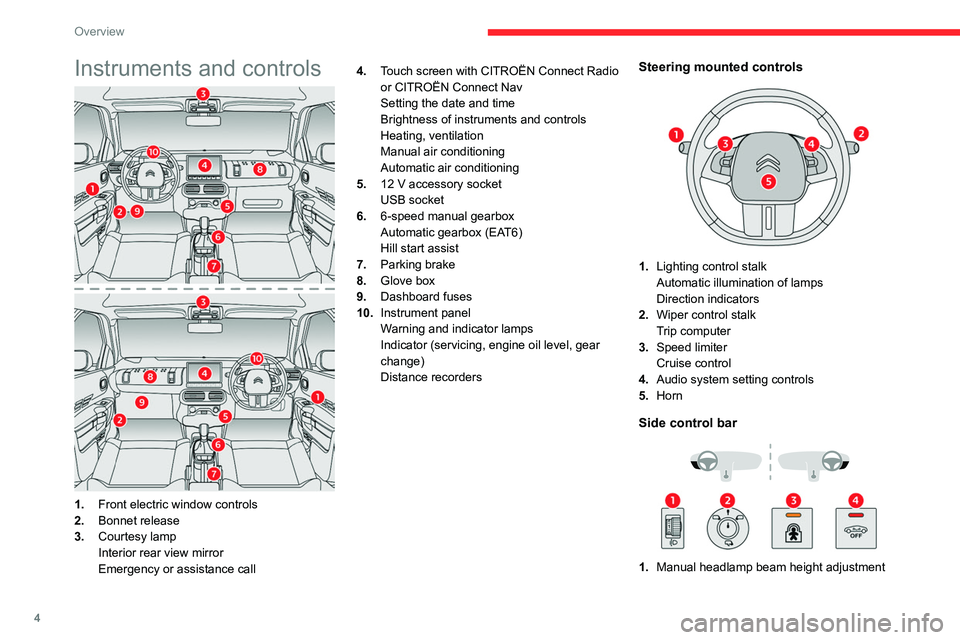
Instruments and controls
1.Front electric window controls
2. Bonnet release
3. Courtesy lamp
Interior rear view mirror
Emergency or assistance call 4.
Touch screen with CITROËN Connect Radio
or CITROËN Connect Nav
Setting the date and time
Brightness of instruments and controls
Heating, ventilation
Manual air conditioning
Automatic air conditioning
5. 12 V accessory socket
USB socket
6. 6-speed manual gearbox
Automatic gearbox (EAT6)
Hill start assist
7. Parking brake
8. Glove box
9. Dashboard fuses
10. Instrument panel
Warning and indicator lamps
Indicator (servicing, engine oil level, gear
change)
Distance recorders
Steering mounted controls
1.Lighting control stalk
Automatic illumination of lamps
Direction indicators
2. Wiper control stalk
Trip computer
3. Speed limiter
Cruise control
4. Audio system setting controls
5. Horn
Side control bar
1.Manual headlamp beam height adjustment
Page 15 of 196
13
Instruments
1Warning
lamps litAction Remaining
driving
range
A top-up is
essential,
due to the
risk that the
engine will
be prevented
from starting.Between
62 miles
and 0 miles
(100 km and
0
km)
To be able
to restart
the engine,
add at least
5 litres of
AdBlue
® to
its tank. 0 miles (km)
Malfunction of the SCR emissions
control system
Malfunction detection
If a malfunction is detected,
these warning lamps come on,
accompanied by an audible
signal and an "Emissions fault”
message.
The alert is triggered while driving, when the
fault is detected for the first time, and thereafter
when switching on the ignition for subsequent
journeys, while the cause of the fault persists.
If the fault is temporary, the alert
disappears during the next journey, after
self-diagnostic checks of the SCR emissions
control system.
Malfunction confirmed during the
permitted driving phase (between 685
miles and 0
miles (1,100 km and 0 km))
If the fault indication is still displayed
permanently after 31 miles (50 km) of driving, the
fault in the SCR system is confirmed.
The AdBlue warning lamp flashes, and an
"Emissions fault: Starting prevented in X
miles" or "NO START IN X miles" message is
displayed, indicating the driving range in miles or
kilometres.
While driving, the message is displayed every 30
seconds. The alert is repeated when switching
on the ignition.
You can continue driving for up to 685 miles
(1,100
km) before the engine immobiliser
system is triggered.
Have the system checked by a
CITROËN dealer or a qualified workshop
as soon as possible.
Starting prevented
Whenever the ignition is switched on, the
"Emissions fault: Starting prevented" or "NO
START IN" message is displayed.
To be able to restart the engine, contact a CITROËN dealer or a qualified
workshop.
Touch screen
The touch screen gives access to:
– the heating / air conditioning controls,
–
menus for adjusting settings for vehicle
functions and systems,
–
audio system and telephone controls and the
display of associated information,
and, depending on equipment, allows:
–
the display of alert messages and the visual
parking sensors information,
–
the permanent display of the time and the
exterior temperature (a blue warning lamp
appears when there is a risk of ice),
–
access to the internet services and navigation
system controls and the display of associated
information.
As a safety measure, the driver must
only carry out operations that require
sustained attention with the vehicle
stationary.
Some functions are not accessible when
driving.
Page 16 of 196
14
Instruments
Display of information in the
touch screen
► In the “Applications ” menu, select the
"Vehicle application " tab, then "Trip
computer".
The trip computer information is displayed on
the page.
► Press one of the buttons to display the
desired tab.
For a temporary display in a specific
window, press the end of the wiper
control stalk for access to the information and
scroll through the different tabs.
– The current information tab with:
• the remaining range,
• current fuel consumption,
• time counter of the Stop & Start.
– The trip "1" tab with:
• the average speed,
• the average fuel consumption,
• the distance travelled, for the first trip.
– The trip "2" tab with:
• the average speed,
• the average fuel consumption,
• the distance travelled, for the second trip.
Trip reset
► When the desired trip is displayed, press the
Reset button or the end of the wiper control stalk
until zeros appear.
Trips “1“ and “2“ are independent.
Recommendations
This screen is of the capacitive type.
Use is possible in all temperatures.
Do not use pointed objects on the touch screen.
Do not touch the touch screen with wet hands.
Use a soft clean cloth to clean the touch screen.
Touch screen
Use the buttons on each side of the touch screen
to access the menus, then use the buttons that
appear on the touch screen.
Certain functions may be displayed over 1 or 2
pages.
To deactivate / activate a function, press OFF/
ON.
To modify a setting (lighting duration, etc.) or
access additional information, press the symbol
for the function.
After a few moments with no action on the secondary page, the primary page is
displayed automatically.
Use this button to confirm.
Use this button to return to the previous
page.
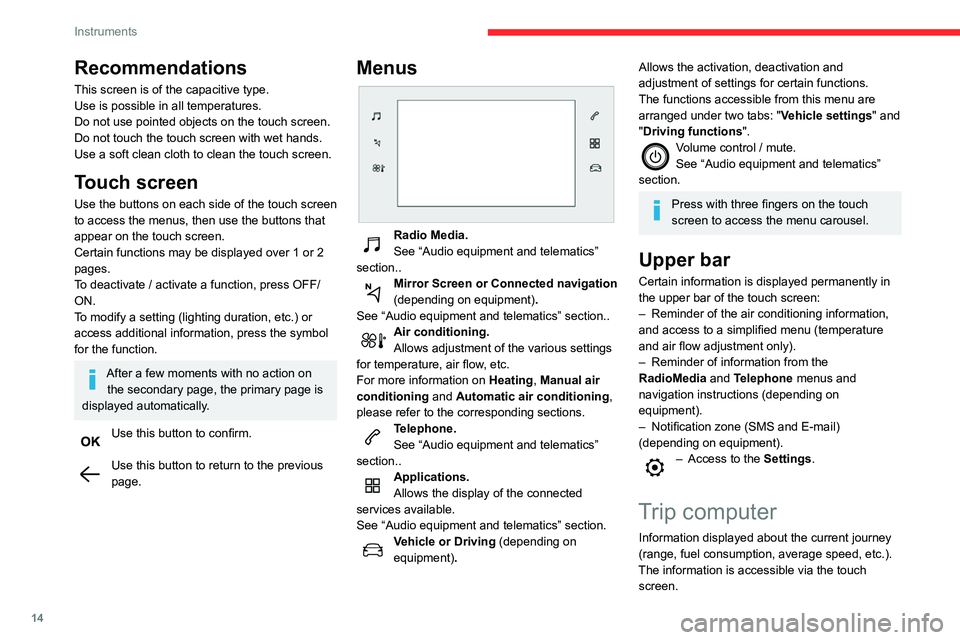
Menus
Radio Media.
See “Audio equipment and telematics”
section..
Mirror Screen or Connected navigation
(depending on equipment) .
See “Audio equipment and telematics” section..
Air conditioning.
Allows adjustment of the various settings
for temperature, air flow, etc.
For more information on Heating, Manual air
conditioning and Automatic air conditioning ,
please refer to the corresponding sections.
Telephone.
See “Audio equipment and telematics”
section..
Applications.
Allows the display of the connected
services available.
See “Audio equipment and telematics” section.
Vehicle or Driving (depending on
equipment) .
Allows the activation, deactivation and
adjustment of settings for certain functions.
The functions accessible from this menu are
arranged under two tabs: " Vehicle settings" and
"Driving functions ".
Volume control / mute.
See “Audio equipment and telematics”
section.
Press with three fingers on the touch
screen to access the menu carousel.
Upper bar
Certain information is displayed permanently in
the upper bar of the touch screen:
–
Reminder of the air conditioning information,
and access to a simplified menu (temperature
and air flow adjustment only).
–
Reminder of information from the
RadioMedia
and Telephone menus and
navigation instructions (depending on
equipment).
–
Notification zone (SMS and E-mail)
(depending on equipment).
– Access to the Settings.
Trip computer
Information displayed about the current journey
(range, fuel consumption, average speed, etc.).
The information is accessible via the touch screen.
Page 40 of 196
38
Ease of use and comfort
Front armrest
Opening
► To access the closed storage compartment,
lift the lever to open the lid.
This storage compartment can be used to house portable devices (e.g. mobile
phone, MP3 player) which can be connected
to the USB sockets or charged from the 12 V
accessories socket in the centre console.
Do not fix or attach anything to the sun
visor on the passenger side, as this could
cause injuries if the front airbag (fitted in the
roof) were deployed.
Glove box
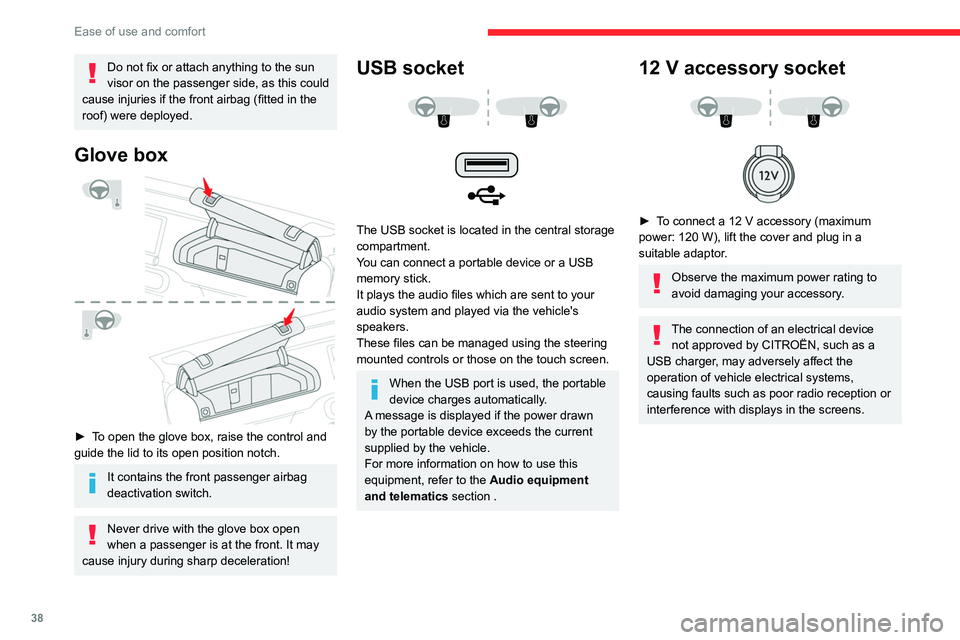
► To open the glove box, raise the control and
guide the lid to its open position notch.
It contains the front passenger airbag
deactivation switch.
Never drive with the glove box open
when a passenger is at the front. It may
cause injury during sharp deceleration!
USB socket
The USB socket is located in the central storage
compartment.
You can connect a portable device or a USB
memory stick.
It plays the audio files which are sent to your
audio system and played via the vehicle's
speakers.
These files can be managed using the steering
mounted controls or those on the touch screen.
When the USB port is used, the portable
device charges automatically.
A message is displayed if the power drawn
by the portable device exceeds the current
supplied by the vehicle.
For more information on how to use this
equipment, refer to the Audio equipment
and telematics section .
12 V accessory socket
► To connect a 12 V accessory (maximum
power: 120 W), lift the cover and plug in a
suitable adaptor.
Observe the maximum power rating to
avoid damaging your accessory.
The connection of an electrical device not approved by CITROËN, such as a
USB charger, may adversely affect the
operation of vehicle electrical systems,
causing faults such as poor radio reception or
interference with displays in the screens.
Page 71 of 196
69
Driving
6automatically to preserve the remaining battery
charge.
Starting the engine
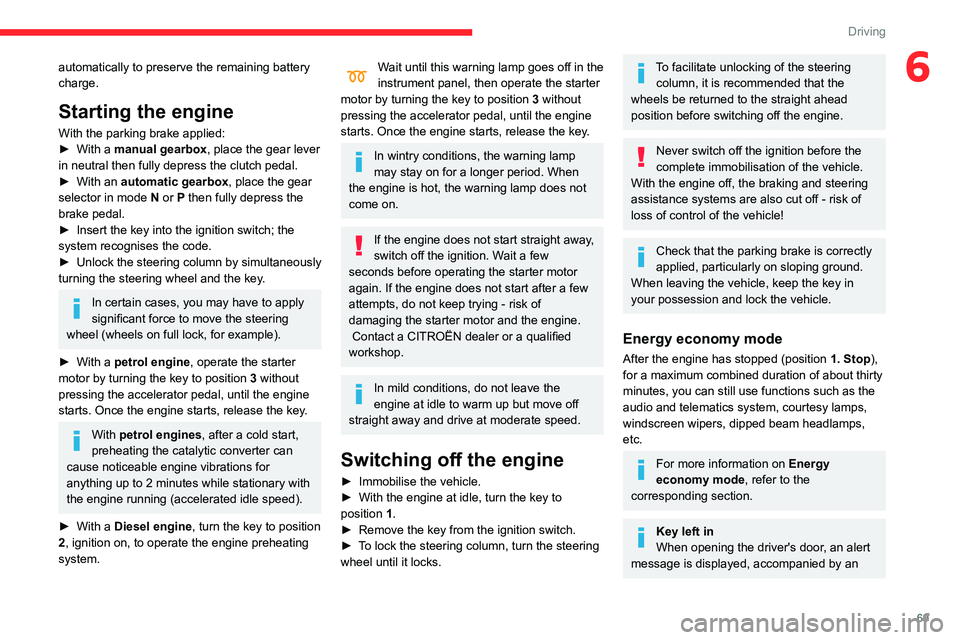
With the parking brake applied:
► With a manual gearbox, place the gear lever
in neutral then fully depress the clutch pedal.
►
With an
automatic gearbox, place the gear
selector in mode N or P then fully depress the
brake pedal.
►
Insert the key into the ignition switch; the
system recognises the code.
►
Unlock
the steering column by simultaneously
turning the steering wheel and the key.
In certain cases, you may have to apply
significant force to move the steering
wheel (wheels on full lock, for example).
►
With a
petrol engine , operate the starter
motor by turning the key to position 3 without
pressing the accelerator pedal, until the engine
starts. Once the engine starts, release the key.
With petrol engines , after a cold start,
preheating the catalytic converter can
cause
noticeable engine vibrations for
anything up to 2 minutes while stationary with
the engine running (accelerated idle speed).
►
With a
Diesel engine, turn the key to position
2, ignition on, to operate the engine preheating
system.
Wait until this warning lamp goes off in the
instrument panel, then operate the starter
motor by turning the key to position 3 without
pressing the accelerator pedal, until the engine
starts. Once the engine starts, release the key.
In wintry conditions, the warning lamp
may stay on for a longer period. When
the engine is hot, the warning lamp does not
come on.
If the engine does not start straight away,
switch off the ignition. Wait a few
seconds before operating the starter motor
again. If the engine does not start after a few
attempts, do not keep trying - risk of
damaging the starter motor and the engine.
Contact a CITROËN dealer or a qualified
workshop.
In mild conditions, do not leave the
engine at idle to warm up but move off
straight away and drive at moderate speed.
Switching off the engine
► Immobilise the vehicle.
► With the engine at idle, turn the key to
position 1
.
►
Remove the key from the ignition switch.
►
T
o lock the steering column, turn the steering
wheel until it locks.
To facilitate unlocking of the steering column, it is recommended that the
wheels be returned to the straight ahead
position before switching off the engine.
Never switch off the ignition before the
complete immobilisation of the vehicle.
With the engine off, the braking and steering
assistance systems are also cut off - risk of
loss of control of the vehicle!
Check that the parking brake is correctly
applied, particularly on sloping ground.
When leaving the vehicle, keep the key in
your possession and lock the vehicle.
Energy economy mode
After the engine has stopped (position 1. Stop),
for a maximum combined duration of about thirty
minutes, you can still use functions such as the
audio and telematics system, courtesy lamps,
windscreen wipers, dipped beam headlamps,
etc.
For more information on Energy
economy mode, refer to the
corresponding section.
Key left in
When opening the driver's door, an alert
message is displayed, accompanied by an
Page 72 of 196
70
Driving
Switching on the ignition
without starting the engine
With the electronic key in the passenger
compartment, pressing the “START/STOP”
button, without pressing any of the pedals ,
allows the ignition to be switched on without
starting the engine (turning on the instrument
panel and accessories such as the audio system
and the lighting).
► Press this button again to switch off the
ignition and allow the vehicle to be locked.
Key not detected
Back-up starting
A back-up reader is fitted underneath the
parking brake lever so that the engine can be
started if the system does not detect the key
in the recognition zone, or if the battery in the
electronic key is flat.
audible signal, to remind you that the key is
still in the ignition switch at position 1 (Stop).
If the key has been left in the ignition switch
at position 2 (Ignition on) , the ignition will be
switched off automatically after one hour.
To switch the ignition back on, turn the key
to position 1 (Stop), then back to position 2
(Ignition on) .
Starting / Switching off the
engine with Keyless Entry
and Starting
The electronic key must be present in the
passenger compartment.
If it is not detected, a message is displayed.
Move the electronic key so that the engine
can be started or switched off.
If there is still a problem, refer to the "Key
not detected - Back-up starting or Back-up
switch-off" section.
Starting
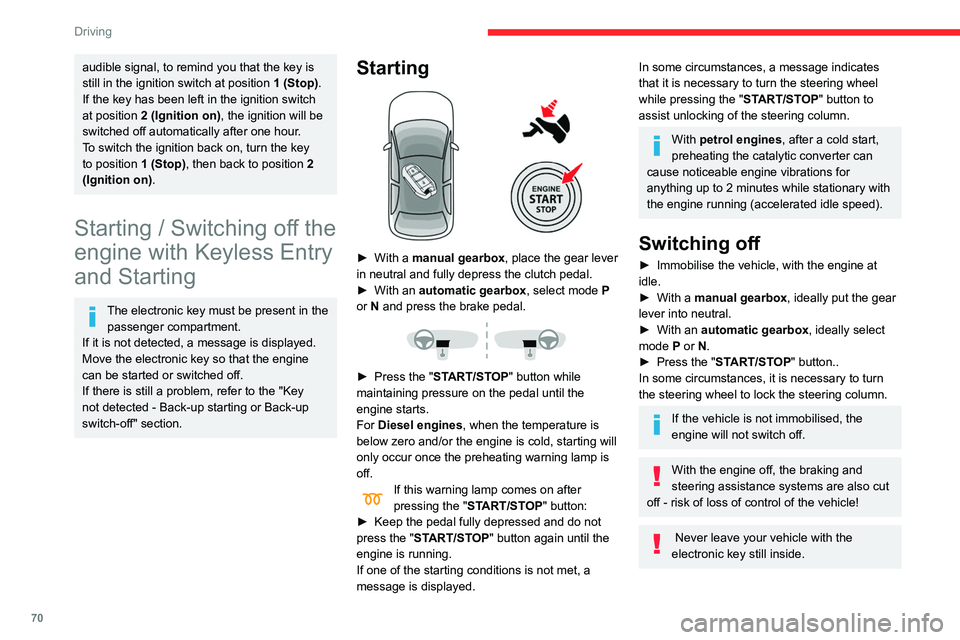
► With a manual gearbox, place the gear lever
in neutral and fully depress the clutch pedal.
►
With an
automatic gearbox, select mode P
or
N and press the brake pedal.
► Press the " START/STOP" button while
maintaining pressure on the pedal until the
engine starts.
For Diesel engines, when the temperature is
below zero and/or the engine is cold, starting will
only occur once the preheating warning lamp is
off.
If this warning lamp comes on after
pressing the " START/STOP" button:
►
Keep the pedal fully depressed and do not
press the "
START/STOP" button again until the
engine is running.
If one of the starting conditions is not met, a
message is displayed.
In some circumstances, a message indicates
that it is necessary to turn the steering wheel
while pressing the " START/STOP" button to
assist unlocking of the steering column.
With petrol engines , after a cold start,
preheating the catalytic converter can
cause noticeable engine vibrations for
anything up to 2 minutes while stationary with
the engine running (accelerated idle speed).
Switching off
► Immobilise the vehicle, with the engine at
idle.
►
With a
manual gearbox, ideally put the gear
lever into neutral.
►
With an
automatic gearbox, ideally select
mode
P or N.
►
Press the "
START/STOP" button..
In some circumstances, it is necessary to turn
the steering wheel to lock the steering column.
If the vehicle is not immobilised, the
engine will not switch off.
With the engine off, the braking and
steering assistance systems are also cut
off - risk of loss of control of the vehicle!
Never leave your vehicle with the
electronic key still inside.
Page 73 of 196

71
Driving
6Switching on the ignition
without starting the engine
With the electronic key in the passenger
compartment, pressing the “START/STOP”
button, without pressing any of the pedals ,
allows the ignition to be switched on without
starting the engine (turning on the instrument
panel and accessories such as the audio system
and the lighting).
►
Press this button
again to switch off the
ignition and allow the vehicle to be locked.
Key not detected
Back-up starting
A back-up reader is fitted underneath the
parking brake lever so that the engine can be
started if the system does not detect the key
in the recognition zone, or if the battery in the
electronic key is flat.
► Place and hold the remote control against the
reader .
►
W
ith a manual gearbox, place the gear lever
in neutral then fully depress the clutch pedal.
►
W
ith an automatic gearbox, select mode P,
then fully depress the brake pedal.
►
Press the “
START/STOP” button.
The engine starts.
Back-up switch-off
If the electronic key is not detected or is no
longer in the recognition zone, a message
appears in the instrument panel when closing a
door or trying to switch off the engine.
►
T
o confirm the instruction to switch off the
engine, press the " START/STOP" button for
approximately 5
seconds.
In the event of a fault with the electronic key,
contact a CITROËN dealer or a qualified
workshop.
Emergency switch-off
In the event of an emergency only, the engine
can be switched off without conditions (even
when driving).
►
Press the "
START/STOP" button for about
5
seconds.
In this case, the steering column locks as soon
as the vehicle stops.
Page 99 of 196
97
Practical information
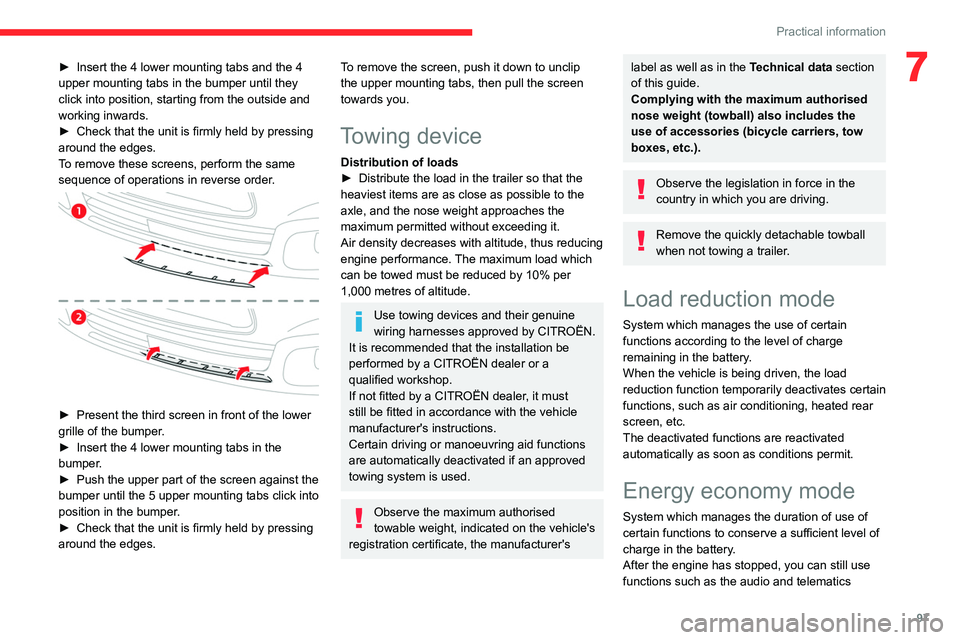
7► Insert the 4 lower mounting tabs and the 4
upper mounting tabs in the bumper until they
click into position, starting from the outside and
working inwards.
►
Check that the unit is firmly held by pressing
around the edges.
T
o remove these screens, perform the same
sequence of operations in reverse order.
► Present the third screen in front of the lower
grille of the bumper .
►
Insert the 4 lower mounting tabs in the
bumper
.
►
Push the upper part of the screen against the
bumper until the 5 upper mounting tabs click into
position in the bumper
.
►
Check that the unit is firmly held by pressing
around the edges.
To remove the screen, push it down to unclip
the upper mounting tabs, then pull the screen
towards you.
Towing device
Distribution of loads
► Distribute the load in the trailer so that the
heaviest items are as close as possible to the
axle, and the nose weight approaches the
maximum permitted without exceeding it.
Air density decreases with altitude, thus reducing
engine performance.
The maximum load which
can be towed must be reduced by 10% per
1,000
metres of altitude.
Use towing devices and their genuine
wiring harnesses approved by CITROËN.
It is recommended that the installation be
performed by a CITROËN dealer or a
qualified workshop.
If not fitted by a CITROËN dealer, it must
still be fitted in accordance with the vehicle
manufacturer's instructions.
Certain driving or manoeuvring aid functions
are automatically deactivated if an approved
towing system is used.
Observe the maximum authorised
towable weight, indicated on the vehicle's
registration certificate, the manufacturer's
label as well as in the Technical data section
of this guide.
Complying with the maximum authorised
nose weight (towball) also includes the
use of accessories (bicycle carriers, tow
boxes, etc.).
Observe the legislation in force in the
country in which you are driving.
Remove the quickly detachable towball
when not towing a trailer.
Load reduction mode
System which manages the use of certain
functions according to the level of charge
remaining in the battery.
When the vehicle is being driven, the load
reduction function temporarily deactivates certain
functions, such as air conditioning, heated rear
screen, etc.
The deactivated functions are reactivated
automatically as soon as conditions permit.
Energy economy mode
System which manages the duration of use of
certain functions to conserve a sufficient level of
charge in the battery.
After the engine has stopped, you can still use
functions such as the audio and telematics
Page 100 of 196
98
Practical information
Recommendations
► Distribute the load uniformly, taking
care to avoid overloading one of the sides.
► Arrange the heaviest part of the load as
close as possible to the roof.
► Lash the load down securely and fit a
warning flag if it overhangs the vehicle.
► Drive gently: the vehicle will be more
susceptible to the effects of side winds
(stability may be affected).
► Remove the roof bars once they are no
longer needed.
Maximum load, distributed over the roof
bars, for a loading height not exceeding
40 cm: 80 kg.
As this value may change, please verify the
maximum load quoted on the note supplied
with the roof bars.
If the height exceeds 40 cm, adapt the
speed of the vehicle to the profile of the road
to avoid damaging the roof bars and the
mountings on the vehicle.
Be sure to refer to national legislation in order
to comply with the regulations for transporting
objects which are longer than the vehicle.
Bonnet
Stop & Start
Before doing anything under the bonnet,
you must switch off the ignition to avoid any
systemI windscreen wipers, dipped beam
headlamps, courtesy lamps, etc. for a maximum
combined duration of about forty minutesK
Switching to the mode
A message indicating that the vehicle has
switched to economy mode is displayed on the
touch screen and the active functions are put on
standby.
If a telephone call is in progress at the
time, it will be maintained for around 10
minutes using your audio system’s hands-free
system.
Exiting the mode
These functions will be automatically restored
the next time the vehicle is used.
In order to restore the use of these functions
immediately, start the engine and let it run:
–
for less than ten minutes, to use the
equipment for approximately five minutes,
–
for more than ten minutes, to use the
equipment for up to approximately thirty minutes.
Let the engine run for the duration specified to
ensure that the battery charge is sufficient.
Do not repeatedly and continuously restart the
engine in order to charge the battery
.
A flat battery prevents the engine from starting.
For more information on the 12 V battery,
refer to the corresponding section.
Roof bars
For safety reasons and to avoid
damaging the roof, it is essential to use
the transverse bars approved for your vehicle.
Observe the fitting instructions and the
conditions of use in the guide supplied
with the roof bars.
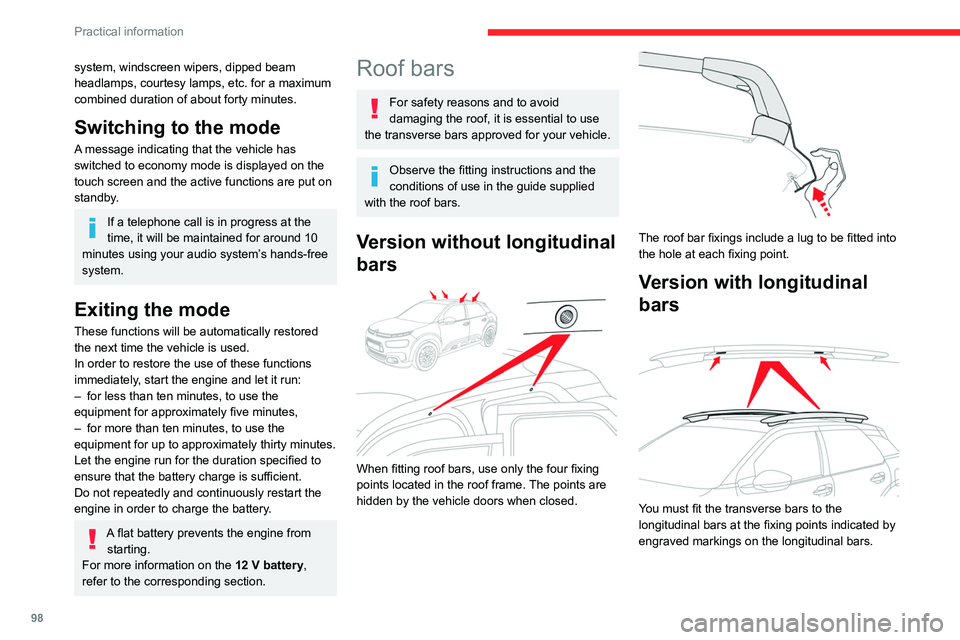
Version without longitudinal
bars
When fitting roof bars, use only the four fixing
points located in the roof frame. The points are
hidden by the vehicle doors when closed.
The roof bar fixings include a lug to be fitted into
the hole at each fixing point.
Version with longitudinal
bars
You must fit the transverse bars to the
longitudinal bars at the fixing points indicated by
engraved markings on the longitudinal bars.