change time CITROEN C4 CACTUS 2023 Owners Manual
[x] Cancel search | Manufacturer: CITROEN, Model Year: 2023, Model line: C4 CACTUS, Model: CITROEN C4 CACTUS 2023Pages: 196, PDF Size: 6.12 MB
Page 6 of 196
4
Overview
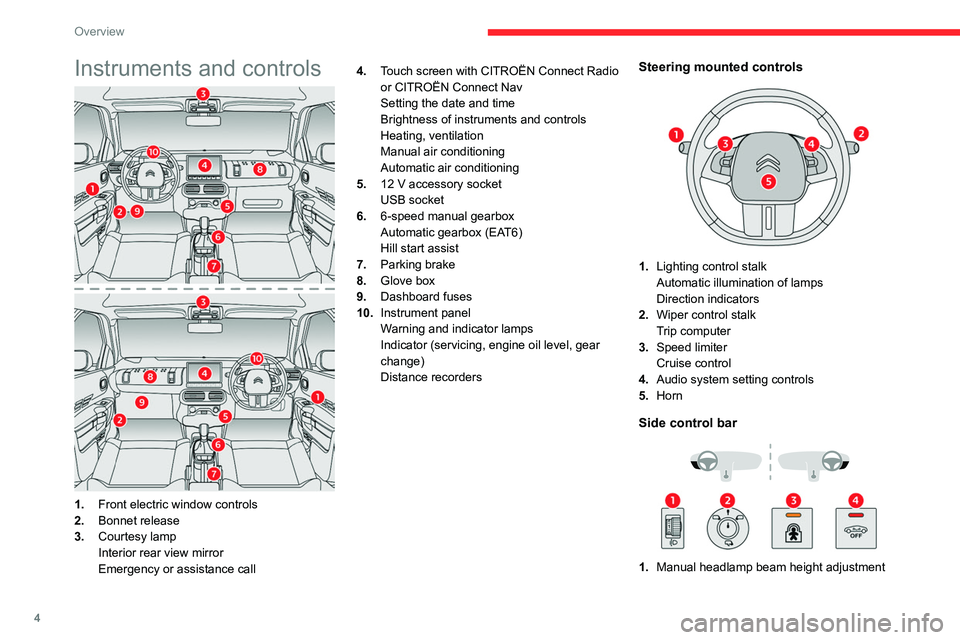
Instruments and controls
1.Front electric window controls
2. Bonnet release
3. Courtesy lamp
Interior rear view mirror
Emergency or assistance call 4.
Touch screen with CITROËN Connect Radio
or CITROËN Connect Nav
Setting the date and time
Brightness of instruments and controls
Heating, ventilation
Manual air conditioning
Automatic air conditioning
5. 12 V accessory socket
USB socket
6. 6-speed manual gearbox
Automatic gearbox (EAT6)
Hill start assist
7. Parking brake
8. Glove box
9. Dashboard fuses
10. Instrument panel
Warning and indicator lamps
Indicator (servicing, engine oil level, gear
change)
Distance recorders
Steering mounted controls
1.Lighting control stalk
Automatic illumination of lamps
Direction indicators
2. Wiper control stalk
Trip computer
3. Speed limiter
Cruise control
4. Audio system setting controls
5. Horn
Side control bar
1.Manual headlamp beam height adjustment
Page 8 of 196
6
Eco-driving
Eco-driving
Eco-driving refers to a range of everyday
practices that allow the motorist to optimise their
fuel consumption and CO
2emissions.
Optimise your use of the gearbox
With a manual gearbox, move off gently and
change up promptly. While accelerating, change
up early.
With an automatic gearbox, favour automatic
mode and avoid pressing the accelerator pedal
heavily or suddenly.
The gear efficiency indicator prompts you to
engage the most suitable gear: whenever this
indication is displayed on the instrument panel,
follow it straight away.
With an automatic gearbox, this indicator
appears only in manual mode.
Drive smoothly
Maintain a safe distance between vehicles, use
engine braking rather than the brake pedal and
press the accelerator gradually. These attitudes
help to save fuel, reduce CO
2 emissions and
decrease general traffic noise.
If the vehicle has the steering-mounted
"CRUISE" control, use cruise control at speeds
above 25 mph (40
km/h) when the traffic is
flowing well.
Use electrical equipment wisely
Before moving off, if the passenger compartment
is too warm, ventilate it by opening the windows
and air vents before using the air conditioning.
At speeds above 31
mph (50 km/h), close the
windows and leave the air vents open.
Consider using equipment that can help keep
the temperature in the passenger compartment
down (sunroof blind and window blinds, etc.).
Unless automatically regulated, switch off the air
conditioning as soon as the desired temperature
has been reached.
Switch off the demisting and defrosting functions,
if they are not managed automatically.
Switch off the heated seat as soon as possible.
Switch off the headlamps and foglamps when
the visibility conditions do not require their use.
Avoid running the engine before moving off,
particularly in winter; your vehicle will warm up
much faster while driving.
As a passenger, avoid connecting your
multimedia devices (film, music, video game,
etc.) to help reduce consumption of electrical
energy, and hence fuel.
Disconnect all portable devices before leaving
the vehicle.
Limit the causes of excess consumption
Spread loads throughout the vehicle; place the
heaviest items in the boot, as close as possible
to the rear seats.
Limit the loads carried in the vehicle and
minimise wind resistance (roof bars, roof rack, bicycle carrier, trailer, etc.). Preferably, use a
roof box.
Remove roof bars and roof racks after use.
At the end of winter, remove snow tyres and refit
summer tyres.
Avoid using the SPORT mode for too long, in
order to limit your fuel consumption.
Comply with servicing instructions
Check tyre pressures regularly, with the tyres
cold, referring to the label in the door aperture on
the driver's side.
Carry out this check in particular:
–
before a long journey
.
–
at each change of season.
–
after a long period out of use.
Do not overlook the spare wheel and, where
applicable, the tyres on your trailer or caravan.
Have your vehicle serviced regularly (engine oil,
oil filter
, air filter, passenger compartment filter,
etc.) and observe the schedule of operations in
the manufacturer's service schedule.
With a BlueHDi Diesel engine, if the SCR system
is faulty, your vehicle will emit pollution. Visit
a CITROËN dealer or a qualified workshop
as soon as possible to restore your vehicle’s
nitrogen oxide emissions to regulatory
compliance.
When filling the fuel tank, do not continue after
the third nozzle cut-out, to avoid overflow.
You will only see the fuel consumption of your
new vehicle settle down to a consistent average
after the first 1,900 miles (3,000 kilometres).
Page 17 of 196
15
Instruments
1Display of information in the
touch screen
► In the “Applications ” menu, select the
"Vehicle application " tab, then "Trip
computer".
The trip computer information is displayed on
the page.
►
Press one of the buttons to display the
desired tab.
For a temporary display in a specific
window, press the end of the wiper
control stalk for access to the information and
scroll through the different tabs.
–
The current information tab with:
•
the remaining range,
•
current fuel consumption,
•
time counter of the Stop & Start.
–
The trip "
1" tab with:
•
the average speed,
•
the average fuel consumption,
•
the distance travelled, for the first trip.
–
The trip "
2" tab with:
•
the average speed,
•
the average fuel consumption,
•
the distance travelled, for the second trip.
Trip reset
► When the desired trip is displayed, press the
Reset button or the end of the wiper control stalk
until zeros appear
.
Trips “1“ and “2“ are independent.
For example, trip “1“ can be used for daily
figures, and trip “2“ for monthly figures.
A few definitions…
Range
(miles or km)The distance which can still be travelled with the fuel remaining in the tank (related
to the average fuel consumption over the last
few miles (kilometres) travelled).
This value may fluctuate if a change of driving style or terrain results in a
significant change in the current fuel
consumption.
Dashes are displayed when the range falls below
20 miles (30km).
After filling with at least 5 litres of fuel, the range
is recalculated and is displayed if it exceeds 60
miles (100 km).
If dashes instead of figures continue to
be displayed when driving, contact a
CITROËN dealer or a qualified workshop.
Current fuel consumption
(mpg or km/l or l/100 km)Calculated over the last few seconds.
This function is only displayed from 19 mph (30 km/h).
Average fuel consumption
(mpg or km/l or l/100 km)Calculated since the last trip computer
reset.
Average speed
(mph or km/h)Calculated since the last trip computer
reset.
Distance travelled
(miles or km)Calculated since the last trip computer
reset.
Time counter in Stop & Start
(minutes / seconds or hours / minutes)
A time counter calculates the time spent in STOP
mode during a journey.
It resets to zero every time the ignition is
switched on.
Distance recorders
The total and trip distances are displayed for
thirty seconds when the ignition is switched off,
when the driver's door is opened and when the
vehicle is locked or unlocked.
When travelling abroad, you may have to
change the units of distance: the display
Page 18 of 196
16
Instruments
of road speed must be in the official units
(miles or km) for the country.
The change of units is done via the screen
configuration menu, with the vehicle
stationary.
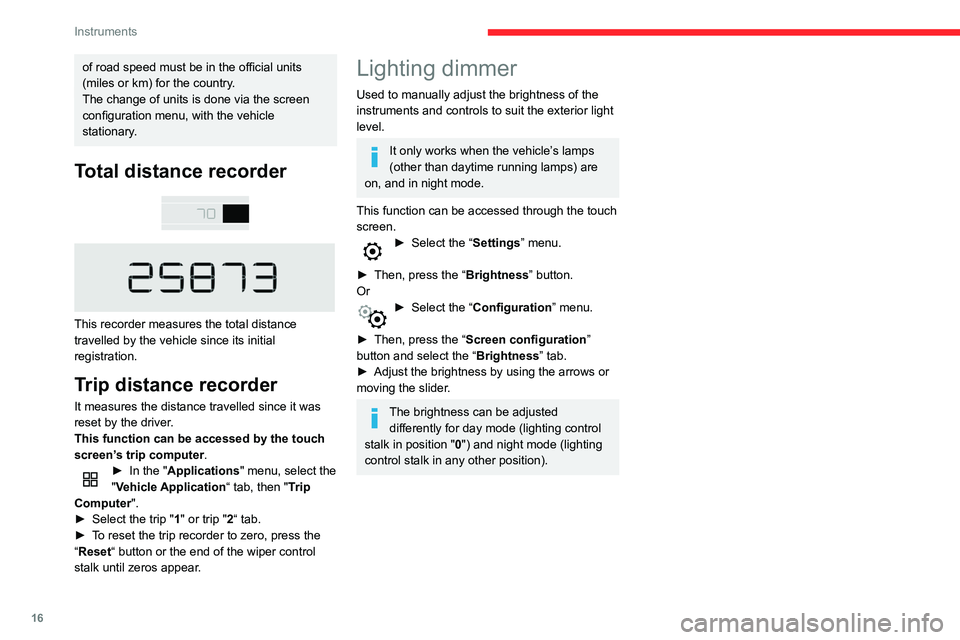
Total distance recorder
This recorder measures the total distance
travelled by the vehicle since its initial
registration.
Trip distance recorder
It measures the distance travelled since it was
reset by the driver.
This function can be accessed by the touch
screen’s trip computer.
► In the " Applications " menu, select the
"Vehicle Application “ tab, then "Trip
Computer".
►
Select the trip "
1" or trip "2“ tab.
►
T
o reset the trip recorder to zero, press the
“Reset “ button or the end of the wiper control
stalk until zeros appear.
Lighting dimmer
Used to manually adjust the brightness of the
instruments and controls to suit the exterior light
level.
It only works when the vehicle’s lamps
(other than daytime running lamps) are
on, and in night mode.
This function can be accessed through the touch
screen.
► Select the “ Settings” menu.
►
Then, press the “
Brightness” button.
Or
► Select the “ Configuration ” menu.
►
Then, press the “
Screen configuration”
button and select the “Brightness” tab.
►
Adjust the brightness by using the arrows or
moving the slider
.
The brightness can be adjusted differently for day mode (lighting control
stalk in position " 0") and night mode (lighting
control stalk in any other position).
Page 33 of 196
31
Ease of use and comfort
3Returning the backrest to
the normal position
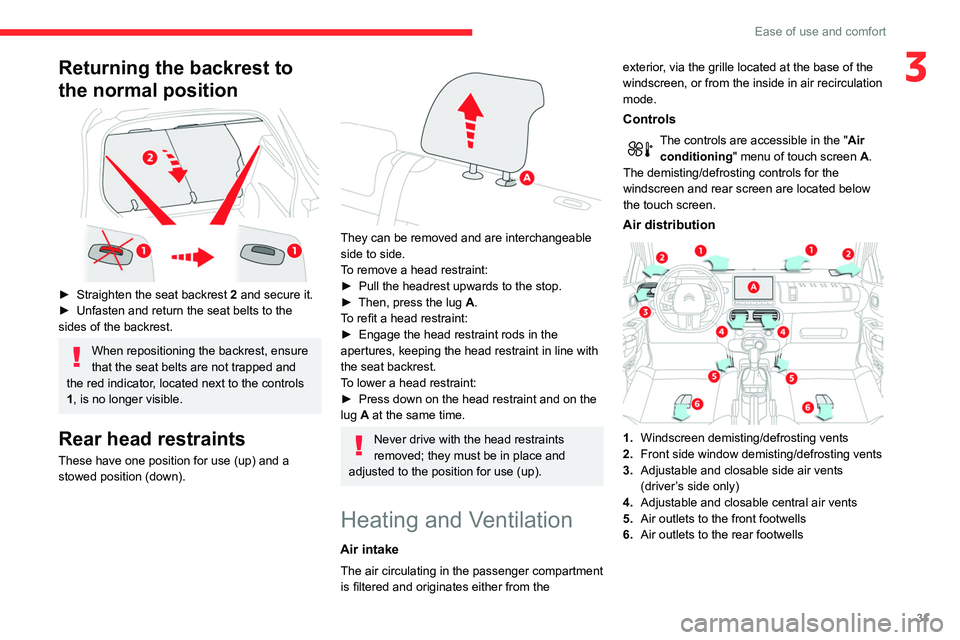
► Straighten the seat backrest 2 and secure it.
► Unfasten and return the seat belts to the
sides of the backrest.
When repositioning the backrest, ensure
that the seat belts are not trapped and
the red indicator, located next to the controls
1, is no longer visible.
Rear head restraints
These have one position for use (up) and a
stowed position (down).
They can be removed and are interchangeable
side to side.
To remove a head restraint:
►
Pull the headrest upwards to the stop.
►
Then, press the lug
A.
To refit a head restraint:
►
Engage the head restraint rods in the
apertures, keeping the head restraint in line with
the seat backrest.
T
o lower a head restraint:
►
Press down on the head restraint and on the
lug
A at the same time.
Never drive with the head restraints
removed; they must be in place and
adjusted to the position for use (up).
Heating and Ventilation
Air intake
The air circulating in the passenger compartment
is filtered and originates either from the exterior, via the grille located at the base of the
windscreen, or from the inside in air recirculation
mode.
Controls
The controls are accessible in the "
Air
conditioning " menu of touch screen
A.
The demisting/defrosting controls for the
windscreen and rear screen are located below
the touch screen.
Air distribution
1. Windscreen demisting/defrosting vents
2. Front side window demisting/defrosting vents
3. Adjustable and closable side air vents
(driver’s side only)
4. Adjustable and closable central air vents
5. Air outlets to the front footwells
6. Air outlets to the rear footwells
Page 34 of 196
32
Ease of use and comfort
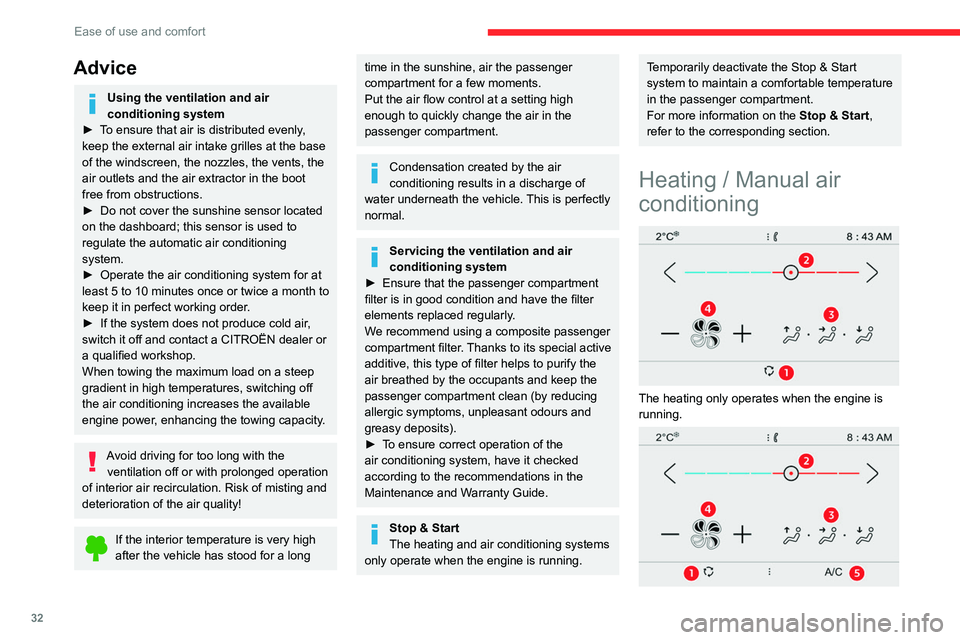
The manual air conditioning operates when the
engine is running.
1.Recirculation of interior air.
2. Temperature adjustment.
3. Air distribution adjustment.
4. Air flow adjustment.
5. Air conditioning on / off.
► Select the Air conditioning touch
screen menu to display the controls page
for the system.
Temperature adjustment
► Press one of the arrows 2, or move the
slider from blue (cold) to red (hot) to adjust the
temperature to your liking.
Air flow adjustment
► Press one of the buttons 4 to increase or
decrease the speed of the air booster fan.
The air flow symbol (a fan) is filled in
progressively as the speed of the fan is
increased.
By reducing the air flow to a minimum, you are
stopping ventilation.
Avoid driving for too long without ventilation - risk of misting and
deterioration of air quality!
Air distribution adjustment
You can vary the air distribution in the passenger
compartment using the buttons 3.
Advice
Using the ventilation and air
conditioning system
►
T
o ensure that air is distributed evenly,
keep the external air intake grilles at the base
of the windscreen, the nozzles, the vents, the
air outlets and the air extractor in the boot
free from obstructions.
►
Do not cover the sunshine sensor located
on the dashboard; this sensor is used to
regulate the automatic air conditioning
system.
►
Operate the air conditioning system for at
least 5 to 10 minutes once or twice a month to
keep it in perfect working order
.
►
If the system does not produce cold air
,
switch it off and contact a CITROËN dealer or
a qualified workshop.
When towing the maximum load on a steep
gradient in high temperatures, switching off
the air conditioning increases the available
engine power, enhancing the towing capacity.
Avoid driving for too long with the ventilation off or with prolonged operation
of interior air recirculation. Risk of misting and
deterioration of the air quality!
If the interior temperature is very high
after the vehicle has stood for a long
time in the sunshine, air the passenger
compartment for a few moments.
Put the air flow control at a setting high
enough to quickly change the air in the
passenger compartment.
Condensation created by the air
conditioning results in a discharge of
water underneath the vehicle. This is perfectly
normal.
Servicing the ventilation and air
conditioning system
►
Ensure that the passenger compartment
filter is in good condition and have the filter
elements replaced regularly
.
We recommend using a composite passenger
compartment filter. Thanks to its special active
additive, this type of filter helps to purify the
air breathed by the occupants and keep the
passenger compartment clean (by reducing
allergic symptoms, unpleasant odours and
greasy deposits).
►
T
o ensure correct operation of the
air conditioning system, have it checked
according to the recommendations in the
Maintenance and Warranty Guide.
Stop & Start
The heating and air conditioning systems
only operate when the engine is running.
Temporarily deactivate the Stop & Start
system to maintain a comfortable temperature
in the passenger compartment.
For more information on the Stop & Start,
refer to the corresponding section.
Heating / Manual air
conditioning
The heating only operates when the engine is
running.
Page 36 of 196
34
Ease of use and comfort
It allows you:
– lower the temperature, in summer,
– increase the effectiveness of the demisting in
winter, above 3°C.
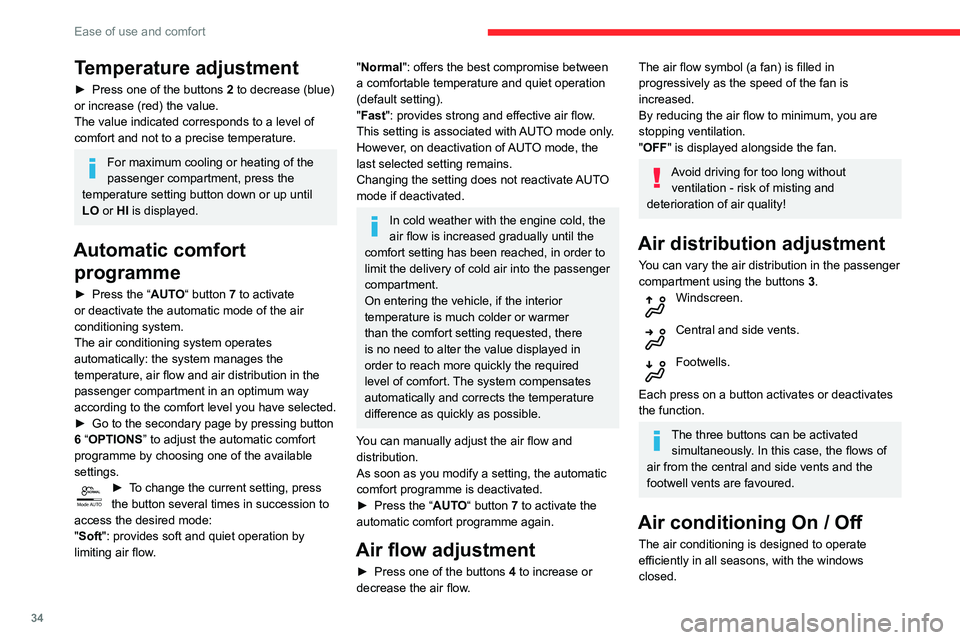
► Press button 5 to activate/deactivate the air
conditioning system.
When the indicator lamp is on, the air
conditioning function is activated.
The air conditioning does not operate when the air flow adjustment is inhibited.
Ventilation function with the
ignition on
When the ignition is switched on, you can
use the ventilation system to adjust the air
flow settings and the air distribution in the
passenger compartment for a duration which
depends on the battery charge.
This function does not operate the air
conditioning.
Recirculation of interior air
The intake of exterior air helps avoid and
eliminate misting of the windscreen and side
windows.
Recirculating the interior air isolates the
passenger compartment from exterior odours
and fumes.
Temperature adjustment
► Press one of the buttons 2 to decrease (blue)
or increase (red) the value.
The value indicated corresponds to a level of
comfort and not to a precise temperature.
For maximum cooling or heating of the
passenger compartment, press the
temperature setting button down or up until
LO or HI is displayed.
Automatic comfort programme
► Press the “ AUTO“ button 7 to activate
or deactivate the automatic mode of the air
conditioning system.
The air conditioning system operates
automatically: the system manages the
temperature, air flow and air distribution in the
passenger compartment in an optimum way
according to the comfort level you have selected.
►
Go to the secondary page by pressing button
6
“OPTIONS ” to adjust the automatic comfort
programme by choosing one of the available
settings.
Mode AUTO► To change the current setting, press
the button several times in succession to
access the desired mode:
"Soft": provides soft and quiet operation by
limiting air flow.
"Normal": offers the best compromise between
a comfortable temperature and quiet operation
(default setting).
"Fast": provides strong and effective air flow.
This setting is associated with AUTO mode only.
However, on deactivation of AUTO mode, the
last selected setting remains.
Changing the setting does not reactivate AUTO
mode if deactivated.
In cold weather with the engine cold, the
air flow is increased gradually until the
comfort setting has been reached, in order to
limit the delivery of cold air into the passenger
compartment.
On entering the vehicle, if the interior
temperature is much colder or warmer
than the comfort setting requested, there
is no need to alter the value displayed in
order to reach more quickly the required
level of comfort. The system compensates
automatically and corrects the temperature
difference as quickly as possible.
You can manually adjust the air flow and distribution.
As soon as you modify a setting, the automatic
comfort programme is deactivated.
►
Press the “
AUTO“ button 7 to activate the
automatic comfort programme again.
Air flow adjustment
► Press one of the buttons 4 to increase or
decrease the air flow.
The air flow symbol (a fan) is filled in
progressively as the speed of the fan is
increased.
By reducing the air flow to minimum, you are
stopping ventilation.
"OFF " is displayed alongside the fan.
Avoid driving for too long without
ventilation - risk of misting and
deterioration of air quality!
Air distribution adjustment
You can vary the air distribution in the passenger
compartment using the buttons 3.
Windscreen.
Central and side vents.
Footwells.
Each press on a button activates or deactivates
the function.
The three buttons can be activated simultaneously. In this case, the flows of
air from the central and side vents and the
footwell vents are favoured.
Air conditioning On / Off
The air conditioning is designed to operate
efficiently in all seasons, with the windows
closed.
Page 57 of 196
55
Safety
5– must be pulled in front of you with a smooth
movement, ensuring that it is not twisted;
–
must only be used to secure one person;
–
must not show signs of tearing or fraying;
–
must not be changed or modified, in order
to avoid affecting its performance.
Recommendations for children
Use a suitable child seat if the passenger
is less than 12 years old or shorter than one
and a half metres.
Never use the same seat belt to secure more
than one child.
Never carry a child on your lap.
For more information on Child seats, refer to
the corresponding section.
Maintenance
In accordance with current safety
regulations, for all repairs on your vehicle's
seat belts, go to a qualified workshop with
the skills and equipment needed, which a
CITROËN dealer is able to provide.
Have the seat belts checked regularly by a
CITROËN dealer or a qualified workshop,
particularly if the straps show signs of
damage.
Clean the seat belt straps with soapy water or
a textile cleaning product, sold by CITROËN
dealers.
Airbags
General information
System designed to help improve the safety
of the occupants sitting in the front seats and
the rear outer seats, in the event of a violent
collision. The airbags supplement the action
of the seat belts equipped with a force limiting
system.
Electronic detectors record and analyse the
front and side impacts sustained in the impact
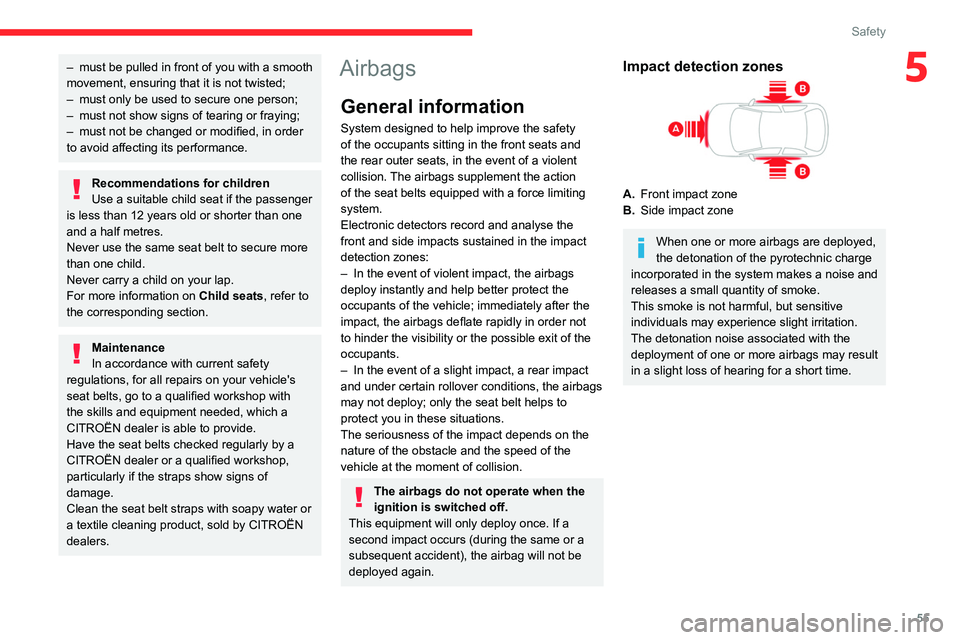
detection zones:
–
In the event of violent impact, the airbags
deploy instantly and help better protect the
occupants of the vehicle; immediately after the
impact, the airbags deflate rapidly in order not
to hinder the visibility or the possible exit of the
occupants.
–
In the event of a slight impact, a rear impact
and under certain rollover conditions, the airbags
may not deploy; only the seat belt helps to
protect you in these situations.
The seriousness of the impact depends on the
nature of the obstacle and the speed of the
vehicle at the moment of collision.
The airbags do not operate when the
ignition is switched off.
This equipment will only deploy once. If a
second impact occurs (during the same or a
subsequent accident), the airbag will not be
deployed again.
Impact detection zones
A. Front impact zone
B. Side impact zone
When one or more airbags are deployed,
the detonation of the pyrotechnic charge
incorporated in the system makes a noise and
releases a small quantity of smoke.
This smoke is not harmful, but sensitive
individuals may experience slight irritation.
The detonation noise associated with the
deployment of one or more airbags may result
in a slight loss of hearing for a short time.
Page 75 of 196

73
Driving
6N.Neutral
–
V ehicle immobilised, parking brake
applied.
–
Starting the engine.
D. Automatic operation
M. + / - Manual operation
►
T
o move up / down through the
gears, move backwards / forwards.
Information displayed on
the instrument panel
When a position is selected in the grate with the
gear selector, the corresponding indicator lamp
lights up on the instrument panel.
P. Park
R. Reverse
N. Neutral
D. Drive (automatic operation)
S. Sport programme
1...6. Gear engaged during manual operation
-. Instruction not processed in manual
operation
Foot on the brake
► Depress the brake pedal when this
warning lamp is displayed on the
instrument panel (e.g. when starting the engine).
Starting the vehicle
► With your foot on the brake pedal,
select position P
or N.
► Start the engine.
If the conditions are not met, you will hear an
audible signal, accompanied by the display of a
message.
►
With the engine running, press the brake
pedal.
►
Release the parking brake.
►
Select position R
, D or M.
►
Gradually release the brake pedal.
The vehicle moves off immediately
.
If position N is selected inadvertently
while driving, allow the engine to return
to idle, then select position D to accelerate.
When the engine is running at idle with
the brakes released, if position R, D or M
is selected, the vehicle moves off even
without the accelerator being pressed.
Never leave children unattended in the
vehicle when the engine is running.
When carrying out maintenance with the
engine running, apply the parking brake and
select position P.
Automatic operation
► Select position D for automatic changing of
the six gears.
The gearbox then operates in auto-adaptive
mode, without any intervention on the part of the
driver. It continuously selects the most suitable
gear according to the driving style, the road
profile and the load in the vehicle.
For maximum acceleration without touching the
selector, press the accelerator fully down (kick-
down). The gearbox changes down automatically
or holds the gear selected until the maximum
engine speed is reached.
When braking, the gearbox changes down
automatically to provide effective engine braking.
If you release the accelerator sharply, the
gearbox will not shift to a higher gear for safety
reasons.
Never select position N while the vehicle
is moving.
Never select positions P or R unless the
vehicle is completely stationary.
"Sport" programme
This special programme supplements the
automatic operation in specific conditions of use.
"Sport"
► Press this button, once the engine has
started.
"
S" appears on the instrument panel.
The gearbox automatically favours a dynamic
style of driving.
Return to automatic operation
► At any time, press the selected button again
to quit the activated programme and return to
auto-adaptive mode.
Page 76 of 196
74
Driving
The system adapts its gear shift recommendation according to the driving
conditions (slope, load, etc.) and the driver’s
requirements (request for power, acceleration,
braking, etc.).
The system never suggests:
– engaging first gear.
– engaging a lower gear.
– engaging reverse.
With a manual gearbox, the arrow may
be accompanied by the recommended
gear. The system always suggests changing
to a higher gear when this is necessary.
Hill start assist
This system keeps your vehicle briefly stationary
(for approximately 2 seconds) when making a hill
start, while you transfer your foot from the brake
pedal to the accelerator pedal.
This system is only active when:
– the vehicle is completely stationary, with your
foot on the brake pedal,
– certain slope conditions are met,
– the driver’s door is closed.
Do not leave the vehicle while it is being
held temporarily by hill start assist.
If someone needs to get out of the vehicle
with the engine running, apply the parking
brake manually. After that, ensure that the
parking brake indicator lamp and the indicator
Manual operation
To limit fuel consumption during an extended standstill with the engine
running (for example, in a traffic jam), set the
gear selector to N and apply the parking
brake.
►
Selecting position
M
enables sequential
shifting between the six gears.
►
Push backwards to shift up a gear
.
►
Push forwards to shift down a gear
.
The gearbox only changes gear if the road
speed and engine speed permit; apart from
this condition, the rules for automatic operation
temporarily apply.
D disappears, and the gears engaged appear in
succession on the instrument panel.
If the engine speed is too low or too high, the
selected gear flashes for a few seconds, then the
gearactually activated is displayed.
It is possible to change from position D to
position M
at any time.
When the vehicle is stationary or moving
very slowly, the gearbox selects gear M1
automatically.
The Sport programme is inactive in manual
operation.
This symbol is displayed if a gear is not engaged correctly (gear selector between
two positions).
Switching off the vehicle
Before switching off the engine, it is possible to
engage position P or N to place the gearbox in
neutral.
In both cases, apply the parking brake to
immobilise the vehicle.
If the gear selector is not in position P,
when the driver's door is opened or
approximately 45 seconds after the ignition is
switched off, an audible signal sounds and a
message appears.
►
Return the gear selector to P
; the audible
signal stops and the message disappears.
Malfunction
In the event of a malfunction, this warning
lamp comes on and a message is
displayed, when the ignition is switched on.
In this case, the gearbox goes into back-up
mode and is locked in 3
rd gear. You may feel a
significant jolt (without risk for the gearbox) while
changing from
P
to R and from N to R.
Do not exceed 62 mph (100
km/h), local speed
restrictions permitting.
Have the system checked by a CITROËN dealer
or a qualified workshop.
There is a risk of damaging the gearbox: – If the accelerator and brake pedals are
pressed simultaneously
.
–
In the event of a battery failure, forcing the
selector from position P
to another position.
With an automatic gearbox, never try to
start the engine by pushing the vehicle.
Gear efficiency indicator
(Depending on engine.)
This system helps reduce fuel consumption by
recommending the most appropriate gear.
Operation
Depending on the driving situation and the
vehicle's equipment, the system may advise to
skip one or more gears.
Gear shift recommendations should not be
considered compulsory. In fact, the road layout,
the traffic density and safety remain the deciding
factors when choosing the best gear. The driver
therefore remains responsible for deciding
whether or not to follow the indications issued by
the system.
This function cannot be deactivated.
On certain BlueHDi Diesel versions with
manual gearbox, the system may suggest
changing into neutral ( N is displayed in the
instrument panel) so that the engine can go into
standby (STOP mode with Stop & Start), in
certain driving conditions.
The system is only active on vehicles fitted with a manual gearbox.
The information appears in the instrument panel in the form of an arrow.