phone Citroen C4 DAG 2008.5 1.G User Guide
[x] Cancel search | Manufacturer: CITROEN, Model Year: 2008.5, Model line: C4 DAG, Model: Citroen C4 DAG 2008.5 1.GPages: 282, PDF Size: 12.66 MB
Page 213 of 282
3
02 DISPLAY AND GENERAL MENU
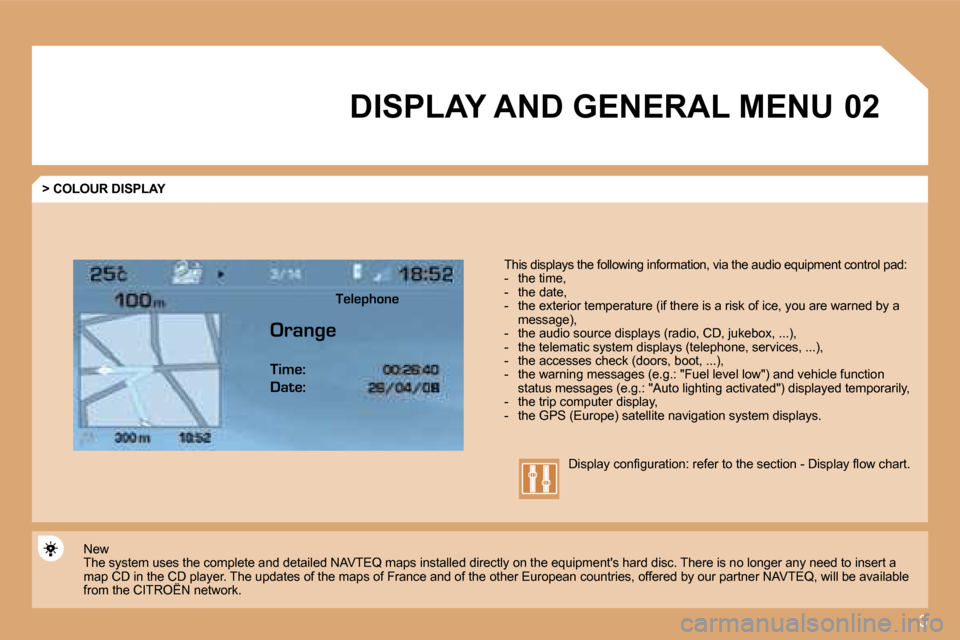
> COLOUR DISPLAY
This displays the following information, via the audio equipment control pad: - the time, - the date, - the exterior temperature (if there is a risk o f ice, you are warned by a message), - the audio source displays (radio, CD, jukebox, ...), - the telematic system displays (telephone, serv ices, ...), - the accesses check (doors, boot, ...), - the warning messages (e.g.: "Fuel level low") and vehicle function status messages (e.g.: "Auto lighting activated") d isplayed temporarily, - the trip computer display, - the GPS (Europe) satellite navigation system displays.
New The system uses the complete and detailed NAVTEQ m aps installed directly on the equipment's hard disc. There is no longer any need to insert a map CD in the CD player. The updates of the maps of France and of the other European countries, offered by our partner NAVTEQ, will be available from the CITROËN network. map CD in the CD player. Thehe CD
Display confi guration: refer to the section - Display fl ow chart.
Telephone
Orange Time:
Date:
Page 214 of 282
4
02 DISPLAY AND GENERAL MENU
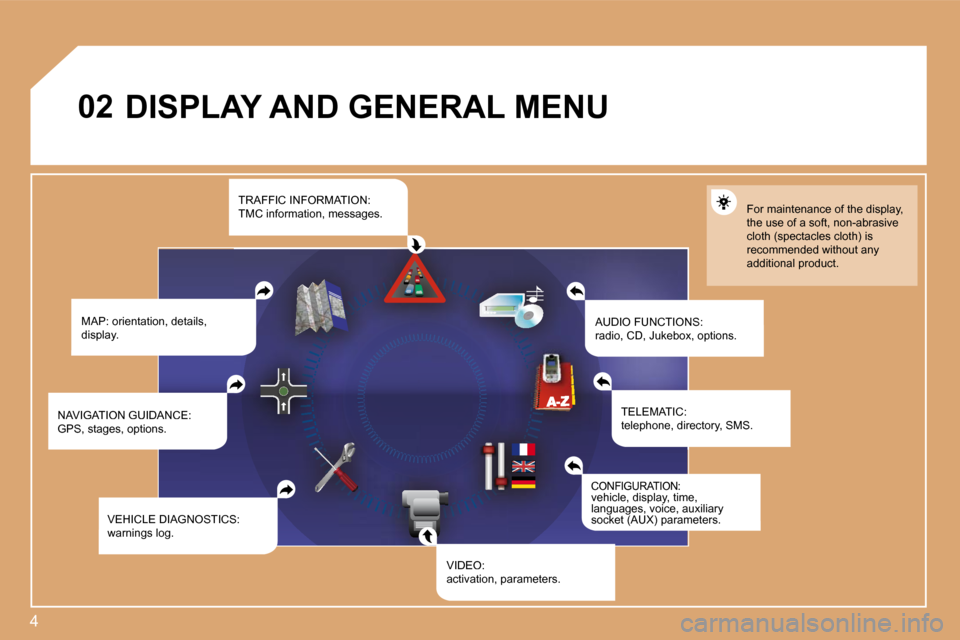
MAP: orientation, details, display. AUDIO FUNCTIONS: radio, CD, Jukebox, options.
For maintenance of the display, the use of a soft, non-abrasive cloth (spectacles cloth) is recommended without any additional product.
TELEMATIC: telephone, directory, SMS.
CONFIGURATION: vehicle, display, time, languages, voice, auxiliary socket (AUX) parameters.
VIDEO: activation, parameters.
VEHICLE DIAGNOSTICS: warnings log.
NAVIGATION GUIDANCE: GPS, stages, options.
TRAFFIC INFORMATION: TMC information, messages.
Page 215 of 282
5
1
1
1
1
1
1
1
1
1
1
1
1
1
1
1
1
1
1
1
1
1
1
1
1
1
1
1
1
1
1
1
1
1
1
1
1
1
1
1
02 DISPLAY AND GENERAL MENU
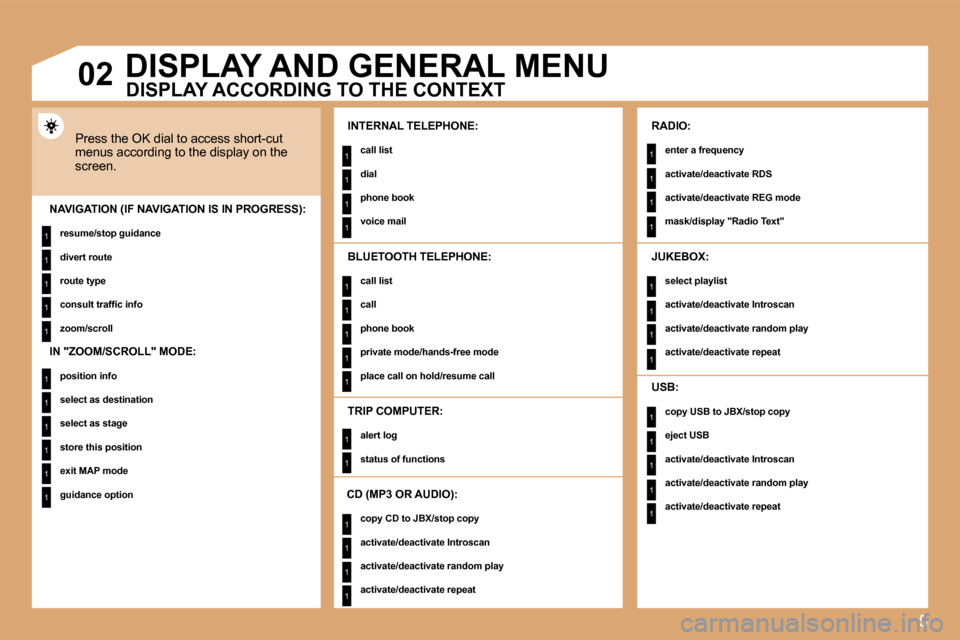
Press the OK dial to access short-cut menus according to the display on the screen.
INTERNAL TELEPHONE:
call list
dial
phone book
voice mail NAVIGATION (IF NAVIGATION IS IN PROGRESS):
resume/stop guidance
divert route
route type
consult traffi c info
zoom/scroll
TRIP COMPUTER:
alert log
status of functions
BLUETOOTH TELEPHONE:
call list
call
phone book
private mode/hands-free mode
place call on hold/resume call
CD (MP3 OR AUDIO):
copy CD to JBX/stop copy
activate/deactivate Introscan
activate/deactivate random play
activate/deactivate repeat
RADIO:
enter a frequency
activate/deactivate RDS
activate/deactivate REG mode
mask/display "Radio Text"
JUKEBOX:
select playlist
activate/deactivate Introscan
activate/deactivate random play
activate/deactivate repeat
USB:
copy USB to JBX/stop copy
eject USB
activate/deactivate Introscan
activate/deactivate random play
activate/deactivate repeat
DISPLAY ACCORDING TO THE CONTEXT
IN "ZOOM/SCROLL" MODE:
position info
select as destination
select as stage
store this position
exit MAP mode
guidance option
Page 235 of 282
25
11
22
33
11
22
06 INTERNAL TELEPHONE
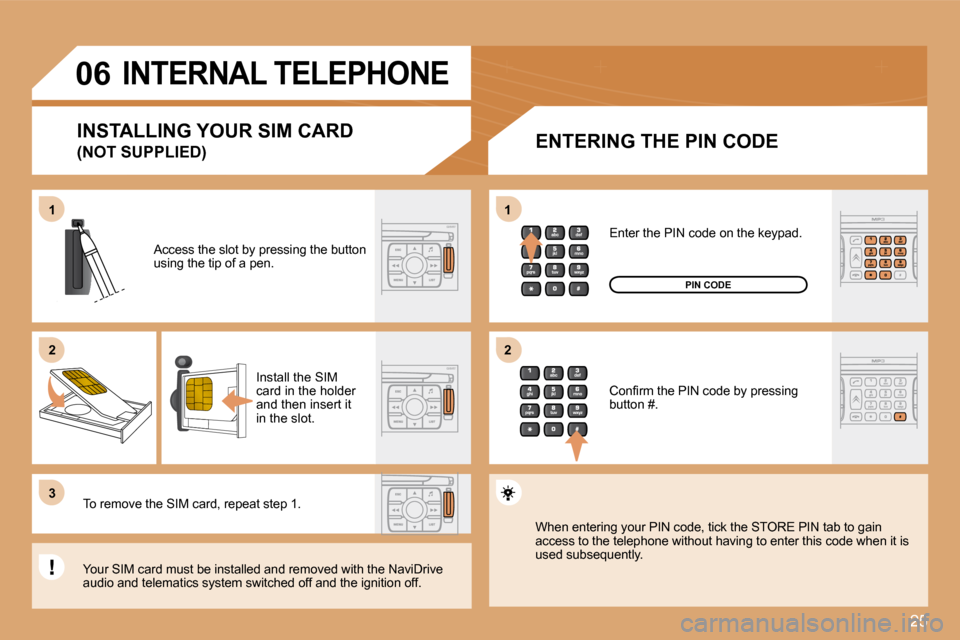
ENTERING THE PIN CODE
Access the slot by pressing the button using the tip of a pen.
Install the SIM card in the holder and then insert it in the slot.
To remove the SIM card, repeat step 1.
Your SIM card must be installed and removed with the NaviDrive audio and telematics system switched off and the ig nition off.
Enter the PIN code on the keypad.
Confi rm the PIN code by pressing button #.
PIN CODE
When entering your PIN code, tick the STORE PIN ta b to gain access to the telephone without having to enter this code when it is used subsequently.
INSTALLING YOUR SIM CARD
(NOT SUPPLIED)
Page 236 of 282
26
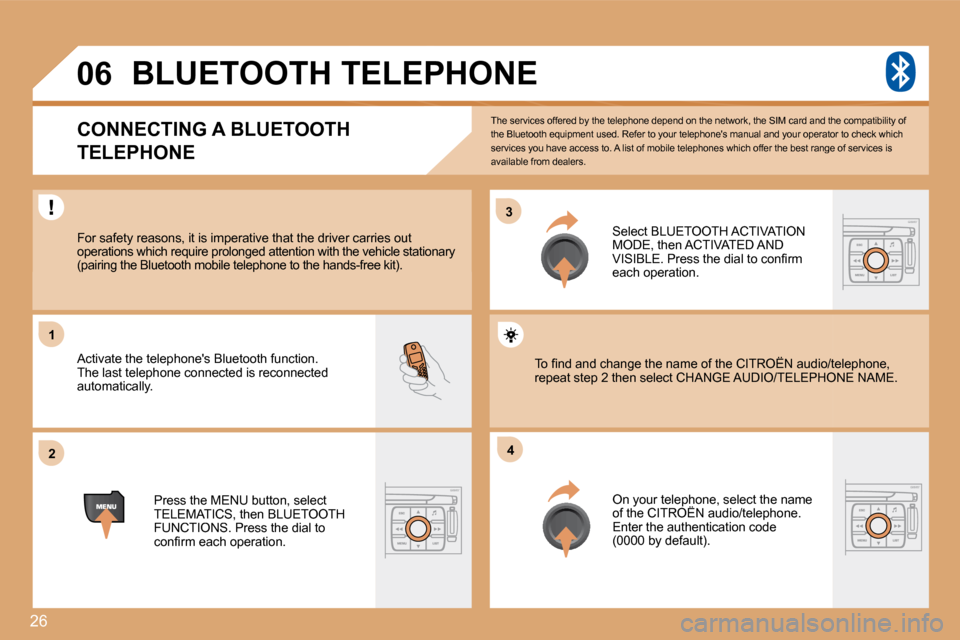
33
22
11
44
06
The services offered by the telephone depend on the network, the SIM card and the compatibility of the Bluetooth equipment used. Refer to your telepho ne's manual and your operator to check which services you have access to. A list of mobile telephones which offer the best range of services is available from dealers.
BLUETOOTH TELEPHONE
CONNECTING A BLUETOOTH
TELEPHONE
For safety reasons, it is imperative that the driv er carries out operations which require prolonged attention with t he vehicle stationary (pairing the Bluetooth mobile telephone to the hand s-free kit).
Activate the telephone's Bluetooth function. The last telephone connected is reconnected automatically.
Select BLUETOOTH ACTIVATION MODE, then ACTIVATED AND VISIBLE. Press the dial to confi rm each operation.
Press the MENU button, select TELEMATICS, then BLUETOOTH FUNCTIONS. Press the dial to confi rm each operation.
On your telephone, select the name of the CITROËN audio/telephone. On your telephone, select the name
Enter the authentication code (0000 by default).
To fi nd and change the name of the CITROËN audio/t elephone, To fi nd and change the name of the CITROËN audio/telephone, repeat step 2 then select CHANGE AUDIO/TELEPHONPHONE NAME.
Page 237 of 282
27
06
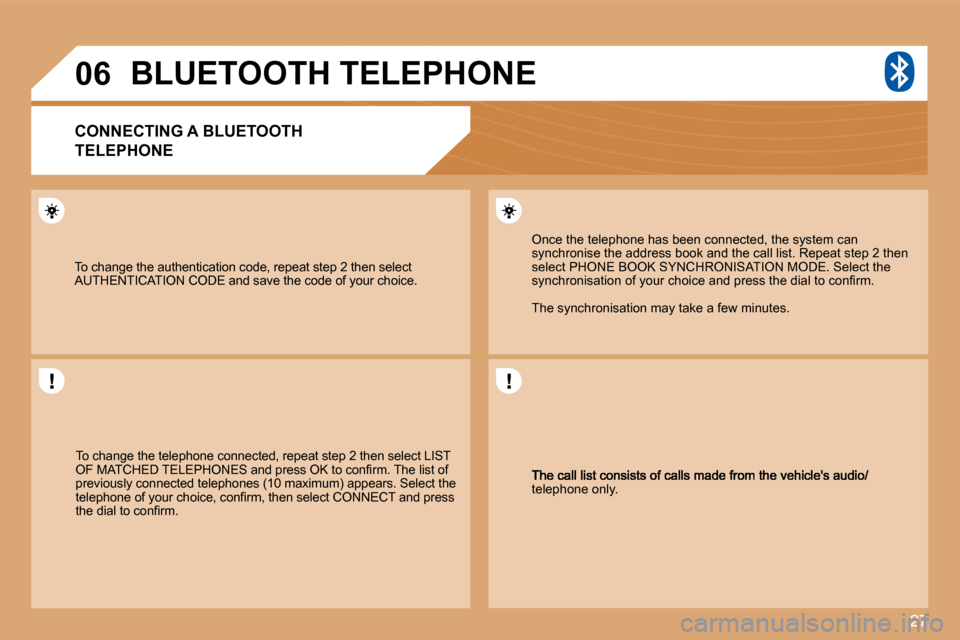
telephone only.
Once the telephone has been connected, the system can synchronise the address book and the call list. Repeat step 2 then select PHONE BOOK SYNCHRONISATION MODE. Select the synchronisation of your choice and press the dial to confi rm.
The synchronisation may take a few minutes.
To change the telephone connected, repeat step 2 then select LIST OF MATCHED TELEPHONES and press OK to confi rm. The list of previously connected telephones (10 maximum) appears. Select the telephone of your choice, confi rm, then select CONNECT and press the dial to confi rm.
To change the authentication code, repeat step 2 then select AUTHENTICATION CODE and save the code of your choic e.
BLUETOOTH TELEPHONE
CONNECTING A BLUETOOTH
TELEPHONE
Page 238 of 282
28
1
22
33
55
66
44
06 TELEPHONE
CALLING A CONTACT
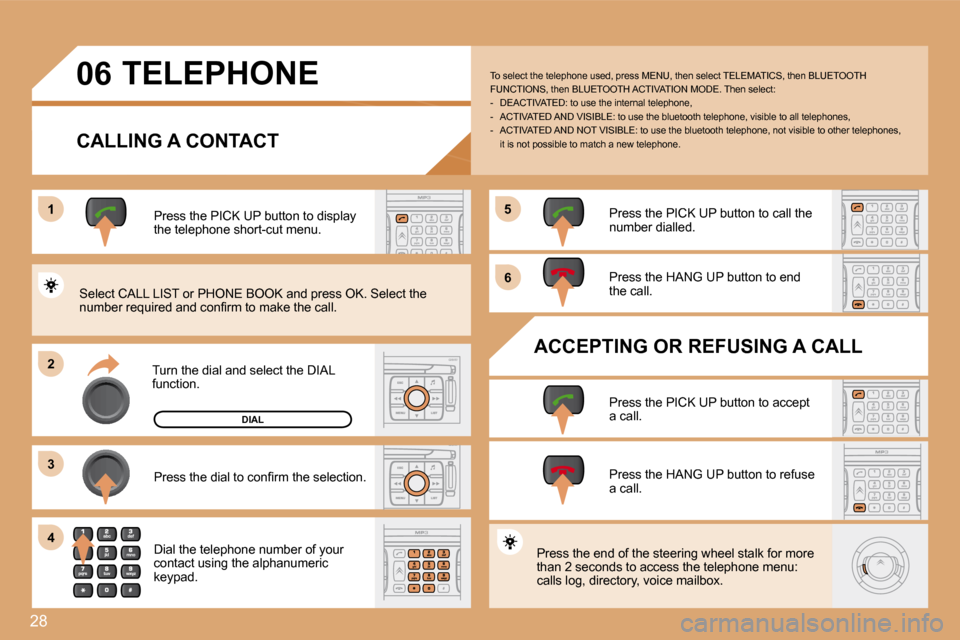
Turn the dial and select the DIAL function.
Press the PICK UP button to display the telephone short-cut menu.
Press the dial to confi rm the selection.
Dial the telephone number of your contact using the alphanumeric keypad.
Press the PICK UP button to call the number dialled.
Press the HANG UP button to end the call.
ACCEPTING OR REFUSING A CALL
Press the PICK UP button to accept a call.
Press the HANG UP button to refuse a call.
Press the end of the steering wheel stalk for more than 2 seconds to access the telephone menu: calls log, directory, voice mailbox.
To select the telephone used, press MENU, then select TELEMATICS, then BLUETOOTH FUNCTIONS, then BLUETOOTH ACTIVATION MODE. Then sel ect: - DEACTIVATED: to use the internal telephone, - ACTIVATED AND VISIBLE: to use the bluetooth telephone, visible to all telephones, - ACTIVATED AND NOT VISIBLE: to use the bluetoo th telephone, not visible to other telephones, it is not possible to match a new telephone.
Select CALL LIST or PHONE BOOK and press OK. Selec t the number required and confi rm to make the call.
DIAL
Page 239 of 282
29
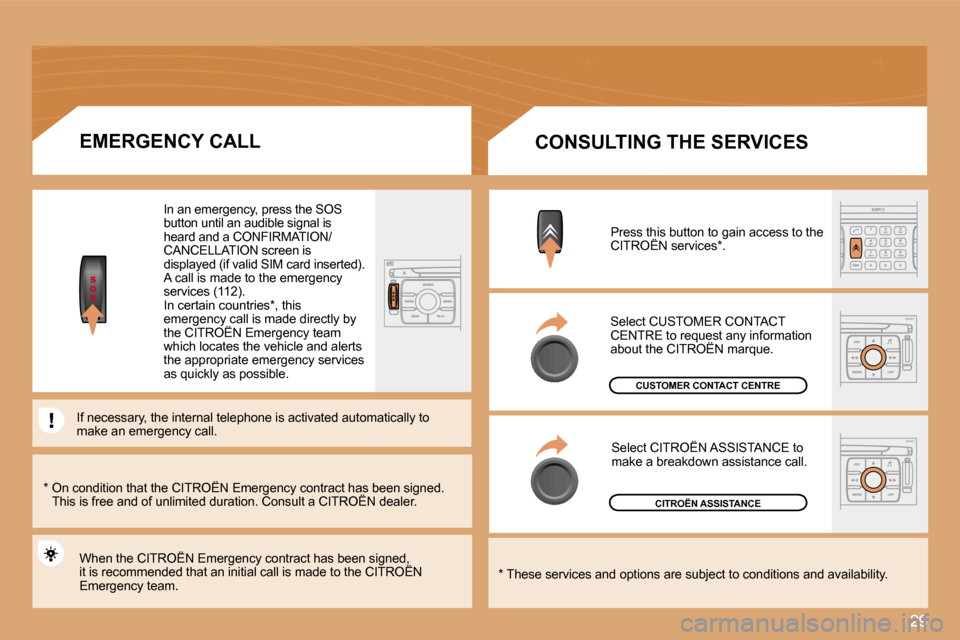
Select CITROËN ASSISTANCE to make a breakdown assistance call.
Select CUSTOMER CONTACT CENTRE to request any information about the CITROËN marque. CENTRE to request any informequest
CITROËN ASSISTANCE
CUSTOMER CONTACT CENTRE
* These services and options are subject to conditions and availability.
CONSULTING THE SERVICES
Press this button to gain access to the CITROËN services * . Press this button to gain access to the Press this button to gain access to the
* On condition that the CITROËN Emergency cont ract has been signed. This is free and of unlimited duration. Consult a CITROËN dealer. * On condition that the CITROËN Emergency cont ract has been signed. * On condition that the CITROËN Emergency contract has been signed.
EMERGENCY CALL
When the CITROËN Emergency contract has been signe d, it is recommended that an initial call is made to the CITROËN When the CITROËN Emergency contract has been signe d, When the CITROËN Emergency contract has been signed,
Emergency team.
In an emergency, press the SOS button until an audible signal is heard and a CONFIRMATION/CANCELLATION screen is displayed (if valid SIM card inserted). A call is made to the emergency services (112). In certain countries * , this emergency call is made directly by the CITROËN Emergency team emergency call is made directly by emergency call is made directly by
which locates the vehicle and alerts the appropriate emergency services as quickly as possible.
If necessary, the internal telephone is activated automattomatically to make an emergency call.
Page 242 of 282
32
08
4
1
23
51
23
4
5
1
CONTROL SHORT-CUTS
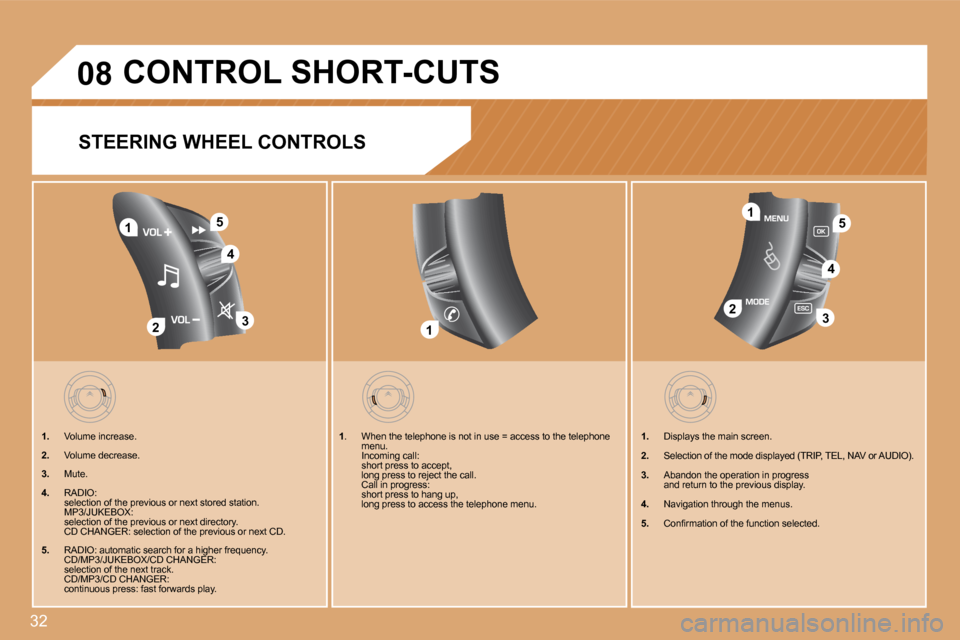
STEERING WHEEL CONTROLS
1. Volume increase.
2. Volume decrease.
3. Mute.
4. RADIO: selection of the previous or next stored station. MP3/JUKEBOX: selection of the previous or next directory. CD CHANGER: selection of the previous or next CD.
5. RADIO: automatic search for a higher frequency. CD/MP3/JUKEBOX/CD CHANGER: selection of the next track. CD/MP3/CD CHANGER: continuous press: fast forwards play.
1. Displays the main screen.
2. Selection of the mode displayed (TRIP, TEL, NAV or AUDIO).
3. Abandon the operation in progress and return to the previous display.
4. Navigation through the menus.
5. Confi rmation of the function selected.
1. When the telephone is not in use = access to the telephone menu. Incoming call: short press to accept, long press to reject the call. Call in progress: short press to hang up, long press to access the telephone menu.
Page 243 of 282
33
22
11
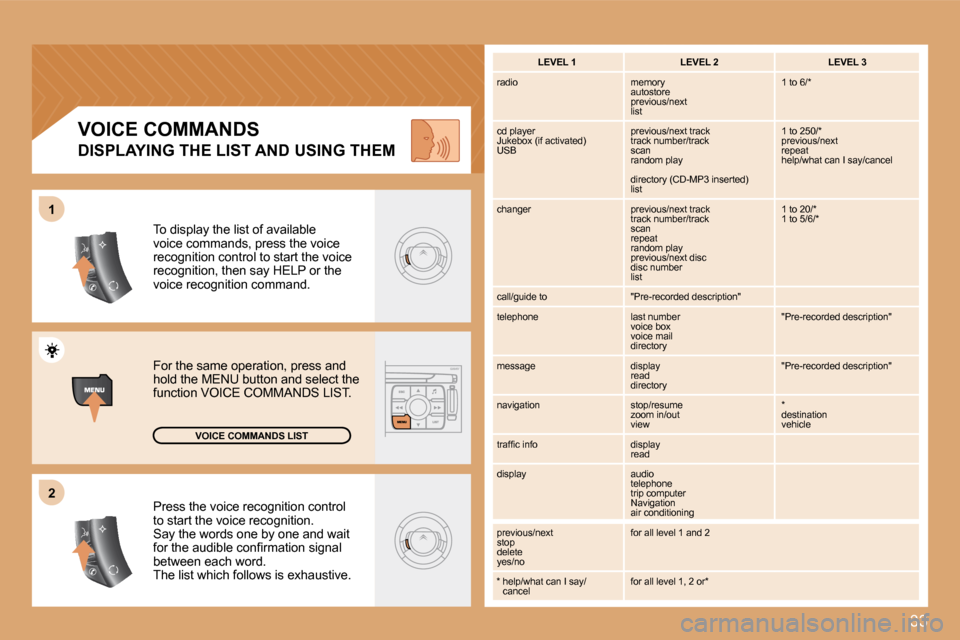
Press the voice recognition control to start the voice recognition. Say the words one by one and wait for the audible confi rmation signal between each word. The list which follows is exhaustive.
To display the list of available voice commands, press the voice recognition control to start the voice recognition, then say HELP or the voice recognition command.
For the same operation, press and hold the MENU button and select the function VOICE COMMANDS LIST.
VOICE COMMANDS LIST
VOICE COMMANDS
DISPLAYING THE LIST AND USING THEM
LEVEL 1 LEVEL 2 LEVEL 3
radio memory autostore previous/next list
1 to 6/*
cd player Jukebox (if activated) USB
previous/next track track number/track scan random play
directory (CD-MP3 inserted) list
1 to 250/* previous/next repeat help/what can I say/cancel
changer previous/next track track number/track scan repeat random play previous/next disc disc number list
1 to 20/* 1 to 5/6/*
call/guide to "Pre-recorded description"
telephone last number voice box voice mail directory
"Pre-recorded description"
message display read directory
"Pre-recorded description"
navigation stop/resume zoom in/out view
* destination vehicle
traffi c info display read
display audio telephone trip computer Navigation air conditioning
previous/next stop delete yes/no
for all level 1 and 2
* help/what can I say/cancel for all level 1, 2 or*