air condition CITROEN C4 DAG 2013 User Guide
[x] Cancel search | Manufacturer: CITROEN, Model Year: 2013, Model line: C4 DAG, Model: CITROEN C4 DAG 2013Pages: 340, PDF Size: 28.95 MB
Page 67 of 340
3
COMFORT
65
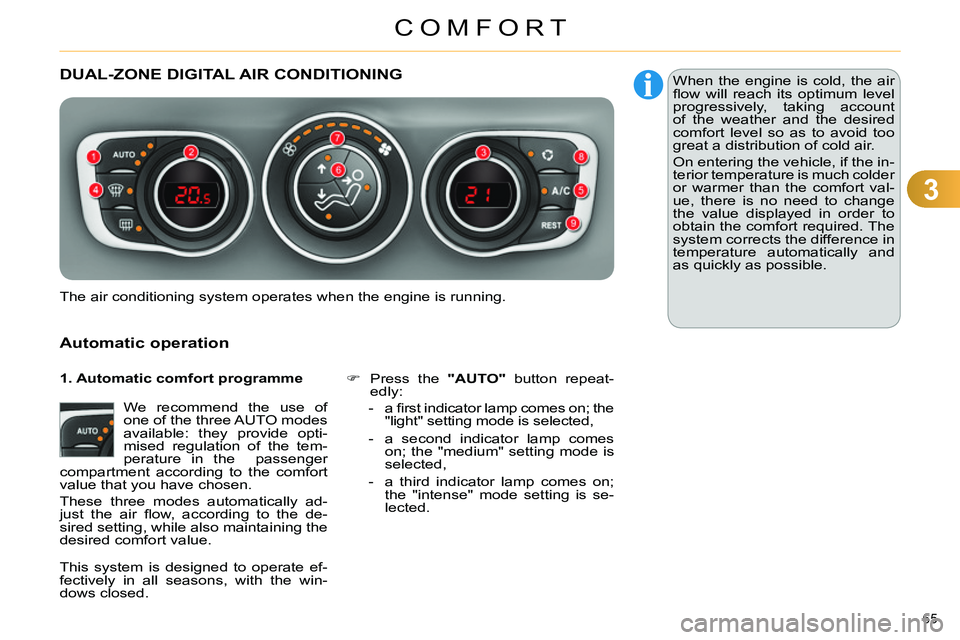
DUAL-ZONE DIGITAL AIR CONDITIONING
Automatic operation
We recommend the use of
one of the three AUTO modes
available: they provide opti-
mised regulation of the tem-
perature in the passenger
compartment according to the comfort
value that you have chosen.
These three modes automatically ad-
just the air fl ow, according to the de-
sired setting, while also maintaining the
desired comfort value.
Press the "AUTO"
button repeat-
edly:
- a fi rst indicator lamp comes on; the
"light" setting mode is selected,
- a second indicator lamp comes
on; the "medium" setting mode is
selected,
- a third indicator lamp comes on;
the "intense" mode setting is se-
lected.
The air conditioning system operates when the engine is running. When the engine is cold, the air
fl ow will reach its optimum level
progressively, taking account
of the weather and the desired
comfort level so as to avoid too
great a distribution of cold air.
On entering the vehicle, if the in-
terior temperature is much colder
or warmer than the comfort val-
ue, there is no need to change
the value displayed in order to
obtain the comfort required. The
system corrects the difference in
temperature automatically and
as quickly as possible.
1. Automatic comfort programme
This system is designed to operate ef-
fectively in all seasons, with the win-
dows closed.
Page 69 of 340
3
COMFORT
67
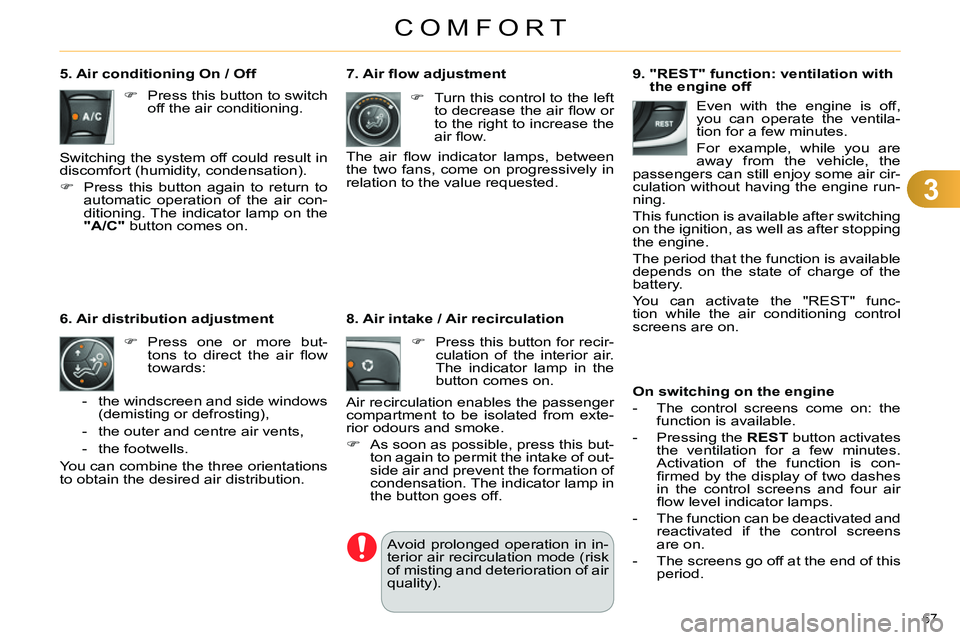
9. "REST" function: ventilation with
the engine off
On switching on the engine
- The control screens come on: the
function is available.
- Pressing the REST
button activates
the ventilation for a few minutes.
Activation of the function is con-
fi rmed by the display of two dashes
in the control screens and four air
fl ow level indicator lamps.
- The function can be deactivated and
reactivated if the control screens
are on.
- The screens go off at the end of this
period. Even with the engine is off,
you can operate the ventila-
tion for a few minutes.
For example, while you are
away from the vehicle, the
passengers can still enjoy some air cir-
culation without having the engine run-
ning.
This function is available after switching
on the ignition, as well as after stopping
the engine.
The period that the function is available
depends on the state of charge of the
battery.
You can activate the "REST" func-
tion while the air conditioning control
screens are on.
7. Air fl ow adjustment
Turn this control to the left
to decrease the air fl ow or
to the right to increase the
air fl ow.
The air fl ow indicator lamps, between
the two fans, come on progressively in
relation to the value requested.
5. Air conditioning On / Off
Press this button to switch
off the air conditioning.
Switching the system off could result in
discomfort (humidity, condensation).
Press this button again to return to
automatic operation of the air con-
ditioning. The indicator lamp on the
"A/C"
button comes on.
Press one or more but-
tons to direct the air fl ow
towards:
6. Air distribution adjustment
- the windscreen and side windows
(demisting or defrosting),
- the outer and centre air vents,
- the footwells.
You can combine the three orientations
to obtain the desired air distribution.
8. Air intake / Air recirculation
Press this button for recir-
culation of the interior air.
The indicator lamp in the
button comes on.
Air recirculation enables the passenger
compartment to be isolated from exte-
rior odours and smoke.
As soon as possible, press this but-
ton again to permit the intake of out-
side air and prevent the formation of
condensation. The indicator lamp in
the button goes off.
Avoid prolonged operation in in-
terior air recirculation mode (risk
of misting and deterioration of air
quality).
Page 70 of 340
3
COMFORT
68
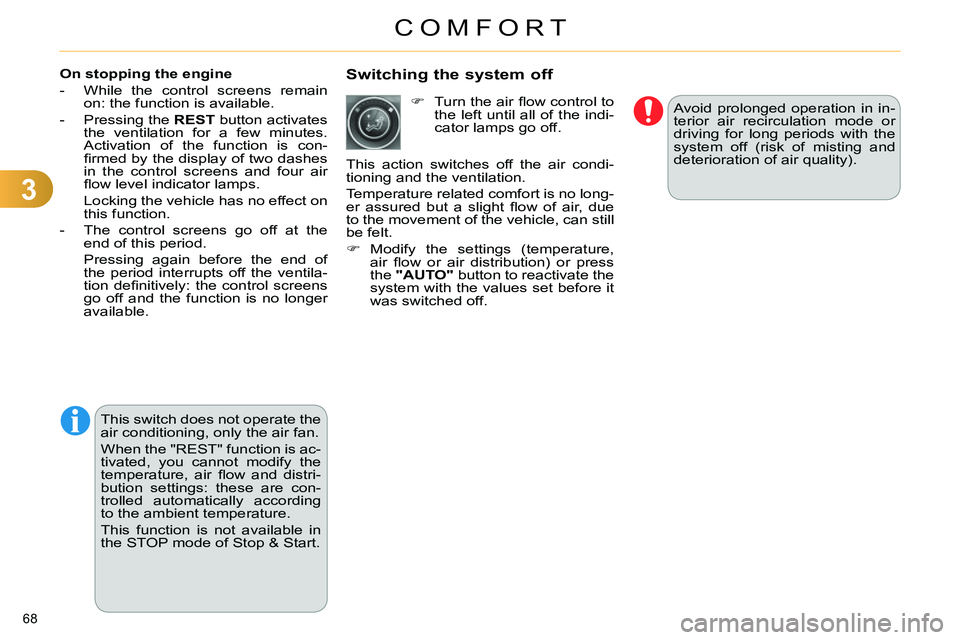
Switching the system off
Avoid prolonged operation in in-
terior air recirculation mode or
driving for long periods with the
system off (risk of misting and
deterioration of air quality).
On stopping the engine
- While the control screens remain
on: the function is available.
- Pressing the REST
button activates
the ventilation for a few minutes.
Activation of the function is con-
fi rmed by the display of two dashes
in the control screens and four air
fl ow level indicator lamps.
Locking the vehicle has no effect on
this function.
- The control screens go off at the
end of this period.
Pressing again before the end of
the period interrupts off the ventila-
tion defi nitively: the control screens
go off and the function is no longer
available.
Turn the air fl ow control to
the left until all of the indi-
cator lamps go off.
This action switches off the air condi-
tioning and the ventilation.
Temperature related comfort is no long-
er assured but a slight fl ow of air, due
to the movement of the vehicle, can still
be felt.
Modify the settings (temperature,
air fl ow or air distribution) or press
the "AUTO"
button to reactivate the
system with the values set before it
was switched off.
This switch does not operate the
air conditioning, only the air fan.
When the "REST" function is ac-
tivated, you cannot modify the
temperature, air fl ow and distri-
bution settings: these are con-
trolled automatically according
to the ambient temperature.
This function is not available in
the STOP mode of Stop & Start.
Page 71 of 340
3
COMFORT
69
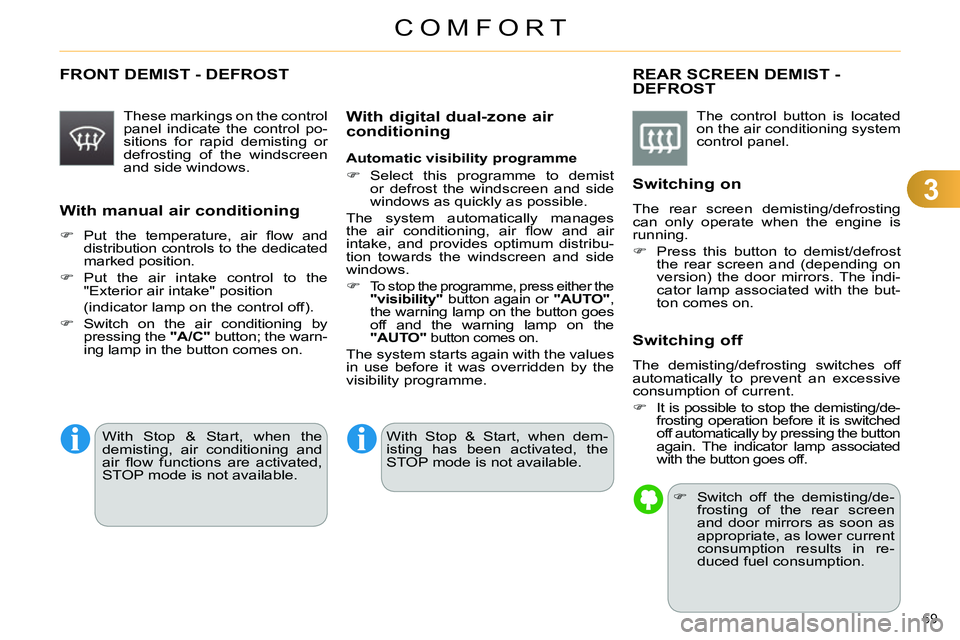
FRONT DEMIST - DEFROST
These markings on the control
panel indicate the control po-
sitions for rapid demisting or
defrosting of the windscreen
and side windows.
With manual air conditioning
Put the temperature, air fl ow and
distribution controls to the dedicated
marked position.
Put the air intake control to the
"Exterior air intake" position
(indicator lamp on the control off).
Switch on the air conditioning by
pressing the "A/C"
button; the warn-
ing lamp in the button comes on.
REAR SCREEN DEMIST -
DEFROST
The control button is located
on the air conditioning system
control panel.
Switching on
The rear screen demisting/defrosting
can only operate when the engine is
running.
Press this button to demist/defrost
the rear screen and (depending on
version) the door mirrors. The indi-
cator lamp associated with the but-
ton comes on.
Switching off
The demisting/defrosting switches off
automatically to prevent an excessive
consumption of current.
It is possible to stop the demisting/de-
frosting operation before it is switched
off automatically by pressing the button
again. The indicator lamp associated
with the button goes off.
Switch off the demisting/de-
frosting of the rear screen
and door mirrors as soon as
appropriate, as lower current
consumption results in re-
duced fuel consumption.
With digital dual-zone air
conditioning
Automatic visibility programme
Select this programme to demist
or defrost the windscreen and side
windows as quickly as possible.
The system automatically manages
the air conditioning, air fl ow and air
intake, and provides optimum distribu-
tion towards the windscreen and side
windows.
To stop the programme, press either the
"visibility"
button again or "AUTO"
,
the warning lamp on the button goes
off and the warning lamp on the
"AUTO"
button comes on.
The system starts again with the values
in use before it was overridden by the
visibility programme.
With Stop & Start, when dem-
isting has been activated, the
STOP mode is not available.
With Stop & Start, when the
demisting, air conditioning and
air fl ow functions are activated,
STOP mode is not available.
Page 101 of 340
5
VISIBILITY
99
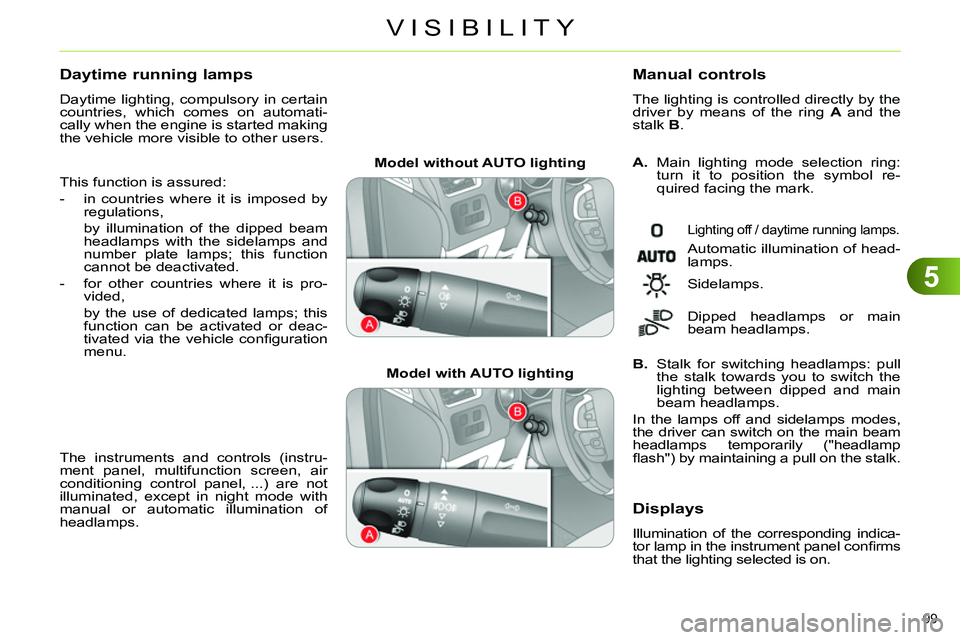
Model without AUTO lighting
Model with AUTO lighting
A.
Main lighting mode selection ring:
turn it to position the symbol re-
quired facing the mark.
Manual controls
The lighting is controlled directly by the
driver by means of the ring A
and the
stalk B
.
Lighting off / daytime running lamps.
Automatic illumination of head-
lamps.
B.
Stalk for switching headlamps: pull
the stalk towards you to switch the
lighting between dipped and main
beam headlamps.
In the lamps off and sidelamps modes,
the driver can switch on the main beam
headlamps temporarily ("headlamp
fl ash") by maintaining a pull on the stalk. Sidelamps.
Dipped headlamps or main
beam headlamps.
Displays
Illumination of the corresponding indica-
tor lamp in the instrument panel confi rms
that the lighting selected is on.
Daytime running lamps
Daytime lighting, compulsory in certain
countries, which comes on automati-
cally when the engine is started making
the vehicle more visible to other users.
This function is assured:
- in countries where it is imposed by
regulations,
by illumination of the dipped beam
headlamps with the sidelamps and
number plate lamps; this function
cannot be deactivated.
- for other countries where it is pro-
vided,
by the use of dedicated lamps; this
function can be activated or deac-
tivated via the vehicle confi guration
menu.
The instruments and controls (instru-
ment panel, multifunction screen, air
conditioning control panel, ...) are not
illuminated, except in night mode with
manual or automatic illumination of
headlamps.
Page 115 of 340
6
FITTINGS
113
Component which protects against sunlight
from the front or the side, also equipped with
an illuminated courtesy mirror.
With the ignition on, raise the con-
cealing fl ap; the mirror is lit auto-
matically.
This sun visor is also equipped with a
ticket holder.
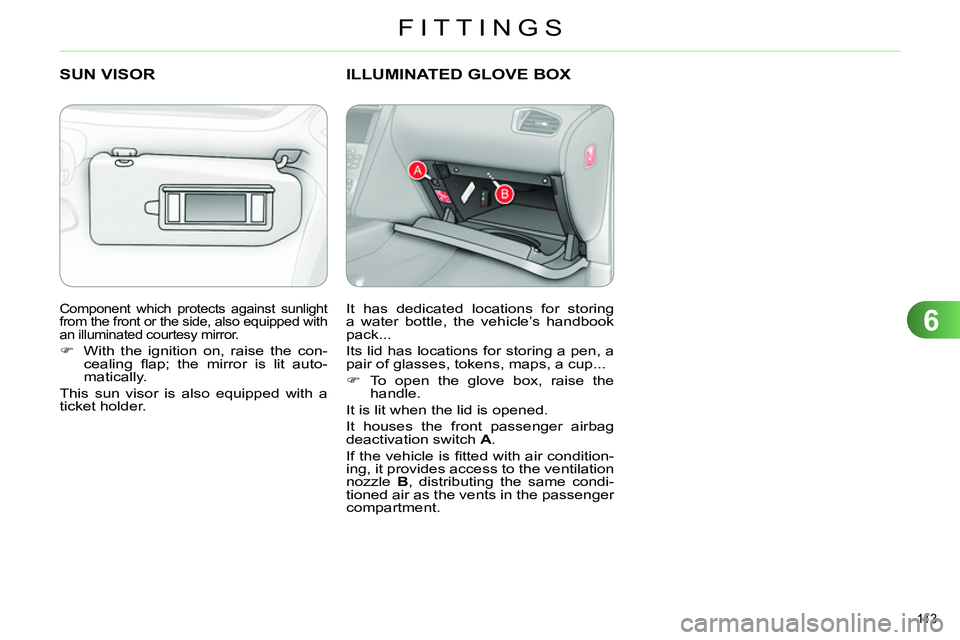
SUN VISOR
ILLUMINATED GLOVE BOX
It has dedicated locations for storing
a water bottle, the vehicle’s handbook
pack...
Its lid has locations for storing a pen, a
pair of glasses, tokens, maps, a cup...
To open the glove box, raise the
handle.
It is lit when the lid is opened.
It houses the front passenger airbag
deactivation switch A
.
If the vehicle is fi tted with air condition-
ing, it provides access to the ventilation
nozzle B
, distributing the same condi-
tioned air as the vents in the passenger
compartment.
Page 118 of 340
6
FITTINGS
116
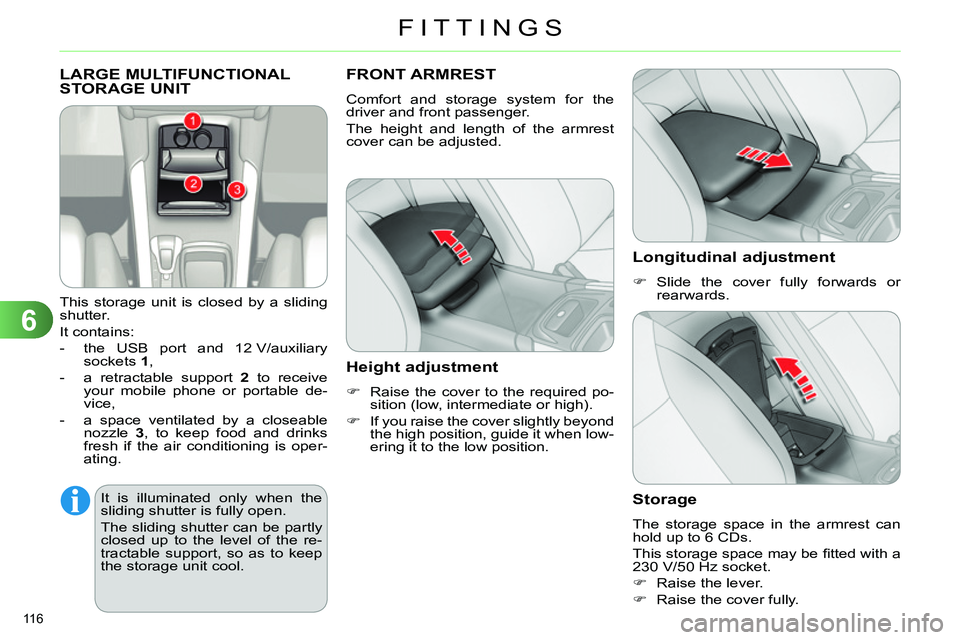
LARGE MULTIFUNCTIONAL
STORAGE UNIT
This storage unit is closed by a sliding
shutter.
It contains:
- the USB port and 12 V/auxiliary
sockets 1
,
- a retractable support 2
to receive
your mobile phone or portable de-
vice,
- a space ventilated by a closeable
nozzle 3
, to keep food and drinks
fresh if the air conditioning is oper-
ating.
FRONT ARMREST
Comfort and storage system for the
driver and front passenger.
The height and length of the armrest
cover can be adjusted.
Height adjustment
Raise the cover to the required po-
sition (low, intermediate or high).
If you raise the cover slightly beyond
the high position, guide it when low-
ering it to the low position.
Longitudinal adjustment
Slide the cover fully forwards or
rearwards.
Storage
The storage space in the armrest can
hold up to 6 CDs.
This storage space may be fi tted with a
230 V/50 Hz socket.
Raise the lever.
Raise the cover fully.
It is illuminated only when the
sliding shutter is fully open.
The sliding shutter can be partly
closed up to the level of the re-
tractable support, so as to keep
the storage unit cool.
Page 148 of 340
8
SAFETY
146
AIRBAGS
System designed to maximise the safe-
ty of the occupants (with the exception
of the rear centre passenger) in the
event of violent collisions. The airbags
supplement the action of the force-limit-
ing seat belts (with the exception of the
centre rear passenger).
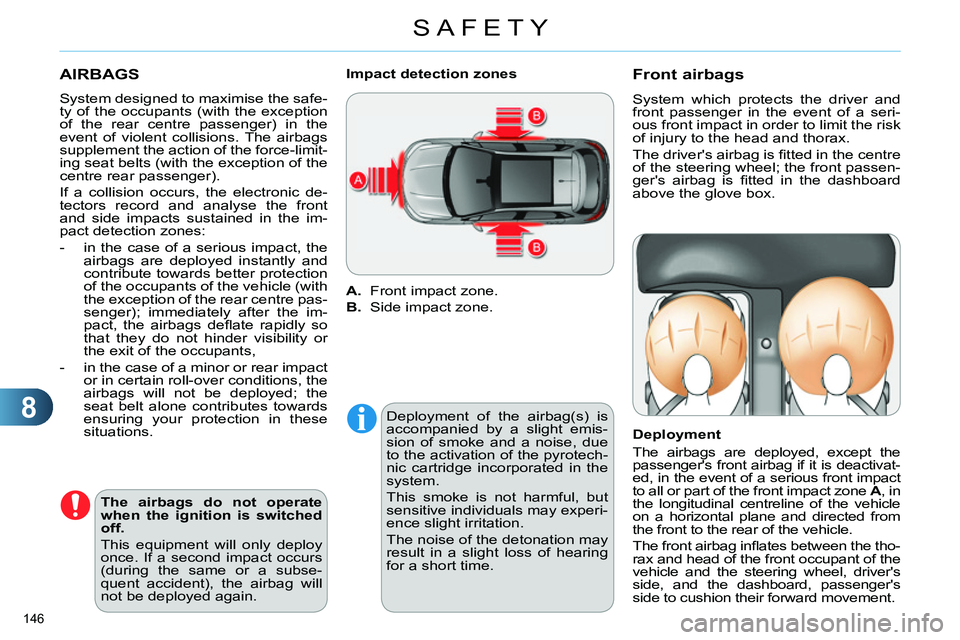
If a collision occurs, the electronic de-
tectors record and analyse the front
and side impacts sustained in the im-
pact detection zones:
- in the case of a serious impact, the
airbags are deployed instantly and
contribute towards better protection
of the occupants of the vehicle (with
the exception of the rear centre pas-
senger); immediately after the im-
pact, the airbags defl ate rapidly so
that they do not hinder visibility or
the exit of the occupants,
- in the case of a minor or rear impact
or in certain roll-over conditions, the
airbags will not be deployed; the
seat belt alone contributes towards
ensuring your protection in these
situations.
The airbags do not operate
when the ignition is switched
off.
This equipment will only deploy
once. If a second impact occurs
(during the same or a subse-
quent accident), the airbag will
not be deployed again.
A.
Front impact zone.
B.
Side impact zone.
Impact detection zones
Deployment of the airbag(s) is
accompanied by a slight emis-
sion of smoke and a noise, due
to the activation of the pyrotech-
nic cartridge incorporated in the
system.
This smoke is not harmful, but
sensitive individuals may experi-
ence slight irritation.
The noise of the detonation may
result in a slight loss of hearing
for a short time.
Front airbags
System which protects the driver and
front passenger in the event of a seri-
ous front impact in order to limit the risk
of injury to the head and thorax.
The driver's airbag is fi tted in the centre
of the steering wheel; the front passen-
ger's airbag is fi tted in the dashboard
above the glove box.
Deployment
The airbags are deployed, except the
passenger's front airbag if it is deactivat-
ed, in the event of a serious front impact
to all or part of the front impact zone A
, in
the longitudinal centreline of the vehicle
on a horizontal plane and directed from
the front to the rear of the vehicle.
The front airbag infl ates between the tho-
rax and head of the front occupant of the
vehicle and the steering wheel, driver's
side, and the dashboard, passenger's
side to cushion their forward movement.
Page 193 of 340
10
CHECKS
191
CHECKS
Particle emission filter (Diesel)
The start of saturation of the particle
emissions fi lter is indicated by:
- fi xed illumination of the par-
ticle emissions fi lter warning
lamp, accompanied by an
audible signal and a message
that there is a risk of blockage
of the particle emissions fi lter.
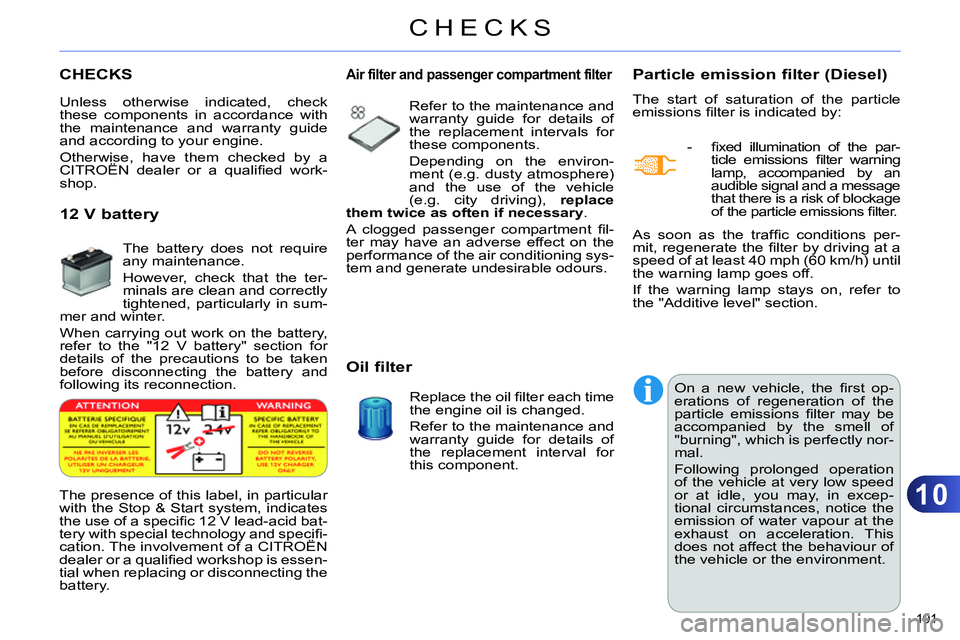
The presence of this label, in particular
with the Stop & Start system, indicates
the use of a specifi c 12 V lead-acid bat-
tery with special technology and specifi -
cation. The involvement of a CITROËN
dealer or a qualifi ed workshop is essen-
tial when replacing or disconnecting the
battery. On a new vehicle, the fi rst op-
erations of regeneration of the
particle emissions fi lter may be
accompanied by the smell of
"burning", which is perfectly nor-
mal.
Following prolonged operation
of the vehicle at very low speed
or at idle, you may, in excep-
tional circumstances, notice the
emission of water vapour at the
exhaust on acceleration. This
does not affect the behaviour of
the vehicle or the environment. As soon as the traffi c conditions per-
mit, regenerate the fi lter by driving at a
speed of at least 40 mph (60 km/h) until
the warning lamp goes off.
If the warning lamp stays on, refer to
the "Additive level" section.
Unless otherwise indicated, check
these components in accordance with
the maintenance and warranty guide
and according to your engine.
Otherwise, have them checked by a
CITROËN dealer or a qualifi ed work-
shop.
Air filter and passenger compartment filter
Refer to the maintenance and
warranty guide for details of
the replacement intervals for
these components.
Depending on the environ-
ment (e.g. dusty atmosphere)
and the use of the vehicle
(e.g. city driving), replace
them twice as often if necessary
.
A clogged passenger compartment fi l-
ter may have an adverse effect on the
performance of the air conditioning sys-
tem and generate undesirable odours.
Oil filter
Replace the oil fi lter each time
the engine oil is changed.
Refer to the maintenance and
warranty guide for details of
the replacement interval for
this component.
12 V battery
The battery does not require
any maintenance.
However, check that the ter-
minals are clean and correctly
tightened, particularly in sum-
mer and winter.
When carrying out work on the battery,
refer to the "12 V battery" section for
details of the precautions to be taken
before disconnecting the battery and
following its reconnection.
Page 211 of 340
11
PRACTICAL INFORMATION
209
CHANGING A FUSE
Access to the tools
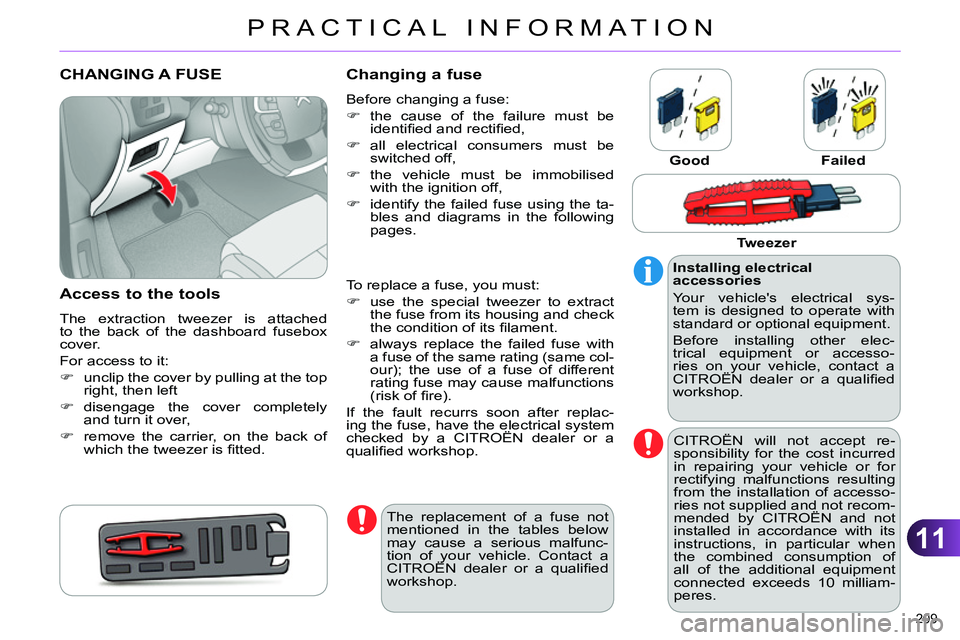
The extraction tweezer is attached
to the back of the dashboard fusebox
cover.
For access to it:
unclip the cover by pulling at the top
right, then left
disengage the cover completely
and turn it over,
remove the carrier, on the back of
which the tweezer is fi tted.
Changing a fuse
Before changing a fuse:
the cause of the failure must be
identifi ed and rectifi ed,
all electrical consumers must be
switched off,
the vehicle must be immobilised
with the ignition off,
identify the failed fuse using the ta-
bles and diagrams in the following
pages.
Good
Failed
To replace a fuse, you must:
use the special tweezer to extract
the fuse from its housing and check
the condition of its fi lament.
always replace the failed fuse with
a fuse of the same rating (same col-
our); the use of a fuse of different
rating fuse may cause malfunctions
(risk of fi re).
If the fault recurrs soon after replac-
ing the fuse, have the electrical system
checked by a CITROËN dealer or a
qualifi ed workshop.
Installing electrical
accessories
Your vehicle's electrical sys-
tem is designed to operate with
standard or optional equipment.
Before installing other elec-
trical equipment or accesso-
ries on your vehicle, contact a
CITROËN dealer or a qualifi ed
workshop.
CITROËN will not accept re-
sponsibility for the cost incurred
in repairing your vehicle or for
rectifying malfunctions resulting
from the installation of accesso-
ries not supplied and not recom-
mended by CITROËN and not
installed in accordance with its
instructions, in particular when
the combined consumption of
all of the additional equipment
connected exceeds 10 milliam-
peres.
The replacement of a fuse not
mentioned in the tables below
may cause a serious malfunc-
tion of your vehicle. Contact a
CITROËN dealer or a qualifi ed
workshop.
Tweezer