phone CITROEN C4 DAG 2013 Owner's Guide
[x] Cancel search | Manufacturer: CITROEN, Model Year: 2013, Model line: C4 DAG, Model: CITROEN C4 DAG 2013Pages: 340, PDF Size: 28.95 MB
Page 291 of 340
289
The system is coded in such a way that it will only
operate in your vehicle.
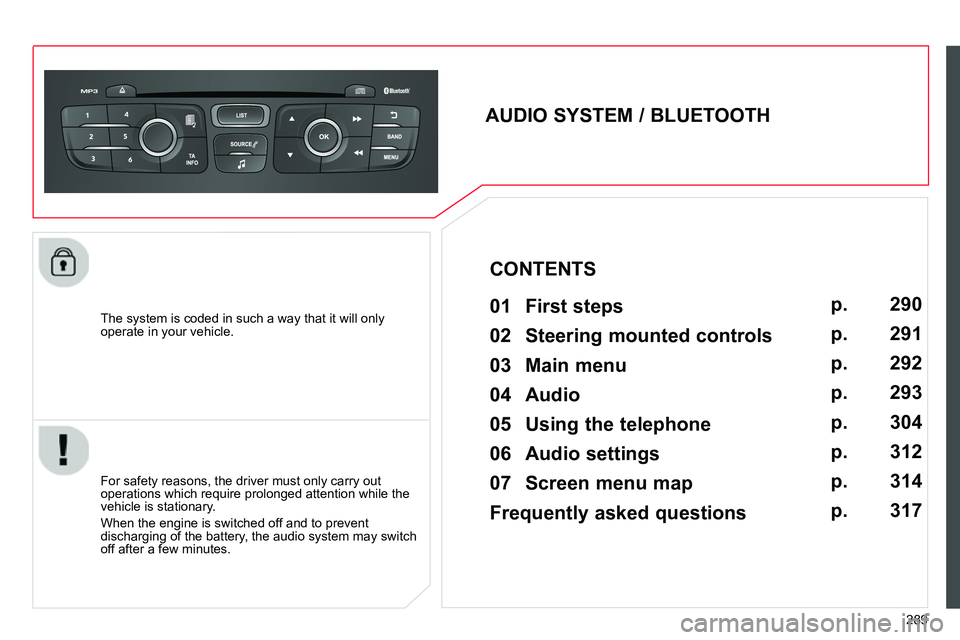
AUDIO SYSTEM / BLUETOOTH
01 First steps
For safety reasons, the driver must only carry out
operations which require prolonged attention while the
vehicle is stationary.
When the engine is switched off and to prevent
discharging of the battery, the audio system may switch
off after a few minutes.
CONTENTS
02 Steering mounted controls
03 Main menu
04 Audio
05 Using the telephone
06 Audio settings
07 Screen menu map
Frequently asked questions p.
p.
p.
p.
p.
p.
p.
p.
290
291
292
293
304
312
314
317
Page 292 of 340
01
290
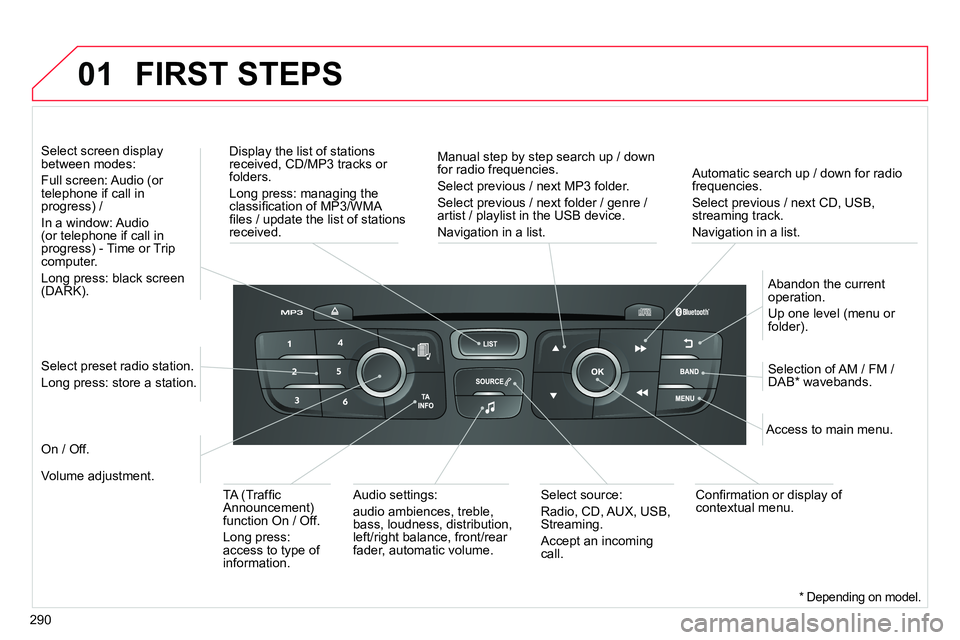
Automatic search up / down for radio
frequencies.
Select previous / next CD, USB,
streaming track.
Navigation in a list.
Display the list of stations
received, CD/MP3 tracks or
folders.
Long press: managing the
classifi cation of MP3/WMA
fi les / update the list of stations
received.
Abandon the current
operation.
Up one level (menu or
folder).
On / Off.
Selection of AM / FM /
DAB * wavebands.
Select preset radio station.
Long press: store a station.
Select screen display
between modes:
Full screen: Audio (or
telephone if call in
progress) /
In a window: Audio
(or telephone if call in
progress) - Time or Trip
computer.
Long press: black screen
(DARK).
Audio settings:
audio ambiences, treble,
bass, loudness, distribution,
left/right balance, front/rear
fader, automatic volume.
Access to main menu.
TA (Traffi c
Announcement)
function On / Off.
Long press:
access to type of
information.
Select source:
Radio, CD, AUX, USB,
Streaming.
Accept an incoming
call.
Confi rmation or display of
contextual menu.
Manual step by step search up / down
for radio frequencies.
Select previous / next MP3 folder.
Select previous / next folder / genre /
artist / playlist in the USB device.
Navigation in a list.
Volume adjustment.
FIRST STEPS
* Depending on model.
Page 293 of 340
02
291
STEERING MOUNTED CONTROLS
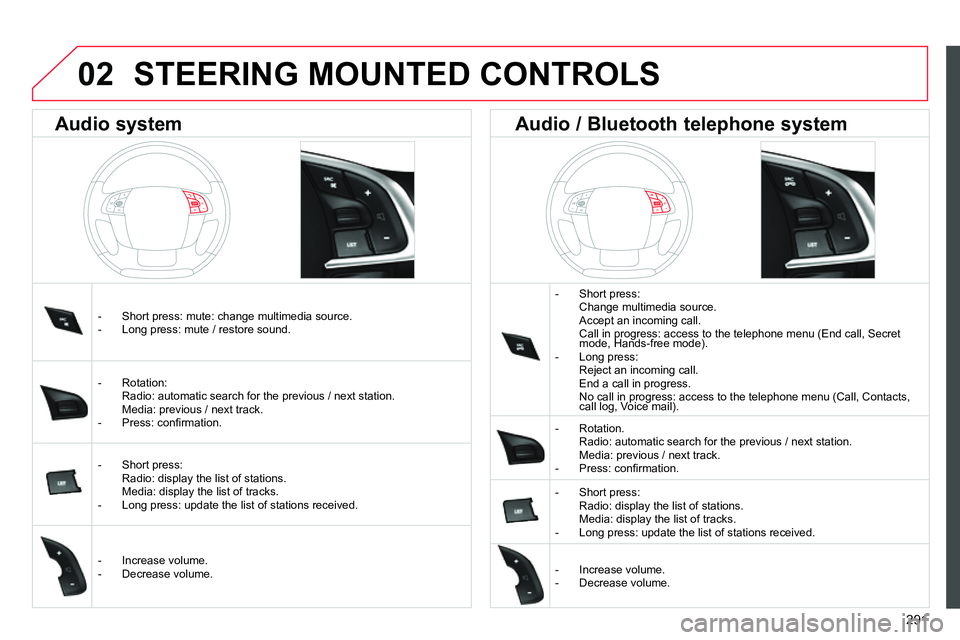
- Short press:
Change multimedia source.
Accept an incoming call.
Call in progress: access to the telephone menu (End call, Secret
mode, Hands-free mode).
- Long press:
Reject an incoming call.
End a call in progress.
No call in progress: access to the telephone menu (Call, Contacts,
call log, Voice mail).
- Rotation.
Radio: automatic search for the previous / next station.
Media: previous / next track.
- Press: confi rmation.
- Short press:
Radio: display the list of stations.
Media: display the list of tracks.
- Long press: update the list of stations received.
- Increase volume.
- Decrease volume.
- Short press: mute: change multimedia source.
- Long press: mute / restore sound.
- Rotation:
Radio: automatic search for the previous / next station.
Media: previous / next track.
- Press: confi rmation.
- Short press:
Radio: display the list of stations.
Media: display the list of tracks.
- Long press: update the list of stations received.
- Increase volume.
- Decrease volume.
Audio system
Audio / Bluetooth telephone system
Page 294 of 340
03
292
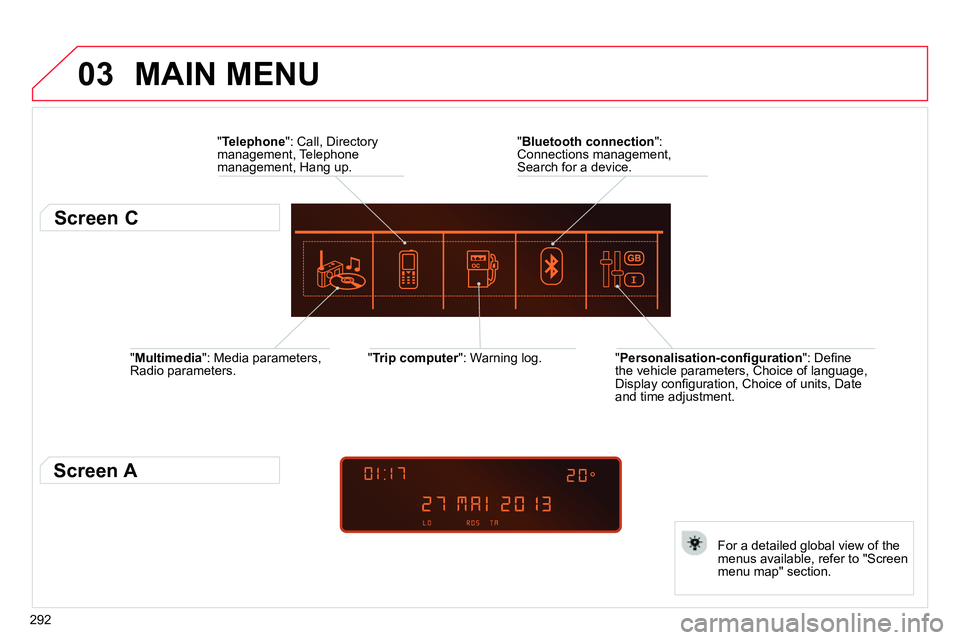
" Multimedia
": Media parameters,
Radio parameters.
" Trip computer
": Warning log.
For a detailed global view of the
menus available, refer to "Screen
menu map" section.
" Bluetooth connection
":
Connections management,
Search for a device.
" Telephone
": Call, Directory
management, Telephone
management, Hang up.
MAIN MENU
" Personalisation-confi guration
": Defi ne
the vehicle parameters, Choice of language,
Display confi guration, Choice of units, Date
and time adjustment.
Screen C
Screen A
Page 305 of 340
04
303
AUDIO
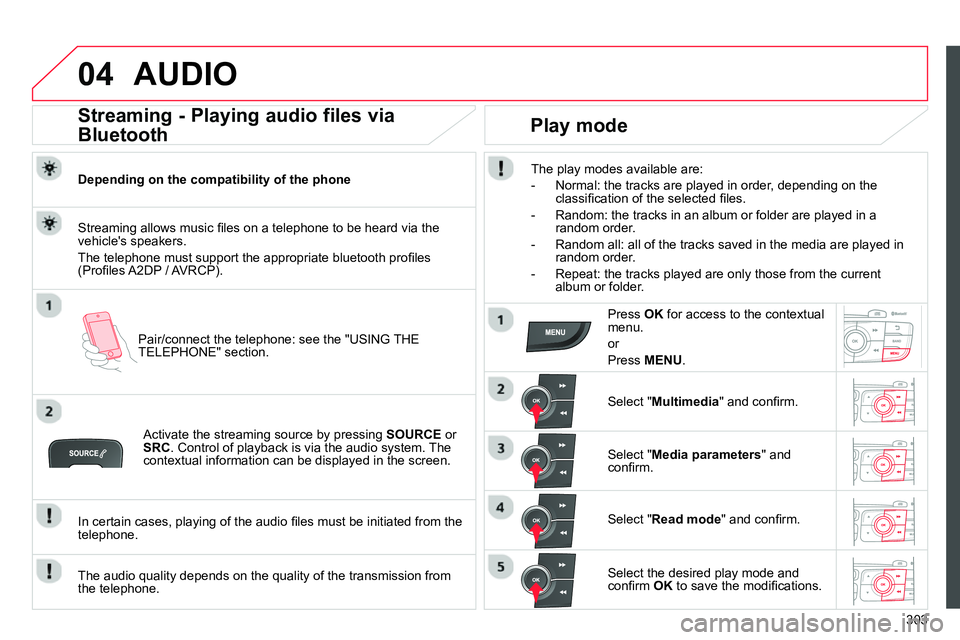
Streaming - Playing audio files via
Bluetooth
Depending on the compatibility of the phone
Pair/connect the telephone: see the "USING THE
TELEPHONE" section.
Streaming allows music fi les on a telephone to be heard via the
vehicle's speakers.
The telephone must support the appropriate bluetooth profi les
(Profi les A2DP / AVRCP).
Activate the streaming source by pressing SOURCE
or
SRC
. Control of playback is via the audio system. The
contextual information can be displayed in the screen.
In certain cases, playing of the audio fi les must be initiated from the
telephone.
The audio quality depends on the quality of the transmission from
the telephone.
Play mode
The play modes available are:
- Normal: the tracks are played in order, depending on the
classifi cation of the selected fi les.
- Random: the tracks in an album or folder are played in a
random order.
- Random all: all of the tracks saved in the media are played in
random order.
- Repeat: the tracks played are only those from the current
album or folder.
Press OK
for access to the contextual
menu.
or
Press MENU
.
Select " Multimedia
" and confi rm.
Select " Media parameters
" and
confi rm.
Select " Read mode
" and confi rm.
Select the desired play mode and
confi rm OK
to save the modifi cations.
Page 306 of 340
05
304
USING THE TELEPHONE
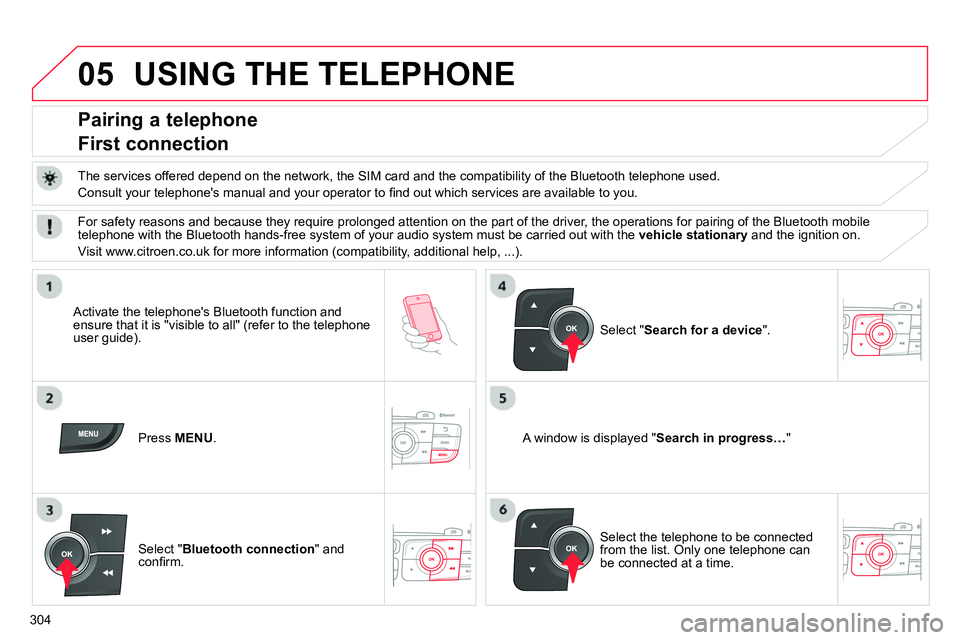
Pairing a telephone
First connection
The services offered depend on the network, the SIM card and the compatibility of the Bluetooth telephone used.
Consult your telephone's manual and your operator to fi nd out which services are available to you.
Activate the telephone's Bluetooth function and
ensure that it is "visible to all" (refer to the telephone
user guide).
Press MENU
.
A window is displayed " Search in progress…
"
Select the telephone to be connected
from the list. Only one telephone can
be connected at a time.
Select " Search for a device
".
For safety reasons and because they require prolonged attention on the part of the driver, the operations for pairing of the Bluetooth mobile
telephone with the Bluetooth hands-free system of your audio system must be carried out with the vehicle stationary
and the ignition on.
Visit www.citroen.co.uk for more information (compatibility, additional help, ...).
Select " Bluetooth connection
" and
confi rm.
Page 307 of 340
05
Saisir code authentification
01
OK Del23456789 _
305
USING THE TELEPHONE
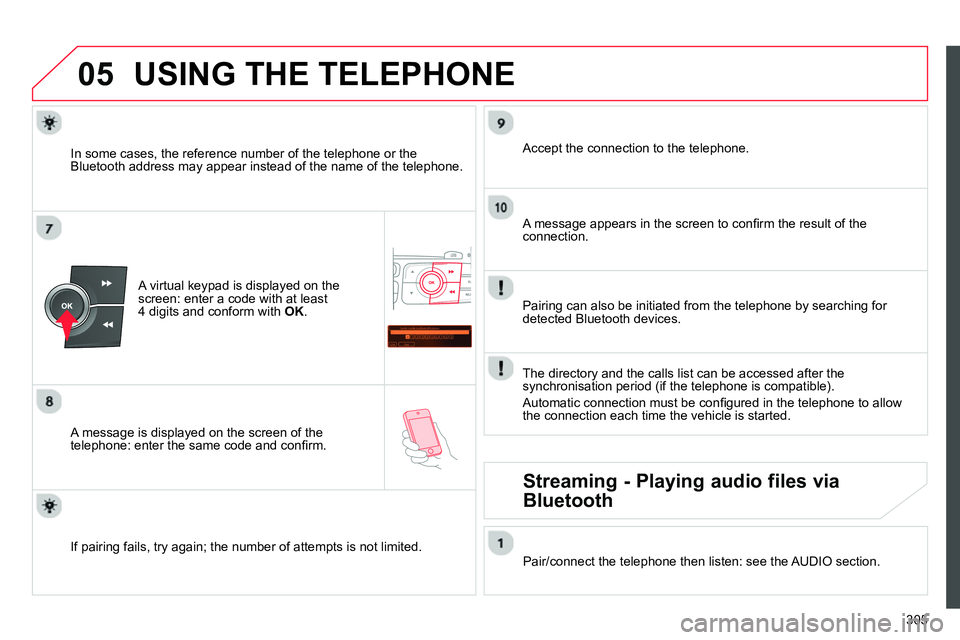
A virtual keypad is displayed on the
screen: enter a code with at least
4 digits and conform with OK
.
A message is displayed on the screen of the
telephone: enter the same code and confi rm.
A message appears in the screen to confi rm the result of the
connection.
Pairing can also be initiated from the telephone by searching for
detected Bluetooth devices.
Accept the connection to the telephone.
If pairing fails, try again; the number of attempts is not limited.
The directory and the calls list can be accessed after the
synchronisation period (if the telephone is compatible).
Automatic connection must be confi gured in the telephone to allow
the connection each time the vehicle is started.
In some cases, the reference number of the telephone or the
Bluetooth address may appear instead of the name of the telephone.
Pair/connect the telephone then listen: see the AUDIO section.
Streaming - Playing audio files via
Bluetooth
Page 308 of 340
05
306
USING THE TELEPHONE
The telephone connection automatically includes hands free operation
and audio streaming.
The ability of the system to connect to just one profi le depends on the
telephone. Both profi les may connect by default.
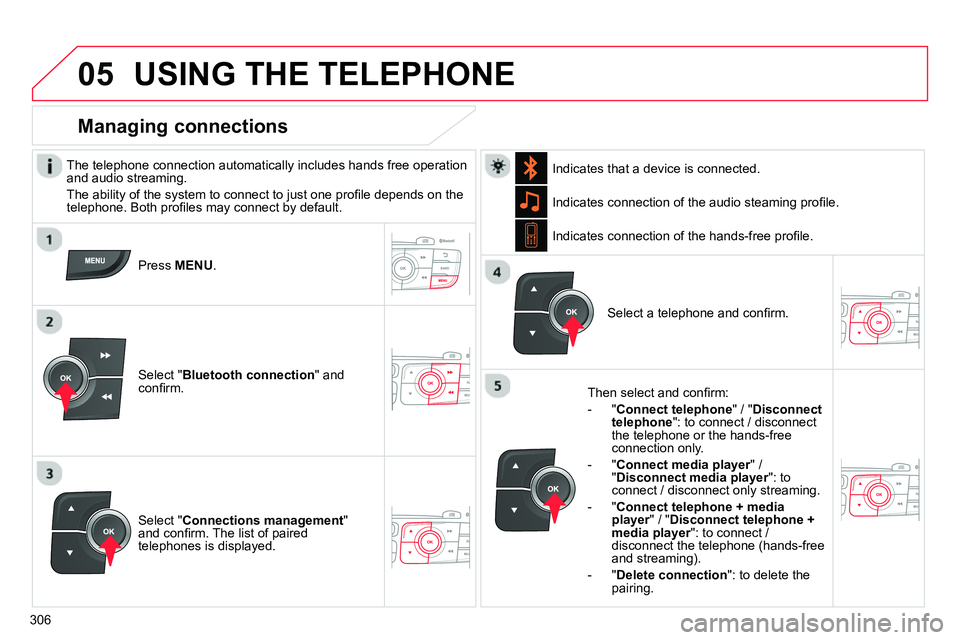
Press MENU
.
Select " Bluetooth connection
" and
confi rm. Indicates connection of the audio steaming profi le.
Managing connections
Select " Connections management
"
and confi rm. The list of paired
telephones is displayed.
Select a telephone and confi rm. Indicates connection of the hands-free profi le.
Then select and confi rm:
- " Connect telephone
" / " Disconnect
telephone
": to connect / disconnect
the telephone or the hands-free
connection only.
- " Connect media player
" /
" Disconnect media player
": to
connect / disconnect only streaming.
- " Connect telephone + media
player
" / " Disconnect telephone +
media player
": to connect /
disconnect the telephone (hands-free
and streaming).
- " Delete connection
": to delete the
pairing.
Indicates that a device is connected.
Page 309 of 340
05
307
USING THE TELEPHONE
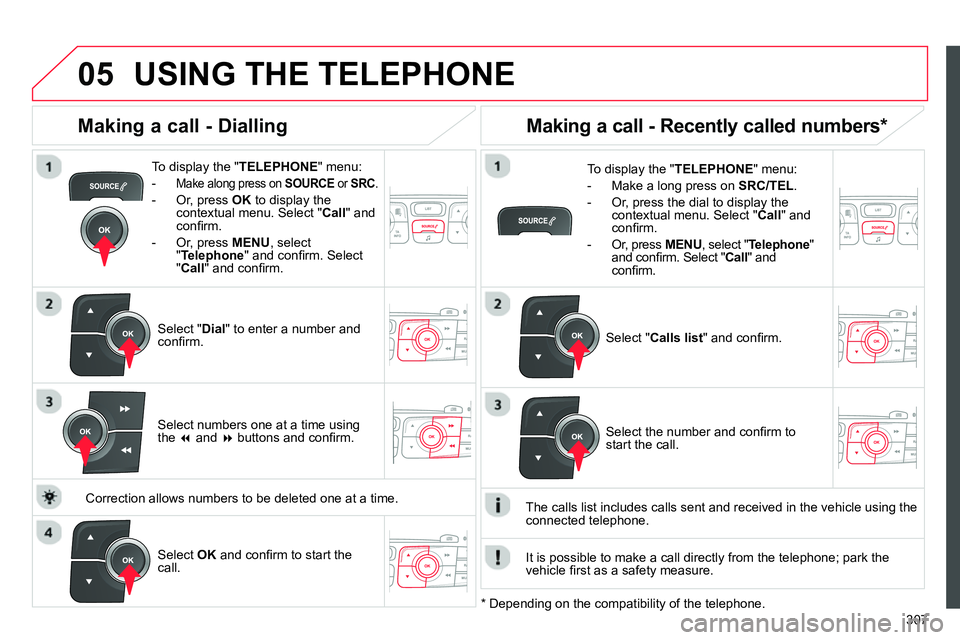
To display the " TELEPHONE
" menu:
-
Make along press on SOURCE
or SRC
.
- Or, press OK
to display the
contextual menu. Select " Call
" and
confi rm.
- Or, press MENU
, select
" Telephone
" and confi rm. Select
" Call
" and confi rm.
Select " Dial
" to enter a number and
confi rm.
To display the " TELEPHONE
" menu:
- Make a long press on SRC/TEL
.
- Or, press the dial to display the
contextual menu. Select " Call
" and
confi rm.
- Or, press MENU
, select " Telephone
"
and confi rm. Select " Call
" and
confi rm.
Select OK
and confi rm to start the
call.
Select " Calls list
" and confi rm.
Making a call - Dialling
Select numbers one at a time using
the
and
buttons and confi rm.
Making a call - Recently called numbers *
Select the number and confi rm to
start the call.
The calls list includes calls sent and received in the vehicle using the
connected telephone.
* Depending on the compatibility of the telephone.
Correction allows numbers to be deleted one at a time.
It is possible to make a call directly from the telephone; park the
vehicle fi rst as a safety measure.
Page 310 of 340
05
308
USING THE TELEPHONE
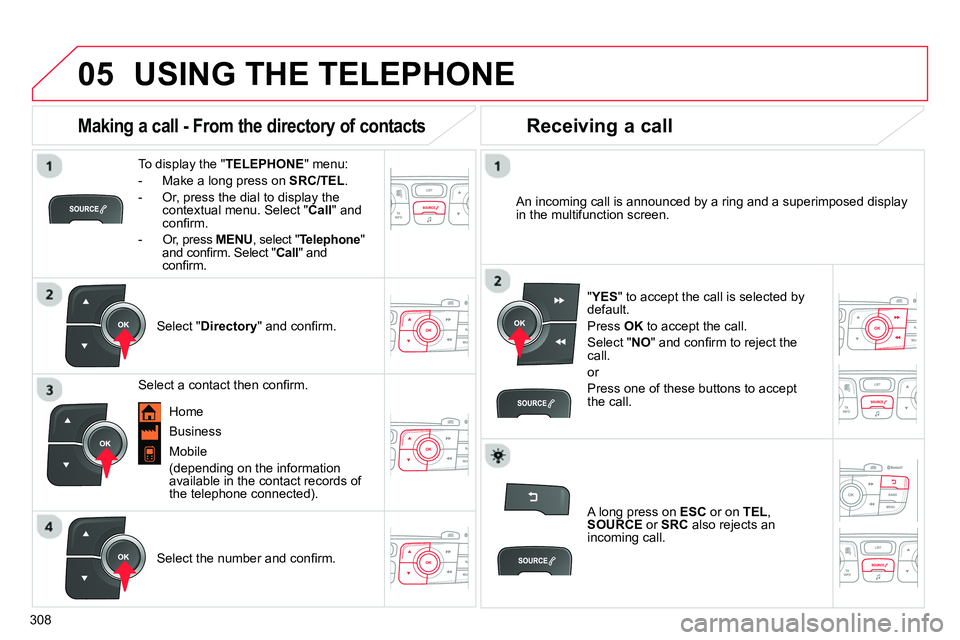
To display the " TELEPHONE
" menu:
- Make a long press on SRC/TEL
.
- Or, press the dial to display the
contextual menu. Select " Call
" and
confi rm.
- Or, press MENU
, select " Telephone
"
and confi rm. Select " Call
" and
confi rm.
Select " Directory
" and confi rm.
An incoming call is announced by a ring and a superimposed display
in the multifunction screen.
Mobile
(depending on the information
available in the contact records of
the telephone connected).
" YES
" to accept the call is selected by
default.
Press OK
to accept the call.
Select " NO
" and confi rm to reject the
call.
or
Press one of these buttons to accept
the call.
Making a call - From the directory of contacts
Select a contact then confi rm.
Receiving a call
Select the number and confi rm.
A long press on ESC
or on TEL
,
SOURCE
or SRC
also rejects an
incoming call.
Business
Home