radio CITROEN C4 DAG 2013 Owner's Guide
[x] Cancel search | Manufacturer: CITROEN, Model Year: 2013, Model line: C4 DAG, Model: CITROEN C4 DAG 2013Pages: 340, PDF Size: 28.95 MB
Page 298 of 340
04
296
AUDIO
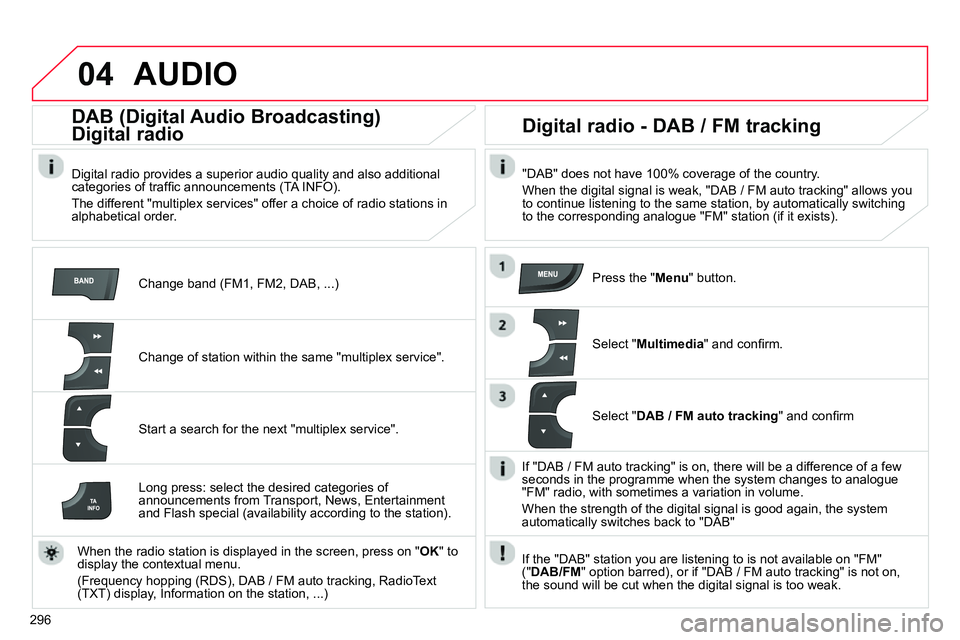
Change band (FM1, FM2, DAB, ...)
DAB (Digital Audio Broadcasting)
Digital radio
Digital radio provides a superior audio quality and also additional
categories of traffi c announcements (TA INFO).
The different "multiplex services" offer a choice of radio stations in
alphabetical order.
Change of station within the same "multiplex service".
Start a search for the next "multiplex service".
Digital radio - DAB / FM tracking
"DAB" does not have 100% coverage of the country.
When the digital signal is weak, "DAB / FM auto tracking" allows you
to continue listening to the same station, by automatically switching
to the corresponding analogue "FM" station (if it exists).
Long press: select the desired categories of
announcements from Transport, News, Entertainment
and Flash special (availability according to the station).
When the radio station is displayed in the screen, press on " OK
" to
display the contextual menu.
(Frequency hopping (RDS), DAB / FM auto tracking, RadioText
(TXT) display, Information on the station, ...)
Press the " Menu
" button.
Select " Multimedia
" and confi rm.
Select " DAB / FM auto tracking
" and confi rm
If "DAB / FM auto tracking" is on, there will be a difference of a few
seconds in the programme when the system changes to analogue
"FM" radio, with sometimes a variation in volume.
When the strength of the digital signal is good again, the system
automatically switches back to "DAB"
If the "DAB" station you are listening to is not available on "FM"
(" DAB/FM
" option barred), or if "DAB / FM auto tracking" is not on,
the sound will be cut when the digital signal is too weak.
Page 315 of 340
06
313
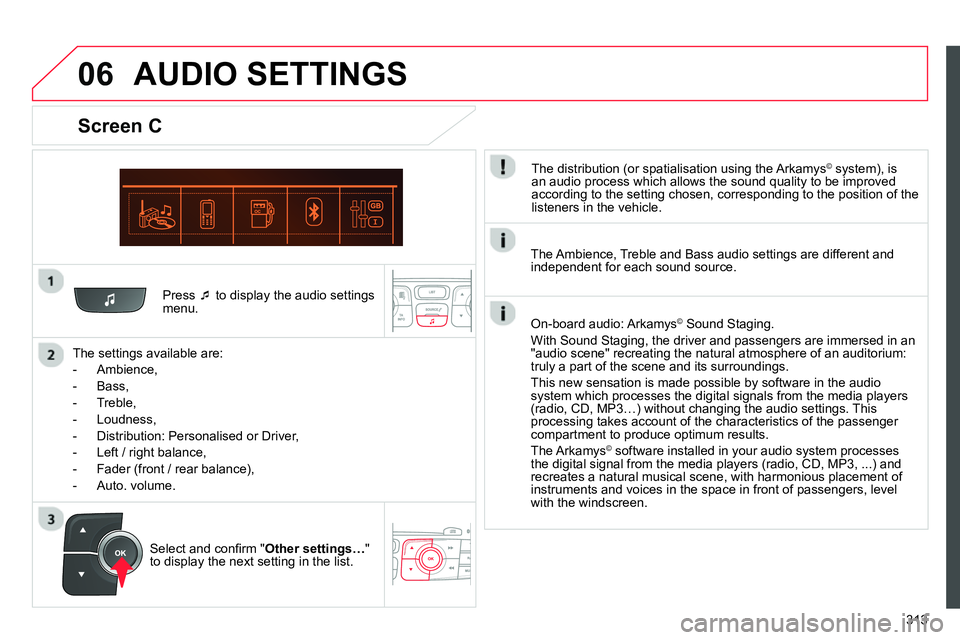
Press
to display the audio settings
menu.
The settings available are:
- Ambience,
- Bass,
- Treble,
- Loudness,
- Distribution: Personalised or Driver,
- Left / right balance,
- Fader (front / rear balance),
- Auto. volume.
Screen C
The distribution (or spatialisation using the Arkamys© system), is
an audio process which allows the sound quality to be improved
according to the setting chosen, corresponding to the position of the
listeners in the vehicle.
AUDIO SETTINGS
Select and confi rm " Other settings…
"
to display the next setting in the list.
The Ambience, Treble and Bass audio settings are different and
independent for each sound source.
On-board audio: Arkamys
©
Sound Staging.
With Sound Staging, the driver and passengers are immersed in an
"audio scene" recreating the natural atmosphere of an auditorium:
truly a part of the scene and its surroundings.
This new sensation is made possible by software in the audio
system which processes the digital signals from the media players
(radio, CD, MP3…) without changing the audio settings. This
processing takes account of the characteristics of the passenger
compartment to produce optimum results.
The Arkamys
© software installed in your audio system processes
the digital signal from the media players (radio, CD, MP3, ...) and
recreates a natural musical scene, with harmonious placement of
instruments and voices in the space in front of passengers, level
with the windscreen.
Page 316 of 340
07
314
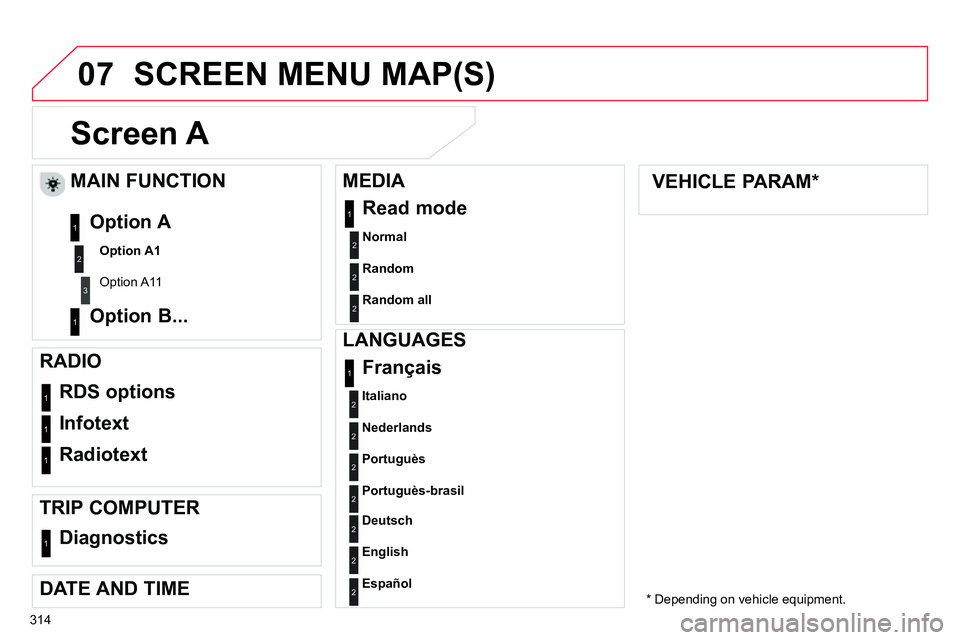
Screen A
Normal
2
RDS options 1
Infotext 1
Radiotext 1
Français 1
MAIN FUNCTION
Option A1
Option A11
Option A
Option B... 1
2
3
1
RADIO
TRIP COMPUTER
Diagnostics
1
DATE AND TIME
MEDIA
Read mode
1
Random 2
Random all
2
VEHICLE PARAM *
SCREEN MENU MAP(S)
LANGUAGES
Italiano
2
Nederlands
2
Portuguès
2
Portuguès-brasil
2
Deutsch
2
English
2
Español
2
* Depending on vehicle equipment.
Page 317 of 340
07
315
SCREEN MENU MAP(S)
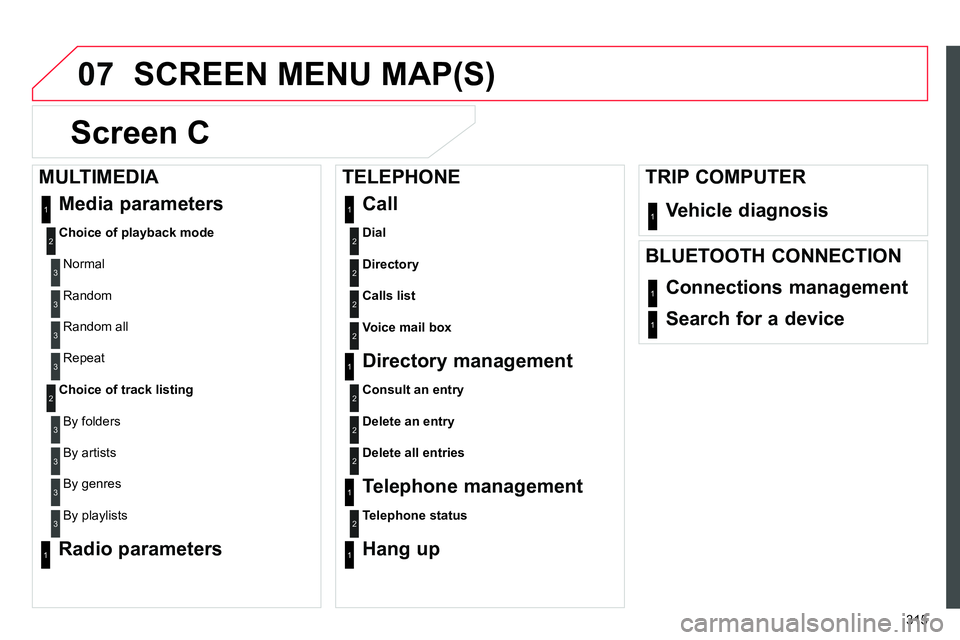
Screen C
Dial
Vehicle diagnosis
2
1
Media parameters
Choice of playback mode
Normal
1
2
3
Random 3
Random all 3
Repeat 3
Choice of track listing
By folders 2
3
By artists 3
By genres 3
By playlists
3
Call 1
Directory
2
Calls list
2
Voice mail box
2
Directory management
Consult an entry
1
2
Delete an entry
2
Delete all entries
2
Telephone management
Telephone status
1
2
Hang up 1
Connections management 1
Search for a device 1
MULTIMEDIA
TRIP COMPUTER
TELEPHONE
BLUETOOTH CONNECTION
Radio parameters
1
Page 319 of 340
317
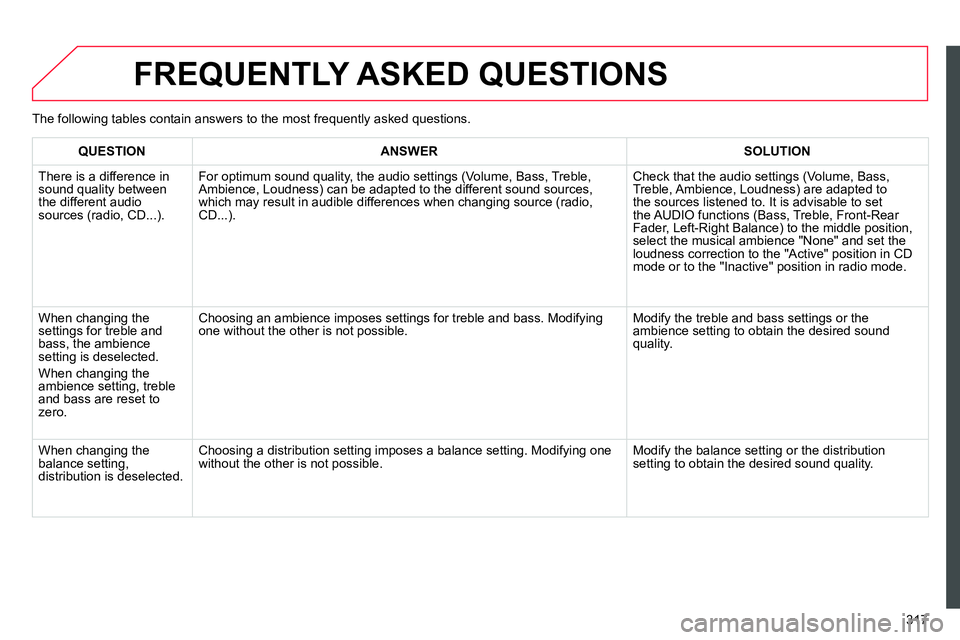
FREQUENTLY ASKED QUESTIONS
QUESTION
ANSWER
SOLUTION
There is a difference in
sound quality between
the different audio
sources (radio, CD...).
For optimum sound quality, the audio settings (Volume, Bass, Treble,
Ambience, Loudness) can be adapted to the different sound sources,
which may result in audible differences when changing source (radio,
CD...). Check that the audio settings (Volume, Bass,
Treble, Ambience, Loudness) are adapted to
the sources listened to. It is advisable to set
the AUDIO functions (Bass, Treble, Front-Rear
Fader, Left-Right Balance) to the middle position,
select the musical ambience "None" and set the
loudness correction to the "Active" position in CD
mode or to the "Inactive" position in radio mode.
When changing the
settings for treble and
bass, the ambience
setting is deselected.
When changing the
ambience setting, treble
and bass are reset to
zero. Choosing an ambience imposes settings for treble and bass. Modifying
one without the other is not possible. Modify the treble and bass settings or the
ambience setting to obtain the desired sound
quality.
When changing the
balance setting,
distribution is deselected. Choosing a distribution setting imposes a balance setting. Modifying one
without the other is not possible. Modify the balance setting or the distribution
setting to obtain the desired sound quality. The following tables contain answers to the most frequently asked questions.
Page 320 of 340
318
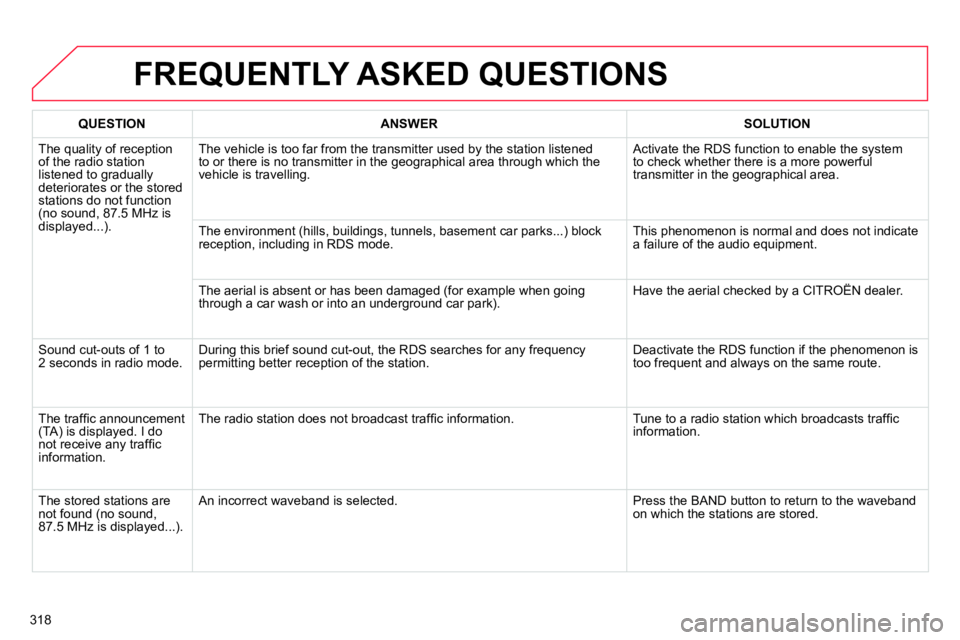
FREQUENTLY ASKED QUESTIONS
QUESTION
ANSWER
SOLUTION
The quality of reception
of the radio station
listened to gradually
deteriorates or the stored
stations do not function
(no sound, 87.5 MHz is
displayed...). The vehicle is too far from the transmitter used by the station listened
to or there is no transmitter in the geographical area through which the
vehicle is travelling. Activate the RDS function to enable the system
to check whether there is a more powerful
transmitter in the geographical area.
The environment (hills, buildings, tunnels, basement car parks...) block
reception, including in RDS mode. This phenomenon is normal and does not indicate
a failure of the audio equipment.
The aerial is absent or has been damaged (for example when going
through a car wash or into an underground car park). Have the aerial checked by a CITROËN dealer.
Sound cut-outs of 1 to
2 seconds in radio mode. During this brief sound cut-out, the RDS searches for any frequency
permitting better reception of the station. Deactivate the RDS function if the phenomenon is
too frequent and always on the same route.
The traffi c announcement
(TA) is displayed. I do
not receive any traffi c
information. The radio station does not broadcast traffi c information. Tune to a radio station which broadcasts traffi c
information.
The stored stations are
not found (no sound,
87.5 MHz is displayed...). An incorrect waveband is selected. Press the BAND button to return to the waveband
on which the stations are stored.
Page 331 of 340
329
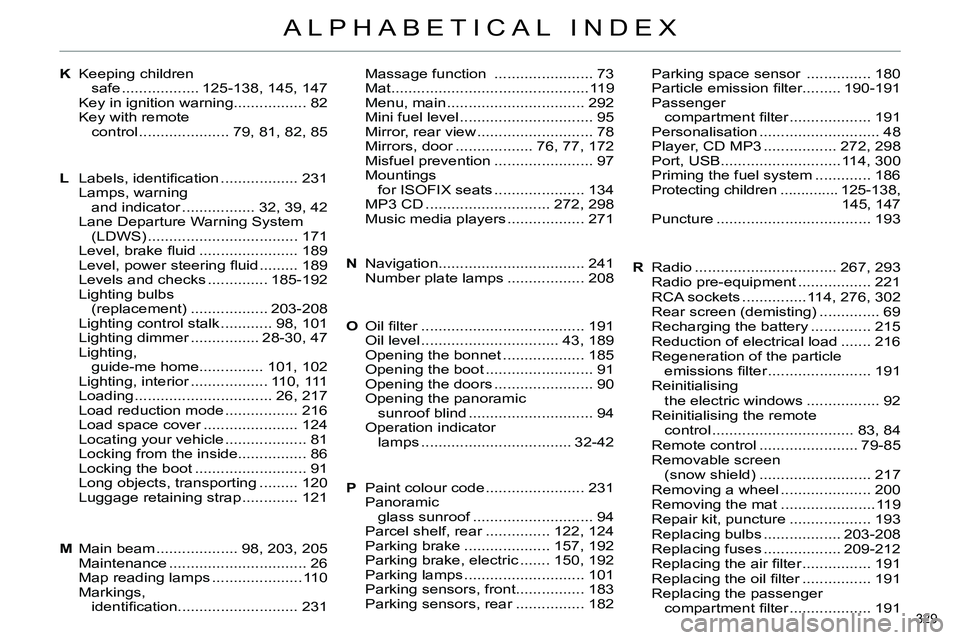
ALPHABETICAL INDEX
KMassage function ....................... 73
Mat.............................................. 119
Menu, main ................................ 292
Mini fuel level ............................... 95
Mirror, rear view ........................... 78
Mirrors, door .................. 76, 77, 172
Misfuel prevention ....................... 97
Mountings
for ISOFIX seats ..................... 134
MP3 CD ............................. 272, 298
Music media players .................. 271Parking space sensor ............... 180
Particle emission fi lter......... 190-191
Passenger
compartment fi lter ................... 191
Personalisation ............................ 48
Player, CD MP3 ................. 272, 298
Port, USB............................114, 300
Priming the fuel system ............. 186
Protecting children .............. 125-138,
145, 147
Puncture .................................... 193 Keeping children
safe .................. 125-138, 145, 147
Key in ignition warning................. 82
Key with remote
control ..................... 79, 81, 82, 85
LLabels, identifi cation .................. 231
Lamps, warning
and indicator ................. 32, 39, 42
Lane Departure Warning System
(LDWS) ................................... 171
Level, brake fl uid ....................... 189
Level, power steering fl uid ......... 189
Levels and checks .............. 185-192
Lighting bulbs
(replacement) .................. 203-208
Lighting control stalk ............ 98, 101
Lighting dimmer ................ 28-30, 47
Lighting,
guide-me home............... 101, 102
Lighting, interior .................. 110, 111
Loading ................................ 26, 217
Load reduction mode ................. 216
Load space cover ...................... 124
Locating your vehicle ................... 81
Locking from the inside................ 86
Locking the boot .......................... 91
Long objects, transporting ......... 120
Luggage retaining strap ............. 121
MMain beam ................... 98, 203, 205
Maintenance ................................ 26
Map reading lamps ..................... 110
Markings,
identifi cation............................ 231Navigation.................................. 241
Number plate lamps .................. 208
Oil fi lter ...................................... 191
Oil level ................................ 43, 189
Opening the bonnet ................... 185
Opening the boot ......................... 91
Opening the doors ....................... 90
Opening the panoramic
sunroof blind ............................. 94
Operation indicator
lamps ................................... 32-42
Paint colour code ....................... 231
Panoramic
glass sunroof ............................ 94
Parcel shelf, rear ............... 122, 124
Parking brake .................... 157, 192
Parking brake, electric ....... 150, 192
Parking lamps ............................ 101
Parking sensors, front................ 183
Parking sensors, rear ................ 182 N
O
PRRadio ................................. 267, 293
Radio pre-equipment ................. 221
RCA sockets ...............114, 276, 302
Rear screen (demisting) .............. 69
Recharging the battery .............. 215
Reduction of electrical load ....... 216
Regeneration of the particle
emissions fi lter ........................ 191
Reinitialising
the electric windows ................. 92
Reinitialising the remote
control ................................. 83, 84
Remote control ....................... 79-85
Removable screen
(snow shield) .......................... 217
Removing a wheel ..................... 200
Removing the mat ...................... 119
Repair kit, puncture ................... 193
Replacing bulbs .................. 203-208
Replacing fuses .................. 209-212
Replacing the air fi lter ................ 191
Replacing the oil fi lter ................ 191
Replacing the passenger
compartment fi lter ................... 191