check engine Citroen C4 DAG 2014.5 2.G User Guide
[x] Cancel search | Manufacturer: CITROEN, Model Year: 2014.5, Model line: C4 DAG, Model: Citroen C4 DAG 2014.5 2.GPages: 340, PDF Size: 12.89 MB
Page 93 of 340

55
91
C4-2_en_Chap05_visibilite_ed01-2014
Automatic rain sensitive
windscreen wipers
The windscreen wipers operate automat -
ically, without any action on the part of
the
driver
,
if
rain
is
detected
(sensor
be
-
hind
the
rear
view
mirror),
adapting
their speed
to the intensity of the rainfall.
Briefly
push
stalk
A
down
-
wards.
The
instruction
is
confirmed
by
a
wiping
cycle,
accompanied
by
illumination
of
this
warning
lamp
in
the
instrument
panel
and
an
activation
message. Switching on
Switching off Operating fault
If
an
automatic
rain
sensitive
wiper
mal
-
function occurs, the wipers will operate
in
intermittent mode.
Contact
a
CITROËN
dealer
or
a
quali
-
fied
workshop.
d
o not cover the rain sensor,
linked
with
the
sunshine
sensor
and
located
in
the
centre
of
the
windscreen
behind
the
rear
view
mirror
.
Switch
of
f
the
automatic
rain
sensitive
wipers
when
using
an
automatic
car wash.
In
winter
,
it
is
advisable
to
wait until
the
windscreen
is
completely clear
of
ice
before
activating
the automatic
rain sensitive wipers.
The
automatic
rain
sensitive
windscreen
wipers
must
be
re
-
activated if the ignition has been of
f for more than one minute.
Briefly
push
stalk
A
downwards
again.
The
instruction
is
confirmed
by
this
warning
lamp
going
of
f
in
the
instrument
panel
and/or
the
display
of
a deactivation message.
Windscreen and headlamp
wash
Low screenwash / headlamp wash
fluid level
On
vehicle
fitted
with
headlamp
wash
-
ers,
the
low
level
of
this
fluid
is
indicat
-
ed
by
gauge
in
the
reservoir
filler
neck
under
the bonnet.
Checking
and
topping
up
this
fluid
can
should
be done with the engine off.
The
level
of
this
fluid
should
be
checked
regularly
, particularly during winter.
Refer
to
"Checks
-
Screenwash
/
head
-
lamp
wash
level"
section
for
the
proce
-
dure
on checking the level.
F
Pull
the
windscreen
wiper
stalk
to
-
wards
you.
The
windscreen
wash
then
the
windscreen
wipers
operate
for
a fixed period.
The
headlamp
washers
only
operate when
the dipped or main beam head
-
lamps are on, with the vehicle moving.
To
reduce
the
consumption
of
the
fluid
by
the
headlamp
wash
-
ers, they operate only with every
seventh use of the screenwash
or
every
25
miles
(40
km)
during
a
given journey.
VISIBILITY
Page 103 of 340
101
C4-2_en_Chap06_amenagement_ed01-2014
230 V / 50 HZ POWER SOCKET
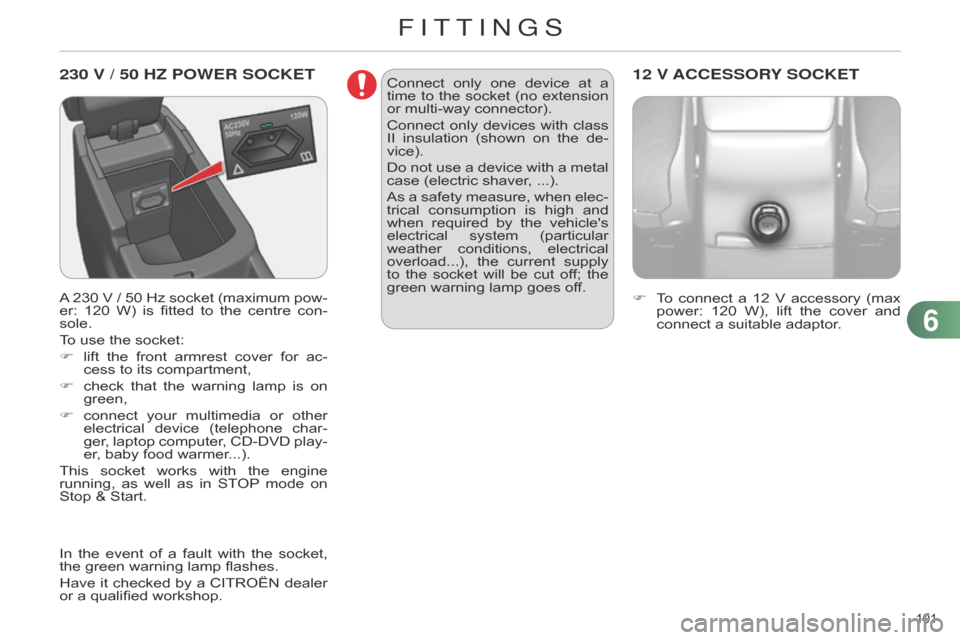
A 230 V / 50 Hz socket (maximum pow -
er: 120 W) is fitted to the centre con -
sole.
To
use the socket:
F
lift
the
front
armrest
cover
for
ac
-
cess
to its compartment,
F
check
that
the
warning
lamp
is
on
green,
F
connect
your
multimedia
or
other
electrical
device
(telephone
char
-
ger,
laptop
computer
,
CD-DVD
play
-
er,
baby food warmer...).
This
socket
works
with
the
engine
running,
as
well
as
in
ST
OP
mode
on
Stop &
Start. F
T o connect a 12 V accessory (max power:
120 W), lift the cover and
connect
a suitable adaptor.
12 V ACCESSORY SOCKETConnect only one device at a time
to the socket (no extension
or
multi-way connector).
Connect
only
devices
with
class
II
insulation
(shown
on
the
de
-
vice).
Do
not
use
a
device
with
a
metal
case
(electric shaver, ...).
As
a
safety
measure,
when
elec
-
trical
consumption
is
high
and
when
required
by
the
vehicle's
electrical
system
(particular
weather
conditions,
electrical
overload...),
the
current
supply
to
the
socket
will
be
cut
of
f;
the
green
warning lamp goes off.
In
the
event
of
a
fault
with
the
socket,
the
green
warning
lamp
flashes.
Have
it
checked
by
a
CITROËN
dealer
or
a
qualified
workshop.
6
FITTINGS
Page 129 of 340
88
127
C4-2_en_Chap08_securite_ed01-2014
Rear seat belts
The rear seats are each fitted with a three-point
seat belt, with force limiter
and,
for
the
outer
seats,
an
ef
fort
limiter
.
Fastening
F
Pull
the
strap,
then
insert
the
tongue
in
the buckle.
F
Check
that
the
seat
belt
is
fastened
correctly
by pulling the strap.
Unfastening
F
Press
the red button on the buckle.
F
Guide
the seat belt as it reels in.
F
o n the outer seat belts, raise the
bar
to
the
top
of
the
backrest
to
prevent
the
tongue
from
knocking
against
the side trim. This
warning lamp comes on in
the
instrument
panel
when
one
or
more
rear
passengers
unfas
-
ten
their seat belt.
Seat belt unfastened warning lamp
in the instrument panel
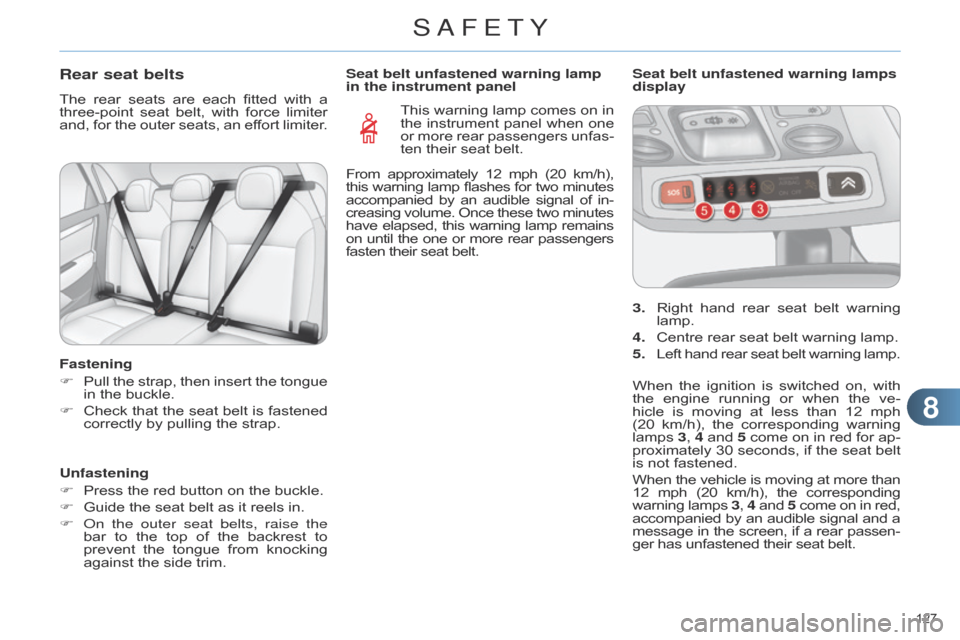
3.
Right
hand
rear
seat
belt
warning
lamp.
4.
Centre
rear seat belt warning lamp.
5.
Left
hand
rear
seat
belt
warning
lamp.
Seat belt unfastened warning lamps
display
When
the
ignition
is
switched
on,
with
the
engine
running
or
when
the
ve
-
hicle
is
moving
at
less
than
12
mph
(20
km/h),
the
corresponding
warning
lamps
3
, 4
and
5
come
on
in
red
for
ap
-
proximately
30
seconds,
if
the
seat
belt
is
not fastened.
When
the
vehicle
is
moving
at
more
than 12
mph
(20
km/h),
the
corresponding warning
lamps
3, 4 and
5 come
on
in
red, accompanied
by
an
audible
signal
and
a message
in
the
screen,
if
a
rear
passen
-
ger
has unfastened their seat belt.
From
approximately
12
mph
(20
km/h),
this
warning
lamp
flashes
for
two
minutes accompanied
by
an
audible
signal
of
in
-
creasing
volume.
Once
these
two
minutes have
elapsed,
this
warning
lamp
remains on
until
the
one
or
more
rear
passengers fasten
their seat belt.
SAFETY
Page 135 of 340
99
133
C4-2_en_Chap09_conduite_ed01-2014
A FEW DRIVING RECOMMENDATIONS
Observe the driving regulations at all times
and remain vigilant whatever the
traffic
conditions.
Pay
close
attention
to
the
traffic
and
keep
your
hands
on
the
wheel
so
that
you
are
ready
to
react
at
any
time
to
any
eventuality.
On
a
long
journey
,
a
break
every
two hours
is strongly recommended.
In
difficult
weather
,
drive
smoothly
,
an
-
ticipate
the
need
to
brake
and
increase
the
distance from other vehicles.
Driving on flooded roads
We strongly advise against driving on flooded
roads, as this could cause seri -
ous
damage
to
the
engine
or
gearbox,
as
well
as
to
the
electrical
systems
of
your
vehicle.
Important!
Never drive with the parking brake
applied - Risk of overheat -
ing
and
damage
to
the
braking
system!
Do
not
park
or
run
the
engine when
stationary in areas where
inflammable substances and ma -terials (dry grass, dead leaves...) might
come into contact with the hot
exhaust
system
-
Risk
of
fire!
n
ever leave a vehicle unsuper-
vised
with
the
engine
running.
If
you have to leave your vehicle
with
the
engine
running,
apply
the
parking
brake
and
put
the
gearbox
into
neutral
or
posi
-
tion
N
or P,
depending
on
the
type
of gearbox.
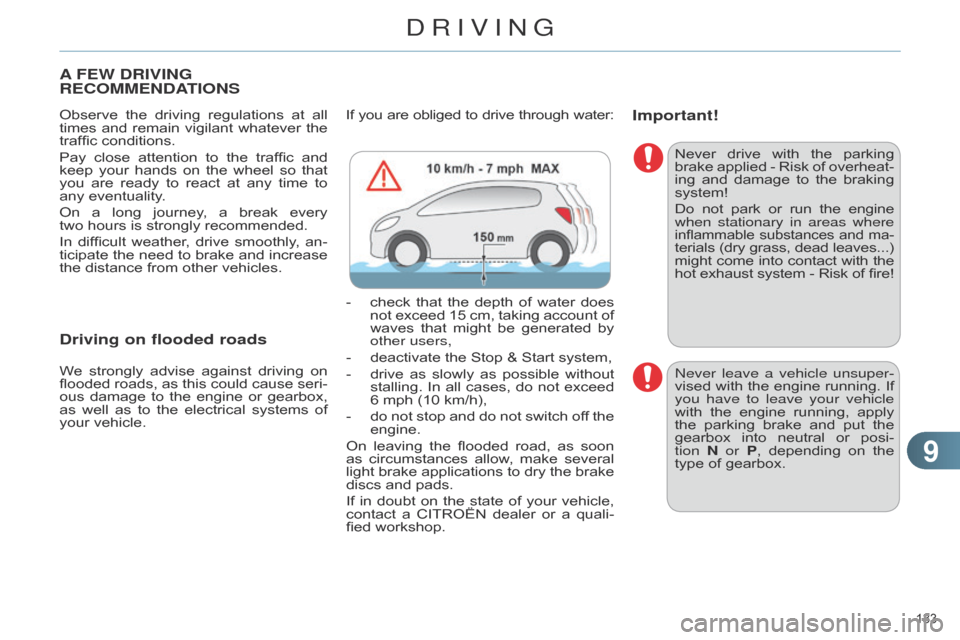
If
you
are
obliged
to
drive
through
water:
-
check
that
the
depth
of
water
does
not
exceed
15
cm,
taking
account
of
waves
that
might
be
generated
by
other users,
-
deactivate
the
Stop
&
Start
system,
-
drive
as
slowly
as
possible
without
stallin
g.
In
all
cases,
do
not
exceed
6
mph
(10
km/h),
-
do
not
stop
and
do
not
switch
of
f
the
engine.
On
leaving
the
flooded
road,
as
soon
as
circumstances
allow
,
make
several
light
brake
applications
to
dry
the
brake
discs
and
pads.
If
in
doubt
on
the
state
of
your
vehicle,
contact
a
CITROËN
dealer
or
a
quali
-
fied
workshop.
DRIVING
Page 138 of 340

99
136
C4-2_en_Chap09_conduite_ed01-2014
Key left in the "Ignition on"
position
On
opening
the
driver's
door
,
an
alert
message
is
displayed,
ac
-
companied
by
an
audible
signal,
to
remind
you
that
the
key
is
still
in
the
ignition
switch
at
posi
-
tion
1 (Stop).
If
the
key
has
been
left
in
the
igni
-
tion switch at position 2 (Ignition
on),
the
ignition
will
be
switched
of
f automatically after one hour.
To
switch
the
ignition
back
on,
turn
the
key
to
position
1 (Stop)
,
then
back
to
position
2 (Ignition
on)
.Switching off the engine
F Stop the vehicle.
F
With
the
engine
running
at
idle,
turn
the
key to position 1.
F
Remove
the
key
from
the
ignition
switch.
F
T
o
lock
the
steering
column,
turn
the
steering
until it locks. Energy economy mode
After
switching of f the engine (posi -
tion 1-Stop ), for a maximum of 30 min -
utes you can still use functions such
as
the
audio
and
telematic
system,
the
wipers,
dipped
beam
headlamps,
cour
-
tesy
lamps, ...
For
more
information,
refer
to
the
"Practical
information"
sec
-
tion,
under
"Energy
economy
mode".
T
o
facilitate
unlocking
of
the
steer
-
ing
column,
it
is
recommended that
the
wheels
be
returned
to the
straight
ahead
position
before switching
off the engine.
F
Check
that
the
parking
brake
is
cor
-
rectly
applied,
particularly
on
sloping ground.Never
switch
of
f
the
ignition
be
-
fore
the
vehicle
is
at
a
complete
stop.
With
the
engine
of
f,
the
braking
and
steering
assistance
systems
are
also
cut
of
f:
risk
of
loss
of control of the vehicle.
When you leave the vehicle,
keep
the
key
with
you
and
lock
the
vehicle.
DRIVING
Page 144 of 340
99
142
C4-2_en_Chap09_conduite_ed01-2014
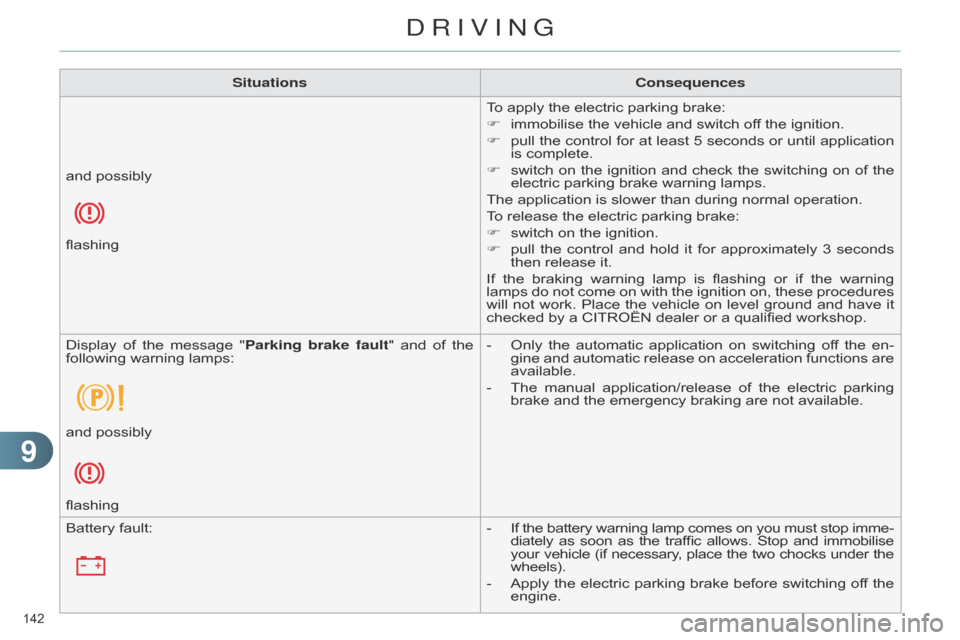
SituationsConsequences
To apply the electric parking brake:
F
immobilise
the vehicle and switch off the ignition.
F
pull
the
control
for
at
least
5
seconds
or
until
application
is
complete.
F
switch
on
the
ignition
and
check
the
switching
on
of
the
electric
parking brake warning lamps.
The
application is slower than during normal operation.
To
release the electric parking brake:
F
switch
on the ignition.
F
pull
the
control
and
hold
it
for
approximately
3
seconds
then
release it.
If
the
braking
warning
lamp
is
flashing
or
if
the
warning
lamps
do
not
come
on
with
the
ignition
on,
these
procedures
will
not
work.
Place
the
vehicle
on
level
ground
and
have
it
checked
by a CITROËN dealer or a qualified workshop.
and
possibly
flashing
Display
of
the
message
"
Parking brake fault"
and
of
the
following
warning
lamps: -
Only
the
automatic
application
on
switching
of
f
the
en
-
gine
and
automatic
release
on
acceleration
functions
are
available.
-
The
manual
application/release
of
the
electric
parking
brake
and the emergency braking are not available.
and
possibly
flashing
Battery
fault: -
If
the
battery
warning
lamp
comes
on
you
must
stop
imme
-
diately
as
soon
as
the
traffic
allows.
Stop
and
immobilise your
vehicle
(if
necessary
,
place
the
two
chocks
under
the wheels).
-
Apply
the
electric
parking
brake
before
switching
of
f
the
engine.
DRIVING
Page 148 of 340
99
146
C4-2_en_Chap09_conduite_ed01-2014
You can change mode at any time
by moving the gear lever
from
A
to M or the other way
round.
At
low
high
speed,
if
reverse
gear
is
requested,
the
N
indicator
flashes
and
the
gearbox
goes
into
neutral
automati
-
cally.
T
o
engage
reverse,
put
the
gear
lever in position
N, then position R. When
immobilising the vehicle, with
the engine running, you
must
place
the
gear
lever
in
neu
-
tral N.
Before
carrying
out
any
work
in
the
engine
compartment,
ensure
that
the
gear
lever
is
in
neutral N
and
that
the
parking
brake
is
ap
-
plied.
Whatever
the
circumstances,
you
must
manually
apply
the
parking
brake
when
parking,
unless
the
parking
brake
is
pro
-
grammed
in automatic mode.
Reverse
To engage reverse gear R , the vehicle
must be immobilised with your foot on
the
brake pedal.
F
Select position
R.
Operating fault
With the ignition on, the flashing of AUT
O, accompanied by an audible sig -
nal
and
a
message
in
the
screen,
indi
-
cates
a malfunction of the gearbox.
Have
it
checked
by
a
CITROËN
dealer
or
a qualified workshop.
Manual mode
F Select position M.
The
gears
engaged
appear
in
succession
in
the
instrument
panel
screen.
The
gear
change
requests
are
only
act
-
ed
on if the engine speed permits.
It is not necessary to release the accel-
erator
during gear changes.
When
braking
or
slowing
down,
the
gearbox
changes
down
automatically
to allow the vehicle to accelerate in the
correct
gear.
On
sharp
acceleration,
the
gearbox
will
not
change
up
unless
the
driver
acts
on
the
gear
lever
or
the
steering
mounted
paddles. T
emporary control of gear changing
You
can
temporarily
take
over
control
of
gear
changing
using
the
"+"
and
"-"
steering
mounted
paddles:
if
the
engine
speed
allows,
the
request
to
change
gear
is acted on.
This function allows you to anticipate
certain
situations
such
as
overtaking
a
vehicle
or the approach to a corner.
After
a
few
moments
without
any
action
on
the
control
paddles,
the
gearbox
re
-
sumes automatic control of the gears.
n
ever select neutral N while the
vehicle is moving.
Stopping the vehicle
Before switching
of f the engine, you can:
-
move
to
position
N
to
engage
neu
-
tral,
or
-
leave
the
gear
engaged;
in
this
case,
it
will
not
be
possible
to
move
the
vehicle.
In both cases, you must apply the
parking brake
to
immobilise
the
ve
-
hicle.
DRIVING
Page 151 of 340
99
149
C4-2_en_Chap09_conduite_ed01-2014
Manual operation
F Select position M for sequential
changing of the six gears.
F
Push
the
lever
towards
the
+
sign
to
change
up a gear.
F
Pull
the
lever
towards
the
-
sign
to
change
down a gear.
It
is
only
possible
to
change
from
one
gear
to
another
if
the
vehicle
speed
and
engine
speed
permit;
otherwise,
the
gearbox
will
operate
temporarily
in
au
-
tomatic
mode.D
disappears
and
the
gears
engaged
appear
in
succes
-
sion
in the instrument panel.
If
the
engine
speed
is
too
low
or
too
high,
the
gear
selected
flashes
for
a
few
seconds,
then
the
ac
-
tual
gear engaged is displayed.
It
is
possible
to
change
from
position
D
(automatic)
to
position
M
(manual)
at
any
time.
When
the
vehicle
is
stationary
or
mov
-
ing
very
slowly
,
the
gearbox
selects
gear
M1 automatically.
The
sport
and
snow
programmes
do
not
operate in manual mode.Invalid value during manual
operation
This symbol is displayed if a
gear
is
not
engaged
correctly
(selector between two posi
-
tions).
Stopping the vehicle
Before switching of f the engine, you can
engage position P or N to place the
gearbox
in neutral.
In
both
cases,
apply
the
parking
brake
to
immobilise
the
vehicle,
unless
it
is
programmed
to automatic mode.
If the lever is not in position P,
when
the
driver's
door
is
opened
or
approximately
45
seconds
after
the
ignition
is
switched
of
f,
there
is
an
audible
signal
and
a
message
appears.
F
Return
the lever to posi-
tion
P
;
the
audible
signal
stops
and
the
message
dis
-
appears. You
risk damaging the gearbox:
-
if
you
press
the
accelera
-
tor
and
brake
pedals
at
the
same
time,
-
if
you
force
the
lever
from
position P
to another position
when
the battery is flat.
When
the
ignition
is
on,
the
lighting
of
this
warning
lamp,
accompanied
by
an
audible
signal
and
a
message
in
the
multifunction
screen,
indicates
a
gear
-
box malfunction.
In
this
case,
the
gearbox
switches
to
back-up
mode
and
is
locked
in
3rd
gear
.
Y
ou
may
feel
a
substantial
knock
when
changing
from
P
to R
and
from
N
to R. This will not cause any damage to the
gearbox.
Do
not
exceed
60
mph
(100
km/h),
lo
-
cal
speed restrictions permitting.
Have
it
checked
by
a
CITROËN
dealer
or
a qualified workshop.
This
warning
lamp
may
also
come
on
if
a
door is opened.
Operating fault
To reduce fuel consumption when
stationary for long periods
with
the
engine
running
(traf
-
fic
jam...),
position
the
gear
le
-
ver at
N
and
apply
the
parking
brake,
unless
it
is
programmed
in
automatic mode.
When
driving
through
flooded
roads
or
crossing
a
ford,
drive
at
walking
speed.
DRIVING
Page 152 of 340
99
150
C4-2_en_Chap09_conduite_ed01-2014
HILL START ASSIST
System which keeps your vehicle im -
mobilised temporarily (approximately
2
seconds)
when
starting
on
a
gradi
-
ent,
the
time
it
takes
to
move
your
foot
from
the
brake
pedal
to
the
accelerator
pedal.
This
function is only active when:
-
the
vehicle
is
completely
stationary
,
with
your foot on the brake pedal,
-
when
certain
conditions
of
gradient
are
met,
-
with
the driver’s door closed.
The hill start assist function cannot be
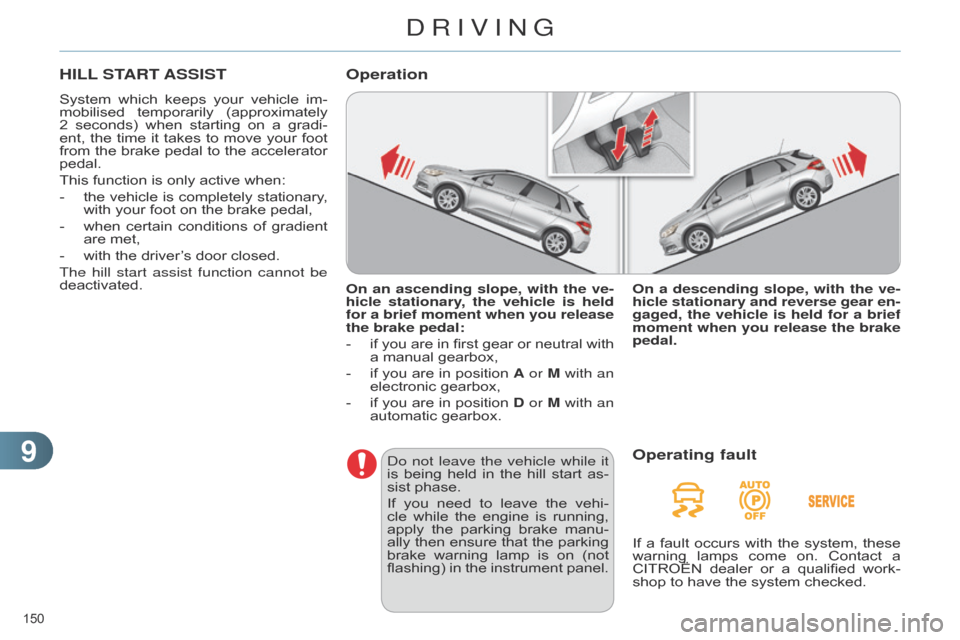
deactivated. On an ascending slope, with the ve-
hicle stationary, the vehicle is held
for a brief moment when you release
the brake pedal:
-
if
you
are
in
first
gear
or
neutral
with
a
manual gearbox,
-
if
you
are
in
position
A
or M with an
electronic
gearbox,
-
if
you
are
in
position
D
or M with an
automatic
gearbox.
Operation
do not leave the vehicle while it
is being held in the hill start as -
sist
phase.
If
you
need
to
leave
the
vehi
-
cle
while
the
engine
is
running,
apply
the
parking
brake
manu
-
ally
then
ensure
that
the
parking
brake
warning
lamp
is
on
(not
flashing)
in
the
instrument
panel.On a descending slope, with the ve
-
hicle stationary and reverse gear en-
gaged, the vehicle is held for a brief
moment when you release the brake
pedal.Operating fault
If a fault occurs with the system, these warning
lamps come on. Contact a
CITROËN
dealer
or
a
qualified
work
-
shop
to have the system checked.
DRIVING
Page 172 of 340
1010
170
C4-2_en_Chap10_verification_ed01-2014
TOTAL & CITROËN
Partners in performance and
protecting the environment
Innovation in the search for
performance
For
over
40
year
,
the
T
OTAL
Research
and
Development
departments
have
developed
for
CITROËN,
lubricants
to
match
the
latest technical innovations on CITR
o Ë n
vehicles,
both
for
competition
and
for
everyday
motoring.
For you, this is an assurance that you will
obtain
of
the
best
performance
for
your
engine.
Optimum protection for your
engine
By
having
your
CITROËN
vehicle serviced
with
T
OTAL
lubricants, you
are
contributing
towards
im
-
proving
the
life
and
performances of
your
engine,
while
also
protect
-
ing
the environment.
prefers
CHECKS