brake CITROEN C4 PICASSO 2011 User Guide
[x] Cancel search | Manufacturer: CITROEN, Model Year: 2011, Model line: C4 PICASSO, Model: CITROEN C4 PICASSO 2011Pages: 352, PDF Size: 10.66 MB
Page 40 of 352

Downloaded from www.Manualslib.com manuals search engine I
38
MONITORING
Warning lamp
is on
Cause
Action/Observations
Anti-lock
Braking
System
(ABS)
fi xed. The anti-lock braking system
has a fault. The vehicle retains conventional braking.
Drive carefully at reduced speed and
contact a CITROËN dealer or a qualifi ed
workshop without delay.
Electric
parking brake
fl ashing. The application or release of
the electric parking brake was
interrupted. You must stop as soon as it is safe to do so.
Park on level ground, switch off the
ignition and contact a CITROËN dealer or
a qualifi ed workshop.
+
Electric
parking brake
malfunction
fi xed. The electric parking brake
has a fault. Automatic application/release is no longer
possible.
Contact a CITROËN dealer or a qualifi ed
workshop without delay.
The parking brake can be released
manually using the emergency release
procedure.
For more information on the electric
parking brake, refer to the "Driving"
section.
Braking
fi xed, associated
with the STOP
warning lamp. The braking system fl uid level
is too low. You must stop as soon as it is safe to do so.
Top up with brake
fl uid recommended by
CITROËN.
If the problem persists, have the system
checked by a CITROËN dealer or a
qualifi ed workshop.
+
fi xed, associated
with the STOP
and ABS warning
lamp. The electronic brake force
distribution (EBFD) system
has a fault. You must stop as soon as it is safe to do so.
Have it checked by a CITROËN or a
qualifi ed workshop.
Page 41 of 352

Downloaded from www.Manualslib.com manuals search engine I
39
MONITORING
Deactivation of
the automatic
functions of the
electric parking
brake
fi xed. The "automatic application"
(on switching off the engine)
and "automatic release"
functions are deactivated or
faulty. Activate the function (according to country)
via the vehicle confi guration menu or
contact a CITROËN dealer or a qualifi ed
workshop if automatic application/release
is not possible.
The parking brake can be released
manually using the emergency release
procedure.
For more information on the electric
parking brake, refer to the "Driving"
section.
Warning lamp
is on
Cause
Action/Observations
Dynamic
stability
control
(ESP/ASR)
fl ashing. The ESP/ASR regulation is
active. The system optimises traction and
improves the directional stability of the
vehicle.
fi xed. Unless it has been
deactivated (button pressed
and its indicator lamp on) the
ESP/ASR system has a fault. Have it checked by a CITROËN or a
qualifi ed workshop.
Engine
autodiagnosis
system
fl ashing. The engine management
system has a fault. Risk of destruction of the catalytic converter.
Have it checked by a CITROËN dealer or
a qualifi ed workshop.
fi xed. The emission control system
has a fault. The warning lamp should go off when the
engine is started.
If it does not go off, contact a CITROËN
dealer or qualifi ed workshop without delay.
Airbags
temporarily. This lamp comes on for a few
seconds when you turn on the
ignition, then goes off.
This lamp should go off when the engine is started.
If it does not go off, contact a CITROËN
dealer or a qualifi ed workshop.
fi xed. One of the airbag or seat belt
pretensioner systems has a
fault. Have it checked by a CITROËN dealer or
a qualifi ed workshop.
Page 42 of 352
Downloaded from www.Manualslib.com manuals search engine I
40
MONITORING
Warning lamp
is on
Cause
Action/Observations
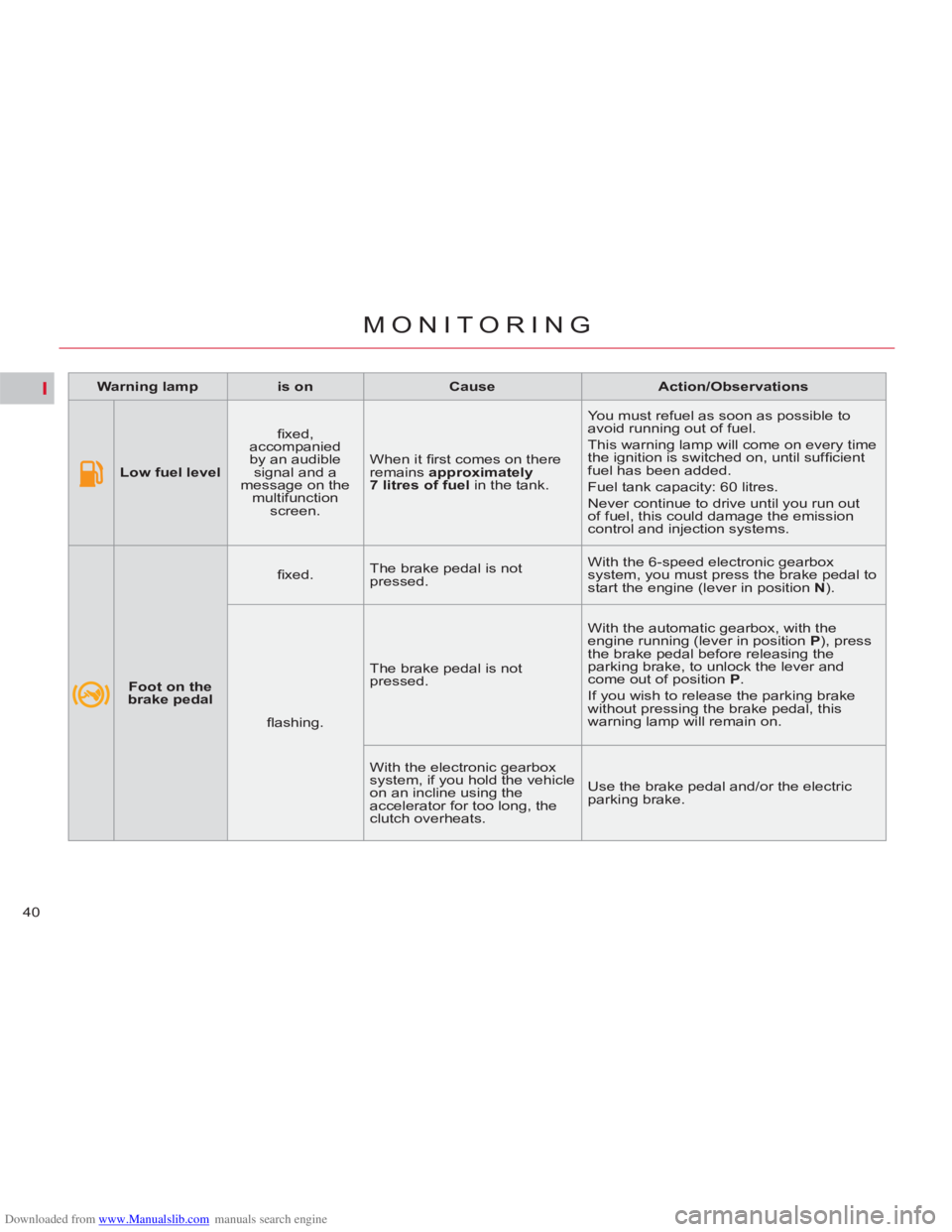
Low fuel level
fi xed,
accompanied
by an audible
signal and a
message on the
multifunction
screen. When it fi rst comes on there
remains approximately
7 litres of
fuel
in the tank. You must refuel as soon as possible to
avoid running out of fuel.
This warning lamp will come on every time
the ignition is switched on, until suffi cient
fuel has been added.
Fuel tank capacity: 60 litres.
Never continue to drive until you run out
of fuel, this could damage the emission
control and injection systems.
Foot on the
brake pedal
fi xed. The brake pedal is not
pressed. With the 6-speed electronic gearbox
system, you must press the brake pedal to
start the engine (lever in position N
).
fl ashing. The brake pedal is not
pressed. With the automatic gearbox, with the
engine running (lever in position P
), press
the brake pedal before releasing the
parking brake, to unlock the lever and
come out of position P
.
If you wish to release the parking brake
without pressing the brake pedal, this
warning lamp will remain on.
With the electronic gearbox
system, if you hold the vehicle
on an incline using the
accelerator for too long, the
clutch overheats. Use the brake pedal and/or the electric
parking brake.
Page 48 of 352
Downloaded from www.Manualslib.com manuals search engine II
46
MULTIFUNCTION SCREENS
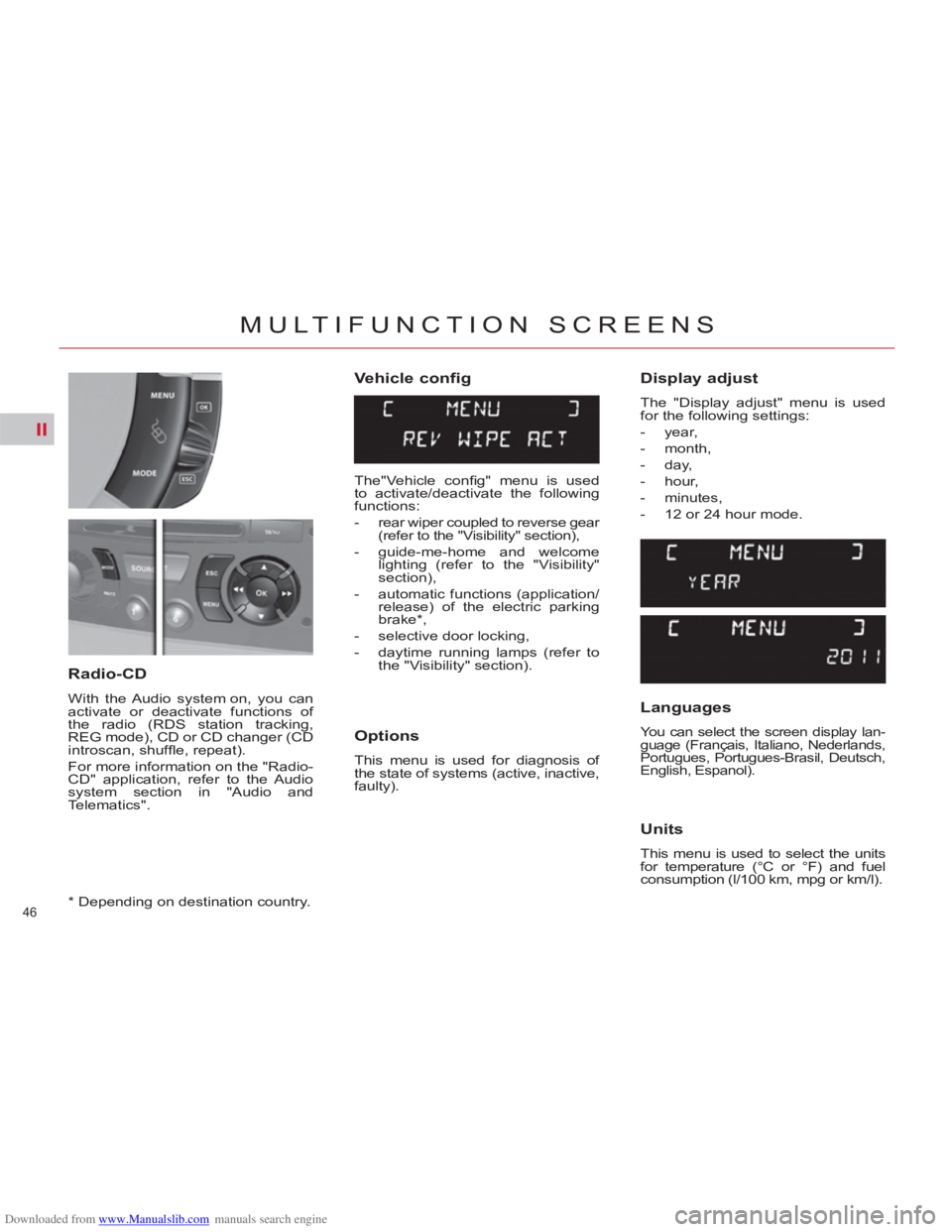
Vehicle config
Options
This menu is used for diagnosis of
the state of systems (active, inactive,
faulty).
Radio-CD
With the Audio system on, you can
activate or deactivate functions of
the radio (RDS station tracking,
REG mode), CD or CD changer (CD
introscan, shuffl e, repeat).
For more information on the "Radio-
CD" application, refer to the Audio
system section in "Audio and
Telematics".
Display adjust
The "Display adjust" menu is used
for the following settings:
- year,
- month,
- day,
- hour,
- minutes,
- 12 or 24 hour mode.
Languages
You can select the screen display lan-
guage (Français, Italiano, Nederlands,
Portugues, Portugues-Brasil, Deutsch,
English, Espanol).
Units
This menu is used to select the units
for temperature (°C or °F) and fuel
consumption (l/100 km, mpg or km/l).
*
Depending on destination country.
The"Vehicle confi g" menu is used
to activate/deactivate the following
functions:
- rear wiper coupled to reverse gear
(refer to the "Visibility" section),
- guide-me-home and welcome
lighting (refer to the "Visibility"
section),
- automatic functions (application/
release) of the electric parking
brake * ,
- selective door locking,
- daytime running lamps (refer to
the "Visibility" section).
Page 51 of 352

Downloaded from www.Manualslib.com manuals search engine II
49
MULTIFUNCTION SCREENS
Choice of language
You can change the screen display
language (Deutsch, English, Espanol,
Français, Italiano, Nederlands, Portugues, Portugues-Brasil, Türkçe * ).
*
Depending on destination country. This menu is used to activate/deac-
tivate the following functions:
- defi ne the vehicle parameters,
- display confi guration,
- choice of language.
Defi ne the vehicle parameters
You can activate or deactivate the
following systems:
-
rear wiper coupled with reverse
gear (refer to the "Visibilty" section),
- automatic guide-me-home lighting,
- directional headlamps,
- automatic functions (application/
release) of the electric parking
brake *
- selective door locking,
- daytime running lamps (refer to
the "Visibilty" section),
Display confi guration
You can make the following adjust-
ments:
- video brightness,
- date and time,
- choice of units.
Personalisation -
Configuration
Page 53 of 352
Downloaded from www.Manualslib.com manuals search engine II
51
MULTIFUNCTION SCREENS
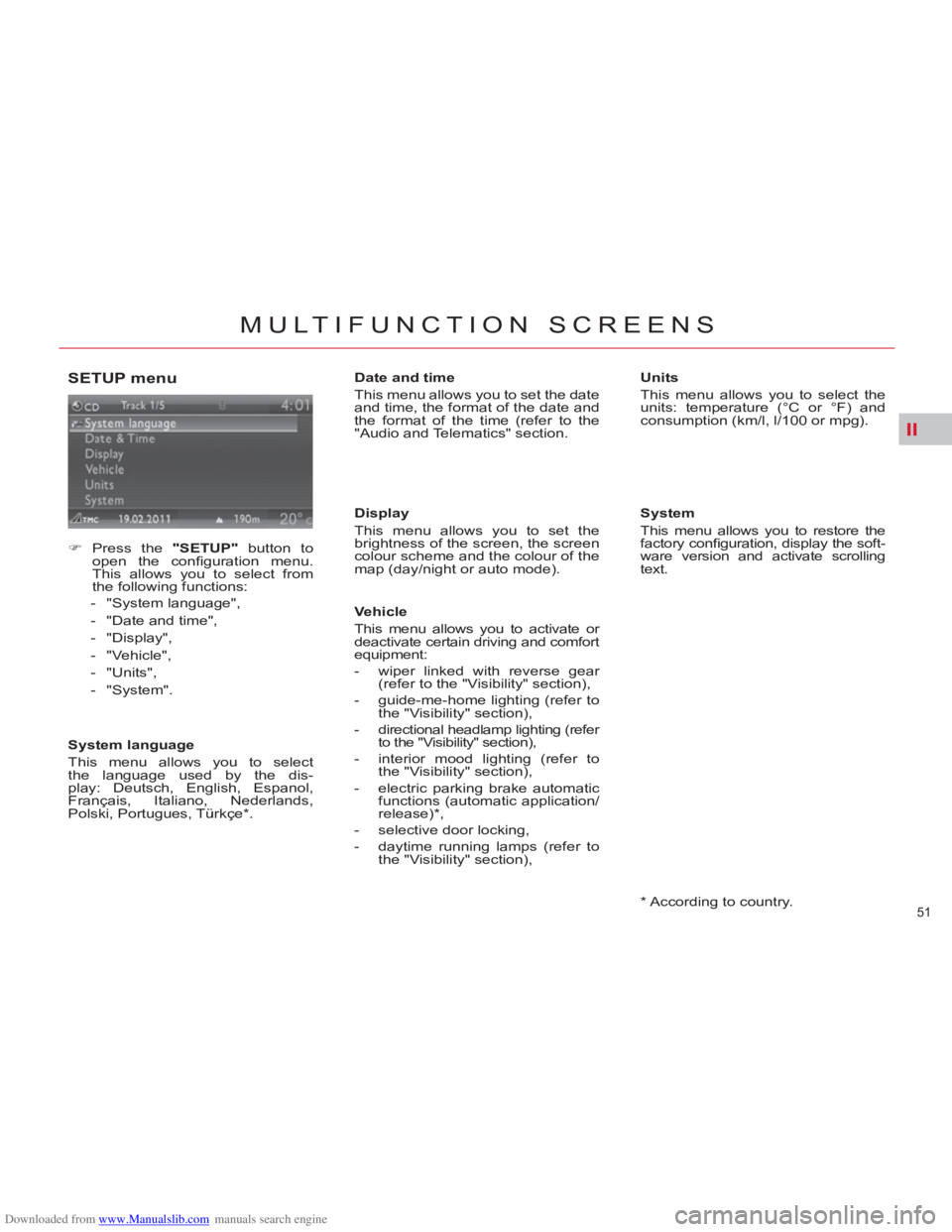
SETUP menu
)
Press the "SETUP"
button to
open the confi guration menu.
This allows you to select from
the following functions:
- "System language",
- "Date and time",
- "Display",
- "Vehicle",
- "Units",
- "System".
System language
This menu allows you to select
the language used by the dis-
play: Deutsch, English, Espanol,
Français, Italiano, Nederlands,
Polski, Portugues, Türkçe * .
*
According to country.
Date and time
This menu allows you to set the date
and time, the format of the date and
the format of the time (refer to the
"Audio and Telematics" section.
Display
This menu allows you to set the
brightness of the screen, the screen
colour scheme and the colour of the
map (day/night or auto mode).
Vehicle
This menu allows you to activate or
deactivate certain driving and comfort
equipment:
- wiper linked with reverse gear
(refer to the "Visibility" section),
- guide-me-home lighting (refer to
the "Visibility" section),
- directional headlamp lighting (refer
to the "Visibility" section),
- interior mood lighting (refer to
the "Visibility" section),
- electric parking brake automatic
functions (automatic application/
release) * ,
- selective door locking,
- daytime running lamps (refer to
the "Visibility" section),
Units
This menu allows you to select the
units: temperature (°C or °F) and
consumption (km/l, l/100 or mpg).
System
This menu allows you to restore the
factory confi guration, display the soft-
ware version and activate scrolling
text.
Page 129 of 352

Downloaded from www.Manualslib.com manuals search engine VIII
127
SAFETY
TYRE UNDER-INFLATION DETECTION
Sensors fi tted in each valve check
the tyre pressure during driving and
trigger a warning in the event of
malfunction (speed above 12 mph
(20 km/h)).
Under-infl ated tyre The tyre under-infl ation detection
system is an aid to driving which
does not replace the vigilance or
responsibility of the driver.
Puncture
The service warning lamp
comes on in the instrument
panel, accompanied by an
audible signal and a mes-
sage on the multifunction screen lo-
cating the wheel concerned.
Check the tyre pressures as soon as
possible. This check must be carried
out when the tyres are cold. The STOP
warning lamp
comes on in the instrument
panel, accompanied by an
audible signal and a mes-
sage on the multifunction screen lo-
cating the wheel concerned.
Stop immediately, avoiding any sud-
den movement of the steering wheel
and the brakes.
Change the damaged wheel (punc-
tured or very defl ated tyre), and
have the tyre pressure checked as
soon as possible.
Sensor(s) not detected or faulty
The service warning lamp
comes on in the instrument
panel, accompanied by an
audible signal and a mes-
sage on the multifunction screen
locating the wheel or wheels which
are not detected or indicating a fault
in the system.
Have the faulty sensor(s) checked
by a CITROËN dealer or a qualifi ed
workshop. All repairs and changing of tyres
on a wheel fi tted with this system
must be carried out by a CITROËN
dealer or a qualifi ed workshop.
If, when changing a tyre, you in-
stall a wheel which is not detected
by your vehicle (example: fi tting
of snow tyres), you must have the
system reinitialised by a CITROËN
dealer or a qualifi ed workshop.
This system does not avoid the
need to have the tyre pressures
checked regularly (refer to the
"Technical data - Identifi cation
markings" section) to ensure that
the optimum dynamic performance
of the vehicle is maintained and
prevent premature wear of the
tyres, particularly in arduous driv-
ing conditions (heavy load, high
speed).
The tyre pressures must be
checked cold, at least once a
month. Remember to check the
pressure of the spare wheel.
The tyre under-infl ation detection
system may experience temporary
interference due to electro-magnetic
signals on a frequency close to that
used by the system.
This message is also displayed
when one of the wheels is away
from the vehicle (being repaired) or
when one or more wheels without a
sensor are fi tted.
The spare wheel is not fi tted with a
sensor.
Page 130 of 352
Downloaded from www.Manualslib.com manuals search engine VIII
128
SAFETY
BRAKING ASSISTANCE
SYSTEMS
Group of supplementary systems
which help you to obtain optimum
braking in complete safety in emer-
gency situations:
- anti-lock braking system (ABS),
- electronic brake force distribu-
tion (EBFD),
- emergency braking assistance
(EBA).
Anti-lock braking system
and electronic brake force
distribution
Linked systems which improve the
stability and manoeuvrability of your
vehicle when braking, in particular
on poor or slippery surfaces.
Activation
The anti-lock braking system comes
into operation automatically when
there is a risk of wheel lock.
Normal operation of the ABS may
make itself felt by slight vibration of
the brake pedal.
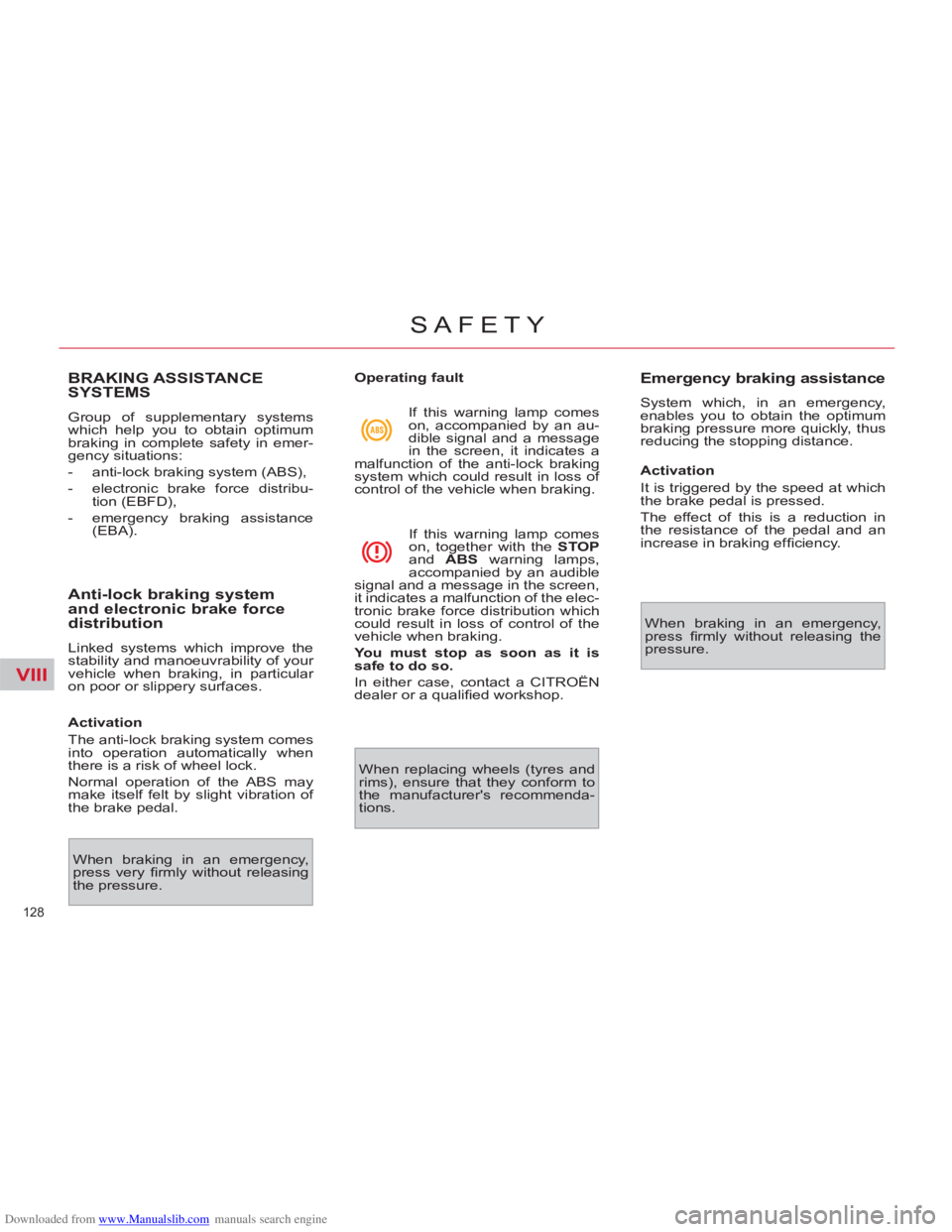
Operating fault
When braking in an emergency,
press very fi rmly without releasing
the pressure. If this warning lamp comes
on, accompanied by an au-
dible signal and a message
in the screen, it indicates a
malfunction of the anti-lock braking
system which could result in loss of
control of the vehicle when braking.
If this warning lamp comes
on, together with the STOP
and ABS
warning lamps,
accompanied by an audible
signal and a message in the screen,
it indicates a malfunction of the elec-
tronic brake force distribution which
could result in loss of control of the
vehicle when braking.
You must stop as soon as it is
safe to do so.
In either case, contact a CITROËN
dealer or a qualifi ed workshop.
When replacing wheels (tyres and
rims), ensure that they conform to
the manufacturer's recommenda-
tions.
Emergency braking assistance
System which, in an emergency,
enables you to obtain the optimum
braking pressure more quickly, thus
reducing the stopping distance.
Activation
It is triggered by the speed at which
the brake pedal is pressed.
The effect of this is a reduction in
the resistance of the pedal and an
increase in braking effi ciency.
When braking in an emergency,
press fi rmly without releasing the
pressure.
Page 131 of 352

Downloaded from www.Manualslib.com manuals search engine VIII
129
SAFETY
TRAJECTORY CONTROL
SYSTEMS
Anti-slip regulation (ASR)
and electronic stability
programme (ESP)
The anti-slip regulation (also known
as Traction Control) optimises trac-
tion to prevent skidding of the wheels,
by acting on the brakes of the driving
wheels and on the engine.
The electronic stability programme acts
on the brake of one or more wheels
and on the engine to keep the vehicle
on the trajectory required by the driver,
within the limits of the laws of physics.
Deactivation
In exceptional conditions (starting a
vehicle which is bogged down, stuck
in snow, on soft ground...), it may be
advisable to deactivate the ASR and
ESP systems, so that the wheels
can move freely and regain grip.
)
Press the "ESP OFF"
button, lo-
cated in the centre of the dash-
board.
If this warning lamp comes
on in the instrument panel
and the indicator lamp on the
button comes on, this indi-
cates that the ASR and ESP
systems are deactivated. This is indicated by fl ashing
of this warning lamp in the
instrument panel.
Activation
These systems are activated auto-
matically each time the vehicle is
started.
They come into operation in the event
of a grip or trajectory problem.
Intelligent Traction Control
system *
Your vehicle has a system to help
driving on snow.
This automatic system continuously
checks for situations of diffi cult sur-
face adhesion that could make it dif-
fi cult to move off or make progress
on deep fresh snow or compacted
snow.
In these situations, the system takes
over from the ASR
system by opti-
mising the amount of wheel slip to
provide the best traction and trajec-
tory control, even without snow tyres
and with or without chains.
In extremely severe conditions (snow
on top of ice, sand, deep mud…), it
can be useful to deactivate the ESP/
ASR
systems to allow a degree of
wheel spin and so recover grip.
*
Depending on engine type.
Page 141 of 352

Downloaded from www.Manualslib.com manuals search engine IX
139
DRIVING
ELECTRIC PARKING BRAKE
The electric parking brake operates
as follows:
- automatic application/release
Application is automatic when
the engine stops, release is au-
tomatic on use of the accelerator
(active by default).
- manual application/release
Manual application/release of
the parking brake is possible
by pulling control lever A
while
pressing the brake pedal.
Manual application
With the vehicle stationary, to apply
the parking brake whether the en-
gine is running or not, pull
control
lever A
.
Manual release
With the ignition on or the engine
running, to release the parking
brake, press on the brake pedal, or
the accelerator, pull then release
control lever A
.
- the warning lamp P
in con-
trol lever A
and in the in-
strument panel going off,
- the display of a message
"Parking brake off" in the multi-
function screen. The application of the parking brake
is confi rmed by:
-
the illumination of the warn-
ing lamp P
in control lever A
and in the instrument panel,
- the display of a message
"Parking brake on" in the multi-
function screen.
When the driver’s door is
opened with the engine run-
ning, a beep is heard and a
message displayed if the parking
brake has not been applied.
Before getting out of the vehicle,
check that the warning lamp P
is
on fi xed in the instrument panel
(not fl ashing). The full application of the parking
brake is confi rmed by:
If you pull control lever A
without pressing the brake
pedal, the parking brake
will not be released and
the "Foot on brake" warn-
ing lamp will come on in
the instrument panel.