Controls Citroen C4 PICASSO 2013 1.G Owner's Guide
[x] Cancel search | Manufacturer: CITROEN, Model Year: 2013, Model line: C4 PICASSO, Model: Citroen C4 PICASSO 2013 1.GPages: 420, PDF Size: 9.66 MB
Page 109 of 420
107
3
Comfort
Dual-zone manual air conditioning with temperature regulation
The air conditioning system operates with the engine running.
The temperature at the nozzles and vents
is re
gulated by the system according to the
temperature in the passenger compartment
and the temperature setting.
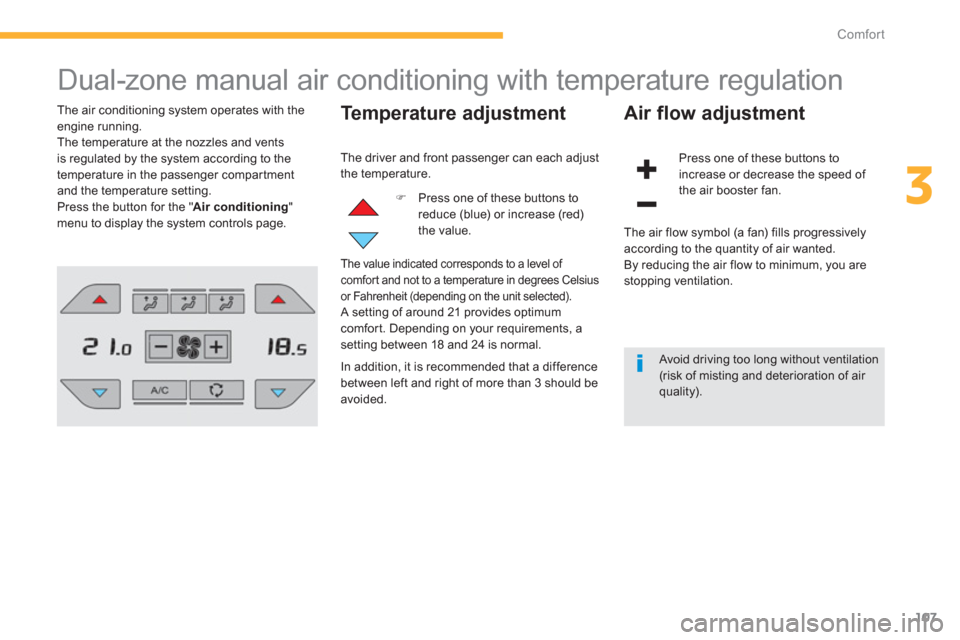
Press the button for the " Air conditioning"menu to display the system controls page.
Temperature adjustment
)
Press one of these buttons toreduce (blue) or increase (red)the value.
Air flow adjustment
Press one of these buttons to
increase or decrease the speed of
the air booster fan. The driver and
front passenger can each adjust
the temperature.
The value indicated corresponds to a level of comfor t and not to a temperature in degrees Celsius
or Fahrenheit (depending on the unit selected). A setting of around 21 provides optimumcomfort. Depending on your requirements, a
setting between 18 and 24 is normal.
In addition, it is recommended that a di
fference
between left and right of more than 3 should beavoided. The air
flow symbol (a fan) fills progressivelyaccording to the quantity of air wanted.
By reducing the air flow to minimum, you arestopping ventilation.
Avoid driving too long without ventilation(risk of misting and deterioration of air quality).
Page 111 of 420
109
3
Comfort
Dual-zone digital air conditioning
This air conditioning system operates with the engine running, but the ventilation and its controls
are available with the ignition on.
Operation of the air conditioning and regulation of temperature, air flow and air distribution in the passenger compartment are automatic.
Press the button for the " Air conditioning" menu to display the controls for the air conditioningsystem.
Temperature adjustment
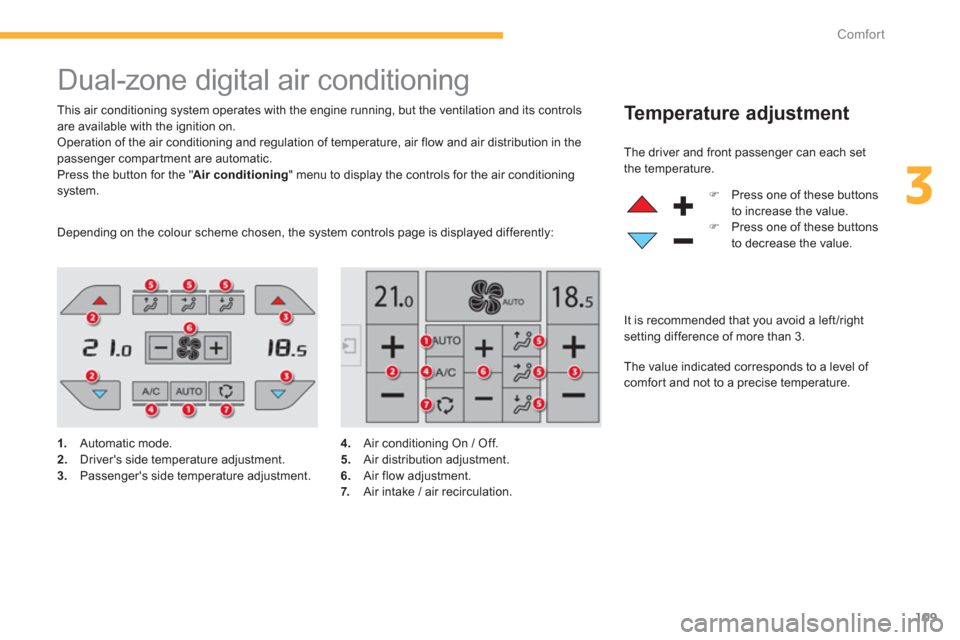
1.
Automatic mode. 2.Driver's side temperature adjustment.3.Passenger's side temperature adjustment. The driver and
front passenger can each set
t
he temperature.
)Press one of these buttons
to increase the value.
)Press one of these buttons
to decrease the value.
The value indicated corresponds to a level of
comfor t and not to a precise temperature.
It is recommended that
you avoid a left /right setting difference of more than 3.
Dependin
g on the colour scheme chosen, the system controls page is displayed differently:
4.
Air conditioning On / Off.
5. Air distribution adjustment.6.
Air flow adjustment. 7.
Air intake / air recirculation.
Page 115 of 420

113
3
Comfort
"Rear" function
)Press this button to activate / deactivate the "Rear" function
The indicator lamp in the button
i
s on when the function is activated.
Settings for
passengers in the
3 rdrow of seats
From the secondary page of the " Airconditioning " menu: This
function gives rear passengers access to
t
he adjustment controls and allows.
- the distribution of air conditioned air to the
vents for the 2 nd row of seats,
- the distribution of ambient air to the vents
for the 3rdrow of seats.
)
Turn the upper wheel to open or close therear vent. )
Turn the lower knob to reduce (to the left)
or increase (to the right) the air flow.
Settings for passengers in
the 2ndrow of seats
) Press the vent cover.)
Adjust the flow of air to the two vents usingthe four-position wheel (off, low, medium, high).
)
Direct the vent by turning the cover.
Page 124 of 420
122
Comfort
12 V acc essory socket
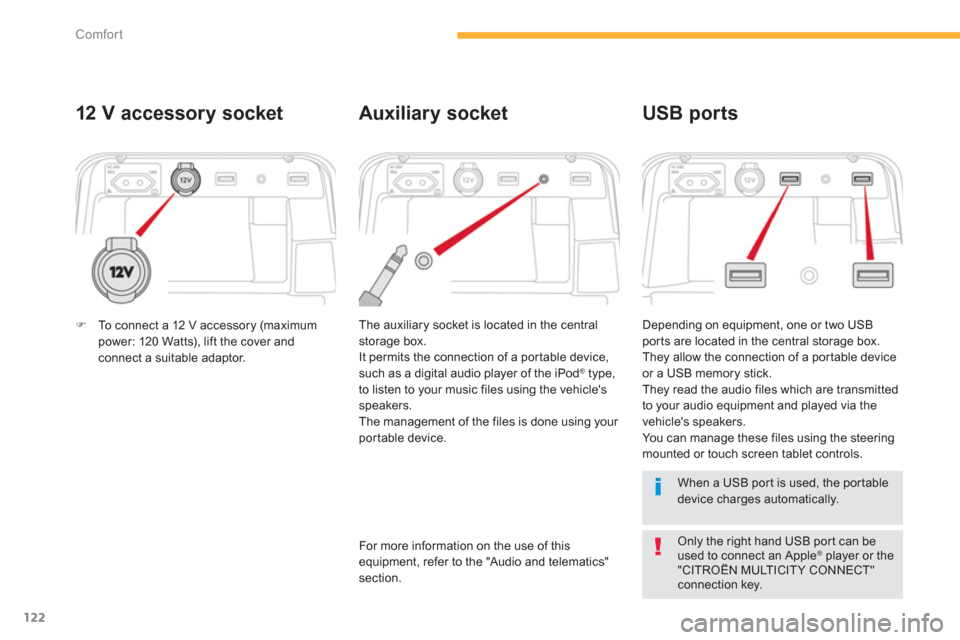
The auxiliary socket is located in the central
storage box.
It permits the connection of a por table device,
such as a di
gital audio player of the iPod® type,®
to listen to your music files using the vehicle's
speakers.
The management of the files is done using your
por table device. Dependin
g on equipment, one or two USBports are located in the central storage box.
They allow the connection of a por table device
or a USB memory stick.
They read the audio files which are transmitted
to your audio equipment and played via the
vehicle's speakers.
You can manage these files using the steeringmounted or touch screen tablet controls.
Auxiliary socket USB ports
For more information on the use of thisequipment, refer to the "Audio and telematics"section.
When a USB por t is used, the por tabledevice charges automatically.
Only the right hand USB por t can be used to connect an Apple®
player or the ®
"CITROËN MULTICITY CONNECT" connection key.
)To connect a 12 V accessory (maximum power: 120 Watts), lift the cover andconnect a suitable adaptor.
Page 135 of 420
133
3
Comfort
Stowing behind the 3 rd
row seats
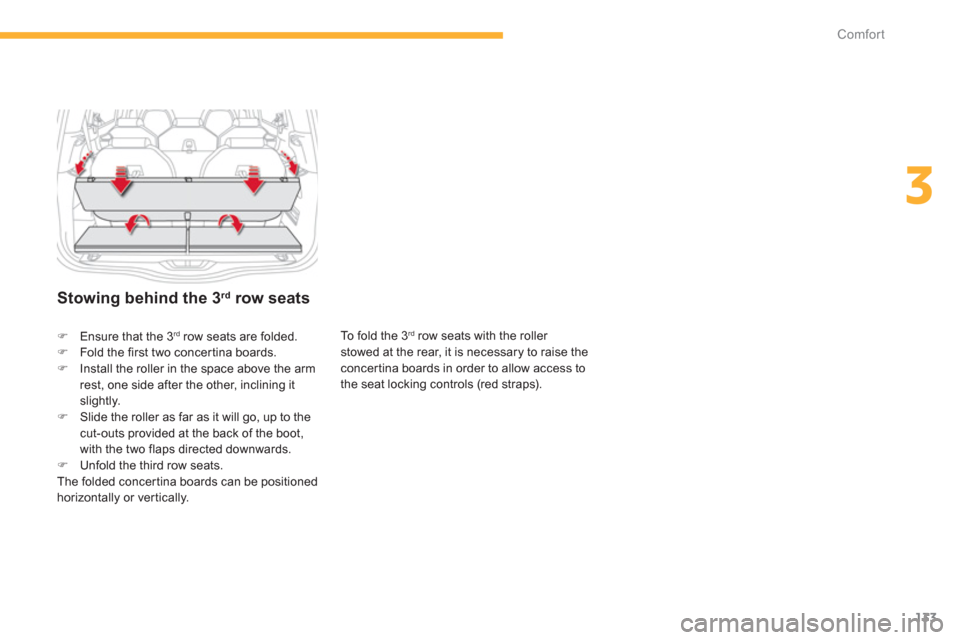
To fold the 3rdrow seats with the roller
stowed at the rear, it is necessary to raise theconcertina boards in order to allow access to
the seat locking controls (red straps).
)Ensure that the 3rdrow seats are folded.)Fold the first two concertina boards.)Install the roller in the space above the armrest, one side after the other, inclining itslightly. )Slide the roller as far as it will go, up to thecut-outs provided at the back of the boot,
with the two flaps directed downwards.)Unfold the third row seats.
The folded concer tina boards can be positioned horizontally or ver tically.
Page 149 of 420

147
4
Driving
SituationsConsequences
Displa
y of the message "Parking brake fault" and of thefollowing warning lamps: The Parking Brake is faulty, the manual and automatic functions may not operate.When stationary, to immobilise your vehicle: y
- Pull and hold the control lever for about 7 to 15 seconds, until the warning lampcomes on in the instrument panel.
If this procedure does not work, you should make your vehicle safe:
- Park on a level surface.
- Engage a gear with a manual or electronic gearbox, or place the gear selector inposition Pwith an automatic gearbox.
- If possible, fit a wheel chock.
Call on a CITROËN dealer or a qualified workshop.
Displa
y of the message "Parking brake fault" and of thefollowing warning lamps:
- The parking brake does not have its full per formance to securely hold the vehicle
in all situations.
You should make your vehicle safe:
- Park on a level surface.
- Engage a gear with a manual or electronic gearbox, or place the gear selector in
position Pwith an automatic gearbox.
- If possible, fit a wheel chock.
Call on a CITROËN dealer or a qualified workshop.
The flashin
g of the Pwarning lamps on star ting the vehicle indicates that the parkingbrake is not correctly applied.
As soon as possible, stop the vehicle and try to completely release the parking brake, using the control lever, with your foot on the brake pedal.
Displa
y of the message "Battery fault
" and the followingwarning lamp:
- The state of charge of the battery is very low and requires immobilisation of the
vehicle in a safe place: engage a gear with a manual gearbox or fit a chock toone of the wheels.
- Once the battery is completely discharged, the controls do not operate: to
release the parking brake, call on a CITROËN dealer or a qualified workshop.
Page 170 of 420

168
Driving
Steering mounted controls
The information is grouped together in the
instrument panel.
6
. Speed limiter on / pause indication.
7. Speed limiter mode selection indication. 8. Speed value setting.
Speed limiter
Once the programmed speed limit is reached, additional pressure on the accelerator pedal has no effect.
The speed limiter cannot, in any circumstances,replace the need to observe speed limits, nor can it replace the need for vigilance and responsibility on the par t of the driver.
System which prevents the vehicle fromexceeding the speed programmed by the driver.
The controls are
grouped together at the
steering wheel.
1.Speed limiter mode selection wheel.
2. Value decrease button. 3.
Value increase button.
4.Speed limiter on / pause button.
5.List of memorised speeds display button.
Displays in the instrument panel
The speed limiter is switched onmanually:
it requires a programmed speed of at least
20 mph (30 km/h).
The speed limiter is paused
by operation of the control.
The programmed speed can be exceeded
temporarily by pressing the accelerator firmly
beyond the point of resistance.
To return to the programmed speed, simply release the accelerator pedal until the vehicle returns to the programmed speed limit.
The programmed speed remains in the memory when the ignition is switched off.
F
or more information on the list of memorisedspeeds, refer to the "Memorising speeds"
section.
Page 173 of 420
171
4
Driving
Steering mounted controls
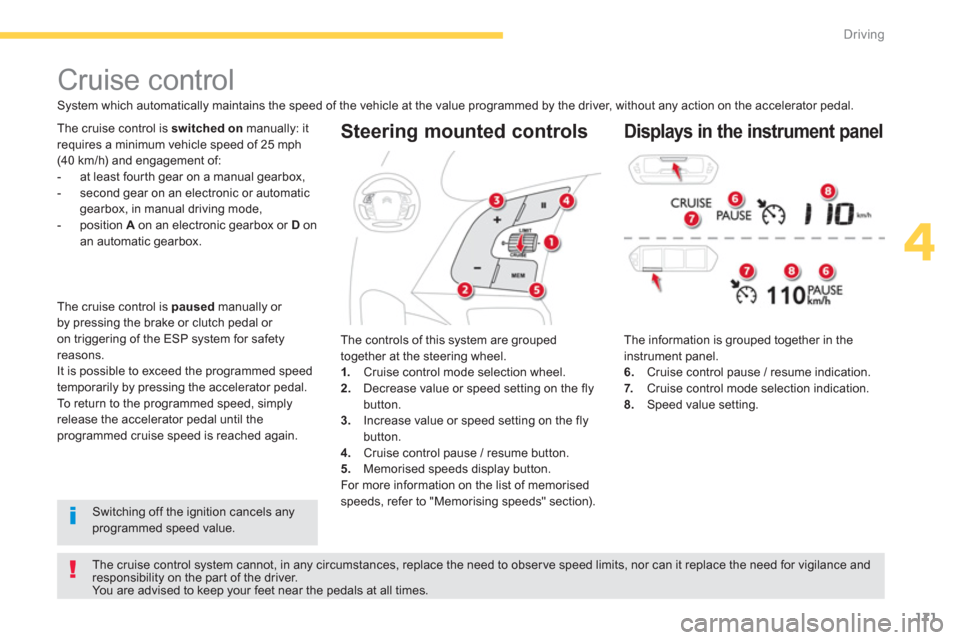
The information is grouped together in the instrument panel.
6. Cruise control pause / resume indication.
7.Cruise control mode selection indication. 8.Speed value setting.
Cruise control
System which automatically maintains the speed of the vehicle at the value programmed by the driver, without any action on the accelerator pedal.
The cruise control system cannot, in any circumstances, replace the need to obser ve speed limits, nor can it replace the need for vigilance and responsibility on the par t of the driver.
You are advised to keep your feet near the pedals at all times.
Th
e cruise control is switched on
manually: it
requires a minimum vehicle speed of 25 mph
(40 km/h) and engagement of:
- at least four th gear on a manual gearbox,
- second gear on an electronic or automatic gearbox, in manual driving mode,
- position A
on an electronic gearbox or D
on an automatic gearbox.
The controls o
f this system are grouped
together at the steering wheel. 1.Cruise control mode selection wheel.
2. Decrease value or speed setting on the flybutton.3.
Increase value or speed setting on the flybutton.
4. Cruise control pause / resume button.
5. Memorised speeds display button.
For more information on the list of memorisedspeeds, refer to "Memorising speeds" section).
Displays in the instrument panel
Switching off the ignition cancels any programmed speed value. Th
e cruise control is paused
manually or
by pressing the brake or clutch pedal or
on triggering of the ESP system for safety
reasons.
It is possible to exceed the programmed speed
temporarily by pressing the accelerator pedal.
To return to the programmed speed, simply
release the accelerator pedal until the programmed cruise speed is reached again.
Page 178 of 420
176
Driving
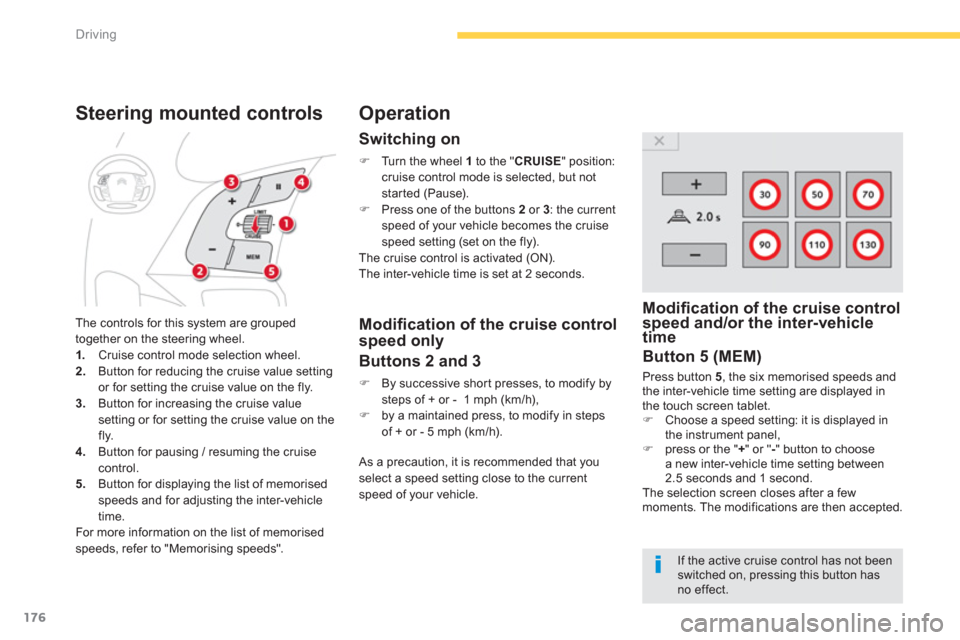
The controls for this system are grouped
together on the steering wheel. 1. Cruise control mode selection wheel. 2.
Button for reducing the cruise value settingor for setting the cruise value on the fly.3.Button for increasing the cruise value
setting or for setting the cruise value on the
fly.4. Button for pausing / resuming the cruise control.5.
Button for displaying the list of memorised
speeds and for adjusting the inter-vehicle
time.
For more information on the list of memorised
speeds, refer to "Memorising speeds".
Steering mounted controls
Switching on
)
Turn the wheel 1
to the "CRUISE" position: cruise control mode is selected, but notstarted (Pause).)
Press one of the buttons 2or 3: the currentspeed of your vehicle becomes the cruisespeed setting (set on the fly).
The cruise control is activated (ON).
The inter-vehicle time is set at 2 seconds.
Operation
Modifi cation of the cruise controlspeed and/or the inter-vehicletime p
Button 5 (MEM)
Press button 5, the six memorised speeds and
the inter-vehicle time setting are displayed in
the touch screen tablet.)Choose a speed setting: it is displayed in
the instrument panel, )press or the " +" or "- " button to choose a new inter-vehicle time setting between
2.5 seconds and 1 second.
The selection screen closes after a fewmoments. The modifications are then accepted.
Modifi cation of the cruise control
speed only
Buttons 2 and 3
)
By successive shor t presses, to modify by steps of + or - 1 mph (km/h), )
by a maintained press, to modify in steps
of + or - 5 mph (km/h).
As a precaution, it is recommended that
you
select a speed setting close to the current
speed of your vehicle.
If the active cruise control has not beenswitched on, pressing this button hasno effect.
Page 196 of 420
194
Driving
Park Assist
This system provides active assistance with parking, detecting a parking space then controlling the steering to park in the space. It controls the steering while the driver manages the accelerator, brakes, gears andclutch (manual gearbox). During phases of entry into and exit from a parking space, the system provides visual and audible information
to the driver in order to make the manoeuvres safe. It may be necessary to move for wards and backwards more than once.
During a manoeuvre the steering wheelturns quickly: do not hold the steeringwheel, do not place your hand between
the spokes of the steering wheel and take care with loose and bulky clothing, scarves, handbags... There is a risk of injury.
When Park Assist is activated, itprevents a change to STOP mode of Stop & Start. In STOP mode, activation of Park Assist restarts the engine.
The Park Assist system cannot in anycircumstances replace the care and responsibility of the driver.
The driver must remain in control of their vehicle ensuring that thespace remains clear throughout themanoeuvre. In some circumstances, the sensors may not detect small obstacles located in their blind spots.
The driver can take control at any time bygripping the steering wheel.
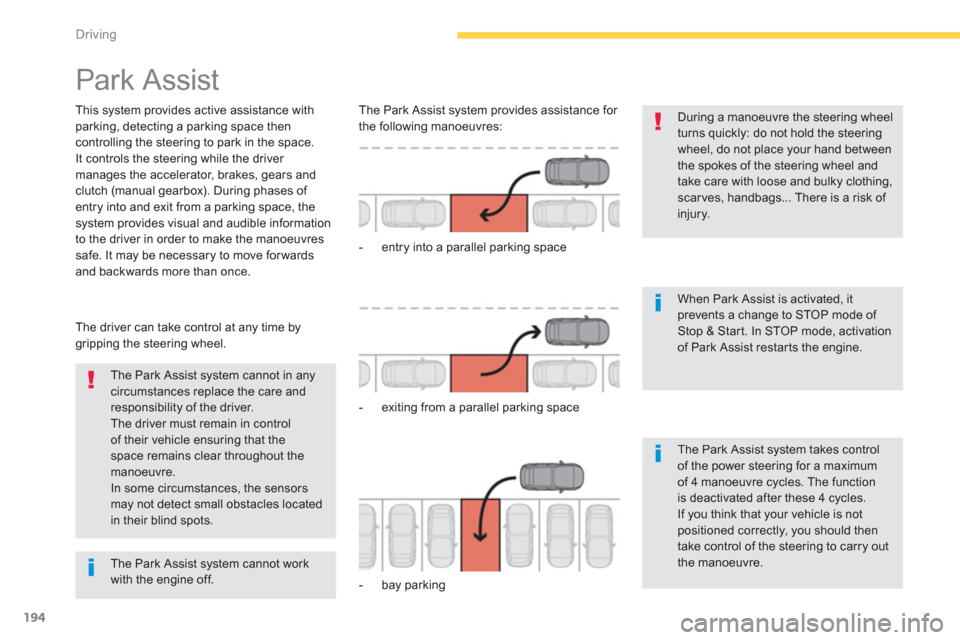
The Park Assist s
ystem provides assistance for
the following manoeuvres:
- entr
y into a parallel parking space
- exitin
g from a parallel parking space
- ba
y parking
The Park Assist system takes control of the power steering for a maximumof 4 manoeuvre cycles. The functionis deactivated after these 4 cycles.If you think that your vehicle is notpositioned correctly, you should then take control of the steering to carry outthe manoeuvre.
The Park Assist system cannot workwith the engine off.